Getting Your
Hands On
Graphs
Nathan T Freeman
Chief Software Architect
Why Framed Graphs
• Performance
• Flexibility
• Ease of Use
• Low Risk
Today’s Mission
• Help you understand the power of GraphNSF
• Show you concrete examples
• Avoid making your brain hurt
– But please understand, we’re drinking from a
firehose for two hours
– This is all I’ve done since 2014
Quick Graph Review
• Graphs are collections of vertices & edges
• Vertices are the entities of interest
• Edges are the relationships between them
• Vertices have whatever properties you want to
give them
• So do Edges
• There are no indices to define relationships
• In fact there are no indices at all
Quick Framed Graph Review
• Framed Graphs map Java objects to Vertices &
Edges
• No classes required; all implementation is
synthetic via interfaces
• Uses @annotations to define model rules
• Specific implementations are optional and
extensible
• Best expressed with Vertices as nouns, Edges as
verbs
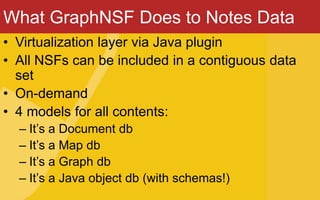
What GraphNSF Does to Notes Data
• Virtualization layer via Java plugin
• All NSFs can be included in a contiguous data
set
• On-demand
• 4 models for all contents:
– It’s a Document db
– It’s a Map db
– It’s a Graph db
– It’s a Java object db (with schemas!)
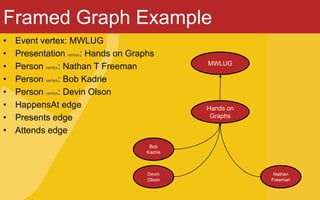
Framed Graph Example
• Event vertex: MWLUG
• Presentation vertex: Hands on Graphs
• Person vertex: Nathan T Freeman
• Person vertex: Bob Kadrie
• Person vertex: Devin Olson
• HappensAt edge
• Presents edge
• Attends edge
MWLUG
Hands on
Graphs
Bob
Kadrie
Devin
Olson
Nathan
Freeman
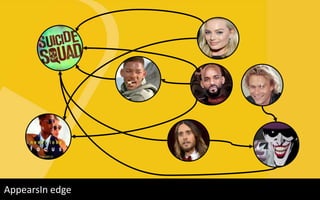
Movie vertex: Suicide SquadActor vertex: Will SmithActor vertex: Margot RobbieStarsIn edgeMovie vertex: FocusActor vertex: Jared LetoCharacter vertex: JokerPortrays edgeActor vertex: Heath LedgerCharacter vertex: Will SmithAppearsIn edge
r
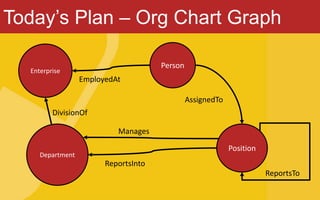
Today’s Plan – Org Chart Graph
Enterprise
Person
Department
Position
EmployedAt
ReportsInto
DivisionOf
AssignedTo
Manages
ReportsTo
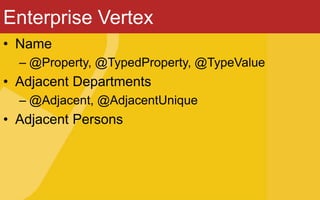
Enterprise Vertex
• Name
– @Property, @TypedProperty, @TypeValue
• Adjacent Departments
– @Adjacent, @AdjacentUnique
• Adjacent Persons
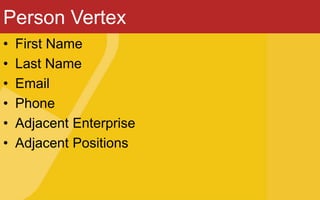
Person Vertex
• First Name
• Last Name
• Email
• Phone
• Adjacent Enterprise
• Adjacent Positions
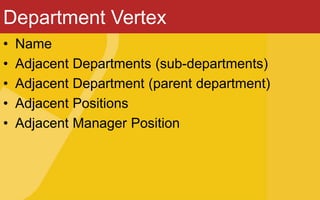
Department Vertex
• Name
• Adjacent Departments (sub-departments)
• Adjacent Department (parent department)
• Adjacent Positions
• Adjacent Manager Position
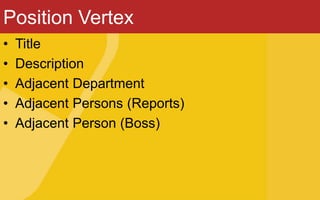
Position Vertex
• Title
• Description
• Adjacent Department
• Adjacent Persons (Reports)
• Adjacent Person (Boss)
A look back at edges
• EmployedAt
– Start date
– End date
– @InVertex, @OutVertex
– @Incidence, @IncidenceUnique
• AssignedTo
– Start date
– End date
Assembling the plugin
• IGraphFactory interface
• Extension point
• Defining ElementStores
• Naming our Graph
We have a Graph. What next?
Everything begins with a Vertex
• Start at the top
• Start with me
• Start with a search
From there we branch out
• Given a vertex, iterate adjacency until you get
what you need
• Example: Find X’s peers
• Example: Find grandboss
• Example: Find everyone in department
ODA REST API
• Based on DAS (Had to modify IBM’s code a little)
• Currently frames only
• Other modes coming (or you can start writing!)
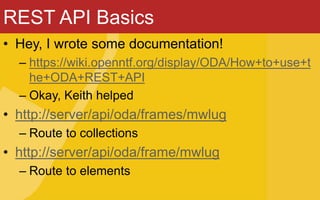
REST API Basics
• Hey, I wrote some documentation!
– https://wiki.openntf.org/display/ODA/How+to+use+t
he+ODA+REST+API
– Okay, Keith helped
• http://server/api/oda/frames/mwlug
– Route to collections
• http://server/api/oda/frame/mwlug
– Route to elements
REST API Supported Methods
• GET, POST, PUT, DELETE, PATCH
• GETs use query parameters
• DELETEs use query parameters
• POST, PUT, PATCH use JSON payloads
REST API Common GET params
• /frames/
– ?type=[namespace]
– &key=[string]
– &filterkey/filtervalue, &partialkey/partialvalue,
&startskey/startsvalue
– &orderby=[property list (comma-separated)]
• /frame/
– ?id=[identifier]
– &edges
– &label=[edge label list (comma-separated]
– &orderby=[property list (comma-separated)]
– &vertices
REST API Common POST params
• /frames/ - none. Only payload
• /frame/
– ?id=[identifier]
– Payload is one or more edges
REST API Common PUT params
• /frames/ - none
• /frame/
– ?id=[identifier]
– Payload is complete vertex/edge contents
REST API Common PATCH params
• /frames/
– Payload is JSON Array of updates
• /frame/
– ?id=[identifier]
– Payload is delta-only for vertex or edge
REST API Common DELETE params
• /frames/ - none
• /frame/
– ?id=[identifiers (comma-separated)]
REST API Demos
Advanced Stuff
• We already have Persons
• They are in the Directory!
• Can we put the Directory in the graph?
The Problem
• When we create edges between vertices, the
vertices are modified.
• This could mean a LOT of updates to the
Directory in an active graph
• Lots of updates to the Directory is double plus
bad
The Solution: Proxy Vertices
• Proxies can be configured per Element Store
• Create mirror documents per vertex to hold
graph info
• Non-graph properties are passed through to
original
• DirPerson Vertex
• BoundTo Edge
Custom Key Resolvers
• How would we like to find Persons?
• Notes persons: canonical name
• Create a Java implementation to discover
document vertex
• Demo
Now we have a directory (ho ho ho)
• That means we have Views
• Let’s use them!
• Why? Because we can!
View Vertices
• All View Design notes are Framed Vertices
• All View Categories are Framed Vertices
• All ViewEntries are Framed Edges (View ->
Category, Category -> Document)
Nathan T Freeman
ntf@redpillnow.com
redpillnow.comwww
Acapulco, Mexico
Nathanfreeman.wordpress.com
Getting your hands on graphs

Getting your hands on graphs

  • 1.
    Getting Your Hands On Graphs NathanT Freeman Chief Software Architect
  • 2.
    Why Framed Graphs •Performance • Flexibility • Ease of Use • Low Risk
  • 3.
    Today’s Mission • Helpyou understand the power of GraphNSF • Show you concrete examples • Avoid making your brain hurt – But please understand, we’re drinking from a firehose for two hours – This is all I’ve done since 2014
  • 4.
    Quick Graph Review •Graphs are collections of vertices & edges • Vertices are the entities of interest • Edges are the relationships between them • Vertices have whatever properties you want to give them • So do Edges • There are no indices to define relationships • In fact there are no indices at all
  • 5.
    Quick Framed GraphReview • Framed Graphs map Java objects to Vertices & Edges • No classes required; all implementation is synthetic via interfaces • Uses @annotations to define model rules • Specific implementations are optional and extensible • Best expressed with Vertices as nouns, Edges as verbs
  • 6.
    What GraphNSF Doesto Notes Data • Virtualization layer via Java plugin • All NSFs can be included in a contiguous data set • On-demand • 4 models for all contents: – It’s a Document db – It’s a Map db – It’s a Graph db – It’s a Java object db (with schemas!)
  • 7.
    Framed Graph Example •Event vertex: MWLUG • Presentation vertex: Hands on Graphs • Person vertex: Nathan T Freeman • Person vertex: Bob Kadrie • Person vertex: Devin Olson • HappensAt edge • Presents edge • Attends edge MWLUG Hands on Graphs Bob Kadrie Devin Olson Nathan Freeman
  • 8.
    Movie vertex: SuicideSquadActor vertex: Will SmithActor vertex: Margot RobbieStarsIn edgeMovie vertex: FocusActor vertex: Jared LetoCharacter vertex: JokerPortrays edgeActor vertex: Heath LedgerCharacter vertex: Will SmithAppearsIn edge r
  • 9.
    Today’s Plan –Org Chart Graph Enterprise Person Department Position EmployedAt ReportsInto DivisionOf AssignedTo Manages ReportsTo
  • 10.
    Enterprise Vertex • Name –@Property, @TypedProperty, @TypeValue • Adjacent Departments – @Adjacent, @AdjacentUnique • Adjacent Persons
  • 11.
    Person Vertex • FirstName • Last Name • Email • Phone • Adjacent Enterprise • Adjacent Positions
  • 12.
    Department Vertex • Name •Adjacent Departments (sub-departments) • Adjacent Department (parent department) • Adjacent Positions • Adjacent Manager Position
  • 13.
    Position Vertex • Title •Description • Adjacent Department • Adjacent Persons (Reports) • Adjacent Person (Boss)
  • 14.
    A look backat edges • EmployedAt – Start date – End date – @InVertex, @OutVertex – @Incidence, @IncidenceUnique • AssignedTo – Start date – End date
  • 15.
    Assembling the plugin •IGraphFactory interface • Extension point • Defining ElementStores • Naming our Graph
  • 16.
    We have aGraph. What next?
  • 17.
    Everything begins witha Vertex • Start at the top • Start with me • Start with a search
  • 18.
    From there webranch out • Given a vertex, iterate adjacency until you get what you need • Example: Find X’s peers • Example: Find grandboss • Example: Find everyone in department
  • 19.
    ODA REST API •Based on DAS (Had to modify IBM’s code a little) • Currently frames only • Other modes coming (or you can start writing!)
  • 20.
    REST API Basics •Hey, I wrote some documentation! – https://wiki.openntf.org/display/ODA/How+to+use+t he+ODA+REST+API – Okay, Keith helped • http://server/api/oda/frames/mwlug – Route to collections • http://server/api/oda/frame/mwlug – Route to elements
  • 21.
    REST API SupportedMethods • GET, POST, PUT, DELETE, PATCH • GETs use query parameters • DELETEs use query parameters • POST, PUT, PATCH use JSON payloads
  • 22.
    REST API CommonGET params • /frames/ – ?type=[namespace] – &key=[string] – &filterkey/filtervalue, &partialkey/partialvalue, &startskey/startsvalue – &orderby=[property list (comma-separated)] • /frame/ – ?id=[identifier] – &edges – &label=[edge label list (comma-separated] – &orderby=[property list (comma-separated)] – &vertices
  • 23.
    REST API CommonPOST params • /frames/ - none. Only payload • /frame/ – ?id=[identifier] – Payload is one or more edges
  • 24.
    REST API CommonPUT params • /frames/ - none • /frame/ – ?id=[identifier] – Payload is complete vertex/edge contents
  • 25.
    REST API CommonPATCH params • /frames/ – Payload is JSON Array of updates • /frame/ – ?id=[identifier] – Payload is delta-only for vertex or edge
  • 26.
    REST API CommonDELETE params • /frames/ - none • /frame/ – ?id=[identifiers (comma-separated)]
  • 27.
  • 28.
    Advanced Stuff • Wealready have Persons • They are in the Directory! • Can we put the Directory in the graph?
  • 29.
    The Problem • Whenwe create edges between vertices, the vertices are modified. • This could mean a LOT of updates to the Directory in an active graph • Lots of updates to the Directory is double plus bad
  • 30.
    The Solution: ProxyVertices • Proxies can be configured per Element Store • Create mirror documents per vertex to hold graph info • Non-graph properties are passed through to original • DirPerson Vertex • BoundTo Edge
  • 31.
    Custom Key Resolvers •How would we like to find Persons? • Notes persons: canonical name • Create a Java implementation to discover document vertex • Demo
  • 32.
    Now we havea directory (ho ho ho) • That means we have Views • Let’s use them! • Why? Because we can!
  • 33.
    View Vertices • AllView Design notes are Framed Vertices • All View Categories are Framed Vertices • All ViewEntries are Framed Edges (View -> Category, Category -> Document)
  • 34.