D3 Data
Visualization
USE CASES
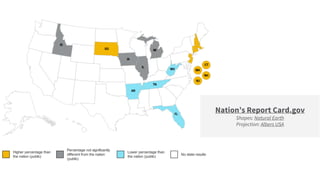
Nation’s Report Card.gov
Shapes: Natural Earth
Projection: Albers USA
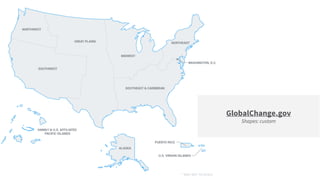
GlobalChange.gov
Shapes: custom
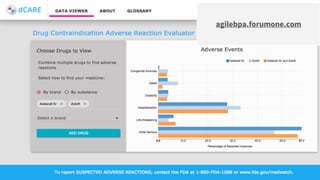
agilebpa.forumone.com
BUILDING
BLOCKS
Scalable Vector Graphics (SVG)
Scalable Vector Graphics (SVG) is an XML-based
vector image format for two-dimensional graphics
with support for interactivity and animation.
SVG Highlights
● DOM API
● Defines vector-based graphics for the Web
● Supports CSS styling
● Element Grouping
● Hyperlinks
● Accessible alternative content
● Path elements for arbitrary drawing
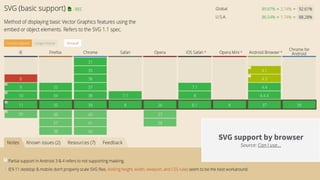
SVG support by browser
Source: Can I use...
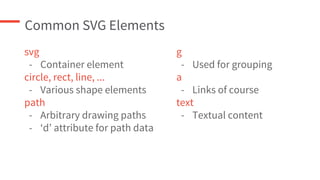
Common SVG Elements
svg
- Container element
circle, rect, line, ...
- Various shape elements
path
- Arbitrary drawing paths
- ‘d’ attribute for path data
g
- Used for grouping
a
- Links of course
text
- Textual content
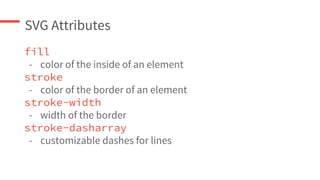
SVG Attributes
fill
- color of the inside of an element
stroke
- color of the border of an element
stroke-width
- width of the border
stroke-dasharray
- customizable dashes for lines
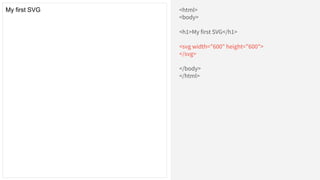
<html>
<body>
<h1>My first SVG</h1>
<svg width="600" height="600">
</svg>
</body>
</html>
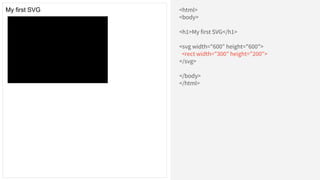
My first SVG
<html>
<body>
<h1>My first SVG</h1>
<svg width="600" height="600">
<rect width="300" height="200">
</svg>
</body>
</html>
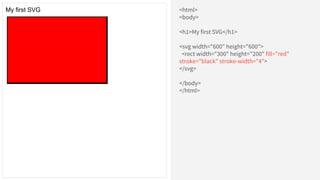
My first SVG
<html>
<body>
<h1>My first SVG</h1>
<svg width="600" height="600">
<rect width="300" height="200" fill="red"
stroke="black" stroke-width="4">
</svg>
</body>
</html>
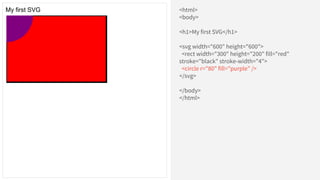
My first SVG
<html>
<body>
<h1>My first SVG</h1>
<svg width="600" height="600">
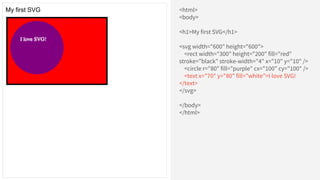
<rect width="300" height="200" fill="red"
stroke="black" stroke-width="4">
<circle r="80" fill="purple" />
</svg>
</body>
</html>
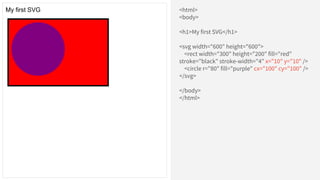
My first SVG
<html>
<body>
<h1>My first SVG</h1>
<svg width="600" height="600">
<rect width="300" height="200" fill="red"
stroke="black" stroke-width="4" x="10" y="10" />
<circle r="80" fill="purple" cx="100" cy="100" />
</svg>
</body>
</html>
My first SVG
<html>
<body>
<h1>My first SVG</h1>
<svg width="600" height="600">
<rect width="300" height="200" fill="red"
stroke="black" stroke-width="4" x="10" y="10" />
<circle r="80" fill="purple" cx="100" cy="100" />
<text x="70" y="80" fill="white">I love SVG!
</text>
</svg>
</body>
</html>
My first SVG
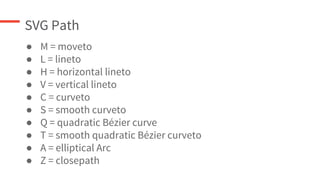
SVG Path
● M = moveto
● L = lineto
● H = horizontal lineto
● V = vertical lineto
● C = curveto
● S = smooth curveto
● Q = quadratic Bézier curve
● T = smooth quadratic Bézier curveto
● A = elliptical Arc
● Z = closepath
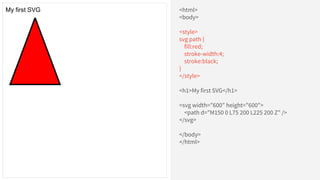
<html>
<body>
<h1>My first SVG</h1>
<svg width="600" height="600">
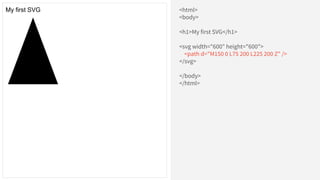
<path d="M150 0 L75 200 L225 200 Z" />
</svg>
</body>
</html>
My first SVG
SVG + CSS
<html>
<body>
<style>
svg path {
fill:red;
stroke-width:4;
stroke:black;
}
</style>
<h1>My first SVG</h1>
<svg width="600" height="600">
<path d="M150 0 L75 200 L225 200 Z" />
</svg>
</body>
</html>
My first SVG
SVG + CSS + D3
What is D3?
D3.js is a JavaScript library for
manipulating documents based on data.
- D3js.org
D3js is the glue between data and SVG.
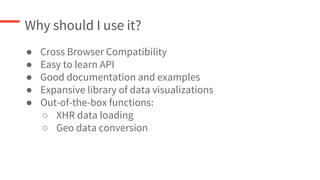
Why should I use it?
● Cross Browser Compatibility
● Easy to learn API
● Good documentation and examples
● Expansive library of data visualizations
● Out-of-the-box functions:
○ XHR data loading
○ Geo data conversion
D3 Selections
d3.select(selector: string)
- query one element
d3.selectAll(selector: string)
- query multiple elements
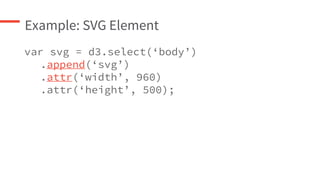
Example: SVG Element
var svg = d3.select(‘body’)
.append(‘svg’)
.attr(‘width’, 960)
.attr(‘height’, 500);
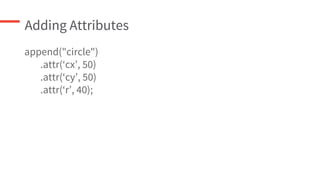
Adding Attributes
append("circle")
.attr(‘cx’, 50)
.attr(‘cy’, 50)
.attr(‘r’, 40);
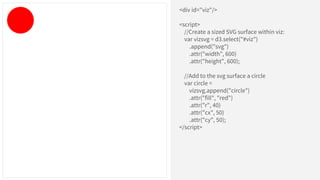
<div id="viz"/>
<script>
//Create a sized SVG surface within viz:
var vizsvg = d3.select("#viz")
.append("svg")
.attr("width", 600)
.attr("height", 600);
//Add to the svg surface a circle
var circle =
vizsvg.append("circle")
.attr("fill", "red")
.attr("r", 40)
.attr("cx", 50)
.attr("cy", 50);
</script>
Bring in the Data
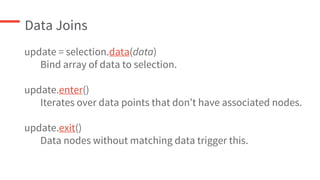
Data Joins
update = selection.data(data)
Bind array of data to selection.
update.enter()
Iterates over data points that don’t have associated nodes.
update.exit()
Data nodes without matching data trigger this.
…
var dataset = [ 5, 10, 15, 20, 25 ];
var circles = svg.selectAll("circle")
.data(dataset)
.enter()
.append("circle")
.attr("r", function(d) {
return d;
})
.attr("cx", function(d, i) {
// i is the current data node index
return (i * 50) + 25;
})
.attr("cy", h/2)
.attr("fill","red");
DRUPAL &
D3 MODULE
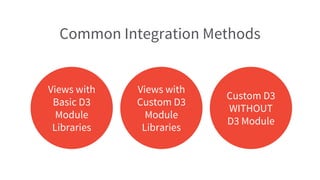
Common Integration Methods
Views with
Basic D3
Module
Libraries
Views with
Custom D3
Module
Libraries
Custom D3
WITHOUT
D3 Module
Why use the D3 module?
D3 Module Features
● Simple API
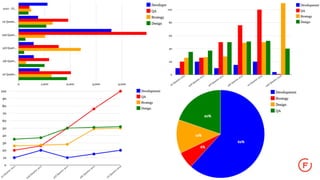
● Out-of-the-box basic visualizations
● Custom library support
● Simplified data binding through Views integration and
custom library
Views with Basic D3 Libraries
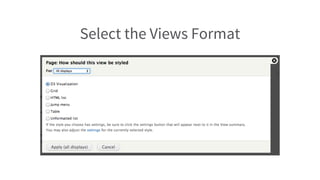
Select the Views Format
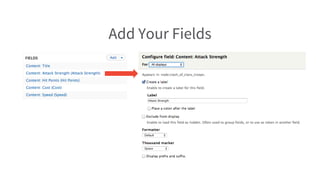
Add Your Fields
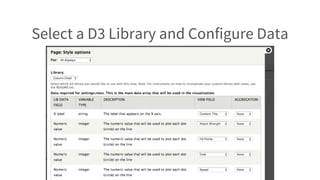
Select a D3 Library and Configure Data
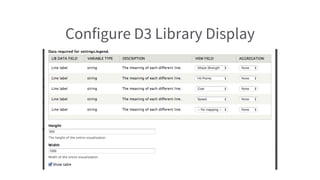
Configure D3 Library Display
Views with Custom D3 Libraries
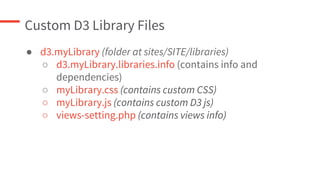
Custom D3 Library Files
● d3.myLibrary (folder at sites/SITE/libraries)
○ d3.myLibrary.libraries.info (contains info and
dependencies)
○ myLibrary.css (contains custom CSS)
○ myLibrary.js (contains custom D3 js)
○ views-setting.php (contains views info)
d3.myViz.libraries.info
name = My Vis
description = My Vis custom D3 display
files[js][] = myvis.js
files[js][] = nv.d3.min.js
files[css][] = myvis.css
version = 0.1
dependencies[] = d3.extend
dependencies[] = d3.tooltip
views[version] = 3.0
views[fields][rows][__data_type] = 2dnnv
views[fields][rows][x_label][label] = X label
views[fields][rows][x_label][type] = string
views[fields][rows][x_label][description] = The label that
appears on the X axis.
views[fields][rows][value] = { __repeated: TRUE, __cardinality: 0,
label: Numeric value, type: integer, description: The numeric
value that will be used to plot each dot (circle) on the line }
views[fields][legend][__cardinality] = 0
views[fields][legend][__data_type] = 1dn
views[fields][legend][label] = Line label
views[fields][legend][description] = The meaning of each
different line.
views[fields][legend][type] = string
views[settings] = views-settings.php
● Same as out the box D3 module
custom library info file with some
exceptions
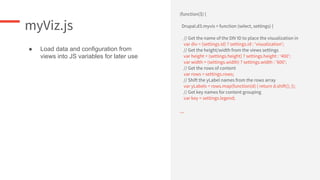
myViz.js
(function($) {
Drupal.d3.myvis = function (select, settings) {
// Get the name of the DIV ID to place the visualization in
var div = (settings.id) ? settings.id : 'visualization';
// Get the height/width from the views settings
var height = (settings.height) ? settings.height : '400';
var width = (settings.width) ? settings.width : '600';
// Get the rows of content
var rows = settings.rows;
// Shift the yLabel names from the rows array
var yLabels = rows.map(function(d) { return d.shift(); });
// Get key names for content grouping
var key = settings.legend;
...
● Load data and configuration from
views into JS variables for later use
myViz.js (cont.)
…
var troopData = [];
// Force rows array into data structure noted above
for (var i in rows) {
var row = rows[i];
var items = [];
for (var j in row) {
var item = row[j];
items.push({
"label" : key[j],
"value" : item
});
}
troopData.push({
"key" : yLabels[i],
"values" : items
});
}
...
● Rearrange data structure to match the
following structure:
"key": "Dragon",
"color": "#E80CC8",
"values": [
{
"label" : "Cost" ,
"value" : 5
},
{
"label" : "Strength" ,
"value" : 5
}
]
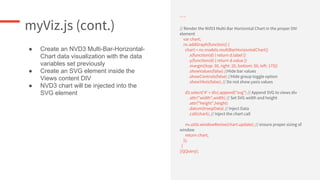
myViz.js (cont.)
…
// Render the NVD3 Multi-Bar Horizontal Chart in the proper DIV
element
var chart;
nv.addGraph(function() {
chart = nv.models.multiBarHorizontalChart()
.x(function(d) { return d.label })
.y(function(d) { return d.value })
.margin({top: 30, right: 20, bottom: 50, left: 175})
.showValues(false) //Hide bar values
.showControls(false) //Hide group toggle option
.showYAxis(false); // Do not show yaxis values
d3.select('#' + div).append("svg") // Append SVG to views div
.attr("width",width) // Set SVG width and height
.attr("height",height)
.datum(troopData) // Inject Data
.call(chart); // Inject the chart call
nv.utils.windowResize(chart.update); // ensure proper sizing of
window
return chart;
});
}
})(jQuery);
● Create an NVD3 Multi-Bar-Horizontal-
Chart data visualization with the data
variables set previously
● Create an SVG element inside the
Views content DIV
● NVD3 chart will be injected into the
SVG element
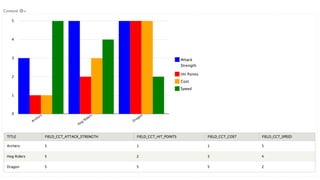
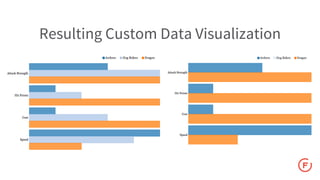
Resulting Custom Data Visualization
Custom D3 WITHOUT D3 Module
D3 Fully Custom
1. Get data in a structured format (JSON, CSV, Array, etc.)
a. Views works best unless using outside data
2. Create custom D3js Drupal library
3. Create custom Drupal module/hook to invoke library where
needed
a. Commonly injected into the content of blocks, panes
and custom pages
4. Additional theming if needed
Keenan Holloway
Senior Developer
kholloway@forumone.com
www.forumone.com
THANK YOU!

D3 data visualization

  • 1.
  • 2.
  • 3.
    Nation’s Report Card.gov Shapes:Natural Earth Projection: Albers USA
  • 4.
  • 5.
  • 6.
  • 7.
  • 8.
    Scalable Vector Graphics(SVG) is an XML-based vector image format for two-dimensional graphics with support for interactivity and animation.
  • 9.
    SVG Highlights ● DOMAPI ● Defines vector-based graphics for the Web ● Supports CSS styling ● Element Grouping ● Hyperlinks ● Accessible alternative content ● Path elements for arbitrary drawing
  • 10.
    SVG support bybrowser Source: Can I use...
  • 11.
    Common SVG Elements svg -Container element circle, rect, line, ... - Various shape elements path - Arbitrary drawing paths - ‘d’ attribute for path data g - Used for grouping a - Links of course text - Textual content
  • 12.
    SVG Attributes fill - colorof the inside of an element stroke - color of the border of an element stroke-width - width of the border stroke-dasharray - customizable dashes for lines
  • 13.
    <html> <body> <h1>My first SVG</h1> <svgwidth="600" height="600"> </svg> </body> </html> My first SVG
  • 14.
    <html> <body> <h1>My first SVG</h1> <svgwidth="600" height="600"> <rect width="300" height="200"> </svg> </body> </html> My first SVG
  • 15.
    <html> <body> <h1>My first SVG</h1> <svgwidth="600" height="600"> <rect width="300" height="200" fill="red" stroke="black" stroke-width="4"> </svg> </body> </html> My first SVG
  • 16.
    <html> <body> <h1>My first SVG</h1> <svgwidth="600" height="600"> <rect width="300" height="200" fill="red" stroke="black" stroke-width="4"> <circle r="80" fill="purple" /> </svg> </body> </html> My first SVG
  • 17.
    <html> <body> <h1>My first SVG</h1> <svgwidth="600" height="600"> <rect width="300" height="200" fill="red" stroke="black" stroke-width="4" x="10" y="10" /> <circle r="80" fill="purple" cx="100" cy="100" /> </svg> </body> </html> My first SVG
  • 18.
    <html> <body> <h1>My first SVG</h1> <svgwidth="600" height="600"> <rect width="300" height="200" fill="red" stroke="black" stroke-width="4" x="10" y="10" /> <circle r="80" fill="purple" cx="100" cy="100" /> <text x="70" y="80" fill="white">I love SVG! </text> </svg> </body> </html> My first SVG
  • 19.
    SVG Path ● M= moveto ● L = lineto ● H = horizontal lineto ● V = vertical lineto ● C = curveto ● S = smooth curveto ● Q = quadratic Bézier curve ● T = smooth quadratic Bézier curveto ● A = elliptical Arc ● Z = closepath
  • 20.
    <html> <body> <h1>My first SVG</h1> <svgwidth="600" height="600"> <path d="M150 0 L75 200 L225 200 Z" /> </svg> </body> </html> My first SVG
  • 21.
  • 22.
    <html> <body> <style> svg path { fill:red; stroke-width:4; stroke:black; } </style> <h1>Myfirst SVG</h1> <svg width="600" height="600"> <path d="M150 0 L75 200 L225 200 Z" /> </svg> </body> </html> My first SVG
  • 23.
  • 24.
    What is D3? D3.jsis a JavaScript library for manipulating documents based on data. - D3js.org D3js is the glue between data and SVG.
  • 25.
    Why should Iuse it? ● Cross Browser Compatibility ● Easy to learn API ● Good documentation and examples ● Expansive library of data visualizations ● Out-of-the-box functions: ○ XHR data loading ○ Geo data conversion
  • 26.
    D3 Selections d3.select(selector: string) -query one element d3.selectAll(selector: string) - query multiple elements
  • 27.
    Example: SVG Element varsvg = d3.select(‘body’) .append(‘svg’) .attr(‘width’, 960) .attr(‘height’, 500);
  • 28.
  • 29.
    <div id="viz"/> <script> //Create asized SVG surface within viz: var vizsvg = d3.select("#viz") .append("svg") .attr("width", 600) .attr("height", 600); //Add to the svg surface a circle var circle = vizsvg.append("circle") .attr("fill", "red") .attr("r", 40) .attr("cx", 50) .attr("cy", 50); </script>
  • 30.
  • 31.
    Data Joins update =selection.data(data) Bind array of data to selection. update.enter() Iterates over data points that don’t have associated nodes. update.exit() Data nodes without matching data trigger this.
  • 32.
    … var dataset =[ 5, 10, 15, 20, 25 ]; var circles = svg.selectAll("circle") .data(dataset) .enter() .append("circle") .attr("r", function(d) { return d; }) .attr("cx", function(d, i) { // i is the current data node index return (i * 50) + 25; }) .attr("cy", h/2) .attr("fill","red");
  • 34.
  • 35.
    Common Integration Methods Viewswith Basic D3 Module Libraries Views with Custom D3 Module Libraries Custom D3 WITHOUT D3 Module
  • 36.
    Why use theD3 module?
  • 37.
    D3 Module Features ●Simple API ● Out-of-the-box basic visualizations ● Custom library support ● Simplified data binding through Views integration and custom library
  • 38.
    Views with BasicD3 Libraries
  • 40.
  • 41.
  • 42.
    Select a D3Library and Configure Data
  • 43.
  • 45.
    Views with CustomD3 Libraries
  • 46.
    Custom D3 LibraryFiles ● d3.myLibrary (folder at sites/SITE/libraries) ○ d3.myLibrary.libraries.info (contains info and dependencies) ○ myLibrary.css (contains custom CSS) ○ myLibrary.js (contains custom D3 js) ○ views-setting.php (contains views info)
  • 47.
    d3.myViz.libraries.info name = MyVis description = My Vis custom D3 display files[js][] = myvis.js files[js][] = nv.d3.min.js files[css][] = myvis.css version = 0.1 dependencies[] = d3.extend dependencies[] = d3.tooltip views[version] = 3.0 views[fields][rows][__data_type] = 2dnnv views[fields][rows][x_label][label] = X label views[fields][rows][x_label][type] = string views[fields][rows][x_label][description] = The label that appears on the X axis. views[fields][rows][value] = { __repeated: TRUE, __cardinality: 0, label: Numeric value, type: integer, description: The numeric value that will be used to plot each dot (circle) on the line } views[fields][legend][__cardinality] = 0 views[fields][legend][__data_type] = 1dn views[fields][legend][label] = Line label views[fields][legend][description] = The meaning of each different line. views[fields][legend][type] = string views[settings] = views-settings.php ● Same as out the box D3 module custom library info file with some exceptions
  • 48.
    myViz.js (function($) { Drupal.d3.myvis =function (select, settings) { // Get the name of the DIV ID to place the visualization in var div = (settings.id) ? settings.id : 'visualization'; // Get the height/width from the views settings var height = (settings.height) ? settings.height : '400'; var width = (settings.width) ? settings.width : '600'; // Get the rows of content var rows = settings.rows; // Shift the yLabel names from the rows array var yLabels = rows.map(function(d) { return d.shift(); }); // Get key names for content grouping var key = settings.legend; ... ● Load data and configuration from views into JS variables for later use
  • 49.
    myViz.js (cont.) … var troopData= []; // Force rows array into data structure noted above for (var i in rows) { var row = rows[i]; var items = []; for (var j in row) { var item = row[j]; items.push({ "label" : key[j], "value" : item }); } troopData.push({ "key" : yLabels[i], "values" : items }); } ... ● Rearrange data structure to match the following structure: "key": "Dragon", "color": "#E80CC8", "values": [ { "label" : "Cost" , "value" : 5 }, { "label" : "Strength" , "value" : 5 } ]
  • 50.
    myViz.js (cont.) … // Renderthe NVD3 Multi-Bar Horizontal Chart in the proper DIV element var chart; nv.addGraph(function() { chart = nv.models.multiBarHorizontalChart() .x(function(d) { return d.label }) .y(function(d) { return d.value }) .margin({top: 30, right: 20, bottom: 50, left: 175}) .showValues(false) //Hide bar values .showControls(false) //Hide group toggle option .showYAxis(false); // Do not show yaxis values d3.select('#' + div).append("svg") // Append SVG to views div .attr("width",width) // Set SVG width and height .attr("height",height) .datum(troopData) // Inject Data .call(chart); // Inject the chart call nv.utils.windowResize(chart.update); // ensure proper sizing of window return chart; }); } })(jQuery); ● Create an NVD3 Multi-Bar-Horizontal- Chart data visualization with the data variables set previously ● Create an SVG element inside the Views content DIV ● NVD3 chart will be injected into the SVG element
  • 51.
    Resulting Custom DataVisualization
  • 52.
  • 53.
    D3 Fully Custom 1.Get data in a structured format (JSON, CSV, Array, etc.) a. Views works best unless using outside data 2. Create custom D3js Drupal library 3. Create custom Drupal module/hook to invoke library where needed a. Commonly injected into the content of blocks, panes and custom pages 4. Additional theming if needed
  • 54.