

The Ultimate SharePoint Infrastructure 
Best Practices Session 
Michael Noel 
Convergent Computing (CCO) 
www.cco.com 
925-933-4800
Michael Noel 
• Author of SAMS Publishing titles “SharePoint 2013 Unleashed,” “SharePoint 2010 Unleashed”, “Windows Server 
2012 Unleashed,” “Exchange Server 2013 Unleashed”, “ISA Server 2006 Unleashed”, and a total of 19 titles that 
have sold over 300,000 copies. 
• Partner at Convergent Computing (www.cco.com) – San Francisco, U.S.A. based Infrastructure/Security 
specialists for SharePoint, AD, Exchange, System Center, Security, etc.
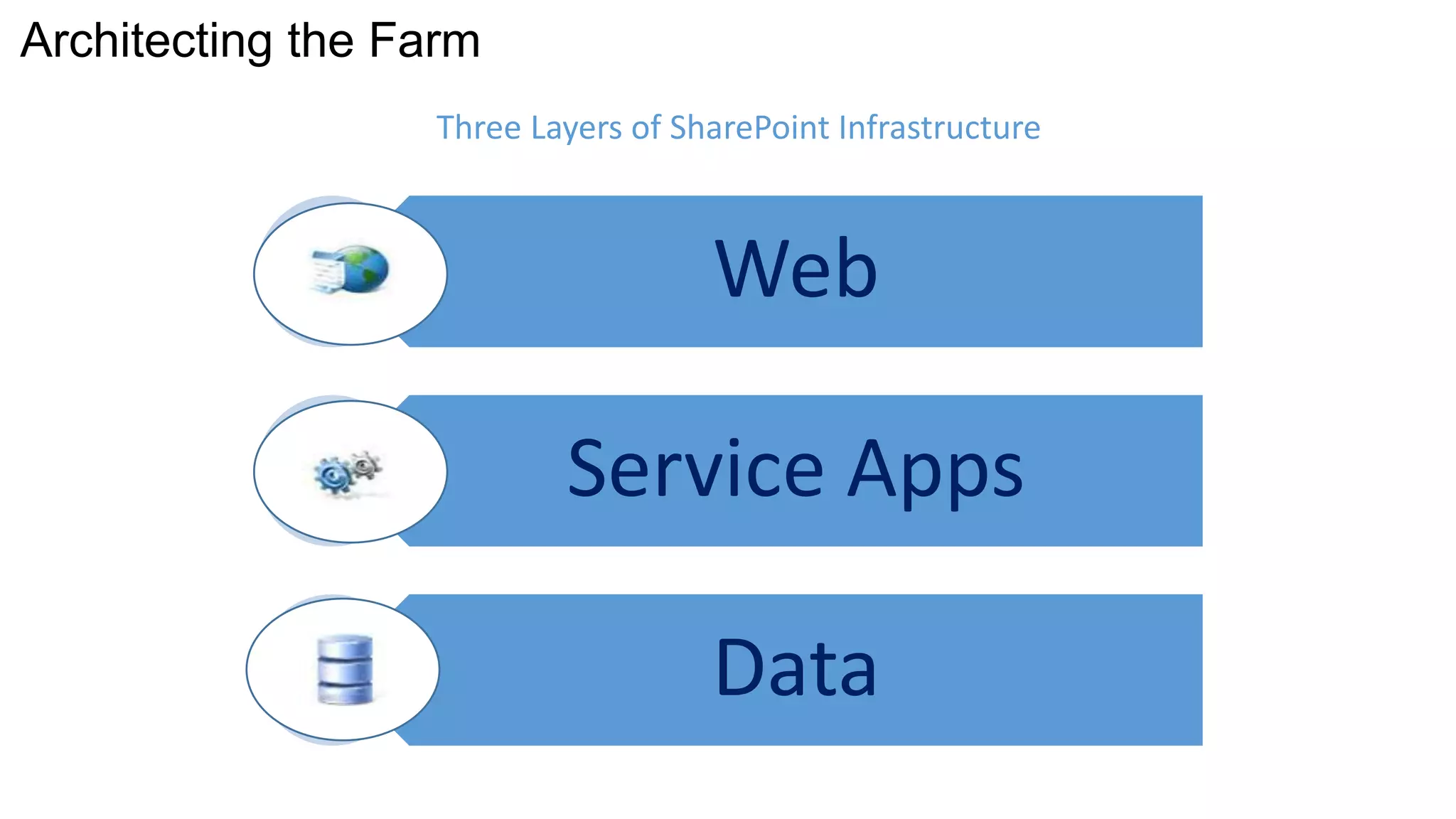
Architecting the Farm
Web 
Service Apps 
Data 
Architecting the Farm 
Three Layers of SharePoint Infrastructure
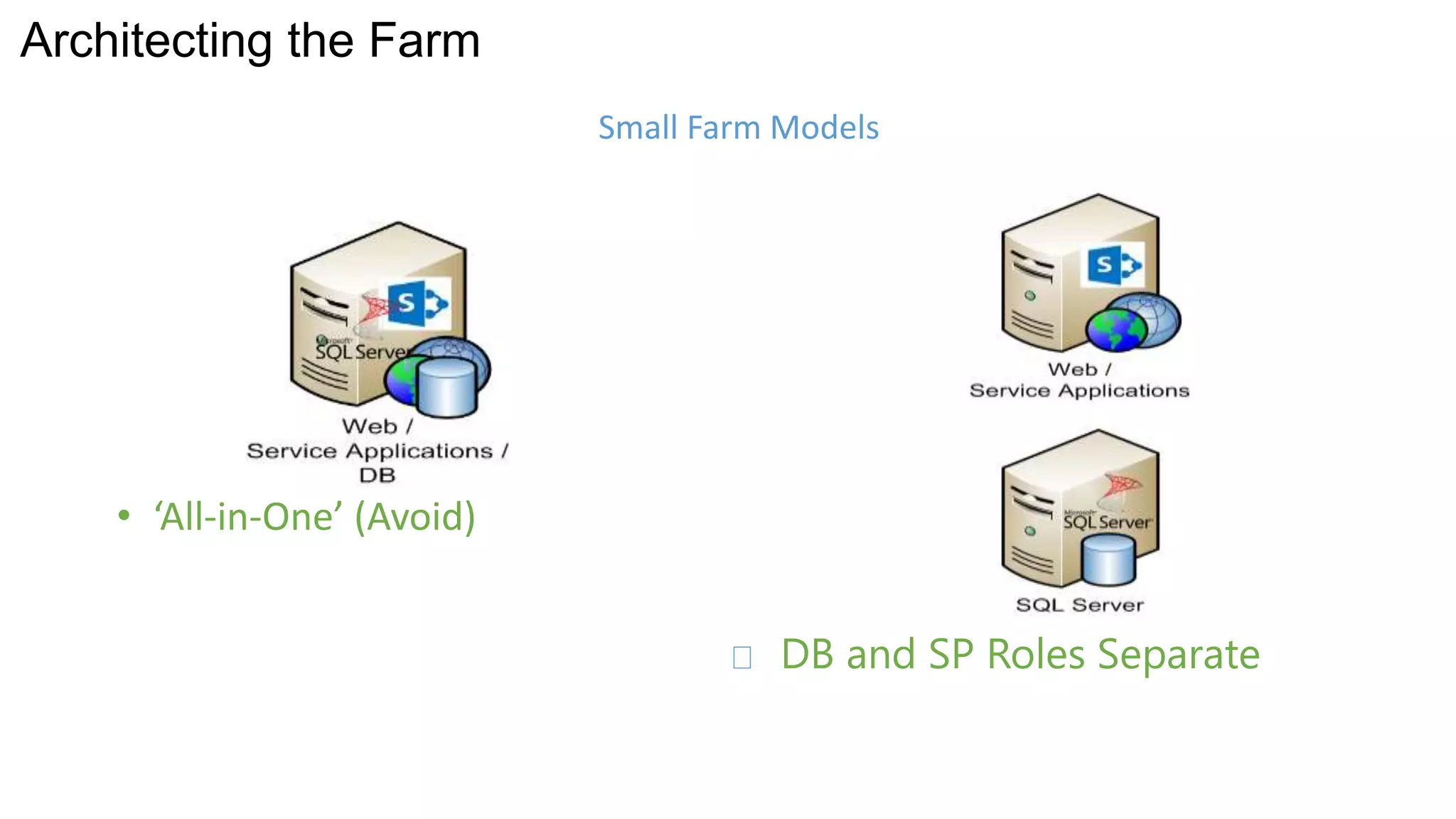
• ‘All-in-One’ (Avoid) 
DB and SP Roles Separate 
Architecting the Farm 
Small Farm Models
Architecting the Farm 
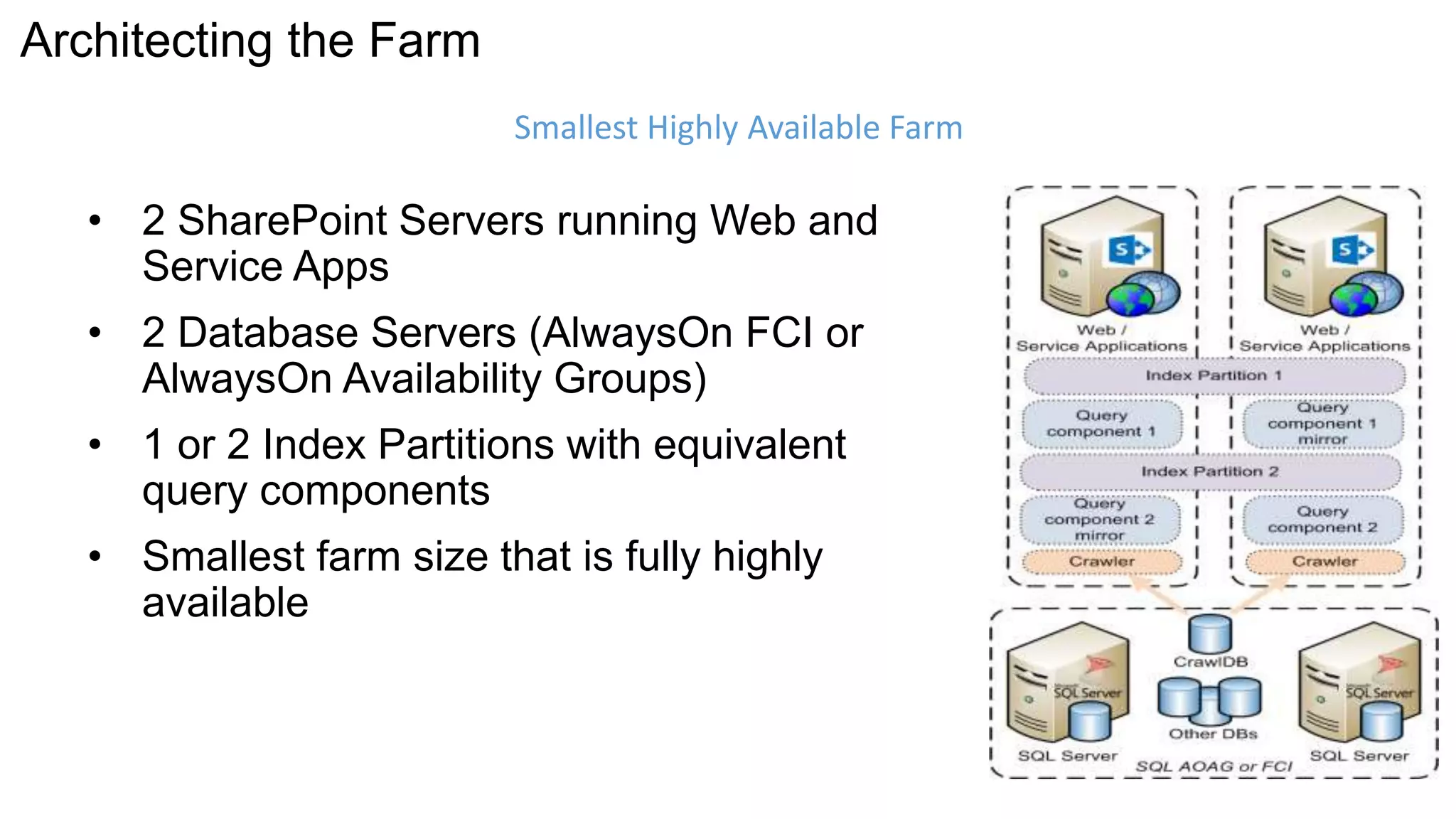
• 2 SharePoint Servers running Web and 
Service Apps 
• 2 Database Servers (AlwaysOn FCI or 
AlwaysOn Availability Groups) 
• 1 or 2 Index Partitions with equivalent 
query components 
• Smallest farm size that is fully highly 
available 
Smallest Highly Available Farm
Architecting the Farm 
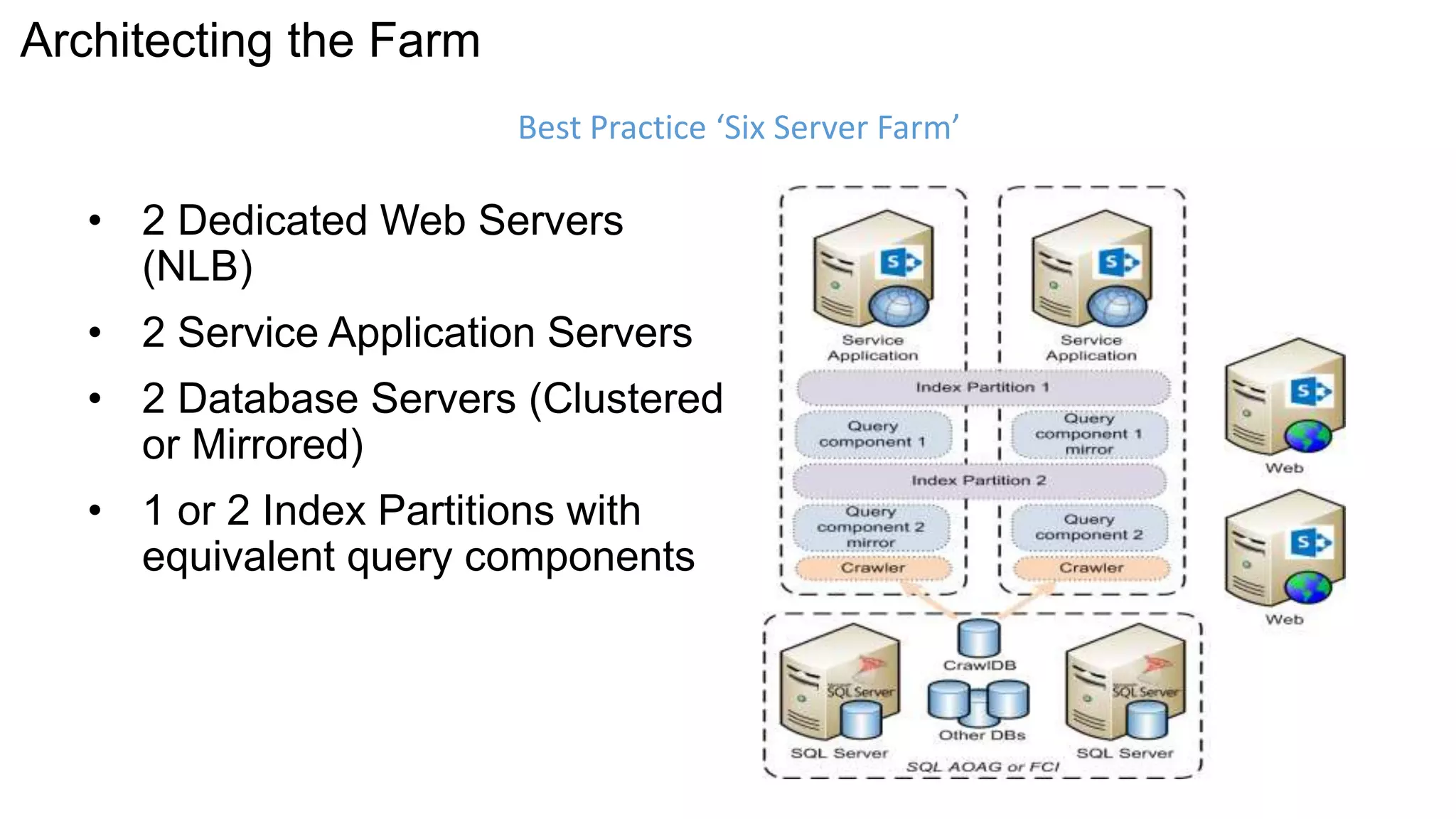
Best Practice ‘Six Server Farm’ 
• 2 Dedicated Web Servers 
(NLB) 
• 2 Service Application Servers 
• 2 Database Servers (Clustered 
or Mirrored) 
• 1 or 2 Index Partitions with 
equivalent query components
Architecting the Farm 
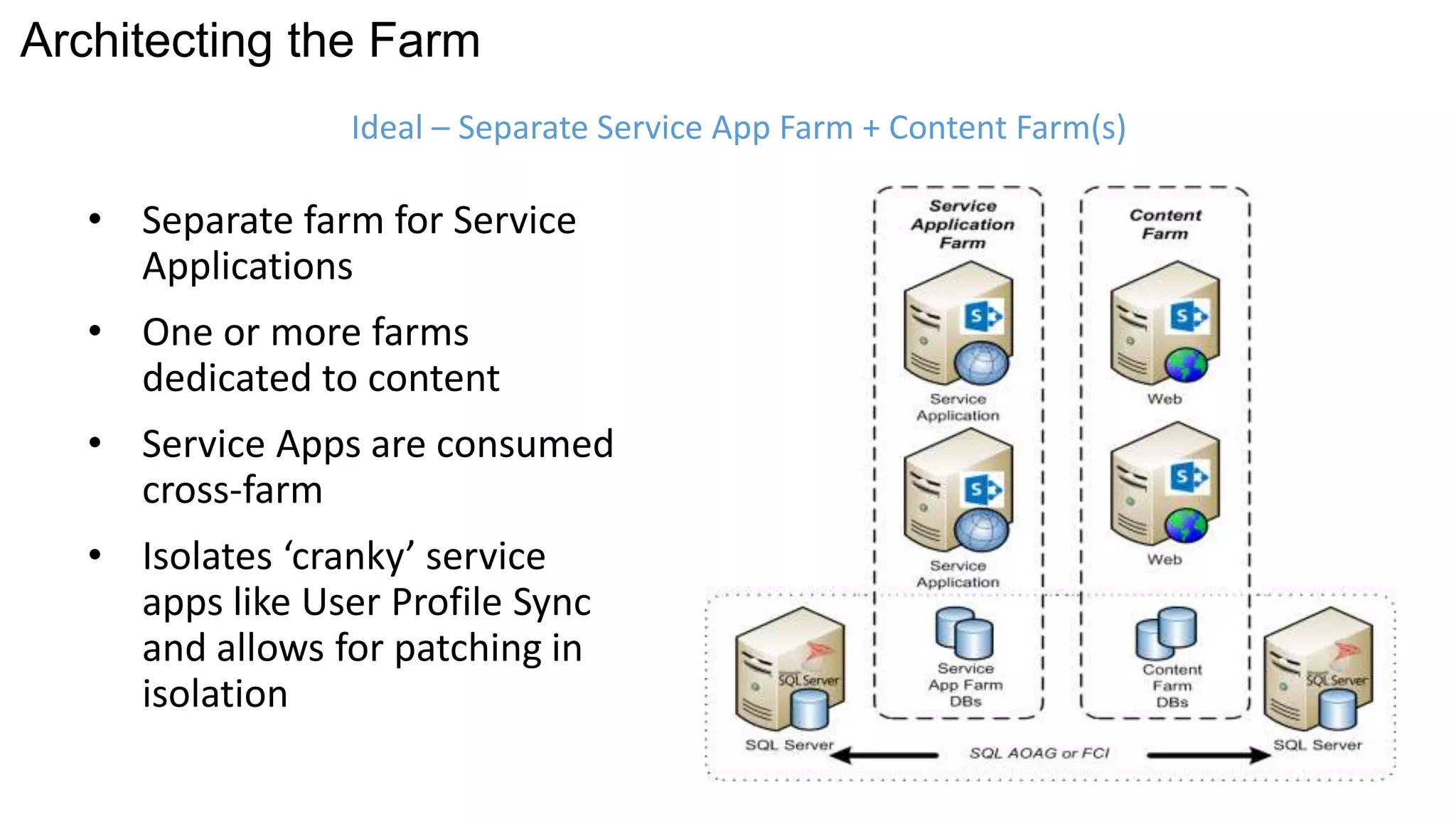
Ideal – Separate Service App Farm + Content Farm(s) 
• Separate farm for Service 
Applications 
• One or more farms 
dedicated to content 
• Service Apps are consumed 
cross-farm 
• Isolates ‘cranky’ service 
apps like User Profile Sync 
and allows for patching in 
isolation
Architecting the Farm 
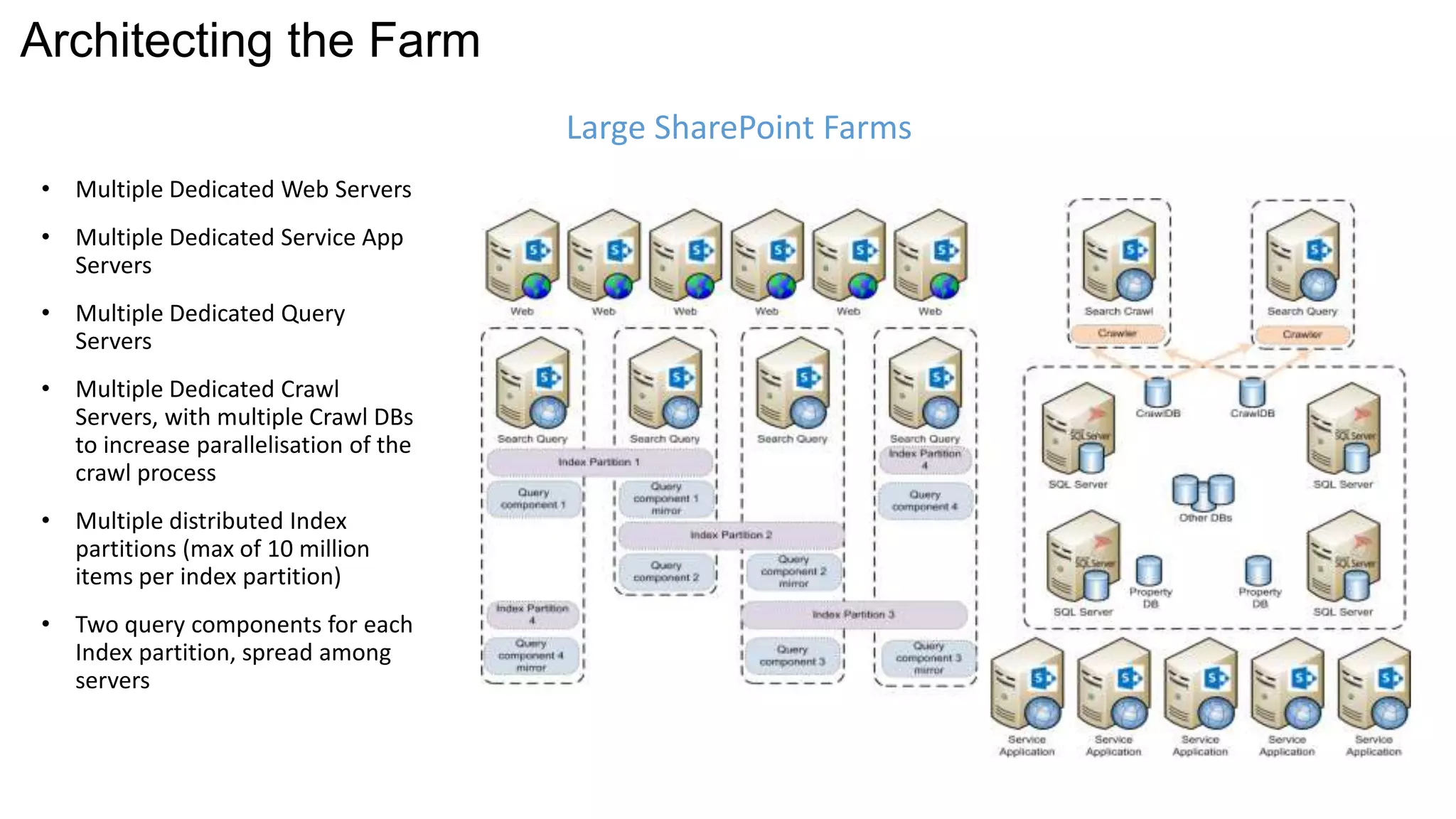
• Multiple Dedicated Web Servers 
• Multiple Dedicated Service App 
Servers 
• Multiple Dedicated Query 
Servers 
• Multiple Dedicated Crawl 
Servers, with multiple Crawl DBs 
to increase parallelisation of the 
crawl process 
• Multiple distributed Index 
partitions (max of 10 million 
items per index partition) 
• Two query components for each 
Index partition, spread among 
servers 
Large SharePoint Farms
Cloud and Hybrid 
Scenarios
www.cco.com 
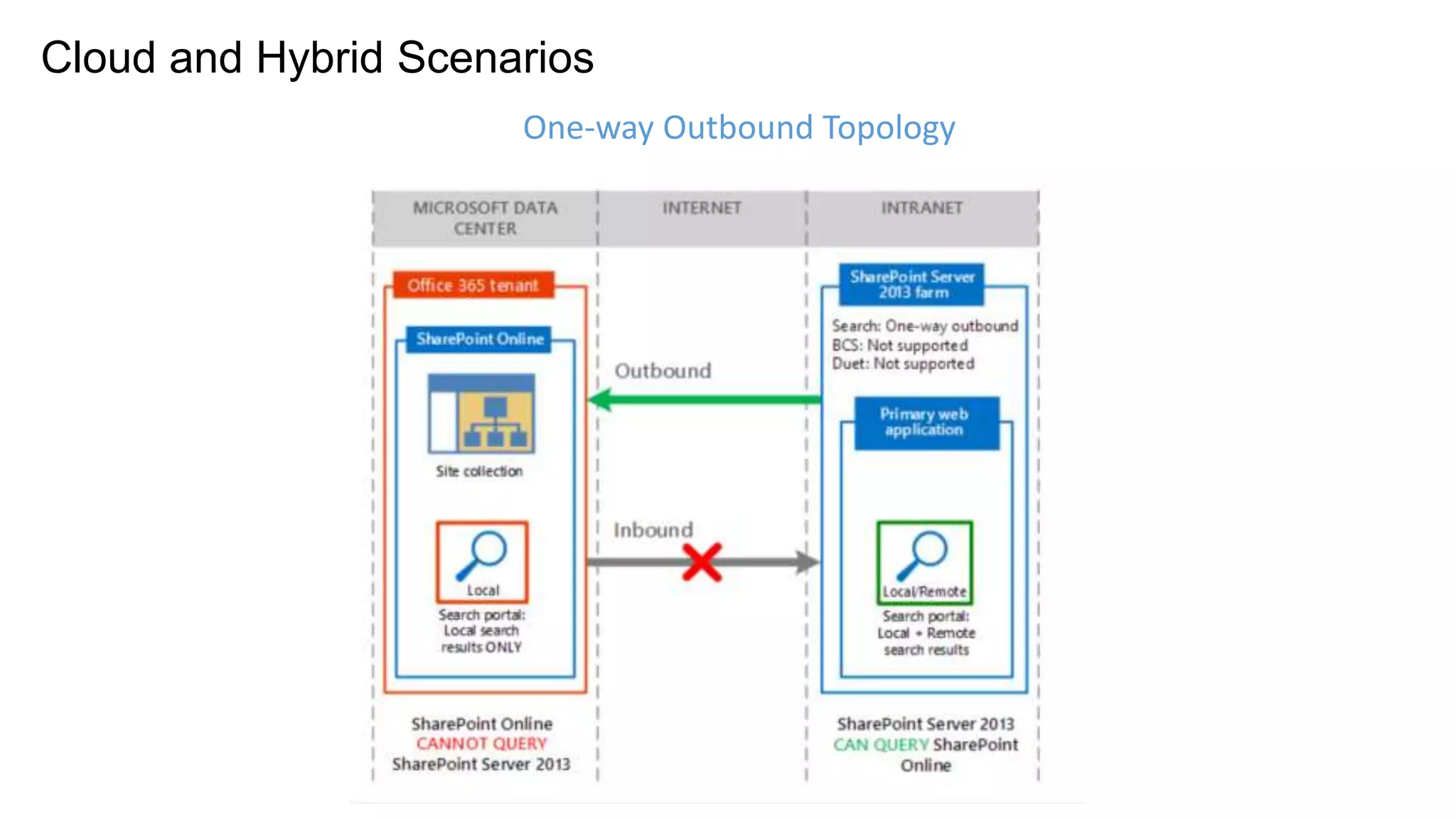
Cloud and Hybrid Scenarios 
One-way Outbound Topology
www.cco.com 
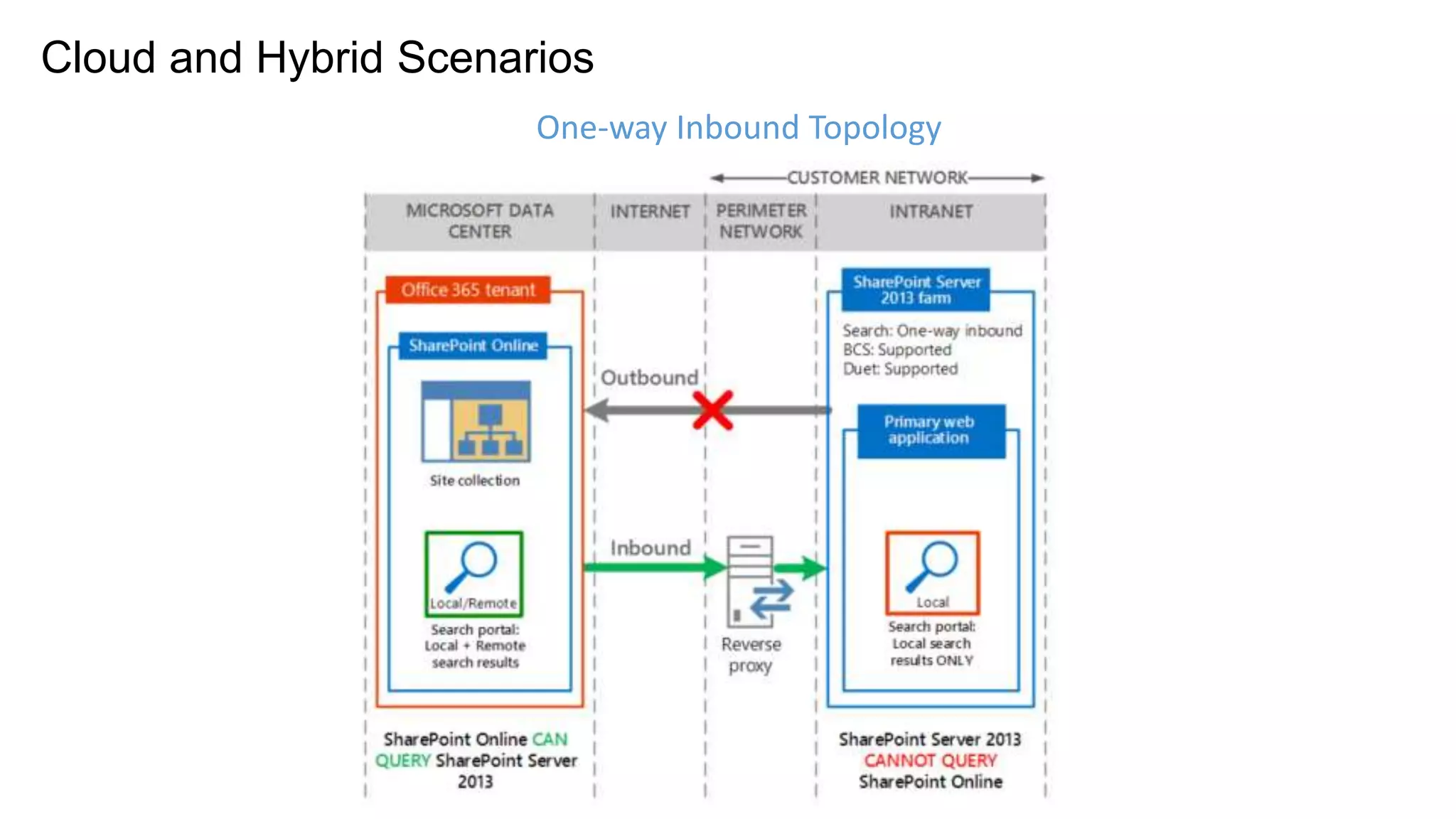
Cloud and Hybrid Scenarios 
One-way Inbound Topology
www.cco.com 
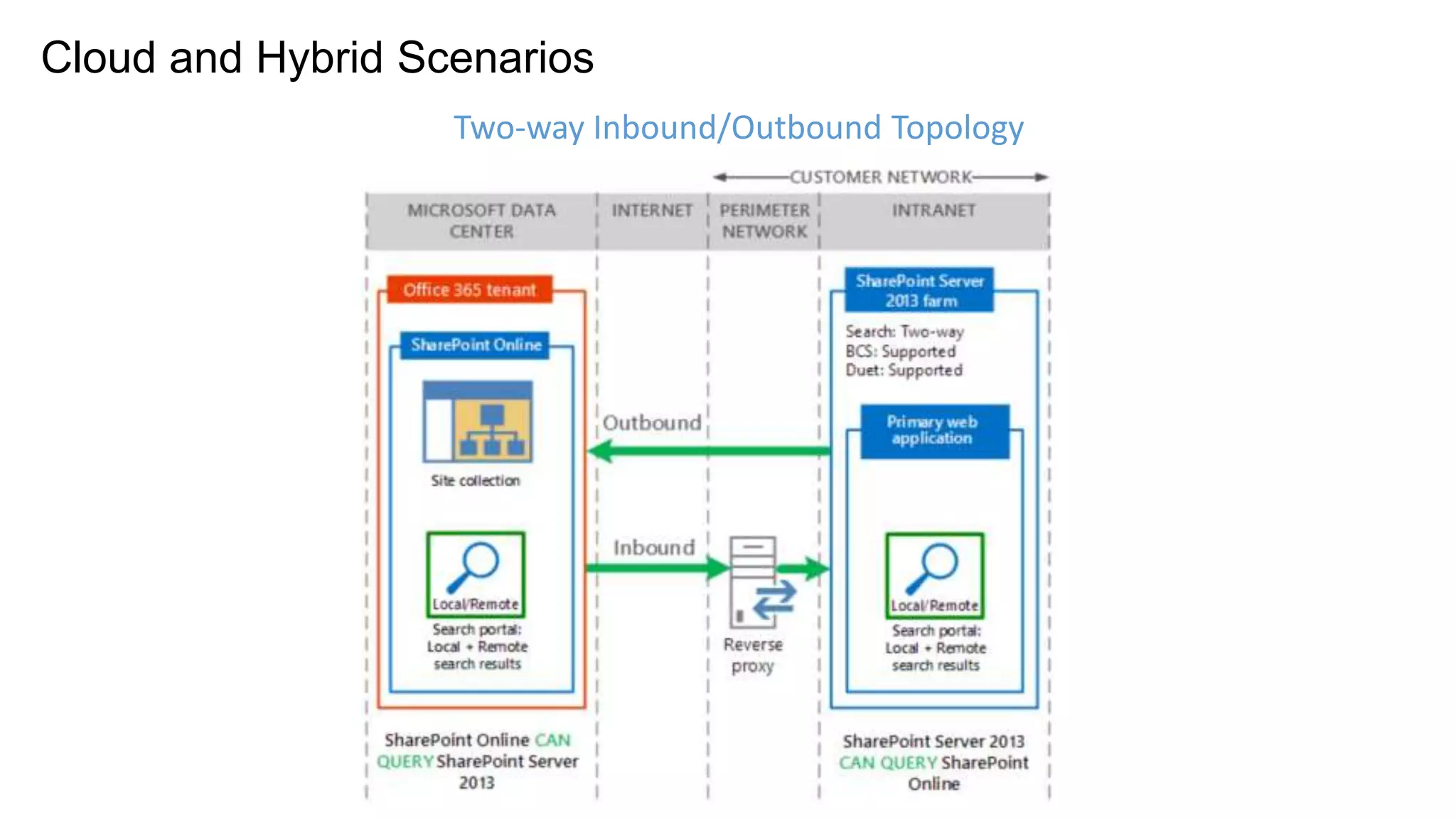
Cloud and Hybrid Scenarios 
Two-way Inbound/Outbound Topology
Identity Management in Hybrid Mode 
• Single Sign On possible between environments using 
Azure Active Directory Synchronisation Tool 
• Azure Active Directory Connection Required, regardless 
of SSO or non SSO (non-SSO just synchs passwords) 
• Consider the use of the OnRamp for Office 365 toolkit 
(https://onramp.office365.com/OnRamp/) 
• Server to Server Authentication also required (Certs) 
www.cco.com
SharePoint Virtualisation
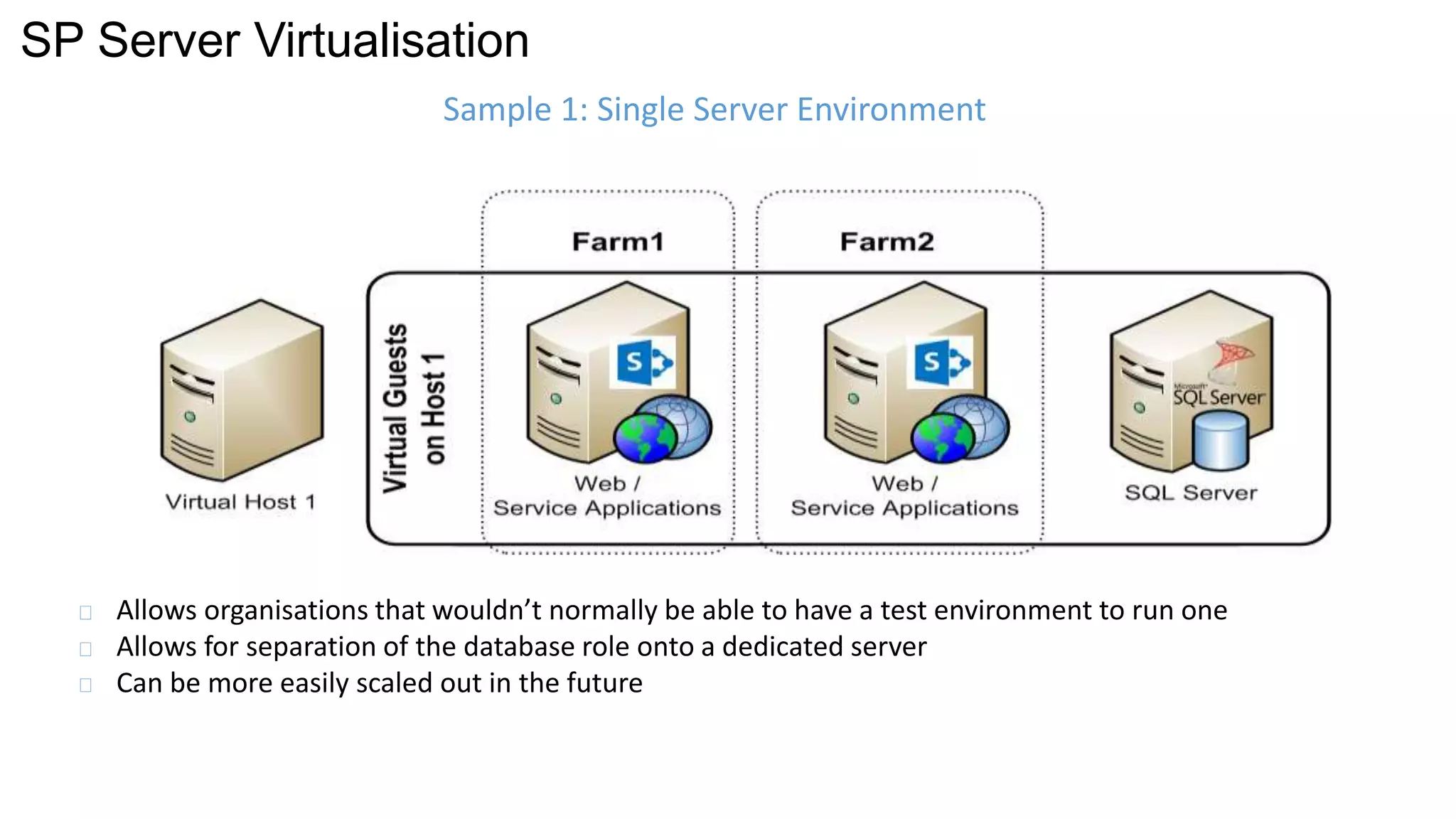
SP Server Virtualisation 
Sample 1: Single Server Environment 
Allows organisations that wouldn’t normally be able to have a test environment to run one 
Allows for separation of the database role onto a dedicated server 
Can be more easily scaled out in the future
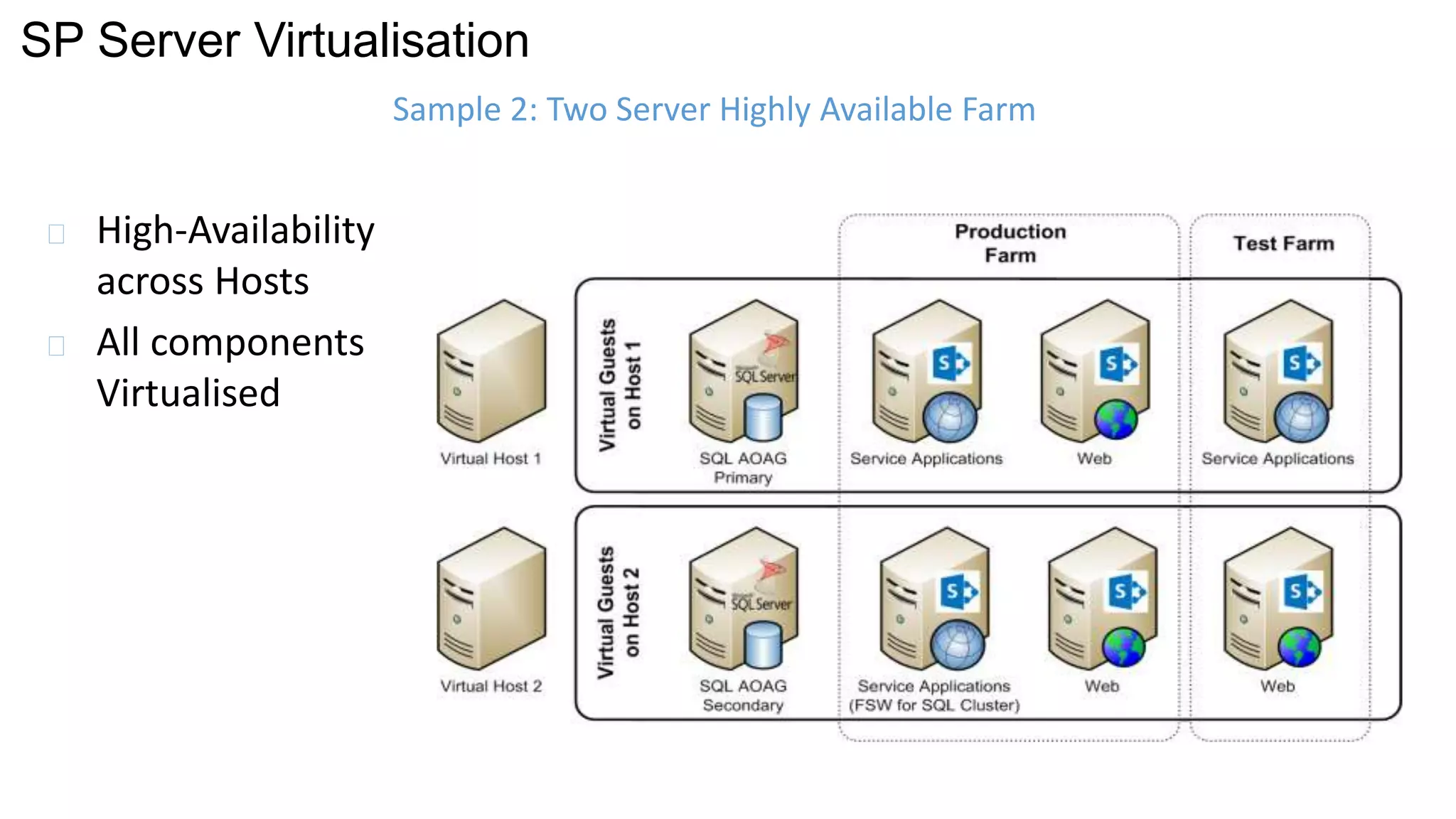
SP Server Virtualisation 
High-Availability 
across Hosts 
All components 
Virtualised 
Sample 2: Two Server Highly Available Farm
SP Server Virtualisation 
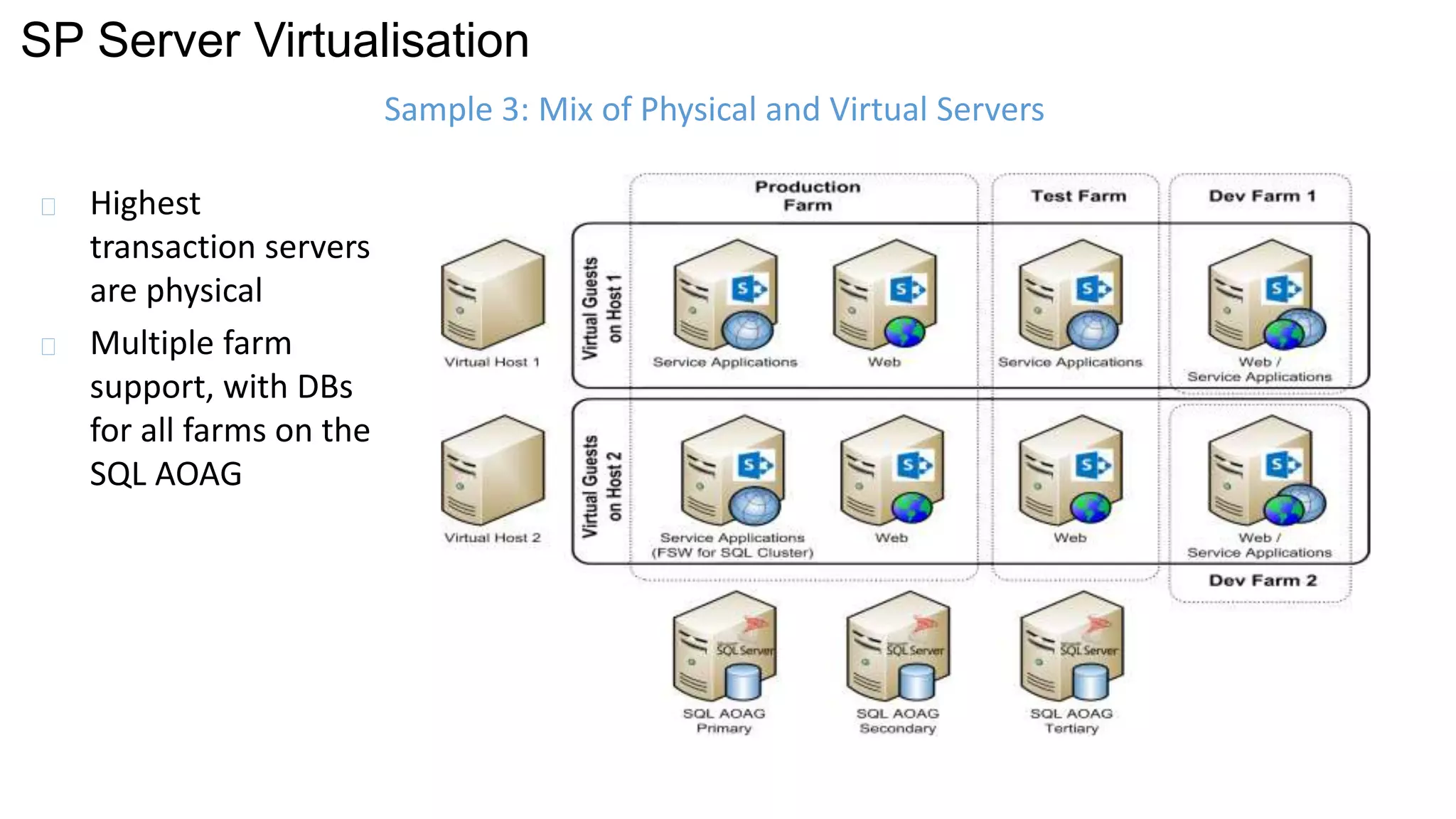
Highest 
transaction servers 
are physical 
Multiple farm 
support, with DBs 
for all farms on the 
SQL AOAG 
Sample 3: Mix of Physical and Virtual Servers
SP Server Virtualisation 
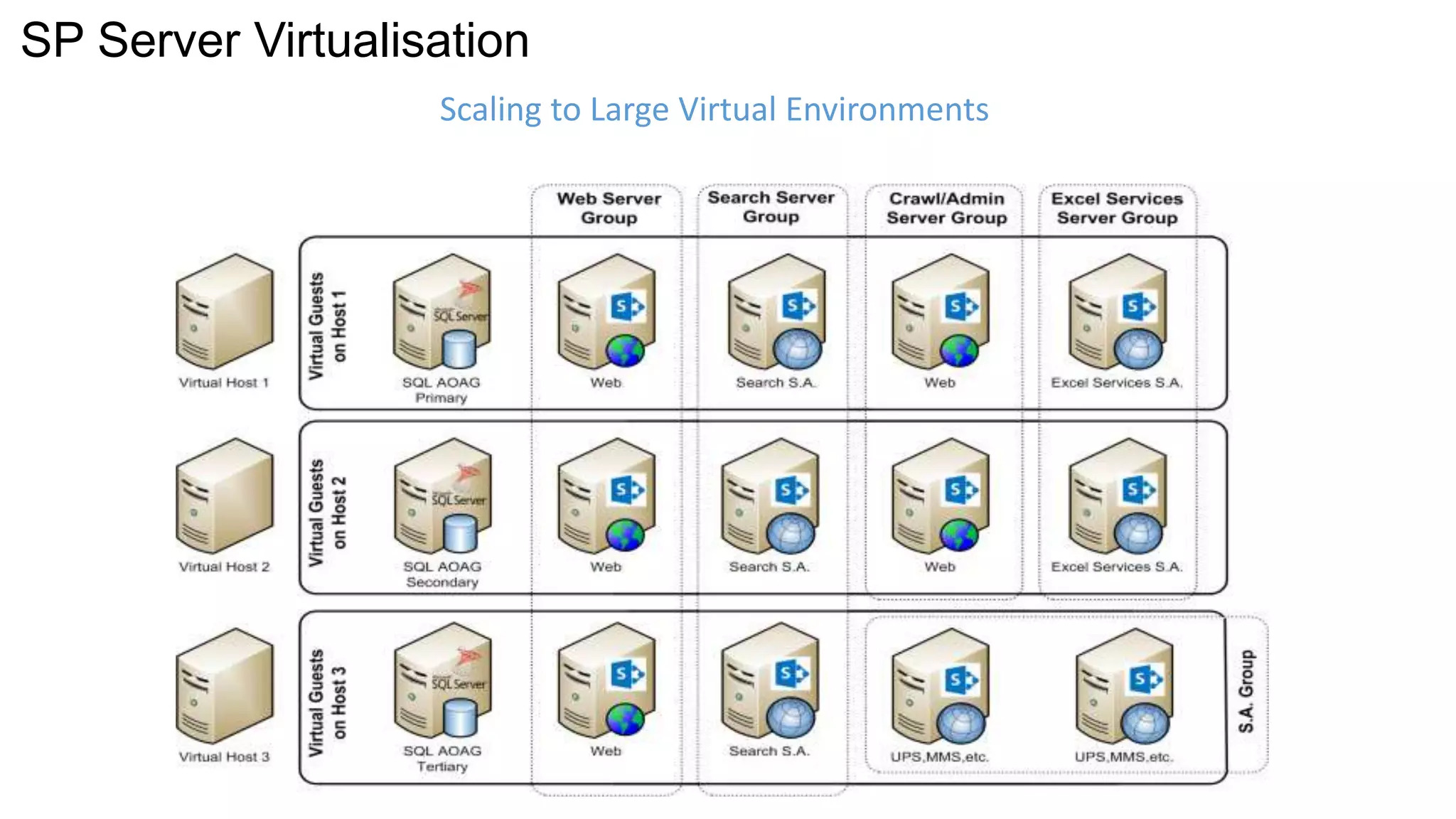
Scaling to Large Virtual Environments
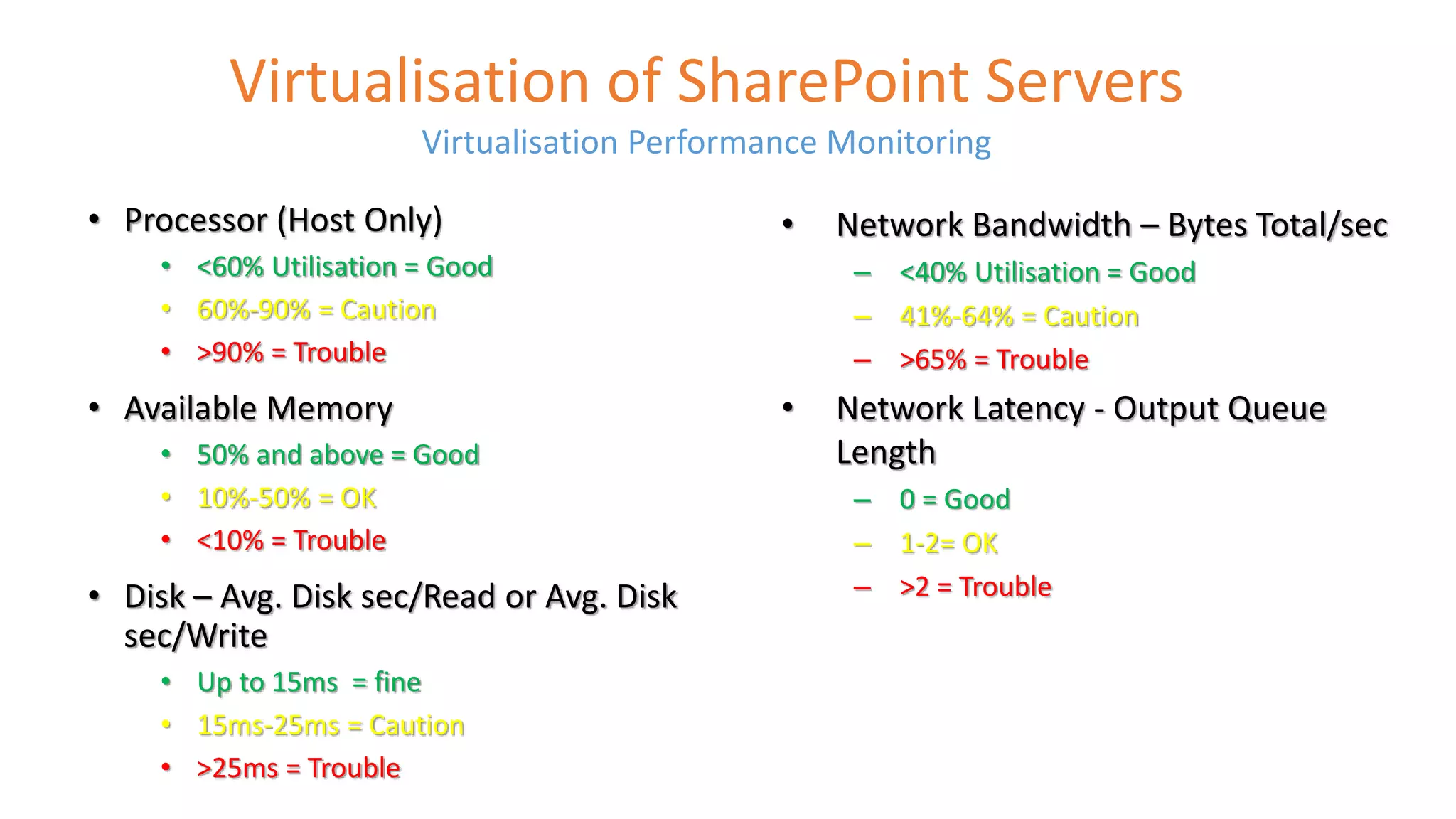
Virtualisation of SharePoint Servers 
Virtualisation Performance Monitoring 
• Processor (Host Only) 
• <60% Utilisation = Good 
• 60%-90% = Caution 
• >90% = Trouble 
• Available Memory 
• 50% and above = Good 
• 10%-50% = OK 
• <10% = Trouble 
• Disk – Avg. Disk sec/Read or Avg. Disk 
sec/Write 
• Up to 15ms = fine 
• 15ms-25ms = Caution 
• >25ms = Trouble 
• Network Bandwidth – Bytes Total/sec 
– <40% Utilisation = Good 
– 41%-64% = Caution 
– >65% = Trouble 
• Network Latency - Output Queue 
Length 
– 0 = Good 
– 1-2= OK 
– >2 = Trouble
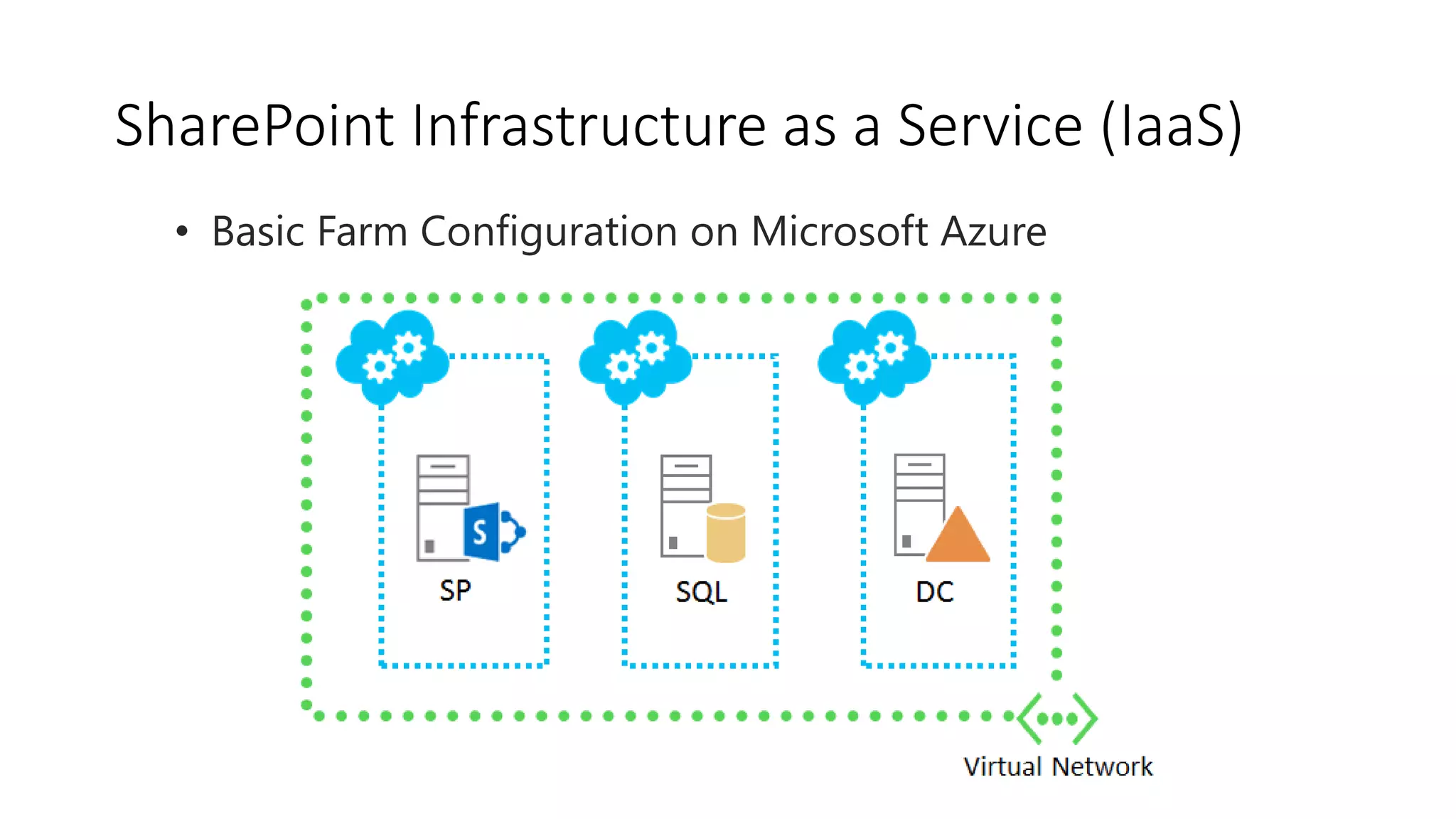
SharePoint Infrastructure as a Service (IaaS) 
• Basic Farm Configuration on Microsoft Azure
SharePoint Infrastructure as a Service (IaaS) 
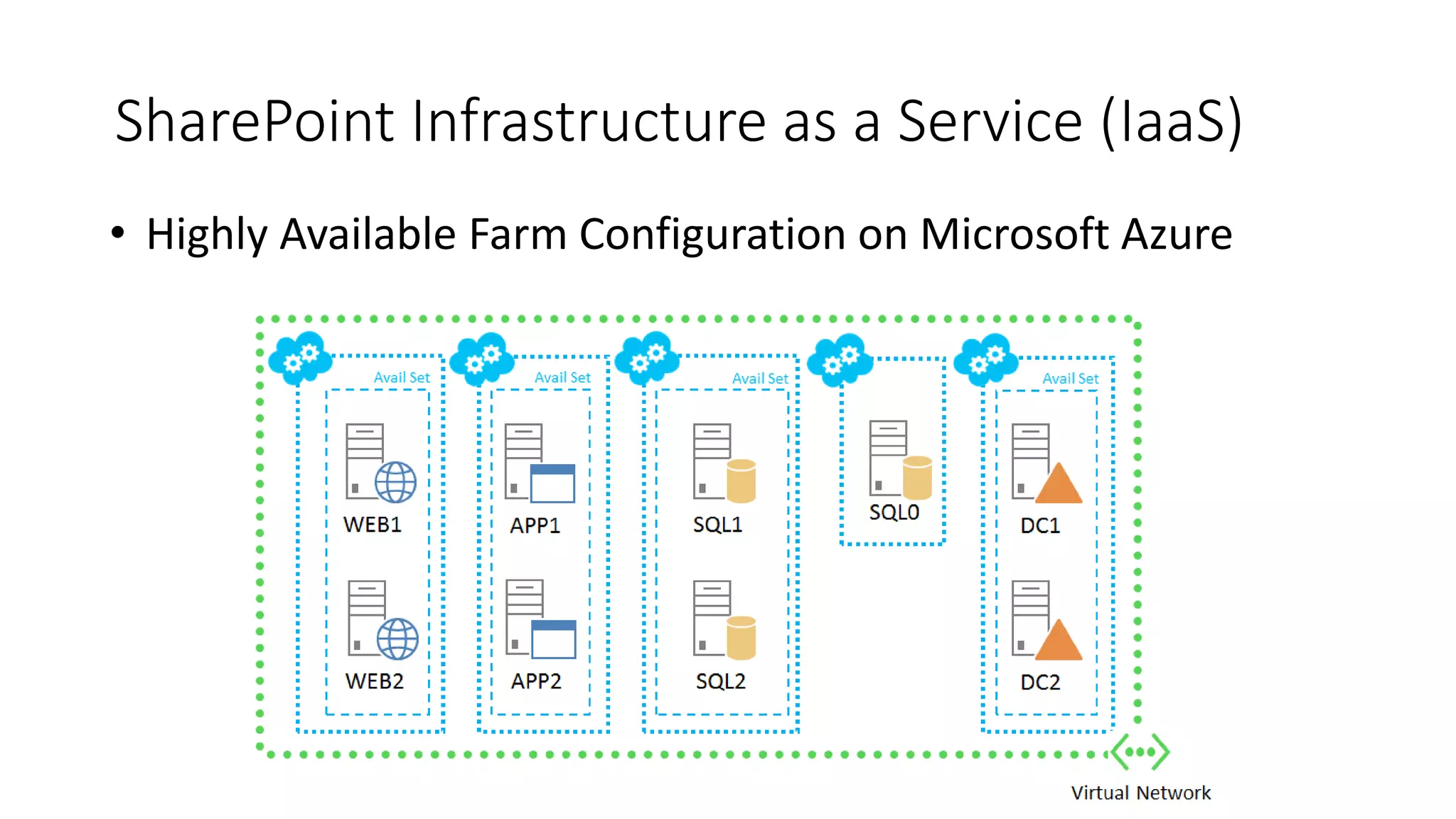
• Highly Available Farm Configuration on Microsoft Azure
Data Management
Data Management 
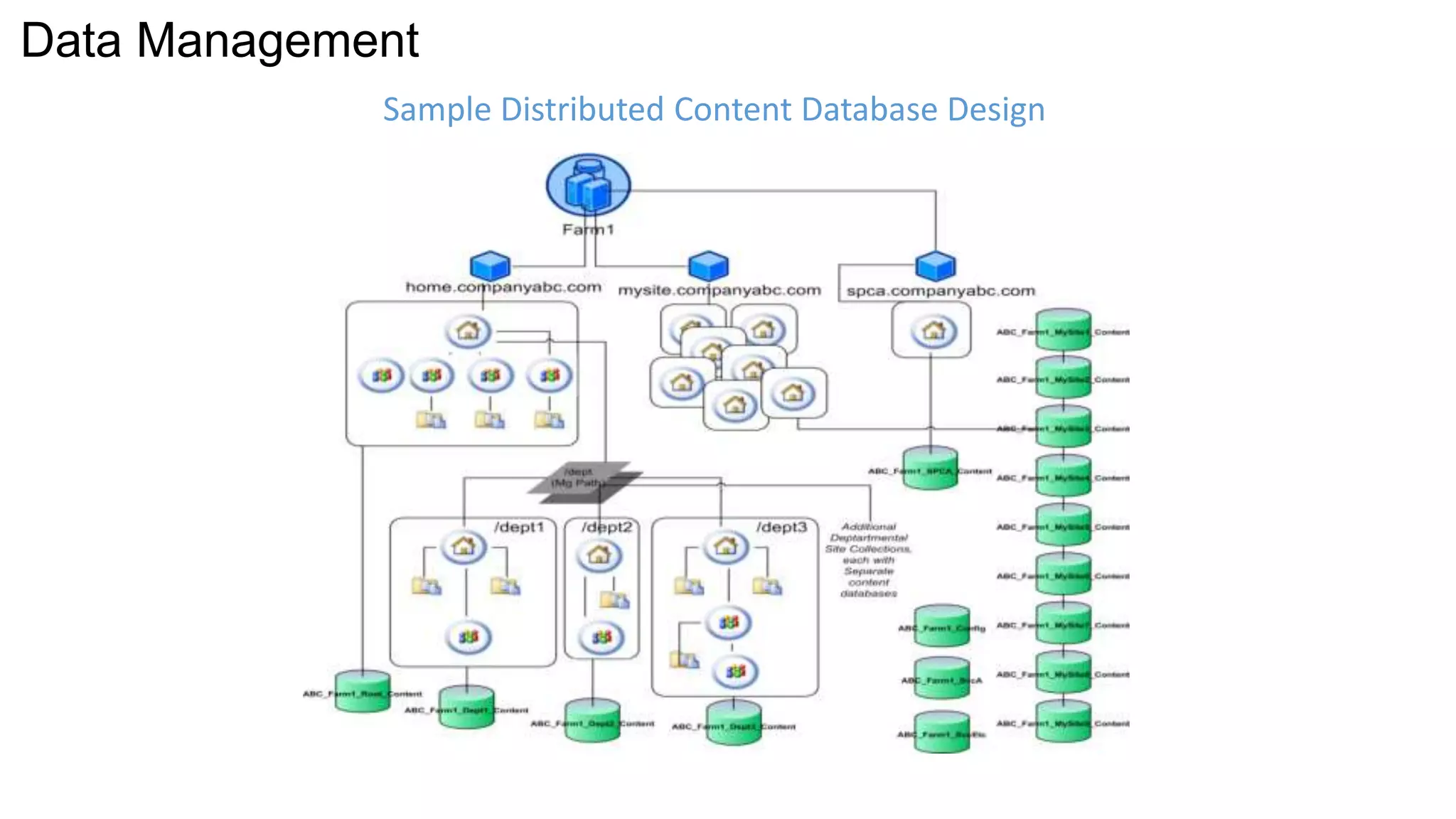
Sample Distributed Content Database Design
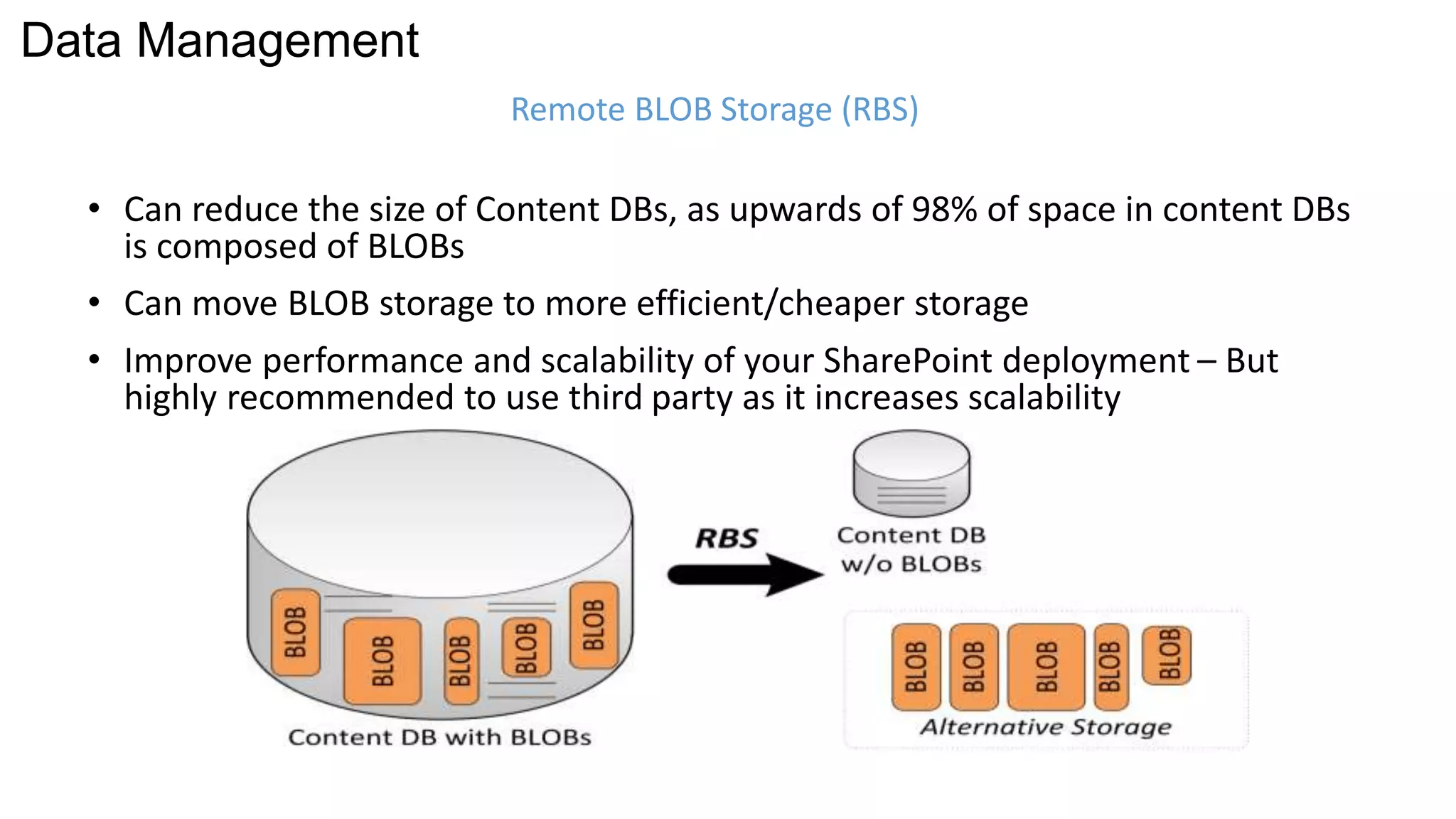
Remote BLOB Storage (RBS) 
Data Management 
• Can reduce the size of Content DBs, as upwards of 98% of space in content DBs 
is composed of BLOBs 
• Can move BLOB storage to more efficient/cheaper storage 
• Improve performance and scalability of your SharePoint deployment – But 
highly recommended to use third party as it increases scalability
SQL Database 
Optimisation
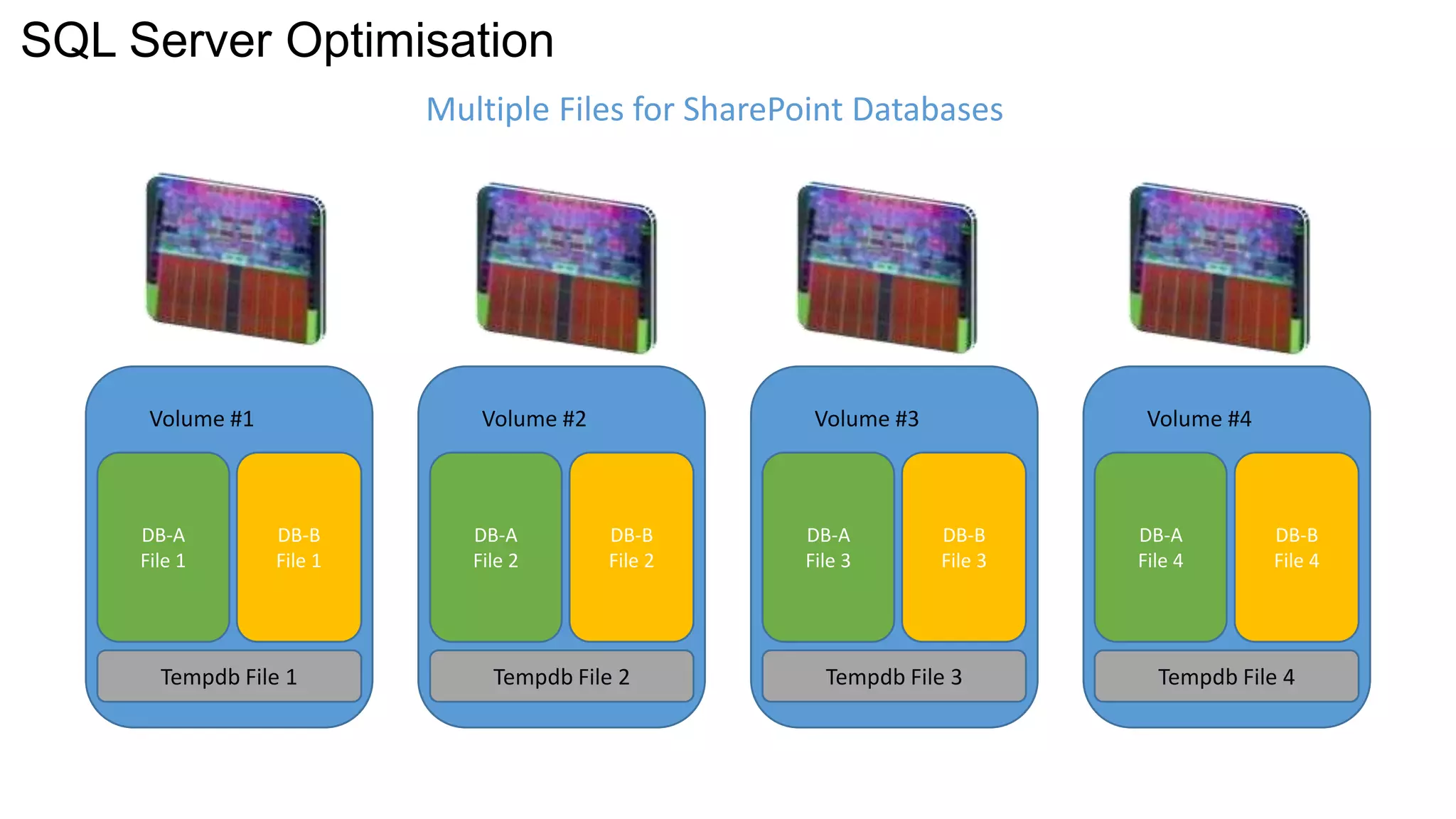
SQL Server Optimisation 
DB-A 
File 1 
DB-B 
File 1 
Volume #1 
Multiple Files for SharePoint Databases 
DB-A 
File 2 
DB-B 
File 2 
Volume #2 
DB-A 
File 3 
DB-B 
File 3 
Volume #3 
DB-A 
File 4 
DB-B 
File 4 
Volume #4 
Tempdb File 1 Tempdb File 2 Tempdb File 3 Tempdb File 4
SQL Server Optimisation 
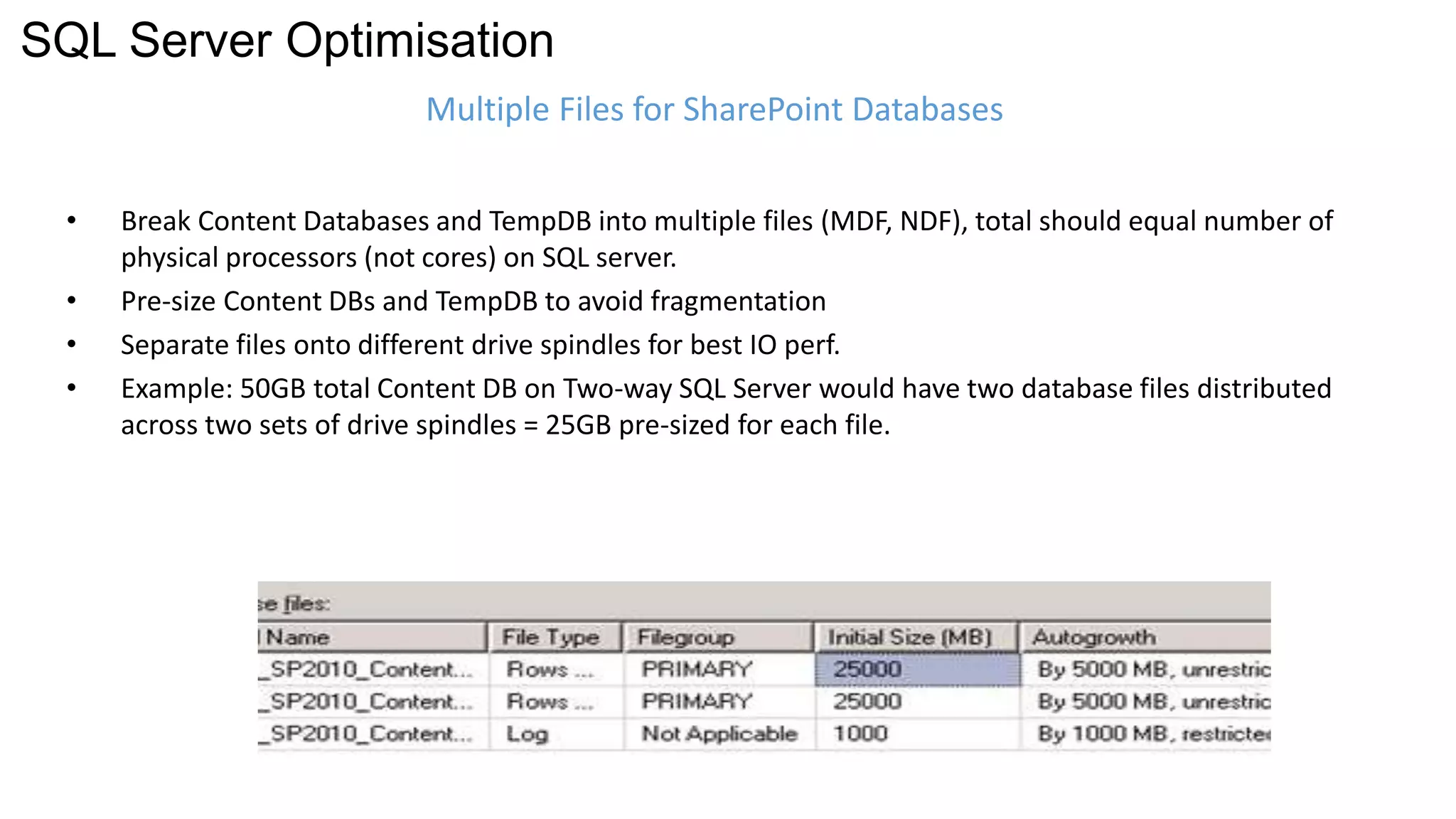
Multiple Files for SharePoint Databases 
• Break Content Databases and TempDB into multiple files (MDF, NDF), total should equal number of 
physical processors (not cores) on SQL server. 
• Pre-size Content DBs and TempDB to avoid fragmentation 
• Separate files onto different drive spindles for best IO perf. 
• Example: 50GB total Content DB on Two-way SQL Server would have two database files distributed 
across two sets of drive spindles = 25GB pre-sized for each file.
SQL Database Optimisation 
SQL Maintenance Plans 
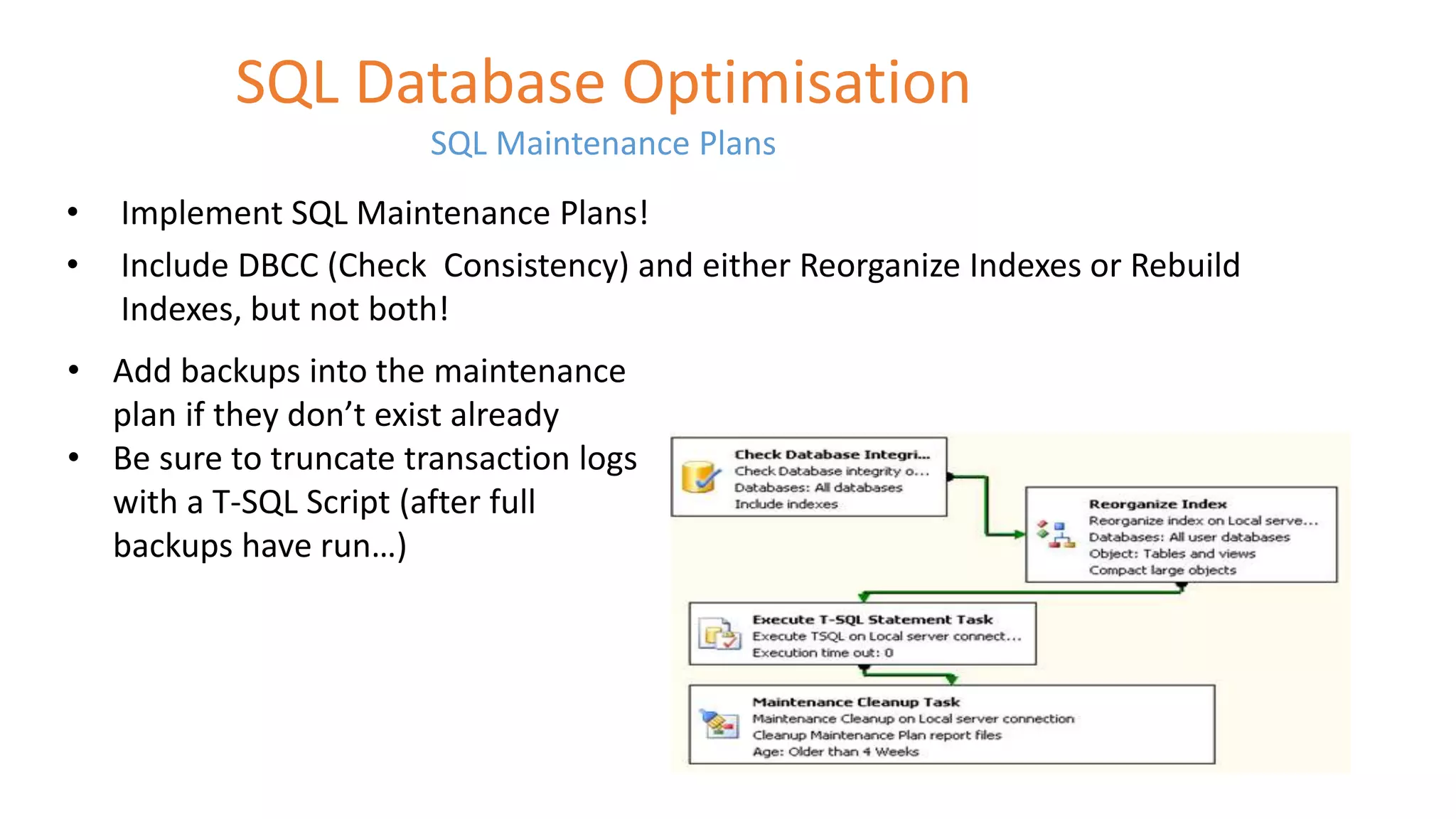
• Implement SQL Maintenance Plans! 
• Include DBCC (Check Consistency) and either Reorganize Indexes or Rebuild 
Indexes, but not both! 
• Add backups into the maintenance 
plan if they don’t exist already 
• Be sure to truncate transaction logs 
with a T-SQL Script (after full 
backups have run…)
High Availability and Disaster Recovery
High Availability and Disaster Recovery 
SQL Server Solution 
Potential Data Loss 
(RPO) 
Potential Recovery 
Time (RTO) 
Automatic Failover 
Additional Readable 
Copies 
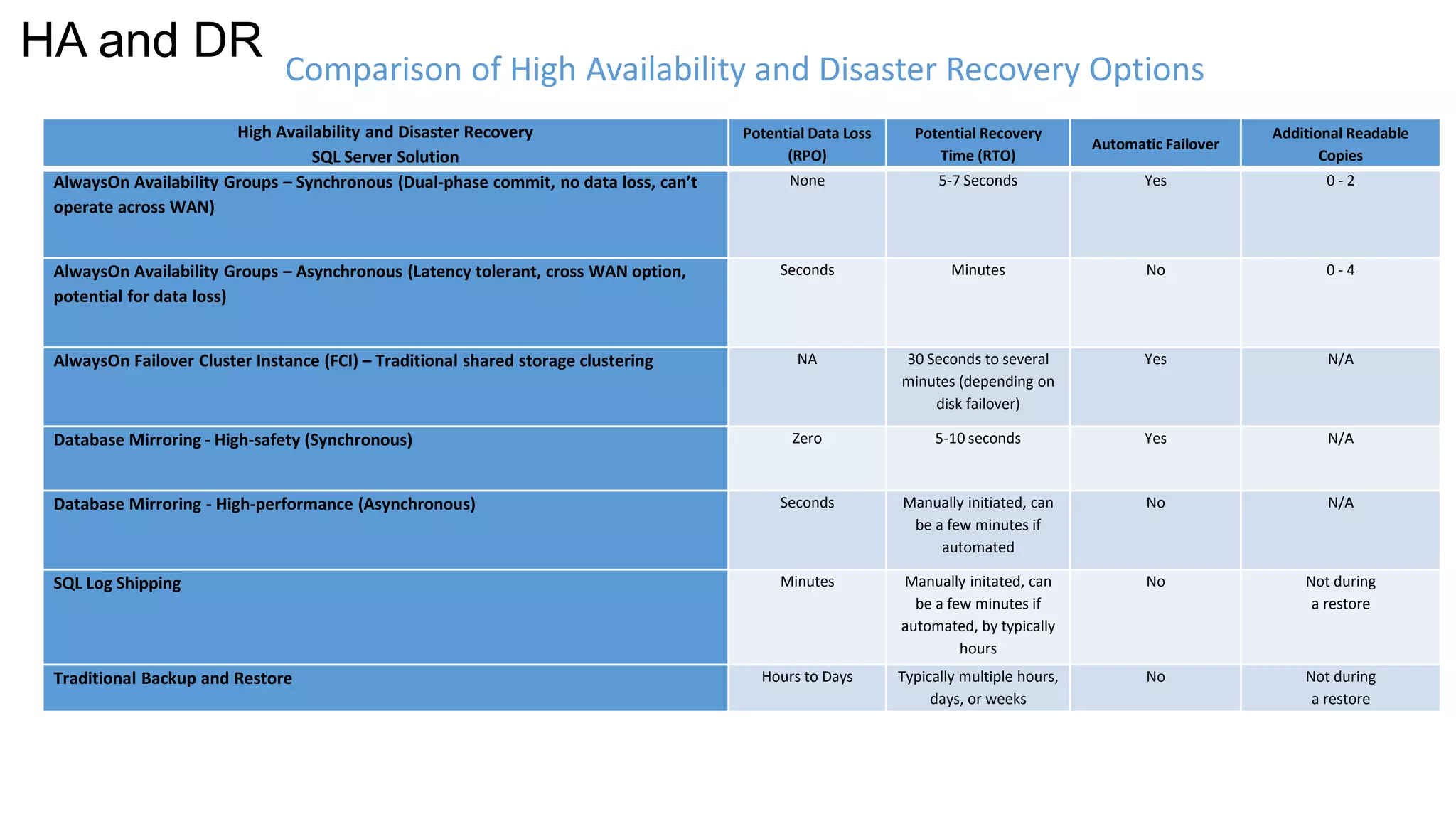
AlwaysOn Availability Groups – Synchronous (Dual-phase commit, no data loss, can’t 
operate across WAN) 
None 5-7 Seconds Yes 0 - 2 
AlwaysOn Availability Groups – Asynchronous (Latency tolerant, cross WAN option, 
potential for data loss) 
Seconds Minutes No 0 - 4 
AlwaysOn Failover Cluster Instance (FCI) – Traditional shared storage clustering NA 30 Seconds to several 
minutes (depending on 
disk failover) 
Yes N/A 
Database Mirroring - High-safety (Synchronous) Zero 5-10 seconds Yes N/A 
Database Mirroring - High-performance (Asynchronous) Seconds Manually initiated, can 
be a few minutes if 
automated 
No N/A 
SQL Log Shipping Minutes Manually initated, can 
be a few minutes if 
automated, by typically 
hours 
No Not during 
a restore 
Traditional Backup and Restore Hours to Days Typically multiple hours, 
days, or weeks 
No Not during 
a restore 
Comparison of High Availability and Disaster Recovery Options 
HA and DR
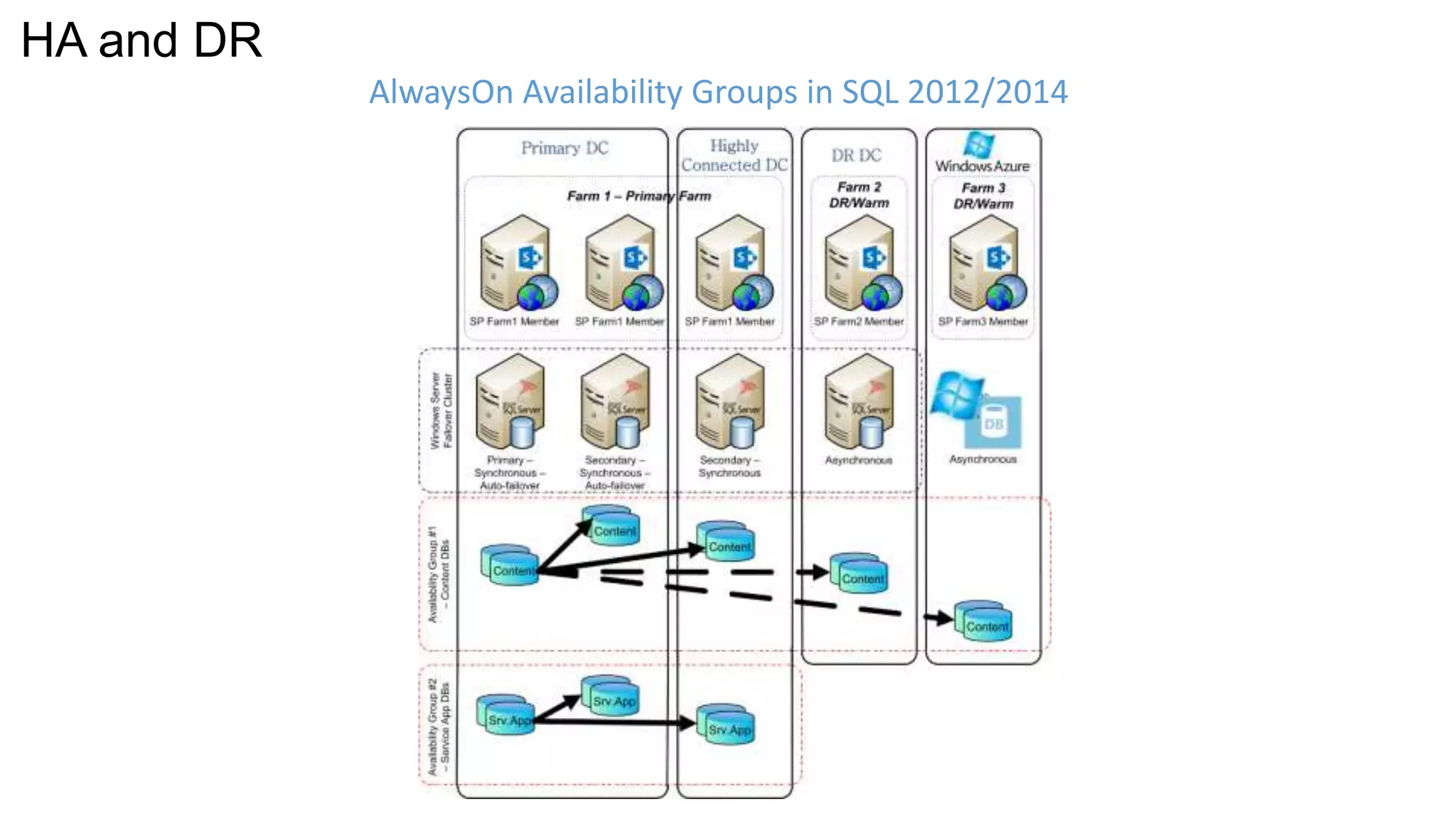
AlwaysOn Availability Groups in SQL 2012/2014 
HA and DR
SQL 2014 AOAGs for SharePoint Database Failover 
Demo
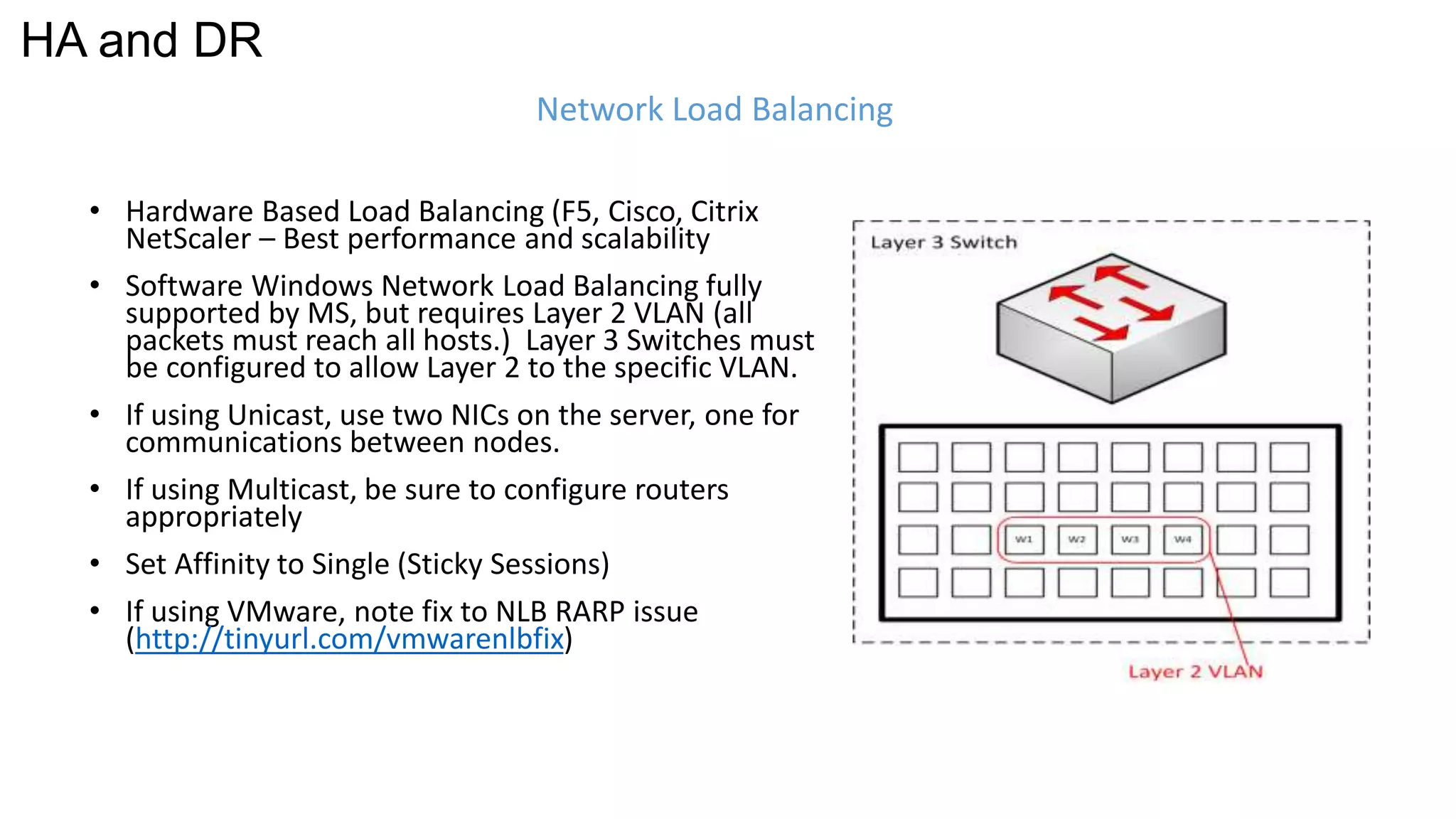
Network Load Balancing 
HA and DR 
• Hardware Based Load Balancing (F5, Cisco, Citrix 
NetScaler – Best performance and scalability 
• Software Windows Network Load Balancing fully 
supported by MS, but requires Layer 2 VLAN (all 
packets must reach all hosts.) Layer 3 Switches must 
be configured to allow Layer 2 to the specific VLAN. 
• If using Unicast, use two NICs on the server, one for 
communications between nodes. 
• If using Multicast, be sure to configure routers 
appropriately 
• Set Affinity to Single (Sticky Sessions) 
• If using VMware, note fix to NLB RARP issue 
(http://tinyurl.com/vmwarenlbfix)
Security and 
Documentation
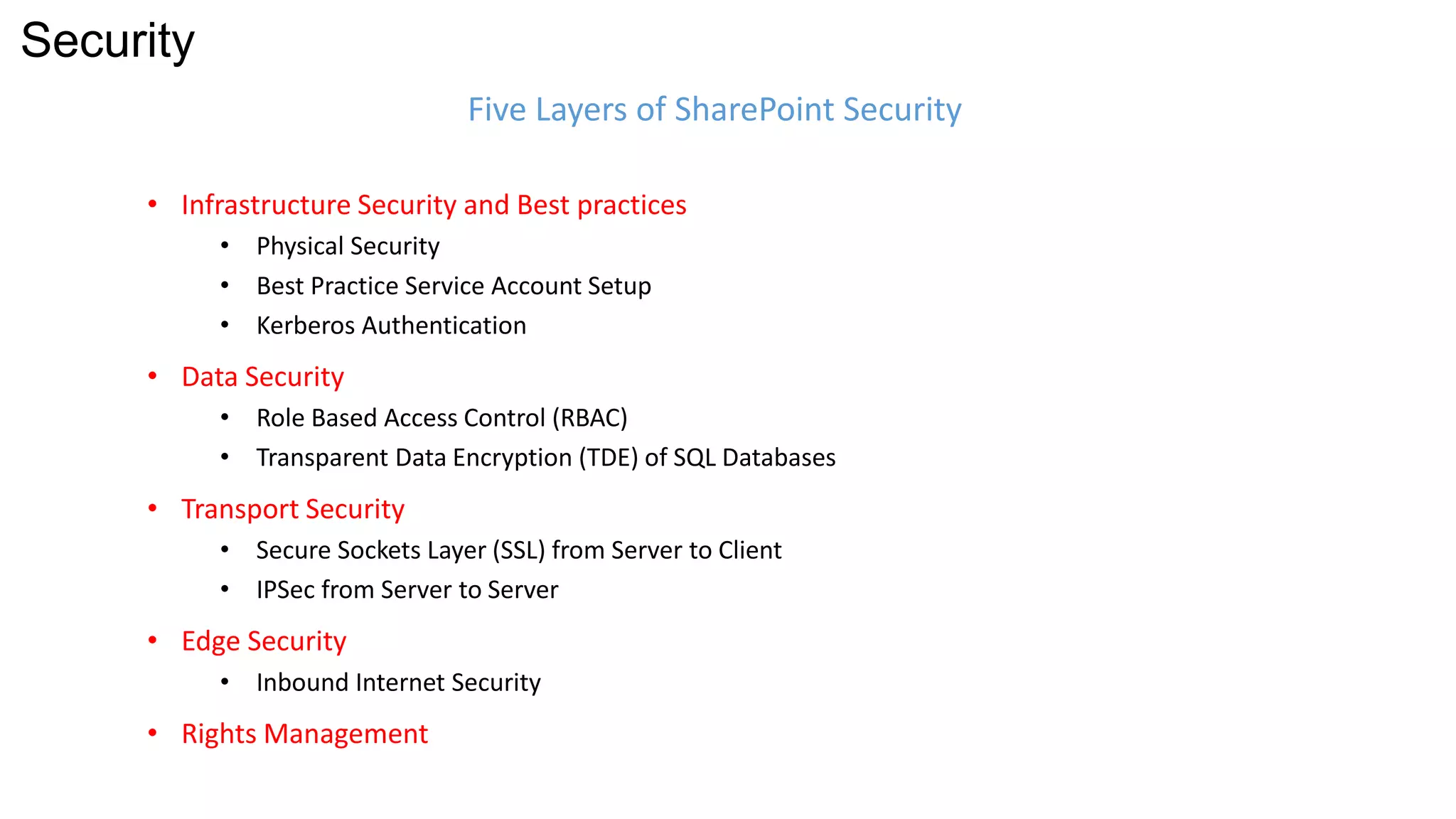
• Infrastructure Security and Best practices 
• Physical Security 
• Best Practice Service Account Setup 
• Kerberos Authentication 
• Data Security 
• Role Based Access Control (RBAC) 
• Transparent Data Encryption (TDE) of SQL Databases 
• Transport Security 
• Secure Sockets Layer (SSL) from Server to Client 
• IPSec from Server to Server 
• Edge Security 
• Inbound Internet Security 
• Rights Management 
Five Layers of SharePoint Security 
Security
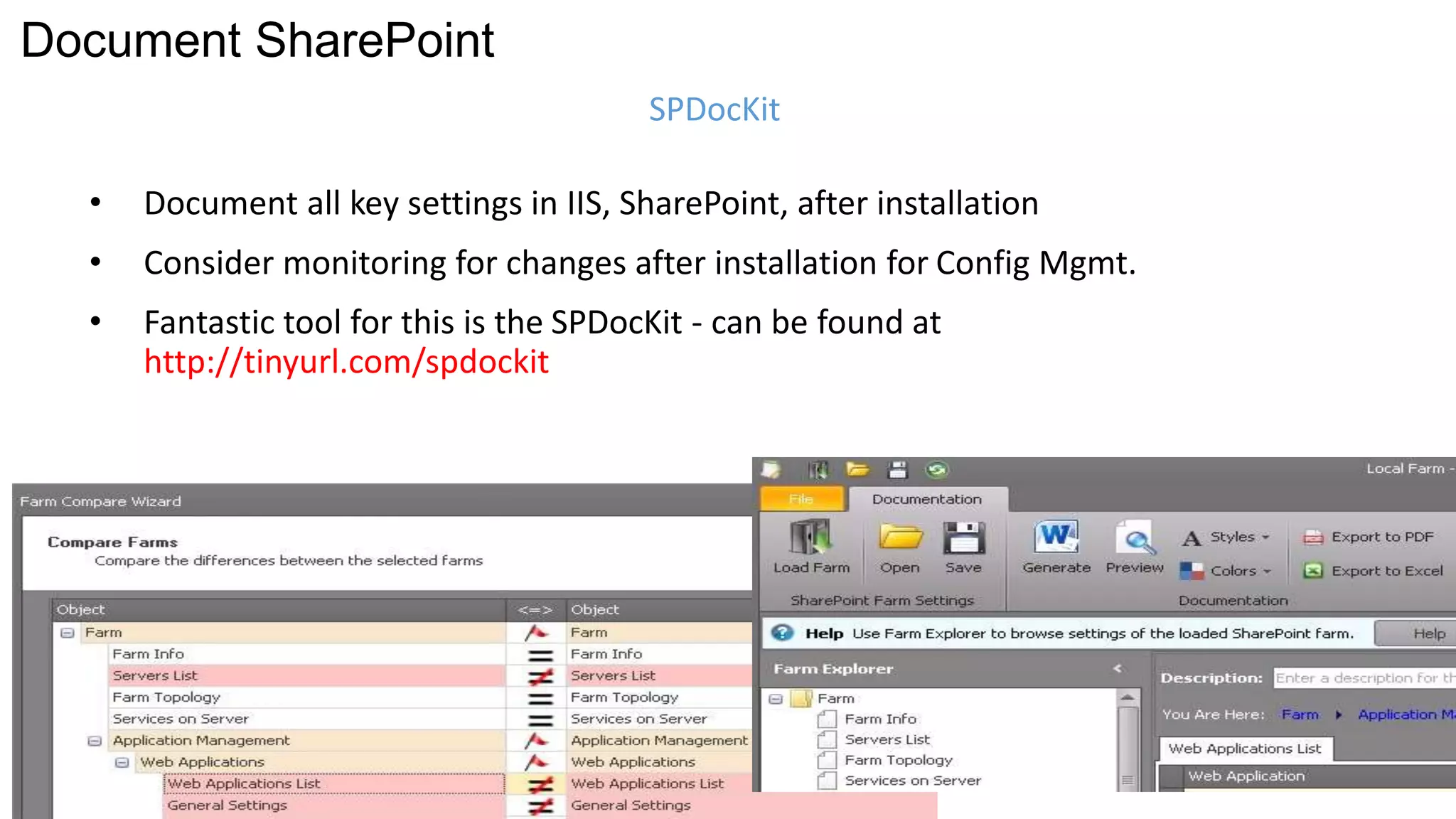
• Document all key settings in IIS, SharePoint, after installation 
• Consider monitoring for changes after installation for Config Mgmt. 
• Fantastic tool for this is the SPDocKit - can be found at 
http://tinyurl.com/spdockit 
SPDocKit 
Document SharePoint
Michael Noel 
Twitter: @MichaelTNoel 
www.cco.com 
Slides: slideshare.net/michaeltnoel 
Travel blog: sharingtheglobe.com 
SharePoint 2013 Unleashed: 
tinyurl.com/sp2013unleashed

Ultimate SharePoint Infrastructure Best Practises Session - Isle of Man SharePoint User Group - December 2014

  • 1.
    The Ultimate SharePointInfrastructure Best Practices Session Michael Noel Convergent Computing (CCO) www.cco.com 925-933-4800
  • 2.
    Michael Noel •Author of SAMS Publishing titles “SharePoint 2013 Unleashed,” “SharePoint 2010 Unleashed”, “Windows Server 2012 Unleashed,” “Exchange Server 2013 Unleashed”, “ISA Server 2006 Unleashed”, and a total of 19 titles that have sold over 300,000 copies. • Partner at Convergent Computing (www.cco.com) – San Francisco, U.S.A. based Infrastructure/Security specialists for SharePoint, AD, Exchange, System Center, Security, etc.
  • 3.
  • 4.
    Web Service Apps Data Architecting the Farm Three Layers of SharePoint Infrastructure
  • 5.
    • ‘All-in-One’ (Avoid) DB and SP Roles Separate Architecting the Farm Small Farm Models
  • 6.
    Architecting the Farm • 2 SharePoint Servers running Web and Service Apps • 2 Database Servers (AlwaysOn FCI or AlwaysOn Availability Groups) • 1 or 2 Index Partitions with equivalent query components • Smallest farm size that is fully highly available Smallest Highly Available Farm
  • 7.
    Architecting the Farm Best Practice ‘Six Server Farm’ • 2 Dedicated Web Servers (NLB) • 2 Service Application Servers • 2 Database Servers (Clustered or Mirrored) • 1 or 2 Index Partitions with equivalent query components
  • 8.
    Architecting the Farm Ideal – Separate Service App Farm + Content Farm(s) • Separate farm for Service Applications • One or more farms dedicated to content • Service Apps are consumed cross-farm • Isolates ‘cranky’ service apps like User Profile Sync and allows for patching in isolation
  • 9.
    Architecting the Farm • Multiple Dedicated Web Servers • Multiple Dedicated Service App Servers • Multiple Dedicated Query Servers • Multiple Dedicated Crawl Servers, with multiple Crawl DBs to increase parallelisation of the crawl process • Multiple distributed Index partitions (max of 10 million items per index partition) • Two query components for each Index partition, spread among servers Large SharePoint Farms
  • 10.
    Cloud and Hybrid Scenarios
  • 11.
    www.cco.com Cloud andHybrid Scenarios One-way Outbound Topology
  • 12.
    www.cco.com Cloud andHybrid Scenarios One-way Inbound Topology
  • 13.
    www.cco.com Cloud andHybrid Scenarios Two-way Inbound/Outbound Topology
  • 14.
    Identity Management inHybrid Mode • Single Sign On possible between environments using Azure Active Directory Synchronisation Tool • Azure Active Directory Connection Required, regardless of SSO or non SSO (non-SSO just synchs passwords) • Consider the use of the OnRamp for Office 365 toolkit (https://onramp.office365.com/OnRamp/) • Server to Server Authentication also required (Certs) www.cco.com
  • 15.
  • 16.
    SP Server Virtualisation Sample 1: Single Server Environment Allows organisations that wouldn’t normally be able to have a test environment to run one Allows for separation of the database role onto a dedicated server Can be more easily scaled out in the future
  • 17.
    SP Server Virtualisation High-Availability across Hosts All components Virtualised Sample 2: Two Server Highly Available Farm
  • 18.
    SP Server Virtualisation Highest transaction servers are physical Multiple farm support, with DBs for all farms on the SQL AOAG Sample 3: Mix of Physical and Virtual Servers
  • 19.
    SP Server Virtualisation Scaling to Large Virtual Environments
  • 20.
    Virtualisation of SharePointServers Virtualisation Performance Monitoring • Processor (Host Only) • <60% Utilisation = Good • 60%-90% = Caution • >90% = Trouble • Available Memory • 50% and above = Good • 10%-50% = OK • <10% = Trouble • Disk – Avg. Disk sec/Read or Avg. Disk sec/Write • Up to 15ms = fine • 15ms-25ms = Caution • >25ms = Trouble • Network Bandwidth – Bytes Total/sec – <40% Utilisation = Good – 41%-64% = Caution – >65% = Trouble • Network Latency - Output Queue Length – 0 = Good – 1-2= OK – >2 = Trouble
  • 21.
    SharePoint Infrastructure asa Service (IaaS) • Basic Farm Configuration on Microsoft Azure
  • 22.
    SharePoint Infrastructure asa Service (IaaS) • Highly Available Farm Configuration on Microsoft Azure
  • 23.
  • 24.
    Data Management SampleDistributed Content Database Design
  • 25.
    Remote BLOB Storage(RBS) Data Management • Can reduce the size of Content DBs, as upwards of 98% of space in content DBs is composed of BLOBs • Can move BLOB storage to more efficient/cheaper storage • Improve performance and scalability of your SharePoint deployment – But highly recommended to use third party as it increases scalability
  • 26.
  • 27.
    SQL Server Optimisation DB-A File 1 DB-B File 1 Volume #1 Multiple Files for SharePoint Databases DB-A File 2 DB-B File 2 Volume #2 DB-A File 3 DB-B File 3 Volume #3 DB-A File 4 DB-B File 4 Volume #4 Tempdb File 1 Tempdb File 2 Tempdb File 3 Tempdb File 4
  • 28.
    SQL Server Optimisation Multiple Files for SharePoint Databases • Break Content Databases and TempDB into multiple files (MDF, NDF), total should equal number of physical processors (not cores) on SQL server. • Pre-size Content DBs and TempDB to avoid fragmentation • Separate files onto different drive spindles for best IO perf. • Example: 50GB total Content DB on Two-way SQL Server would have two database files distributed across two sets of drive spindles = 25GB pre-sized for each file.
  • 29.
    SQL Database Optimisation SQL Maintenance Plans • Implement SQL Maintenance Plans! • Include DBCC (Check Consistency) and either Reorganize Indexes or Rebuild Indexes, but not both! • Add backups into the maintenance plan if they don’t exist already • Be sure to truncate transaction logs with a T-SQL Script (after full backups have run…)
  • 30.
    High Availability andDisaster Recovery
  • 31.
    High Availability andDisaster Recovery SQL Server Solution Potential Data Loss (RPO) Potential Recovery Time (RTO) Automatic Failover Additional Readable Copies AlwaysOn Availability Groups – Synchronous (Dual-phase commit, no data loss, can’t operate across WAN) None 5-7 Seconds Yes 0 - 2 AlwaysOn Availability Groups – Asynchronous (Latency tolerant, cross WAN option, potential for data loss) Seconds Minutes No 0 - 4 AlwaysOn Failover Cluster Instance (FCI) – Traditional shared storage clustering NA 30 Seconds to several minutes (depending on disk failover) Yes N/A Database Mirroring - High-safety (Synchronous) Zero 5-10 seconds Yes N/A Database Mirroring - High-performance (Asynchronous) Seconds Manually initiated, can be a few minutes if automated No N/A SQL Log Shipping Minutes Manually initated, can be a few minutes if automated, by typically hours No Not during a restore Traditional Backup and Restore Hours to Days Typically multiple hours, days, or weeks No Not during a restore Comparison of High Availability and Disaster Recovery Options HA and DR
  • 32.
    AlwaysOn Availability Groupsin SQL 2012/2014 HA and DR
  • 33.
    SQL 2014 AOAGsfor SharePoint Database Failover Demo
  • 34.
    Network Load Balancing HA and DR • Hardware Based Load Balancing (F5, Cisco, Citrix NetScaler – Best performance and scalability • Software Windows Network Load Balancing fully supported by MS, but requires Layer 2 VLAN (all packets must reach all hosts.) Layer 3 Switches must be configured to allow Layer 2 to the specific VLAN. • If using Unicast, use two NICs on the server, one for communications between nodes. • If using Multicast, be sure to configure routers appropriately • Set Affinity to Single (Sticky Sessions) • If using VMware, note fix to NLB RARP issue (http://tinyurl.com/vmwarenlbfix)
  • 35.
  • 36.
    • Infrastructure Securityand Best practices • Physical Security • Best Practice Service Account Setup • Kerberos Authentication • Data Security • Role Based Access Control (RBAC) • Transparent Data Encryption (TDE) of SQL Databases • Transport Security • Secure Sockets Layer (SSL) from Server to Client • IPSec from Server to Server • Edge Security • Inbound Internet Security • Rights Management Five Layers of SharePoint Security Security
  • 37.
    • Document allkey settings in IIS, SharePoint, after installation • Consider monitoring for changes after installation for Config Mgmt. • Fantastic tool for this is the SPDocKit - can be found at http://tinyurl.com/spdockit SPDocKit Document SharePoint
  • 38.
    Michael Noel Twitter:@MichaelTNoel www.cco.com Slides: slideshare.net/michaeltnoel Travel blog: sharingtheglobe.com SharePoint 2013 Unleashed: tinyurl.com/sp2013unleashed

Editor's Notes