SQL 2012 AlwaysOn Availability Groups
      for SharePoint Database Failover
                      (Database Mirroring)
                            Michael Noel
              Convergent Computing (CCO)
Michael Noel


Great to be back in Beautiful Australia!
What we will cover
 SQL 2012 AlwaysOn

• What is SQL 2012 AlwaysOn?
   – AlwaysOn Failover Clustering
   – AlwaysOn Availability Groups
• Why AlwaysOn Availability Groups for SharePoint?
• Requirements and Prerequisites
• Step by Step guide to implementing AlwaysOn Availability
  Groups
• Demonstration
SQL 2012 AlwaysOn
 Hype or Reality?

• Two distinct technologies that share the same name
• AlwaysOn Failover Clustering is a different thing!
   – A Failover Cluster Instance (FCI) uses traditional Shared
      Storage Clustering (one copy of data shared by multiple
      nodes)
   – Same marketing name, but completely different
      technology
• AlwaysOn Availability Groups correspond to the new version
  of SQL Database Mirroring – High Availability and Disaster
  Recovery at the Data Tier
History of AlwaysOn Availability Groups
 Background and Predecessor Technologies


• Original concept was log shipping in SQL 2000 –
  making a duplicate copy of your databases on another
  server
• Mirroring itself introduced in SQL 2005 SP1, improved
  in SQL 2008 and SQL 2008 R2
• Works by keeping a mirror copy of a database or
  databases on up to four additional SQL instances.
• AlwaysOn Availability Groups introduced with SQL
  2012, added up to four mirror copies, and more
• This is a huge change to data tier design for
  SharePoint
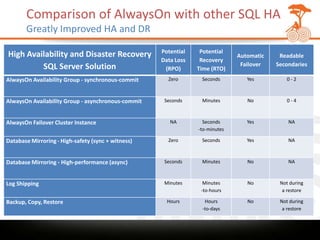
Comparison of AlwaysOn with other SQL HA
       Greatly Improved HA and DR
                                                    Potential    Potential
High Availability and Disaster Recovery                                       Automatic    Readable
                                                    Data Loss    Recovery
         SQL Server Solution                                                   Failover   Secondaries
                                                     (RPO)      Time (RTO)
AlwaysOn Availability Group - synchronous-commit      Zero       Seconds         Yes         0-2


AlwaysOn Availability Group - asynchronous-commit    Seconds     Minutes         No          0-4


AlwaysOn Failover Cluster Instance                     NA         Seconds        Yes          NA
                                                                -to-minutes

Database Mirroring - High-safety (sync + witness)     Zero       Seconds         Yes          NA


Database Mirroring - High-performance (async)        Seconds     Minutes         No           NA


Log Shipping                                         Minutes      Minutes        No        Not during
                                                                 -to-hours                  a restore

Backup, Copy, Restore                                 Hours       Hours          No        Not during
                                                                 -to-days                   a restore
AlwaysOn Availability Groups
 Design Options


• Create up to four additional copies of each database
  on a different SQL node
• Copies can be a mix of synchronous (exact copy) or
  asynchronous (works across low latency link)
• Create a synchronous copy when connectivity is 1Gb
  or greater and latency is no more than 10ms
• Create asynchronous copies across WAN links, for
  Disaster Recovery or when architecting a read-only
  farm
AlwaysOn Availability Groups
 Read-only Farms


• Unlike SQL Mirroring, AlwaysOn Availability Groups
  allow for read-only access to the content on a remote
  SQL instance
• Allows for the DR copy of the data to be used as part
  of a view-only SharePoint farm in a remote location
• Requires a separate SharePoint farm from the
  production read/write farm
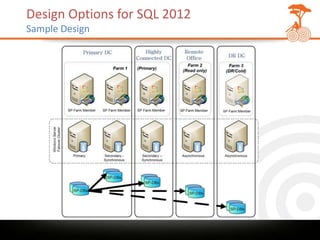
Design Options for SQL 2012
Sample Design
AlwaysOn Availability Groups for SharePoint
  Improving Data Tier High Availability and Disaster Recovery

• Completely changes the design options for the data tier
• Allows for ‘Exchange Server’ like multi-copy database server failover
  on multiple replicas at the same time
• The equivalent of running a constant backup of your databases
• Can be used to create HA/DR copies of your SharePoint databases
• SharePoint no longer needs to be ‘aware’ of the mirrored copy (in
  fact, it won’t failover if you configure it manually in SPCA.)
  SharePoint connects to the listener (Client Access Point) which is
  clustered
• SharePoint 2010 Service Pack 1 supports SQL 2012 fully

CAVEAT: Be sure to understand that synchronous mirroring copies need
to be in close proximity and have very good bandwidth, as data needs to
be written into all replicas before the transaction is committed.
SharePoint will lock up if there are any interruptions at the data tier.
AlwaysOn Availability Groups
 Version Requirements


• Windows Server 2008 R2 (w SP1 ideally, as patches
  are required) – Enterprise Edition
   – One per node
   – Can use Virtualization licensing options
   – Should also work on Windows 8 Server
• SQL Server 2012 Enterprise Edition
   – MS has moved to ‘Oracle model’ of licensing, based
     on CPU power
   – Legacy licenses of SQL 2008/2005 Enterprise are
     ‘grandfathered in’ if you have upgrade assurance
AlwaysOn Availability Groups
 Prerequisites and Requirements – Windows OS


• Cannot be installed on a Domain Controller
• Must be either x86 (non-WOW64) or x64 Windows
  Server 2008 or later versions.
• Must be a node in a Windows Server Failover
  Clustering (WSFC) cluster.
• Ensure that WSFC cluster contains sufficient nodes to
  support your availability group configurations.
• Ensure that all applicable Window hotfixes have been
  installed on every node in the WSFC cluster (Taken
  care of with SP1 for Windows Server 2008 R2)
AlwaysOn Availability Groups
 Prerequisites and Requirements – SQL Server


• If you plan to use a SQL Server failover cluster
  instance (FCI) to host an availability replica, ensure
  that you understand the FCI restrictions and that the
  FCI requirements are met (Manual config required)
• All the server instances that host availability replicas
  for an availability group must use the same SQL Server
  collation.
• If any databases that use FILESTREAM will be added to
  an availability group, ensure that FILESTREAM is
  enabled on every server instance that will host an
  availability replica for the availability group.
Creating AlwaysOn Availability Groups
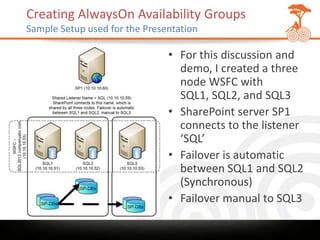
Sample Setup used for the Presentation

                               • For this discussion and
                                 demo, I created a three
                                 node WSFC with
                                 SQL1, SQL2, and SQL3
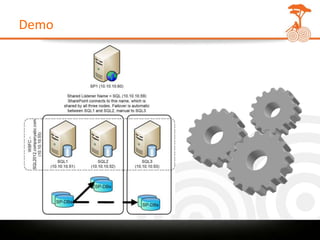
                               • SharePoint server SP1
                                 connects to the listener
                                 ‘SQL’
                               • Failover is automatic
                                 between SQL1 and SQL2
                                 (Synchronous)
                               • Failover manual to SQL3
Creating AlwaysOn Availability Groups
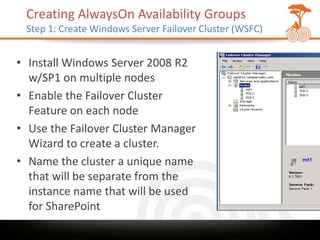
 Step 1: Create Windows Server Failover Cluster (WSFC)


• Install Windows Server 2008 R2
  w/SP1 on multiple nodes
• Enable the Failover Cluster
  Feature on each node
• Use the Failover Cluster Manager
  Wizard to create a cluster.
• Name the cluster a unique name
  that will be separate from the
  instance name that will be used
  for SharePoint
Creating AlwaysOn Availability Groups
   Step 2: Prepare Nodes

• Install .NET Services 3.5 Feature on each SQL node
• Install SQL 2012 Enterprise Edition Database Services (Also recommend
  adding SQL Management Tools – Complete)
• Ensure proper Windows Firewall ports are open
• Service Account for SQL
   – Use the same service account for all nodes
   – Don’t use Network Service
   – If using Kerberos, make sure all SQL names have SPNs associated with
       the service account
• Make sure databases are set to FULL recovery mode
• Ensure that the file paths and drive letters are consistent throughout all
  instances (ideally, or config will have to be manual)
• Copy or Create SharePoint databases on Primary node only (use SQL Alias to
  change name later)
• Perform a full backup of your SharePoint databases
• Create a file share location that is accessible by all nodes that will be used
  for the shared backups (i.e. SQL1Backups)
Creating AlwaysOn Availability Groups
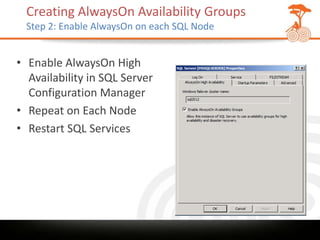
  Step 2: Enable AlwaysOn on each SQL Node


• Enable AlwaysOn High
  Availability in SQL Server
  Configuration Manager
• Repeat on Each Node
• Restart SQL Services
Creating AlwaysOn Availability Groups
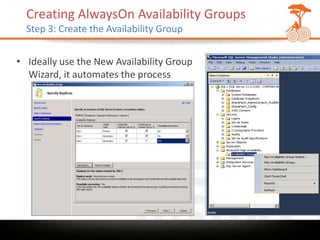
  Step 3: Create the Availability Group


• Ideally use the New Availability Group
  Wizard, it automates the process
Creating AlwaysOn Availability Groups
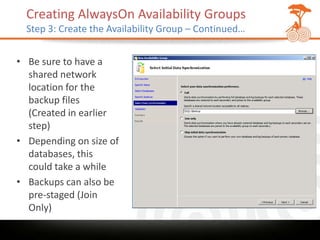
  Step 3: Create the Availability Group – Continued…


• Be sure to have a
  shared network
  location for the
  backup files
  (Created in earlier
  step)
• Depending on size of
  databases, this
  could take a while
• Backups can also be
  pre-staged (Join
  Only)
Creating AlwaysOn Availability Groups
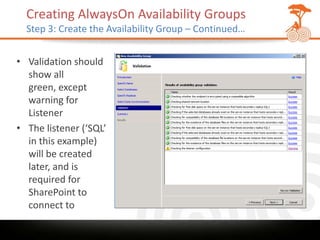
  Step 3: Create the Availability Group – Continued…


• Validation should
  show all
  green, except
  warning for
  Listener
• The listener (‘SQL’
  in this example)
  will be created
  later, and is
  required for
  SharePoint to
  connect to
Creating AlwaysOn Availability Groups
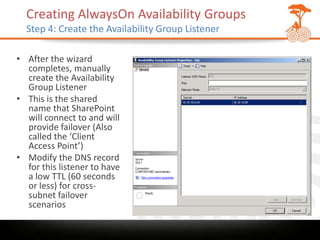
  Step 4: Create the Availability Group Listener

• After the wizard
  completes, manually
  create the Availability
  Group Listener
• This is the shared
  name that SharePoint
  will connect to and will
  provide failover (Also
  called the ‘Client
  Access Point’)
• Modify the DNS record
  for this listener to have
  a low TTL (60 seconds
  or less) for cross-
  subnet failover
  scenarios
Demo
Session Summary

• Throw away all previous data tier designs for
  SharePoint!
• SQL 2012 AlwaysOn Availability Groups are the
  preferred design option for High Availability and
  Disaster Recovery at the data tier
• SQL 2012 is fully supported by SharePoint 2010
  Service Pack 1 databases
• Follow closely the guidelines, ensure data paths are
  the same, double-check security requirements
Michael Noel
        Twitter: @MichaelTNoel
               www.cco.com
   Slides: slideshare.net/michaeltnoel
Travel blog: http://sharingtheglobe.com
Gold Sponsors


                  Silver Sponsors


Bronze Sponsors                     Media Sponsors
• http://www.youtube.com/watch?v=rOPI5LDo7mg&feature=y
  outu.be

SQL 2012 AlwaysOn Availability Groups for SharePoint 2010 - AUSPC2012

  • 1.
    SQL 2012 AlwaysOnAvailability Groups for SharePoint Database Failover (Database Mirroring) Michael Noel Convergent Computing (CCO)
  • 2.
    Michael Noel Great tobe back in Beautiful Australia!
  • 3.
    What we willcover SQL 2012 AlwaysOn • What is SQL 2012 AlwaysOn? – AlwaysOn Failover Clustering – AlwaysOn Availability Groups • Why AlwaysOn Availability Groups for SharePoint? • Requirements and Prerequisites • Step by Step guide to implementing AlwaysOn Availability Groups • Demonstration
  • 4.
    SQL 2012 AlwaysOn Hype or Reality? • Two distinct technologies that share the same name • AlwaysOn Failover Clustering is a different thing! – A Failover Cluster Instance (FCI) uses traditional Shared Storage Clustering (one copy of data shared by multiple nodes) – Same marketing name, but completely different technology • AlwaysOn Availability Groups correspond to the new version of SQL Database Mirroring – High Availability and Disaster Recovery at the Data Tier
  • 5.
    History of AlwaysOnAvailability Groups Background and Predecessor Technologies • Original concept was log shipping in SQL 2000 – making a duplicate copy of your databases on another server • Mirroring itself introduced in SQL 2005 SP1, improved in SQL 2008 and SQL 2008 R2 • Works by keeping a mirror copy of a database or databases on up to four additional SQL instances. • AlwaysOn Availability Groups introduced with SQL 2012, added up to four mirror copies, and more • This is a huge change to data tier design for SharePoint
  • 6.
    Comparison of AlwaysOnwith other SQL HA Greatly Improved HA and DR Potential Potential High Availability and Disaster Recovery Automatic Readable Data Loss Recovery SQL Server Solution Failover Secondaries (RPO) Time (RTO) AlwaysOn Availability Group - synchronous-commit Zero Seconds Yes 0-2 AlwaysOn Availability Group - asynchronous-commit Seconds Minutes No 0-4 AlwaysOn Failover Cluster Instance NA Seconds Yes NA -to-minutes Database Mirroring - High-safety (sync + witness) Zero Seconds Yes NA Database Mirroring - High-performance (async) Seconds Minutes No NA Log Shipping Minutes Minutes No Not during -to-hours a restore Backup, Copy, Restore Hours Hours No Not during -to-days a restore
  • 7.
    AlwaysOn Availability Groups Design Options • Create up to four additional copies of each database on a different SQL node • Copies can be a mix of synchronous (exact copy) or asynchronous (works across low latency link) • Create a synchronous copy when connectivity is 1Gb or greater and latency is no more than 10ms • Create asynchronous copies across WAN links, for Disaster Recovery or when architecting a read-only farm
  • 8.
    AlwaysOn Availability Groups Read-only Farms • Unlike SQL Mirroring, AlwaysOn Availability Groups allow for read-only access to the content on a remote SQL instance • Allows for the DR copy of the data to be used as part of a view-only SharePoint farm in a remote location • Requires a separate SharePoint farm from the production read/write farm
  • 9.
    Design Options forSQL 2012 Sample Design
  • 10.
    AlwaysOn Availability Groupsfor SharePoint Improving Data Tier High Availability and Disaster Recovery • Completely changes the design options for the data tier • Allows for ‘Exchange Server’ like multi-copy database server failover on multiple replicas at the same time • The equivalent of running a constant backup of your databases • Can be used to create HA/DR copies of your SharePoint databases • SharePoint no longer needs to be ‘aware’ of the mirrored copy (in fact, it won’t failover if you configure it manually in SPCA.) SharePoint connects to the listener (Client Access Point) which is clustered • SharePoint 2010 Service Pack 1 supports SQL 2012 fully CAVEAT: Be sure to understand that synchronous mirroring copies need to be in close proximity and have very good bandwidth, as data needs to be written into all replicas before the transaction is committed. SharePoint will lock up if there are any interruptions at the data tier.
  • 11.
    AlwaysOn Availability Groups Version Requirements • Windows Server 2008 R2 (w SP1 ideally, as patches are required) – Enterprise Edition – One per node – Can use Virtualization licensing options – Should also work on Windows 8 Server • SQL Server 2012 Enterprise Edition – MS has moved to ‘Oracle model’ of licensing, based on CPU power – Legacy licenses of SQL 2008/2005 Enterprise are ‘grandfathered in’ if you have upgrade assurance
  • 12.
    AlwaysOn Availability Groups Prerequisites and Requirements – Windows OS • Cannot be installed on a Domain Controller • Must be either x86 (non-WOW64) or x64 Windows Server 2008 or later versions. • Must be a node in a Windows Server Failover Clustering (WSFC) cluster. • Ensure that WSFC cluster contains sufficient nodes to support your availability group configurations. • Ensure that all applicable Window hotfixes have been installed on every node in the WSFC cluster (Taken care of with SP1 for Windows Server 2008 R2)
  • 13.
    AlwaysOn Availability Groups Prerequisites and Requirements – SQL Server • If you plan to use a SQL Server failover cluster instance (FCI) to host an availability replica, ensure that you understand the FCI restrictions and that the FCI requirements are met (Manual config required) • All the server instances that host availability replicas for an availability group must use the same SQL Server collation. • If any databases that use FILESTREAM will be added to an availability group, ensure that FILESTREAM is enabled on every server instance that will host an availability replica for the availability group.
  • 14.
    Creating AlwaysOn AvailabilityGroups Sample Setup used for the Presentation • For this discussion and demo, I created a three node WSFC with SQL1, SQL2, and SQL3 • SharePoint server SP1 connects to the listener ‘SQL’ • Failover is automatic between SQL1 and SQL2 (Synchronous) • Failover manual to SQL3
  • 15.
    Creating AlwaysOn AvailabilityGroups Step 1: Create Windows Server Failover Cluster (WSFC) • Install Windows Server 2008 R2 w/SP1 on multiple nodes • Enable the Failover Cluster Feature on each node • Use the Failover Cluster Manager Wizard to create a cluster. • Name the cluster a unique name that will be separate from the instance name that will be used for SharePoint
  • 16.
    Creating AlwaysOn AvailabilityGroups Step 2: Prepare Nodes • Install .NET Services 3.5 Feature on each SQL node • Install SQL 2012 Enterprise Edition Database Services (Also recommend adding SQL Management Tools – Complete) • Ensure proper Windows Firewall ports are open • Service Account for SQL – Use the same service account for all nodes – Don’t use Network Service – If using Kerberos, make sure all SQL names have SPNs associated with the service account • Make sure databases are set to FULL recovery mode • Ensure that the file paths and drive letters are consistent throughout all instances (ideally, or config will have to be manual) • Copy or Create SharePoint databases on Primary node only (use SQL Alias to change name later) • Perform a full backup of your SharePoint databases • Create a file share location that is accessible by all nodes that will be used for the shared backups (i.e. SQL1Backups)
  • 17.
    Creating AlwaysOn AvailabilityGroups Step 2: Enable AlwaysOn on each SQL Node • Enable AlwaysOn High Availability in SQL Server Configuration Manager • Repeat on Each Node • Restart SQL Services
  • 18.
    Creating AlwaysOn AvailabilityGroups Step 3: Create the Availability Group • Ideally use the New Availability Group Wizard, it automates the process
  • 19.
    Creating AlwaysOn AvailabilityGroups Step 3: Create the Availability Group – Continued… • Be sure to have a shared network location for the backup files (Created in earlier step) • Depending on size of databases, this could take a while • Backups can also be pre-staged (Join Only)
  • 20.
    Creating AlwaysOn AvailabilityGroups Step 3: Create the Availability Group – Continued… • Validation should show all green, except warning for Listener • The listener (‘SQL’ in this example) will be created later, and is required for SharePoint to connect to
  • 21.
    Creating AlwaysOn AvailabilityGroups Step 4: Create the Availability Group Listener • After the wizard completes, manually create the Availability Group Listener • This is the shared name that SharePoint will connect to and will provide failover (Also called the ‘Client Access Point’) • Modify the DNS record for this listener to have a low TTL (60 seconds or less) for cross- subnet failover scenarios
  • 22.
  • 23.
    Session Summary • Throwaway all previous data tier designs for SharePoint! • SQL 2012 AlwaysOn Availability Groups are the preferred design option for High Availability and Disaster Recovery at the data tier • SQL 2012 is fully supported by SharePoint 2010 Service Pack 1 databases • Follow closely the guidelines, ensure data paths are the same, double-check security requirements
  • 24.
    Michael Noel Twitter: @MichaelTNoel www.cco.com Slides: slideshare.net/michaeltnoel Travel blog: http://sharingtheglobe.com
  • 25.
    Gold Sponsors Silver Sponsors Bronze Sponsors Media Sponsors
  • 27.

Editor's Notes

  • #2 This must be the opening slide