EATL Mobile Apps Development Contest


                             User Interface and

                    User Experience Design
                            Grooming Session 1


                                    Conducted by:

                                    Mirza Amin,
                                  CEO, Prime Tech.

                                 Masrur Hannan,
                                Managing Director,
                                MNHs Technologies.


                           1 March 2013, 10:45 am – 12.30 pm
                         BASIS auditorium, Karwan Bazaar, Dhaka.


Topics:

Principles of UX …. 2 - 4
Process of designing User Experience …. 5 - 9
Topics for next session …. 10
Discussion/ lecture notes on Usability and User Experience (UX) Design by:
Masrur Hannan | bd.linkedin.com/in/masrurhannan

Core concepts:

Enthusiasm in designing GOOD products, with great interfaces that are Comfortable to use and
bring users JOY; driven by the principles of:

               ο‚·    Human Computer Interaction (HCI), Interaction Design
               ο‚·    Usability and User Experience Design principles
               ο‚·    Information Architecture

Resources:

Books:
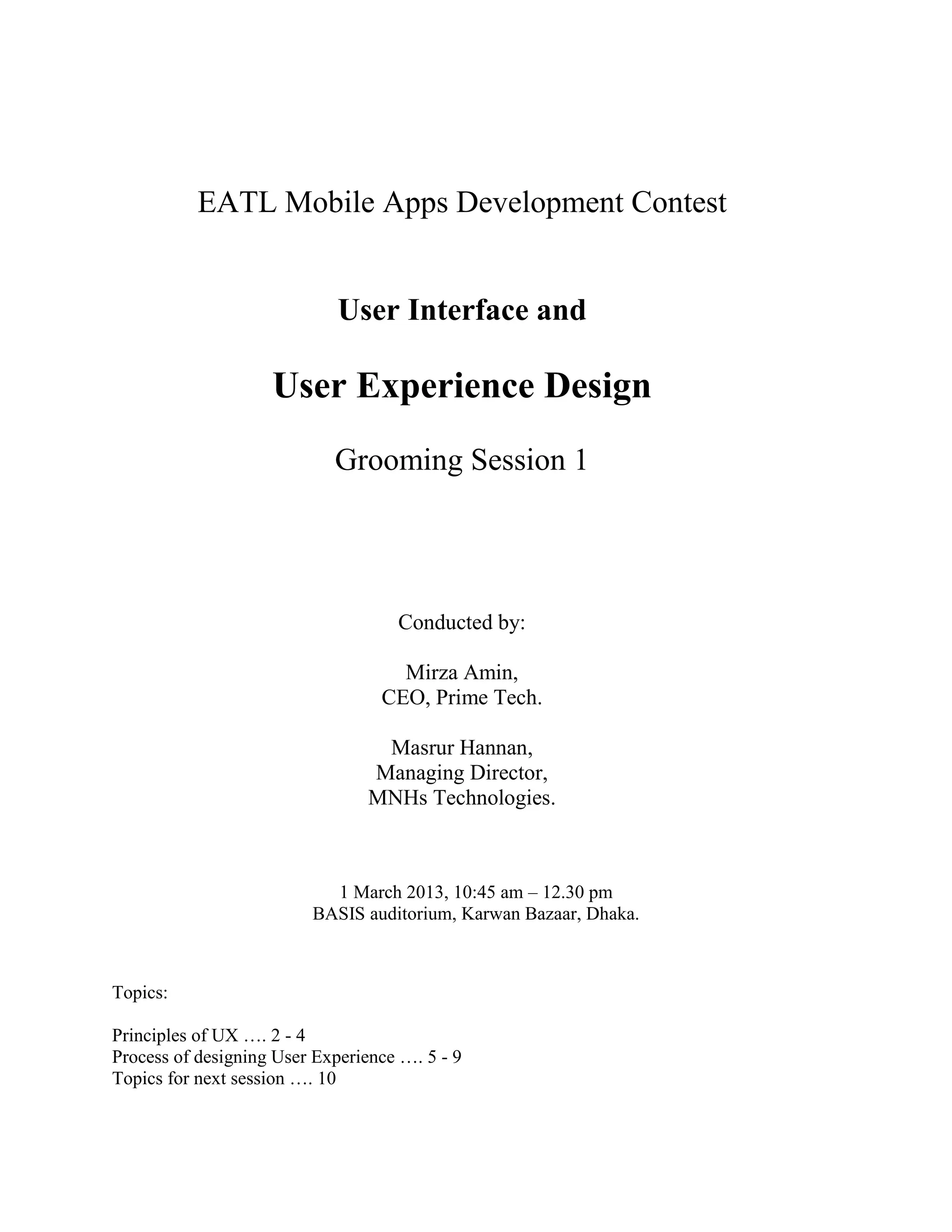
     ο‚·    Design of Everyday Things, by Don Norman
     ο‚·    Don’t Make Me Think, by Steve Krugg
     ο‚·    Information Architecture for the World Wide Web, by Peter Morville and Louis Rosenfeld
     ο‚·    Sketching User Experience, by Bill Buxton
     ο‚·    Elements of User Experience, by Jesse James Garrett


MOOC (massive open online course): Human Computer Interaction (HCI) course from Stanford
University, through Coursera: https://www.coursera.org/course/hci


Articles and publications of Neilsen Norman Group:


http://www.nngroup.com/articles/

User Interface and User Experience – Grooming Session 1, EATL Mobile Apps Development Contest.     1
Discussion/ lecture notes by Masrur Hannan.
1 March 2013, 10:45 am – 12.30 pm | BASIS, Karwan Bazaar, Dhaka.
Principles of UX

Source: Design of Everyday Things, 1988 – Donald A. Norman

Usability and User Experience (UX) design concepts originate from various principles of
psychology – that make things Understandable and Usable for humans.

          Twenty Thousand things we deal with in everyday lives;


          Whatever we develop are intended to be included in the list of things to be used…

          Everyday things we can find difficulties with; difficulty = squinting eyebrows, have to
          think about…

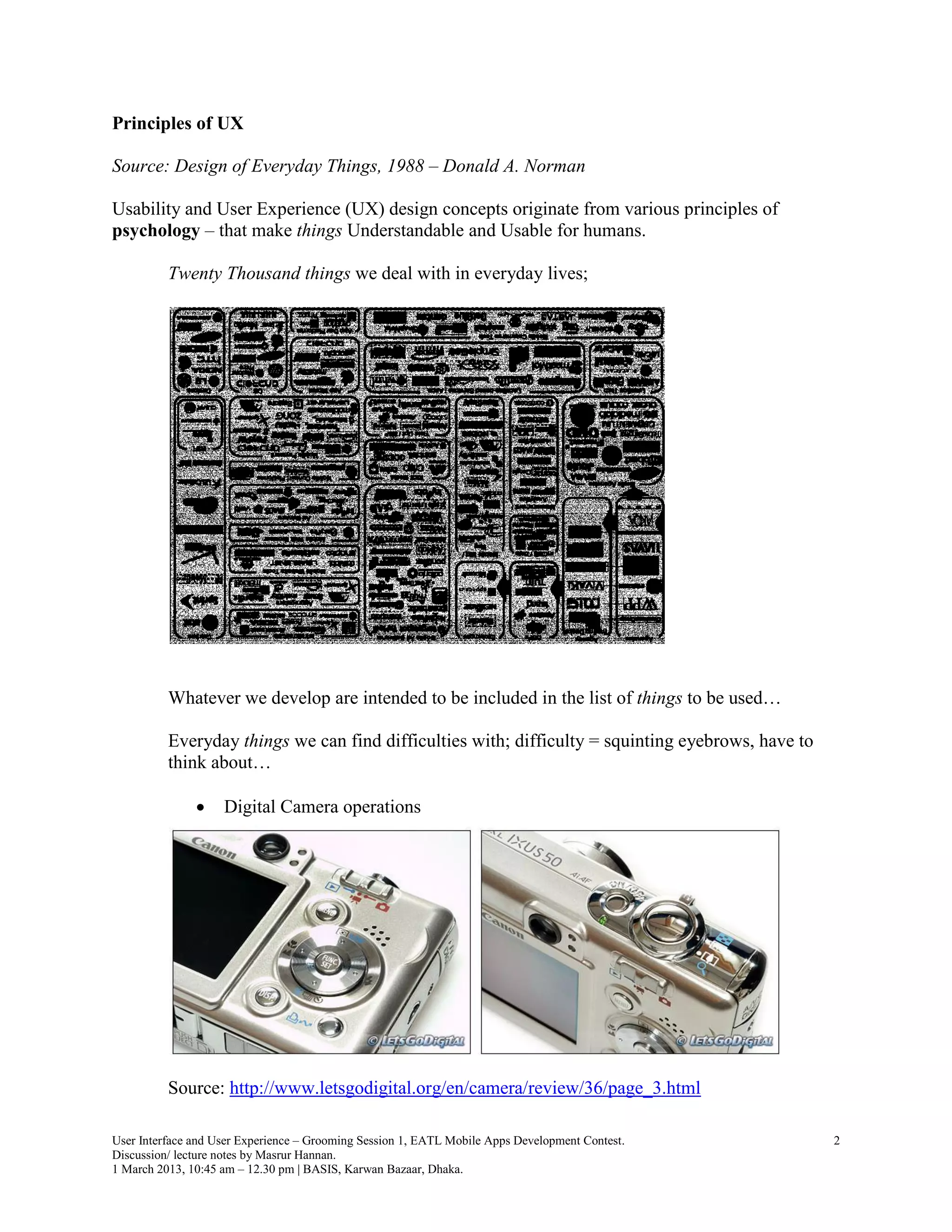
               ο‚·    Digital Camera operations


          Source: http://www.letsgodigital.org/en/camera/review/36/page_3.html

User Interface and User Experience – Grooming Session 1, EATL Mobile Apps Development Contest.      2
Discussion/ lecture notes by Masrur Hannan.
1 March 2013, 10:45 am – 12.30 pm | BASIS, Karwan Bazaar, Dhaka.
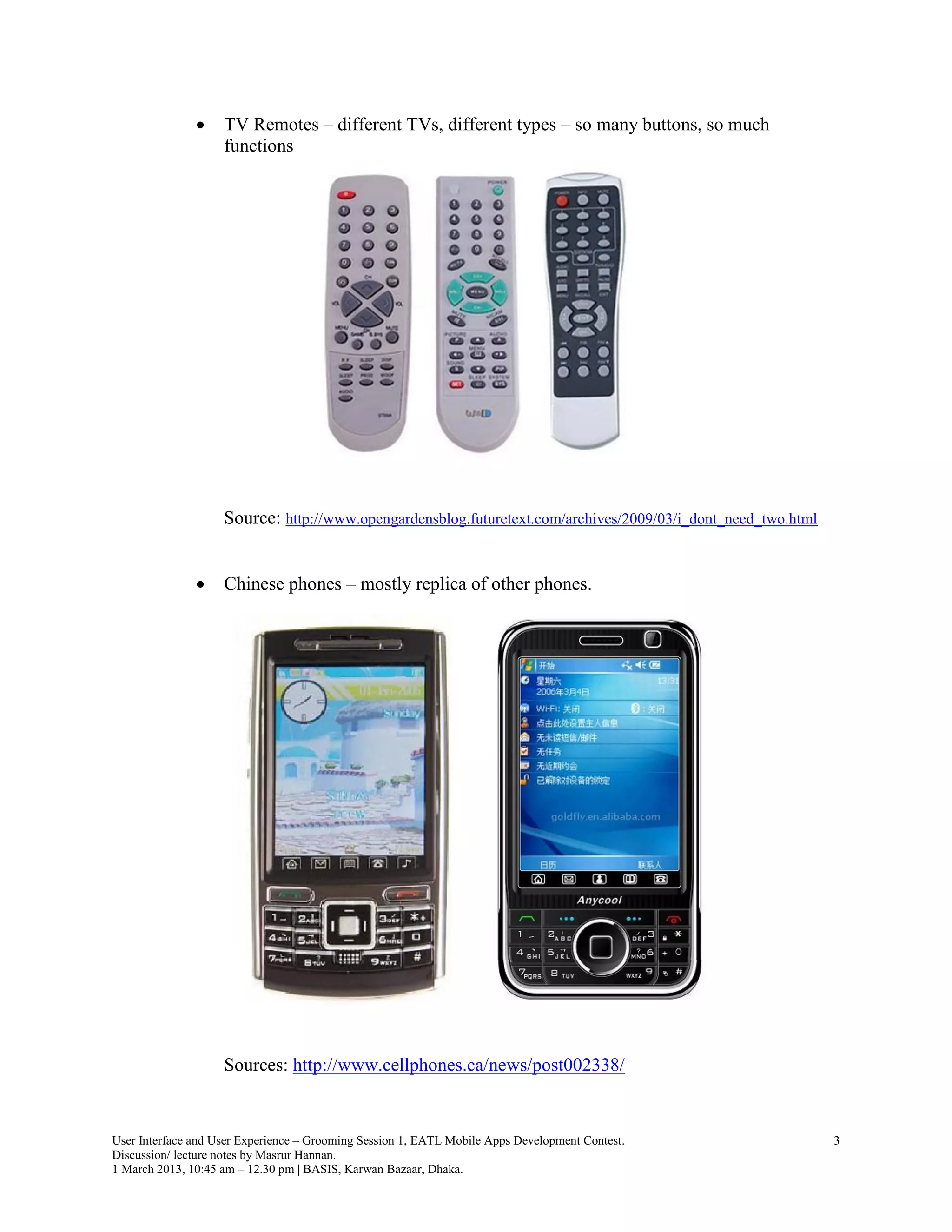
ο‚·    TV Remotes – different TVs, different types – so many buttons, so much
                    functions


                    Source: http://www.opengardensblog.futuretext.com/archives/2009/03/i_dont_need_two.html


               ο‚·    Chinese phones – mostly replica of other phones.


                    Sources: http://www.cellphones.ca/news/post002338/


User Interface and User Experience – Grooming Session 1, EATL Mobile Apps Development Contest.                3
Discussion/ lecture notes by Masrur Hannan.
1 March 2013, 10:45 am – 12.30 pm | BASIS, Karwan Bazaar, Dhaka.
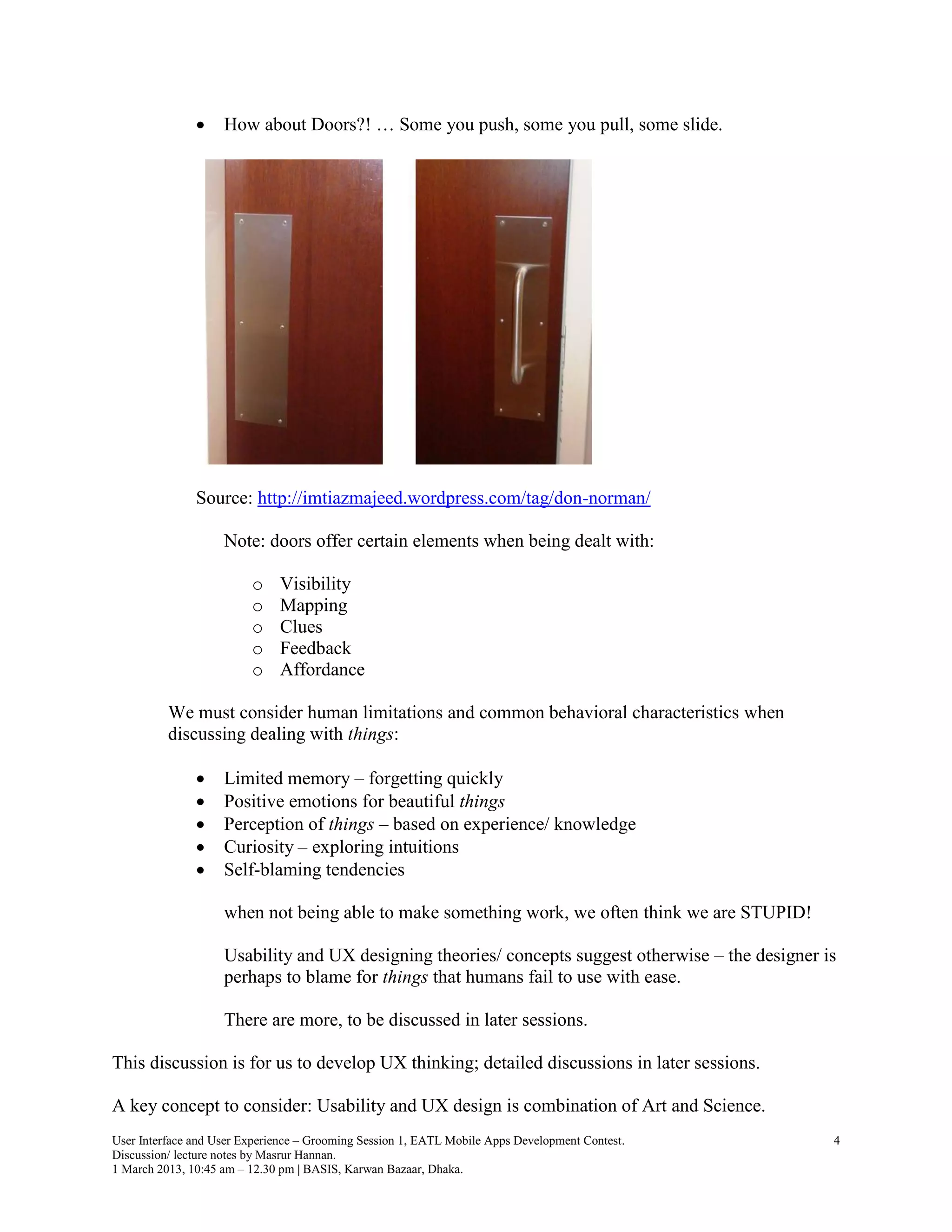
ο‚·    How about Doors?! … Some you push, some you pull, some slide.


               Source: http://imtiazmajeed.wordpress.com/tag/don-norman/

                    Note: doors offer certain elements when being dealt with:

                         o    Visibility
                         o    Mapping
                         o    Clues
                         o    Feedback
                         o    Affordance

          We must consider human limitations and common behavioral characteristics when
          discussing dealing with things:

               ο‚·    Limited memory – forgetting quickly
               ο‚·    Positive emotions for beautiful things
               ο‚·    Perception of things – based on experience/ knowledge
               ο‚·    Curiosity – exploring intuitions
               ο‚·    Self-blaming tendencies

                    when not being able to make something work, we often think we are STUPID!

                    Usability and UX designing theories/ concepts suggest otherwise – the designer is
                    perhaps to blame for things that humans fail to use with ease.

                    There are more, to be discussed in later sessions.

This discussion is for us to develop UX thinking; detailed discussions in later sessions.

A key concept to consider: Usability and UX design is combination of Art and Science.
User Interface and User Experience – Grooming Session 1, EATL Mobile Apps Development Contest.      4
Discussion/ lecture notes by Masrur Hannan.
1 March 2013, 10:45 am – 12.30 pm | BASIS, Karwan Bazaar, Dhaka.
Process of designing User Experience

Sources:
       ο‚·       Elements of User Experience, by Jesse James Garrett
       ο‚·       Sketching User Experience, by Bill Buxton
       ο‚·       Information Architecture for the World Wide Web, by Peter Morville and Louis
               Rosenfeld

          MOOC (massive open online course): Human Computer Interaction (HCI) course from
          Stanford University, through Coursera: https://www.coursera.org/course/hci

          Articles and publications: NN/g: www.nngroup.com/about/, clients: Microsoft, Google,
          Dell, HP, BBC …

Every Usability and UX design practitioner has certain process, approach and methodologies,
following are mine (Masrur Hannan’s) based mostly on aforementioned sources:

               1.   Research and concept finalization
               2.   Prototyping, wireframes, taxonomy
               3.   Early stage feedback
               4.   Iterative design and development work with User Testing
               5.   Post-launch testing: performance, behavior etc

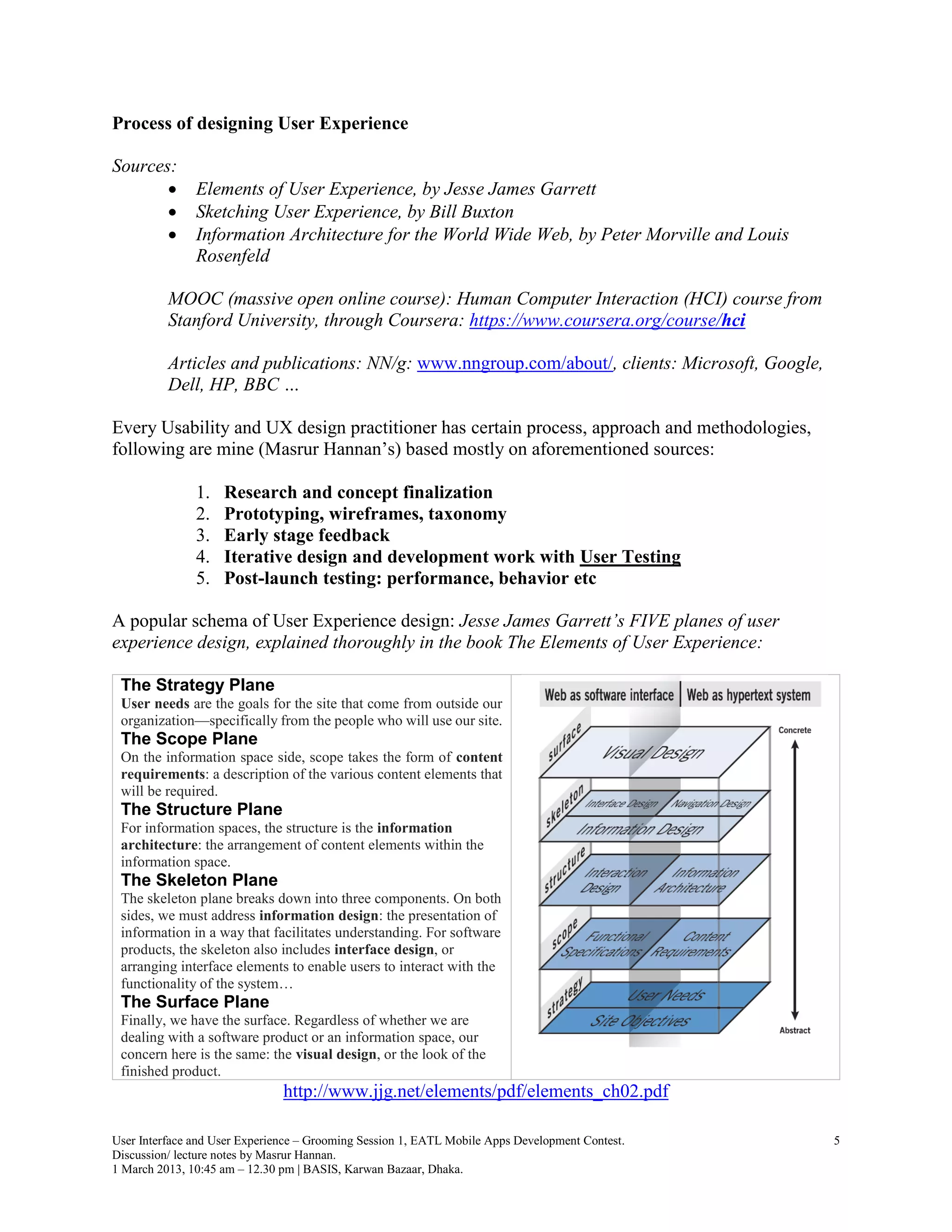
A popular schema of User Experience design: Jesse James Garrett’s FIVE planes of user
experience design, explained thoroughly in the book The Elements of User Experience:

 The Strategy Plane
 User needs are the goals for the site that come from outside our
 organizationβ€”specifically from the people who will use our site.
 The Scope Plane
 On the information space side, scope takes the form of content
 requirements: a description of the various content elements that
 will be required.
 The Structure Plane
 For information spaces, the structure is the information
 architecture: the arrangement of content elements within the
 information space.
 The Skeleton Plane
 The skeleton plane breaks down into three components. On both
 sides, we must address information design: the presentation of
 information in a way that facilitates understanding. For software
 products, the skeleton also includes interface design, or
 arranging interface elements to enable users to interact with the
 functionality of the system…
 The Surface Plane
 Finally, we have the surface. Regardless of whether we are
 dealing with a software product or an information space, our
 concern here is the same: the visual design, or the look of the
 finished product.
                               http://www.jjg.net/elements/pdf/elements_ch02.pdf

User Interface and User Experience – Grooming Session 1, EATL Mobile Apps Development Contest.   5
Discussion/ lecture notes by Masrur Hannan.
1 March 2013, 10:45 am – 12.30 pm | BASIS, Karwan Bazaar, Dhaka.
My approach matches and is somewhat based on Jesse James Garrett’s FIVE planes of user
experience design. However, considering local (Bangladesh) context – I have tried some
simplification.

Initial Research

     1. Information ecology: identifying the context, content and users


                                                                              Goals, funding, politics,
                                                                              culture, technology,
                                                                              resources, constraints….


          Data types, volumes,                                                        Audience, tasks, needs,
          content objects, existing                                                   information seeking
          structures….                                                                behavior, experience….


                      Figure 1.1: Three inter-dependent components of an information ecology
        [Information Architecture for the World Wide Web: Designing Large-Scale Web Sites, 2006, page 25]

          Mobile app context: Anticipated environment, time of use, devices of users

          Ultimate goal: recognizing the Real Challenge and Opportunity


     2. Needfinding exercises: user (potential and existing) interviews, card sorting exercises
        amongst small segment. Some quick approaches:

               ο‚·    Open, unbiased questions: What values and goals do people have?
               ο‚·    Story of experiences on task and need related issues
               ο‚·    What do people do now – learn from Observations

          https://class.coursera.org/hci/lecture/preview : Week 1 – Needfinding


Concept finalization

     3. Inspiration research: review similar existing products and services: local and global, big
        and small

     4. Ideation and concept finalization: based on information ecology, needfinding exercises
        and inspiration research


User Interface and User Experience – Grooming Session 1, EATL Mobile Apps Development Contest.                  6
Discussion/ lecture notes by Masrur Hannan.
1 March 2013, 10:45 am – 12.30 pm | BASIS, Karwan Bazaar, Dhaka.
Prototyping, wireframes, taxonomy

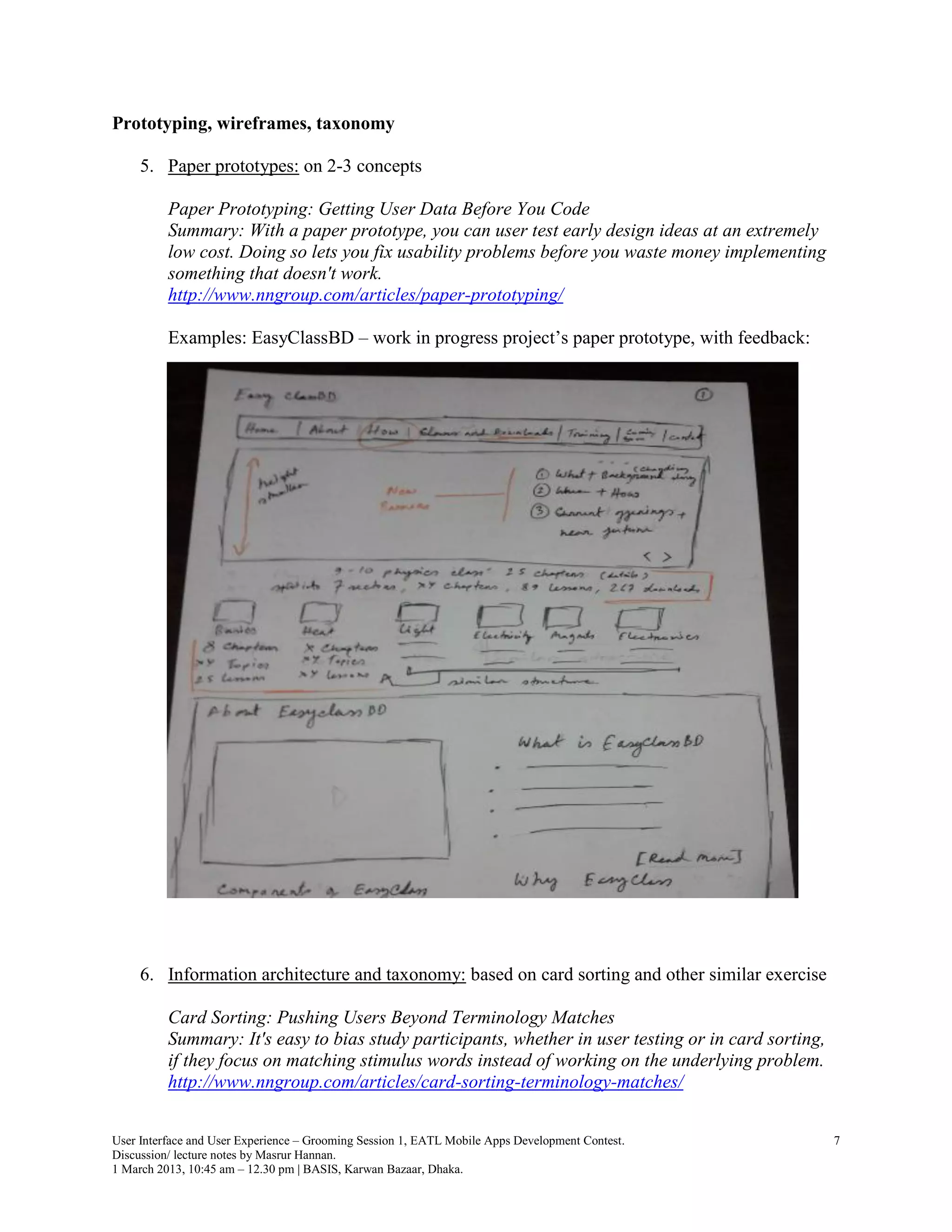
     5. Paper prototypes: on 2-3 concepts

          Paper Prototyping: Getting User Data Before You Code
          Summary: With a paper prototype, you can user test early design ideas at an extremely
          low cost. Doing so lets you fix usability problems before you waste money implementing
          something that doesn't work.
          http://www.nngroup.com/articles/paper-prototyping/

          Examples: EasyClassBD – work in progress project’s paper prototype, with feedback:


     6. Information architecture and taxonomy: based on card sorting and other similar exercise

          Card Sorting: Pushing Users Beyond Terminology Matches
          Summary: It's easy to bias study participants, whether in user testing or in card sorting,
          if they focus on matching stimulus words instead of working on the underlying problem.
          http://www.nngroup.com/articles/card-sorting-terminology-matches/


User Interface and User Experience – Grooming Session 1, EATL Mobile Apps Development Contest.         7
Discussion/ lecture notes by Masrur Hannan.
1 March 2013, 10:45 am – 12.30 pm | BASIS, Karwan Bazaar, Dhaka.
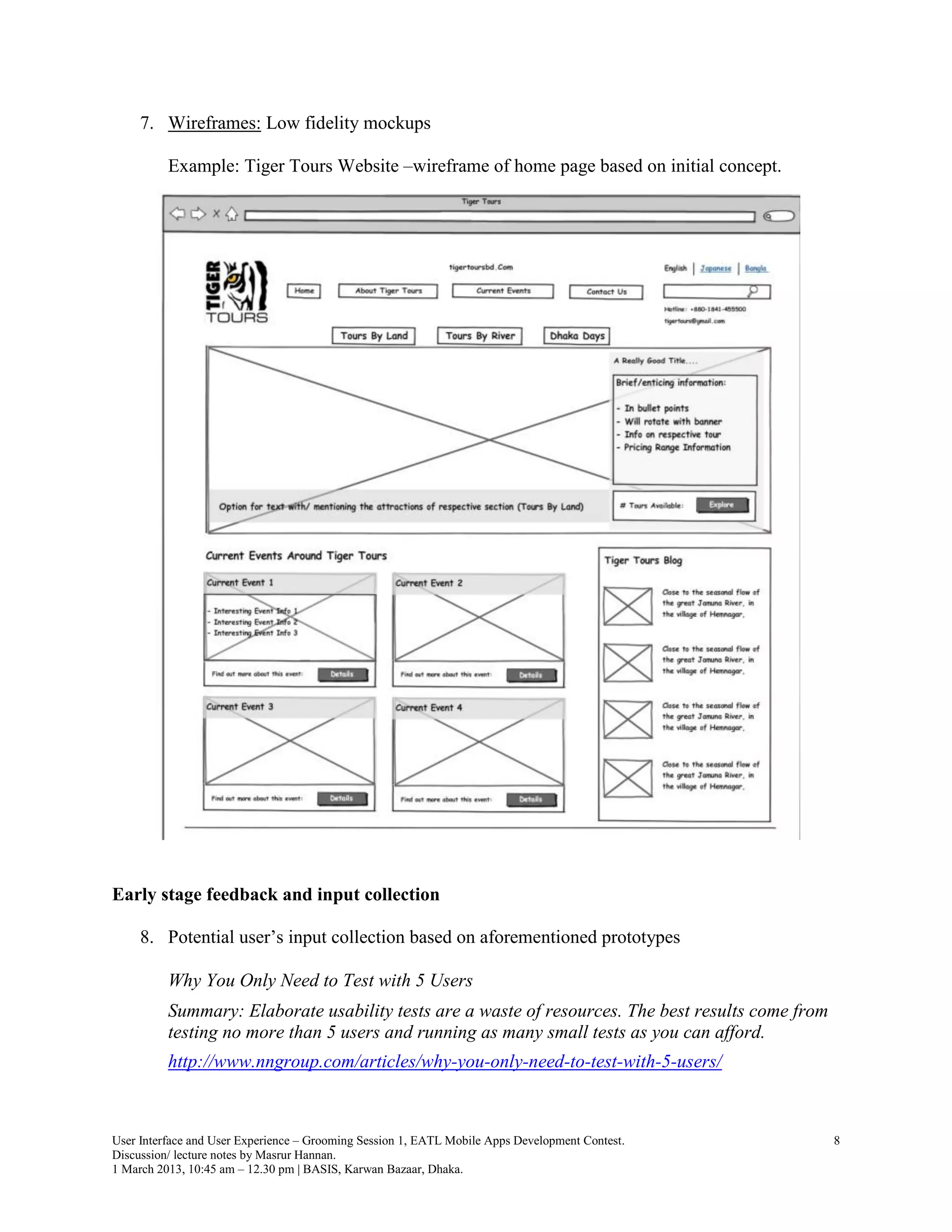
7. Wireframes: Low fidelity mockups

          Example: Tiger Tours Website –wireframe of home page based on initial concept.


Early stage feedback and input collection

     8. Potential user’s input collection based on aforementioned prototypes

          Why You Only Need to Test with 5 Users
          Summary: Elaborate usability tests are a waste of resources. The best results come from
          testing no more than 5 users and running as many small tests as you can afford.
          http://www.nngroup.com/articles/why-you-only-need-to-test-with-5-users/


User Interface and User Experience – Grooming Session 1, EATL Mobile Apps Development Contest.      8
Discussion/ lecture notes by Masrur Hannan.
1 March 2013, 10:45 am – 12.30 pm | BASIS, Karwan Bazaar, Dhaka.
9. Heuristic evaluations from experts in education, technology, support

          How to Conduct a Heuristic Evaluation
          Summary: Heuristic evaluation involves having a small set of evaluators examine the interface
          and judge its compliance with recognized usability principles (the "heuristics").
          http://www.nngroup.com/articles/how-to-conduct-a-heuristic-evaluation

Iterative design and development with User Testing

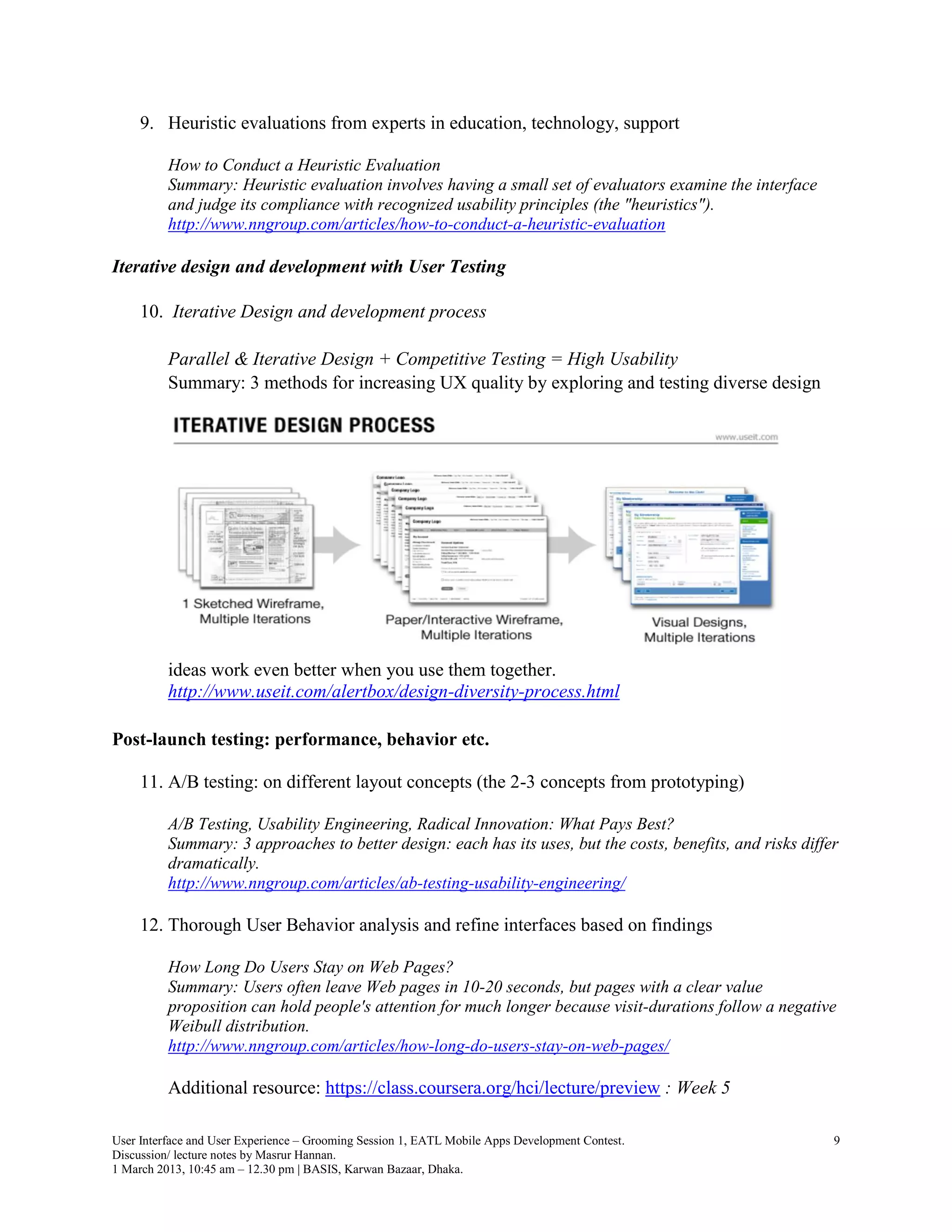
     10. Iterative Design and development process

          Parallel & Iterative Design + Competitive Testing = High Usability
          Summary: 3 methods for increasing UX quality by exploring and testing diverse design


          ideas work even better when you use them together.
          http://www.useit.com/alertbox/design-diversity-process.html

Post-launch testing: performance, behavior etc.

     11. A/B testing: on different layout concepts (the 2-3 concepts from prototyping)

          A/B Testing, Usability Engineering, Radical Innovation: What Pays Best?
          Summary: 3 approaches to better design: each has its uses, but the costs, benefits, and risks differ
          dramatically.
          http://www.nngroup.com/articles/ab-testing-usability-engineering/

     12. Thorough User Behavior analysis and refine interfaces based on findings

          How Long Do Users Stay on Web Pages?
          Summary: Users often leave Web pages in 10-20 seconds, but pages with a clear value
          proposition can hold people's attention for much longer because visit-durations follow a negative
          Weibull distribution.
          http://www.nngroup.com/articles/how-long-do-users-stay-on-web-pages/

          Additional resource: https://class.coursera.org/hci/lecture/preview : Week 5

User Interface and User Experience – Grooming Session 1, EATL Mobile Apps Development Contest.               9
Discussion/ lecture notes by Masrur Hannan.
1 March 2013, 10:45 am – 12.30 pm | BASIS, Karwan Bazaar, Dhaka.
Getting started with Usability and UX design:

          Usability 101: Introduction to Usability
          Summary: How to define usability? How, when, and where can you improve it? Why
          should you care? This overview answers these basic questions.
          http://www.nngroup.com/articles/usability-101-introduction-to-usability/

          Guerrilla HCI: Using Discount Usability Engineering to Penetrate the Intimidation
          Barrier http://www.nngroup.com/articles/guerrilla-hci/

          Considering the context of Mobile Apps Development

          The Elements Of The Mobile User Experience
          http://mobile.smashingmagazine.com/2012/07/12/elements-mobile-user-experience/

          How Do Users Really Hold Mobile Devices?
          http://www.uxmatters.com/mt/archives/2013/02/how-do-users-really-hold-mobile-
          devices.php

          Mobile Sites vs. Apps: The Coming Strategy Shift
          Summary: Mobile apps currently have better usability than mobile sites, but forthcoming
          changes will eventually make a mobile site the superior strategy.
          http://www.nngroup.com/articles/mobile-sites-vs-apps-strategy-shift/


Topics for next session:

     UX design issues for Mobile apps
       ο‚· Small Screen – Bigger touch targets – lesser options to click!
       ο‚· As less User Input as possible …
       ο‚· As few features as possible

     Detailed discussion:
        ο‚· Usability and UX principles
        ο‚· User Experience design process, with examples
        ο‚· Agile UX


Masrur Hannan
m_hannan@hotmail.com
www.linkedin.com/in/masrurhannan


User Interface and User Experience – Grooming Session 1, EATL Mobile Apps Development Contest.   10
Discussion/ lecture notes by Masrur Hannan.
1 March 2013, 10:45 am – 12.30 pm | BASIS, Karwan Bazaar, Dhaka.

User Experience (UX) design discussion notes 1 - EATL mobile app dev contest - grooming session 1, 1st march 2013 at BASIS

  • 1.
    EATL Mobile AppsDevelopment Contest User Interface and User Experience Design Grooming Session 1 Conducted by: Mirza Amin, CEO, Prime Tech. Masrur Hannan, Managing Director, MNHs Technologies. 1 March 2013, 10:45 am – 12.30 pm BASIS auditorium, Karwan Bazaar, Dhaka. Topics: Principles of UX …. 2 - 4 Process of designing User Experience …. 5 - 9 Topics for next session …. 10
  • 2.
    Discussion/ lecture noteson Usability and User Experience (UX) Design by: Masrur Hannan | bd.linkedin.com/in/masrurhannan Core concepts: Enthusiasm in designing GOOD products, with great interfaces that are Comfortable to use and bring users JOY; driven by the principles of: ο‚· Human Computer Interaction (HCI), Interaction Design ο‚· Usability and User Experience Design principles ο‚· Information Architecture Resources: Books: ο‚· Design of Everyday Things, by Don Norman ο‚· Don’t Make Me Think, by Steve Krugg ο‚· Information Architecture for the World Wide Web, by Peter Morville and Louis Rosenfeld ο‚· Sketching User Experience, by Bill Buxton ο‚· Elements of User Experience, by Jesse James Garrett MOOC (massive open online course): Human Computer Interaction (HCI) course from Stanford University, through Coursera: https://www.coursera.org/course/hci Articles and publications of Neilsen Norman Group: http://www.nngroup.com/articles/ User Interface and User Experience – Grooming Session 1, EATL Mobile Apps Development Contest. 1 Discussion/ lecture notes by Masrur Hannan. 1 March 2013, 10:45 am – 12.30 pm | BASIS, Karwan Bazaar, Dhaka.
  • 3.
    Principles of UX Source:Design of Everyday Things, 1988 – Donald A. Norman Usability and User Experience (UX) design concepts originate from various principles of psychology – that make things Understandable and Usable for humans. Twenty Thousand things we deal with in everyday lives; Whatever we develop are intended to be included in the list of things to be used… Everyday things we can find difficulties with; difficulty = squinting eyebrows, have to think about… ο‚· Digital Camera operations Source: http://www.letsgodigital.org/en/camera/review/36/page_3.html User Interface and User Experience – Grooming Session 1, EATL Mobile Apps Development Contest. 2 Discussion/ lecture notes by Masrur Hannan. 1 March 2013, 10:45 am – 12.30 pm | BASIS, Karwan Bazaar, Dhaka.
  • 4.
    ο‚· TV Remotes – different TVs, different types – so many buttons, so much functions Source: http://www.opengardensblog.futuretext.com/archives/2009/03/i_dont_need_two.html ο‚· Chinese phones – mostly replica of other phones. Sources: http://www.cellphones.ca/news/post002338/ User Interface and User Experience – Grooming Session 1, EATL Mobile Apps Development Contest. 3 Discussion/ lecture notes by Masrur Hannan. 1 March 2013, 10:45 am – 12.30 pm | BASIS, Karwan Bazaar, Dhaka.
  • 5.
    ο‚· How about Doors?! … Some you push, some you pull, some slide. Source: http://imtiazmajeed.wordpress.com/tag/don-norman/ Note: doors offer certain elements when being dealt with: o Visibility o Mapping o Clues o Feedback o Affordance We must consider human limitations and common behavioral characteristics when discussing dealing with things: ο‚· Limited memory – forgetting quickly ο‚· Positive emotions for beautiful things ο‚· Perception of things – based on experience/ knowledge ο‚· Curiosity – exploring intuitions ο‚· Self-blaming tendencies when not being able to make something work, we often think we are STUPID! Usability and UX designing theories/ concepts suggest otherwise – the designer is perhaps to blame for things that humans fail to use with ease. There are more, to be discussed in later sessions. This discussion is for us to develop UX thinking; detailed discussions in later sessions. A key concept to consider: Usability and UX design is combination of Art and Science. User Interface and User Experience – Grooming Session 1, EATL Mobile Apps Development Contest. 4 Discussion/ lecture notes by Masrur Hannan. 1 March 2013, 10:45 am – 12.30 pm | BASIS, Karwan Bazaar, Dhaka.
  • 6.
    Process of designingUser Experience Sources: ο‚· Elements of User Experience, by Jesse James Garrett ο‚· Sketching User Experience, by Bill Buxton ο‚· Information Architecture for the World Wide Web, by Peter Morville and Louis Rosenfeld MOOC (massive open online course): Human Computer Interaction (HCI) course from Stanford University, through Coursera: https://www.coursera.org/course/hci Articles and publications: NN/g: www.nngroup.com/about/, clients: Microsoft, Google, Dell, HP, BBC … Every Usability and UX design practitioner has certain process, approach and methodologies, following are mine (Masrur Hannan’s) based mostly on aforementioned sources: 1. Research and concept finalization 2. Prototyping, wireframes, taxonomy 3. Early stage feedback 4. Iterative design and development work with User Testing 5. Post-launch testing: performance, behavior etc A popular schema of User Experience design: Jesse James Garrett’s FIVE planes of user experience design, explained thoroughly in the book The Elements of User Experience: The Strategy Plane User needs are the goals for the site that come from outside our organizationβ€”specifically from the people who will use our site. The Scope Plane On the information space side, scope takes the form of content requirements: a description of the various content elements that will be required. The Structure Plane For information spaces, the structure is the information architecture: the arrangement of content elements within the information space. The Skeleton Plane The skeleton plane breaks down into three components. On both sides, we must address information design: the presentation of information in a way that facilitates understanding. For software products, the skeleton also includes interface design, or arranging interface elements to enable users to interact with the functionality of the system… The Surface Plane Finally, we have the surface. Regardless of whether we are dealing with a software product or an information space, our concern here is the same: the visual design, or the look of the finished product. http://www.jjg.net/elements/pdf/elements_ch02.pdf User Interface and User Experience – Grooming Session 1, EATL Mobile Apps Development Contest. 5 Discussion/ lecture notes by Masrur Hannan. 1 March 2013, 10:45 am – 12.30 pm | BASIS, Karwan Bazaar, Dhaka.
  • 7.
    My approach matchesand is somewhat based on Jesse James Garrett’s FIVE planes of user experience design. However, considering local (Bangladesh) context – I have tried some simplification. Initial Research 1. Information ecology: identifying the context, content and users Goals, funding, politics, culture, technology, resources, constraints…. Data types, volumes, Audience, tasks, needs, content objects, existing information seeking structures…. behavior, experience…. Figure 1.1: Three inter-dependent components of an information ecology [Information Architecture for the World Wide Web: Designing Large-Scale Web Sites, 2006, page 25] Mobile app context: Anticipated environment, time of use, devices of users Ultimate goal: recognizing the Real Challenge and Opportunity 2. Needfinding exercises: user (potential and existing) interviews, card sorting exercises amongst small segment. Some quick approaches: ο‚· Open, unbiased questions: What values and goals do people have? ο‚· Story of experiences on task and need related issues ο‚· What do people do now – learn from Observations https://class.coursera.org/hci/lecture/preview : Week 1 – Needfinding Concept finalization 3. Inspiration research: review similar existing products and services: local and global, big and small 4. Ideation and concept finalization: based on information ecology, needfinding exercises and inspiration research User Interface and User Experience – Grooming Session 1, EATL Mobile Apps Development Contest. 6 Discussion/ lecture notes by Masrur Hannan. 1 March 2013, 10:45 am – 12.30 pm | BASIS, Karwan Bazaar, Dhaka.
  • 8.
    Prototyping, wireframes, taxonomy 5. Paper prototypes: on 2-3 concepts Paper Prototyping: Getting User Data Before You Code Summary: With a paper prototype, you can user test early design ideas at an extremely low cost. Doing so lets you fix usability problems before you waste money implementing something that doesn't work. http://www.nngroup.com/articles/paper-prototyping/ Examples: EasyClassBD – work in progress project’s paper prototype, with feedback: 6. Information architecture and taxonomy: based on card sorting and other similar exercise Card Sorting: Pushing Users Beyond Terminology Matches Summary: It's easy to bias study participants, whether in user testing or in card sorting, if they focus on matching stimulus words instead of working on the underlying problem. http://www.nngroup.com/articles/card-sorting-terminology-matches/ User Interface and User Experience – Grooming Session 1, EATL Mobile Apps Development Contest. 7 Discussion/ lecture notes by Masrur Hannan. 1 March 2013, 10:45 am – 12.30 pm | BASIS, Karwan Bazaar, Dhaka.
  • 9.
    7. Wireframes: Lowfidelity mockups Example: Tiger Tours Website –wireframe of home page based on initial concept. Early stage feedback and input collection 8. Potential user’s input collection based on aforementioned prototypes Why You Only Need to Test with 5 Users Summary: Elaborate usability tests are a waste of resources. The best results come from testing no more than 5 users and running as many small tests as you can afford. http://www.nngroup.com/articles/why-you-only-need-to-test-with-5-users/ User Interface and User Experience – Grooming Session 1, EATL Mobile Apps Development Contest. 8 Discussion/ lecture notes by Masrur Hannan. 1 March 2013, 10:45 am – 12.30 pm | BASIS, Karwan Bazaar, Dhaka.
  • 10.
    9. Heuristic evaluationsfrom experts in education, technology, support How to Conduct a Heuristic Evaluation Summary: Heuristic evaluation involves having a small set of evaluators examine the interface and judge its compliance with recognized usability principles (the "heuristics"). http://www.nngroup.com/articles/how-to-conduct-a-heuristic-evaluation Iterative design and development with User Testing 10. Iterative Design and development process Parallel & Iterative Design + Competitive Testing = High Usability Summary: 3 methods for increasing UX quality by exploring and testing diverse design ideas work even better when you use them together. http://www.useit.com/alertbox/design-diversity-process.html Post-launch testing: performance, behavior etc. 11. A/B testing: on different layout concepts (the 2-3 concepts from prototyping) A/B Testing, Usability Engineering, Radical Innovation: What Pays Best? Summary: 3 approaches to better design: each has its uses, but the costs, benefits, and risks differ dramatically. http://www.nngroup.com/articles/ab-testing-usability-engineering/ 12. Thorough User Behavior analysis and refine interfaces based on findings How Long Do Users Stay on Web Pages? Summary: Users often leave Web pages in 10-20 seconds, but pages with a clear value proposition can hold people's attention for much longer because visit-durations follow a negative Weibull distribution. http://www.nngroup.com/articles/how-long-do-users-stay-on-web-pages/ Additional resource: https://class.coursera.org/hci/lecture/preview : Week 5 User Interface and User Experience – Grooming Session 1, EATL Mobile Apps Development Contest. 9 Discussion/ lecture notes by Masrur Hannan. 1 March 2013, 10:45 am – 12.30 pm | BASIS, Karwan Bazaar, Dhaka.
  • 11.
    Getting started withUsability and UX design: Usability 101: Introduction to Usability Summary: How to define usability? How, when, and where can you improve it? Why should you care? This overview answers these basic questions. http://www.nngroup.com/articles/usability-101-introduction-to-usability/ Guerrilla HCI: Using Discount Usability Engineering to Penetrate the Intimidation Barrier http://www.nngroup.com/articles/guerrilla-hci/ Considering the context of Mobile Apps Development The Elements Of The Mobile User Experience http://mobile.smashingmagazine.com/2012/07/12/elements-mobile-user-experience/ How Do Users Really Hold Mobile Devices? http://www.uxmatters.com/mt/archives/2013/02/how-do-users-really-hold-mobile- devices.php Mobile Sites vs. Apps: The Coming Strategy Shift Summary: Mobile apps currently have better usability than mobile sites, but forthcoming changes will eventually make a mobile site the superior strategy. http://www.nngroup.com/articles/mobile-sites-vs-apps-strategy-shift/ Topics for next session: UX design issues for Mobile apps ο‚· Small Screen – Bigger touch targets – lesser options to click! ο‚· As less User Input as possible … ο‚· As few features as possible Detailed discussion: ο‚· Usability and UX principles ο‚· User Experience design process, with examples ο‚· Agile UX Masrur Hannan m_hannan@hotmail.com www.linkedin.com/in/masrurhannan User Interface and User Experience – Grooming Session 1, EATL Mobile Apps Development Contest. 10 Discussion/ lecture notes by Masrur Hannan. 1 March 2013, 10:45 am – 12.30 pm | BASIS, Karwan Bazaar, Dhaka.