Types of computers
SECTION 1: HARDWARE AND SOFTWARE FUNDAMENTALS
Objectives
 Define the following terms:
 Supercomputer, Mainframe, Microcomputer, Minicomputer, Server,
Workstations, Stand Alone
 Identify, sort and briefly explain the types of Computers based on storage
and processing capacity
 Describe the characteristics/functions of each type of computer
 Briefly discuss where each type of computer is applicable
What is a computer?
 A computer is a machine that can be programmed to manipulate symbols.
 Its principal characteristics are:
 It responds to a specific set of instructions in a well-defined manner.
 It can execute a prerecorded list of instructions (a program).
 It can quickly store and retrieve large amounts of data.
 All computers must be able to gather and process data, store, disseminate
and display information
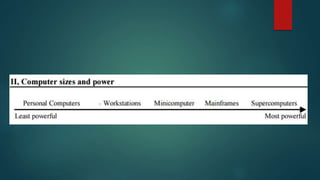
types of computers
 Computers are categorized based on their storage capacity, processing
power, cost and uses.
 There are Eight main Categories:
 Mobile computers
 Microcomputers
 Workstation
 Minicomputers
 Server
 Mainframe Computers
 Supercomputers
 Special-Purpose Computer
Mobile computers
 They are single user computers.
 They are super small and mobile.
 They are meant to be carried around and taken from place to place.
Microcomputers
 They are single user computers.
 They run on microprocessors in their central processing units.
 They are much, much cheaper than supercomputers, mainframe
computers and even minicomputers.
 They posses a smaller storage capacity and have a slower processing
speed than supercomputers, mainframe computers.
 They’re meant for everyday uses that are more practical than professional.
Workstations
 It is a desktop computer with a more powerful processor, additional
memory and enhanced capabilities
 It performs a special group of task, such as 3D Graphics or game
development.
 It may use multiple screens to enhance their viewing.
 It is a applicable in the use of engineering applications
 (CAD/CAM),
 desktop publishing,
 software development,
 other types of applications that require a moderate amount of computing
power and relatively high quality graphics capabilities.
Workstations
 Workstations generally come with:
 a large, high-resolution graphics screen,
 large amounts of RAM,
 built-in network support,
 and a graphical user interface.
 Most have a mass storage device such as a disk drive,
 Special types of workstations, called a diskless workstation, comes without
a disk drive.
 The most common operating systems for them are UNIX and Windows NT.
 Workstations are single-user computers.
 Workstations are typically linked together to form a local-area network, but
they can also be used as stand-alone systems.
Minicomputers
 A minicomputer is a multiprocessing machine that can support up to
about 200 users at the same time.
 It’s like a less powerful mainframe computer, and is about the size of a
refrigerator.
 A server can be an example of a minicomputer, but not all servers are
minicomputers.
 Due to the ways microcomputers have excelled in processing power even
beyond minicomputers, and at a much smaller size, minicomputers have
become pretty much obsolete.
 Some examples: K-202, Texas Instrument TI-990, SDS-92, IBM Midrange
computers
Servers
 A computer or device on a network that manages network resources.
 There are many different types of servers.
 File server: a computer and storage device dedicated to storing files. Any user
on the network can store files on the server.
 Print server: a computer that manages one or more printers, and a network
server is a computer that manages network traffic.
 Database server: a computer system that processes database queries.
 Web server: are computers that deliver (serves up) Web pages.
Mainframe
 They are multi-user computers
 They can handle more than 1000 (>1000) users at a time.
 They are huge, towering machines with lots of processing power.
 Mainframe computers are mostly used by corporations, government
agencies, and banks – organizations that need a way to store large
quantities of information such as censuses.
 The processing capabilities of mainframe computers are measured in MIPS,
or millions of instructions per second.
 Some examples: Fujitsu’s ICL VME, Hitachi’s Z800
Supercomputers
 It’s a term used to describe computers that have the most capable processing
power of its time.
 Today, modern supercomputers run hundreds of thousands of processors,
capable of computing quadrillions of calculations in just a few nanoseconds.
 They are used in computational science to calculate and carry out a plethora of
complex tasks.
 Modeling molecular structures, weather forecasting, and the field of quantum
mechanics, among others, rely on supercomputers and their intense
processing power to solve their equations.
 The processing capabilities of Supercomputers are measured in FLOPS, or
floating point operations per seconds.
 Some prominent examples of supercomputers include the Jaguar, Nebulae,
Roadrunner, Kraken, Jugene, Pleiades and the Tianhe-2
Special-purpose Computers
 Special-purpose computers refer to computers that are built to perform specific tasks,
such as automatic teller machines or washing machines.
 Special-purpose computers also include systems to control military planes, boats,
surveillance equipment and other defense-oriented applications.
 They utilize unique operating systems that are tailored to performing their specific
functions.
 Special-purpose computers possess a logical structure and data input-output devices
that are built to solve strictly-defined issues in an efficient manner.
Special-purpose Computers
 Special-purpose computers utilize embedded systems or other unique operating
platforms to work independently of other functions.
 Other examples of special purpose computers include traffic-light control systems,
weather-forecasting simulators, oil-exploration systems and traffic-control computers.
 These computer systems share similar features, but their design aims to fulfill a distinct
role.
 They perform a singular function, allowing them to eliminate excess memory and the
amount of information that can be submitted into it.
 This allows special-purpose computers to operate at heightened speeds to complete
their task.
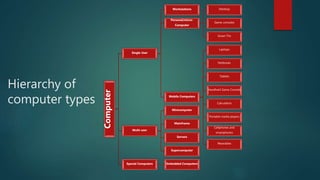
Hierarchy of
computer types
Computer
Single User
Workstations
Personal/micro-
Computer
Desktop
Game consoles
Smart TVs
Mobile Computers
Laptops
Netbooks
Tablets
Handheld Game Console
Calculators
Portable media players
Cellphones and
smartphones
Wearables
Multi-user
Minicomputer
Mainframe
Servers
Supercomputer
Special Computers Embedded Computers

Types of computers

  • 1.
    Types of computers SECTION1: HARDWARE AND SOFTWARE FUNDAMENTALS
  • 2.
    Objectives  Define thefollowing terms:  Supercomputer, Mainframe, Microcomputer, Minicomputer, Server, Workstations, Stand Alone  Identify, sort and briefly explain the types of Computers based on storage and processing capacity  Describe the characteristics/functions of each type of computer  Briefly discuss where each type of computer is applicable
  • 3.
    What is acomputer?  A computer is a machine that can be programmed to manipulate symbols.  Its principal characteristics are:  It responds to a specific set of instructions in a well-defined manner.  It can execute a prerecorded list of instructions (a program).  It can quickly store and retrieve large amounts of data.  All computers must be able to gather and process data, store, disseminate and display information
  • 5.
    types of computers Computers are categorized based on their storage capacity, processing power, cost and uses.  There are Eight main Categories:  Mobile computers  Microcomputers  Workstation  Minicomputers  Server  Mainframe Computers  Supercomputers  Special-Purpose Computer
  • 6.
    Mobile computers  Theyare single user computers.  They are super small and mobile.  They are meant to be carried around and taken from place to place.
  • 7.
    Microcomputers  They aresingle user computers.  They run on microprocessors in their central processing units.  They are much, much cheaper than supercomputers, mainframe computers and even minicomputers.  They posses a smaller storage capacity and have a slower processing speed than supercomputers, mainframe computers.  They’re meant for everyday uses that are more practical than professional.
  • 8.
    Workstations  It isa desktop computer with a more powerful processor, additional memory and enhanced capabilities  It performs a special group of task, such as 3D Graphics or game development.  It may use multiple screens to enhance their viewing.  It is a applicable in the use of engineering applications  (CAD/CAM),  desktop publishing,  software development,  other types of applications that require a moderate amount of computing power and relatively high quality graphics capabilities.
  • 9.
    Workstations  Workstations generallycome with:  a large, high-resolution graphics screen,  large amounts of RAM,  built-in network support,  and a graphical user interface.  Most have a mass storage device such as a disk drive,  Special types of workstations, called a diskless workstation, comes without a disk drive.  The most common operating systems for them are UNIX and Windows NT.  Workstations are single-user computers.  Workstations are typically linked together to form a local-area network, but they can also be used as stand-alone systems.
  • 10.
    Minicomputers  A minicomputeris a multiprocessing machine that can support up to about 200 users at the same time.  It’s like a less powerful mainframe computer, and is about the size of a refrigerator.  A server can be an example of a minicomputer, but not all servers are minicomputers.  Due to the ways microcomputers have excelled in processing power even beyond minicomputers, and at a much smaller size, minicomputers have become pretty much obsolete.  Some examples: K-202, Texas Instrument TI-990, SDS-92, IBM Midrange computers
  • 11.
    Servers  A computeror device on a network that manages network resources.  There are many different types of servers.  File server: a computer and storage device dedicated to storing files. Any user on the network can store files on the server.  Print server: a computer that manages one or more printers, and a network server is a computer that manages network traffic.  Database server: a computer system that processes database queries.  Web server: are computers that deliver (serves up) Web pages.
  • 12.
    Mainframe  They aremulti-user computers  They can handle more than 1000 (>1000) users at a time.  They are huge, towering machines with lots of processing power.  Mainframe computers are mostly used by corporations, government agencies, and banks – organizations that need a way to store large quantities of information such as censuses.  The processing capabilities of mainframe computers are measured in MIPS, or millions of instructions per second.  Some examples: Fujitsu’s ICL VME, Hitachi’s Z800
  • 13.
    Supercomputers  It’s aterm used to describe computers that have the most capable processing power of its time.  Today, modern supercomputers run hundreds of thousands of processors, capable of computing quadrillions of calculations in just a few nanoseconds.  They are used in computational science to calculate and carry out a plethora of complex tasks.  Modeling molecular structures, weather forecasting, and the field of quantum mechanics, among others, rely on supercomputers and their intense processing power to solve their equations.  The processing capabilities of Supercomputers are measured in FLOPS, or floating point operations per seconds.  Some prominent examples of supercomputers include the Jaguar, Nebulae, Roadrunner, Kraken, Jugene, Pleiades and the Tianhe-2
  • 14.
    Special-purpose Computers  Special-purposecomputers refer to computers that are built to perform specific tasks, such as automatic teller machines or washing machines.  Special-purpose computers also include systems to control military planes, boats, surveillance equipment and other defense-oriented applications.  They utilize unique operating systems that are tailored to performing their specific functions.  Special-purpose computers possess a logical structure and data input-output devices that are built to solve strictly-defined issues in an efficient manner.
  • 15.
    Special-purpose Computers  Special-purposecomputers utilize embedded systems or other unique operating platforms to work independently of other functions.  Other examples of special purpose computers include traffic-light control systems, weather-forecasting simulators, oil-exploration systems and traffic-control computers.  These computer systems share similar features, but their design aims to fulfill a distinct role.  They perform a singular function, allowing them to eliminate excess memory and the amount of information that can be submitted into it.  This allows special-purpose computers to operate at heightened speeds to complete their task.
  • 16.
    Hierarchy of computer types Computer SingleUser Workstations Personal/micro- Computer Desktop Game consoles Smart TVs Mobile Computers Laptops Netbooks Tablets Handheld Game Console Calculators Portable media players Cellphones and smartphones Wearables Multi-user Minicomputer Mainframe Servers Supercomputer Special Computers Embedded Computers