INTRODUCTION TO COMPUTER STUDIES
Unit Six: Classification of
Computers
COMPUTER STUDIES DEPARTMENT
BISHOP SUART UNIVERSITY
10/28/24 1
Unit Objectives
To be able to
a) Classify
computers by size
 i. Super Computers
 ii. Mainframes
 iii. Mini Computers
 iv. Micro Computers
b) Classify computers
by purpose
c)Classify computers by the
functions they perform
 i. Stand-alone
 ii. Networked
 iii. Real-time Systems
 iv. Integrated Systems
d) Classify computers by
processing power
(don’t Write)
Unit Introduction
 In the previous unit, we looked at Analog, Digital
and Hybrid as the categories of computers
basing on how they represent data.
 Those categories of computers are sometimes
referred to as classifications of computers by
process or by nature.
 In this unit, we are going to further classify
digital computers according to their size, their
purposes, functions and processing power.
3
CLASSIFICATION COMPUTERS BY
SIZE/ CAPACITY
 According to size or capacity, we base on the physical size
and the number of people the computers can accommodate
at the same time.
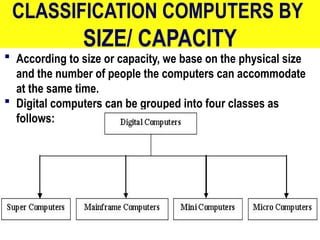
 Digital computers can be grouped into four classes as
follows:
4
Super Computers
 Super Computers are the best in terms of processing capacity.
 These computers can process billions of instructions per
second.
 They are used for applications which require intensive
numerical computations such as weather forecasting.
 They have a high storage capacity and are huge in size.
 They generate large amounts of heat and therefore need
complex cooling systems.
 A supercomputer channels all its power into executing a few
programs as fast as possible.
 Super computers are the most expensive ones
5
6
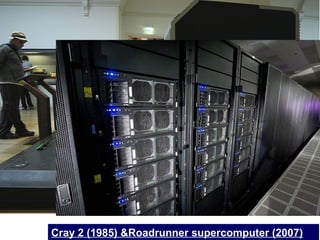
Cray 2 (1985) &Roadrunner supercomputer (2007)
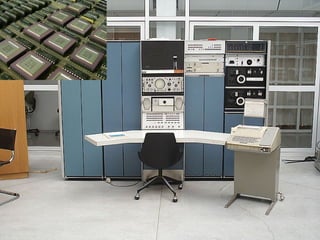
Mainframe Computers
(also known as big iron)
 These are powerful computers used mainly by large
organizations for bulk data processing such as
census, and financial transaction processing.
 They are also called central processors because they
process data centrally.
 These computers are used in places where
processing needs to be done in bulk such as banks.
 They can store a lot of information
 They support a wide range of peripheral devices
 They have many users connected via dumb terminals.
10/28/24
7
What are Dumb Terminals?
 Dumb terminals are display and input devices
which don't process data, instead they transmit
input to a computer to which it is connected and
display the resulting output.
 Dumb terminals have no 'intelligence' (data
processing power) and depend entirely on the
(intelligent) computer to which they are
connected for computations, data storage, and
retrieval.
8
9
MORE MAINFRAMES BEING USED
Mini Computers
(a.k.a. midrange computers)
 A minicomputer is a class of multi-user computers
that lies in the middle range between mainframe
computers and the smallest single-user systems
(microcomputers or personal computers).
 They are similar to main frames but they are smaller
in size, support a limited number of peripheral
devices connected to them, Have a lower speed, have
lesser storage capacity, and support fewer number
of users at the same time than as compared to main
frames.
10/28/24
10
11
Micro Computers
(a.k.a. Personal Computers –PCs)
 A microcomputer is a computer with a
microprocessor as its central processing unit.
 When equipped with a keyboard and screen for
input and output, they are also personal
computers.
 They are single user and are the most widely
used computers in our everyday life.
 Micro computers are relatively cheap, smaller in
size and support fewer peripheral devices.
10/28/24
12
Micro Computers (cont)
 Micro computers are further classified into:
 a) Desktop computers: Designed to be
stationed in one place probably on top of a
desk.
 b) Laptop computers: These are more
portable and suitable for mobile computing.
 c) Palmtops/Personal Digital Assistants
(PDAs): These are handheld digital computers.
13
14
Laptop
PDA/Palmtop
Desktop
CLASSIFICATION OF
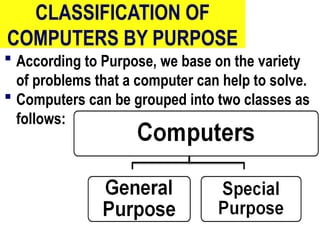
COMPUTERS BY PURPOSE
 According to Purpose, we base on the variety
of problems that a computer can help to solve.
 Computers can be grouped into two classes as
follows:
10/28/24
15
Special Purpose Computers
 A special purpose computer is designed to
operate on a restricted type of problems.
 They have instructions permanently stored in
them to perform the given task quickly and
efficiently.
 Most special purpose computers have the
capability of performing just one task.
 They are commonly referred to as "dedicated
computers,”
16
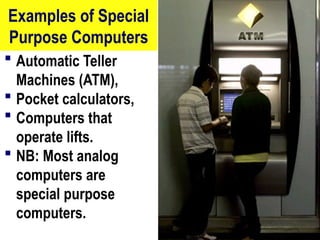
Examples of Special
Purpose Computers
 Automatic Teller
Machines (ATM),
 Pocket calculators,
 Computers that
operate lifts.
 NB: Most analog
computers are
special purpose
computers.
17
General Purpose Computers
 General-Purpose Computers are designed to
solve a wide range of problems.
 They are also able to act in response to new
programs created to meet different needs.
 A general-purpose computer is one that has the
ability to store different programs of instruction
and thus to perform a variety of operations.
 Most PCs (Desktops, laptops and palmtops) are
general purpose.
18
CLASSIFICATION COMPUTERS BY
FUNCTION
 According to Function, we base on what
computers do and how they do it.
We have four classifications of computers by
function:
 i. Networked
 ii. Stand-alone
 iii. Real-time Systems
 iv. Integrated Systems
19
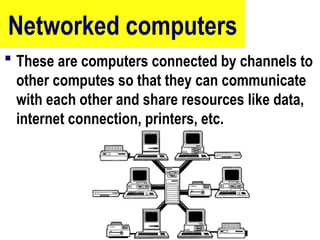
Networked computers
 These are computers connected by channels to
other computes so that they can communicate
with each other and share resources like data,
internet connection, printers, etc.
20
Stand-alone computers
 This is a computer that operates and does everything
independently.
 Stand-alone computers do not have any internet
connection or a connection to the outside world.
 A photocopying machine is a stand-alone device
because it does not require a computer, printer,
modem, or other device.
 A printer, on the other hand, is not a stand-alone
device because it requires a computer to feed it data.
21
Real-time systems
 These are systems that respond to an event that
has occurred within a certain specified time
frame.
 Real-time means that after an event has
occurred, a system or application has to react to
that event within a certain time period or
deadline.
 For example, computers for a banking system
are real time systems.
22
Integrated system
 An integrated system is a group of
interconnected units that form a
functioning computer system.
 An integrated system has separate
programs that perform separate functions
but they all contribute to the same output.
23
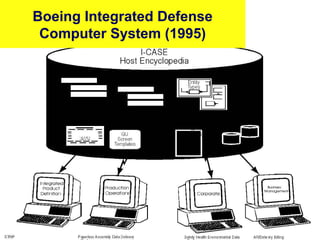
Boeing Integrated Defense
Computer System (1995)
24
CLASSIFICATION COMPUTERS
BY PROCESSING POWER
 PCs can be classified by their microprocessor
model name or number.
 The leading processor chip manufacturers for
personal computers are Intel, AMD, IBM, and
Motorola.
 Due to the rapid changes in technology
processing power is also rapidly increasing.
Computers are getting faster and faster each
time a new micro processor chip is introduced .
25
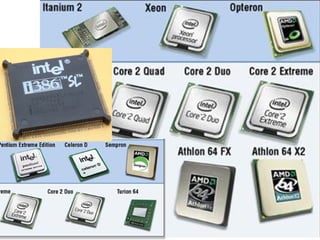
Examples of Microprocessors
 The most
common types
of processor
power are:-
 80286,
 80386,
 Pentium I,
 Pentium II,
 Pentium III,
 Pentium IV,
 Pentium Duo core,
 Core 2 Quad,
 Celeron,
 Celeron D,
 Xeon,
 Opteron,
 Athlon,
 Itanium
 e.t.c.
26
 The unit for
measuring the
processing
power is the
Hertz.
 For example,
Celeron
processors’
speed ranges
from 266MHz –
2.8 GHz.
27

Classification of Computers unit six.ppt

  • 1.
    INTRODUCTION TO COMPUTERSTUDIES Unit Six: Classification of Computers COMPUTER STUDIES DEPARTMENT BISHOP SUART UNIVERSITY 10/28/24 1
  • 2.
    Unit Objectives To beable to a) Classify computers by size  i. Super Computers  ii. Mainframes  iii. Mini Computers  iv. Micro Computers b) Classify computers by purpose c)Classify computers by the functions they perform  i. Stand-alone  ii. Networked  iii. Real-time Systems  iv. Integrated Systems d) Classify computers by processing power (don’t Write)
  • 3.
    Unit Introduction  Inthe previous unit, we looked at Analog, Digital and Hybrid as the categories of computers basing on how they represent data.  Those categories of computers are sometimes referred to as classifications of computers by process or by nature.  In this unit, we are going to further classify digital computers according to their size, their purposes, functions and processing power. 3
  • 4.
    CLASSIFICATION COMPUTERS BY SIZE/CAPACITY  According to size or capacity, we base on the physical size and the number of people the computers can accommodate at the same time.  Digital computers can be grouped into four classes as follows: 4
  • 5.
    Super Computers  SuperComputers are the best in terms of processing capacity.  These computers can process billions of instructions per second.  They are used for applications which require intensive numerical computations such as weather forecasting.  They have a high storage capacity and are huge in size.  They generate large amounts of heat and therefore need complex cooling systems.  A supercomputer channels all its power into executing a few programs as fast as possible.  Super computers are the most expensive ones 5
  • 6.
    6 Cray 2 (1985)&Roadrunner supercomputer (2007)
  • 7.
    Mainframe Computers (also knownas big iron)  These are powerful computers used mainly by large organizations for bulk data processing such as census, and financial transaction processing.  They are also called central processors because they process data centrally.  These computers are used in places where processing needs to be done in bulk such as banks.  They can store a lot of information  They support a wide range of peripheral devices  They have many users connected via dumb terminals. 10/28/24 7
  • 8.
    What are DumbTerminals?  Dumb terminals are display and input devices which don't process data, instead they transmit input to a computer to which it is connected and display the resulting output.  Dumb terminals have no 'intelligence' (data processing power) and depend entirely on the (intelligent) computer to which they are connected for computations, data storage, and retrieval. 8
  • 9.
  • 10.
    Mini Computers (a.k.a. midrangecomputers)  A minicomputer is a class of multi-user computers that lies in the middle range between mainframe computers and the smallest single-user systems (microcomputers or personal computers).  They are similar to main frames but they are smaller in size, support a limited number of peripheral devices connected to them, Have a lower speed, have lesser storage capacity, and support fewer number of users at the same time than as compared to main frames. 10/28/24 10
  • 11.
  • 12.
    Micro Computers (a.k.a. PersonalComputers –PCs)  A microcomputer is a computer with a microprocessor as its central processing unit.  When equipped with a keyboard and screen for input and output, they are also personal computers.  They are single user and are the most widely used computers in our everyday life.  Micro computers are relatively cheap, smaller in size and support fewer peripheral devices. 10/28/24 12
  • 13.
    Micro Computers (cont) Micro computers are further classified into:  a) Desktop computers: Designed to be stationed in one place probably on top of a desk.  b) Laptop computers: These are more portable and suitable for mobile computing.  c) Palmtops/Personal Digital Assistants (PDAs): These are handheld digital computers. 13
  • 14.
  • 15.
    CLASSIFICATION OF COMPUTERS BYPURPOSE  According to Purpose, we base on the variety of problems that a computer can help to solve.  Computers can be grouped into two classes as follows: 10/28/24 15
  • 16.
    Special Purpose Computers A special purpose computer is designed to operate on a restricted type of problems.  They have instructions permanently stored in them to perform the given task quickly and efficiently.  Most special purpose computers have the capability of performing just one task.  They are commonly referred to as "dedicated computers,” 16
  • 17.
    Examples of Special PurposeComputers  Automatic Teller Machines (ATM),  Pocket calculators,  Computers that operate lifts.  NB: Most analog computers are special purpose computers. 17
  • 18.
    General Purpose Computers General-Purpose Computers are designed to solve a wide range of problems.  They are also able to act in response to new programs created to meet different needs.  A general-purpose computer is one that has the ability to store different programs of instruction and thus to perform a variety of operations.  Most PCs (Desktops, laptops and palmtops) are general purpose. 18
  • 19.
    CLASSIFICATION COMPUTERS BY FUNCTION According to Function, we base on what computers do and how they do it. We have four classifications of computers by function:  i. Networked  ii. Stand-alone  iii. Real-time Systems  iv. Integrated Systems 19
  • 20.
    Networked computers  Theseare computers connected by channels to other computes so that they can communicate with each other and share resources like data, internet connection, printers, etc. 20
  • 21.
    Stand-alone computers  Thisis a computer that operates and does everything independently.  Stand-alone computers do not have any internet connection or a connection to the outside world.  A photocopying machine is a stand-alone device because it does not require a computer, printer, modem, or other device.  A printer, on the other hand, is not a stand-alone device because it requires a computer to feed it data. 21
  • 22.
    Real-time systems  Theseare systems that respond to an event that has occurred within a certain specified time frame.  Real-time means that after an event has occurred, a system or application has to react to that event within a certain time period or deadline.  For example, computers for a banking system are real time systems. 22
  • 23.
    Integrated system  Anintegrated system is a group of interconnected units that form a functioning computer system.  An integrated system has separate programs that perform separate functions but they all contribute to the same output. 23
  • 24.
  • 25.
    CLASSIFICATION COMPUTERS BY PROCESSINGPOWER  PCs can be classified by their microprocessor model name or number.  The leading processor chip manufacturers for personal computers are Intel, AMD, IBM, and Motorola.  Due to the rapid changes in technology processing power is also rapidly increasing. Computers are getting faster and faster each time a new micro processor chip is introduced . 25
  • 26.
    Examples of Microprocessors The most common types of processor power are:-  80286,  80386,  Pentium I,  Pentium II,  Pentium III,  Pentium IV,  Pentium Duo core,  Core 2 Quad,  Celeron,  Celeron D,  Xeon,  Opteron,  Athlon,  Itanium  e.t.c. 26  The unit for measuring the processing power is the Hertz.  For example, Celeron processors’ speed ranges from 266MHz – 2.8 GHz.
  • 27.

Editor's Notes

  • #7  Dumb terminals are display and input devices which don't process data and input locally, instead they transmit input to an computer to which it is connected and display the resulting output. Dumb terminals have no 'intelligence' (data processing power) and depend entirely on the (intelligent) computer cto which they are connected for computations, data storage, and retrieval. Dumb terminals are used by airlines, banks, and other such firms for inputting data to, and recalling it from, the connected computer.
  • #25 Advanced Micro Devices, or AMD is an American multinational semiconductor company based in Sunnyvale, California, that develops computer processors and related technologies for commercial and consumer markets. Its main products include microprocessors, motherboard chipsets, embedded processors and graphics processors for servers, workstations and personal computers, and embedded systems applications.