Twitter Smart Card Twitter 121511_1631
W2
Social Networks -Do’s and Don’ts
 Only establish and maintain connections with people you know and trust. Review your connections often.
 Assume that ANYONE can see any information about your activities, personal life, or professional life that you post and share.
 Ensure that your family takes similar precautions with their accounts; their privacy and sharing settings can expose your personal data.
 Avoid posting or tagging images of you or your family that clearly show your face. Select pictures taken at a distance, at an angle, or
otherwise concealed. Never post Smartphone photos and don’t use your face as a profile photo, instead, use cartoons or avatars.
 Use secure browser settings when possible and monitor your browsing history to ensure that you recognize all access points.
Managing your Twitter Account
Twitter is a social networking and microblogging site whose users send and read text-based posts online. The site surged to worldwide
popularity with +300 million active users as of 2011, generating 300 million tweets and 1.6 billion search queries daily.
Tweets
“Tweets” are short text-based messages – up to 140 characters – that users post to Twitter. "Tweet" can
refer to a post as well or to the act of posting to Twitter. Tweets are public, indexed, and searchable unless
protected by the user. Many users never Tweet, choosing only to follow persons or topics of interest.
Hashtags (#topic) are used to mark a keyword or topic in a
Tweet. Posts with hashtag are categorized by topics in the
Twitter search engine. Hashtagged words that become popular
become Trending Topics (ex. #jan25, #egypt, #sxsw).
Mentions (@username) are used to tag a user in a Twitter
update. When a public user mentions a private Twitter
account, the link to the private account profile becomes public.
Profile Settings
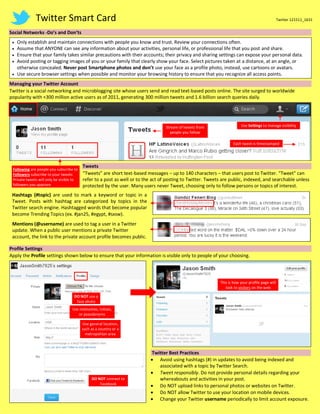
Apply the Profile settings shown below to ensure that your information is visible only to people of your choosing.
Twitter Best Practices
 Avoid using hashtags (#) in updates to avoid being indexed and
associated with a topic by Twitter Search.
 Tweet responsibly. Do not provide personal details regarding your
whereabouts and activities in your post.
 Do NOT upload links to personal photos or websites on Twitter.
 Do NOT allow Twitter to use your location on mobile devices.
 Change your Twitter username periodically to limit account exposure.
Use Settings to manage visibility
Following are people you subscribe to
Followers subscribe to your tweets
Private tweets will only be visible to
followers you approve
Each tweet is timestamped
Stream of tweets from
people you follow
This is how your profile page will
look to visitors on the web
DO NOT use a
face photo
Use nicknames, initials,
or pseudonyms
Use general location,
such as a country or a
metropolitan area
DO NOT connect to
Facebook
Twitter Smart Card Twitter 121511_1631
Account Settings
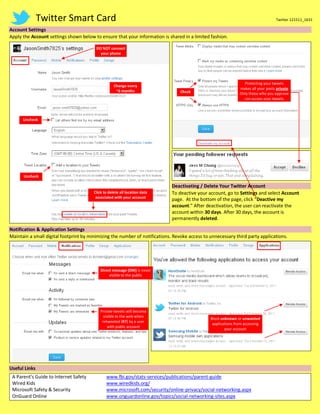
Apply the Account settings shown below to ensure that your information is shared in a limited fashion.
Deactivating / Delete Your Twitter Account
To deactive your account, go to Settings and select Account
page. At the bottom of the page, click “Deactive my
account.” After deactivation, the user can reactivate the
account within 30 days. After 30 days, the account is
permanently deleted.
Notification & Application Settings
Maintain a small digital footprint by minimizing the number of notifications. Revoke access to unnecessary third party applications.
Useful Links
A Parent’s Guide to Internet Safety www.fbi.gov/stats-services/publications/parent-guide
Wired Kids www.wiredkids.org/
Microsoft Safety & Security www.microsoft.com/security/online-privacy/social-networking.aspx
OnGuard Online www.onguardonline.gov/topics/social-networking-sites.aspx
Uncheck
Block unknown or unwanted
applications from accessing
your account
Check
Uncheck
Protecting your tweets
makes all your posts private
Only those who you approve
can access your tweets
Click to delete all location data
associated with your account
Private tweets will become
visible to the web when
retweeted (RT) by a user
with public account
Direct message (DM) is never
visible to the public
DO NOT connect
your phone
Change every
~6 months

Twitter Smart Card

  • 1.
    Twitter Smart CardTwitter 121511_1631 W2 Social Networks -Do’s and Don’ts  Only establish and maintain connections with people you know and trust. Review your connections often.  Assume that ANYONE can see any information about your activities, personal life, or professional life that you post and share.  Ensure that your family takes similar precautions with their accounts; their privacy and sharing settings can expose your personal data.  Avoid posting or tagging images of you or your family that clearly show your face. Select pictures taken at a distance, at an angle, or otherwise concealed. Never post Smartphone photos and don’t use your face as a profile photo, instead, use cartoons or avatars.  Use secure browser settings when possible and monitor your browsing history to ensure that you recognize all access points. Managing your Twitter Account Twitter is a social networking and microblogging site whose users send and read text-based posts online. The site surged to worldwide popularity with +300 million active users as of 2011, generating 300 million tweets and 1.6 billion search queries daily. Tweets “Tweets” are short text-based messages – up to 140 characters – that users post to Twitter. "Tweet" can refer to a post as well or to the act of posting to Twitter. Tweets are public, indexed, and searchable unless protected by the user. Many users never Tweet, choosing only to follow persons or topics of interest. Hashtags (#topic) are used to mark a keyword or topic in a Tweet. Posts with hashtag are categorized by topics in the Twitter search engine. Hashtagged words that become popular become Trending Topics (ex. #jan25, #egypt, #sxsw). Mentions (@username) are used to tag a user in a Twitter update. When a public user mentions a private Twitter account, the link to the private account profile becomes public. Profile Settings Apply the Profile settings shown below to ensure that your information is visible only to people of your choosing. Twitter Best Practices  Avoid using hashtags (#) in updates to avoid being indexed and associated with a topic by Twitter Search.  Tweet responsibly. Do not provide personal details regarding your whereabouts and activities in your post.  Do NOT upload links to personal photos or websites on Twitter.  Do NOT allow Twitter to use your location on mobile devices.  Change your Twitter username periodically to limit account exposure. Use Settings to manage visibility Following are people you subscribe to Followers subscribe to your tweets Private tweets will only be visible to followers you approve Each tweet is timestamped Stream of tweets from people you follow This is how your profile page will look to visitors on the web DO NOT use a face photo Use nicknames, initials, or pseudonyms Use general location, such as a country or a metropolitan area DO NOT connect to Facebook
  • 2.
    Twitter Smart CardTwitter 121511_1631 Account Settings Apply the Account settings shown below to ensure that your information is shared in a limited fashion. Deactivating / Delete Your Twitter Account To deactive your account, go to Settings and select Account page. At the bottom of the page, click “Deactive my account.” After deactivation, the user can reactivate the account within 30 days. After 30 days, the account is permanently deleted. Notification & Application Settings Maintain a small digital footprint by minimizing the number of notifications. Revoke access to unnecessary third party applications. Useful Links A Parent’s Guide to Internet Safety www.fbi.gov/stats-services/publications/parent-guide Wired Kids www.wiredkids.org/ Microsoft Safety & Security www.microsoft.com/security/online-privacy/social-networking.aspx OnGuard Online www.onguardonline.gov/topics/social-networking-sites.aspx Uncheck Block unknown or unwanted applications from accessing your account Check Uncheck Protecting your tweets makes all your posts private Only those who you approve can access your tweets Click to delete all location data associated with your account Private tweets will become visible to the web when retweeted (RT) by a user with public account Direct message (DM) is never visible to the public DO NOT connect your phone Change every ~6 months