Beginner's Guide to Twitter


                  Emina Demiri
             Digital Media Specialist
             Community Organisers
                   Programme
                     @demirie
                  @corganisers
             #communityorganisers
                   08/04/2013
What is it?
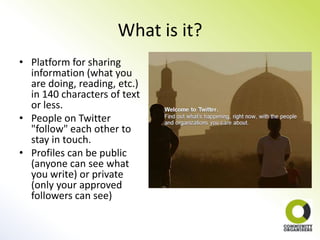
• Platform for sharing
  information (what you
  are doing, reading, etc.)
  in 140 characters of text
  or less.
• People on Twitter
  "follow" each other to
  stay in touch.
• Profiles can be public
  (anyone can see what
  you write) or private
  (only your approved
  followers can see)
Main Twitter terms explained
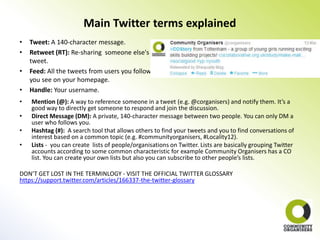
•   Tweet: A 140-character message.
•   Retweet (RT): Re-sharing someone else's
    tweet.
•   Feed: All the tweets from users you follow
    you see on your homepage.
•   Handle: Your username.
•   Mention (@): A way to reference someone in a tweet (e.g. @corganisers) and notify them. It’s a
    good way to directly get someone to respond and join the discussion.
•   Direct Message (DM): A private, 140-character message between two people. You can only DM a
    user who follows you.
•   Hashtag (#): A search tool that allows others to find your tweets and you to find conversations of
    interest based on a common topic (e.g. #communityorganisers, #Locality12).
•   Lists - you can create lists of people/organisations on Twitter. Lists are basically grouping Twitter
    accounts according to some common characteristic for example Community Organisers has a CO
    list. You can create your own lists but also you can subscribe to other people’s lists.

DON’T GET LOST IN THE TERMINLOGY - VISIT THE OFFICIAL TWITTER GLOSSARY
https://support.twitter.com/articles/166337-the-twitter-glossary
Signing up
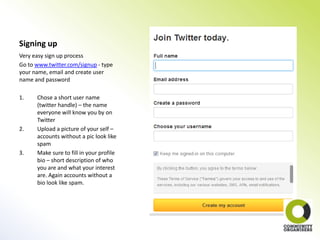
Very easy sign up process
Go to www.twitter.com/signup - type
your name, email and create user
name and password

1.    Chose a short user name
      (twitter handle) – the name
      everyone will know you by on
      Twitter
2.    Upload a picture of your self –
      accounts without a pic look like
      spam
3.    Make sure to fill in your profile
      bio – short description of who
      you are and what your interest
      are. Again accounts without a
      bio look like spam.
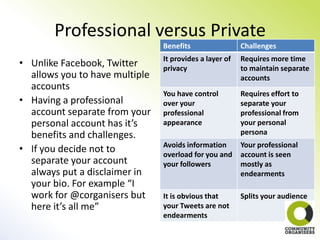
Professional versus Private
                                Benefits                 Challenges
                                It provides a layer of   Requires more time
• Unlike Facebook, Twitter      privacy                  to maintain separate
  allows you to have multiple                            accounts
  accounts
                                You have control         Requires effort to
• Having a professional         over your                separate your
  account separate from your    professional             professional from
  personal account has it’s     appearance               your personal
  benefits and challenges.                               persona
                                Avoids information       Your professional
• If you decide not to          overload for you and     account is seen
  separate your account         your followers           mostly as
  always put a disclaimer in                             endearments
  your bio. For example “I
  work for @corganisers but     It is obvious that       Splits your audience
  here it’s all me”             your Tweets are not
                                endearments
Following others
• Who to follow:
1. Friends and people you know
2. Organisations you are interested in – use Twitter search or go to
   their website and find the Follow us on Twitter button.
3. Use lists to find people/organisations – for example check out
   Community Organisers Lists to find Organisers/Hosts. Or use
   online tools such as Twitter counter to find opinion maker lists on
   Twitter http://twittercounter.com/lists/
4. Use hashtags to connect with people who have similar interest for
   example interested in #assettransfer write the term in the Twitter
   Search and see who else is interested in it.
5. Explore people your friends are following
6. Twitter will also give you follow suggestions, based on the
   industries/fields associated with your interests.
Getting followers and beyond
• Be patient. Rome was not built in a day. It’s not
  about the quantity it’s about quality.
• Take some time when you first open an account
  to measure the pulse of Twitter. Start with
  observing and following others.
• Don’t panic! Twitter works on feeds – Tweets
  are changing at a rapid speed. You do not have
  to scroll back to every Tweet each time you log
  in. Trying to do so will cause information
  overload.
• Be personal, authentic and true to your values
• Be concise, insightful, interesting and funny
• Be generous in Re-Tweeting others
Getting followers and beyond
• Engage with content gold mines:
1.    Use Social Buttons on websites to share what you are reading/watching.
      A Twitter social button might look like this
2.    Cover events – participating in an interesting conference? Remember to
      ask the organisers if there is a hashtag for it and report live.
Be creative in your content:
1.    Photos
2.    Videos
3.    Infographics
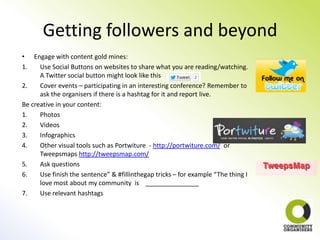
4.    Other visual tools such as Portwiture - http://portwiture.com/ or
      Tweepsmaps http://tweepsmap.com/
5.    Ask questions
6.    Use finish the sentence” & #fillinthegap tricks – for example “The thing I
      love most about my community is _______________
7.    Use relevant hashtags
Getting followers and beyond
•   Thank followers for following (T4F). Do it in groups (that way
    you are also connecting people) and share your Facebook
    profile .
•   Tweet the names of Twitter users you'd like others to follow
    and tag by using #ff on Fridays (Follow Friday) but remember
    you can always suggest to your followers who to follow, not
    only on Fridays. Promote others and others will promote you.
•   Take the online to offline. Don’t be afraid to use Twitter to
    arrange face to face meetings.
•   Open up a Daily or Weekly Digest – use Paper Li (find it here
    http://paper.li/)
•   Use the "reply" feature – when you see someone talking
    about something of interest don’t be scared to engage
    directly. Hit that reply button and have your voice heard!
•   Avoid auto updates and cross posting to Twitter. Not
    everything you say on your Facebook account is interesting to
    post on Twitter.
Going mobile
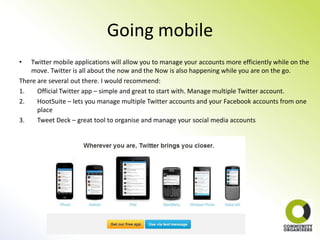
•   Twitter mobile applications will allow you to manage your accounts more efficiently while on the
    move. Twitter is all about the now and the Now is also happening while you are on the go.
There are several out there. I would recommend:
1.    Official Twitter app – simple and great to start with. Manage multiple Twitter account.
2.    HootSuite – lets you manage multiple Twitter accounts and your Facebook accounts from one
      place
3.    Tweet Deck – great tool to organise and manage your social media accounts
Thanks for listening and see you on
               Twitter!

                 Follow me
                 @demirie
         Follow the CO Programme
               @corganisers
          #communityorganisers

Beginner's guide to twitter

  • 1.
    Beginner's Guide toTwitter Emina Demiri Digital Media Specialist Community Organisers Programme @demirie @corganisers #communityorganisers 08/04/2013
  • 2.
    What is it? •Platform for sharing information (what you are doing, reading, etc.) in 140 characters of text or less. • People on Twitter "follow" each other to stay in touch. • Profiles can be public (anyone can see what you write) or private (only your approved followers can see)
  • 3.
    Main Twitter termsexplained • Tweet: A 140-character message. • Retweet (RT): Re-sharing someone else's tweet. • Feed: All the tweets from users you follow you see on your homepage. • Handle: Your username. • Mention (@): A way to reference someone in a tweet (e.g. @corganisers) and notify them. It’s a good way to directly get someone to respond and join the discussion. • Direct Message (DM): A private, 140-character message between two people. You can only DM a user who follows you. • Hashtag (#): A search tool that allows others to find your tweets and you to find conversations of interest based on a common topic (e.g. #communityorganisers, #Locality12). • Lists - you can create lists of people/organisations on Twitter. Lists are basically grouping Twitter accounts according to some common characteristic for example Community Organisers has a CO list. You can create your own lists but also you can subscribe to other people’s lists. DON’T GET LOST IN THE TERMINLOGY - VISIT THE OFFICIAL TWITTER GLOSSARY https://support.twitter.com/articles/166337-the-twitter-glossary
  • 4.
    Signing up Very easysign up process Go to www.twitter.com/signup - type your name, email and create user name and password 1. Chose a short user name (twitter handle) – the name everyone will know you by on Twitter 2. Upload a picture of your self – accounts without a pic look like spam 3. Make sure to fill in your profile bio – short description of who you are and what your interest are. Again accounts without a bio look like spam.
  • 5.
    Professional versus Private Benefits Challenges It provides a layer of Requires more time • Unlike Facebook, Twitter privacy to maintain separate allows you to have multiple accounts accounts You have control Requires effort to • Having a professional over your separate your account separate from your professional professional from personal account has it’s appearance your personal benefits and challenges. persona Avoids information Your professional • If you decide not to overload for you and account is seen separate your account your followers mostly as always put a disclaimer in endearments your bio. For example “I work for @corganisers but It is obvious that Splits your audience here it’s all me” your Tweets are not endearments
  • 6.
    Following others • Whoto follow: 1. Friends and people you know 2. Organisations you are interested in – use Twitter search or go to their website and find the Follow us on Twitter button. 3. Use lists to find people/organisations – for example check out Community Organisers Lists to find Organisers/Hosts. Or use online tools such as Twitter counter to find opinion maker lists on Twitter http://twittercounter.com/lists/ 4. Use hashtags to connect with people who have similar interest for example interested in #assettransfer write the term in the Twitter Search and see who else is interested in it. 5. Explore people your friends are following 6. Twitter will also give you follow suggestions, based on the industries/fields associated with your interests.
  • 7.
    Getting followers andbeyond • Be patient. Rome was not built in a day. It’s not about the quantity it’s about quality. • Take some time when you first open an account to measure the pulse of Twitter. Start with observing and following others. • Don’t panic! Twitter works on feeds – Tweets are changing at a rapid speed. You do not have to scroll back to every Tweet each time you log in. Trying to do so will cause information overload. • Be personal, authentic and true to your values • Be concise, insightful, interesting and funny • Be generous in Re-Tweeting others
  • 8.
    Getting followers andbeyond • Engage with content gold mines: 1. Use Social Buttons on websites to share what you are reading/watching. A Twitter social button might look like this 2. Cover events – participating in an interesting conference? Remember to ask the organisers if there is a hashtag for it and report live. Be creative in your content: 1. Photos 2. Videos 3. Infographics 4. Other visual tools such as Portwiture - http://portwiture.com/ or Tweepsmaps http://tweepsmap.com/ 5. Ask questions 6. Use finish the sentence” & #fillinthegap tricks – for example “The thing I love most about my community is _______________ 7. Use relevant hashtags
  • 9.
    Getting followers andbeyond • Thank followers for following (T4F). Do it in groups (that way you are also connecting people) and share your Facebook profile . • Tweet the names of Twitter users you'd like others to follow and tag by using #ff on Fridays (Follow Friday) but remember you can always suggest to your followers who to follow, not only on Fridays. Promote others and others will promote you. • Take the online to offline. Don’t be afraid to use Twitter to arrange face to face meetings. • Open up a Daily or Weekly Digest – use Paper Li (find it here http://paper.li/) • Use the "reply" feature – when you see someone talking about something of interest don’t be scared to engage directly. Hit that reply button and have your voice heard! • Avoid auto updates and cross posting to Twitter. Not everything you say on your Facebook account is interesting to post on Twitter.
  • 10.
    Going mobile • Twitter mobile applications will allow you to manage your accounts more efficiently while on the move. Twitter is all about the now and the Now is also happening while you are on the go. There are several out there. I would recommend: 1. Official Twitter app – simple and great to start with. Manage multiple Twitter account. 2. HootSuite – lets you manage multiple Twitter accounts and your Facebook accounts from one place 3. Tweet Deck – great tool to organise and manage your social media accounts
  • 11.
    Thanks for listeningand see you on Twitter! Follow me @demirie Follow the CO Programme @corganisers #communityorganisers