TWITTER:What it is, how it’s used, and why it can be effective for and
W H A T
DEFINITION
Twitter is a social networking and micro-blogging service that allows you to answer the question, “What are you doing?” by sending short text messages 140 characters in length, called “tweets,” to your friends, or “followers.”http://tweeternet.com/
H O W
the TWEET
“Tweeting” allows you or your organization to share what you are doing or what is on your mind in real time.
the MENTION
@You can use @ in a tweet to mention someone, ask them a question, or point them in the direction of a cool website. Using the @ symbol is also a great way to reply to tweets by other people.
the HASHTAG
Hashtags, or “#” symbols, are used in tweets to mark keywords or topics, thus making them more accessible in the Twitter Search bar at the top of your home page.
the RETWEET
Retweetingallows you to pass on an interesting tweet from someone you follow to everyone following you. It’s a great way to spread the word!
the URL
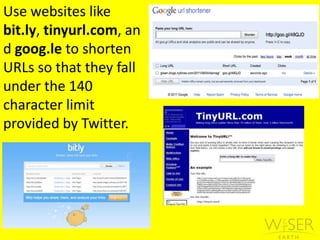
Use websites like bit.ly, tinyurl.com, and goog.le to shorten URLs so that they fall under the 140 character limit provided by Twitter.
FOLLOWING & FOLLOWERS
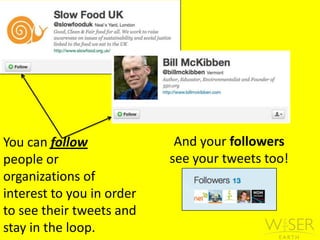
And your followers see your tweets too!You can follow people or   organizations of interest to you in order to see their tweets and stay in the loop.
the TIMELINE
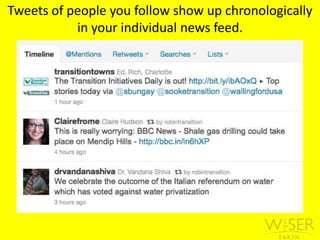
Tweets of people you follow show up chronologically in your individual news feed.
the FAVORITE
You can favorite a tweet that you like in order to save it for later. Once you favorite it, a yellow star will appear both in the upper left-hand corner of the tweet, as well as at the bottom. You can always unfavoritea tweet as well.
W H Y
stay CONNECTED
Follow people and organizations of interest and get real-time updates Find out what others are reading, doing, and saying
SPREAD YOUR MESSAGE
	Communicate and collaborate with others doing work in similar fieldsPost info about events, blog updates, and pictures/videos
CASE STUDY
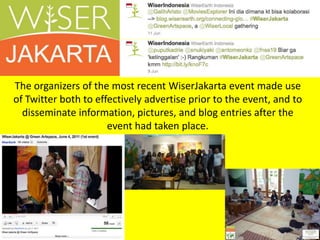
The organizers of the most recent WiserJakarta event made use of Twitter both to effectively advertise prior to the event, and to disseminate information, pictures, and blog entries after the event had taken place.

Twitter webinar

  • 1.
    TWITTER:What it is,how it’s used, and why it can be effective for and
  • 2.
  • 3.
  • 4.
    Twitter is asocial networking and micro-blogging service that allows you to answer the question, “What are you doing?” by sending short text messages 140 characters in length, called “tweets,” to your friends, or “followers.”http://tweeternet.com/
  • 5.
  • 6.
  • 7.
    “Tweeting” allows youor your organization to share what you are doing or what is on your mind in real time.
  • 8.
  • 9.
    @You can use@ in a tweet to mention someone, ask them a question, or point them in the direction of a cool website. Using the @ symbol is also a great way to reply to tweets by other people.
  • 10.
  • 11.
    Hashtags, or “#”symbols, are used in tweets to mark keywords or topics, thus making them more accessible in the Twitter Search bar at the top of your home page.
  • 12.
  • 13.
    Retweetingallows you topass on an interesting tweet from someone you follow to everyone following you. It’s a great way to spread the word!
  • 14.
  • 15.
    Use websites likebit.ly, tinyurl.com, and goog.le to shorten URLs so that they fall under the 140 character limit provided by Twitter.
  • 16.
  • 17.
    And your followerssee your tweets too!You can follow people or organizations of interest to you in order to see their tweets and stay in the loop.
  • 18.
  • 19.
    Tweets of peopleyou follow show up chronologically in your individual news feed.
  • 20.
  • 21.
    You can favoritea tweet that you like in order to save it for later. Once you favorite it, a yellow star will appear both in the upper left-hand corner of the tweet, as well as at the bottom. You can always unfavoritea tweet as well.
  • 22.
  • 23.
  • 24.
    Follow people andorganizations of interest and get real-time updates Find out what others are reading, doing, and saying
  • 25.
  • 26.
    Communicate and collaboratewith others doing work in similar fieldsPost info about events, blog updates, and pictures/videos
  • 27.
  • 28.
    The organizers ofthe most recent WiserJakarta event made use of Twitter both to effectively advertise prior to the event, and to disseminate information, pictures, and blog entries after the event had taken place.