Twitter Marketing Made Easy
Points to remember
• It’s a micro-blogging platform and it would be unwise to treat it as a purely selling
platform at the very outset
• Header Photo (Cover Photo for Facebook): 1500 x 500 pixels
• Profile Photo: 400 x 400 pixels
•
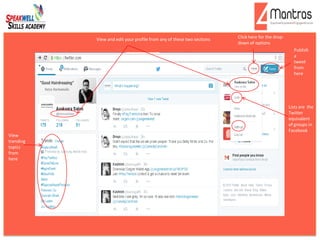
Publish
a
tweet
from
here
View and edit your profile from any of these two sections Click here for the drop-
down of options
View
trending
topics
from
here
Lists are the
Twitter
equivalent
of groups in
Facebook
This is what
your profile
will look like
and you can
edit it from
here
This is your edit mode
Make changes according to dimension
specifications from here
This is your bio. Make sure it is below
160 characters
Include the exact location and website
details; they boost the brand’s credibility
Make sure
you are saving
the changes
Twitter Settings:Apps https://twitter.com/settings/applications
This is for the purpose of
cross-platform integration
Click here
Fill out the necessary
details…
…and click Log In
Twitter Settings:Widgets https://twitter.com/settings/widgets
This is for the
purpose of
generating a code
which when
uploaded to the
website will show
the daily twitter
updates on the
website
Click here
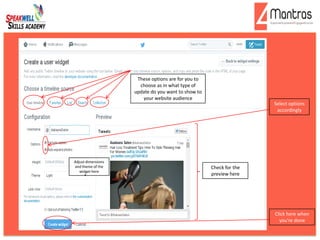
These options are for you to
choose as in what type of
update do you want to show to
your website audience
Select options
accordingly
Adjust dimensions
and theme of the
widget here
Check for the
preview here
Click here when
you’re done
This is the
code which
when
uploaded to
the website
will show
the daily
twitter
updates on
the website
Searching in Twitter: Whom to follow, etc.
Your search box
This is a # result for
topic and hence it is
already trending and
popular and so should
be used while tweeting
depending on
relevance to your lie of
business
Twitter handles you are
already following
Shows all possible
search results under al
categories as follows
Categories
In case you want to
filter your search
results
Helps you search with
more advanced options
like specific words,
hash tags and even
locations and many
more
Lists

Twitter Marketing Slides

  • 1.
  • 2.
    Points to remember •It’s a micro-blogging platform and it would be unwise to treat it as a purely selling platform at the very outset • Header Photo (Cover Photo for Facebook): 1500 x 500 pixels • Profile Photo: 400 x 400 pixels •
  • 3.
    Publish a tweet from here View and edityour profile from any of these two sections Click here for the drop- down of options View trending topics from here Lists are the Twitter equivalent of groups in Facebook
  • 4.
    This is what yourprofile will look like and you can edit it from here
  • 5.
    This is youredit mode Make changes according to dimension specifications from here This is your bio. Make sure it is below 160 characters Include the exact location and website details; they boost the brand’s credibility Make sure you are saving the changes
  • 6.
    Twitter Settings:Apps https://twitter.com/settings/applications Thisis for the purpose of cross-platform integration Click here Fill out the necessary details… …and click Log In
  • 7.
    Twitter Settings:Widgets https://twitter.com/settings/widgets Thisis for the purpose of generating a code which when uploaded to the website will show the daily twitter updates on the website Click here
  • 8.
    These options arefor you to choose as in what type of update do you want to show to your website audience Select options accordingly Adjust dimensions and theme of the widget here Check for the preview here Click here when you’re done
  • 9.
    This is the codewhich when uploaded to the website will show the daily twitter updates on the website
  • 10.
    Searching in Twitter:Whom to follow, etc. Your search box This is a # result for topic and hence it is already trending and popular and so should be used while tweeting depending on relevance to your lie of business Twitter handles you are already following Shows all possible search results under al categories as follows
  • 11.
    Categories In case youwant to filter your search results Helps you search with more advanced options like specific words, hash tags and even locations and many more
  • 12.