Twitter @Fayfree Part 1: The Basics What’s a tweet?
Basics of Twitter Twitter is a microblogging tool. You can also think of it as a global chat. A “tweet” is limited to 140 characters or less. Tweets appear on the homepages of your account’s followers, but they are also visible to the entire Internet. Hashtags such as #CNY or #ALA2009 are used to track specific subjects on Twitter.
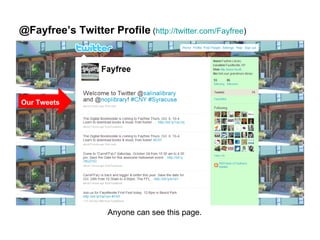
@Fayfree’s Twitter Profile  ( http://twitter.com/Fayfree )  Our Tweets Anyone can see this page.
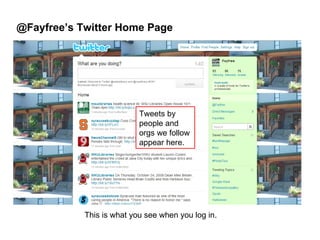
@Fayfree’s Twitter Home Page This is what you see when you log in. Tweets by people and orgs we follow appear here.
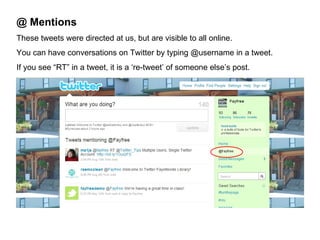
@ Mentions These tweets were directed at us, but are visible to all online. You can have conversations on Twitter by typing @username in a tweet. If you see “RT” in a tweet, it is a ‘re-tweet’ of someone else’s post.
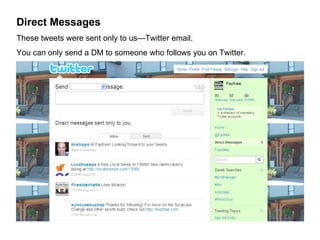
Direct Messages These tweets were sent only to us—Twitter email. You can only send a DM to someone who follows you on Twitter. If you see “RT” in a tweet, it is a ‘re-tweet’ of someone else’s post.
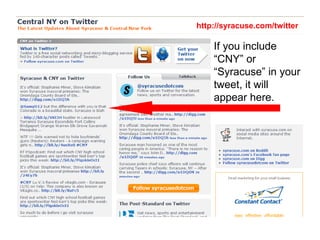
If you include “CNY” or “Syracuse” in your tweet, it will appear here. http://syracuse.com/twitter
Twitter @Fayfree Part 2: Get Involved What should I tweet?
Tweet This Promote library events and programs Tweet during a library event or program. What’s happening right now?  Promote library services: digital downloads, Homework Helper, computer labs, etc. Promote library materials: new books or media, Playaways, etc. Highlight cool reference material, relate to current school assignments or recent events Share tips on finding information online or in the library FFL in the news: link to articles from local news outlets Links to other online FFL content: blog posts, You Tube, CNY Heritage, etc. Links to non-FFL articles, videos, etc. that might interest patrons. “Cool stuff” Community-related info Note: When sharing links, use a link shortener like bit.ly
Tweet This Photographs (Choose “Blog This” from a photo in our Flickr Feed or use TwitPic) Retweet interesting tweets from others Encouragement and thanks to library volunteers, community groups, etc. Announcements: closings, cancellations, awards, etc.  Answer questions Solicit feedback Create a poll using a tool such as StrawPoll Respond to criticism Be creative Be clever Be funny Personalize it Interact!
How do I tweet? We’ll help! Send your 140-character message to a member of the Web Development Team, and we’ll post it for you. Or, try it yourself. Ask one of us for the login and password. It’s easy! Think you’ll tweet often? Ask us about Tweetdeck.
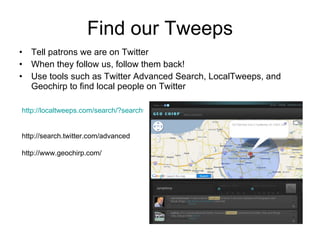
Find our Tweeps Tell patrons we are on Twitter When they follow us, follow them back! Use tools such as Twitter Advanced Search, LocalTweeps, and Geochirp to find local people on Twitter http://localtweeps.com/search/?search=13066   http://search.twitter.com/advanced http://www.geochirp.com/
Twitter Resources Bill Drew: Why Twitter? What can Twitter do for my library & my community?  http://sites.google.com/site/whytwitterstls/home   Mashable: Twitter Guidebook http://mashable.com/guidebook/twitter/     Andy Burkhardt: Six Things Libraries Should Tweet http://andyburkhardt.com/2009/07/27/six-things-libraries-should-tweet/     Andy Burkhardt: Seven More Things Libraries Should Tweet http://andyburkhardt.com/2009/10/19/seven-more-things-libraries-should-tweet/   Kelly D Allen: How Your Library May Not Be Using Twitter But Should http://www.kellyd.com/2009/07/29/how-your-library-may-not-be-using-twitter-but-should/     Dana Oshiro: 6 Great Twitter Quiz and Polling Apps http://www.readwriteweb.com/readwritestart/2009/10/6-great-twitter-quiz-and-polli.php   http://strawpollnow.com/     Twitter Search Operators:  http://search.twitter.com/operators

Twitter @Fayfree

  • 1.
    Twitter @Fayfree Part1: The Basics What’s a tweet?
  • 2.
    Basics of TwitterTwitter is a microblogging tool. You can also think of it as a global chat. A “tweet” is limited to 140 characters or less. Tweets appear on the homepages of your account’s followers, but they are also visible to the entire Internet. Hashtags such as #CNY or #ALA2009 are used to track specific subjects on Twitter.
  • 3.
    @Fayfree’s Twitter Profile ( http://twitter.com/Fayfree ) Our Tweets Anyone can see this page.
  • 4.
    @Fayfree’s Twitter HomePage This is what you see when you log in. Tweets by people and orgs we follow appear here.
  • 5.
    @ Mentions Thesetweets were directed at us, but are visible to all online. You can have conversations on Twitter by typing @username in a tweet. If you see “RT” in a tweet, it is a ‘re-tweet’ of someone else’s post.
  • 6.
    Direct Messages Thesetweets were sent only to us—Twitter email. You can only send a DM to someone who follows you on Twitter. If you see “RT” in a tweet, it is a ‘re-tweet’ of someone else’s post.
  • 7.
    If you include“CNY” or “Syracuse” in your tweet, it will appear here. http://syracuse.com/twitter
  • 8.
    Twitter @Fayfree Part2: Get Involved What should I tweet?
  • 9.
    Tweet This Promotelibrary events and programs Tweet during a library event or program. What’s happening right now? Promote library services: digital downloads, Homework Helper, computer labs, etc. Promote library materials: new books or media, Playaways, etc. Highlight cool reference material, relate to current school assignments or recent events Share tips on finding information online or in the library FFL in the news: link to articles from local news outlets Links to other online FFL content: blog posts, You Tube, CNY Heritage, etc. Links to non-FFL articles, videos, etc. that might interest patrons. “Cool stuff” Community-related info Note: When sharing links, use a link shortener like bit.ly
  • 10.
    Tweet This Photographs(Choose “Blog This” from a photo in our Flickr Feed or use TwitPic) Retweet interesting tweets from others Encouragement and thanks to library volunteers, community groups, etc. Announcements: closings, cancellations, awards, etc. Answer questions Solicit feedback Create a poll using a tool such as StrawPoll Respond to criticism Be creative Be clever Be funny Personalize it Interact!
  • 11.
    How do Itweet? We’ll help! Send your 140-character message to a member of the Web Development Team, and we’ll post it for you. Or, try it yourself. Ask one of us for the login and password. It’s easy! Think you’ll tweet often? Ask us about Tweetdeck.
  • 12.
    Find our TweepsTell patrons we are on Twitter When they follow us, follow them back! Use tools such as Twitter Advanced Search, LocalTweeps, and Geochirp to find local people on Twitter http://localtweeps.com/search/?search=13066 http://search.twitter.com/advanced http://www.geochirp.com/
  • 13.
    Twitter Resources BillDrew: Why Twitter? What can Twitter do for my library & my community? http://sites.google.com/site/whytwitterstls/home   Mashable: Twitter Guidebook http://mashable.com/guidebook/twitter/   Andy Burkhardt: Six Things Libraries Should Tweet http://andyburkhardt.com/2009/07/27/six-things-libraries-should-tweet/   Andy Burkhardt: Seven More Things Libraries Should Tweet http://andyburkhardt.com/2009/10/19/seven-more-things-libraries-should-tweet/   Kelly D Allen: How Your Library May Not Be Using Twitter But Should http://www.kellyd.com/2009/07/29/how-your-library-may-not-be-using-twitter-but-should/   Dana Oshiro: 6 Great Twitter Quiz and Polling Apps http://www.readwriteweb.com/readwritestart/2009/10/6-great-twitter-quiz-and-polli.php http://strawpollnow.com/   Twitter Search Operators: http://search.twitter.com/operators