All about using Twitter for
                 business
Background, uses, influence and best practice
About Twitter


 Twitter describes itself as “a service for
    friends, families, and co-workers to
     communicate and stay connected
 through the exchange of quick, frequent
      answers to one simple question:
          What are you doing?”
History


 Twitter   was created in March 2006

 Based     in San Francisco

 Inspired   by Text Messaging
History
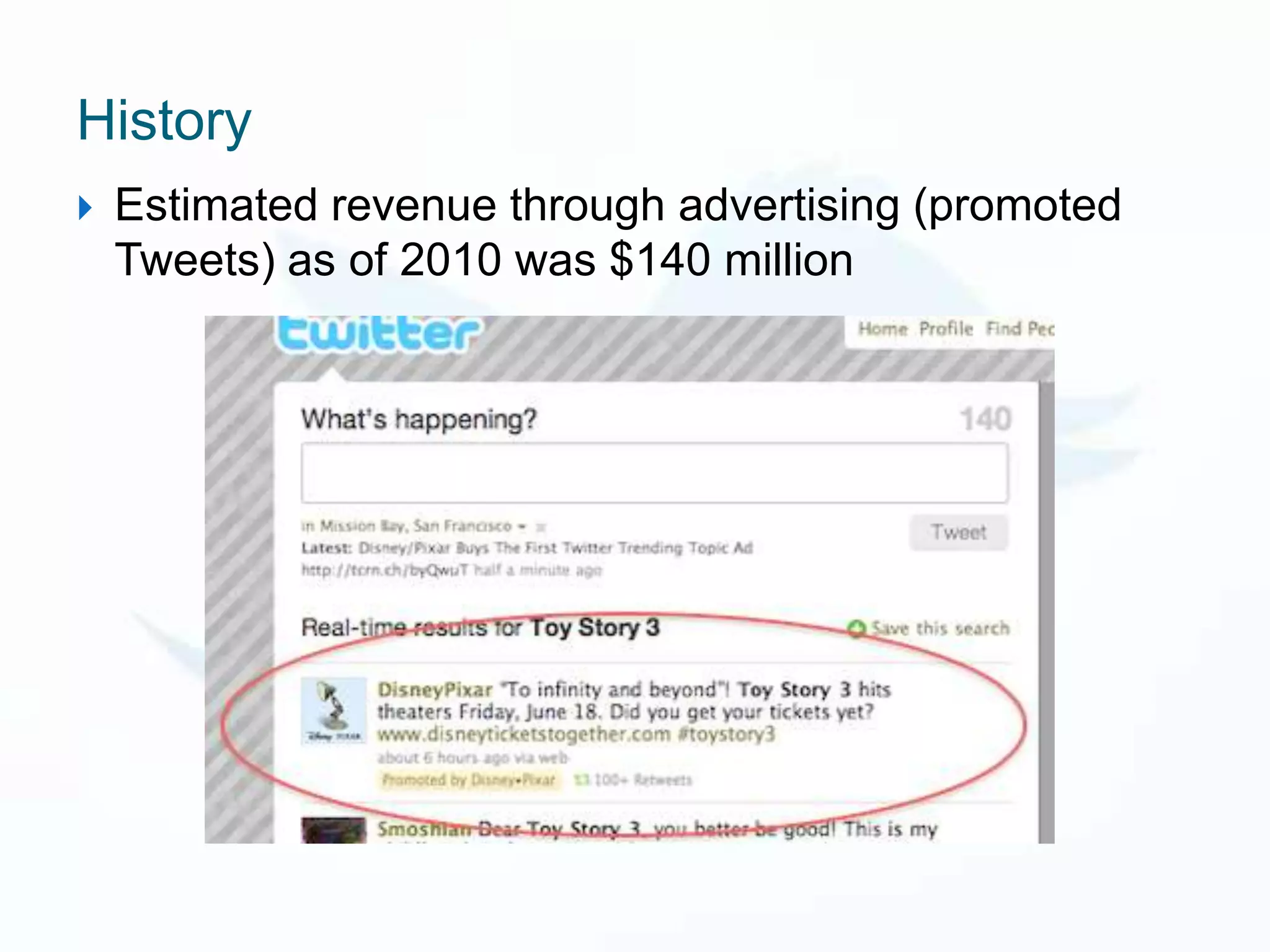
   Estimated revenue through advertising (promoted
    Tweets) as of 2010 was $140 million
History

   Twitter has over 500 million active users
    (2012)

   Generates 340 million tweets per day

   Handles over 1.6 billion search queries per
    day
History
   The first unassisted off-Earth Twitter message was
    posted from the International Space Station by
    NASA astronaut T.J. Creamer on 22nd January
    2010.
Key terms
   DM = Direct Message

   @ = Use to reply and always include proceeding a
    Twitter ID in reply

   RT = Retweet

   Tweet = sending a message on Twitter

   # = Hashtag used to organise information
About Twitter
   Twitter is a microblogging tool – a short form of blogging

   Tweets are limited to 140 characters (including links – we
    use url shorteners to save space)

   Users can post and read Tweets through the website
    Twitter.com, through smart phone apps, and via portable
    devices such as iPads

   You can post updates, follow and view other people’s
    updates (this is similar to subscribing to an RSS feed)
    send a reply or direct message to connect with other
    Twitter users
About Twitter
   Although it is often called a ‘social media’ it is more like a
    blog - you are announcing or making short one sentence
    blog posts which a wide audience of people can share or
    reply to.

   This is different from Facebook which allows for more
    one to one conversational style posts directed at friends
    (although some businesses work well on Facebook too)

   Twitter is best for B2B while Facebook is best for B2C

   It is a communication platform for listening as well as
    posting information
Users

   People in the business sector were ‘early adopters’
    of Twitter

   Twitter is mainly used by adults (majority age
    range 25 – 54 years old)

   Slightly more women (60%) than men (40%)

   Multiple languages in use on Twitter

                                             Source: US survey 2012
Twitter Handles & Bios
 Each Twitter account has a ‘handle’ – your online
  name
E.g.: @simpsonrc

   The name is included in your letter count for
    Retweets so shorter is better

   Choose a good profile photo & background – match
    brand identity

   Your ‘bio’ is also important. Appears at the top of
    your Twitter profile and explains who you are.
Public or private tweets?
   You can make your Twitter account private which
    means you must approve each new follower and
    your Tweets are not available to view publically.

   Businesses, products and services tend to be public
    for better coverage

   Twitter accounts are public by default – don’t say
    things online that you wouldn’t say in person!
#Hash tags
   Messages can be grouped by using hash tags


   For events - It’s important to choose an event
    hashtag early and to reinforce it with your followers
Trending Topics
Trending Topics
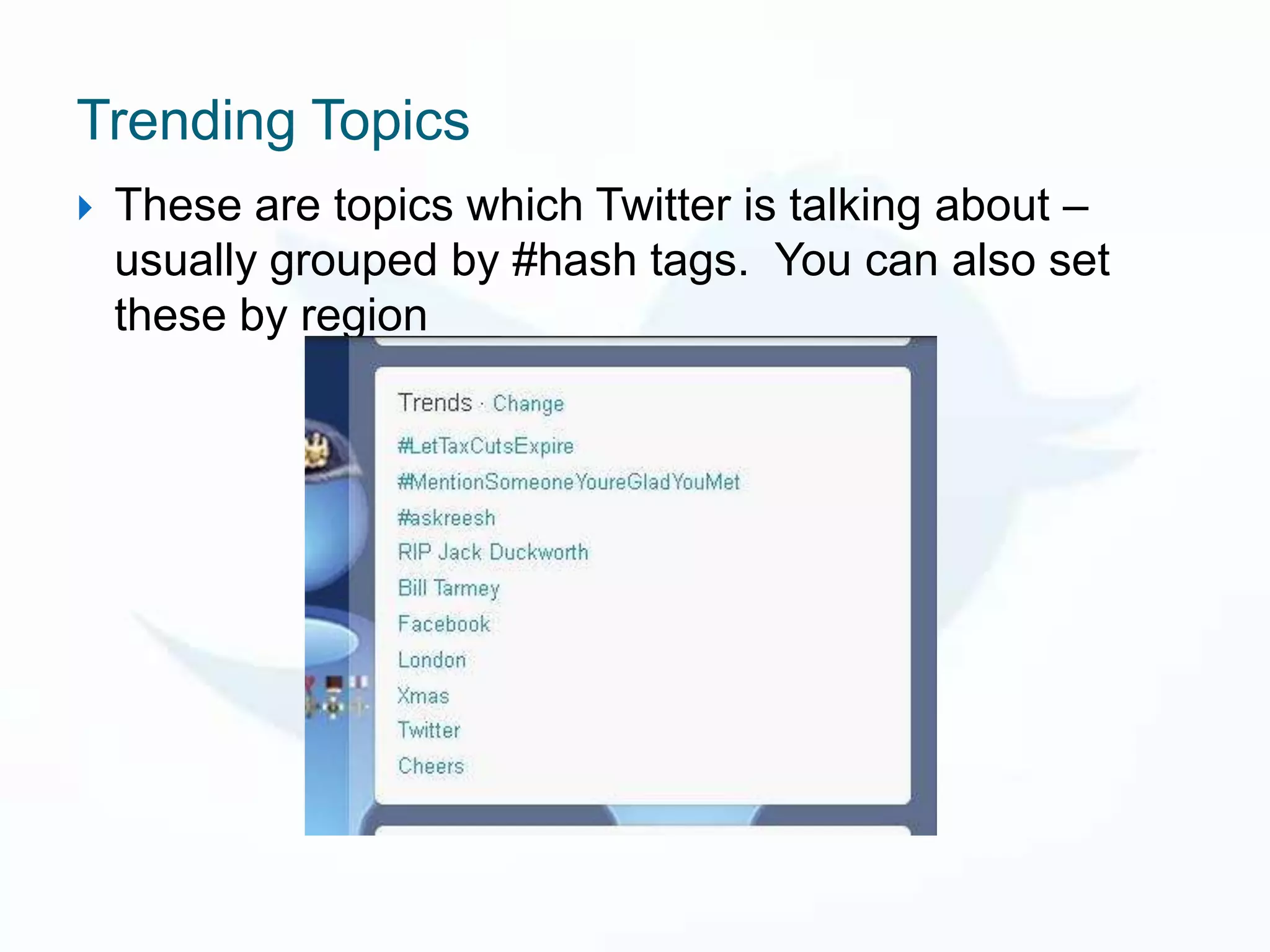
   These are topics which Twitter is talking about –
    usually grouped by #hash tags. You can also set
    these by region
Sharing
   As well as Tweets you can post photos and
    videos as updates


   Gives your followers an instant live view of
    an event
Retweets
   You can Retweet other peoples updates to your
    followers and they can Retweet your posts.

   The communications team can constantly cross
    promotes content from different brands if it is of
    interest to the followers

   This drives up website traffic, helps gain new
    followers and increases the public’s awareness of
    brands
Measuring Tools
   Important to have measuring tools like Hootsuite
    or Tweetdeck

These allow us to:

   Manage multiple Twitter accounts at once,
   Schedule updates,
   Monitor who is talking about us and to us
Direct Messages
   As well as tweeting @ someone you can also send
    them a direct message

   Many companies have auto messages saying
    ‘thanks for following!’ this is up to you as sometimes
    it may appear impersonal and spam-like

   Used more for correcting mistakes, to set up longer
    conversations and to pass on personal/private info
    (phone numbers etc)
#FollowFriday #FF #ff
   Follow Friday is a game in which people suggest
    who to follow on Twitter – it’s hugely popular and our
    brands do it from time to time.
   You Tweet the handles of all the accounts you think
    people should follow and tag it with #ff or
    #followfriday
How to promote your Twitter account
(not on Twitter)

   Account added to e-mail signature

   Widget on website

   Part of newsletters

   End of presentations

   On business cards
Best practise for businesses on Twitter
   Share – share photos, give glimpses of behind-the-
    scenes action, upcoming projects, events
   Listen – Monitor what people are saying about our
    brands
   Ask – ask your followers questions and gain insight
   Respond – in real time
   Reward – tweet time sensitive offers, discounts and deals
   Demonstrate knowledge – show off expertise!
   Champion stakeholders – Retweet customers and
    partnerships
   Establish your voice – use a direct, genuine tone, think
    about how your voice appears to the Twitter community
Social Media in general
The Communications and Social Media team
  must:
 Understand the brand
 Develop content
 Create strategy
 Be empathetic
 Lead
 Analyse
 Mediate
 Be Relevant
What is Social Media good for?

   Useful because it pushes the brand and
    boosts awareness

   Useful for customer feedback

   Making customers feel valued and
    emotionally bonded with the product
Social Media & Selling

   While selling is ultimately the aim Social Media
    works by not focusing on it but not ignoring it
    either – keep it subtle

   We help build loyalty, awareness and positive
    feelings about the brands and keep everyone up
    to date on our products

   We help create an emotional bond between the
    customer and the product
Social Media Feedback

   Customers WILL talk online about your product – so
    we need to be there to shout about our good points
    and to tackle our negative points

   This helps empower customers

   Tidies up bad press, highlights our good reviews

   Peer feedback can even help shape the next years
    strategy
Social Media Feedback
   Take negative conversations OFF social media and ON
    to your customer service team

   Reply quickly and politely

   Acknowledge the problem and direct them to a solution

   Swift resolution may even result in online praise

   DON’T say nothing and hope it goes away – it won’t.

   ...but don’t engage in an online row – always stay
    professional
Got questions?

     Tweet them to @simpsonrc

                 Happy Tweeting!


         Presentation by Rachael Simpson
 Journalist, Communications & Social Media Officer

Twitter for business

  • 1.
    All about usingTwitter for business Background, uses, influence and best practice
  • 2.
    About Twitter Twitterdescribes itself as “a service for friends, families, and co-workers to communicate and stay connected through the exchange of quick, frequent answers to one simple question: What are you doing?”
  • 3.
    History  Twitter was created in March 2006  Based in San Francisco  Inspired by Text Messaging
  • 4.
    History  Estimated revenue through advertising (promoted Tweets) as of 2010 was $140 million
  • 5.
    History  Twitter has over 500 million active users (2012)  Generates 340 million tweets per day  Handles over 1.6 billion search queries per day
  • 6.
    History  The first unassisted off-Earth Twitter message was posted from the International Space Station by NASA astronaut T.J. Creamer on 22nd January 2010.
  • 7.
    Key terms  DM = Direct Message  @ = Use to reply and always include proceeding a Twitter ID in reply  RT = Retweet  Tweet = sending a message on Twitter  # = Hashtag used to organise information
  • 8.
    About Twitter  Twitter is a microblogging tool – a short form of blogging  Tweets are limited to 140 characters (including links – we use url shorteners to save space)  Users can post and read Tweets through the website Twitter.com, through smart phone apps, and via portable devices such as iPads  You can post updates, follow and view other people’s updates (this is similar to subscribing to an RSS feed) send a reply or direct message to connect with other Twitter users
  • 9.
    About Twitter  Although it is often called a ‘social media’ it is more like a blog - you are announcing or making short one sentence blog posts which a wide audience of people can share or reply to.  This is different from Facebook which allows for more one to one conversational style posts directed at friends (although some businesses work well on Facebook too)  Twitter is best for B2B while Facebook is best for B2C  It is a communication platform for listening as well as posting information
  • 10.
    Users  People in the business sector were ‘early adopters’ of Twitter  Twitter is mainly used by adults (majority age range 25 – 54 years old)  Slightly more women (60%) than men (40%)  Multiple languages in use on Twitter Source: US survey 2012
  • 11.
    Twitter Handles &Bios  Each Twitter account has a ‘handle’ – your online name E.g.: @simpsonrc  The name is included in your letter count for Retweets so shorter is better  Choose a good profile photo & background – match brand identity  Your ‘bio’ is also important. Appears at the top of your Twitter profile and explains who you are.
  • 12.
    Public or privatetweets?  You can make your Twitter account private which means you must approve each new follower and your Tweets are not available to view publically.  Businesses, products and services tend to be public for better coverage  Twitter accounts are public by default – don’t say things online that you wouldn’t say in person!
  • 13.
    #Hash tags  Messages can be grouped by using hash tags  For events - It’s important to choose an event hashtag early and to reinforce it with your followers
  • 14.
  • 15.
    Trending Topics  These are topics which Twitter is talking about – usually grouped by #hash tags. You can also set these by region
  • 16.
    Sharing  As well as Tweets you can post photos and videos as updates  Gives your followers an instant live view of an event
  • 18.
    Retweets  You can Retweet other peoples updates to your followers and they can Retweet your posts.  The communications team can constantly cross promotes content from different brands if it is of interest to the followers  This drives up website traffic, helps gain new followers and increases the public’s awareness of brands
  • 19.
    Measuring Tools  Important to have measuring tools like Hootsuite or Tweetdeck These allow us to:  Manage multiple Twitter accounts at once,  Schedule updates,  Monitor who is talking about us and to us
  • 20.
    Direct Messages  As well as tweeting @ someone you can also send them a direct message  Many companies have auto messages saying ‘thanks for following!’ this is up to you as sometimes it may appear impersonal and spam-like  Used more for correcting mistakes, to set up longer conversations and to pass on personal/private info (phone numbers etc)
  • 21.
    #FollowFriday #FF #ff  Follow Friday is a game in which people suggest who to follow on Twitter – it’s hugely popular and our brands do it from time to time.  You Tweet the handles of all the accounts you think people should follow and tag it with #ff or #followfriday
  • 22.
    How to promoteyour Twitter account (not on Twitter)  Account added to e-mail signature  Widget on website  Part of newsletters  End of presentations  On business cards
  • 23.
    Best practise forbusinesses on Twitter  Share – share photos, give glimpses of behind-the- scenes action, upcoming projects, events  Listen – Monitor what people are saying about our brands  Ask – ask your followers questions and gain insight  Respond – in real time  Reward – tweet time sensitive offers, discounts and deals  Demonstrate knowledge – show off expertise!  Champion stakeholders – Retweet customers and partnerships  Establish your voice – use a direct, genuine tone, think about how your voice appears to the Twitter community
  • 24.
    Social Media ingeneral The Communications and Social Media team must:  Understand the brand  Develop content  Create strategy  Be empathetic  Lead  Analyse  Mediate  Be Relevant
  • 25.
    What is SocialMedia good for?  Useful because it pushes the brand and boosts awareness  Useful for customer feedback  Making customers feel valued and emotionally bonded with the product
  • 26.
    Social Media &Selling  While selling is ultimately the aim Social Media works by not focusing on it but not ignoring it either – keep it subtle  We help build loyalty, awareness and positive feelings about the brands and keep everyone up to date on our products  We help create an emotional bond between the customer and the product
  • 27.
    Social Media Feedback  Customers WILL talk online about your product – so we need to be there to shout about our good points and to tackle our negative points  This helps empower customers  Tidies up bad press, highlights our good reviews  Peer feedback can even help shape the next years strategy
  • 28.
    Social Media Feedback  Take negative conversations OFF social media and ON to your customer service team  Reply quickly and politely  Acknowledge the problem and direct them to a solution  Swift resolution may even result in online praise  DON’T say nothing and hope it goes away – it won’t.  ...but don’t engage in an online row – always stay professional
  • 29.
    Got questions? Tweet them to @simpsonrc Happy Tweeting! Presentation by Rachael Simpson Journalist, Communications & Social Media Officer