Twitter 101
Martin-Wilbourn Partners
Twitter
• Twitter has more than 500 million users
• 60% Female, 40% Male
• 120,000 tweets are posted every second
• 340 Million tweets are posted per day
• Every day, 1 million new accounts are
  created
• 43% of Americans are exposed to tweets
  from traditional media
Twitter
• 64% of Twitter users are more likely to buy
  products of brands they follow
• 53% of users have recommend
  companies and products on Twitter
• 50% of shoppers have made a purchase
  based on a recommendation posted on
  social media
• Engagement levels among Twitter users
  rose from 69% in 2011 to 76% in 2012
Twitter: Super Bowl
• 26 Super Bowl commercials included
  Twitter references.
  – Four referenced Facebook
  – One referenced Instagram
  – One referenced YouTube
  – Zero referenced Google+
• Twitter increased its hashtag mentions
  by 300% over the course of 2011
Twitter: Super Bowl
Twitter Glossary
• Blocking – Action used to keep someone on Twitter from
  following you or adding you to their lists, resulting in no
  mentions of them being delivered to your Mentions tab.

• Deactivation – A way to remove a profile from Twitter.
  Information from deactivated profiles remains in Twitter’s
  system for 30 days.

• Direct Message (DM) – Private, 140-character message
  between two people. You may only DM a user who follows
  you.

• Favorite – To mark a tweet by clicking the yellow star next to a
  message. Marked posts are housed in your personal
  “Favorites” section.
Twitter Glossary
• Follow – Subscribing to someone’s tweets or
  updates.

• Follow Count – Quantity of people or accounts
  you follow, and how many people or
  accounts follow you.

• Follower – Twitter user who has followed you.

• Following – Reflects the quantity of other
  Twitter users you have chosen to follow.
Twitter Glossary
• Handle – Username selected by a user and its
  accompanying URL (i.e. @BrentSGambill and
  Twitter.com/BrentSGambill).

• Hashtag (#) – The # symbol is used to denote a
  topic of conversation, allowing users to
  participate in a larger linked discussion (i.e.
  #Braves, #MadMen). A hashtag is a discovery tool
  that allows others to find your tweets, based on
  topics. You can also click on a hashtag to see all
  the tweets that mention it in real time – even from
  people you do not follow.
Twitter Glossary
• Listed – To be included in another Twitter user’s list. Listed
  numbers and details appear in the statistics section of your
  profile.

• Lists – Curated groups of other users. Used to tie specific
  individuals into a group on your Twitter account.

• Mention (@) – Referencing another user by including the @ sign
  followed directly by their username (i.e. @LRChamber) in a
  tweet. Users are notified when mentioned. It is also a way to
  conduct discussions with other users in a public realm.

• Modified Tweet (MT) – Placed before the retweeted text when
  users manually retweet a message with modifications, for
  example shortening a tweet.
Twitter Glossary
• Name – A listing separate from your handle. It can be different
  from your username and is used to locate you on Twitter. Must
  be 20 characters or fewer.

• Profile Picture – Personal image uploaded to your Twitter
  profile via the Settings tab of your account.

• Promoted Tweets – Tweets that businesses have paid to
  promote. They appear at the top of search results on Twitter.

• Protected/Private Accounts – Twitter accounts are public by
  default. Choosing to protect your account means your tweets
  will only be seen by approved followers and will not appear in
  search results.
Twitter Glossary
• Reply – Tweet posted in reply to another user’s
  post, usually posted by clicking the “reply” button
  next to their tweet in your timeline. Always begins
  with @username.

• Retweet (RT) - Re-posting or giving credit to
  someone else’s tweet. The retweet button allows
  instant sharing of another’s full embedded post.

• Retweet with Comment - Re-posting or giving
  credit to someone else’s tweet by manually
  cutting and pasting content into a post.
Twitter Glossary
• Timeline – Real-time stream of tweets you see on your
  homepage. It’s comprised of updates from users you
  follow.

• Trends – Subject algorithmically determined to be one of
  the most popular topics at the moment on Twitter.

• Tweet – 140-character message.

• Unfollow – To cease following another Twitter user. Their
  tweets no longer show up in your timeline.
Twitter Glossary
• URL – Uniform Resource Locator (URL) is a web address that
  points to a unique page on the Internet.

• URL Shortener – Turns a long URL into a shorter URL. Shortening
  services can be found online (i.e. Bitly, TinyURL).

• Username – Also known as a Twitter handle. Must be unique
  and contain fewer than 15 characters. Is used to identify you
  on Twitter for replies and mentions.

• Verification – Process whereby a user’s Twitter account is
  stamped to show that a legitimate source is authoring the
  account’s tweets. Sometimes used for accounts who
  experience identity confusion on Twitter.
Twitter Tips: Branding
• Consistency
  – Handles
  – Bios

• Official Page

• Imaging
  – Profile Photo
  – Header
  – Background
Twitter Tips: Organization
• Social Media Directory
  – Page Managers

• Monitoring

• Training

• Page managers should use separate
  mobile twitter apps for personal and
  company
Twitter Tips: Organization
Twitter Tips: Content
• Consistent posting

• Include links
  – Tweets with links are three times more
    likely to be RT’d

• Be timely
Twitter Tips: Content
• Specific words can lead to a higher rate
  of retweets

• The most commonly retweeted words:
  –   You
  –   Twitter
  –   Please
  –   Retweet
  –   Post
  –   Check out
Twitter Tips: Content
• Posts with more than 118 characters on
  Twitter have less engagement.
  – Users do not want to read longer tweets, and
    retweets with comments are more difficult to
    retweet.

• Grammar matters. Use proper
  punctuation.
  – Colons and periods are the most commonly
    used punctuation.
  – Question marks and semicolons are not
    commonly used.
Twitter Tips: Content
• How many tweets per day?
  – Research indicates ten to twenty tweets is a
    good daily average for brands.
  – Infrequent posts can lead to unengaged
    followers.
  – Over-tweeting leads to engaged unfollows.

• Engagement is higher on posts with photos.
  – Instagram no longer embeds photos on Twitter.
  – Twitter has photo filters?
Twitter Tips: Content
• A common mistake is starting a tweet
  with @someone for a post meant for
  the public.
  – When a tweet begins with
    @someone, only the two accounts (one
    posting and one mentioned) will see the
    post, along with anyone who follows both.
Twitter Tips: Hashtags
• The hashtag was first used in August 2007.

• A hashtag is a ”tag” used to categorize tweets according to
  topics.

• To add a hashtag, you preface the relevant term with pound
  sign (#).

• It allows people who follow a topic to find your tweet and
  hopefully follow you.

• You can create your own business hashtag.

• Be careful of using trending hashtags
   – Example: #LRChamber #WPS #MWPartners
Twitter Tips: Hashtags
• Use sparingly & respectfully

• Search a hashtag before using it

• Hashtags provide useful context & cues for topics

• Excessive use causes annoyance, confusion or
  frustration

• Use hashtags when it adds value, not on every word in a
  post

• Create an official hashtag for your business
Twitter Tips: Hashtags
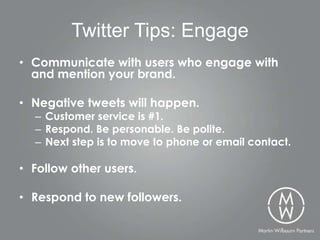
Twitter Tips: Engage
• Communicate with users who engage with
  and mention your brand.

• Negative tweets will happen.
  – Customer service is #1.
  – Respond. Be personable. Be polite.
  – Next step is to move to phone or email contact.

• Follow other users.

• Respond to new followers.
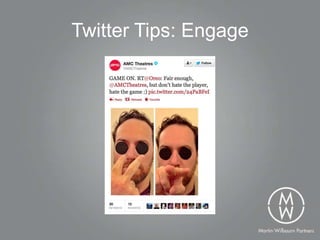
Twitter Tips: Engage
Twitter Tips: Customer Service
Twitter Tips: Policy
• Create a Social Media Standards &
  Practices Guide
  – Provides rules for employees
  – Page managers need expectations for
    their work on social media
  – Involve public relations strategies
Martin-Wilbourn Partners
•   Follow me at @BrentSGambill
•   Follow us at @MWPartners
•   Website: MWPartners.com
•   Blog: MWPartners.com/Podium

Twitter 101

  • 1.
  • 2.
    Twitter • Twitter hasmore than 500 million users • 60% Female, 40% Male • 120,000 tweets are posted every second • 340 Million tweets are posted per day • Every day, 1 million new accounts are created • 43% of Americans are exposed to tweets from traditional media
  • 3.
    Twitter • 64% ofTwitter users are more likely to buy products of brands they follow • 53% of users have recommend companies and products on Twitter • 50% of shoppers have made a purchase based on a recommendation posted on social media • Engagement levels among Twitter users rose from 69% in 2011 to 76% in 2012
  • 4.
    Twitter: Super Bowl •26 Super Bowl commercials included Twitter references. – Four referenced Facebook – One referenced Instagram – One referenced YouTube – Zero referenced Google+ • Twitter increased its hashtag mentions by 300% over the course of 2011
  • 5.
  • 6.
    Twitter Glossary • Blocking– Action used to keep someone on Twitter from following you or adding you to their lists, resulting in no mentions of them being delivered to your Mentions tab. • Deactivation – A way to remove a profile from Twitter. Information from deactivated profiles remains in Twitter’s system for 30 days. • Direct Message (DM) – Private, 140-character message between two people. You may only DM a user who follows you. • Favorite – To mark a tweet by clicking the yellow star next to a message. Marked posts are housed in your personal “Favorites” section.
  • 7.
    Twitter Glossary • Follow– Subscribing to someone’s tweets or updates. • Follow Count – Quantity of people or accounts you follow, and how many people or accounts follow you. • Follower – Twitter user who has followed you. • Following – Reflects the quantity of other Twitter users you have chosen to follow.
  • 8.
    Twitter Glossary • Handle– Username selected by a user and its accompanying URL (i.e. @BrentSGambill and Twitter.com/BrentSGambill). • Hashtag (#) – The # symbol is used to denote a topic of conversation, allowing users to participate in a larger linked discussion (i.e. #Braves, #MadMen). A hashtag is a discovery tool that allows others to find your tweets, based on topics. You can also click on a hashtag to see all the tweets that mention it in real time – even from people you do not follow.
  • 9.
    Twitter Glossary • Listed– To be included in another Twitter user’s list. Listed numbers and details appear in the statistics section of your profile. • Lists – Curated groups of other users. Used to tie specific individuals into a group on your Twitter account. • Mention (@) – Referencing another user by including the @ sign followed directly by their username (i.e. @LRChamber) in a tweet. Users are notified when mentioned. It is also a way to conduct discussions with other users in a public realm. • Modified Tweet (MT) – Placed before the retweeted text when users manually retweet a message with modifications, for example shortening a tweet.
  • 10.
    Twitter Glossary • Name– A listing separate from your handle. It can be different from your username and is used to locate you on Twitter. Must be 20 characters or fewer. • Profile Picture – Personal image uploaded to your Twitter profile via the Settings tab of your account. • Promoted Tweets – Tweets that businesses have paid to promote. They appear at the top of search results on Twitter. • Protected/Private Accounts – Twitter accounts are public by default. Choosing to protect your account means your tweets will only be seen by approved followers and will not appear in search results.
  • 11.
    Twitter Glossary • Reply– Tweet posted in reply to another user’s post, usually posted by clicking the “reply” button next to their tweet in your timeline. Always begins with @username. • Retweet (RT) - Re-posting or giving credit to someone else’s tweet. The retweet button allows instant sharing of another’s full embedded post. • Retweet with Comment - Re-posting or giving credit to someone else’s tweet by manually cutting and pasting content into a post.
  • 12.
    Twitter Glossary • Timeline– Real-time stream of tweets you see on your homepage. It’s comprised of updates from users you follow. • Trends – Subject algorithmically determined to be one of the most popular topics at the moment on Twitter. • Tweet – 140-character message. • Unfollow – To cease following another Twitter user. Their tweets no longer show up in your timeline.
  • 13.
    Twitter Glossary • URL– Uniform Resource Locator (URL) is a web address that points to a unique page on the Internet. • URL Shortener – Turns a long URL into a shorter URL. Shortening services can be found online (i.e. Bitly, TinyURL). • Username – Also known as a Twitter handle. Must be unique and contain fewer than 15 characters. Is used to identify you on Twitter for replies and mentions. • Verification – Process whereby a user’s Twitter account is stamped to show that a legitimate source is authoring the account’s tweets. Sometimes used for accounts who experience identity confusion on Twitter.
  • 14.
    Twitter Tips: Branding •Consistency – Handles – Bios • Official Page • Imaging – Profile Photo – Header – Background
  • 15.
    Twitter Tips: Organization •Social Media Directory – Page Managers • Monitoring • Training • Page managers should use separate mobile twitter apps for personal and company
  • 16.
  • 17.
  • 18.
  • 19.
  • 20.
    Twitter Tips: Content •Consistent posting • Include links – Tweets with links are three times more likely to be RT’d • Be timely
  • 21.
    Twitter Tips: Content •Specific words can lead to a higher rate of retweets • The most commonly retweeted words: – You – Twitter – Please – Retweet – Post – Check out
  • 22.
    Twitter Tips: Content •Posts with more than 118 characters on Twitter have less engagement. – Users do not want to read longer tweets, and retweets with comments are more difficult to retweet. • Grammar matters. Use proper punctuation. – Colons and periods are the most commonly used punctuation. – Question marks and semicolons are not commonly used.
  • 23.
    Twitter Tips: Content •How many tweets per day? – Research indicates ten to twenty tweets is a good daily average for brands. – Infrequent posts can lead to unengaged followers. – Over-tweeting leads to engaged unfollows. • Engagement is higher on posts with photos. – Instagram no longer embeds photos on Twitter. – Twitter has photo filters?
  • 24.
    Twitter Tips: Content •A common mistake is starting a tweet with @someone for a post meant for the public. – When a tweet begins with @someone, only the two accounts (one posting and one mentioned) will see the post, along with anyone who follows both.
  • 25.
    Twitter Tips: Hashtags •The hashtag was first used in August 2007. • A hashtag is a ”tag” used to categorize tweets according to topics. • To add a hashtag, you preface the relevant term with pound sign (#). • It allows people who follow a topic to find your tweet and hopefully follow you. • You can create your own business hashtag. • Be careful of using trending hashtags – Example: #LRChamber #WPS #MWPartners
  • 26.
    Twitter Tips: Hashtags •Use sparingly & respectfully • Search a hashtag before using it • Hashtags provide useful context & cues for topics • Excessive use causes annoyance, confusion or frustration • Use hashtags when it adds value, not on every word in a post • Create an official hashtag for your business
  • 27.
  • 28.
  • 29.
  • 30.
    Twitter Tips: Engage •Communicate with users who engage with and mention your brand. • Negative tweets will happen. – Customer service is #1. – Respond. Be personable. Be polite. – Next step is to move to phone or email contact. • Follow other users. • Respond to new followers.
  • 31.
  • 32.
  • 33.
  • 34.
  • 35.
  • 36.
  • 37.
  • 38.
  • 39.
  • 40.
  • 41.
    Twitter Tips: Policy •Create a Social Media Standards & Practices Guide – Provides rules for employees – Page managers need expectations for their work on social media – Involve public relations strategies
  • 42.
    Martin-Wilbourn Partners • Follow me at @BrentSGambill • Follow us at @MWPartners • Website: MWPartners.com • Blog: MWPartners.com/Podium