



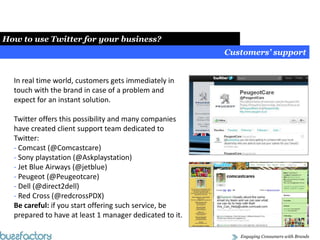
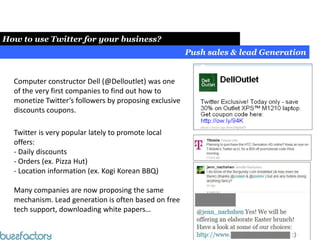
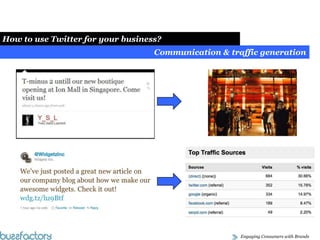
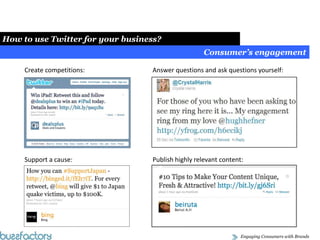



Social Media & Blog MarketingHow Twitter Works?      Simple steps to use Twitter for your business.
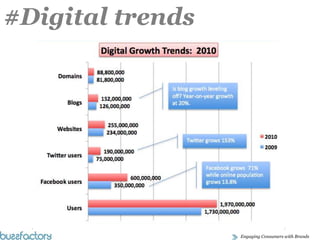
#Digital trends
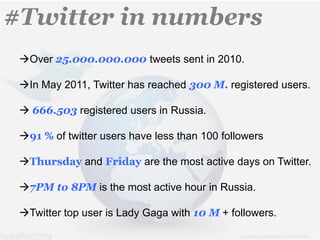
#Twitter in numbers Over 25.000.000.000 tweets sent in 2010.In May 2011, Twitter has reached 300 M. registered users.
 666.503 registered users in Russia.
91 % of twitter users have less than 100 followers
Thursday and Friday are the most active days on Twitter.
7PM to 8PM is the most active hour in Russia.
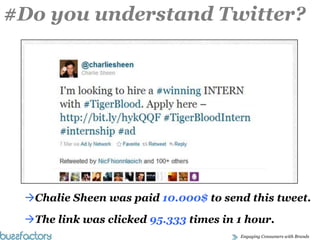
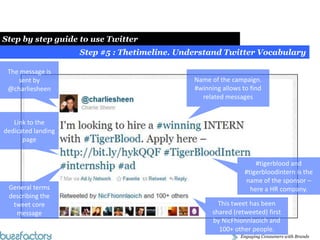
Twitter top user is Lady Gaga with 10 M + followers.#Do you understand Twitter?Chalie Sheen was paid 10.000$ to send this tweet.
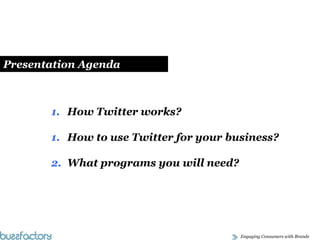
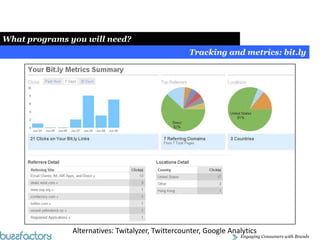
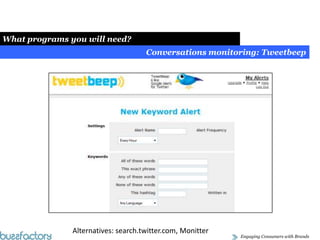
The link was clicked 95.333 times in 1 hour.    Presentation AgendaHow Twitter works?How to use Twitter for your business?What programs you will need?
How Twitter Works: Step by step guide
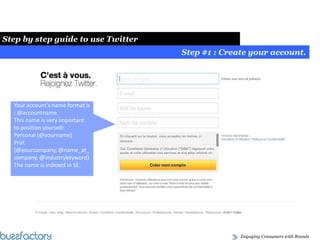
Social Media Strategy Fundamentals:Social Media Strategy Fundamentals:Step by step guide to use TwitterStep #1 : Create your account.Your account’s name format is : @accountname.This name is very important to position yourself:Personal (@yourname)Prof. (@yourcompany, @name_at_company, @industrykeyword) The name is indexed in SE.
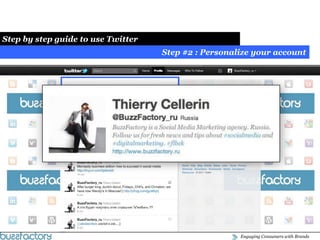
Social Media Strategy Fundamentals:Social Media Strategy Fundamentals:Step by step guide to use TwitterStep #2 : Personalize your account
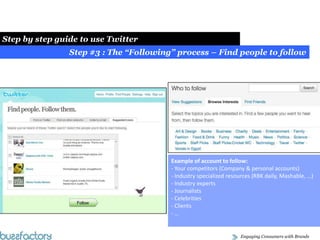
Social Media Strategy Fundamentals:Social Media Strategy Fundamentals:Step by step guide to use TwitterStep #3 : The “Following” process – Find people to followExample of account to follow: Your competitors (Company & personal accounts)
 Industry specialized resources (RBK daily, Mashable, …)
 Industry experts
 Journalists
 Celebrities
 Clients- …
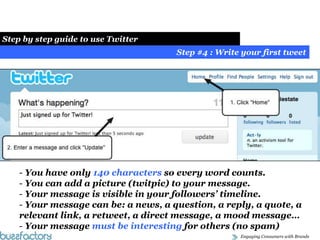
Social Media Strategy Fundamentals:Social Media Strategy Fundamentals:Step by step guide to use TwitterStep #4 : Write your first tweet You have only 140 characters so every word counts.
 You can add a picture (twitpic) to your message.
 Your message is visible in your followers’ timeline.
 Your message can be: a news, a question, a reply, a quote, a relevant link, a retweet, a direct message, a mood message…
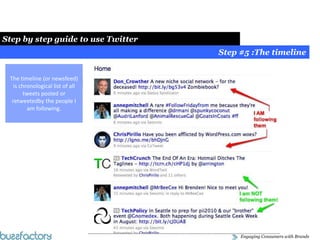
 Your message must be interesting for others (no spam) Social Media Strategy Fundamentals:Social Media Strategy Fundamentals:Step by step guide to use TwitterStep #5 :The timelineThe timeline (or newsfeed) is chronological list of all tweets posted or retweetedby the people I am following.
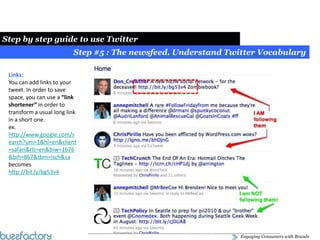
Social Media Strategy Fundamentals:Social Media Strategy Fundamentals:Step by step guide to use TwitterStep #5 : The newsfeed. Understand Twitter VocabularyLinks:You can add links to your tweet. In order to save space, you can use a “link shortener” in order to transform a usual long link in a short one. ex. http://www.google.com/search?um=1&hl=en&client=safari&rls=en&biw=1676&bih=867&tbm=isch&sabecomes http://bit.ly/bg53v4
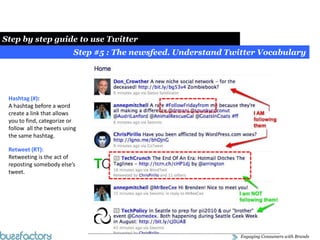
Social Media Strategy Fundamentals:Social Media Strategy Fundamentals:Step by step guide to use TwitterStep #5 : The newsfeed. Understand Twitter VocabularyHashtag (#):A hashtag before a word create a link that allows you to find, categorize or follow  all the tweets using the same hashtag.  Retweet (RT):Retweeting is the act of reposting somebody else’s tweet.
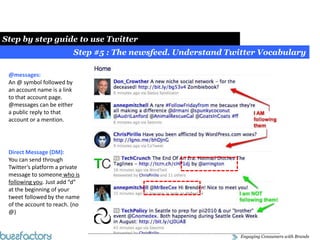
Social Media Strategy Fundamentals:Social Media Strategy Fundamentals:Step by step guide to use TwitterStep #5 : The newsfeed. Understand Twitter Vocabulary@messages:An @ symbol followed by an account name is a link to that account page. @messages can be either a public reply to that account or a mention.Direct Message (DM):You can send through Twitter’s platform a private message to someone who is following you. Just add “d” at the beginning of your tweet followed by the name of the account to reach. (no @)
Social Media Strategy Fundamentals:Social Media Strategy Fundamentals:Step by step guide to use TwitterStep #5 : Thetimeline. Understand Twitter VocabularyThe message is sent by @charliesheenName of the campaign. #winning allows to find related messagesLink to the dedicated landing page#tigerblood and #tigerbloodintern is the name of the sponsor – here a HR company.General terms describing the tweet core messageThis tweet has been shared (retweeted) first by NicFhionnlaoich and 100+ other people.
How to use Twitter for your business?
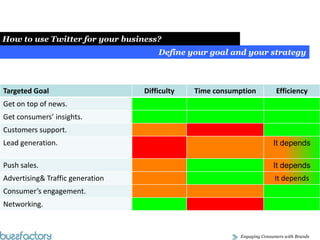
Social Media Strategy Fundamentals:Social Media Strategy Fundamentals:How to use Twitter for your business?Define your goal and your strategy
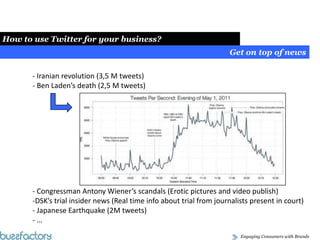
Social Media Strategy Fundamentals:Social Media Strategy Fundamentals:How to use Twitter for your business?Get on top of news Iranian revolution (3,5 M tweets)
 Ben Laden’s death (2,5 M tweets)- Congressman Antony Wiener’s scandals (Erotic pictures and video publish)DSK’s trial insider news (Real time info about trial from journalists present in court)
 Japanese Earthquake (2M tweets)
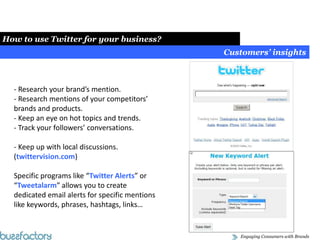
 …  Social Media Strategy Fundamentals:Social Media Strategy Fundamentals:How to use Twitter for your business?Customers’ insights Research your brand’s mention.

Simple Step By Step Twitter Guide for Beginners

  • 1.
    Social Media &Blog MarketingHow Twitter Works? Simple steps to use Twitter for your business.
  • 2.
  • 3.
    #Twitter in numbersOver 25.000.000.000 tweets sent in 2010.In May 2011, Twitter has reached 300 M. registered users.
  • 4.
    666.503 registeredusers in Russia.
  • 5.
    91 % oftwitter users have less than 100 followers
  • 6.
    Thursday and Fridayare the most active days on Twitter.
  • 7.
    7PM to 8PMis the most active hour in Russia.
  • 8.
    Twitter top useris Lady Gaga with 10 M + followers.#Do you understand Twitter?Chalie Sheen was paid 10.000$ to send this tweet.
  • 9.
    The link wasclicked 95.333 times in 1 hour. Presentation AgendaHow Twitter works?How to use Twitter for your business?What programs you will need?
  • 10.
    How Twitter Works:Step by step guide
  • 11.
    Social Media StrategyFundamentals:Social Media Strategy Fundamentals:Step by step guide to use TwitterStep #1 : Create your account.Your account’s name format is : @accountname.This name is very important to position yourself:Personal (@yourname)Prof. (@yourcompany, @name_at_company, @industrykeyword) The name is indexed in SE.
  • 12.
    Social Media StrategyFundamentals:Social Media Strategy Fundamentals:Step by step guide to use TwitterStep #2 : Personalize your account
  • 13.
    Social Media StrategyFundamentals:Social Media Strategy Fundamentals:Step by step guide to use TwitterStep #3 : The “Following” process – Find people to followExample of account to follow: Your competitors (Company & personal accounts)
  • 14.
    Industry specializedresources (RBK daily, Mashable, …)
  • 15.
  • 16.
  • 17.
  • 18.
  • 19.
    Social Media StrategyFundamentals:Social Media Strategy Fundamentals:Step by step guide to use TwitterStep #4 : Write your first tweet You have only 140 characters so every word counts.
  • 20.
    You canadd a picture (twitpic) to your message.
  • 21.
    Your messageis visible in your followers’ timeline.
  • 22.
    Your messagecan be: a news, a question, a reply, a quote, a relevant link, a retweet, a direct message, a mood message…
  • 23.
    Your messagemust be interesting for others (no spam) Social Media Strategy Fundamentals:Social Media Strategy Fundamentals:Step by step guide to use TwitterStep #5 :The timelineThe timeline (or newsfeed) is chronological list of all tweets posted or retweetedby the people I am following.
  • 24.
    Social Media StrategyFundamentals:Social Media Strategy Fundamentals:Step by step guide to use TwitterStep #5 : The newsfeed. Understand Twitter VocabularyLinks:You can add links to your tweet. In order to save space, you can use a “link shortener” in order to transform a usual long link in a short one. ex. http://www.google.com/search?um=1&hl=en&client=safari&rls=en&biw=1676&bih=867&tbm=isch&sabecomes http://bit.ly/bg53v4
  • 25.
    Social Media StrategyFundamentals:Social Media Strategy Fundamentals:Step by step guide to use TwitterStep #5 : The newsfeed. Understand Twitter VocabularyHashtag (#):A hashtag before a word create a link that allows you to find, categorize or follow all the tweets using the same hashtag. Retweet (RT):Retweeting is the act of reposting somebody else’s tweet.
  • 26.
    Social Media StrategyFundamentals:Social Media Strategy Fundamentals:Step by step guide to use TwitterStep #5 : The newsfeed. Understand Twitter Vocabulary@messages:An @ symbol followed by an account name is a link to that account page. @messages can be either a public reply to that account or a mention.Direct Message (DM):You can send through Twitter’s platform a private message to someone who is following you. Just add “d” at the beginning of your tweet followed by the name of the account to reach. (no @)
  • 27.
    Social Media StrategyFundamentals:Social Media Strategy Fundamentals:Step by step guide to use TwitterStep #5 : Thetimeline. Understand Twitter VocabularyThe message is sent by @charliesheenName of the campaign. #winning allows to find related messagesLink to the dedicated landing page#tigerblood and #tigerbloodintern is the name of the sponsor – here a HR company.General terms describing the tweet core messageThis tweet has been shared (retweeted) first by NicFhionnlaoich and 100+ other people.
  • 28.
    How to useTwitter for your business?
  • 29.
    Social Media StrategyFundamentals:Social Media Strategy Fundamentals:How to use Twitter for your business?Define your goal and your strategy
  • 30.
    Social Media StrategyFundamentals:Social Media Strategy Fundamentals:How to use Twitter for your business?Get on top of news Iranian revolution (3,5 M tweets)
  • 31.
    Ben Laden’sdeath (2,5 M tweets)- Congressman Antony Wiener’s scandals (Erotic pictures and video publish)DSK’s trial insider news (Real time info about trial from journalists present in court)
  • 32.
  • 33.
    Social Media Strategy Fundamentals:Social Media Strategy Fundamentals:How to use Twitter for your business?Customers’ insights Research your brand’s mention.

Editor's Notes

  • #5  Charlie Sheen was paid 10.000 $ to publish that tweet. The link was clicked 95.333 times in 1 hour.
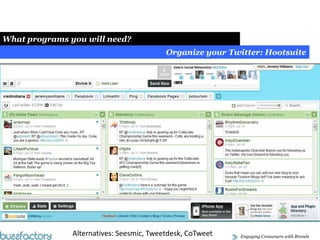
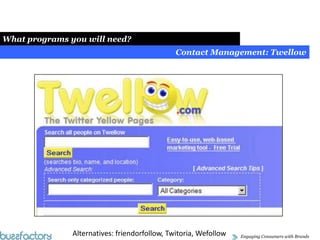
  • #6 What programs you will need?
  • #16  Charlie Sheen was paid 10.000 $ to publish that tweet. The link was clicked 95.333 times in 1 hour.
  • #19 http://www.onlinesocialmedia.net/20110503/osama-bin-laden-death-twitter’s-stats-revealed/
  • #29 http://tweepi.com/
  • #33 Social Media Exposure