



Ranjeeth Kathiresan
Senior Software Engineer
rkathiresan@salesforce.com
Scaling HBase for Big Data
Salesforce
Gurpreet Multani
Principal Software Engineer
gmultani@salesforce.com
Introduction
Ranjeeth Kathiresan is a Senior Software Engineer at Salesforce, where he
focuses primarily on improving the performance, scalability, and availability of
applications by assessing and tuning the server-side components in terms of
code, design, configuration, and so on, particularly with Apache HBase.
Ranjeeth is an admirer of performance engineering and is especially fond of
tuning an application to perform better.
Gurpreet Multani is a Principal Software Engineer at Salesforce. At Salesforce,
Gurpreet has lead initiatives to scale various Big Data technologies such as Apache
HBase, Apache Solr, Apache Kafka. He is particularly interested in finding ways to
optimize code to reduce bottlenecks, consume lesser resources and achieve more out
of available capacity in the process.
Agenda
• HBase @ Salesforce
• CAP Theorem
• HBase Refresher
• Typical HBase Use Cases
• HBase Internals
• Data Loading Use Case
• Write Bottlenecks
• Tuning Writes
• Best Practices
• Q&A
HBase @ Salesforce
Typical Cluster
Data Volume
120 TB
Nodes Across All Clusters
2200+
Variety
Simple Row Store
Denormalization
Messaging
Event Log
Analytics
Metrics
Graphs
Cache
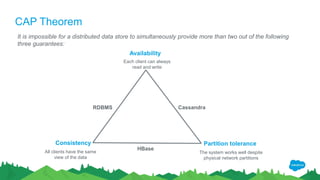
CAP Theorem
It is impossible for a distributed data store to simultaneously provide more than two out of the following
three guarantees:
Availability
Consistency Partition tolerance
Each client can always
read and write
All clients have the same
view of the data
The system works well despite
physical network partitions
CassandraRDBMS
HBase
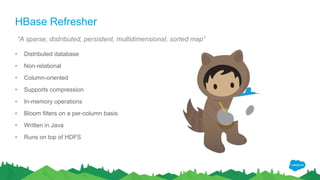
HBase Refresher
• Distributed database
• Non-relational
• Column-oriented
• Supports compression
• In-memory operations
• Bloom filters on a per-column basis
• Written in Java
• Runs on top of HDFS
“A sparse, distributed, persistent, multidimensional, sorted map”
Typical HBase Use Cases
Large Data Volume running into at least hundreds of GBs or more (aka Big Data)
Data access patterns are well known at design time and are not expected to change i.e.
no secondary indexes / joins need to be added at a later stage
RDBMS-like multi-row transactions are not required
Large “working set” of data. Working set = data being accessed or being updated
Multiple versions of data
Region Server
Region
HBase Internals
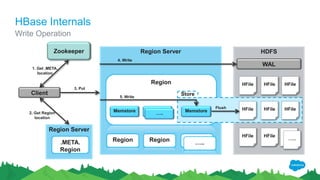
Write Operation
Client
Zookeeper HDFS
Region Server
.META.
Region
WAL
HFile HFile
HFile HFile HFile
Memstore HFile
Store
1. Get .META.
location
2. Get Region
location
3. Put
4. Write
5. Write
Flush
Region Region …..
HFile HFile HFile
…..
…..
Memstore Memstore…..
HBase Internals
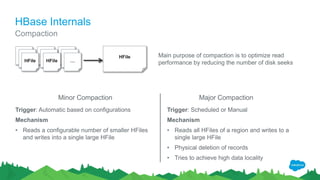
Compaction
HFile HFile HFile
HFile HFile HFile
HFile HFile …
HFile Main purpose of compaction is to optimize read
performance by reducing the number of disk seeks
Minor Compaction Major Compaction
Trigger: Automatic based on configurations
Mechanism
• Reads a configurable number of smaller HFiles
and writes into a single large HFile
Trigger: Scheduled or Manual
Mechanism
• Reads all HFiles of a region and writes to a
single large HFile
• Physical deletion of records
• Tries to achieve high data locality
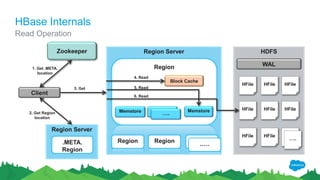
Region Server
Region
Client
Zookeeper
Memstore
HDFS
Region Server
.META.
Region
WAL
HFile HFile
HFile HFile HFile
Memstore HFile
1. Get .META.
location
2. Get Region
location
3. Get 5. Read
Region Region Region
HFile HFile HFile
Block Cache
4. Read
6. Read
…..
.….
Memstore…..
HBase Internals
Read Operation
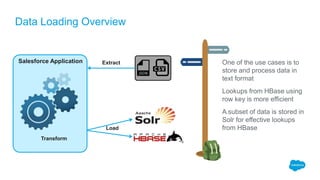
One of the use cases is to
store and process data in
text format
Lookups from HBase using
row key is more efficient
A subset of data is stored in
Solr for effective lookups
from HBase
Data Loading Overview
Salesforce Application
Transform
Extract
Load
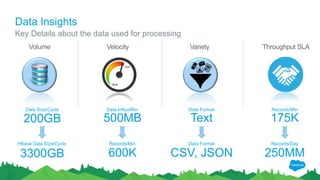
Data Insights
Key Details about the data used for processing
Velocity VarietyVolume
500MB
Data Influx/Min
200GB
Data Size/Cycle
Text
Data Format
175K
Records/Min
Throughput SLA
600K
Records/Min
3300GB
HBase Data Size/Cycle
CSV, JSON
Data Format
250MM
Records/Day
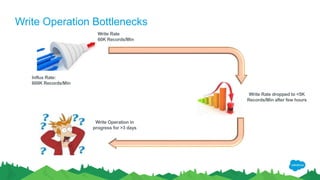
Write Operation Bottlenecks
Influx Rate:
600K Records/Min
Write Rate
60K Records/Min
Write Operation in
progress for >3 days
Write Rate dropped to <5K
Records/Min after few hours
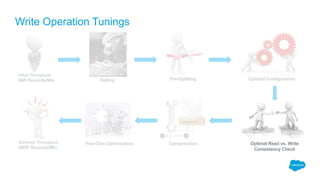
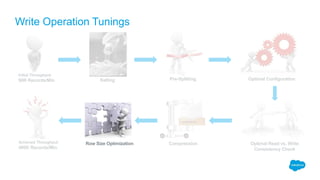
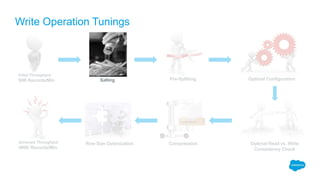
Write Operation Tunings
Improved throughput by ~8 times & achieved ~3 times more than expected throughput
Initial Throughput:
60K Records/Min
Achieved Throughput:
480K Records/Min
Salting Pre-Splitting Optimal Configuration
CompressionRow Size Optimization Optimal Read vs. Write
Consistency Check
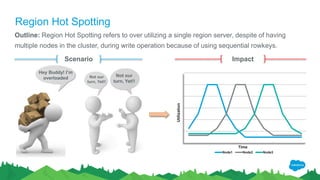
Region Hot Spotting
Outline: Region Hot Spotting refers to over utilizing a single region server, despite of having
multiple nodes in the cluster, during write operation because of using sequential rowkeys.
Scenario
Not our
turn, Yet!!
Not our
turn, Yet!!
Hey Buddy! I’m
overloaded
Impact
Node1 Node2 Node3
Utilization
Time
Write Operation Tunings
Initial Throughput:
60K Records/Min
Achieved Throughput:
480K Records/Min
Salting Pre-Splitting Optimal Configuration
CompressionRow Size Optimization Optimal Read vs. Write
Consistency Check
Salting
Outline: Salting helps to distribute writes over multiple
regions by using random row keys
How do I implement Salting?
Salting is implemented by defining the rowkeys wisely by
adding a salt prefix (random character) to the original key
Two Common ways of salting
• Adding a random number as prefix based on modulo
• Hashing the rowkey
Salting
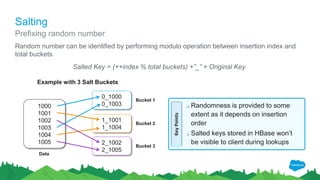
Random number can be identified by performing modulo operation between insertion index and
total buckets
Salted Key = (++index % total buckets) +”_” + Original Key
Prefixing random number
0_1000
0_1003
1_1001
1_1004
2_1002
2_1005
Bucket 1
Bucket 2
Bucket 3
1000
1001
1002
1003
1004
1005
Example with 3 Salt Buckets
KeyPoints
 Randomness is provided to some
extent as it depends on insertion
order
 Salted keys stored in HBase won’t
be visible to client during lookups
Data
Salting
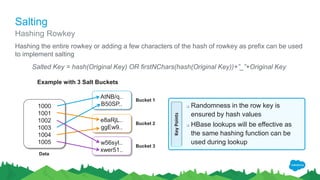
Hashing the entire rowkey or adding a few characters of the hash of rowkey as prefix can be used
to implement salting
Salted Key = hash(Original Key) OR firstNChars(hash(Original Key))+”_”+Original Key
Hashing Rowkey
AtNB/q..
B50SP..
e8aRjL..
ggEw9..
w56syI..
xwer51..
Bucket 1
Bucket 2
Bucket 3
1000
1001
1002
1003
1004
1005
Example with 3 Salt Buckets
KeyPoints
 Randomness in the row key is
ensured by hash values
 HBase lookups will be effective as
the same hashing function can be
used during lookup
Data
Salting
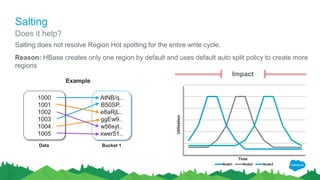
Salting does not resolve Region Hot spotting for the entire write cycle.
Reason: HBase creates only one region by default and uses default auto split policy to create more
regions
AtNB/q..
B50SP..
e8aRjL..
ggEw9..
w56syI..
xwer51..
Bucket 1
1000
1001
1002
1003
1004
1005
Data
Example
Does it help?
Impact
Node1 Node2 Node3
Utilization
Time
Write Operation Tunings
Initial Throughput:
60K Records/Min
Achieved Throughput:
480K Records/Min
Salting Pre-Splitting Optimal Configuration
CompressionRow Size Optimization Optimal Read vs. Write
Consistency Check
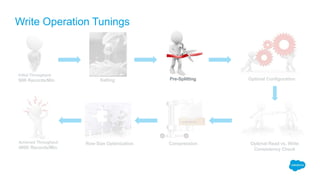
Pre-Splitting
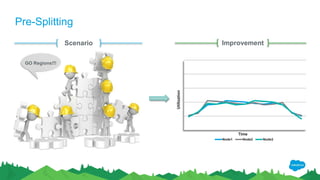
Outline: Pre-Splitting helps to create multiple regions during table creation which will help to
reap the benefits of salting
How do I pre-split a HBase table?
Pre-splitting can be done by providing split points during table creation
Example: create ‘table_name’, ‘cf_name’, SPLITS => [‘a’ , ‘m’]
AtNB/q..
B50SP..
e8aRjL..
ggEw9..
w56syI..
xwer51..
Bucket 1 [‘’ -> ‘a’]
Bucket 2 [‘a’ -> ‘m’]
Bucket 3 [‘m’ -> ‘’]
1000
1001
1002
1003
1004
1005
Data
Pre-Splitting
Scenario
Hey Buddy! I’m
overloaded
Improvement
Node1 Node2 Node3
Utilization
Time
GO Regions!!!
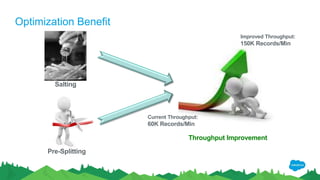
Optimization Benefit
Salting
Pre-Splitting
Throughput Improvement
Current Throughput:
60K Records/Min
Improved Throughput:
150K Records/Min
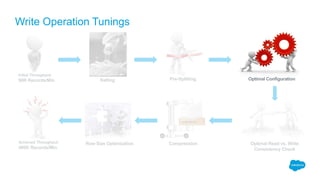
Write Operation Tunings
Initial Throughput:
60K Records/Min
Achieved Throughput:
480K Records/Min
Salting Pre-Splitting Optimal Configuration
CompressionRow Size Optimization Optimal Read vs. Write
Consistency Check
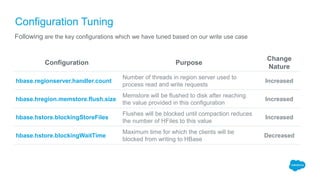
Configuration Tuning
Outline: Default configurations may not work for all use cases. We need to tune configurations based on
our use case
It is 9!! No. It is 6!!
Configuration Tuning
Configuration Purpose
Change
Nature
hbase.regionserver.handler.count
Number of threads in region server used to
process read and write requests
Increased
hbase.hregion.memstore.flush.size
Memstore will be flushed to disk after reaching
the value provided in this configuration
Increased
hbase.hstore.blockingStoreFiles
Flushes will be blocked until compaction reduces
the number of HFiles to this value
Increased
hbase.hstore.blockingWaitTime
Maximum time for which the clients will be
blocked from writing to HBase
Decreased
Following are the key configurations which we have tuned based on our write use case
Configuration Tuning
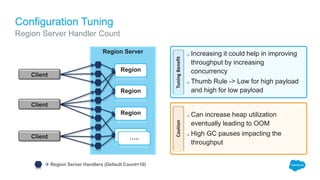
Region Server Handler Count
Region Server
Client
Client
Client
Region
Region
Region
Region
…..
 Region Server Handlers (Default Count=10)
TuningBenefitCaution
 Increasing it could help in improving
throughput by increasing
concurrency
 Thumb Rule -> Low for high payload
and high for low payload
 Can increase heap utilization
eventually leading to OOM
 High GC pauses impacting the
throughput
Configuration Tuning
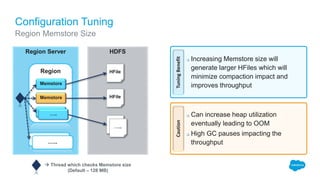
Region Memstore Size
Region Server
Region
Region
…..
 Thread which checks Memstore size
(Default – 128 MB)
TuningBenefitCaution
 Increasing Memstore size will
generate larger HFiles which will
minimize compaction impact and
improves throughput
 Can increase heap utilization
eventually leading to OOM
 High GC pauses impacting the
throughput
HDFS
HFile
Memstore
Memstore
Memstore
HFile
HFile
…..
…..
Memstore
Configuration Tuning
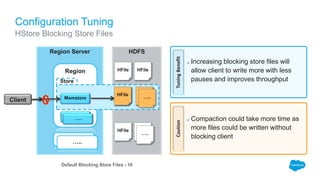
HStore Blocking Store Files
Region Server
Region
Region
…..
Default Blocking Store Files - 10
TuningBenefitCaution
 Increasing blocking store files will
allow client to write more with less
pauses and improves throughput
 Compaction could take more time as
more files could be written without
blocking client
HDFS
HFile
Memstore…..
HFile
HFile
Memstore
HFile
Store
HFile HFile
Client
HFile HFile…..
…..
Configuration Tuning
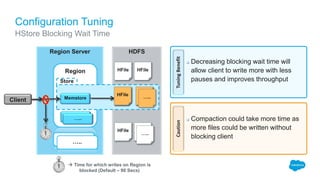
HStore Blocking Wait Time
Region Server
Region
Region
…..
TuningBenefitCaution
 Decreasing blocking wait time will
allow client to write more with less
pauses and improves throughput
 Compaction could take more time as
more files could be written without
blocking client
HDFS
HFile
Memstore…..
HFile
HFile
Memstore
HFile
Store
HFile HFile
Client
HFile HFile…..
…..
 Time for which writes on Region is
blocked (Default – 90 Secs)
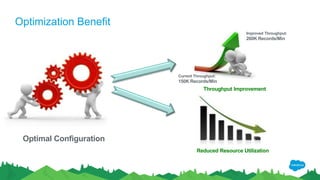
Optimization Benefit
Throughput Improvement
Current Throughput:
150K Records/Min
Improved Throughput:
260K Records/Min
Optimal Configuration
Reduced Resource Utilization
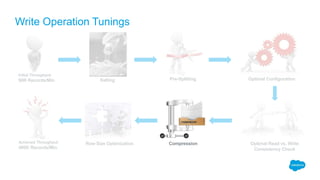
Write Operation Tunings
Initial Throughput:
60K Records/Min
Achieved Throughput:
480K Records/Min
Salting Pre-Splitting Optimal Configuration
CompressionRow Size Optimization Optimal Read vs. Write
Consistency Check
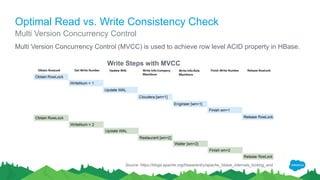
Optimal Read vs. Write Consistency Check
Multi Version Concurrency Control
Multi Version Concurrency Control (MVCC) is used to achieve row level ACID property in HBase.
Source: https://blogs.apache.org/hbase/entry/apache_hbase_internals_locking_and
Write Steps with MVCC
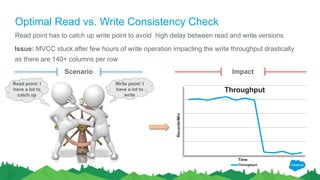
Optimal Read vs. Write Consistency Check
Issue: MVCC stuck after few hours of write operation impacting the write throughput drastically
as there are 140+ columns per row
Scenario Impact
Throughput
Throughput
Records/Min
Time
Write point: I
have a lot to
write
Read point: I
have a lot to
catch up
Read point has to catch up write point to avoid high delay between read and write versions
Optimal Read vs. Write Consistency Check
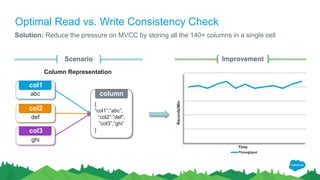
Solution: Reduce the pressure on MVCC by storing all the 140+ columns in a single cell
Scenario
Throughput
Records/Min
Time
Improvement
abc
def
ghi
{
“col1”:”abc”,
“col2”:”def”,
“col3”,”ghi”
}
Column Representation
col1
col2
col3
column
Optimal Read vs. Write
Consistency Check
Optimization Benefit
Stability Improvement
Steady Resource Utilization
Storage Optimization
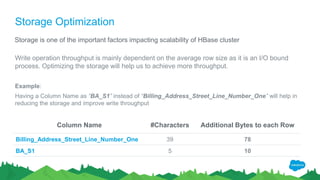
Storage is one of the important factors impacting scalability of HBase cluster
Write operation throughput is mainly dependent on the average row size as it is an I/O bound
process. Optimizing the storage will help us to achieve more throughput.
Example:
Having a Column Name as “BA_S1” instead of “Billing_Address_Street_Line_Number_One” will help in
reducing the storage and improve write throughput
Column Name #Characters Additional Bytes to each Row
Billing_Address_Street_Line_Number_One 39 78
BA_S1 5 10
Write Operation Tunings
Initial Throughput:
60K Records/Min
Achieved Throughput:
480K Records/Min
Salting Pre-Splitting Optimal Configuration
CompressionRow Size Optimization Optimal Read vs. Write
Consistency Check
Compression
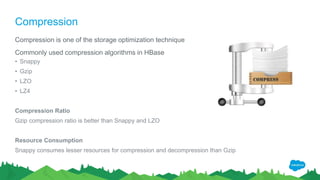
Compression is one of the storage optimization technique
Commonly used compression algorithms in HBase
• Snappy
• Gzip
• LZO
• LZ4
Compression Ratio
Gzip compression ratio is better than Snappy and LZO
Resource Consumption
Snappy consumes lesser resources for compression and decompression than Gzip
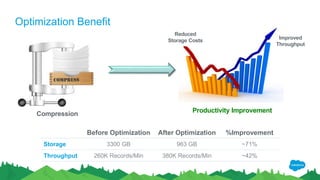
Optimization Benefit
Productivity Improvement
Reduced
Storage Costs
Improved
Throughput
Compression
Before Optimization After Optimization %Improvement
Storage 3300 GB 963 GB ~71%
Throughput 260K Records/Min 380K Records/Min ~42%
Write Operation Tunings
Initial Throughput:
60K Records/Min
Achieved Throughput:
480K Records/Min
Salting Pre-Splitting Optimal Configuration
CompressionRow Size Optimization Optimal Read vs. Write
Consistency Check
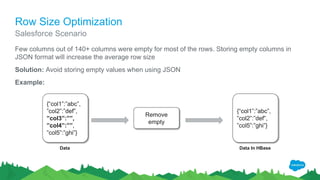
Row Size Optimization
Few columns out of 140+ columns were empty for most of the rows. Storing empty columns in
JSON format will increase the average row size
Solution: Avoid storing empty values when using JSON
Example:
Salesforce Scenario
{“col1”:”abc”,
”col2”:”def”,
”col3”:””,
”col4”:””,
”col5”:”ghi”}
Data
Remove
empty
{“col1”:”abc”,
”col2”:”def”,
”col5”:”ghi”}
Data In HBase
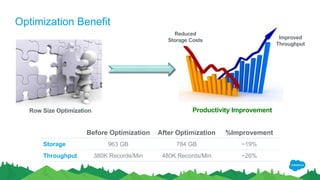
Optimization Benefit
Productivity Improvement
Reduced
Storage Costs Improved
Throughput
Before Optimization After Optimization %Improvement
Storage 963 GB 784 GB ~19%
Throughput 380K Records/Min 480K Records/Min ~26%
Row Size Optimization
RECAP
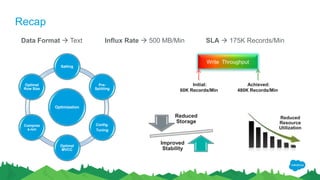
Recap
Write Throughput
Initial:
60K Records/Min
Achieved:
480K Records/Min
SLA  175K Records/Min
Optimization
Salting
Pre-
Splitting
Config.
Tuning
Optimal
MVCC
Compres
s-ion
Optimal
Row Size
Data Format  Text Influx Rate  500 MB/Min
Reduced
Storage
Improved
Stability
Reduced
Resource
Utilization
Best Practices
Row key design
• Know your data better before pre-splitting
• Shorter row key but long enough for data access
Minimize IO
• Less number of Column Families
• Shorter Column Family and Qualifier name
Locality
• Review the locality of regions periodically
• Co-locate Region server and Data node
Maximize Throughput
• Minimize major compactions
• Use high throughput disk
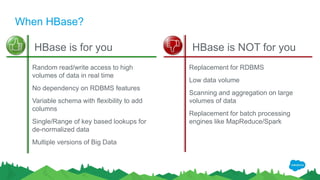
When HBase?
HBase is for you HBase is NOT for you
Random read/write access to high
volumes of data in real time
No dependency on RDBMS features
Variable schema with flexibility to add
columns
Single/Range of key based lookups for
de-normalized data
Multiple versions of Big Data
Replacement for RDBMS
Low data volume
Scanning and aggregation on large
volumes of data
Replacement for batch processing
engines like MapReduce/Spark
Q & A
Thank Y u

Scaling HBase for Big Data

  • 1.
    Ranjeeth Kathiresan Senior SoftwareEngineer rkathiresan@salesforce.com Scaling HBase for Big Data Salesforce Gurpreet Multani Principal Software Engineer gmultani@salesforce.com
  • 2.
    Introduction Ranjeeth Kathiresan isa Senior Software Engineer at Salesforce, where he focuses primarily on improving the performance, scalability, and availability of applications by assessing and tuning the server-side components in terms of code, design, configuration, and so on, particularly with Apache HBase. Ranjeeth is an admirer of performance engineering and is especially fond of tuning an application to perform better. Gurpreet Multani is a Principal Software Engineer at Salesforce. At Salesforce, Gurpreet has lead initiatives to scale various Big Data technologies such as Apache HBase, Apache Solr, Apache Kafka. He is particularly interested in finding ways to optimize code to reduce bottlenecks, consume lesser resources and achieve more out of available capacity in the process.
  • 3.
    Agenda • HBase @Salesforce • CAP Theorem • HBase Refresher • Typical HBase Use Cases • HBase Internals • Data Loading Use Case • Write Bottlenecks • Tuning Writes • Best Practices • Q&A
  • 4.
    HBase @ Salesforce TypicalCluster Data Volume 120 TB Nodes Across All Clusters 2200+ Variety Simple Row Store Denormalization Messaging Event Log Analytics Metrics Graphs Cache
  • 5.
    CAP Theorem It isimpossible for a distributed data store to simultaneously provide more than two out of the following three guarantees: Availability Consistency Partition tolerance Each client can always read and write All clients have the same view of the data The system works well despite physical network partitions CassandraRDBMS HBase
  • 6.
    HBase Refresher • Distributeddatabase • Non-relational • Column-oriented • Supports compression • In-memory operations • Bloom filters on a per-column basis • Written in Java • Runs on top of HDFS “A sparse, distributed, persistent, multidimensional, sorted map”
  • 7.
    Typical HBase UseCases Large Data Volume running into at least hundreds of GBs or more (aka Big Data) Data access patterns are well known at design time and are not expected to change i.e. no secondary indexes / joins need to be added at a later stage RDBMS-like multi-row transactions are not required Large “working set” of data. Working set = data being accessed or being updated Multiple versions of data
  • 8.
    Region Server Region HBase Internals WriteOperation Client Zookeeper HDFS Region Server .META. Region WAL HFile HFile HFile HFile HFile Memstore HFile Store 1. Get .META. location 2. Get Region location 3. Put 4. Write 5. Write Flush Region Region ….. HFile HFile HFile ….. ….. Memstore Memstore…..
  • 9.
    HBase Internals Compaction HFile HFileHFile HFile HFile HFile HFile HFile … HFile Main purpose of compaction is to optimize read performance by reducing the number of disk seeks Minor Compaction Major Compaction Trigger: Automatic based on configurations Mechanism • Reads a configurable number of smaller HFiles and writes into a single large HFile Trigger: Scheduled or Manual Mechanism • Reads all HFiles of a region and writes to a single large HFile • Physical deletion of records • Tries to achieve high data locality
  • 10.
    Region Server Region Client Zookeeper Memstore HDFS Region Server .META. Region WAL HFileHFile HFile HFile HFile Memstore HFile 1. Get .META. location 2. Get Region location 3. Get 5. Read Region Region Region HFile HFile HFile Block Cache 4. Read 6. Read ….. .…. Memstore….. HBase Internals Read Operation
  • 11.
    One of theuse cases is to store and process data in text format Lookups from HBase using row key is more efficient A subset of data is stored in Solr for effective lookups from HBase Data Loading Overview Salesforce Application Transform Extract Load
  • 12.
    Data Insights Key Detailsabout the data used for processing Velocity VarietyVolume 500MB Data Influx/Min 200GB Data Size/Cycle Text Data Format 175K Records/Min Throughput SLA 600K Records/Min 3300GB HBase Data Size/Cycle CSV, JSON Data Format 250MM Records/Day
  • 13.
    Write Operation Bottlenecks InfluxRate: 600K Records/Min Write Rate 60K Records/Min Write Operation in progress for >3 days Write Rate dropped to <5K Records/Min after few hours
  • 14.
    Write Operation Tunings Improvedthroughput by ~8 times & achieved ~3 times more than expected throughput Initial Throughput: 60K Records/Min Achieved Throughput: 480K Records/Min Salting Pre-Splitting Optimal Configuration CompressionRow Size Optimization Optimal Read vs. Write Consistency Check
  • 15.
    Region Hot Spotting Outline:Region Hot Spotting refers to over utilizing a single region server, despite of having multiple nodes in the cluster, during write operation because of using sequential rowkeys. Scenario Not our turn, Yet!! Not our turn, Yet!! Hey Buddy! I’m overloaded Impact Node1 Node2 Node3 Utilization Time
  • 16.
    Write Operation Tunings InitialThroughput: 60K Records/Min Achieved Throughput: 480K Records/Min Salting Pre-Splitting Optimal Configuration CompressionRow Size Optimization Optimal Read vs. Write Consistency Check
  • 17.
    Salting Outline: Salting helpsto distribute writes over multiple regions by using random row keys How do I implement Salting? Salting is implemented by defining the rowkeys wisely by adding a salt prefix (random character) to the original key Two Common ways of salting • Adding a random number as prefix based on modulo • Hashing the rowkey
  • 18.
    Salting Random number canbe identified by performing modulo operation between insertion index and total buckets Salted Key = (++index % total buckets) +”_” + Original Key Prefixing random number 0_1000 0_1003 1_1001 1_1004 2_1002 2_1005 Bucket 1 Bucket 2 Bucket 3 1000 1001 1002 1003 1004 1005 Example with 3 Salt Buckets KeyPoints  Randomness is provided to some extent as it depends on insertion order  Salted keys stored in HBase won’t be visible to client during lookups Data
  • 19.
    Salting Hashing the entirerowkey or adding a few characters of the hash of rowkey as prefix can be used to implement salting Salted Key = hash(Original Key) OR firstNChars(hash(Original Key))+”_”+Original Key Hashing Rowkey AtNB/q.. B50SP.. e8aRjL.. ggEw9.. w56syI.. xwer51.. Bucket 1 Bucket 2 Bucket 3 1000 1001 1002 1003 1004 1005 Example with 3 Salt Buckets KeyPoints  Randomness in the row key is ensured by hash values  HBase lookups will be effective as the same hashing function can be used during lookup Data
  • 20.
    Salting Salting does notresolve Region Hot spotting for the entire write cycle. Reason: HBase creates only one region by default and uses default auto split policy to create more regions AtNB/q.. B50SP.. e8aRjL.. ggEw9.. w56syI.. xwer51.. Bucket 1 1000 1001 1002 1003 1004 1005 Data Example Does it help? Impact Node1 Node2 Node3 Utilization Time
  • 21.
    Write Operation Tunings InitialThroughput: 60K Records/Min Achieved Throughput: 480K Records/Min Salting Pre-Splitting Optimal Configuration CompressionRow Size Optimization Optimal Read vs. Write Consistency Check
  • 22.
    Pre-Splitting Outline: Pre-Splitting helpsto create multiple regions during table creation which will help to reap the benefits of salting How do I pre-split a HBase table? Pre-splitting can be done by providing split points during table creation Example: create ‘table_name’, ‘cf_name’, SPLITS => [‘a’ , ‘m’] AtNB/q.. B50SP.. e8aRjL.. ggEw9.. w56syI.. xwer51.. Bucket 1 [‘’ -> ‘a’] Bucket 2 [‘a’ -> ‘m’] Bucket 3 [‘m’ -> ‘’] 1000 1001 1002 1003 1004 1005 Data
  • 23.
  • 24.
    Optimization Benefit Salting Pre-Splitting Throughput Improvement CurrentThroughput: 60K Records/Min Improved Throughput: 150K Records/Min
  • 25.
    Write Operation Tunings InitialThroughput: 60K Records/Min Achieved Throughput: 480K Records/Min Salting Pre-Splitting Optimal Configuration CompressionRow Size Optimization Optimal Read vs. Write Consistency Check
  • 26.
    Configuration Tuning Outline: Defaultconfigurations may not work for all use cases. We need to tune configurations based on our use case It is 9!! No. It is 6!!
  • 27.
    Configuration Tuning Configuration Purpose Change Nature hbase.regionserver.handler.count Numberof threads in region server used to process read and write requests Increased hbase.hregion.memstore.flush.size Memstore will be flushed to disk after reaching the value provided in this configuration Increased hbase.hstore.blockingStoreFiles Flushes will be blocked until compaction reduces the number of HFiles to this value Increased hbase.hstore.blockingWaitTime Maximum time for which the clients will be blocked from writing to HBase Decreased Following are the key configurations which we have tuned based on our write use case
  • 28.
    Configuration Tuning Region ServerHandler Count Region Server Client Client Client Region Region Region Region …..  Region Server Handlers (Default Count=10) TuningBenefitCaution  Increasing it could help in improving throughput by increasing concurrency  Thumb Rule -> Low for high payload and high for low payload  Can increase heap utilization eventually leading to OOM  High GC pauses impacting the throughput
  • 29.
    Configuration Tuning Region MemstoreSize Region Server Region Region …..  Thread which checks Memstore size (Default – 128 MB) TuningBenefitCaution  Increasing Memstore size will generate larger HFiles which will minimize compaction impact and improves throughput  Can increase heap utilization eventually leading to OOM  High GC pauses impacting the throughput HDFS HFile Memstore Memstore Memstore HFile HFile ….. ….. Memstore
  • 30.
    Configuration Tuning HStore BlockingStore Files Region Server Region Region ….. Default Blocking Store Files - 10 TuningBenefitCaution  Increasing blocking store files will allow client to write more with less pauses and improves throughput  Compaction could take more time as more files could be written without blocking client HDFS HFile Memstore….. HFile HFile Memstore HFile Store HFile HFile Client HFile HFile….. …..
  • 31.
    Configuration Tuning HStore BlockingWait Time Region Server Region Region ….. TuningBenefitCaution  Decreasing blocking wait time will allow client to write more with less pauses and improves throughput  Compaction could take more time as more files could be written without blocking client HDFS HFile Memstore….. HFile HFile Memstore HFile Store HFile HFile Client HFile HFile….. …..  Time for which writes on Region is blocked (Default – 90 Secs)
  • 32.
    Optimization Benefit Throughput Improvement CurrentThroughput: 150K Records/Min Improved Throughput: 260K Records/Min Optimal Configuration Reduced Resource Utilization
  • 33.
    Write Operation Tunings InitialThroughput: 60K Records/Min Achieved Throughput: 480K Records/Min Salting Pre-Splitting Optimal Configuration CompressionRow Size Optimization Optimal Read vs. Write Consistency Check
  • 34.
    Optimal Read vs.Write Consistency Check Multi Version Concurrency Control Multi Version Concurrency Control (MVCC) is used to achieve row level ACID property in HBase. Source: https://blogs.apache.org/hbase/entry/apache_hbase_internals_locking_and Write Steps with MVCC
  • 35.
    Optimal Read vs.Write Consistency Check Issue: MVCC stuck after few hours of write operation impacting the write throughput drastically as there are 140+ columns per row Scenario Impact Throughput Throughput Records/Min Time Write point: I have a lot to write Read point: I have a lot to catch up Read point has to catch up write point to avoid high delay between read and write versions
  • 36.
    Optimal Read vs.Write Consistency Check Solution: Reduce the pressure on MVCC by storing all the 140+ columns in a single cell Scenario Throughput Records/Min Time Improvement abc def ghi { “col1”:”abc”, “col2”:”def”, “col3”,”ghi” } Column Representation col1 col2 col3 column
  • 37.
    Optimal Read vs.Write Consistency Check Optimization Benefit Stability Improvement Steady Resource Utilization
  • 38.
    Storage Optimization Storage isone of the important factors impacting scalability of HBase cluster Write operation throughput is mainly dependent on the average row size as it is an I/O bound process. Optimizing the storage will help us to achieve more throughput. Example: Having a Column Name as “BA_S1” instead of “Billing_Address_Street_Line_Number_One” will help in reducing the storage and improve write throughput Column Name #Characters Additional Bytes to each Row Billing_Address_Street_Line_Number_One 39 78 BA_S1 5 10
  • 39.
    Write Operation Tunings InitialThroughput: 60K Records/Min Achieved Throughput: 480K Records/Min Salting Pre-Splitting Optimal Configuration CompressionRow Size Optimization Optimal Read vs. Write Consistency Check
  • 40.
    Compression Compression is oneof the storage optimization technique Commonly used compression algorithms in HBase • Snappy • Gzip • LZO • LZ4 Compression Ratio Gzip compression ratio is better than Snappy and LZO Resource Consumption Snappy consumes lesser resources for compression and decompression than Gzip
  • 41.
    Optimization Benefit Productivity Improvement Reduced StorageCosts Improved Throughput Compression Before Optimization After Optimization %Improvement Storage 3300 GB 963 GB ~71% Throughput 260K Records/Min 380K Records/Min ~42%
  • 42.
    Write Operation Tunings InitialThroughput: 60K Records/Min Achieved Throughput: 480K Records/Min Salting Pre-Splitting Optimal Configuration CompressionRow Size Optimization Optimal Read vs. Write Consistency Check
  • 43.
    Row Size Optimization Fewcolumns out of 140+ columns were empty for most of the rows. Storing empty columns in JSON format will increase the average row size Solution: Avoid storing empty values when using JSON Example: Salesforce Scenario {“col1”:”abc”, ”col2”:”def”, ”col3”:””, ”col4”:””, ”col5”:”ghi”} Data Remove empty {“col1”:”abc”, ”col2”:”def”, ”col5”:”ghi”} Data In HBase
  • 44.
    Optimization Benefit Productivity Improvement Reduced StorageCosts Improved Throughput Before Optimization After Optimization %Improvement Storage 963 GB 784 GB ~19% Throughput 380K Records/Min 480K Records/Min ~26% Row Size Optimization
  • 45.
  • 46.
    Recap Write Throughput Initial: 60K Records/Min Achieved: 480KRecords/Min SLA  175K Records/Min Optimization Salting Pre- Splitting Config. Tuning Optimal MVCC Compres s-ion Optimal Row Size Data Format  Text Influx Rate  500 MB/Min Reduced Storage Improved Stability Reduced Resource Utilization
  • 47.
    Best Practices Row keydesign • Know your data better before pre-splitting • Shorter row key but long enough for data access Minimize IO • Less number of Column Families • Shorter Column Family and Qualifier name Locality • Review the locality of regions periodically • Co-locate Region server and Data node Maximize Throughput • Minimize major compactions • Use high throughput disk
  • 48.
    When HBase? HBase isfor you HBase is NOT for you Random read/write access to high volumes of data in real time No dependency on RDBMS features Variable schema with flexibility to add columns Single/Range of key based lookups for de-normalized data Multiple versions of Big Data Replacement for RDBMS Low data volume Scanning and aggregation on large volumes of data Replacement for batch processing engines like MapReduce/Spark
  • 49.
  • 50.

Editor's Notes

  • #4 Add picture for Agenda
  • #5 Talk about scale and use cases of HBase at Salesforce
  • #9 Client gets the location of HBase META region from Zookeeper Client get the table details from HBase META region Client invokes HBase API to write records in HBase Region Server writes the records in WAL (Write Ahead Log) Region Server writes the records in Memstore Memstore is flushed to HDFS as HFile when the flushing policy is met
  • #10 Write Amplification: Records will be re-written during compaction as HFiles are immutable Explain benefit of data locality
  • #11 Client gets the location of HBase META region from Zookeeper Client get the table details from HBase META region Client invokes HBase API to write records in HBase Region Server fetches the record from block cache in HBase If the record is not available in block cache then it fetches the record from Memstore If the record is not available in Memstore then it fetches the record from HFile
  • #14 Major write bottlenecks were low throughput, instability in achieved throughput and write operation never ended even after 3 days
  • #15 Write Operation Tunings helped to improve write throughput and stability in HBase
  • #21 The impact explained here is about the beginning of write cycle. After more regions gets created, salting may help in distributing the load & utilization to multiple nodes
  • #25 Salting and Pre-splitting together helped us to improve write operation throughput from 60K to 150K Records/Min
  • #33 Optimal configuration in HBase yielded higher throughput and reduced resource utilization
  • #38 Optimal Read vs Write Consistency Check helped to stabilize the write operation throughput and resource utilization
  • #42 Compression is one of the commonly used approach to reduce storage utilization. It helped to improve throughput and reduce storage utilization
  • #45 Reducing IO by storing only essential information helped to improve throughput and reduce storage utilization
  • #47 Optimized various attributes in order to achieve higher write throughput in stable manner. Some of the attributes are applicable for both read and write operation. Tuning for writes does not imply that read operation will be efficient as well. Optimizing HBase for both write and read operation might not be effective.