
Trying to implement enterprise collaboration? Challenges and lessons learned   Stephane Cheikh
In this short presentation Define enterprise collaboration Validate the need for enterprise collaboration Scan the available tools on the market Glance at the basics features & functionalities Once you have selected a tool  Recommended steps to follow Discuss the issues faced Review key lessons learned
About SITA SITA is the world's leading service provider of IT business solutions and communications services to the air transport industry.  About myself Project management, KM, Collaboration Web 2.0 concept applied to the enterprise
Define enterprise collaboration Collaboration fulfill two key functions:  Allowing teams to share and synchronize information at any time, irrespective of location; Enabling the creation of electronic workspaces so that groups can work together in real time.  Collaboration is a process and the tools need to be geared towards supporting this process.  Main enterprise collaboration tools:  Enterprise blogs & Wiki
Why Enterprise Collaboration? Today we try to collaborate: Face to face, phone: unsaved, one2one / one2many E-mail: unstructured, personal, difficult to search IM / Web Conferencing: one2one, unsaved Intranet: one2many, simplex Databases: very structured, simplex Files: no context, no collaboration Information is kept on individual desktops or on  access limited mailboxes, databases  Over usage of email and attachments Document management feature not available
Expected benefits Foster cross-department interactions and encourage employee participation Increase visibility on projects and initiatives Better collect experiences on customers and market Better identify expertise Better capture knowledge (integrate KM strategy and methodology) Improve communication in general Better identify and promote commitment and initiatives Better identify and collaborate on internal issues Create a corporate culture of dialogue
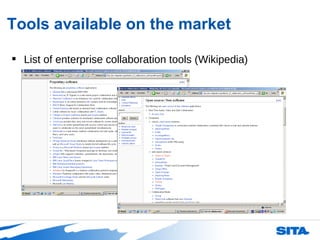
Tools available on the market List of enterprise collaboration tools (Wikipedia)
Basics features & functionalities Organization, Permission and Views Front Page & Project Pages Category Labels/Keywords Calendar Navigation Access Control and Security Dynamic, Permission Filtered  Views Dynamic, Permission Filtered  Search Content Creation and Management Publishing, Editing & Linking WebDAV Attachments & Project Share Folders Comments and Threaded Discussions Email Reply Audit Trails Presence Awareness
Basics features & functionalities Content Distribution and Export Automated Email Summary Digest Trackback Dynamic RSS and Atom Feeds Printing Export to Word or PDF Authentication, Interoperability and Security Authentication & Interoperability Security Interfaces and Skins - Options and Customization Custom Displays and Views Language, Localization and Time Zone Support DMZ Availability
Tool selection Engage with a small team keen on collaboration and web savvy Document their need and requirements Choose 2 products/solutions that will come close to answer the need and requirements –  simple is key Give a demo of both tools, with its features & functionalities Let the team use both systems for a couple of weeks and reconvene for feedback sessions Decide on 1 product/solution
IT or not IT One of the first question you will have to answer: Can this solution be hosted externally? (ASP mode) Or it has to be on an internal server? Second question that should be your first one: Do I have to involve the IT department in this initiative? Or I can just buy licenses and start using a specific product? If IT is involved: Delays and complexity Solution not meeting user requirements Deployment issues No moderation
Initial steps Engage with a small team (keen on collaboration and web savvy) Understand their pain points around sharing information  Identify at least one main key document/process important for their work Map out the behaviour, sharing patern and flows with this key document/process Promote a member of this team as the owner, driver, moderator (reward)
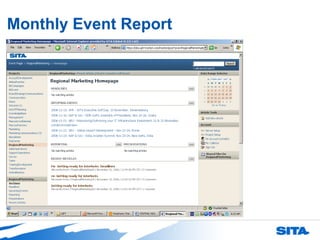
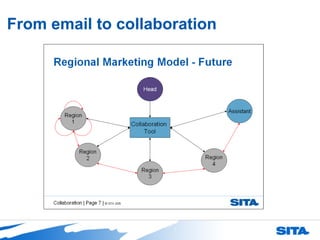
Example - Regional Marketing Met with the head of regional marketing and some members of its very geographically dispersed team Identified that the Monthly Event Report was a key document for the whole team Mapped out the behaviour around this Monthly Event Report  Re-created the Monthly Event Report on the enterprise collaboration tool Results were an easy to use and update series of web page (using blogs & wiki concept)
Monthly Event Report
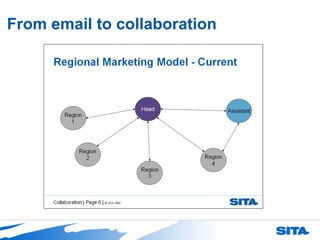
From email to collaboration
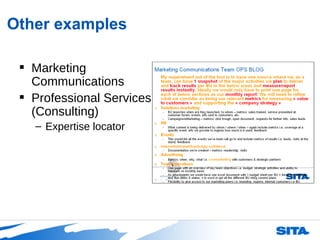
Other examples Marketing Communications Professional Services (Consulting) Expertise locator
Lessons learned Before implementation: Start small – with a web savvy group During product demo - custumize your presentation to their needs with expected benefits (what’s in it for me)  Use real life example – diagrams, scenarios…  Once started: Train your users approprietly Train them again 2 weeks after start When you train, use the live tool with real documents Need a lot of hand holding, do not hesitate to start publishing on their behalf, for uptake
Lessons learned Keep your tool simple Blog to post and comment on articles Wiki to collaborate/modify a document/text Be there the first 4 to 6 weeks to moderate, entertain, maintain… Make sure that the team’s manager is using the tool and lead by example Once it picked up – continue to work with users on moving to the tool other types of process for more collaboration
Overall Close to a full time job Not technology – but human behavior project Uptake is slow  You will need the following traits: Patience Hand holding Lobbying Politics Psycology
Blog available: http://enterprisecollab.wordpress.com The end, any questions?

Trying to implement enterprise collaboration

  • 1.
    Trying to implemententerprise collaboration? Challenges and lessons learned Stephane Cheikh
  • 2.
    In this shortpresentation Define enterprise collaboration Validate the need for enterprise collaboration Scan the available tools on the market Glance at the basics features & functionalities Once you have selected a tool Recommended steps to follow Discuss the issues faced Review key lessons learned
  • 3.
    About SITA SITAis the world's leading service provider of IT business solutions and communications services to the air transport industry. About myself Project management, KM, Collaboration Web 2.0 concept applied to the enterprise
  • 4.
    Define enterprise collaborationCollaboration fulfill two key functions: Allowing teams to share and synchronize information at any time, irrespective of location; Enabling the creation of electronic workspaces so that groups can work together in real time. Collaboration is a process and the tools need to be geared towards supporting this process. Main enterprise collaboration tools: Enterprise blogs & Wiki
  • 5.
    Why Enterprise Collaboration?Today we try to collaborate: Face to face, phone: unsaved, one2one / one2many E-mail: unstructured, personal, difficult to search IM / Web Conferencing: one2one, unsaved Intranet: one2many, simplex Databases: very structured, simplex Files: no context, no collaboration Information is kept on individual desktops or on access limited mailboxes, databases Over usage of email and attachments Document management feature not available
  • 6.
    Expected benefits Fostercross-department interactions and encourage employee participation Increase visibility on projects and initiatives Better collect experiences on customers and market Better identify expertise Better capture knowledge (integrate KM strategy and methodology) Improve communication in general Better identify and promote commitment and initiatives Better identify and collaborate on internal issues Create a corporate culture of dialogue
  • 7.
    Tools available onthe market List of enterprise collaboration tools (Wikipedia)
  • 8.
    Basics features &functionalities Organization, Permission and Views Front Page & Project Pages Category Labels/Keywords Calendar Navigation Access Control and Security Dynamic, Permission Filtered Views Dynamic, Permission Filtered Search Content Creation and Management Publishing, Editing & Linking WebDAV Attachments & Project Share Folders Comments and Threaded Discussions Email Reply Audit Trails Presence Awareness
  • 9.
    Basics features &functionalities Content Distribution and Export Automated Email Summary Digest Trackback Dynamic RSS and Atom Feeds Printing Export to Word or PDF Authentication, Interoperability and Security Authentication & Interoperability Security Interfaces and Skins - Options and Customization Custom Displays and Views Language, Localization and Time Zone Support DMZ Availability
  • 10.
    Tool selection Engagewith a small team keen on collaboration and web savvy Document their need and requirements Choose 2 products/solutions that will come close to answer the need and requirements – simple is key Give a demo of both tools, with its features & functionalities Let the team use both systems for a couple of weeks and reconvene for feedback sessions Decide on 1 product/solution
  • 11.
    IT or notIT One of the first question you will have to answer: Can this solution be hosted externally? (ASP mode) Or it has to be on an internal server? Second question that should be your first one: Do I have to involve the IT department in this initiative? Or I can just buy licenses and start using a specific product? If IT is involved: Delays and complexity Solution not meeting user requirements Deployment issues No moderation
  • 12.
    Initial steps Engagewith a small team (keen on collaboration and web savvy) Understand their pain points around sharing information Identify at least one main key document/process important for their work Map out the behaviour, sharing patern and flows with this key document/process Promote a member of this team as the owner, driver, moderator (reward)
  • 13.
    Example - RegionalMarketing Met with the head of regional marketing and some members of its very geographically dispersed team Identified that the Monthly Event Report was a key document for the whole team Mapped out the behaviour around this Monthly Event Report Re-created the Monthly Event Report on the enterprise collaboration tool Results were an easy to use and update series of web page (using blogs & wiki concept)
  • 14.
  • 15.
    From email tocollaboration
  • 16.
    From email tocollaboration
  • 17.
    Other examples MarketingCommunications Professional Services (Consulting) Expertise locator
  • 18.
    Lessons learned Beforeimplementation: Start small – with a web savvy group During product demo - custumize your presentation to their needs with expected benefits (what’s in it for me) Use real life example – diagrams, scenarios… Once started: Train your users approprietly Train them again 2 weeks after start When you train, use the live tool with real documents Need a lot of hand holding, do not hesitate to start publishing on their behalf, for uptake
  • 19.
    Lessons learned Keepyour tool simple Blog to post and comment on articles Wiki to collaborate/modify a document/text Be there the first 4 to 6 weeks to moderate, entertain, maintain… Make sure that the team’s manager is using the tool and lead by example Once it picked up – continue to work with users on moving to the tool other types of process for more collaboration
  • 20.
    Overall Close toa full time job Not technology – but human behavior project Uptake is slow You will need the following traits: Patience Hand holding Lobbying Politics Psycology
  • 21.