Truth or Dare: Evaluation
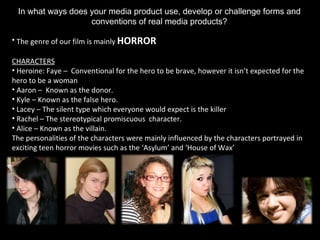
In what ways does your media product use, develop or challenge forms and conventions of real media products? The genre of our film is mainly  HORROR CHARACTERS Heroine: Faye –  Conventional for the hero to be brave, however it isn’t expected for the hero to be a woman Aaron –  Known as the donor.  Kyle – Known as the false hero.  Lacey – The silent type which everyone would expect is the killer Rachel – The stereotypical promiscuous  character. Alice – Known as the villain. The personalities of the characters were mainly influenced by the characters portrayed in exciting teen horror movies such as the ‘Asylum’ and ‘House of Wax’
LOCATION/LIGHTING Set in a isolated place Low lighting to insinuate that it is a horror film In what ways does your media product use, develop or challenge forms and conventions of real media products?
TRAILER Camera Shots and movements: Use of close up to extreme close up shots to create tension and to show the character’s emotions Shaky camera movement at times – usually featured in teen horror movies Used digital effects such as ‘Trail’ and ‘Strobe’ - unconventional Mise-en-Scene: An abandoned place, which gives an eerie atmosphere In what ways does your media product use, develop or challenge forms and conventions of real media products?
Sound: Fast paced music – conventional Dubstep like music at the start – unconventional in most horror films  Some use of diagetic sound i.e. screaming, dialogue Editing: Mostly fast cuts – reflects upon the situation the characters are in 1:08 – 1:25 In what ways does your media product use, develop or challenge forms and conventions of real media products?
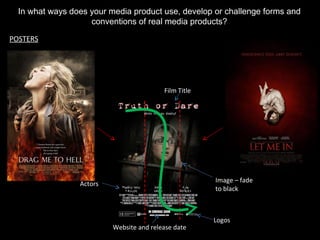
In what ways does your media product use, develop or challenge forms and conventions of real media products? POSTERS Film Title Logos Website and release date Actors Image – fade to black
In what ways does your media product use, develop or challenge forms and conventions of real media products? POSTERS Layout Subject Tag Line Age Rating Billing Box Image
In what ways does your media product use, develop or challenge forms and conventions of real media products? WEBSITE Image – fade to black Social Buttons Film Title Release date Navigation menu Embed trailer Billing Box Logos, age rating and copyright information
How effective is the combination of your main product and ancillary tasks Colour Scheme: Consistent – Black (background), Red and White (text) Font: Consistent in all media productions  Imagery: Distinctly shows the genre of the film Main poster image is also used on the website Language: Directed to the target audience to appeal to them – in both the trailer and posters
How effective is the combination of your main product and ancillary tasks Used in the website and posters Used in the trailer Billing box is different (font and content) in trailer in contrast to the website and poster Some logos used in the trailer are not included in the website and poster
What have you learnt from your audience feedback? Presented our trailer (first screening) and posters to Year 12 and gained feedback They were our initial target audience Ask other year 12 and 13 as well as other people within your target audience (non-media students) Changes… Positives Negatives Good soundtrack – works well with mobile graphics It was not clear who/what the killer is The telephone effect = good Choose more variation in time Good use of editing to show the film in a horrific way Silence before the scream creates tension – good use of diagetic and non-diagetic sound
How did you use new media technologies in the research and planning, post-production and evaluation stages Research and Planning: Records process of my project Post documents/ powerpoints/videos/images etc Microsoft Office: Presents my research and planning in a simple way Create tables and charts to plan when and what we are going to film
How did you use new media technologies in the research and planning, post-production and evaluation stages Research and Planning: Allows me to upload documents from Microsoft Office and embed it on to my blog View existing trailers and embed onto our blogs to show what has inspired us Upload our own trailers and get feedback
How did you use new media technologies in the research and planning, post-production and evaluation stages Research and Planning: Used to create a moodboard Enables the images to be presented in a creative way Can be embed onto my blog Plan the days we were going to shoot with the rest of the crew Good way of keeping in contact with the actors
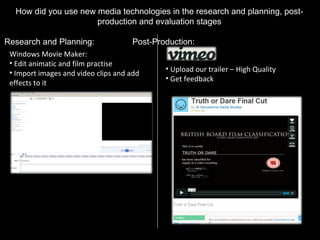
How did you use new media technologies in the research and planning, post-production and evaluation stages Research and Planning: Post-Production: Upload our trailer – High Quality Get feedback Windows Movie Maker: Edit animatic and film practise Import images and video clips and add effects to it
How did you use new media technologies in the research and planning, post-production and evaluation stages Post-Production: Obtain copyright free music Have a wide range of music related to any genre Garage Band Edit different music together Upload it to our trailer and publish it
How did you use new media technologies in the research and planning, post-production and evaluation stages Post-Production: Final Cut Pro Edit our footage Change some aspects of any shot i.e. Lighting (shown below) – cannot be done in Windows Movie Maker Motion Create and animate our film title screen
How did you use new media technologies in the research and planning, post-production and evaluation stages Post-production: Adobe Photoshop: Used to design the website and poster(s) Edit different aspects of an image i.e. brightness, hue and saturation etc Change the paper size to fit the size of the website/poster
How did you use new media technologies in the research and planning, post-production and evaluation stages Post-production: Macromedia Dreamweaver: Used to make website Trailer can be embed Add/alter codes to change the placement of the trailer Preview the website on HTML Social Network Buttons: Allows people to be updated with the latest news about the film Icon matches the genre of the film

Truth or dare

  • 1.
    Truth or Dare:Evaluation
  • 2.
    In what waysdoes your media product use, develop or challenge forms and conventions of real media products? The genre of our film is mainly HORROR CHARACTERS Heroine: Faye – Conventional for the hero to be brave, however it isn’t expected for the hero to be a woman Aaron – Known as the donor. Kyle – Known as the false hero. Lacey – The silent type which everyone would expect is the killer Rachel – The stereotypical promiscuous character. Alice – Known as the villain. The personalities of the characters were mainly influenced by the characters portrayed in exciting teen horror movies such as the ‘Asylum’ and ‘House of Wax’
  • 3.
    LOCATION/LIGHTING Set ina isolated place Low lighting to insinuate that it is a horror film In what ways does your media product use, develop or challenge forms and conventions of real media products?
  • 4.
    TRAILER Camera Shotsand movements: Use of close up to extreme close up shots to create tension and to show the character’s emotions Shaky camera movement at times – usually featured in teen horror movies Used digital effects such as ‘Trail’ and ‘Strobe’ - unconventional Mise-en-Scene: An abandoned place, which gives an eerie atmosphere In what ways does your media product use, develop or challenge forms and conventions of real media products?
  • 5.
    Sound: Fast pacedmusic – conventional Dubstep like music at the start – unconventional in most horror films Some use of diagetic sound i.e. screaming, dialogue Editing: Mostly fast cuts – reflects upon the situation the characters are in 1:08 – 1:25 In what ways does your media product use, develop or challenge forms and conventions of real media products?
  • 6.
    In what waysdoes your media product use, develop or challenge forms and conventions of real media products? POSTERS Film Title Logos Website and release date Actors Image – fade to black
  • 7.
    In what waysdoes your media product use, develop or challenge forms and conventions of real media products? POSTERS Layout Subject Tag Line Age Rating Billing Box Image
  • 8.
    In what waysdoes your media product use, develop or challenge forms and conventions of real media products? WEBSITE Image – fade to black Social Buttons Film Title Release date Navigation menu Embed trailer Billing Box Logos, age rating and copyright information
  • 9.
    How effective isthe combination of your main product and ancillary tasks Colour Scheme: Consistent – Black (background), Red and White (text) Font: Consistent in all media productions Imagery: Distinctly shows the genre of the film Main poster image is also used on the website Language: Directed to the target audience to appeal to them – in both the trailer and posters
  • 10.
    How effective isthe combination of your main product and ancillary tasks Used in the website and posters Used in the trailer Billing box is different (font and content) in trailer in contrast to the website and poster Some logos used in the trailer are not included in the website and poster
  • 11.
    What have youlearnt from your audience feedback? Presented our trailer (first screening) and posters to Year 12 and gained feedback They were our initial target audience Ask other year 12 and 13 as well as other people within your target audience (non-media students) Changes… Positives Negatives Good soundtrack – works well with mobile graphics It was not clear who/what the killer is The telephone effect = good Choose more variation in time Good use of editing to show the film in a horrific way Silence before the scream creates tension – good use of diagetic and non-diagetic sound
  • 12.
    How did youuse new media technologies in the research and planning, post-production and evaluation stages Research and Planning: Records process of my project Post documents/ powerpoints/videos/images etc Microsoft Office: Presents my research and planning in a simple way Create tables and charts to plan when and what we are going to film
  • 13.
    How did youuse new media technologies in the research and planning, post-production and evaluation stages Research and Planning: Allows me to upload documents from Microsoft Office and embed it on to my blog View existing trailers and embed onto our blogs to show what has inspired us Upload our own trailers and get feedback
  • 14.
    How did youuse new media technologies in the research and planning, post-production and evaluation stages Research and Planning: Used to create a moodboard Enables the images to be presented in a creative way Can be embed onto my blog Plan the days we were going to shoot with the rest of the crew Good way of keeping in contact with the actors
  • 15.
    How did youuse new media technologies in the research and planning, post-production and evaluation stages Research and Planning: Post-Production: Upload our trailer – High Quality Get feedback Windows Movie Maker: Edit animatic and film practise Import images and video clips and add effects to it
  • 16.
    How did youuse new media technologies in the research and planning, post-production and evaluation stages Post-Production: Obtain copyright free music Have a wide range of music related to any genre Garage Band Edit different music together Upload it to our trailer and publish it
  • 17.
    How did youuse new media technologies in the research and planning, post-production and evaluation stages Post-Production: Final Cut Pro Edit our footage Change some aspects of any shot i.e. Lighting (shown below) – cannot be done in Windows Movie Maker Motion Create and animate our film title screen
  • 18.
    How did youuse new media technologies in the research and planning, post-production and evaluation stages Post-production: Adobe Photoshop: Used to design the website and poster(s) Edit different aspects of an image i.e. brightness, hue and saturation etc Change the paper size to fit the size of the website/poster
  • 19.
    How did youuse new media technologies in the research and planning, post-production and evaluation stages Post-production: Macromedia Dreamweaver: Used to make website Trailer can be embed Add/alter codes to change the placement of the trailer Preview the website on HTML Social Network Buttons: Allows people to be updated with the latest news about the film Icon matches the genre of the film