EVALUATION
Question 6: What have you learnt about technologies from the process of
constructing this product?
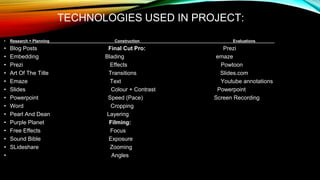
TECHNOLOGIES USED IN PROJECT:
• Research + Planning Construction Evaluations
• Blog Posts Final Cut Pro: Prezi
• Embedding Blading emaze
• Prezi Effects Powtoon
• Art Of The Title Transitions Slides.com
• Emaze Text Youtube annotations
• Slides Colour + Contrast Powerpoint
• Powerpoint Speed (Pace) Screen Recording
• Word Cropping
• Pearl And Dean Layering
• Purple Planet Filming:
• Free Effects Focus
• Sound Bible Exposure
• SLideshare Zooming
• Angles
TECHNOLOGIES
BY SACHIN
BLOG POSTING (RESEARCH AND
PLANNING):
• We used this to post all our assignments and work on the blog
Process
Go to the dashboard/ post list on
the blog and click ‘new post’
Once you have
completed your
work, click publish
Put the title here Insert date
and time
here
EMBEDDING (RESEARCH AND
PLANNING)
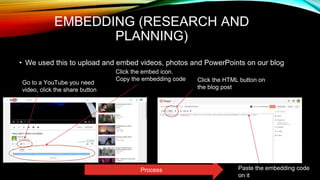
• We used this to upload and embed videos, photos and PowerPoints on our blog
Process
Go to a YouTube you need
video, click the share button
Click the embed icon.
Copy the embedding code Click the HTML button on
the blog post
Paste the embedding code
on it
TRANSITIONS (CONSTRUCTION)
• We used transitions (such as a cross dissolve) in our OTS. We mainly used them for
temporal ellipsis (to show the pass of time).
In Final Cut pro look for this symbol which should be
on the far right of the screen, just above the timeline.
Transitions are on the right. Choose the one you
want and drag it on the timeline where you want it to
go
There are a range of
transitions you can choose,
including wipes and fades.
TEXT (CONSTRUCTION)
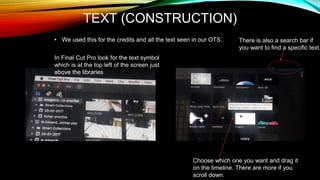
• We used this for the credits and all the text seen in our OTS.
In Final Cut Pro look for the text symbol
which is at the top left of the screen just
above the libraries
Choose which one you want and drag it
on the timeline. There are more if you
scroll down.
There is also a search bar if
you want to find a specific text.
PREZI (EVALUATION):
• We used Prezi for question 1 where we talked about the conventions of our OTS.
TECHNOLOGIES BY
JACK
POWERPOINT ( RESEARCH AND
PLANNING)
We used PowerPoint a lot in our
research and planning mainly for
research tasks. An example of
when we used PowerPoint would
be here in our risk assessment
we used PowerPoint to make the
table for our risk assessment as it
is easy to use.
Or another example of us
using PowerPoint would
be this piece of the
evaluation where we used
PowerPoint.
PEARL AND DEAN (RESEARCH
AND PLANNING)
Pearl and dean is a website that we
used in our research and planning to
explore target audiences for other films
to help see what our target audience
would be. We found it helpful as it gave
useful information such as target age
and target social class.
Here you can see an
example of use using
pearl and dean for a
resealable arch and
planning task earlier on
our blog.
BLADING (CONSTRUCTION)
We used blading in our
video to cut clips together
mainly to create good and
effective match on action.
Here you see an example
of where we used
blading.
FOCUS (CONSTRUCTION)
We used a lot of deep
focus and focus pulls in
our final opening title
sequence to add some
more sophisticated shots
to our opening title
sequence.
Here is an example of
one of the focus pulls we
did
After focus pullBefore focus pull
VIDEO RECORDINGS
(EVALUATION)
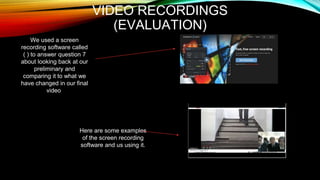
We used a screen
recording software called
( ) to answer question 7
about looking back at our
preliminary and
comparing it to what we
have changed in our final
video
Here are some examples
of the screen recording
software and us using it.
TECHNOLOGIES
BY TOM
PURPLE PLANET (RESEARCH AND
PLANNING)Purple Planet:
(http://www.purple-planet.com/)
-On the website Purple Planet I found
a load of score music that we can use
for our OTS, I especially liked the score
'Abandoned' which will give the film a
paranormal feel to it, with the piano and
stings playing. We will most likely use
this website for its score music as that is
the only kind of content it contains. The
presentation of this page is very good as
I can easily browse for what music I
want.
Home page:
Search layout:
FREE EFFECTS (RESEARCH AND
PLANNING)Freesound:
(https://www.freesound.org/)
-On this website there is a lot more sound
effects that we can use, there is a simple
search that will looks up exactly what you
type in. I found a few sound effects we can
use for 'Loud bangs' however there is a
limited amount in terms of score music. We
will most likely use this website to find
different sound effects that we can use. The
presentation of this website is poor as it is
difficult for me to find the music or sound
effects that I want.
Homepage:​
Search Layout:
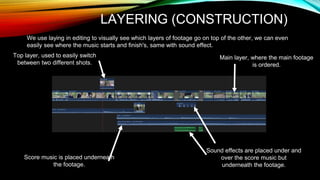
LAYERING (CONSTRUCTION)
Top layer, used to easily switch
between two different shots.
Main layer, where the main footage
is ordered.
Sound effects are placed under and
over the score music but
underneath the footage.
Score music is placed underneath
the footage.
We use laying in editing to visually see which layers of footage go on top of the other, we can even
easily see where the music starts and finish's, same with sound effect.
ZOOMING (CONSTRUCTION)
We used zooming in our OTS to amplify the
Facial expressions that our characters are
showing. Like this example where we start
The shot off as a medium shot to show the
Audience of the situation of Tom and Sachin
Are filming.
Then we zoom in on the shot just before the
characters hear the scream. This gives the
moment more suspense as the slow zoom
makes the audience feel uneasy, it also
allows us to show our characters facial
expression as they hear the horrifying
scream.
YOUTUBE ANNOTATIONS
(EVALUATION)
To put in annotations to our film, we used
Final cut pro to add text into our Final draft
explaining how our movie appeals to our audience.
To do this we added the blur text on top of our
Footage and placed it in the section of the footage
That we are describing.
All of our annotations were colour coded depending
On who wrote them. Jack was purple, Sachin was
blue and Tom was orange.

Evaluation Question 6

  • 1.
    EVALUATION Question 6: Whathave you learnt about technologies from the process of constructing this product?
  • 2.
    TECHNOLOGIES USED INPROJECT: • Research + Planning Construction Evaluations • Blog Posts Final Cut Pro: Prezi • Embedding Blading emaze • Prezi Effects Powtoon • Art Of The Title Transitions Slides.com • Emaze Text Youtube annotations • Slides Colour + Contrast Powerpoint • Powerpoint Speed (Pace) Screen Recording • Word Cropping • Pearl And Dean Layering • Purple Planet Filming: • Free Effects Focus • Sound Bible Exposure • SLideshare Zooming • Angles
  • 3.
  • 4.
    BLOG POSTING (RESEARCHAND PLANNING): • We used this to post all our assignments and work on the blog Process Go to the dashboard/ post list on the blog and click ‘new post’ Once you have completed your work, click publish Put the title here Insert date and time here
  • 5.
    EMBEDDING (RESEARCH AND PLANNING) •We used this to upload and embed videos, photos and PowerPoints on our blog Process Go to a YouTube you need video, click the share button Click the embed icon. Copy the embedding code Click the HTML button on the blog post Paste the embedding code on it
  • 6.
    TRANSITIONS (CONSTRUCTION) • Weused transitions (such as a cross dissolve) in our OTS. We mainly used them for temporal ellipsis (to show the pass of time). In Final Cut pro look for this symbol which should be on the far right of the screen, just above the timeline. Transitions are on the right. Choose the one you want and drag it on the timeline where you want it to go There are a range of transitions you can choose, including wipes and fades.
  • 7.
    TEXT (CONSTRUCTION) • Weused this for the credits and all the text seen in our OTS. In Final Cut Pro look for the text symbol which is at the top left of the screen just above the libraries Choose which one you want and drag it on the timeline. There are more if you scroll down. There is also a search bar if you want to find a specific text.
  • 8.
    PREZI (EVALUATION): • Weused Prezi for question 1 where we talked about the conventions of our OTS.
  • 9.
  • 10.
    POWERPOINT ( RESEARCHAND PLANNING) We used PowerPoint a lot in our research and planning mainly for research tasks. An example of when we used PowerPoint would be here in our risk assessment we used PowerPoint to make the table for our risk assessment as it is easy to use. Or another example of us using PowerPoint would be this piece of the evaluation where we used PowerPoint.
  • 11.
    PEARL AND DEAN(RESEARCH AND PLANNING) Pearl and dean is a website that we used in our research and planning to explore target audiences for other films to help see what our target audience would be. We found it helpful as it gave useful information such as target age and target social class. Here you can see an example of use using pearl and dean for a resealable arch and planning task earlier on our blog.
  • 12.
    BLADING (CONSTRUCTION) We usedblading in our video to cut clips together mainly to create good and effective match on action. Here you see an example of where we used blading.
  • 13.
    FOCUS (CONSTRUCTION) We useda lot of deep focus and focus pulls in our final opening title sequence to add some more sophisticated shots to our opening title sequence. Here is an example of one of the focus pulls we did After focus pullBefore focus pull
  • 14.
    VIDEO RECORDINGS (EVALUATION) We useda screen recording software called ( ) to answer question 7 about looking back at our preliminary and comparing it to what we have changed in our final video Here are some examples of the screen recording software and us using it.
  • 15.
  • 16.
    PURPLE PLANET (RESEARCHAND PLANNING)Purple Planet: (http://www.purple-planet.com/) -On the website Purple Planet I found a load of score music that we can use for our OTS, I especially liked the score 'Abandoned' which will give the film a paranormal feel to it, with the piano and stings playing. We will most likely use this website for its score music as that is the only kind of content it contains. The presentation of this page is very good as I can easily browse for what music I want. Home page: Search layout:
  • 17.
    FREE EFFECTS (RESEARCHAND PLANNING)Freesound: (https://www.freesound.org/) -On this website there is a lot more sound effects that we can use, there is a simple search that will looks up exactly what you type in. I found a few sound effects we can use for 'Loud bangs' however there is a limited amount in terms of score music. We will most likely use this website to find different sound effects that we can use. The presentation of this website is poor as it is difficult for me to find the music or sound effects that I want. Homepage:​ Search Layout:
  • 18.
    LAYERING (CONSTRUCTION) Top layer,used to easily switch between two different shots. Main layer, where the main footage is ordered. Sound effects are placed under and over the score music but underneath the footage. Score music is placed underneath the footage. We use laying in editing to visually see which layers of footage go on top of the other, we can even easily see where the music starts and finish's, same with sound effect.
  • 19.
    ZOOMING (CONSTRUCTION) We usedzooming in our OTS to amplify the Facial expressions that our characters are showing. Like this example where we start The shot off as a medium shot to show the Audience of the situation of Tom and Sachin Are filming. Then we zoom in on the shot just before the characters hear the scream. This gives the moment more suspense as the slow zoom makes the audience feel uneasy, it also allows us to show our characters facial expression as they hear the horrifying scream.
  • 20.
    YOUTUBE ANNOTATIONS (EVALUATION) To putin annotations to our film, we used Final cut pro to add text into our Final draft explaining how our movie appeals to our audience. To do this we added the blur text on top of our Footage and placed it in the section of the footage That we are describing. All of our annotations were colour coded depending On who wrote them. Jack was purple, Sachin was blue and Tom was orange.