Troubleshooting
Real
Production
Problems
Ram Lakshmanan
Architect: GCeasy.io, fastThread.io,HeapHero.io
https://blog.fastthread.io/2018/12/13/how-to-troubleshoot-cpu-problems/
Troubleshooting C P U spike
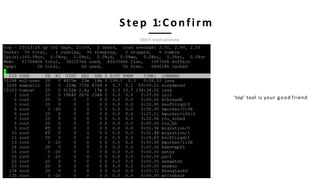
Step 1:Confirm
Don‘t trust anyone
‘top’ tool is your good friend
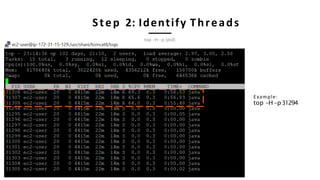
Step 2: Identify Threads
Example:
top -H -p31294
top –H –p {pid}
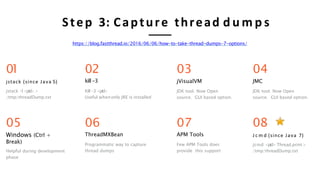
Step 3: Capture thread d u m p s
https://blog.fastthread.io/2016/06/06/how-to-take-thread-dumps-7-options/
03
jVisualVM
JDK tool. Now Open
source. GUI based option.
02
kill-3
Kill -3 <pid>
Useful whenonly JRE is installed
01
jstack (since Java 5)
jstack -l<pid>>
/tmp/threadDump.txt
07
APM Tools
Few APM Tools does
provide this support
06
ThreadMXBean
Programmatic way to capture
thread dumps
04
JMC
JDK tool. Now Open
source. GUI based option.
08
J c m d (since Java 7)
jcmd <pid> Thread.print>
/tmp/threadDump.txt
05
Windows (Ctrl +
Break)
Helpful during development
phase
2019-02-2617:13:23
"Reconnection-1" prio=10 tid=0x00007f0442e10800 nid=0x112a waiting on condition
[0x00007f042f719000]
java.lang.Thread.State: WAITING (parking)
at sun.misc.Unsafe.park(Native Method)
- parking to wait for <0x007b3953a98> (a java.util.concurrent.locks.AbstractQueuedSynchr) at
java.util.concurrent.locks.LockSupport.park(LockSupport.java:186)at java.lang.Thread.run(Thread.java:722)
:
:
1
2
3
1 Timestamp at which thread dump was triggered
2 JVM Versioninfo
3 Thread Details-<<detailsin following slides>>
Anatomy of thread d u m p
Full thread dump Java HotSpot(TM) 64-Bit Server VM (23.7-b01 mixed mode):
"InvoiceThread-A996" prio=10 tid=0x00002b7cfc6fb000 nid=0x4479 runnable [0x00002b7d17ab8000] java.lang.Thread.State:
RUNNABLE
at com.buggycompany.rt.util.ItinerarySegmentProcessor.setConnectingFlight(ItinerarySegmentProcessor.java:380) at
com.buggycompany.rt.util.ItinerarySegmentProcessor.processTripType0(ItinerarySegmentProcessor.java:366)
at com.buggycompany.rt.util.ItinerarySegmentProcessor.processItineraryByTripType(ItinerarySegmentProcessor.java:254) at
com.buggycompany.rt.util.ItinerarySegmentProcessor.templateMethod(ItinerarySegmentProcessor.java:399)
at com.buggycompany.qc.gds.InvoiceGeneratedFacade.readTicketImage(InvoiceGeneratedFacade.java:252) at
com.buggycompany.qc.gds.InvoiceGeneratedFacade.doOrchestrate(InvoiceGeneratedFacade.java:151)
at com.buggycompany.framework.gdstask.BaseGDSFacade.orchestrate(BaseGDSFacade.java:32)
at com.buggycompany.framework.gdstask.BaseGDSFacade.doWork(BaseGDSFacade.java:22)
at com.buggycompany.framework.concurrent.BuggycompanyCallable.call(buggycompanyCallable.java:80) at
java.util.concurrent.FutureTask$Sync.innerRun(FutureTask.java:334)
at java.util.concurrent.FutureTask.run(FutureTask.java:166)
at java.util.concurrent.ThreadPoolExecutor.runWorker(ThreadPoolExecutor.java:1145) at
java.util.concurrent.ThreadPoolExecutor$Worker.run(ThreadPoolExecutor.java:615) at java.lang.Thread.run(Thread.java:722)
"InvoiceThread-A996" prio=10 tid=0x00002b7cfc6fb000 nid=0x4479 runnable
[0x00002b7d17ab8000]
java.lang.Thread.State: RUNNABLE
at com.buggycompany.rt.util.ItinerarySegmentProcessor.setConnectingFlight(ItinerarySegmentProcessor.java:380) at
com.buggycompany.rt.util.ItinerarySegmentProcessor.processTripType0(ItinerarySegmentProcessor.java:366)
at com.buggycompany.rt.util.ItinerarySegmentProcessor.processItineraryByTripType(ItinerarySegmentProcessor.java:254) at
com.buggycompany.rt.util.ItinerarySegmentProcessor.templateMethod(ItinerarySegmentProcessor.java:399)
at com.buggycompany.qc.gds.InvoiceGeneratedFacade.readTicketImage(InvoiceGeneratedFacade.java:252) at
com.buggycompany.qc.gds.InvoiceGeneratedFacade.doOrchestrate(InvoiceGeneratedFacade.java:151)
at com.buggycompany.framework.gdstask.BaseGDSFacade.orchestrate(BaseGDSFacade.java:32) at
com.buggycompany.framework.gdstask.BaseGDSFacade.doWork(BaseGDSFacade.java:22)
at com.buggycompany.framework.concurrent.BuggycompanyCallable.call(buggycompanyCallable.java:80) at
java.util.concurrent.FutureTask$Sync.innerRun(FutureTask.java:334)
at java.util.concurrent.FutureTask.run(FutureTask.java:166)
at java.util.concurrent.ThreadPoolExecutor.runWorker(ThreadPoolExecutor.java:1145) at
java.util.concurrent.ThreadPoolExecutor$Worker.run(ThreadPoolExecutor.java:615) at
java.lang.Thread.run(Thread.java:722)
1 2 3 4 5
6
7
1 Thread Name -InvoiceThread-A996
2 Priority -Can have values from 1to10
3 Thread Id - 0x00002b7cfc6fb000 – Unique ID assigned by JVM. It's returned by calling the Thread.getId() method.
4
5
6
7
Native Id - 0x4479 - This ID is highly platform dependent. On Linux, it's the pid of the thread. On Windows, it's simply the OS-level
thread a process. On Mac OS X, it is said to be the native pthread_t value.
Address space - 0x00002b7d17ab8000 -
Thread State - RUNNABLE
Stack trace -
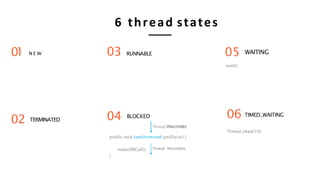
6 thread states
RUNNABLE
TERMINATED
N E W WAITING03
02
01
06 TIMED_WAITING
Thread.sleep(10);
public void synchronized getData() {
makeDBCall();
}
BLOCKED04
Thread 1:Runnable
05
wait();
Thread12::RBuLnOnCaKbElDe
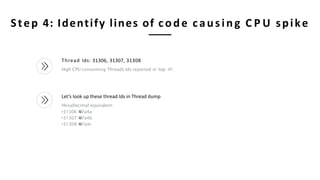
Step 4: Identify lines of code causing C P U spike
Thread Ids: 31306, 31307, 31308
High CPU consuming Threads Ids reported in ‘top –H’.
Let’s look up these thread Ids in Thread dump
HexaDecimal equivalent:
•31306 7a4a
•31307 7a4b
•31308 7a4c
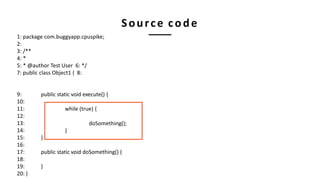
1: package com.buggyapp.cpuspike;
2:
3: /**
4: *
5: * @author Test User 6: */
7: public class Object1 { 8:
public static void execute() {
while (true) {
doSomething();
}
}
public static void doSomething() {
}
9:
10:
11:
12:
13:
14:
15:
16:
17:
18:
19:
20: }
Source code
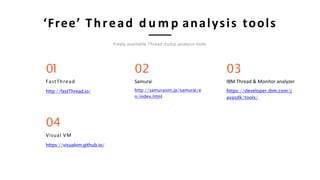
‘Free’ Thread d u m p analysis tools
Freely available Thread dump analysis tools
03
IBM Thread & Monitor analyzer
https://developer.ibm.com/j
avasdk/tools/
02
Samurai
http://samuraism.jp/samurai/e
n/index.html
01
FastThread
http://fastThread.io/
04
Visual VM
https://visualvm.github.io/
C P U spike in a major trading application
Troubleshooting unresponsive app
Unresponsiveness in a B 2 B Travel application
Process 70% of N. America oversease Leisure travel ticketing
Troubleshooting OutOfMemoryError
Unable to create new native thread
Major financial institution in N. America
Thread d u m p troubleshooting pattern: RSI
https://map.tinyurl.com/yxho6lan
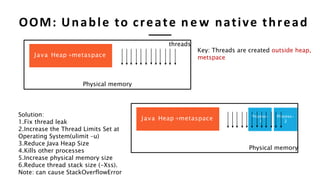
Java Heap +metaspace
Physical memory
Process-
1
Process-
2
Key: Threads are created outside heap,
metspace
threads
Physical memory
Solution:
1.Fix thread leak
2.Increase the Thread Limits Set at
Operating System(ulimit –u)
3.Reduce Java Heap Size
4.Kills other processes
5.Increase physical memory size
6.Reduce thread stack size (-Xss).
Note: can cause StackOverflowError
OOM: Unable to create n e w native thread
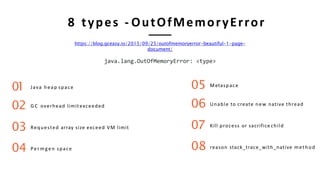
8 types - OutOfMemoryError
Java heap space
G C overhead limit exceeded
Requested array size exceed VM limit
Permgen space
01
02
03
04
Metaspace
Unable to create new native thread
Kill process or sacrifice child
reason stack_trace_with_native method
05
06
07
08
https://blog.gceasy.io/2015/09/25/outofmemoryerror-beautiful-1-page-
document/
java.lang.OutOfMemoryError: <type>
• https://tinyurl.com/yywdmvyy
• RSI Pattern – Same pattern, different problem.
Troubleshooting unresponsive app
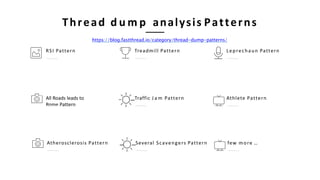
Thread d u m p analysis Patterns
https://blog.fastthread.io/category/thread-dump-patterns/
Leprechaun PatternTreadmill PatternRSI Pattern
Athlete PatternTraffic J a m PatternAll Roads leads to
Rome Pattern
few more …Atherosclerosis Pattern Several Scavengers Pattern
Troubleshooting Memory
problems
Enable G C L o g s (always)
Till Java 8:
-XX:+PrintGCDetails -XX:+PrintGCDateStamps -Xloggc:<file-path>
From Java 9:
-Xlog:gc*:file=<file-path>
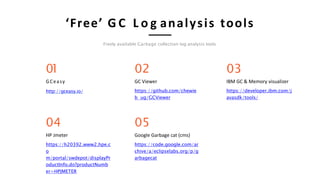
‘Free’ G C L o g analysis tools
Freely available Garbage collection log analysis tools
03
IBM GC & Memory visualizer
https://developer.ibm.com/j
avasdk/tools/
02
GC Viewer
https://github.com/chewie
b ug/GCViewer
01
GCeasy
http://gceasy.io/
05
Google Garbage cat (cms)
https://code.google.com/ar
chive/a/eclipselabs.org/p/g
arbagecat
04
HP Jmeter
https://h20392.www2.hpe.c
o
m/portal/swdepot/displayPr
oductInfo.do?productNumb
er=HPJMETER
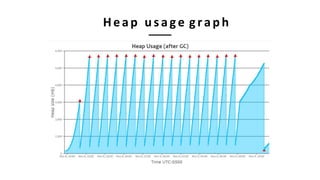
Heap usage graph
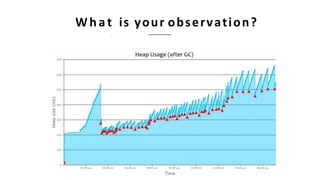
W h a t is your observation?
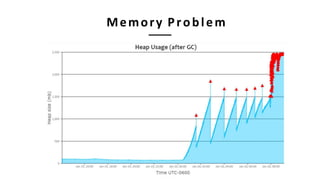
Memory Problem
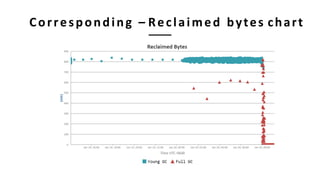
Corresponding – Reclaimed bytes chart
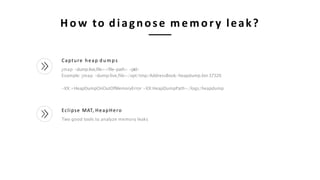
H o w to diagnose memor y leak?
Capture heap d u m p s
jmap -dump:live,file=<file-path> <pid>
Example: jmap -dump:live,file=/opt/tmp/AddressBook-heapdump.bin37320
-XX:+HeapDumpOnOutOfMemoryError -XX:HeapDumpPath=/logs/heapdump
Eclipse MAT, HeapHero
Two good tools to analyze memory leaks
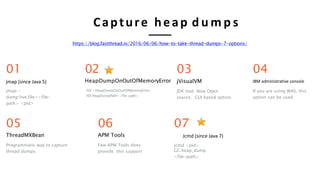
Capture heap d u m p s
https://blog.fastthread.io/2016/06/06/how-to-take-thread-dumps-7-options/
03
jVisualVM
JDK tool. Now Open
source. GUI based option.
02
HeapDumpOnOutOfMemoryError
-XX:+HeapDumpOnOutOfMemoryError
-XX:HeapDumpPath=<file-path>
01
jmap (since Java 5)
jmap -
dump:live,file=<file-
path> <pid>
06
APM Tools
Few APM Tools does
provide this support
05
ThreadMXBean
Programmatic way to capture
thread dumps
04
IBM administrative console
If you are using WAS, this
option can be used
07
Jcmd (since Java 7)
jcmd <pid>
GC.heap_dump
<file-path>
Micro-metrics
https://blog.gceasy.io/2019/03/13/micrometrics-to-forecast-application-performance/
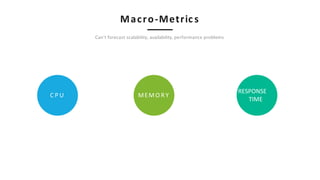
Macro-Metric s
Can’t forecast scalability, availability, performance problems
C P U
RESPONSE
TIME
MEMO RY
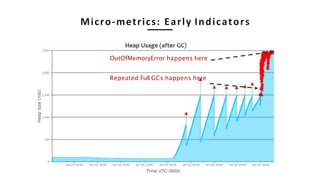
Micro-metrics: Early Indicators
OutOfMemoryError happens here
Repeated Full GCs happens here
Few more…
TCP/IP States, Hosts count, IOPS,..
File Descriptors
File descriptor is a handle to access: File, Pipe,
Network Connections. If count grows it’s a lead
indicator that application isn’t closing resources
properly.
Thread States
If BLOCKED thread state count grows, it’s
an early indication that your application has
potential to become unresponsive
GC Throughput
Amount time
application spends
in processing
customer
transactions vs
amount of time
application spend in
doing GC
Object Reclamation rate
If number of objects created in
unit time
GC Latency
If pause time
starts to
increase,
then it’s an
indication that
app is
suffering from
memory
problems
W h a t are Micrometrics?
https://blog.gceasy.io/2019/03/13/micrometrics-to-forecast-application-performance/
right data @ right time
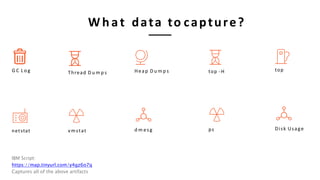
G C L o g
netstat vmstat
Thread D u m p s
d m esg
Heap D u m p s
W h a t data to capture?
ps
top -H
Disk Usage
top
IBM Script:
https://map.tinyurl.com/y4gz6o7q
Captures all of the above artifacts
Thank you m y friends!
R a m Lakshmanan
ram@tier1ap p .com
@tier1app
https://www.linkedin.com/company/gceasy

Troubleshooting performanceavailabilityproblems (1)

  • 1.
  • 2.
  • 3.
    Step 1:Confirm Don‘t trustanyone ‘top’ tool is your good friend
  • 4.
    Step 2: IdentifyThreads Example: top -H -p31294 top –H –p {pid}
  • 5.
    Step 3: Capturethread d u m p s https://blog.fastthread.io/2016/06/06/how-to-take-thread-dumps-7-options/ 03 jVisualVM JDK tool. Now Open source. GUI based option. 02 kill-3 Kill -3 <pid> Useful whenonly JRE is installed 01 jstack (since Java 5) jstack -l<pid>> /tmp/threadDump.txt 07 APM Tools Few APM Tools does provide this support 06 ThreadMXBean Programmatic way to capture thread dumps 04 JMC JDK tool. Now Open source. GUI based option. 08 J c m d (since Java 7) jcmd <pid> Thread.print> /tmp/threadDump.txt 05 Windows (Ctrl + Break) Helpful during development phase
  • 6.
    2019-02-2617:13:23 "Reconnection-1" prio=10 tid=0x00007f0442e10800nid=0x112a waiting on condition [0x00007f042f719000] java.lang.Thread.State: WAITING (parking) at sun.misc.Unsafe.park(Native Method) - parking to wait for <0x007b3953a98> (a java.util.concurrent.locks.AbstractQueuedSynchr) at java.util.concurrent.locks.LockSupport.park(LockSupport.java:186)at java.lang.Thread.run(Thread.java:722) : : 1 2 3 1 Timestamp at which thread dump was triggered 2 JVM Versioninfo 3 Thread Details-<<detailsin following slides>> Anatomy of thread d u m p Full thread dump Java HotSpot(TM) 64-Bit Server VM (23.7-b01 mixed mode): "InvoiceThread-A996" prio=10 tid=0x00002b7cfc6fb000 nid=0x4479 runnable [0x00002b7d17ab8000] java.lang.Thread.State: RUNNABLE at com.buggycompany.rt.util.ItinerarySegmentProcessor.setConnectingFlight(ItinerarySegmentProcessor.java:380) at com.buggycompany.rt.util.ItinerarySegmentProcessor.processTripType0(ItinerarySegmentProcessor.java:366) at com.buggycompany.rt.util.ItinerarySegmentProcessor.processItineraryByTripType(ItinerarySegmentProcessor.java:254) at com.buggycompany.rt.util.ItinerarySegmentProcessor.templateMethod(ItinerarySegmentProcessor.java:399) at com.buggycompany.qc.gds.InvoiceGeneratedFacade.readTicketImage(InvoiceGeneratedFacade.java:252) at com.buggycompany.qc.gds.InvoiceGeneratedFacade.doOrchestrate(InvoiceGeneratedFacade.java:151) at com.buggycompany.framework.gdstask.BaseGDSFacade.orchestrate(BaseGDSFacade.java:32) at com.buggycompany.framework.gdstask.BaseGDSFacade.doWork(BaseGDSFacade.java:22) at com.buggycompany.framework.concurrent.BuggycompanyCallable.call(buggycompanyCallable.java:80) at java.util.concurrent.FutureTask$Sync.innerRun(FutureTask.java:334) at java.util.concurrent.FutureTask.run(FutureTask.java:166) at java.util.concurrent.ThreadPoolExecutor.runWorker(ThreadPoolExecutor.java:1145) at java.util.concurrent.ThreadPoolExecutor$Worker.run(ThreadPoolExecutor.java:615) at java.lang.Thread.run(Thread.java:722)
  • 7.
    "InvoiceThread-A996" prio=10 tid=0x00002b7cfc6fb000nid=0x4479 runnable [0x00002b7d17ab8000] java.lang.Thread.State: RUNNABLE at com.buggycompany.rt.util.ItinerarySegmentProcessor.setConnectingFlight(ItinerarySegmentProcessor.java:380) at com.buggycompany.rt.util.ItinerarySegmentProcessor.processTripType0(ItinerarySegmentProcessor.java:366) at com.buggycompany.rt.util.ItinerarySegmentProcessor.processItineraryByTripType(ItinerarySegmentProcessor.java:254) at com.buggycompany.rt.util.ItinerarySegmentProcessor.templateMethod(ItinerarySegmentProcessor.java:399) at com.buggycompany.qc.gds.InvoiceGeneratedFacade.readTicketImage(InvoiceGeneratedFacade.java:252) at com.buggycompany.qc.gds.InvoiceGeneratedFacade.doOrchestrate(InvoiceGeneratedFacade.java:151) at com.buggycompany.framework.gdstask.BaseGDSFacade.orchestrate(BaseGDSFacade.java:32) at com.buggycompany.framework.gdstask.BaseGDSFacade.doWork(BaseGDSFacade.java:22) at com.buggycompany.framework.concurrent.BuggycompanyCallable.call(buggycompanyCallable.java:80) at java.util.concurrent.FutureTask$Sync.innerRun(FutureTask.java:334) at java.util.concurrent.FutureTask.run(FutureTask.java:166) at java.util.concurrent.ThreadPoolExecutor.runWorker(ThreadPoolExecutor.java:1145) at java.util.concurrent.ThreadPoolExecutor$Worker.run(ThreadPoolExecutor.java:615) at java.lang.Thread.run(Thread.java:722) 1 2 3 4 5 6 7 1 Thread Name -InvoiceThread-A996 2 Priority -Can have values from 1to10 3 Thread Id - 0x00002b7cfc6fb000 – Unique ID assigned by JVM. It's returned by calling the Thread.getId() method. 4 5 6 7 Native Id - 0x4479 - This ID is highly platform dependent. On Linux, it's the pid of the thread. On Windows, it's simply the OS-level thread a process. On Mac OS X, it is said to be the native pthread_t value. Address space - 0x00002b7d17ab8000 - Thread State - RUNNABLE Stack trace -
  • 8.
    6 thread states RUNNABLE TERMINATED NE W WAITING03 02 01 06 TIMED_WAITING Thread.sleep(10); public void synchronized getData() { makeDBCall(); } BLOCKED04 Thread 1:Runnable 05 wait(); Thread12::RBuLnOnCaKbElDe
  • 9.
    Step 4: Identifylines of code causing C P U spike Thread Ids: 31306, 31307, 31308 High CPU consuming Threads Ids reported in ‘top –H’. Let’s look up these thread Ids in Thread dump HexaDecimal equivalent: •31306 7a4a •31307 7a4b •31308 7a4c
  • 10.
    1: package com.buggyapp.cpuspike; 2: 3:/** 4: * 5: * @author Test User 6: */ 7: public class Object1 { 8: public static void execute() { while (true) { doSomething(); } } public static void doSomething() { } 9: 10: 11: 12: 13: 14: 15: 16: 17: 18: 19: 20: } Source code
  • 11.
    ‘Free’ Thread du m p analysis tools Freely available Thread dump analysis tools 03 IBM Thread & Monitor analyzer https://developer.ibm.com/j avasdk/tools/ 02 Samurai http://samuraism.jp/samurai/e n/index.html 01 FastThread http://fastThread.io/ 04 Visual VM https://visualvm.github.io/
  • 12.
    C P Uspike in a major trading application
  • 13.
  • 14.
    Unresponsiveness in aB 2 B Travel application Process 70% of N. America oversease Leisure travel ticketing
  • 15.
  • 16.
    Major financial institutionin N. America Thread d u m p troubleshooting pattern: RSI https://map.tinyurl.com/yxho6lan
  • 17.
    Java Heap +metaspace JavaHeap +metaspace Physical memory Process- 1 Process- 2 Key: Threads are created outside heap, metspace threads Physical memory Solution: 1.Fix thread leak 2.Increase the Thread Limits Set at Operating System(ulimit –u) 3.Reduce Java Heap Size 4.Kills other processes 5.Increase physical memory size 6.Reduce thread stack size (-Xss). Note: can cause StackOverflowError OOM: Unable to create n e w native thread
  • 18.
    8 types -OutOfMemoryError Java heap space G C overhead limit exceeded Requested array size exceed VM limit Permgen space 01 02 03 04 Metaspace Unable to create new native thread Kill process or sacrifice child reason stack_trace_with_native method 05 06 07 08 https://blog.gceasy.io/2015/09/25/outofmemoryerror-beautiful-1-page- document/ java.lang.OutOfMemoryError: <type>
  • 19.
    • https://tinyurl.com/yywdmvyy • RSIPattern – Same pattern, different problem. Troubleshooting unresponsive app
  • 20.
    Thread d um p analysis Patterns https://blog.fastthread.io/category/thread-dump-patterns/ Leprechaun PatternTreadmill PatternRSI Pattern Athlete PatternTraffic J a m PatternAll Roads leads to Rome Pattern few more …Atherosclerosis Pattern Several Scavengers Pattern
  • 21.
  • 22.
    Enable G CL o g s (always) Till Java 8: -XX:+PrintGCDetails -XX:+PrintGCDateStamps -Xloggc:<file-path> From Java 9: -Xlog:gc*:file=<file-path>
  • 23.
    ‘Free’ G CL o g analysis tools Freely available Garbage collection log analysis tools 03 IBM GC & Memory visualizer https://developer.ibm.com/j avasdk/tools/ 02 GC Viewer https://github.com/chewie b ug/GCViewer 01 GCeasy http://gceasy.io/ 05 Google Garbage cat (cms) https://code.google.com/ar chive/a/eclipselabs.org/p/g arbagecat 04 HP Jmeter https://h20392.www2.hpe.c o m/portal/swdepot/displayPr oductInfo.do?productNumb er=HPJMETER
  • 24.
  • 25.
    W h at is your observation?
  • 26.
  • 27.
  • 28.
    H o wto diagnose memor y leak? Capture heap d u m p s jmap -dump:live,file=<file-path> <pid> Example: jmap -dump:live,file=/opt/tmp/AddressBook-heapdump.bin37320 -XX:+HeapDumpOnOutOfMemoryError -XX:HeapDumpPath=/logs/heapdump Eclipse MAT, HeapHero Two good tools to analyze memory leaks
  • 29.
    Capture heap du m p s https://blog.fastthread.io/2016/06/06/how-to-take-thread-dumps-7-options/ 03 jVisualVM JDK tool. Now Open source. GUI based option. 02 HeapDumpOnOutOfMemoryError -XX:+HeapDumpOnOutOfMemoryError -XX:HeapDumpPath=<file-path> 01 jmap (since Java 5) jmap - dump:live,file=<file- path> <pid> 06 APM Tools Few APM Tools does provide this support 05 ThreadMXBean Programmatic way to capture thread dumps 04 IBM administrative console If you are using WAS, this option can be used 07 Jcmd (since Java 7) jcmd <pid> GC.heap_dump <file-path>
  • 30.
  • 31.
    Macro-Metric s Can’t forecastscalability, availability, performance problems C P U RESPONSE TIME MEMO RY
  • 32.
    Micro-metrics: Early Indicators OutOfMemoryErrorhappens here Repeated Full GCs happens here
  • 33.
    Few more… TCP/IP States,Hosts count, IOPS,.. File Descriptors File descriptor is a handle to access: File, Pipe, Network Connections. If count grows it’s a lead indicator that application isn’t closing resources properly. Thread States If BLOCKED thread state count grows, it’s an early indication that your application has potential to become unresponsive GC Throughput Amount time application spends in processing customer transactions vs amount of time application spend in doing GC Object Reclamation rate If number of objects created in unit time GC Latency If pause time starts to increase, then it’s an indication that app is suffering from memory problems W h a t are Micrometrics? https://blog.gceasy.io/2019/03/13/micrometrics-to-forecast-application-performance/
  • 34.
    right data @right time
  • 35.
    G C Lo g netstat vmstat Thread D u m p s d m esg Heap D u m p s W h a t data to capture? ps top -H Disk Usage top IBM Script: https://map.tinyurl.com/y4gz6o7q Captures all of the above artifacts
  • 36.
    Thank you my friends! R a m Lakshmanan ram@tier1ap p .com @tier1app https://www.linkedin.com/company/gceasy