

Naive application development - Learning Android from failure 2010/03/17 shakalaca
About shakalaca (shaka) Engineer @ Qisda Android UI development & system integration Where to find me ? @plurk, @facebook, @twitter Contact @gmail.com Published Android App PlurQ / Beauty Clock Widget
Outline A short introduction Go ahead and DIY ? Taking picture should be easy ? Lots of memory out there ? Networking is simple as doc told you so ? Upload and your app should be published ? My 2 cents Q & A
A short introduction
About PlurQ “ Missing the timeline view of Plurk? Enjoying surfing between Plurk mesages? PlurQ provides almost the same look-n-feel as Plurk on your web browser. Feature: -Similar look-n-feel as Plurk on web browser, including the timeline view” -  http://www.cyrket.com/p/android/mobi.qiss.plurq/
Story of PlurQ API first developed @ 2009/Mar As a practice of getting started with Android River view first developed @ 2009/Sep Inspired by HTC sense™ UI Creating  custom view PlurkClient as a Demo Spare time project
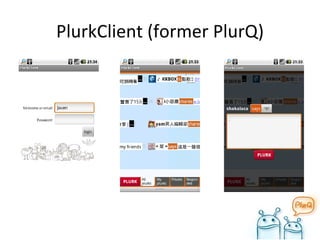
PlurkClient (former PlurQ)
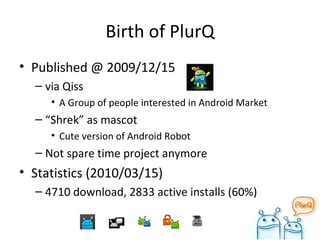
Birth of PlurQ Published @ 2009/12/15 via Qiss A Group of people interested in Android Market “ Shrek” as mascot Cute version of Android Robot Not spare time project anymore Statistics (2010/03/15) 4710 download, 2833 active installs (60%)
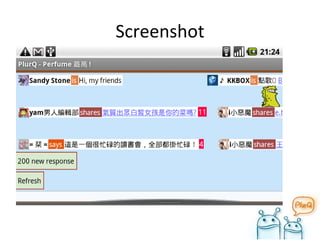
Screenshot
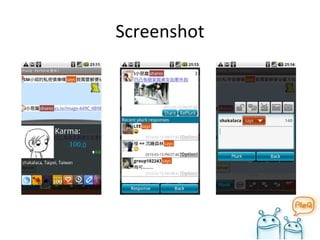
Screenshot
Download and play !
Go ahead and DIY ?
DIY is good, but.. Don’t reinvent wheel Official API Unofficial API Do a search on  http://code.google.com/  or  http://github.com/  first Bad for PlurQ Not noticing this open source project :  http://code.google.com/p/jplurkapi/
Analyzing first.. No official API Unofficial Plurk API :  http://plurkapi.com  (down) Problems Not all methods are listed Input/Output are not match to current state Plurk said there will be official API .. soon ?
Go go go ! Fire in the hole ! Shim code Wrapper for underlying API Easy to change difference implementation 2 days after official API released Digg plurk.com Firefox + Live HTTP header add-on ( https://addons.mozilla.org/en-US/firefox/addon/3829 ) Get methods from .js Faster than reading document .
Dealing with strange output Format of “date” in return JSON object is wrong ("Mon, 12 Jan 1976 00:01:00 GMT") Solution Copy from android and hack Not used after official API released
Taking picture should be easy ?
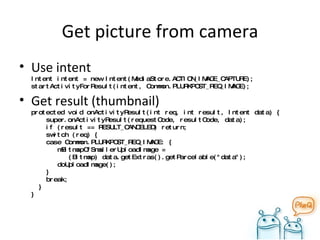
Get picture from camera Use intent Intent intent = new Intent(MediaStore.ACTION_IMAGE_CAPTURE); startActivityForResult(intent, Common.PLURKPOST_REQ_IMAGE); Get result (thumbnail) protected void onActivityResult(int req, int result, Intent data) {   super.onActivityResult(requestCode, resultCode, data);   if (result == RESULT_CANCELED) return;   switch (req) {   case Common.PLURKPOST_REQ_IMAGE: {   mBitmapOfSmallerUploadImage =    (Bitmap) data.getExtras().getParcelable("data");   doUploadImage();   }    break;   } }
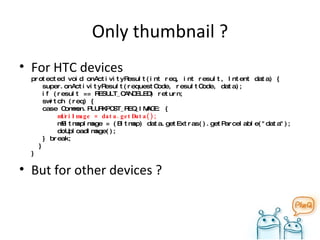
Only thumbnail ? For HTC devices protected void onActivityResult(int req, int result, Intent data) {   super.onActivityResult(requestCode, resultCode, data);   if (result == RESULT_CANCELED) return;   switch (req) {   case Common.PLURKPOST_REQ_IMAGE: {   mUriImage = data.getData();   mBitmapImage = (Bitmap) data.getExtras().getParcelable("data");   doUploadImage();   } break;   } } But for other devices ?
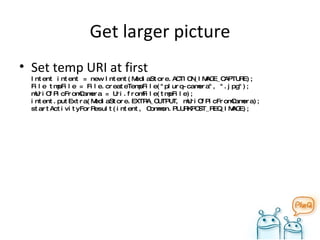
Get larger picture Set temp URI at first Intent intent = new Intent(MediaStore.ACTION_IMAGE_CAPTURE); File tmpFile = File.createTempFile("plurq-camera", ".jpg"); mUriOfPicFromCamera = Uri.fromFile(tmpFile); intent.putExtra(MediaStore.EXTRA_OUTPUT, mUriOfPicFromCamera); startActivityForResult(intent, Common.PLURKPOST_REQ_IMAGE);
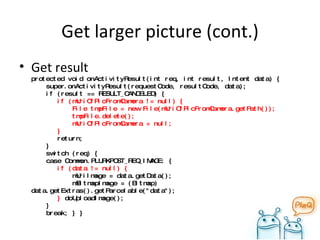
Get larger picture (cont.) Get result protected void onActivityResult(int req, int result, Intent data) {   super.onActivityResult(requestCode, resultCode, data);   if (result == RESULT_CANCELED) {    if (mUriOfPicFromCamera != null) {   File tmpFile = new File(mUriOfPicFromCamera.getPath());   tmpFile.delete();   mUriOfPicFromCamera = null;   }    return;    }   switch (req) {   case Common.PLURKPOST_REQ_IMAGE: {   if (data != null) {   mUriImage = data.getData();   mBitmapImage = (Bitmap) data.getExtras().getParcelable("data");   }  doUploadImage();   }    break; } }
Side Story Activity closed after launching camera Sometimes FC after taking picture Analysis Due to memory issue Solution Do no assumptions Do login check when activity starts
Lots of memory out there ?
Memory is big enough, right ? "640K ought to be enough for anybody" Specs of phones G1 : 192MB HTC Magic : 288MB (or 192MB) HTC Hero : 288MB Nexus One : 512MB
Truth is .. http://developer.android.com/intl/zh-TW/reference/android/app/ActivityManager.html getMemoryClass()  Return the approximate per-application memory class of the current device. This gives you an idea of how hard a memory limit you should impose on your application to let the overall system work best . The returned value is in megabytes; the baseline Android memory class is 16  (which happens to be the Java heap limit of those devices);  some device with more memory may return 24 or even higher numbers. On G1 or most device : 16MB Droid & Nexus One : 24MB
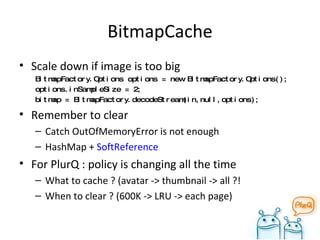
BitmapCache Scale down if image is too big BitmapFactory.Options options = new BitmapFactory.Options(); options.inSampleSize = 2; bitmap = BitmapFactory.decodeStream(in,null,options); Remember to clear Catch OutOfMemoryError is not enough HashMap +  SoftReference For PlurQ : policy is changing all the time What to cache ? (avatar -> thumbnail -> all ?! When to clear ? (600K -> LRU -> each page)
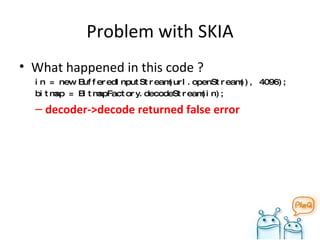
Problem with SKIA What happened in this code ? in = new BufferedInputStream(url.openStream(), 4096); bitmap = BitmapFactory.decodeStream(in); decoder->decode returned false error
Solution Use  BitmapFactory.decodeByteArray   instead Bitmap bitmap = null; InputStream in = null; BufferedOutputStream out = null; try {   in = new BufferedInputStream(url.openStream(), 4096);   final ByteArrayOutputStream ds = new ByteArrayOutputStream();   out = new  BufferedOutputStream(ds, 4096);   copy(in, out);   out.flush();   final byte[] data = ds.toByteArray();   bitmap = BitmapFactory.decodeByteArray(data, 0, data.length); } catch (...) { } private void copy(InputStream in, OutputStream out) throws IOException {   byte[] b = new byte[4096]; int read;   while ((read = in.read(b)) != -1) {   out.write(b, 0, read);   } }
Memory optimization tools ddms process heap monitor Memory Analyzer for Eclipse Finding memory leaks
Networking is simple as doc told you so ?
Problems Users complain Can’t login (a few users) Can’t see picture (some users) Sometimes it takes a long time loading something Analyze Proxy Timeout Secure connection
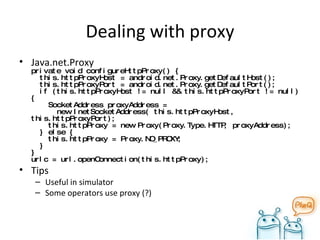
Dealing with proxy Java.net.Proxy private void configureHttpProxy() {   this.httpProxyHost = android.net.Proxy.getDefaultHost();   this.httpProxyPort = android.net.Proxy.getDefaultPort();   if (this.httpProxyHost != null && this.httpProxyPort != null) {   SocketAddress proxyAddress =    new InetSocketAddress( this.httpProxyHost, this.httpProxyPort);   this.httpProxy = new Proxy(Proxy.Type.HTTP, proxyAddress);   } else {   this.httpProxy = Proxy.NO_PROXY;   } } urlc = url.openConnection(this.httpProxy); Tips Useful in simulator Some operators use proxy (?)
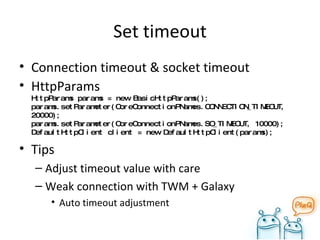
Set timeout Connection timeout & socket timeout HttpParams HttpParams params = new BasicHttpParams(); params.setParameter(CoreConnectionPNames.CONNECTION_TIMEOUT, 20000); params.setParameter(CoreConnectionPNames.SO_TIMEOUT, 10000); DefaultHttpClient client = new DefaultHttpClient(params); Tips Adjust timeout value with care Weak connection with TWM + Galaxy Auto timeout adjustment
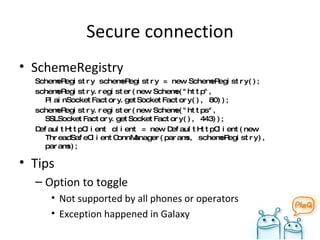
Secure connection SchemeRegistry SchemeRegistry schemeRegistry = new SchemeRegistry(); schemeRegistry.register(new Scheme("http", PlainSocketFactory.getSocketFactory(), 80)); schemeRegistry.register(new Scheme("https", SSLSocketFactory.getSocketFactory(), 443)); DefaultHttpClient client = new DefaultHttpClient(new ThreadSafeClientConnManager(params, schemeRegistry), params); Tips Option to toggle Not supported by all phones or operators Exception happened in Galaxy
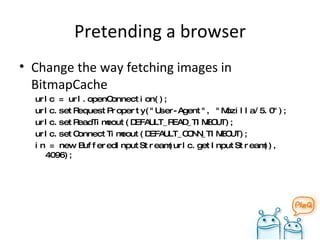
Pretending a browser Change the way fetching images in BitmapCache urlc = url.openConnection(); urlc.setRequestProperty("User-Agent", "Mozilla/5.0"); urlc.setReadTimeout(DEFAULT_READ_TIMEOUT); urlc.setConnectTimeout(DEFAULT_CONN_TIMEOUT); in = new BufferedInputStream(urlc.getInputStream(), 4096);
Upload and your app should be published ?
Problems Can’t be found in Android Market Tattoo A688 Analysis SDK Layout (screen) Layout (screen) Permission
SDK issues Always use the latest Android SDK release 1.6+ Use emulator provided by vendors SE :  http://developer.sonyericsson.com/wportal/devworld/home?cc=gb&lc=en Motorola :  http://developer.motorola.com/ Put in your AndroidManifest.xml <uses-sdk  android:minSdkVersion= &quot;3”/> Not sure:  android:targetSdkVersion= &quot;4“
Layout (screen) issues res/layout, res/layout-*dpi At least ldpi AndroidManifest.xml <supports-screens android:largeScreens=&quot;true“ android:normalScreens=&quot;true“ android:smallScreens=&quot;true“ android:anyDensity=&quot;true&quot; /> Yeah ! Can be found on Tattoo & A688, but..
Ugly layout Because of  android:anyDensity=&quot;true&quot;  Android won’t auto adjust UI elements UI hell if you’re coding in the wrong way Tips Prefer wrap_content, fill_parent and the  dip  unit to px in XML layout files ( sp  for text) Avoid AbsoluteLayout Do not use hard coded pixel values in your code Use density and/or resolution specific resources http://developer.android.com/intl/zh-TW/guide/practices/screens_support.html#dips-pels
Add permission only when needed Story PlurQ is not found on Tattoo market -> Problem solved PlurQ uses camera, should add “ android.permission.CAMERA ” to AndroidManifest.xml PlurQ is not found on Tattoo market, again. Only AndroidManifest.xml differs After hours of testing, remove this stupid change and Booom ! Tips Add permission only when exception occurs.
My 2 cents
Experience sharing.. Field try is important Buy one ! Borrow one ! Go local store and try it ! Win one ! ADC or ADL ? Record exception log You don’t know WTF is going on with users’ phone Log should be easily turn on/off and get
Experience sharing.. (cont.) Don’t be sad when you only have an old G1 If your program can run flawlessly on G1, robustness++ for your application! Don’t be frustrated by your defective Nexus One If your program can survive under the horrible networking environment on NO, robustness++ for your application!
Performance tuning Tools Log.* traceview Tips Some UI components can be created later Use  AsyncTask  if you want to something in background and return result to UI
Q & A
Any re Q uests or  A dvises ?
On-going features Social Activity View profile / View plurks / Add friend,fan.. Share via … Widget Notification
Wish list Friend Browser / Editor Send private plurk / clique Theme Short url Video upload Search plurker Music listening GPS support
Reference Plurk API http://code.google.com/p/jplurk/ http://code.google.com/p/anplurkapi/ http://code.google.com/p/jplurkapi/ Mobile development LG :  http://developer.lgmobile.com/lge.mdn.mai.RetrieveMainPage.dev Samsung :  http://innovator.samsungmobile.com/ Acer :  http://mobile.acer.com/en/developers/

Naive application development

  • 1.
    Naive application development- Learning Android from failure 2010/03/17 shakalaca
  • 2.
    About shakalaca (shaka)Engineer @ Qisda Android UI development & system integration Where to find me ? @plurk, @facebook, @twitter Contact @gmail.com Published Android App PlurQ / Beauty Clock Widget
  • 3.
    Outline A shortintroduction Go ahead and DIY ? Taking picture should be easy ? Lots of memory out there ? Networking is simple as doc told you so ? Upload and your app should be published ? My 2 cents Q & A
  • 4.
  • 5.
    About PlurQ “Missing the timeline view of Plurk? Enjoying surfing between Plurk mesages? PlurQ provides almost the same look-n-feel as Plurk on your web browser. Feature: -Similar look-n-feel as Plurk on web browser, including the timeline view” - http://www.cyrket.com/p/android/mobi.qiss.plurq/
  • 6.
    Story of PlurQAPI first developed @ 2009/Mar As a practice of getting started with Android River view first developed @ 2009/Sep Inspired by HTC sense™ UI Creating custom view PlurkClient as a Demo Spare time project
  • 7.
  • 8.
    Birth of PlurQPublished @ 2009/12/15 via Qiss A Group of people interested in Android Market “ Shrek” as mascot Cute version of Android Robot Not spare time project anymore Statistics (2010/03/15) 4710 download, 2833 active installs (60%)
  • 9.
  • 10.
  • 11.
  • 12.
  • 13.
    DIY is good,but.. Don’t reinvent wheel Official API Unofficial API Do a search on http://code.google.com/ or http://github.com/ first Bad for PlurQ Not noticing this open source project : http://code.google.com/p/jplurkapi/
  • 14.
    Analyzing first.. Noofficial API Unofficial Plurk API : http://plurkapi.com (down) Problems Not all methods are listed Input/Output are not match to current state Plurk said there will be official API .. soon ?
  • 15.
    Go go go! Fire in the hole ! Shim code Wrapper for underlying API Easy to change difference implementation 2 days after official API released Digg plurk.com Firefox + Live HTTP header add-on ( https://addons.mozilla.org/en-US/firefox/addon/3829 ) Get methods from .js Faster than reading document .
  • 16.
    Dealing with strangeoutput Format of “date” in return JSON object is wrong (&quot;Mon, 12 Jan 1976 00:01:00 GMT&quot;) Solution Copy from android and hack Not used after official API released
  • 17.
  • 18.
    Get picture fromcamera Use intent Intent intent = new Intent(MediaStore.ACTION_IMAGE_CAPTURE); startActivityForResult(intent, Common.PLURKPOST_REQ_IMAGE); Get result (thumbnail) protected void onActivityResult(int req, int result, Intent data) { super.onActivityResult(requestCode, resultCode, data); if (result == RESULT_CANCELED) return; switch (req) { case Common.PLURKPOST_REQ_IMAGE: { mBitmapOfSmallerUploadImage = (Bitmap) data.getExtras().getParcelable(&quot;data&quot;); doUploadImage(); } break; } }
  • 19.
    Only thumbnail ?For HTC devices protected void onActivityResult(int req, int result, Intent data) { super.onActivityResult(requestCode, resultCode, data); if (result == RESULT_CANCELED) return; switch (req) { case Common.PLURKPOST_REQ_IMAGE: { mUriImage = data.getData(); mBitmapImage = (Bitmap) data.getExtras().getParcelable(&quot;data&quot;); doUploadImage(); } break; } } But for other devices ?
  • 20.
    Get larger pictureSet temp URI at first Intent intent = new Intent(MediaStore.ACTION_IMAGE_CAPTURE); File tmpFile = File.createTempFile(&quot;plurq-camera&quot;, &quot;.jpg&quot;); mUriOfPicFromCamera = Uri.fromFile(tmpFile); intent.putExtra(MediaStore.EXTRA_OUTPUT, mUriOfPicFromCamera); startActivityForResult(intent, Common.PLURKPOST_REQ_IMAGE);
  • 21.
    Get larger picture(cont.) Get result protected void onActivityResult(int req, int result, Intent data) { super.onActivityResult(requestCode, resultCode, data); if (result == RESULT_CANCELED) { if (mUriOfPicFromCamera != null) { File tmpFile = new File(mUriOfPicFromCamera.getPath()); tmpFile.delete(); mUriOfPicFromCamera = null; } return; } switch (req) { case Common.PLURKPOST_REQ_IMAGE: { if (data != null) { mUriImage = data.getData(); mBitmapImage = (Bitmap) data.getExtras().getParcelable(&quot;data&quot;); } doUploadImage(); } break; } }
  • 22.
    Side Story Activityclosed after launching camera Sometimes FC after taking picture Analysis Due to memory issue Solution Do no assumptions Do login check when activity starts
  • 23.
    Lots of memoryout there ?
  • 24.
    Memory is bigenough, right ? &quot;640K ought to be enough for anybody&quot; Specs of phones G1 : 192MB HTC Magic : 288MB (or 192MB) HTC Hero : 288MB Nexus One : 512MB
  • 25.
    Truth is ..http://developer.android.com/intl/zh-TW/reference/android/app/ActivityManager.html getMemoryClass() Return the approximate per-application memory class of the current device. This gives you an idea of how hard a memory limit you should impose on your application to let the overall system work best . The returned value is in megabytes; the baseline Android memory class is 16 (which happens to be the Java heap limit of those devices); some device with more memory may return 24 or even higher numbers. On G1 or most device : 16MB Droid & Nexus One : 24MB
  • 26.
    BitmapCache Scale downif image is too big BitmapFactory.Options options = new BitmapFactory.Options(); options.inSampleSize = 2; bitmap = BitmapFactory.decodeStream(in,null,options); Remember to clear Catch OutOfMemoryError is not enough HashMap + SoftReference For PlurQ : policy is changing all the time What to cache ? (avatar -> thumbnail -> all ?! When to clear ? (600K -> LRU -> each page)
  • 27.
    Problem with SKIAWhat happened in this code ? in = new BufferedInputStream(url.openStream(), 4096); bitmap = BitmapFactory.decodeStream(in); decoder->decode returned false error
  • 28.
    Solution Use BitmapFactory.decodeByteArray instead Bitmap bitmap = null; InputStream in = null; BufferedOutputStream out = null; try { in = new BufferedInputStream(url.openStream(), 4096); final ByteArrayOutputStream ds = new ByteArrayOutputStream(); out = new BufferedOutputStream(ds, 4096); copy(in, out); out.flush(); final byte[] data = ds.toByteArray(); bitmap = BitmapFactory.decodeByteArray(data, 0, data.length); } catch (...) { } private void copy(InputStream in, OutputStream out) throws IOException { byte[] b = new byte[4096]; int read; while ((read = in.read(b)) != -1) { out.write(b, 0, read); } }
  • 29.
    Memory optimization toolsddms process heap monitor Memory Analyzer for Eclipse Finding memory leaks
  • 30.
    Networking is simpleas doc told you so ?
  • 31.
    Problems Users complainCan’t login (a few users) Can’t see picture (some users) Sometimes it takes a long time loading something Analyze Proxy Timeout Secure connection
  • 32.
    Dealing with proxyJava.net.Proxy private void configureHttpProxy() { this.httpProxyHost = android.net.Proxy.getDefaultHost(); this.httpProxyPort = android.net.Proxy.getDefaultPort(); if (this.httpProxyHost != null && this.httpProxyPort != null) { SocketAddress proxyAddress = new InetSocketAddress( this.httpProxyHost, this.httpProxyPort); this.httpProxy = new Proxy(Proxy.Type.HTTP, proxyAddress); } else { this.httpProxy = Proxy.NO_PROXY; } } urlc = url.openConnection(this.httpProxy); Tips Useful in simulator Some operators use proxy (?)
  • 33.
    Set timeout Connectiontimeout & socket timeout HttpParams HttpParams params = new BasicHttpParams(); params.setParameter(CoreConnectionPNames.CONNECTION_TIMEOUT, 20000); params.setParameter(CoreConnectionPNames.SO_TIMEOUT, 10000); DefaultHttpClient client = new DefaultHttpClient(params); Tips Adjust timeout value with care Weak connection with TWM + Galaxy Auto timeout adjustment
  • 34.
    Secure connection SchemeRegistrySchemeRegistry schemeRegistry = new SchemeRegistry(); schemeRegistry.register(new Scheme(&quot;http&quot;, PlainSocketFactory.getSocketFactory(), 80)); schemeRegistry.register(new Scheme(&quot;https&quot;, SSLSocketFactory.getSocketFactory(), 443)); DefaultHttpClient client = new DefaultHttpClient(new ThreadSafeClientConnManager(params, schemeRegistry), params); Tips Option to toggle Not supported by all phones or operators Exception happened in Galaxy
  • 35.
    Pretending a browserChange the way fetching images in BitmapCache urlc = url.openConnection(); urlc.setRequestProperty(&quot;User-Agent&quot;, &quot;Mozilla/5.0&quot;); urlc.setReadTimeout(DEFAULT_READ_TIMEOUT); urlc.setConnectTimeout(DEFAULT_CONN_TIMEOUT); in = new BufferedInputStream(urlc.getInputStream(), 4096);
  • 36.
    Upload and yourapp should be published ?
  • 37.
    Problems Can’t befound in Android Market Tattoo A688 Analysis SDK Layout (screen) Layout (screen) Permission
  • 38.
    SDK issues Alwaysuse the latest Android SDK release 1.6+ Use emulator provided by vendors SE : http://developer.sonyericsson.com/wportal/devworld/home?cc=gb&lc=en Motorola : http://developer.motorola.com/ Put in your AndroidManifest.xml <uses-sdk android:minSdkVersion= &quot;3”/> Not sure: android:targetSdkVersion= &quot;4“
  • 39.
    Layout (screen) issuesres/layout, res/layout-*dpi At least ldpi AndroidManifest.xml <supports-screens android:largeScreens=&quot;true“ android:normalScreens=&quot;true“ android:smallScreens=&quot;true“ android:anyDensity=&quot;true&quot; /> Yeah ! Can be found on Tattoo & A688, but..
  • 40.
    Ugly layout Becauseof android:anyDensity=&quot;true&quot; Android won’t auto adjust UI elements UI hell if you’re coding in the wrong way Tips Prefer wrap_content, fill_parent and the dip unit to px in XML layout files ( sp for text) Avoid AbsoluteLayout Do not use hard coded pixel values in your code Use density and/or resolution specific resources http://developer.android.com/intl/zh-TW/guide/practices/screens_support.html#dips-pels
  • 41.
    Add permission onlywhen needed Story PlurQ is not found on Tattoo market -> Problem solved PlurQ uses camera, should add “ android.permission.CAMERA ” to AndroidManifest.xml PlurQ is not found on Tattoo market, again. Only AndroidManifest.xml differs After hours of testing, remove this stupid change and Booom ! Tips Add permission only when exception occurs.
  • 42.
  • 43.
    Experience sharing.. Fieldtry is important Buy one ! Borrow one ! Go local store and try it ! Win one ! ADC or ADL ? Record exception log You don’t know WTF is going on with users’ phone Log should be easily turn on/off and get
  • 44.
    Experience sharing.. (cont.)Don’t be sad when you only have an old G1 If your program can run flawlessly on G1, robustness++ for your application! Don’t be frustrated by your defective Nexus One If your program can survive under the horrible networking environment on NO, robustness++ for your application!
  • 45.
    Performance tuning ToolsLog.* traceview Tips Some UI components can be created later Use AsyncTask if you want to something in background and return result to UI
  • 46.
  • 47.
    Any re Quests or A dvises ?
  • 48.
    On-going features SocialActivity View profile / View plurks / Add friend,fan.. Share via … Widget Notification
  • 49.
    Wish list FriendBrowser / Editor Send private plurk / clique Theme Short url Video upload Search plurker Music listening GPS support
  • 50.
    Reference Plurk APIhttp://code.google.com/p/jplurk/ http://code.google.com/p/anplurkapi/ http://code.google.com/p/jplurkapi/ Mobile development LG : http://developer.lgmobile.com/lge.mdn.mai.RetrieveMainPage.dev Samsung : http://innovator.samsungmobile.com/ Acer : http://mobile.acer.com/en/developers/

Editor's Notes

  • #27 Launcher/src/com/android/launcher/LiveFolderAdapter.java ( http://www.google.com/codesearch/p?hl=en#4r7JaNM0EqE/src/com/android/launcher/LiveFolderAdapter.java )