Upgrade to Oracle Database 19c
AutoUpgrade to Oracle Database 19c
Mike Dietrich
Master Product Manager
Database Upgrade and Migration
Roy Swonger
Vice President
Database Upgrade, Utilities and Patching
Virtual Classroom Series
Vice President
Database Upgrade,
Utilities & Patching
Roy F. Swonger
@RoyFSwonger
Master Product Manager
Database Upgrade
and Migrations
Mike Dietrich
https://MikeDietrichDE.com
@MikeDietrichDE
mikedietrich
Slides | https://MikeDietrichDE.com
Content Overview
Migration to
Multitenant
4
Ensure
Performance Stability
3
Upgrade to Oracle
Database 19c
2Release and
Patching Strategy
1
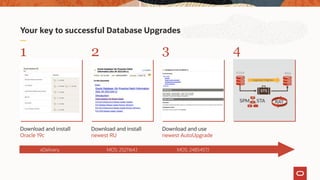
Your key to successful Database Upgrades
1 2 3 4
Download and install
Oracle 19c
Download and install
newest RU
Download and use
newest AutoUpgrade
eDelivery MOS: 2521164.1 MOS: 2485457.1
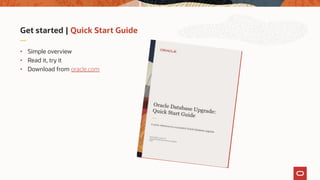
Get started | Quick Start Guide
• Simple overview
• Read it, try it
• Download from oracle.com
Check
Before Upgrade
PhotobyPabloHeimplatzonUnsplash
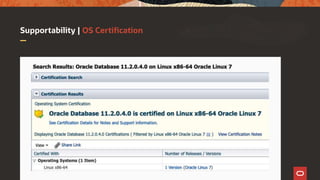
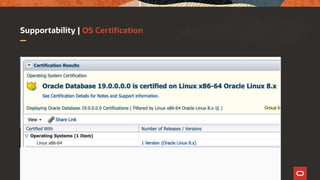
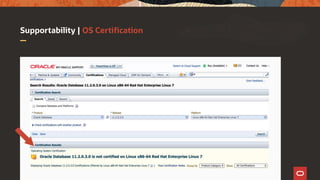
Supportability | OS Certification
More Links on the Upgrade Blog
Oracle Clusterware Certification on OL8/RHEL8
https://mikedietrichde.com/2020/05/14/of-course-oracle-clusterware-is-certified-on-ol8-rhel8-as-well/
Oracle Database 19c Certification on OL8/RHEL8
https://mikedietrichde.com/2020/05/11/oracle-database-19c-is-certified-on-ol8-and-rhel8/
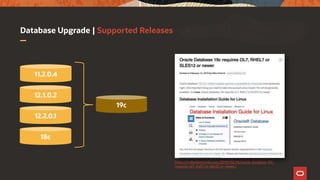
Database Upgrade | Supported Releases
11.2.0.4
12.1.0.2
12.2.0.1
19c
18c
https://mikedietrichde.com/2019/02/14/oracle-database-19c-
requires-ol7-rhel7-or-sles12-or-newer/
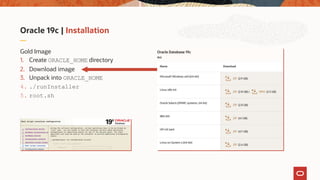
Oracle 19c | Installation
Gold Image
1. Create ORACLE_HOME directory
2. Download image
3. Unpack into ORACLE_HOME
4. ./runInstaller
5. root.sh
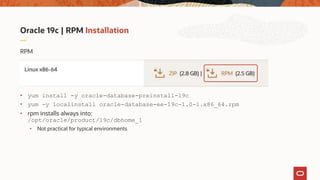
Oracle 19c | RPM Installation
RPM
• yum install -y oracle-database-preinstall-19c
• yum -y localinstall oracle-database-ee-19c-1.0-1.x86_64.rpm
• rpm installs always into:
/opt/oracle/product/19c/dbhome_1
• Not practical for typical environments
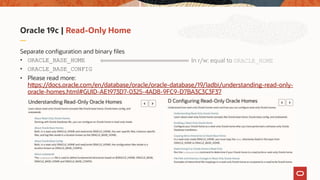
Oracle 19c | Read-Only Home
Separate configuration and binary files
• ORACLE_BASE_HOME
• ORACLE_BASE_CONFIG
• Please read more:
https://docs.oracle.com/en/database/oracle/oracle-database/19/ladbi/understanding-read-only-
oracle-homes.html#GUID-AE1973D7-0325-4AD8-9FC9-D7BA3C3C3F37
In r/w: equal to ORACLE_HOME
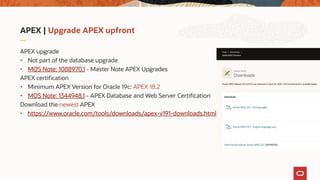
APEX | Upgrade APEX upfront
APEX upgrade
• Not part of the database upgrade
• MOS Note: 1088970.1 - Master Note APEX Upgrades
APEX certification
• Minimum APEX Version for Oracle 19c: APEX 18.2
• MOS Note: 1344948.1 - APEX Database and Web Server Certification
Download the newest APEX
• https://www.oracle.com/tools/downloads/apex-v191-downloads.html
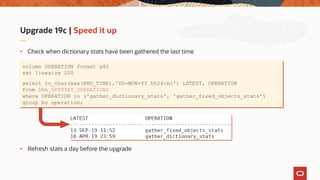
Upgrade 19c | Speed it up
• Check when dictionary stats have been gathered the last time
• Refresh stats a day before the upgrade
column OPERATION format a40
set linesize 200
select to_char(max(END_TIME),'DD-MON-YY hh24:mi') LATEST, OPERATION
from DBA_OPTSTAT_OPERATIONS
where OPERATION in ('gather_dictionary_stats', 'gather_fixed_objects_stats’)
group by operation;
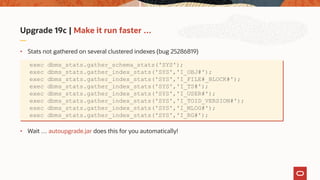
Upgrade 19c | Make it run faster …
• Stats not gathered on several clustered indexes (bug 25286819)
• Wait … autoupgrade.jar does this for you automatically!
exec dbms_stats.gather_schema_stats('SYS');
exec dbms_stats.gather_index_stats('SYS','I_OBJ#');
exec dbms_stats.gather_index_stats('SYS','I_FILE#_BLOCK#');
exec dbms_stats.gather_index_stats('SYS','I_TS#');
exec dbms_stats.gather_index_stats('SYS','I_USER#');
exec dbms_stats.gather_index_stats('SYS','I_TOID_VERSION#');
exec dbms_stats.gather_index_stats('SYS','I_MLOG#');
exec dbms_stats.gather_index_stats('SYS','I_RG#');
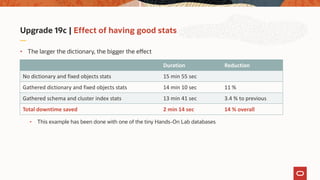
Upgrade 19c | Effect of having good stats
• The larger the dictionary, the bigger the effect
• This example has been done with one of the tiny Hands-On Lab databases
Duration Reduction
No dictionary and fixed objects stats 15 min 55 sec
Gathered dictionary and fixed objects stats 14 min 10 sec 11 %
Gathered schema and cluster index stats 13 min 41 sec 3.4 % to previous
Total downtime saved 2 min 14 sec 14 % overall
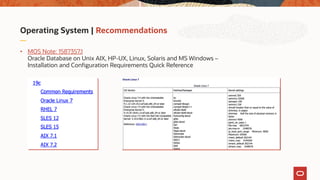
Operating System | Recommendations
• MOS Note: 1587357.1
Oracle Database on Unix AIX, HP-UX, Linux, Solaris and MS Windows –
Installation and Configuration Requirements Quick Reference
AutoUpgrade
The ONLY recommended
way to upgrade databases
PhotobyJoshuaSortinoonUnsplash
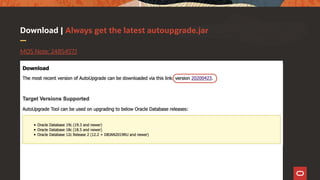
Download | Always get the latest autoupgrade.jar
MOS Note: 2485457.1
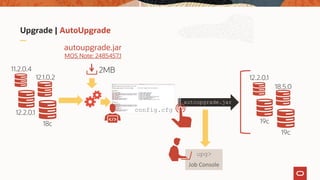
Upgrade | AutoUpgrade
upg>
Job Console
11.2.0.4
12.1.0.2
12.2.0.1
18c
autoupgrade.jar
MOS Note: 2485457.1
2MB
config.cfg
autoupgrade.jar
12.2.0.1
18.5.0
19c
19c
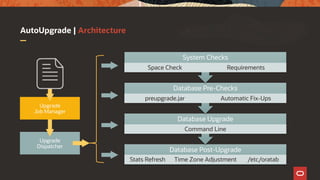
AutoUpgrade | Architecture
Upgrade
Job Manager
Upgrade
Dispatcher
config.cfg
Database Post-Upgrade
Stats Refresh Time Zone Adjustment /etc/oratab
Database Upgrade
Command Line
Database Pre-Checks
preupgrade.jar Automatic Fix-Ups
System Checks
Space Check Requirements
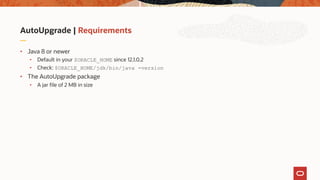
AutoUpgrade | Requirements
• Java 8 or newer
• Default in your $ORACLE_HOME since 12.1.0.2
• Check: $ORACLE_HOME/jdk/bin/java -version
• The AutoUpgrade package
• A jar file of 2 MB in size
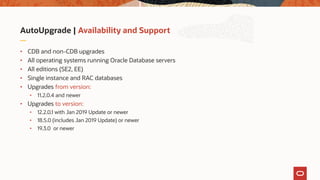
AutoUpgrade | Availability and Support
• CDB and non-CDB upgrades
• All operating systems running Oracle Database servers
• All editions (SE2, EE)
• Single instance and RAC databases
• Upgrades from version:
• 11.2.0.4 and newer
• Upgrades to version:
• 12.2.0.1 with Jan 2019 Update or newer
• 18.5.0 (includes Jan 2019 Update) or newer
• 19.3.0 or newer
AutoUpgrade | What you don't need …
• Agents
• EM Cloud Control
• DBUA
• Extra license
AutoUpgrade | Coming soon!
• Data Guard
• Disable DG Broker and defer log transport
• Unplug/plug/upgrade
AutoUpgrade | Blog Post Series
https://mikedietrichde.com/2019/04/29/the-new-autoupgrade-utility-in-oracle-19c/
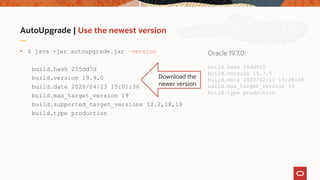
AutoUpgrade | Use the newest version
• $ java -jar autoupgrade.jar –version
build.hash 255dd7d
build.version 19.9.0
build.date 2020/04/23 15:01:36
build.max_target_version 19
build.supported_target_versions 12.2,18,19
build.type production
Oracle 19.7.0:
build.hash 04dd9f2
build.version 19.7.5
build.date 2020/02/11 15:28:49
build.max_target_version 19
build.type production
Download the
newer version
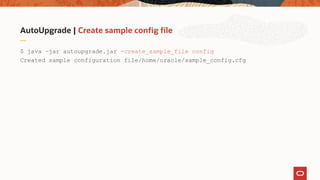
AutoUpgrade | Create sample config file
$ java –jar autoupgrade.jar -create_sample_file config
Created sample configuration file/home/oracle/sample_config.cfg
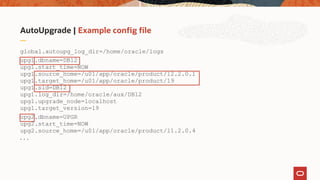
AutoUpgrade | Example config file
global.autoupg_log_dir=/home/oracle/logs
upg1.dbname=DB12
upg1.start_time=NOW
upg1.source_home=/u01/app/oracle/product/12.2.0.1
upg1.target_home=/u01/app/oracle/product/19
upg1.sid=DB12
upg1.log_dir=/home/oracle/aux/DB12
upg1.upgrade_node=localhost
upg1.target_version=19
upg2.dbname=UPGR
upg2.start_time=NOW
upg2.source_home=/u01/app/oracle/product/11.2.0.4
. . .
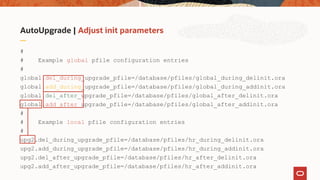
AutoUpgrade | Adjust init parameters
#
# Example global pfile configuration entries
#
global.del_during_upgrade_pfile=/database/pfiles/global_during_delinit.ora
global.add_during_upgrade_pfile=/database/pfiles/global_during_addinit.ora
global.del_after_upgrade_pfile=/database/pfiles/global_after_delinit.ora
global.add_after_upgrade_pfile=/database/pfiles/global_after_addinit.ora
#
# Example local pfile configuration entries
#
upg2.del_during_upgrade_pfile=/database/pfiles/hr_during_delinit.ora
upg2.add_during_upgrade_pfile=/database/pfiles/hr_during_addinit.ora
upg2.del_after_upgrade_pfile=/database/pfiles/hr_after_delinit.ora
upg2.add_after_upgrade_pfile=/database/pfiles/hr_after_addinit.ora
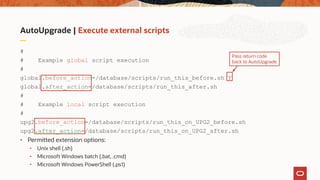
AutoUpgrade | Execute external scripts
#
# Example global script execution
#
global.before_action=/database/scripts/run_this_before.sh Y
global.after_action=/database/scripts/run_this_after.sh
#
# Example local script execution
#
upg2.before_action=/database/scripts/run_this_on_UPG2_before.sh
upg2.after_action=/database/scripts/run_this_on_UPG2_after.sh
• Permitted extension options:
• Unix shell (.sh)
• Microsoft Windows batch (.bat, .cmd)
• Microsoft Windows PowerShell (.ps1)
Pass return code
back to AutoUpgrade
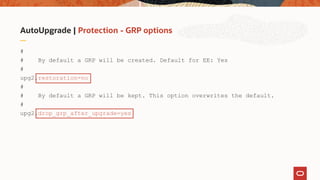
AutoUpgrade | Protection - GRP options
#
# By default a GRP will be created. Default for EE: Yes
#
upg2.restoration=no
#
# By default a GRP will be kept. This option overwrites the default.
#
upg2.drop_grp_after_upgrade=yes
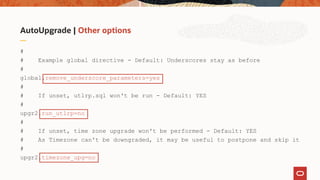
AutoUpgrade | Other options
#
# Example global directive - Default: Underscores stay as before
#
global.remove_underscore_parameters=yes
#
# If unset, utlrp.sql won't be run - Default: YES
#
upgr2.run_utlrp=no
#
# If unset, time zone upgrade won't be performed - Default: YES
# As Timezone can't be downgraded, it may be useful to postpone and skip it
#
upgr2.timezone_upg=no
AutoUpgrade | Start time
• VALID values
• Format: DD/MM/YYYY HH24:MI:SS
• NOW [this is the default]
• 30/12/2018 15:30:00
• 01/11/2019 01:30:15
• 2/5/2019 3:30:50
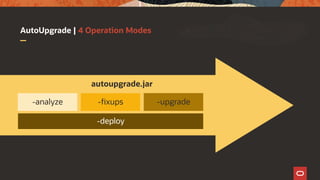
AutoUpgrade | 4 Operation Modes
autoupgrade.jar
-deploy
-analyze -fixups -upgrade
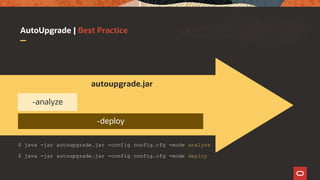
AutoUpgrade | Best Practice
$ java -jar autoupgrade.jar -config config.cfg -mode analyze
autoupgrade.jar
-deploy
-analyze
$ java -jar autoupgrade.jar -config config.cfg -mode deploy
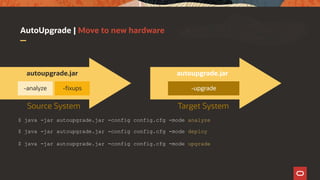
AutoUpgrade | Move to new hardware
$ java -jar autoupgrade.jar -config config.cfg -mode analyze
autoupgrade.jar
-analyze -fixups
autoupgrade.jar
-upgrade
$ java -jar autoupgrade.jar -config config.cfg -mode deploy
$ java -jar autoupgrade.jar -config config.cfg -mode upgrade
Source System Target System
AutoUpgrade | Job Console
• Most important commands
upg>
lsj // List jobs
resume -job <number> // Restarts a job
status -job <number> // Show job status
restore -job <number> // Restores database from GRP
abort -job <number> // Aborts the specified job
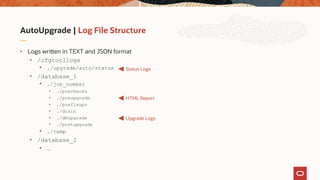
AutoUpgrade | Log File Structure
• Logs written in TEXT and JSON format
• /cfgtoollogs
• ./upgrade/auto/status
• /database_1
• ./job_number
• ./prechecks
• ./preupgrade
• ./prefixups
• ./drain
• ./dbupgrade
• ./postupgrade
• ./temp
• /database_2
• …
Status Logs
HTML Report
Upgrade Logs
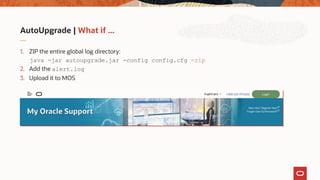
AutoUpgrade | What if ...
1. ZIP the entire global log directory:
java -jar autoupgrade.jar -config config.cfg -zip
2. Add the alert.log
3. Upload it to MOS
AutoUpgrade | What if ... a fixup fails?
• In case you need to override this particular fixup
• Run autoupgrade.jar -mode analyze
• Afterwards set parameter in config file:
• upg1.checklist=<use_the_full_path+filename_below>
• And edit:
• ../logdir/sid/jobno/prechecks/sid_checklist.cfg
[checkname] DICTIONARY_STATS
[stage] PRECHECKS
[fixup_available] YES
[runfix] YES >>>> NO
[severity] RECOMMEND
AutoUpgrade | What if ... you need to restart?
• By default, AutoUpgrade will resume where it left off
• If you’d like to restart from the beginning, remove the recovery checkpoint
• java -jar autoupgrade.jar -config DB.cfg -clear_recovery_data
• Then start AutoUpgrade again
AutoUpgrade | What if ... you have RAC?
• Since AutoUpgrade 19.8 (2020/03/27)
• RAC database upgrades are supported
• Works best with SPFILE in ASM
• Oracle Grid Infrastructure upgrade must be done separately upfront
After qualifying the new AutoUpgrade tool on a
representative portion of our database landscape
we found that tool was doing a great job and is
production-ready. In our automation tool we
have removed a lot of “home-grown” code, and
replaced it with AutoUpgrade functionality.
Since August 2019 all upgrades at SimCorp have
been executed using the AutoUpgrade tool.
Daniel Overby Hansen
Lead Developer
SimCorp A/S - Denmark
Slides | https://MikeDietrichDE.com
Time for a break
Migration Strategies
Migration to
Oracle Multitenant
PhotobyMathiasJensenonUnsplash
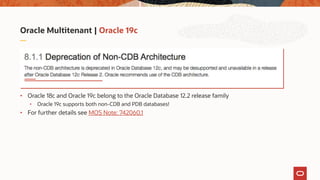
Oracle Multitenant | Oracle 19c
• Oracle 18c and Oracle 19c belong to the Oracle Database 12.2 release family
• Oracle 19c supports both non-CDB and PDB databases!
• For further details see MOS Note: 742060.1
Oracle Multitenant | Oracle 19c
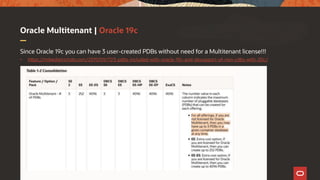
Since Oracle 19c you can have 3 user-created PDBs without need for a Multitenant license!!!
• https://mikedietrichde.com/2019/09/17/3-pdbs-included-with-oracle-19c-and-desupport-of-non-cdbs-with-20c/
Upgrade to 19c | Migration to Multitenant
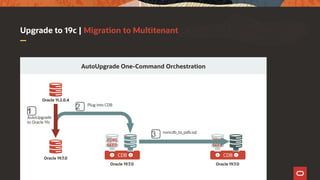
AutoUpgrade One-Command Orchestration
Oracle 11.2.0.4
AutoUpgrade
to Oracle 19c
Oracle 19.7.0
Oracle 19.7.0
CDB
PDB$
SEED
Oracle 19.7.0
CDB
PDB$
SEED
1️⃣
2️⃣ Plug into CDB
3️⃣ noncdb_to_pdb.sql
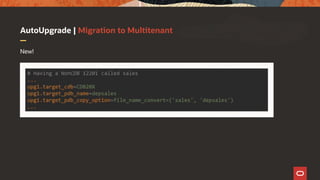
AutoUpgrade | Migration to Multitenant
New!
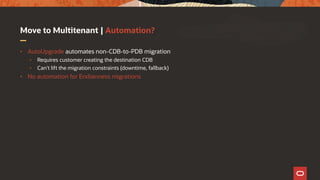
Move to Multitenant | Automation?
• AutoUpgrade automates non-CDB-to-PDB migration
• Requires customer creating the destination CDB
• Can't lift the migration constraints (downtime, fallback)
• No automation for Endianness migrations
Videos | Upgrade Channel on Youtube
• https://www.youtube.com/channel/UCTKvCZwAbOeTSRFQDAh7yXw
• AutoUpgrade
• https://youtu.be/kr3aZrqA9Go [11:57 min]
• https://youtu.be/dO_y8sOasjs [DOAG 2019]
• Preupgrade Steps
• https://youtu.be/2R0Plcn7Udk [6:27 min]
• Database Upgrade
• https://youtu.be/ZqW3hS64hng [4:17 min]
• Postupgrade and Time Zone change
• https://youtu.be/kEBLqYDmspw [7:58 min]
DEMO
After Upgrade
Important things to
do after the upgrade
completed successfully
Things to do right after upgrade
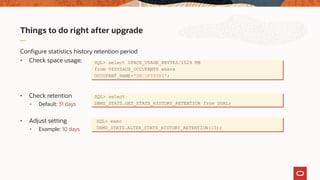
Configure statistics history retention period
• Check space usage:
• Check retention
• Default: 31 days
• Adjust setting
• Example: 10 days
SQL> select SPACE_USAGE_KBYTES/1024 MB
from V$SYSAUX_OCCUPANTS where
OCCUPANT_NAME='SM/OPTSTAT';
SQL> select
DBMS_STATS.GET_STATS_HISTORY_RETENTION from DUAL;
SQL> exec
DBMS_STATS.ALTER_STATS_HISTORY_RETENTION(10);
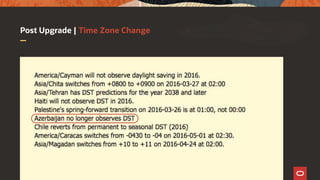
Post Upgrade | Time Zone Change
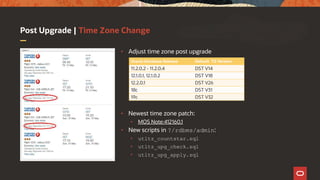
• Adjust time zone post upgrade
• Newest time zone patch:
• MOS Note:412160.1
• New scripts in ?/rdbms/admin:
• utltz_countstar.sql
• utltz_upg_check.sql
• utltz_upg_apply.sql
Oracle Database Release Default TZ Version
11.2.0.2 - 11.2.0.4 DST V14
12.1.0.1, 12.1.0.2 DST V18
12.2.0.1 DST V26
18c DST V31
19c DST V32
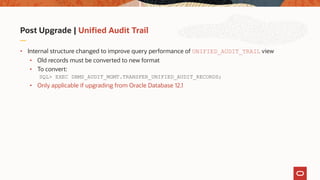
Post Upgrade | Unified Audit Trail
• Internal structure changed to improve query performance of UNIFIED_AUDIT_TRAIL view
• Old records must be converted to new format
• To convert:
SQL> EXEC DBMS_AUDIT_MGMT.TRANSFER_UNIFIED_AUDIT_RECORDS;
• Only applicable if upgrading from Oracle Database 12.1
More Information | Client Connectivity
MOS Note: 207303.1
Client / Server Interoperability Support Matrix for Different Oracle Versions
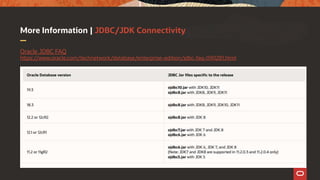
More Information | JDBC/JDK Connectivity
Oracle JDBC FAQ
https://www.oracle.com/technetwork/database/enterprise-edition/jdbc-faq-090281.html
Things to know
Best Practices and
things to take care on
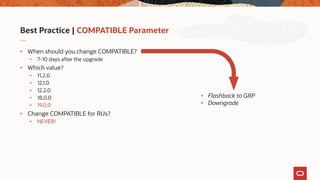
Best Practice | COMPATIBLE Parameter
• When should you change COMPATIBLE?
• 7-10 days after the upgrade
• Which value?
• 11.2.0
• 12.1.0
• 12.2.0
• 18.0.0
• 19.0.0
• Change COMPATIBLE for RUs?
• NEVER!
• Flashback to GRP
• Downgrade
Oracle 19c | Multimedia Removal
• The Oracle Multimedia API gets removed during upgrade
• The Locator still exists and works
• ORDIM component remains VALID in DBA_REGISTRY
• Recommendation
• Check, if you use Oracle Multimedia
• If not, you can remove it before upgrade
• More information
• https://mikedietrichde.com/2019/02/18/oracle-multimedia-will-be-removed-in-oracle-database-19c/
• MOS Note: 2347372.1 – Oracle Multimedia Statement of Direction
• MOS Note: 2375644.1 – How To Migrate Data From Oracle Multimedia Data Types to BLOB columns
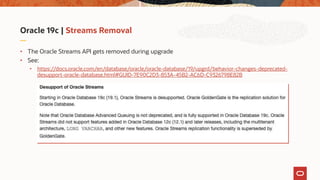
Oracle 19c | Streams Removal
• The Oracle Streams API gets removed during upgrade
• See:
• https://docs.oracle.com/en/database/oracle/oracle-database/19/upgrd/behavior-changes-deprecated-
desupport-oracle-database.html#GUID-7E90C2D3-853A-45B2-AC6D-C9326798E82B
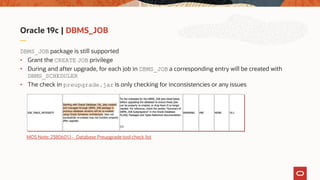
Oracle 19c | DBMS_JOB
DBMS_JOB package is still supported
• Grant the CREATE JOB privilege
• During and after upgrade, for each job in DBMS_JOB a corresponding entry will be created with
DBMS_SCHEDULER
• The check in preupgrade.jar is only checking for inconsistencies or any issues
MOS Note: 2380601.1 - Database Preupgrade tool check list
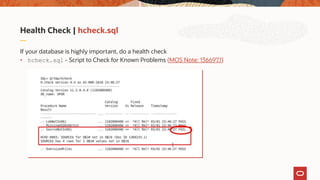
Health Check | hcheck.sql
If your database is highly important, do a health check
• hcheck.sql - Script to Check for Known Problems (MOS Note: 136697.1)
How to Diagnose
Oracle Database Upgrade Issues
Agenda | How to Diagnose Upgrade related issues
Determining
Success or Failure
2
Why Upgrade
is Different
1
Why Upgrade is Different
• Heavy DDL workload
• A trivial upgrade includes approximately
• 3000 ALTERs (mostly tables, also types and users)
• 15000 CREATE OR REPLACEs (views, types, synonyms, procedures, packages, functions)
• 18000 GRANT statements
• 1000 CREATE TABLE statements
• 500 CREATE INDEX statements
• And more…
• Almost exclusively in SYSTEM tablespaces
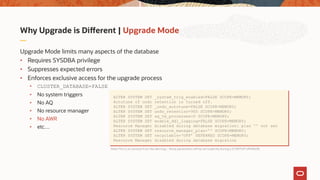
Why Upgrade is Different | Upgrade Mode
Upgrade Mode limits many aspects of the database
• Requires SYSDBA privilege
• Suppresses expected errors
• Enforces exclusive access for the upgrade process
• CLUSTER_DATABASE=FALSE
• No system triggers
• No AQ
• No resource manager
• No AWR
• etc…
ALTER SYSTEM SET _system_trig_enabled=FALSE SCOPE=MEMORY;
Autotune of undo retention is turned off.
ALTER SYSTEM SET _undo_autotune=FALSE SCOPE=MEMORY;
ALTER SYSTEM SET undo_retention=900 SCOPE=MEMORY;
ALTER SYSTEM SET aq_tm_processes=0 SCOPE=MEMORY;
ALTER SYSTEM SET enable_ddl_logging=FALSE SCOPE=MEMORY;
Resource Manager disabled during database migration: plan '' not set
ALTER SYSTEM SET resource_manager_plan='' SCOPE=MEMORY;
ALTER SYSTEM SET recyclebin=‘OFF’ DEFERRED SCOPE=MEMORY;
Resource Manager disabled during database migration
Note:This is an excerpt from the alert.log – these parameters will be set implicitly during a STARTUP UPGRADE
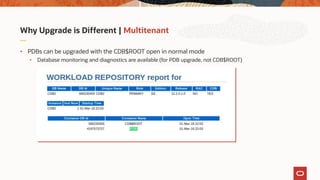
Why Upgrade is Different | Multitenant
• PDBs can be upgraded with the CDB$ROOT open in normal mode
• Database monitoring and diagnostics are available (for PDB upgrade, not CDB$ROOT)
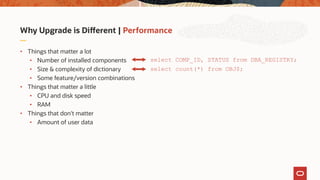
Why Upgrade is Different | Performance
• Things that matter a lot
• Number of installed components
• Size & complexity of dictionary
• Some feature/version combinations
• Things that matter a little
• CPU and disk speed
• RAM
• Things that don't matter
• Amount of user data
select COMP_ID, STATUS from DBA_REGISTRY;
select count(*) from OBJ$;
Agenda | How to Diagnose Upgrade related issues
Determining
Success or Failure
2
Why Upgrade
is Different
1
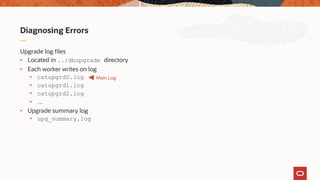
Diagnosing Errors
Upgrade log files
• Located in ../dbupgrade directory
• Each worker writes on log
• catupgrd0.log
• catupgrd1.log
• catupgrd2.log
• …
• Upgrade summary log
• upg_summary.log
Main Log
Diagnosing Errors
After upgrade, startup database
• Check upg_summary.log
• Recompilation
• ?/rdbms/admin/utlrp.sql
• Post Upgrade
• postupgrade_fixups.sql
COMP_ID
----------
CATALOG
CATPROC
JAVAVM
CATJAVA
...
COMP_NAME
-----------------------
Oracle Catalo
Oracle Database Packa
JServer JAVA Virtual M
Oracle Database Java P
VERSION
----------
12.2.0.1.0
12.2.0.1.0
12.2.0.1.0
12.2.0.1.0
STATUS
---------
UPGRADED
UPGRADED
UPGRADED
UPGRADED
Diagnosing Errors
After upgrade, startup database
• Check upg_summary.log
• Recompilation
• ?/rdbms/admin/utlrp.sql
• Post Upgrade
• postupgrade_fixups.sql
• Check catupgrd*.log for errors
• $ grep -i 'error at line'
catupgrd*.log
• [Win: C:> find /I "error at line"
catupgrd*.log]
Further Information
Finally …
Slides | https://MikeDietrichDE.com
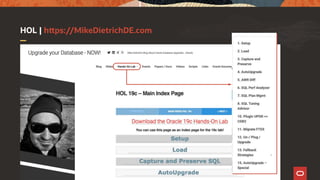
HOL | https://MikeDietrichDE.com
Thank you!
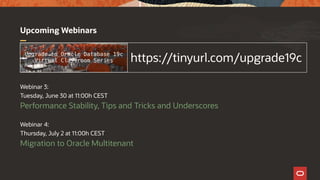
Upcoming Webinars
Webinar 3:
Tuesday, June 30 at 11:00h CEST
Performance Stability, Tips and Tricks and Underscores
Webinar 4:
Thursday, July 2 at 11:00h CEST
Migration to Oracle Multitenant
https://tinyurl.com/upgrade19c

AutoUpgrade and Best Practices

  • 1.
    Upgrade to OracleDatabase 19c AutoUpgrade to Oracle Database 19c Mike Dietrich Master Product Manager Database Upgrade and Migration Roy Swonger Vice President Database Upgrade, Utilities and Patching Virtual Classroom Series
  • 2.
    Vice President Database Upgrade, Utilities& Patching Roy F. Swonger @RoyFSwonger
  • 3.
    Master Product Manager DatabaseUpgrade and Migrations Mike Dietrich https://MikeDietrichDE.com @MikeDietrichDE mikedietrich
  • 4.
  • 5.
    Content Overview Migration to Multitenant 4 Ensure PerformanceStability 3 Upgrade to Oracle Database 19c 2Release and Patching Strategy 1
  • 6.
    Your key tosuccessful Database Upgrades 1 2 3 4 Download and install Oracle 19c Download and install newest RU Download and use newest AutoUpgrade eDelivery MOS: 2521164.1 MOS: 2485457.1
  • 7.
    Get started |Quick Start Guide • Simple overview • Read it, try it • Download from oracle.com
  • 8.
  • 9.
    Supportability | OSCertification
  • 10.
    Supportability | OSCertification
  • 11.
    Supportability | OSCertification
  • 12.
    More Links onthe Upgrade Blog Oracle Clusterware Certification on OL8/RHEL8 https://mikedietrichde.com/2020/05/14/of-course-oracle-clusterware-is-certified-on-ol8-rhel8-as-well/ Oracle Database 19c Certification on OL8/RHEL8 https://mikedietrichde.com/2020/05/11/oracle-database-19c-is-certified-on-ol8-and-rhel8/
  • 13.
    Database Upgrade |Supported Releases 11.2.0.4 12.1.0.2 12.2.0.1 19c 18c https://mikedietrichde.com/2019/02/14/oracle-database-19c- requires-ol7-rhel7-or-sles12-or-newer/
  • 14.
    Oracle 19c |Installation Gold Image 1. Create ORACLE_HOME directory 2. Download image 3. Unpack into ORACLE_HOME 4. ./runInstaller 5. root.sh
  • 15.
    Oracle 19c |RPM Installation RPM • yum install -y oracle-database-preinstall-19c • yum -y localinstall oracle-database-ee-19c-1.0-1.x86_64.rpm • rpm installs always into: /opt/oracle/product/19c/dbhome_1 • Not practical for typical environments
  • 16.
    Oracle 19c |Read-Only Home Separate configuration and binary files • ORACLE_BASE_HOME • ORACLE_BASE_CONFIG • Please read more: https://docs.oracle.com/en/database/oracle/oracle-database/19/ladbi/understanding-read-only- oracle-homes.html#GUID-AE1973D7-0325-4AD8-9FC9-D7BA3C3C3F37 In r/w: equal to ORACLE_HOME
  • 17.
    APEX | UpgradeAPEX upfront APEX upgrade • Not part of the database upgrade • MOS Note: 1088970.1 - Master Note APEX Upgrades APEX certification • Minimum APEX Version for Oracle 19c: APEX 18.2 • MOS Note: 1344948.1 - APEX Database and Web Server Certification Download the newest APEX • https://www.oracle.com/tools/downloads/apex-v191-downloads.html
  • 18.
    Upgrade 19c |Speed it up • Check when dictionary stats have been gathered the last time • Refresh stats a day before the upgrade column OPERATION format a40 set linesize 200 select to_char(max(END_TIME),'DD-MON-YY hh24:mi') LATEST, OPERATION from DBA_OPTSTAT_OPERATIONS where OPERATION in ('gather_dictionary_stats', 'gather_fixed_objects_stats’) group by operation;
  • 19.
    Upgrade 19c |Make it run faster … • Stats not gathered on several clustered indexes (bug 25286819) • Wait … autoupgrade.jar does this for you automatically! exec dbms_stats.gather_schema_stats('SYS'); exec dbms_stats.gather_index_stats('SYS','I_OBJ#'); exec dbms_stats.gather_index_stats('SYS','I_FILE#_BLOCK#'); exec dbms_stats.gather_index_stats('SYS','I_TS#'); exec dbms_stats.gather_index_stats('SYS','I_USER#'); exec dbms_stats.gather_index_stats('SYS','I_TOID_VERSION#'); exec dbms_stats.gather_index_stats('SYS','I_MLOG#'); exec dbms_stats.gather_index_stats('SYS','I_RG#');
  • 20.
    Upgrade 19c |Effect of having good stats • The larger the dictionary, the bigger the effect • This example has been done with one of the tiny Hands-On Lab databases Duration Reduction No dictionary and fixed objects stats 15 min 55 sec Gathered dictionary and fixed objects stats 14 min 10 sec 11 % Gathered schema and cluster index stats 13 min 41 sec 3.4 % to previous Total downtime saved 2 min 14 sec 14 % overall
  • 21.
    Operating System |Recommendations • MOS Note: 1587357.1 Oracle Database on Unix AIX, HP-UX, Linux, Solaris and MS Windows – Installation and Configuration Requirements Quick Reference
  • 22.
    AutoUpgrade The ONLY recommended wayto upgrade databases PhotobyJoshuaSortinoonUnsplash
  • 23.
    Download | Alwaysget the latest autoupgrade.jar MOS Note: 2485457.1
  • 24.
    Upgrade | AutoUpgrade upg> JobConsole 11.2.0.4 12.1.0.2 12.2.0.1 18c autoupgrade.jar MOS Note: 2485457.1 2MB config.cfg autoupgrade.jar 12.2.0.1 18.5.0 19c 19c
  • 25.
    AutoUpgrade | Architecture Upgrade JobManager Upgrade Dispatcher config.cfg Database Post-Upgrade Stats Refresh Time Zone Adjustment /etc/oratab Database Upgrade Command Line Database Pre-Checks preupgrade.jar Automatic Fix-Ups System Checks Space Check Requirements
  • 26.
    AutoUpgrade | Requirements •Java 8 or newer • Default in your $ORACLE_HOME since 12.1.0.2 • Check: $ORACLE_HOME/jdk/bin/java -version • The AutoUpgrade package • A jar file of 2 MB in size
  • 27.
    AutoUpgrade | Availabilityand Support • CDB and non-CDB upgrades • All operating systems running Oracle Database servers • All editions (SE2, EE) • Single instance and RAC databases • Upgrades from version: • 11.2.0.4 and newer • Upgrades to version: • 12.2.0.1 with Jan 2019 Update or newer • 18.5.0 (includes Jan 2019 Update) or newer • 19.3.0 or newer
  • 28.
    AutoUpgrade | Whatyou don't need … • Agents • EM Cloud Control • DBUA • Extra license
  • 29.
    AutoUpgrade | Comingsoon! • Data Guard • Disable DG Broker and defer log transport • Unplug/plug/upgrade
  • 30.
    AutoUpgrade | BlogPost Series https://mikedietrichde.com/2019/04/29/the-new-autoupgrade-utility-in-oracle-19c/
  • 31.
    AutoUpgrade | Usethe newest version • $ java -jar autoupgrade.jar –version build.hash 255dd7d build.version 19.9.0 build.date 2020/04/23 15:01:36 build.max_target_version 19 build.supported_target_versions 12.2,18,19 build.type production Oracle 19.7.0: build.hash 04dd9f2 build.version 19.7.5 build.date 2020/02/11 15:28:49 build.max_target_version 19 build.type production Download the newer version
  • 32.
    AutoUpgrade | Createsample config file $ java –jar autoupgrade.jar -create_sample_file config Created sample configuration file/home/oracle/sample_config.cfg
  • 33.
    AutoUpgrade | Exampleconfig file global.autoupg_log_dir=/home/oracle/logs upg1.dbname=DB12 upg1.start_time=NOW upg1.source_home=/u01/app/oracle/product/12.2.0.1 upg1.target_home=/u01/app/oracle/product/19 upg1.sid=DB12 upg1.log_dir=/home/oracle/aux/DB12 upg1.upgrade_node=localhost upg1.target_version=19 upg2.dbname=UPGR upg2.start_time=NOW upg2.source_home=/u01/app/oracle/product/11.2.0.4 . . .
  • 34.
    AutoUpgrade | Adjustinit parameters # # Example global pfile configuration entries # global.del_during_upgrade_pfile=/database/pfiles/global_during_delinit.ora global.add_during_upgrade_pfile=/database/pfiles/global_during_addinit.ora global.del_after_upgrade_pfile=/database/pfiles/global_after_delinit.ora global.add_after_upgrade_pfile=/database/pfiles/global_after_addinit.ora # # Example local pfile configuration entries # upg2.del_during_upgrade_pfile=/database/pfiles/hr_during_delinit.ora upg2.add_during_upgrade_pfile=/database/pfiles/hr_during_addinit.ora upg2.del_after_upgrade_pfile=/database/pfiles/hr_after_delinit.ora upg2.add_after_upgrade_pfile=/database/pfiles/hr_after_addinit.ora
  • 35.
    AutoUpgrade | Executeexternal scripts # # Example global script execution # global.before_action=/database/scripts/run_this_before.sh Y global.after_action=/database/scripts/run_this_after.sh # # Example local script execution # upg2.before_action=/database/scripts/run_this_on_UPG2_before.sh upg2.after_action=/database/scripts/run_this_on_UPG2_after.sh • Permitted extension options: • Unix shell (.sh) • Microsoft Windows batch (.bat, .cmd) • Microsoft Windows PowerShell (.ps1) Pass return code back to AutoUpgrade
  • 36.
    AutoUpgrade | Protection- GRP options # # By default a GRP will be created. Default for EE: Yes # upg2.restoration=no # # By default a GRP will be kept. This option overwrites the default. # upg2.drop_grp_after_upgrade=yes
  • 37.
    AutoUpgrade | Otheroptions # # Example global directive - Default: Underscores stay as before # global.remove_underscore_parameters=yes # # If unset, utlrp.sql won't be run - Default: YES # upgr2.run_utlrp=no # # If unset, time zone upgrade won't be performed - Default: YES # As Timezone can't be downgraded, it may be useful to postpone and skip it # upgr2.timezone_upg=no
  • 38.
    AutoUpgrade | Starttime • VALID values • Format: DD/MM/YYYY HH24:MI:SS • NOW [this is the default] • 30/12/2018 15:30:00 • 01/11/2019 01:30:15 • 2/5/2019 3:30:50
  • 39.
    AutoUpgrade | 4Operation Modes autoupgrade.jar -deploy -analyze -fixups -upgrade
  • 40.
    AutoUpgrade | BestPractice $ java -jar autoupgrade.jar -config config.cfg -mode analyze autoupgrade.jar -deploy -analyze $ java -jar autoupgrade.jar -config config.cfg -mode deploy
  • 41.
    AutoUpgrade | Moveto new hardware $ java -jar autoupgrade.jar -config config.cfg -mode analyze autoupgrade.jar -analyze -fixups autoupgrade.jar -upgrade $ java -jar autoupgrade.jar -config config.cfg -mode deploy $ java -jar autoupgrade.jar -config config.cfg -mode upgrade Source System Target System
  • 42.
    AutoUpgrade | JobConsole • Most important commands upg> lsj // List jobs resume -job <number> // Restarts a job status -job <number> // Show job status restore -job <number> // Restores database from GRP abort -job <number> // Aborts the specified job
  • 43.
    AutoUpgrade | LogFile Structure • Logs written in TEXT and JSON format • /cfgtoollogs • ./upgrade/auto/status • /database_1 • ./job_number • ./prechecks • ./preupgrade • ./prefixups • ./drain • ./dbupgrade • ./postupgrade • ./temp • /database_2 • … Status Logs HTML Report Upgrade Logs
  • 44.
    AutoUpgrade | Whatif ... 1. ZIP the entire global log directory: java -jar autoupgrade.jar -config config.cfg -zip 2. Add the alert.log 3. Upload it to MOS
  • 45.
    AutoUpgrade | Whatif ... a fixup fails? • In case you need to override this particular fixup • Run autoupgrade.jar -mode analyze • Afterwards set parameter in config file: • upg1.checklist=<use_the_full_path+filename_below> • And edit: • ../logdir/sid/jobno/prechecks/sid_checklist.cfg [checkname] DICTIONARY_STATS [stage] PRECHECKS [fixup_available] YES [runfix] YES >>>> NO [severity] RECOMMEND
  • 46.
    AutoUpgrade | Whatif ... you need to restart? • By default, AutoUpgrade will resume where it left off • If you’d like to restart from the beginning, remove the recovery checkpoint • java -jar autoupgrade.jar -config DB.cfg -clear_recovery_data • Then start AutoUpgrade again
  • 47.
    AutoUpgrade | Whatif ... you have RAC? • Since AutoUpgrade 19.8 (2020/03/27) • RAC database upgrades are supported • Works best with SPFILE in ASM • Oracle Grid Infrastructure upgrade must be done separately upfront
  • 48.
    After qualifying thenew AutoUpgrade tool on a representative portion of our database landscape we found that tool was doing a great job and is production-ready. In our automation tool we have removed a lot of “home-grown” code, and replaced it with AutoUpgrade functionality. Since August 2019 all upgrades at SimCorp have been executed using the AutoUpgrade tool. Daniel Overby Hansen Lead Developer SimCorp A/S - Denmark
  • 49.
  • 50.
  • 51.
    Migration Strategies Migration to OracleMultitenant PhotobyMathiasJensenonUnsplash
  • 52.
    Oracle Multitenant |Oracle 19c • Oracle 18c and Oracle 19c belong to the Oracle Database 12.2 release family • Oracle 19c supports both non-CDB and PDB databases! • For further details see MOS Note: 742060.1
  • 53.
    Oracle Multitenant |Oracle 19c Since Oracle 19c you can have 3 user-created PDBs without need for a Multitenant license!!! • https://mikedietrichde.com/2019/09/17/3-pdbs-included-with-oracle-19c-and-desupport-of-non-cdbs-with-20c/
  • 54.
    Upgrade to 19c| Migration to Multitenant AutoUpgrade One-Command Orchestration Oracle 11.2.0.4 AutoUpgrade to Oracle 19c Oracle 19.7.0 Oracle 19.7.0 CDB PDB$ SEED Oracle 19.7.0 CDB PDB$ SEED 1️⃣ 2️⃣ Plug into CDB 3️⃣ noncdb_to_pdb.sql
  • 55.
    AutoUpgrade | Migrationto Multitenant New!
  • 56.
    Move to Multitenant| Automation? • AutoUpgrade automates non-CDB-to-PDB migration • Requires customer creating the destination CDB • Can't lift the migration constraints (downtime, fallback) • No automation for Endianness migrations
  • 57.
    Videos | UpgradeChannel on Youtube • https://www.youtube.com/channel/UCTKvCZwAbOeTSRFQDAh7yXw • AutoUpgrade • https://youtu.be/kr3aZrqA9Go [11:57 min] • https://youtu.be/dO_y8sOasjs [DOAG 2019] • Preupgrade Steps • https://youtu.be/2R0Plcn7Udk [6:27 min] • Database Upgrade • https://youtu.be/ZqW3hS64hng [4:17 min] • Postupgrade and Time Zone change • https://youtu.be/kEBLqYDmspw [7:58 min]
  • 58.
  • 59.
    After Upgrade Important thingsto do after the upgrade completed successfully
  • 60.
    Things to doright after upgrade Configure statistics history retention period • Check space usage: • Check retention • Default: 31 days • Adjust setting • Example: 10 days SQL> select SPACE_USAGE_KBYTES/1024 MB from V$SYSAUX_OCCUPANTS where OCCUPANT_NAME='SM/OPTSTAT'; SQL> select DBMS_STATS.GET_STATS_HISTORY_RETENTION from DUAL; SQL> exec DBMS_STATS.ALTER_STATS_HISTORY_RETENTION(10);
  • 61.
    Post Upgrade |Time Zone Change
  • 62.
    Post Upgrade |Time Zone Change • Adjust time zone post upgrade • Newest time zone patch: • MOS Note:412160.1 • New scripts in ?/rdbms/admin: • utltz_countstar.sql • utltz_upg_check.sql • utltz_upg_apply.sql Oracle Database Release Default TZ Version 11.2.0.2 - 11.2.0.4 DST V14 12.1.0.1, 12.1.0.2 DST V18 12.2.0.1 DST V26 18c DST V31 19c DST V32
  • 63.
    Post Upgrade |Unified Audit Trail • Internal structure changed to improve query performance of UNIFIED_AUDIT_TRAIL view • Old records must be converted to new format • To convert: SQL> EXEC DBMS_AUDIT_MGMT.TRANSFER_UNIFIED_AUDIT_RECORDS; • Only applicable if upgrading from Oracle Database 12.1
  • 64.
    More Information |Client Connectivity MOS Note: 207303.1 Client / Server Interoperability Support Matrix for Different Oracle Versions
  • 65.
    More Information |JDBC/JDK Connectivity Oracle JDBC FAQ https://www.oracle.com/technetwork/database/enterprise-edition/jdbc-faq-090281.html
  • 66.
    Things to know BestPractices and things to take care on
  • 67.
    Best Practice |COMPATIBLE Parameter • When should you change COMPATIBLE? • 7-10 days after the upgrade • Which value? • 11.2.0 • 12.1.0 • 12.2.0 • 18.0.0 • 19.0.0 • Change COMPATIBLE for RUs? • NEVER! • Flashback to GRP • Downgrade
  • 68.
    Oracle 19c |Multimedia Removal • The Oracle Multimedia API gets removed during upgrade • The Locator still exists and works • ORDIM component remains VALID in DBA_REGISTRY • Recommendation • Check, if you use Oracle Multimedia • If not, you can remove it before upgrade • More information • https://mikedietrichde.com/2019/02/18/oracle-multimedia-will-be-removed-in-oracle-database-19c/ • MOS Note: 2347372.1 – Oracle Multimedia Statement of Direction • MOS Note: 2375644.1 – How To Migrate Data From Oracle Multimedia Data Types to BLOB columns
  • 69.
    Oracle 19c |Streams Removal • The Oracle Streams API gets removed during upgrade • See: • https://docs.oracle.com/en/database/oracle/oracle-database/19/upgrd/behavior-changes-deprecated- desupport-oracle-database.html#GUID-7E90C2D3-853A-45B2-AC6D-C9326798E82B
  • 70.
    Oracle 19c |DBMS_JOB DBMS_JOB package is still supported • Grant the CREATE JOB privilege • During and after upgrade, for each job in DBMS_JOB a corresponding entry will be created with DBMS_SCHEDULER • The check in preupgrade.jar is only checking for inconsistencies or any issues MOS Note: 2380601.1 - Database Preupgrade tool check list
  • 71.
    Health Check |hcheck.sql If your database is highly important, do a health check • hcheck.sql - Script to Check for Known Problems (MOS Note: 136697.1)
  • 72.
    How to Diagnose OracleDatabase Upgrade Issues
  • 73.
    Agenda | Howto Diagnose Upgrade related issues Determining Success or Failure 2 Why Upgrade is Different 1
  • 74.
    Why Upgrade isDifferent • Heavy DDL workload • A trivial upgrade includes approximately • 3000 ALTERs (mostly tables, also types and users) • 15000 CREATE OR REPLACEs (views, types, synonyms, procedures, packages, functions) • 18000 GRANT statements • 1000 CREATE TABLE statements • 500 CREATE INDEX statements • And more… • Almost exclusively in SYSTEM tablespaces
  • 75.
    Why Upgrade isDifferent | Upgrade Mode Upgrade Mode limits many aspects of the database • Requires SYSDBA privilege • Suppresses expected errors • Enforces exclusive access for the upgrade process • CLUSTER_DATABASE=FALSE • No system triggers • No AQ • No resource manager • No AWR • etc… ALTER SYSTEM SET _system_trig_enabled=FALSE SCOPE=MEMORY; Autotune of undo retention is turned off. ALTER SYSTEM SET _undo_autotune=FALSE SCOPE=MEMORY; ALTER SYSTEM SET undo_retention=900 SCOPE=MEMORY; ALTER SYSTEM SET aq_tm_processes=0 SCOPE=MEMORY; ALTER SYSTEM SET enable_ddl_logging=FALSE SCOPE=MEMORY; Resource Manager disabled during database migration: plan '' not set ALTER SYSTEM SET resource_manager_plan='' SCOPE=MEMORY; ALTER SYSTEM SET recyclebin=‘OFF’ DEFERRED SCOPE=MEMORY; Resource Manager disabled during database migration Note:This is an excerpt from the alert.log – these parameters will be set implicitly during a STARTUP UPGRADE
  • 76.
    Why Upgrade isDifferent | Multitenant • PDBs can be upgraded with the CDB$ROOT open in normal mode • Database monitoring and diagnostics are available (for PDB upgrade, not CDB$ROOT)
  • 77.
    Why Upgrade isDifferent | Performance • Things that matter a lot • Number of installed components • Size & complexity of dictionary • Some feature/version combinations • Things that matter a little • CPU and disk speed • RAM • Things that don't matter • Amount of user data select COMP_ID, STATUS from DBA_REGISTRY; select count(*) from OBJ$;
  • 78.
    Agenda | Howto Diagnose Upgrade related issues Determining Success or Failure 2 Why Upgrade is Different 1
  • 79.
    Diagnosing Errors Upgrade logfiles • Located in ../dbupgrade directory • Each worker writes on log • catupgrd0.log • catupgrd1.log • catupgrd2.log • … • Upgrade summary log • upg_summary.log Main Log
  • 80.
    Diagnosing Errors After upgrade,startup database • Check upg_summary.log • Recompilation • ?/rdbms/admin/utlrp.sql • Post Upgrade • postupgrade_fixups.sql COMP_ID ---------- CATALOG CATPROC JAVAVM CATJAVA ... COMP_NAME ----------------------- Oracle Catalo Oracle Database Packa JServer JAVA Virtual M Oracle Database Java P VERSION ---------- 12.2.0.1.0 12.2.0.1.0 12.2.0.1.0 12.2.0.1.0 STATUS --------- UPGRADED UPGRADED UPGRADED UPGRADED
  • 81.
    Diagnosing Errors After upgrade,startup database • Check upg_summary.log • Recompilation • ?/rdbms/admin/utlrp.sql • Post Upgrade • postupgrade_fixups.sql • Check catupgrd*.log for errors • $ grep -i 'error at line' catupgrd*.log • [Win: C:> find /I "error at line" catupgrd*.log]
  • 82.
  • 83.
  • 84.
  • 85.
  • 86.
    Upcoming Webinars Webinar 3: Tuesday,June 30 at 11:00h CEST Performance Stability, Tips and Tricks and Underscores Webinar 4: Thursday, July 2 at 11:00h CEST Migration to Oracle Multitenant https://tinyurl.com/upgrade19c