Introduction for Deep Neural
Network DNN with Python
Asst. Prof. Dr.
Noor Dhia Al-Shakarchy
May 2021
Lecture 1
2
Outlines
Fundamentals of Deep Learning
 What is deep learning?
 Before we begin: the mathematical
building blocks of neural networks
 Getting started with neural networks
 Fundamentals of machine learning
3
What is deep learning
 Deep learning can also called Deep structured learning or
hierarchical learning is part of the family of machine learning
methods which are themselves a subset of the broader field of
Artificial Intelligence.
 Deep learning is a class of machine learning algorithms that use
several layers of nonlinear processing units for feature
extraction and transformation.
Each successive layer uses the output from the previous layer as
input.
Figure 1: Artificial intelligence, machine learning, and deep learning
4
What is deep learning
 The main failure of traditional algorithms; which Deep learning is
designed to overcome; can be presented as:
1- The Curse of Dimensionality
2- Local Constancy and Smoothness Regularization
3- Manifold Learning
 Deep Learning Algorithms and Networks based on the learning of
multiple levels of features or representations of the data. Higher-
level features are derived from lower level features to form a
hierarchical representation by use some form of gradient descent for
training.
 Many types of deep neural networks ( CNN, DBN, RNN) have been
applied to fields such as computer vision, speech recognition, natural
language processing, audio recognition, social network filtering,
machine translation, and bioinformatics where they produced results
comparable to and in some cases better than human experts have.
5
Python Deep Learning Environment
The first step to perform machine learning and deep
learning is setting up the environment of Deep
Learning to make a computer system powerful enough to
handle the computing power necessary.
Building a deep learning system can be intimidating and
time-consuming, since the minimum requirements, to
build a deep learning system, you would need:
 Graphics Processing Unit (GPU) :- NVIDIA GeForce GTX
1050 Ti 4 GB
 CPU:- Intel(R) Core (TM) i7-7700HQ CPU @ 2.80 GHz.
 RAM:- 16GB
6
Python Deep Learning Environment
With Python Deep Learning environment We have to install the following
software for making deep learning algorithms.
Python 2.7+
Scipy with Numpy
Matplotlib
Theano
TensorFlow
Keras
To ensure that the different types of software are installed properly, go to
our python command line and check python version and in this python
command line can import the required libraries and print their versions
Example:
Import numpy
print(numpy.__version__)
7
Python Deep Learning Environment
 Installation of TensorFlow on Windows 10:
 With deep neural network can be works with CPU (but that
have more limitation and time consuming). In this case the
tensorflow installed directly with:
>> pip install --upgrade tensorflow
8
Python Deep Learning Environment
 Installation of TensorFlow with GPU on Windows 10:
 Pre-requisites Check the software you will need to install
Microsoft Visual Studio
CUDA for Windows 10 — 9.0
CUDNN for Windows 10 — 9.0
Tensorflow GPU — 1.5.0
 Microsoft Visual Studio
 Install CUDA Toolkit 9.0
 Copy cudnn64_7.dll from the cuDNN Library
 Add CUDA folder to the PATH
 Install Tensorflow GPU 1.5
 Verify Tensorflow Installation
9
Python Deep Learning Environment
 Checking your Windows GPU (from Device Manager>>
Display adapter).
NVIDIA has published a list of CUDA enabled GPU’s on
their site (https://developer.nvidia.com/cuda-gpus)
10
Python Deep Learning Environment
 Download Visual Studio Express
Visual studio is required for the installation of Nvidia CUDA
Toolkit. If you attempt to download and install CUDA Toolkit
for Windows without having first installed Visual Studio, you
get the message
11
Python Deep Learning Environment
Installing the CUDA drivers:
Download the CUDA Toolkit 9.0 version from the following link
(https://developer.nvidia.com/cuda-downloads) then installation it:
CUDA Toolkit 9.0 Downloads
Note: be sure to download the right version of the driver
12
Python Deep Learning Environment
 Download and Install the CuDNN libraries
The CuDNN libraries are an update to CUDA for Deep Neural
Nets, and used by TensorFlow to accelerate deep learning on
NVidia GPUs.
Tensorflow requires a file cudnn64_7.dll to work. This file is
available from a zip file in the cuDNN archive.
You can download them from: https://developer.nvidia.com/cudnn.
13
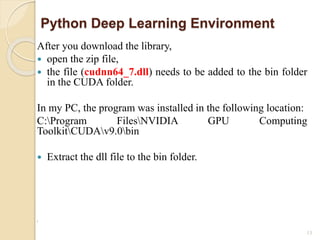
Python Deep Learning Environment
After you download the library,
 open the zip file,
 the file (cudnn64_7.dll) needs to be added to the bin folder
in the CUDA folder.
In my PC, the program was installed in the following location:
C:Program FilesNVIDIA GPU Computing
ToolkitCUDAv9.0bin
 Extract the dll file to the bin folder.
r
14
Python Deep Learning Environment
 Add CUDA folder to the PATH
We need to edit the environment variables with the CUDA
location.
15
Python Deep Learning Environment
 Install Tensorflow GPU 1.5
Now open command prompt and type the following
command:
>> pip install tensorflow-gpu==1.5.0
16
Python Deep Learning Environment
 Verify Tensorflow Installation
You can verify the Tensorflow installation by using the following
commands in the Windows command prompt:
>> import tensorflow as tf
>> print (tf.__version__)
 Installation and Verify Keras
>> pip install keras (installation library)
You can verify the keras:
>>> import keras
Using TensorFlow backend.
>>> print (keras.__version__)
2.2.4
17
Before we begin: the mathematical building
blocks of neural networks
 Learning means finding a combination of model parameters that
minimize a loss function for a given set of training data samples and
their corresponding targets.
 Learning happens by drawing random batches of data samples and
their targets and computing the gradient of the network parameters
with respect to the loss on the batch. The network parameters are
then moved a bit (the magnitude of the move is defined by the
learning rate) in the opposite direction from the gradient.
 The entire learning process is made possible by the fact that neural
networks are chains of differentiable tensor operations, and thus
it’s possible to apply the chain rule of derivation to find the gradient
function mapping the current parameters and current batch of data to
a gradient value.
18
Before we begin: the mathematical building
blocks of neural networks
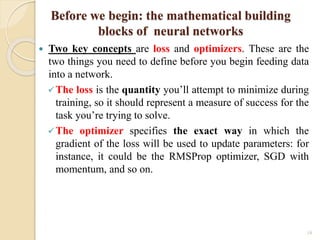
 Two key concepts are loss and optimizers. These are the
two things you need to define before you begin feeding data
into a network.
The loss is the quantity you’ll attempt to minimize during
training, so it should represent a measure of success for the
task you’re trying to solve.
The optimizer specifies the exact way in which the
gradient of the loss will be used to update parameters: for
instance, it could be the RMSProp optimizer, SGD with
momentum, and so on.
Create a Keras model with TensorFlow
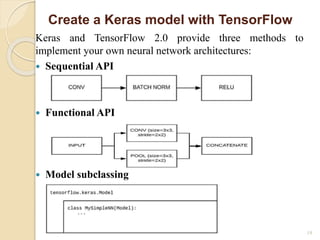
Keras and TensorFlow 2.0 provide three methods to
implement your own neural network architectures:
 Sequential API
 Functional API
 Model subclassing
19
Create a Keras model with TensorFlow
 A sequential model, as the name suggests, allows
you to create models layer-by-layer in a step-by-step
fashion.
 Keras Sequential API is by far the easiest way to get
up and running with Keras, but it’s also the most
limited, A sequential model is not appropriate when:
 Share layers
 Have branches (at least not easily)
 Have multiple inputs
 Have multiple outputs
 non-linear topology
20
Fundamentals of DNN
 Define the problem at hand and the data on which
you’ll train. Collect this data, or annotate it with
labels if need be.
 divide dataset to:
 Train subset 85% (actual train 80% and
validation sets 20%)
 Test subset 15%
21
Fundamentals of DNN
 Choose how you’ll measure success on your
problem. Which metrics will you monitor on your
validation data?
 Determine your evaluation protocol: hold-out
validation? K-fold validation? Which portion of the
data should you use for validation?
22
Fundamentals of DNN
 Develop a first model that does better than a basic
baseline: a model with statistical power.
 Develop a model that overfits.
 Regularize your model and tune its
hyperparameters, based on performance on the
validation data.
23
THANK YOU

Training course lect1

  • 1.
    Introduction for DeepNeural Network DNN with Python Asst. Prof. Dr. Noor Dhia Al-Shakarchy May 2021 Lecture 1
  • 2.
    2 Outlines Fundamentals of DeepLearning  What is deep learning?  Before we begin: the mathematical building blocks of neural networks  Getting started with neural networks  Fundamentals of machine learning
  • 3.
    3 What is deeplearning  Deep learning can also called Deep structured learning or hierarchical learning is part of the family of machine learning methods which are themselves a subset of the broader field of Artificial Intelligence.  Deep learning is a class of machine learning algorithms that use several layers of nonlinear processing units for feature extraction and transformation. Each successive layer uses the output from the previous layer as input. Figure 1: Artificial intelligence, machine learning, and deep learning
  • 4.
    4 What is deeplearning  The main failure of traditional algorithms; which Deep learning is designed to overcome; can be presented as: 1- The Curse of Dimensionality 2- Local Constancy and Smoothness Regularization 3- Manifold Learning  Deep Learning Algorithms and Networks based on the learning of multiple levels of features or representations of the data. Higher- level features are derived from lower level features to form a hierarchical representation by use some form of gradient descent for training.  Many types of deep neural networks ( CNN, DBN, RNN) have been applied to fields such as computer vision, speech recognition, natural language processing, audio recognition, social network filtering, machine translation, and bioinformatics where they produced results comparable to and in some cases better than human experts have.
  • 5.
    5 Python Deep LearningEnvironment The first step to perform machine learning and deep learning is setting up the environment of Deep Learning to make a computer system powerful enough to handle the computing power necessary. Building a deep learning system can be intimidating and time-consuming, since the minimum requirements, to build a deep learning system, you would need:  Graphics Processing Unit (GPU) :- NVIDIA GeForce GTX 1050 Ti 4 GB  CPU:- Intel(R) Core (TM) i7-7700HQ CPU @ 2.80 GHz.  RAM:- 16GB
  • 6.
    6 Python Deep LearningEnvironment With Python Deep Learning environment We have to install the following software for making deep learning algorithms. Python 2.7+ Scipy with Numpy Matplotlib Theano TensorFlow Keras To ensure that the different types of software are installed properly, go to our python command line and check python version and in this python command line can import the required libraries and print their versions Example: Import numpy print(numpy.__version__)
  • 7.
    7 Python Deep LearningEnvironment  Installation of TensorFlow on Windows 10:  With deep neural network can be works with CPU (but that have more limitation and time consuming). In this case the tensorflow installed directly with: >> pip install --upgrade tensorflow
  • 8.
    8 Python Deep LearningEnvironment  Installation of TensorFlow with GPU on Windows 10:  Pre-requisites Check the software you will need to install Microsoft Visual Studio CUDA for Windows 10 — 9.0 CUDNN for Windows 10 — 9.0 Tensorflow GPU — 1.5.0  Microsoft Visual Studio  Install CUDA Toolkit 9.0  Copy cudnn64_7.dll from the cuDNN Library  Add CUDA folder to the PATH  Install Tensorflow GPU 1.5  Verify Tensorflow Installation
  • 9.
    9 Python Deep LearningEnvironment  Checking your Windows GPU (from Device Manager>> Display adapter). NVIDIA has published a list of CUDA enabled GPU’s on their site (https://developer.nvidia.com/cuda-gpus)
  • 10.
    10 Python Deep LearningEnvironment  Download Visual Studio Express Visual studio is required for the installation of Nvidia CUDA Toolkit. If you attempt to download and install CUDA Toolkit for Windows without having first installed Visual Studio, you get the message
  • 11.
    11 Python Deep LearningEnvironment Installing the CUDA drivers: Download the CUDA Toolkit 9.0 version from the following link (https://developer.nvidia.com/cuda-downloads) then installation it: CUDA Toolkit 9.0 Downloads Note: be sure to download the right version of the driver
  • 12.
    12 Python Deep LearningEnvironment  Download and Install the CuDNN libraries The CuDNN libraries are an update to CUDA for Deep Neural Nets, and used by TensorFlow to accelerate deep learning on NVidia GPUs. Tensorflow requires a file cudnn64_7.dll to work. This file is available from a zip file in the cuDNN archive. You can download them from: https://developer.nvidia.com/cudnn.
  • 13.
    13 Python Deep LearningEnvironment After you download the library,  open the zip file,  the file (cudnn64_7.dll) needs to be added to the bin folder in the CUDA folder. In my PC, the program was installed in the following location: C:Program FilesNVIDIA GPU Computing ToolkitCUDAv9.0bin  Extract the dll file to the bin folder. r
  • 14.
    14 Python Deep LearningEnvironment  Add CUDA folder to the PATH We need to edit the environment variables with the CUDA location.
  • 15.
    15 Python Deep LearningEnvironment  Install Tensorflow GPU 1.5 Now open command prompt and type the following command: >> pip install tensorflow-gpu==1.5.0
  • 16.
    16 Python Deep LearningEnvironment  Verify Tensorflow Installation You can verify the Tensorflow installation by using the following commands in the Windows command prompt: >> import tensorflow as tf >> print (tf.__version__)  Installation and Verify Keras >> pip install keras (installation library) You can verify the keras: >>> import keras Using TensorFlow backend. >>> print (keras.__version__) 2.2.4
  • 17.
    17 Before we begin:the mathematical building blocks of neural networks  Learning means finding a combination of model parameters that minimize a loss function for a given set of training data samples and their corresponding targets.  Learning happens by drawing random batches of data samples and their targets and computing the gradient of the network parameters with respect to the loss on the batch. The network parameters are then moved a bit (the magnitude of the move is defined by the learning rate) in the opposite direction from the gradient.  The entire learning process is made possible by the fact that neural networks are chains of differentiable tensor operations, and thus it’s possible to apply the chain rule of derivation to find the gradient function mapping the current parameters and current batch of data to a gradient value.
  • 18.
    18 Before we begin:the mathematical building blocks of neural networks  Two key concepts are loss and optimizers. These are the two things you need to define before you begin feeding data into a network. The loss is the quantity you’ll attempt to minimize during training, so it should represent a measure of success for the task you’re trying to solve. The optimizer specifies the exact way in which the gradient of the loss will be used to update parameters: for instance, it could be the RMSProp optimizer, SGD with momentum, and so on.
  • 19.
    Create a Kerasmodel with TensorFlow Keras and TensorFlow 2.0 provide three methods to implement your own neural network architectures:  Sequential API  Functional API  Model subclassing 19
  • 20.
    Create a Kerasmodel with TensorFlow  A sequential model, as the name suggests, allows you to create models layer-by-layer in a step-by-step fashion.  Keras Sequential API is by far the easiest way to get up and running with Keras, but it’s also the most limited, A sequential model is not appropriate when:  Share layers  Have branches (at least not easily)  Have multiple inputs  Have multiple outputs  non-linear topology 20
  • 21.
    Fundamentals of DNN Define the problem at hand and the data on which you’ll train. Collect this data, or annotate it with labels if need be.  divide dataset to:  Train subset 85% (actual train 80% and validation sets 20%)  Test subset 15% 21
  • 22.
    Fundamentals of DNN Choose how you’ll measure success on your problem. Which metrics will you monitor on your validation data?  Determine your evaluation protocol: hold-out validation? K-fold validation? Which portion of the data should you use for validation? 22
  • 23.
    Fundamentals of DNN Develop a first model that does better than a basic baseline: a model with statistical power.  Develop a model that overfits.  Regularize your model and tune its hyperparameters, based on performance on the validation data. 23
  • 24.