Tips for maintaining and managing
knowledge as a professional
Trainee Intern Library Session 2010
Luisa Rossitto and Susan Hope
WM&HS Library, University of Otago
Strategies
to keep growing once you leave the nest…
Show your boss!
Once set up… use to
build your portfolio
prove your ongoing development
strengthen performance reviews
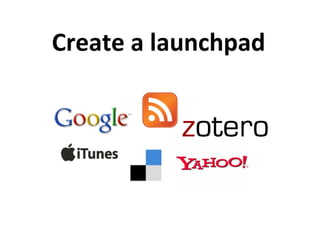
Create a launchpad
Maintaining
What?
Blogs, TOC alerts, podcasts, database alerts
How?
Email, RSS
Where?
Sites: Journals, Associations, Universities, databases
Start at the source
Where?
Sites: Journals, Associations, Universities, databases
But also… who?
Ask mentors, colleagues, librarians: what sources do they use?
Ideas?
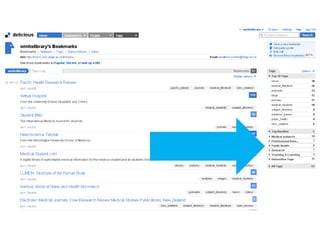
http://delicious.com/wmhslibrary
Explore
Work with a partner at
http://delicious.com/wmhslibrary
1) Find one journal
how can you subscribe to updates?
OR
2) Find one blog
who creates it? How do you subscribe?
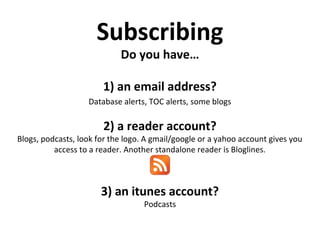
Subscribing
Do you have…
1) an email address?
Database alerts, TOC alerts, some blogs
2) a reader account?
Blogs, podcasts, look for the logo. A gmail/google or a yahoo account gives you
access to a reader. Another standalone reader is Bloglines.
3) an itunes account?
Podcasts
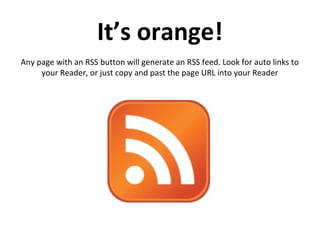
It’s orange!
Any page with an RSS button will generate an RSS feed. Look for auto links to
your Reader, or just copy and past the page URL into your Reader
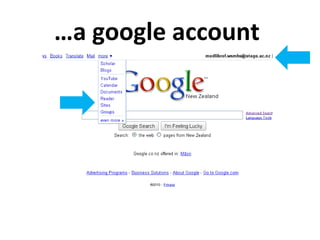
…a google account
Explore
Work with a partner at
www.google.com
Login!
Use your own google account, our one of the library training accounts
Try google reader
Keeping your google tab active, try adding blogs or podcast subscriptions from
the Delicious library to Google reader
DIY
Find your own blogs in google:
(blogs OR podcasts) AND (surgery OR surgeons)
(“best blogs” OR “best podcasts”) (medical OR health)
How to judge a personal blog?
Can you see: A bio? Comments? Awards? Frequent posts?
MedGadget: journal of emerging medical technology;
Maintaining…managing
“Social book marking”e.g. delicious
All your bookmarked websites available from anywhere
Also a great tool for seeing what resources other people use
For websites or individual online articles
http://delicious.com/wmhslibrary
One step beyond…
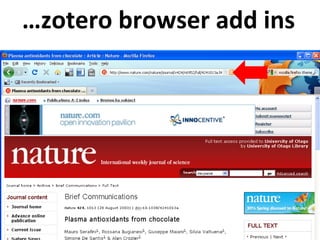
“Reference managers” e.g. Zotero
Save and share your resources (like delicious), but also create automatic
citations of research in your documents (like Endnote, but free!)
Better for individual online articles than websites
http://www.zotero.org/
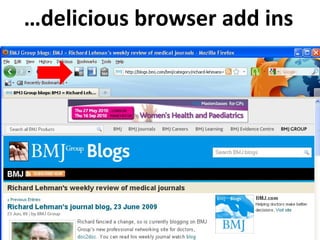
…delicious browser add ins
…zotero browser add ins
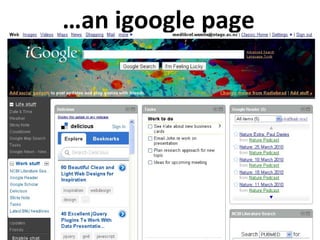
Boxing it all up
Do you have a google/gmail or yahoo account?
If yes, you have access to a “personalised homepage”. Other personalised
homepage providers are Netvibes and Pageflakes.
Add your
•RSS feeds
•email
•delicious bookmarks
•Search tools
•To do lists
…an igoogle page
Explore
Work with a partner and try igoogle
www.google.com/igoogle
1.Sign in, top right with google account from last activity
2.Experiment with adding gadgets- look for the link “add stuff”
3.Look for how many people use the gadget and ratings before choosing
Try finding the gadgets for…
• Google scholar
• Pubmed
• Google reader
• Facebook
Take home messages
No right or wrong way
Concentrate on a few, good sources
Work with what you already use
luisa.rossitto@otago.ac.nz
susan.hope@otago.ac.nz
http://delicious.com/wmhslibrary

Trainee Interns Library Session

  • 1.
    Tips for maintainingand managing knowledge as a professional Trainee Intern Library Session 2010 Luisa Rossitto and Susan Hope WM&HS Library, University of Otago
  • 2.
    Strategies to keep growingonce you leave the nest…
  • 3.
    Show your boss! Onceset up… use to build your portfolio prove your ongoing development strengthen performance reviews
  • 4.
  • 5.
    Maintaining What? Blogs, TOC alerts,podcasts, database alerts How? Email, RSS Where? Sites: Journals, Associations, Universities, databases
  • 6.
    Start at thesource Where? Sites: Journals, Associations, Universities, databases But also… who? Ask mentors, colleagues, librarians: what sources do they use? Ideas? http://delicious.com/wmhslibrary
  • 8.
    Explore Work with apartner at http://delicious.com/wmhslibrary 1) Find one journal how can you subscribe to updates? OR 2) Find one blog who creates it? How do you subscribe?
  • 9.
    Subscribing Do you have… 1)an email address? Database alerts, TOC alerts, some blogs 2) a reader account? Blogs, podcasts, look for the logo. A gmail/google or a yahoo account gives you access to a reader. Another standalone reader is Bloglines. 3) an itunes account? Podcasts
  • 10.
    It’s orange! Any pagewith an RSS button will generate an RSS feed. Look for auto links to your Reader, or just copy and past the page URL into your Reader
  • 11.
  • 12.
    Explore Work with apartner at www.google.com Login! Use your own google account, our one of the library training accounts Try google reader Keeping your google tab active, try adding blogs or podcast subscriptions from the Delicious library to Google reader
  • 13.
    DIY Find your ownblogs in google: (blogs OR podcasts) AND (surgery OR surgeons) (“best blogs” OR “best podcasts”) (medical OR health) How to judge a personal blog? Can you see: A bio? Comments? Awards? Frequent posts? MedGadget: journal of emerging medical technology;
  • 14.
    Maintaining…managing “Social book marking”e.g.delicious All your bookmarked websites available from anywhere Also a great tool for seeing what resources other people use For websites or individual online articles http://delicious.com/wmhslibrary
  • 15.
    One step beyond… “Referencemanagers” e.g. Zotero Save and share your resources (like delicious), but also create automatic citations of research in your documents (like Endnote, but free!) Better for individual online articles than websites http://www.zotero.org/
  • 16.
  • 17.
  • 18.
    Boxing it allup Do you have a google/gmail or yahoo account? If yes, you have access to a “personalised homepage”. Other personalised homepage providers are Netvibes and Pageflakes. Add your •RSS feeds •email •delicious bookmarks •Search tools •To do lists
  • 19.
  • 20.
    Explore Work with apartner and try igoogle www.google.com/igoogle 1.Sign in, top right with google account from last activity 2.Experiment with adding gadgets- look for the link “add stuff” 3.Look for how many people use the gadget and ratings before choosing Try finding the gadgets for… • Google scholar • Pubmed • Google reader • Facebook
  • 21.
    Take home messages Noright or wrong way Concentrate on a few, good sources Work with what you already use luisa.rossitto@otago.ac.nz susan.hope@otago.ac.nz http://delicious.com/wmhslibrary