EDUC 601: Educational Research
Todd Wehr Memorial Library, Viterbo University
Today’s Goals:
1. Understand how to contact the library and
use the webpage.
2. Sign up for ILLiad and RefWorks.
3. Practice locating articles in databases.
This information is available at:
http://libguides.viterbo.edu/educ601
GOAL One: Contact Us!
• Email: reference@viterbo.edu
• Phone: 608-796-3270
• Web Page: www.viterbo.edu/library
• Database Access: Use your VU login and
password.
• Chat: Available on the homepage.
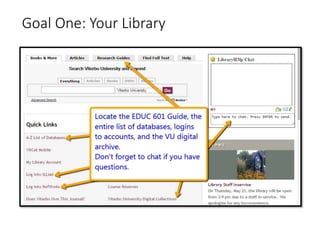
Goal One: Your Library
Goal Two: Using
What is ILLiad?
• If our library doesn’t have access to an article, you’ll use ILLiad to request it
from other libraries.
When to Use ILLiad
• If you do not locate a full-text article online, use your ILLiad account. Articles
will take approximately 2-5 days to arrive electronically.
Note on Books
• If Viterbo does not own the book, your local public library can often get it
faster. We can help you, but it will take longer and you will have the book for
less time.
Note on Dissertations
• If you would like to request a dissertation, please remember that it is not peer-
reviewed. Also, it may be difficult to find older dissertations as most libraries
will not lend them.
ILLiad Guidelines and Instructions:
http://libguides.viterbo.edu/content.php?pid=217725&sid=1809542
Goal Two: Using ILLiad
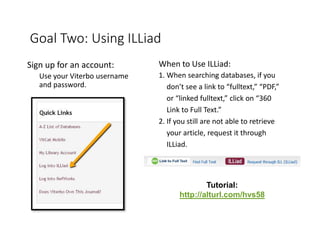
Sign up for an account:
Use your Viterbo username
and password.
When to Use ILLiad:
1. When searching databases, if you
don’t see a link to “fulltext,” “PDF,”
or “linked fulltext,” click on “360
Link to Full Text.”
2. If you still are not able to retrieve
your article, request it through
ILLiad.
Tutorial:
http://alturl.com/hvs58
Goal Two: Using
• Official RefWorks Tutorial:
http://www.youtube.com/user/ProQuestRefWorks#p/c/0/MuVb9j0mX6Y
• Our Guide:
http://libguides.viterbo.edu/aecontent.php?pid=217725&sid=4900411
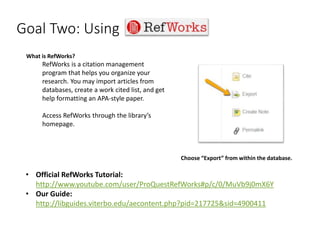
What is RefWorks?
RefWorks is a citation management
program that helps you organize your
research. You may import articles from
databases, create a work cited list, and get
help formatting an APA-style paper.
Access RefWorks through the library’s
homepage.
Choose “Export” from within the database.
Goal Three: Searching for Peer-Reviewed, Primary Research
Articles
What you need:
• Research articles (studies)
• Peer-reviewed (refereed)
• Published recently (within 5
years)
Locate these from the EDUC 601
Research Guide or the A-Z List of
Databases.
Where you’ll find these:
• Databases:
• Try Education Research
Complete
• ERIC
• Professional Development
Collection
• Academic Search Complete
• For behavioral issues, try:
• PsycInfo and/or PsycArticles
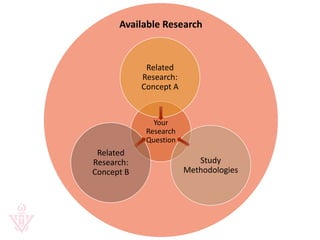
Goal Three: What is “Related” research?
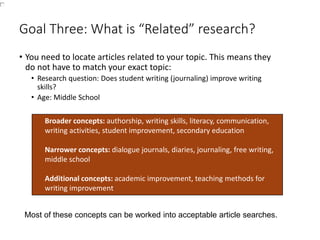
• You need to locate articles related to your topic. This means they
do not have to match your exact topic:
• Research question: Does student writing (journaling) improve writing
skills?
• Age: Middle School
Broader concepts: authorship, writing skills, literacy, communication,
writing activities, student improvement, secondary education
Narrower concepts: dialogue journals, diaries, journaling, free writing,
middle school
Additional concepts: academic improvement, teaching methods for
writing improvement
Most of these concepts can be worked into acceptable article searches.
Available Research
Your
Research
Question
Related
Research:
Concept A
Study
Methodologies
Related
Research:
Concept B
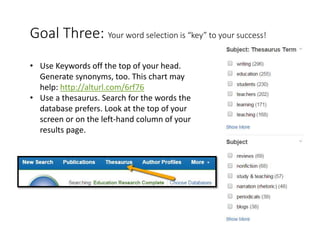
Goal Three: Your word selection is “key” to your success!
• Use Keywords off the top of your head.
Generate synonyms, too. This chart may
help: http://alturl.com/6rf76
• Use a thesaurus. Search for the words the
database prefers. Look at the top of your
screen or on the left-hand column of your
results page.
Goal Three: How to interpret key article information.
• Once in a database, look closely at these items to
interpret your citation:
• Use the “scholarly/peer-reviewed” limiter
• Check the publication information (date,
journal title, etc.)
• Consider who the author(s) are and what their
expertise is
• Take a quick look at the contents to decide if
it’s a study by reviewing the abstract
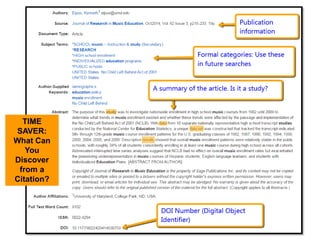
TIME
SAVER:
What Can
You
Discover
from a
Citation?
Remember: Contact Us!
• Email: reference@viterbo.edu
• Phone: 608-796-3270
• Web Page: www.viterbo.edu/library
• Database Access: Use your VU login and
password.
• Chat: Available on the homepage.
• For a more detailed look at the research process, go to:
• http://libguides.viterbo.edu/researchprocess

EDUC 601 Library Presentation

  • 1.
    EDUC 601: EducationalResearch Todd Wehr Memorial Library, Viterbo University
  • 2.
    Today’s Goals: 1. Understandhow to contact the library and use the webpage. 2. Sign up for ILLiad and RefWorks. 3. Practice locating articles in databases. This information is available at: http://libguides.viterbo.edu/educ601
  • 3.
    GOAL One: ContactUs! • Email: reference@viterbo.edu • Phone: 608-796-3270 • Web Page: www.viterbo.edu/library • Database Access: Use your VU login and password. • Chat: Available on the homepage.
  • 4.
  • 5.
    Goal Two: Using Whatis ILLiad? • If our library doesn’t have access to an article, you’ll use ILLiad to request it from other libraries. When to Use ILLiad • If you do not locate a full-text article online, use your ILLiad account. Articles will take approximately 2-5 days to arrive electronically. Note on Books • If Viterbo does not own the book, your local public library can often get it faster. We can help you, but it will take longer and you will have the book for less time. Note on Dissertations • If you would like to request a dissertation, please remember that it is not peer- reviewed. Also, it may be difficult to find older dissertations as most libraries will not lend them. ILLiad Guidelines and Instructions: http://libguides.viterbo.edu/content.php?pid=217725&sid=1809542
  • 6.
    Goal Two: UsingILLiad Sign up for an account: Use your Viterbo username and password. When to Use ILLiad: 1. When searching databases, if you don’t see a link to “fulltext,” “PDF,” or “linked fulltext,” click on “360 Link to Full Text.” 2. If you still are not able to retrieve your article, request it through ILLiad. Tutorial: http://alturl.com/hvs58
  • 7.
    Goal Two: Using •Official RefWorks Tutorial: http://www.youtube.com/user/ProQuestRefWorks#p/c/0/MuVb9j0mX6Y • Our Guide: http://libguides.viterbo.edu/aecontent.php?pid=217725&sid=4900411 What is RefWorks? RefWorks is a citation management program that helps you organize your research. You may import articles from databases, create a work cited list, and get help formatting an APA-style paper. Access RefWorks through the library’s homepage. Choose “Export” from within the database.
  • 8.
    Goal Three: Searchingfor Peer-Reviewed, Primary Research Articles What you need: • Research articles (studies) • Peer-reviewed (refereed) • Published recently (within 5 years) Locate these from the EDUC 601 Research Guide or the A-Z List of Databases. Where you’ll find these: • Databases: • Try Education Research Complete • ERIC • Professional Development Collection • Academic Search Complete • For behavioral issues, try: • PsycInfo and/or PsycArticles
  • 9.
    Goal Three: Whatis “Related” research? • You need to locate articles related to your topic. This means they do not have to match your exact topic: • Research question: Does student writing (journaling) improve writing skills? • Age: Middle School Broader concepts: authorship, writing skills, literacy, communication, writing activities, student improvement, secondary education Narrower concepts: dialogue journals, diaries, journaling, free writing, middle school Additional concepts: academic improvement, teaching methods for writing improvement Most of these concepts can be worked into acceptable article searches.
  • 10.
  • 11.
    Goal Three: Yourword selection is “key” to your success! • Use Keywords off the top of your head. Generate synonyms, too. This chart may help: http://alturl.com/6rf76 • Use a thesaurus. Search for the words the database prefers. Look at the top of your screen or on the left-hand column of your results page.
  • 12.
    Goal Three: Howto interpret key article information. • Once in a database, look closely at these items to interpret your citation: • Use the “scholarly/peer-reviewed” limiter • Check the publication information (date, journal title, etc.) • Consider who the author(s) are and what their expertise is • Take a quick look at the contents to decide if it’s a study by reviewing the abstract
  • 13.
  • 14.
    Remember: Contact Us! •Email: reference@viterbo.edu • Phone: 608-796-3270 • Web Page: www.viterbo.edu/library • Database Access: Use your VU login and password. • Chat: Available on the homepage. • For a more detailed look at the research process, go to: • http://libguides.viterbo.edu/researchprocess

Editor's Notes

  • #2 Nancy Steinhoff , ncsteinhoff@viterbo.edu