Library DDPKeeping up-to-date with RSS feedsMarion TattersallResearch Development LibrarianUniversity of Sheffield Library
Today’s 1 hour sessionIntroductory talkWhat is RSS, why it is useful,How it works for different sourcesHands-on practice with workbookat your own pace, staff to helpsuggested time 30 minsInformation Skills Resource for researchersaccess via Library home pageFeedback
What is RSS?RSS is a web feed to which you subscribeUseful for content which changes regularlyCollects material from a wide variety of sourcesDatabases of peer reviewed articleseg Scopus, Web of Science, PubgetJournal tables of contentsWeb pages, news alerts, blogsYou still need a reference manager to store, manage and reformat any items you want to keep
Why use RSS?Alerts from different sources in 1 place – the feed readerControls/tailors what you get – not overwhelmingClear format to scanAvoids losing or deleting important itemsReduces risk of spam and frozen email inboxCan organise tags/folders to suit youHelps you share with colleaguesRSS in 100 seconds video
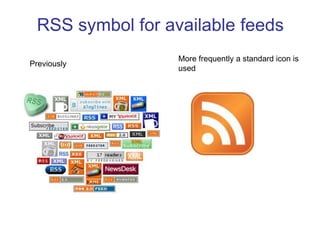
RSS symbol for available feedsMore frequently a standard icon is used Previously
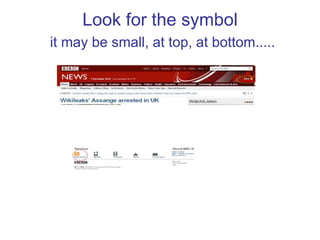
Look for the symbol it may be small, at top, at bottom.....
How do I get started with RSS?1 Choose a feed readerWe recommend www.google.com/readerBloglines is a popular alternative2 Setup the reader   		Today3 Organise it to suit you	Laterfolders, display options
Advice on setting up Google readerwww.google.com/reader Set up an account and follow the workbook instructions Follow our online interactive tutorialLibrary information skills resourceResearcher’s tab Keeping up to date, Watch a video on YouTube Getting Started with Google Readerabout 1 year old runs for 2 mins
Add some feeds 1: Databases Slightly older articles, but specifickeywords, authorscitations to follow influential papersScopus & Web of Science - multi-disciplinarysubject specific ones egPubMedfor Biomedicine, MLA for languagesKeep your references currentExtra benefit from previous searches
RSS feeds from Scopus Set up personal accountCarry out specific searchkeywords, authors, combine terms......test on short time periodcitation (cited reference)use a key paper, find by sorting other results in citation orderProcess detailsSee workbook 1
Web of Science RSS feedsAlso require a personal accountSame search adviceNB Must save to server. Form covers email too, must select RSSProcessscreencasts in Library ISR include citation alertworkbook field tagged
Alerts: WoS or Scopus?All WoS journals are in Scopus - except ArtsScopus has expanded its Arts coverageEngineering and medicine – more in ScopusTest which works best– now & laterDon’t be distracted by the interfaceit’s the results that countUse both? – sometimes/alwaysYou may also need a subject database
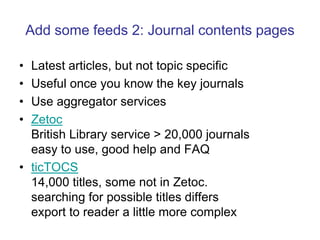
Add some feeds 2: Journal contents pagesLatest articles, but not topic specificUseful once you know the key journalsUse aggregator servicesZetocBritish Library service > 20,000 journalseasy to use, good help and FAQticTOCS14,000 titles, some not in Zetoc. searching for possible titles differsexport to reader a little more complex
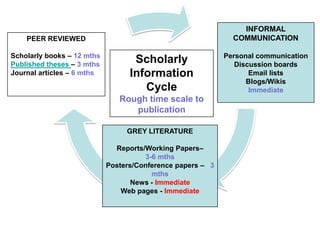
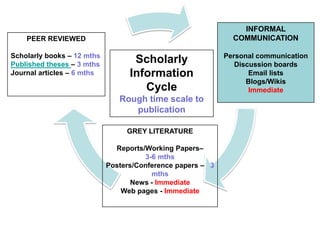
INFORMAL COMMUNICATIONPersonal communicationDiscussion boardsEmail listsBlogs/WikisImmediatePEER REVIEWEDScholarly books – 12 mthsPublished theses – 3 mthsJournal articles – 6 mthsScholarly Information CycleRough time scale to publicationGREY LITERATUREReports/Working Papers– 3-6 mthsPosters/Conference papers –   3 mthsNews - ImmediateWeb pages - Immediate
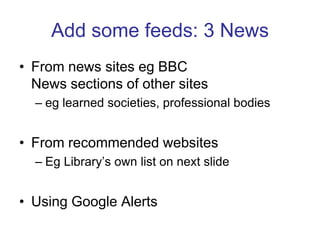
Add some feeds: 3 NewsFrom news sites eg BBCNews sections of other sites eg learned societies, professional bodiesFrom recommended websitesEg Library’s own list on next slideUsing Google Alerts
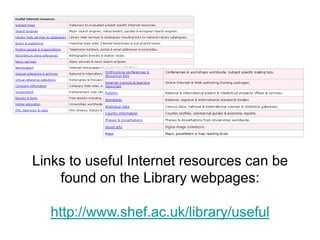
Links to useful Internet resources can be found on the Library webpages:http://www.shef.ac.uk/library/useful
Google AlertsGoogle Reader is not the only feature that Google provide to keep you up to dateTry Google Alertsmonitoring a developing news story keeping current on a competitor or industry tracking medical or technological advances getting the latest on a celebrity or sports team searching for new videos that match a specific topic http://www.google.com/alertsDelivered by RSS feed into your Google Reader account
Add feeds: 4 Blogs informal IMMEDIATE infoWeb log = blog like a diaryChronological - most recent firstPrimary source of information about relevant people and researchInternet publishing & reflective practice follow leaders, expand your network, build your reputation, get feedback.....University advice in setting up and usingEvaluate carefully to avoid overload
INFORMAL COMMUNICATIONPersonal communicationDiscussion boardsEmail listsBlogs/WikisImmediatePEER REVIEWEDScholarly books – 12 mthsPublished theses – 3 mthsJournal articles – 6 mthsScholarly Information CycleRough time scale to publicationGREY LITERATUREReports/Working Papers– 3-6 mthsPosters/Conference papers –   3 mthsNews - ImmediateWeb pages - Immediate
What next with Google Reader?Star items, add notes, share with your friendsFind out how from Google Reader HelpExplanatory pages eg organizing covers tags and foldersLinks to videos Help forumFeed into other services such as iGoogle, Netvibes, Pageflakes etc.
SummaryRSS feeds help you tosave time & effortsave and organise itemstap into formal and informal sourcesprioritise & share information
Find out more – try it outWorkbooklogin to MUSE Library tabhave another browser window openLibrary information skills resourceslides, workbooks, interactive tutorialsRecord progress in your ePortfolio in uSpacetraining need met? How will you work differently? What do you need next?
Library contact detailsLibrary DDP Feedback – email us your commentsjoin our evaluation projectFor subject specific help contact your Faculty LibrarianAll other Library stafflibrary@sheffield.ac.uk

Keeping up to date with RSS feeds

  • 1.
    Library DDPKeeping up-to-datewith RSS feedsMarion TattersallResearch Development LibrarianUniversity of Sheffield Library
  • 2.
    Today’s 1 hoursessionIntroductory talkWhat is RSS, why it is useful,How it works for different sourcesHands-on practice with workbookat your own pace, staff to helpsuggested time 30 minsInformation Skills Resource for researchersaccess via Library home pageFeedback
  • 3.
    What is RSS?RSSis a web feed to which you subscribeUseful for content which changes regularlyCollects material from a wide variety of sourcesDatabases of peer reviewed articleseg Scopus, Web of Science, PubgetJournal tables of contentsWeb pages, news alerts, blogsYou still need a reference manager to store, manage and reformat any items you want to keep
  • 4.
    Why use RSS?Alertsfrom different sources in 1 place – the feed readerControls/tailors what you get – not overwhelmingClear format to scanAvoids losing or deleting important itemsReduces risk of spam and frozen email inboxCan organise tags/folders to suit youHelps you share with colleaguesRSS in 100 seconds video
  • 5.
    RSS symbol foravailable feedsMore frequently a standard icon is used Previously
  • 6.
    Look for thesymbol it may be small, at top, at bottom.....
  • 7.
    How do Iget started with RSS?1 Choose a feed readerWe recommend www.google.com/readerBloglines is a popular alternative2 Setup the reader Today3 Organise it to suit you Laterfolders, display options
  • 8.
    Advice on settingup Google readerwww.google.com/reader Set up an account and follow the workbook instructions Follow our online interactive tutorialLibrary information skills resourceResearcher’s tab Keeping up to date, Watch a video on YouTube Getting Started with Google Readerabout 1 year old runs for 2 mins
  • 9.
    Add some feeds1: Databases Slightly older articles, but specifickeywords, authorscitations to follow influential papersScopus & Web of Science - multi-disciplinarysubject specific ones egPubMedfor Biomedicine, MLA for languagesKeep your references currentExtra benefit from previous searches
  • 10.
    RSS feeds fromScopus Set up personal accountCarry out specific searchkeywords, authors, combine terms......test on short time periodcitation (cited reference)use a key paper, find by sorting other results in citation orderProcess detailsSee workbook 1
  • 11.
    Web of ScienceRSS feedsAlso require a personal accountSame search adviceNB Must save to server. Form covers email too, must select RSSProcessscreencasts in Library ISR include citation alertworkbook field tagged
  • 12.
    Alerts: WoS orScopus?All WoS journals are in Scopus - except ArtsScopus has expanded its Arts coverageEngineering and medicine – more in ScopusTest which works best– now & laterDon’t be distracted by the interfaceit’s the results that countUse both? – sometimes/alwaysYou may also need a subject database
  • 13.
    Add some feeds2: Journal contents pagesLatest articles, but not topic specificUseful once you know the key journalsUse aggregator servicesZetocBritish Library service > 20,000 journalseasy to use, good help and FAQticTOCS14,000 titles, some not in Zetoc. searching for possible titles differsexport to reader a little more complex
  • 14.
    INFORMAL COMMUNICATIONPersonal communicationDiscussionboardsEmail listsBlogs/WikisImmediatePEER REVIEWEDScholarly books – 12 mthsPublished theses – 3 mthsJournal articles – 6 mthsScholarly Information CycleRough time scale to publicationGREY LITERATUREReports/Working Papers– 3-6 mthsPosters/Conference papers – 3 mthsNews - ImmediateWeb pages - Immediate
  • 15.
    Add some feeds:3 NewsFrom news sites eg BBCNews sections of other sites eg learned societies, professional bodiesFrom recommended websitesEg Library’s own list on next slideUsing Google Alerts
  • 16.
    Links to usefulInternet resources can be found on the Library webpages:http://www.shef.ac.uk/library/useful
  • 17.
    Google AlertsGoogle Readeris not the only feature that Google provide to keep you up to dateTry Google Alertsmonitoring a developing news story keeping current on a competitor or industry tracking medical or technological advances getting the latest on a celebrity or sports team searching for new videos that match a specific topic http://www.google.com/alertsDelivered by RSS feed into your Google Reader account
  • 18.
    Add feeds: 4Blogs informal IMMEDIATE infoWeb log = blog like a diaryChronological - most recent firstPrimary source of information about relevant people and researchInternet publishing & reflective practice follow leaders, expand your network, build your reputation, get feedback.....University advice in setting up and usingEvaluate carefully to avoid overload
  • 20.
    INFORMAL COMMUNICATIONPersonal communicationDiscussionboardsEmail listsBlogs/WikisImmediatePEER REVIEWEDScholarly books – 12 mthsPublished theses – 3 mthsJournal articles – 6 mthsScholarly Information CycleRough time scale to publicationGREY LITERATUREReports/Working Papers– 3-6 mthsPosters/Conference papers – 3 mthsNews - ImmediateWeb pages - Immediate
  • 21.
    What next withGoogle Reader?Star items, add notes, share with your friendsFind out how from Google Reader HelpExplanatory pages eg organizing covers tags and foldersLinks to videos Help forumFeed into other services such as iGoogle, Netvibes, Pageflakes etc.
  • 22.
    SummaryRSS feeds helpyou tosave time & effortsave and organise itemstap into formal and informal sourcesprioritise & share information
  • 23.
    Find out more– try it outWorkbooklogin to MUSE Library tabhave another browser window openLibrary information skills resourceslides, workbooks, interactive tutorialsRecord progress in your ePortfolio in uSpacetraining need met? How will you work differently? What do you need next?
  • 24.
    Library contact detailsLibraryDDP Feedback – email us your commentsjoin our evaluation projectFor subject specific help contact your Faculty LibrarianAll other Library stafflibrary@sheffield.ac.uk

Editor's Notes

  • #5 No need to check loads of sites just in caseYou mark things as read, stuff cant get “lost”Stops email growing out of hand or distracting you when doing other stuffCan organise in folders by source/content etc to suit your information Easy to share with others, and vice versaBenefits outweigh the fact that you need to check feeds as well as emails.
  • #8 Small icons may be at top or bottom of the screen
  • #9 Loads of other readers out there, but not all will be there long-term. Google reader has been around a long time, but like other Google products is developing Set up is easy you dont need to be a techiePresenter clicks on g reader link on slide. Show create account button and click.Show account creation screenWill be able to DIY during hands on with workbook
  • #12 Citation go into Scopus personal account saved search all results and show RSS iconThen sort by citations, pick one ,click on title then set feed
  • #13 You need a personal account. We have demos in the ISR – click on linkto show you how to do it, don’t want to take up too much time nowCan use workbook and give individual help in hands on time
  • #14 No 1 tool does it all. You may need to use more than 1. your needs can change over timeWe have subject databases too.****************************************So that covers peer reviewed journal lit.Look at other areas next
  • #15 Show my reader with some journal feeds
  • #18 Finding information about specialist sources or topics eg conferences, statistics, news services
  • #20 =current opinion as well as newsGood ones have tags to group posts and update frequently
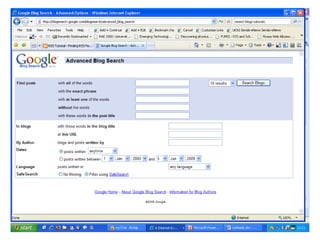
  • #21 Google blog search, designed specifically to retrieve blogsUse Advanced Search as usual with google Choose to search for blogs about your topic. Bottom half of form.Can also search all blogs for postingsGoogle blog search Is in workbookCheck the authority of blog posts; Technorati tracks links between blogs and uses this to determine the “authority” of blogs. The more blogs linking to your site, the higher your authority.Tutor guide on how to use Technorati - http://websearch.about.com/od/dailywebsearchtips/qt/dnt0719.htmSearch strategy
  • #23 Open my Google Reader account m.tattersall@sheffield.ac.uk not gmailShow Journal Table of ContentsAsk if anyone uses iGoogle – show own if timeLots of videos available through the Google Reader help screens, particularly useful are Organising – folders, tags and bundles; Star items which are particularly useful; Sharing – writing and sharing notes, how can get into stuff already read, tag, star, organise through folder