By Randy Ksar
@djksar #hangoutsonair
Top 5 Tips
Google+ Hangouts on AIR
Google+ Hangouts & Your Biz
 Google+ Hangouts are being
used by big to small brands to
easily create video content and
real-time engagement
 The content is authentic, low-
cost and requires minimal effort
to produce
 Minimal Requirements:
 Google+ Page for your business
 aYouTube account to link your
account to
 Computer with camera & mic
#hangoutsonair
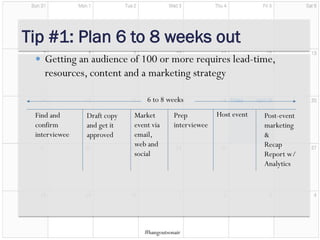
Market
event via
email,
web and
social
Find and
confirm
interviewee
Draft copy
and get it
approved
Prep
interviewee
Host event Post-event
marketing
&
Recap
Report w/
Analytics
6 to 8 weeks
Tip #1: Plan 6 to 8 weeks out
 Getting an audience of 100 or more requires lead-time,
resources, content and a marketing strategy
#hangoutsonair
Tip #2: Don’t Rely on RSVP Functionality
 If you want to follow-up with
your leads they need to be in
your database.
 Use a tool like eventbrite,
Marketo or Eloqua to get
people to RSVP to the event ,
automate email reminders and
get access to campaign
analytics
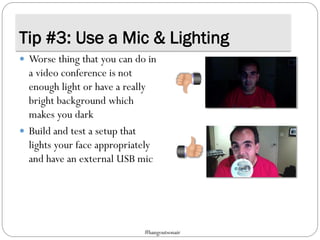
Tip #3: Use a Mic & Lighting
 Worse thing that you can do in
a video conference is not
enough light or have a really
bright background which
makes you dark
 Build and test a setup that
lights your face appropriately
and have an external USB mic
#hangoutsonair
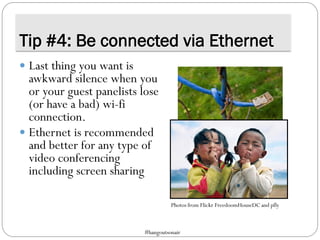
Tip #4: Be connected via Ethernet
 Last thing you want is
awkward silence when you
or your guest panelists lose
(or have a bad) wi-fi
connection.
 Ethernet is recommended
and better for any type of
video conferencing
including screen sharing
Photos from Flickr FreedoomHouseDC and pfly
#hangoutsonair
Tip #5: Create a Private Hangout 1st
 Only invite panelists and
pre-screened members of
the community
 Once you start the
Hangout, enable it to go
ON AIR for the public to
view
Photos from Flickr Richard Holt
#hangoutsonair
Want more Hangout tips?
Find Randy Ksar on Google+
or
Tweet @djksar #hangoutsonair

Top 5 Tips for Google+ Hangouts on Air

  • 1.
    By Randy Ksar @djksar#hangoutsonair Top 5 Tips Google+ Hangouts on AIR
  • 2.
    Google+ Hangouts &Your Biz  Google+ Hangouts are being used by big to small brands to easily create video content and real-time engagement  The content is authentic, low- cost and requires minimal effort to produce  Minimal Requirements:  Google+ Page for your business  aYouTube account to link your account to  Computer with camera & mic #hangoutsonair
  • 3.
    Market event via email, web and social Findand confirm interviewee Draft copy and get it approved Prep interviewee Host event Post-event marketing & Recap Report w/ Analytics 6 to 8 weeks Tip #1: Plan 6 to 8 weeks out  Getting an audience of 100 or more requires lead-time, resources, content and a marketing strategy #hangoutsonair
  • 4.
    Tip #2: Don’tRely on RSVP Functionality  If you want to follow-up with your leads they need to be in your database.  Use a tool like eventbrite, Marketo or Eloqua to get people to RSVP to the event , automate email reminders and get access to campaign analytics
  • 5.
    Tip #3: Usea Mic & Lighting  Worse thing that you can do in a video conference is not enough light or have a really bright background which makes you dark  Build and test a setup that lights your face appropriately and have an external USB mic #hangoutsonair
  • 6.
    Tip #4: Beconnected via Ethernet  Last thing you want is awkward silence when you or your guest panelists lose (or have a bad) wi-fi connection.  Ethernet is recommended and better for any type of video conferencing including screen sharing Photos from Flickr FreedoomHouseDC and pfly #hangoutsonair
  • 7.
    Tip #5: Createa Private Hangout 1st  Only invite panelists and pre-screened members of the community  Once you start the Hangout, enable it to go ON AIR for the public to view Photos from Flickr Richard Holt #hangoutsonair
  • 8.
    Want more Hangouttips? Find Randy Ksar on Google+ or Tweet @djksar #hangoutsonair