Top 10 SQL Server Reporting
Services Tips
By Ike Ellis
The Monastery
@ike_ellis
www.the-monastery.com
Blog.the-monastery.com
http://www.linkedin.com/in/ikeellis
Tip #1: Store Colors in the Database
• Colors = Business Logic
• Put it in the database
• Use Expressions to read the colors
• Include action colors and levels
• Demo
Tip #2: Get Buy-in to Export to Single
Format
• Build to export to a single format
– Excel
– Word
– Web
– PDF
• Then get buy-in and make it a standard in the
organization
• Demo: Build to export to excel
Tip #3: Alias, Obscure, and De-couple
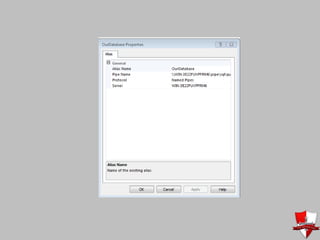
• Use DNS CName Aliases for ConnectionStrings
– If you can’t use that, then use the HOSTS file on
the report server and on your dev machine
– Or alias the client on the server and your dev
machine
• Use Views instead of tables and don’t hit the
views directly in datasets
Tip #4: Log, Log, Log (and beware of
subscriptions)
select c.Name
, e.InstanceName
, e.UserName
, e.Parameters
, e.TimeStart
, e.TimeEnd
, e.TimeDataRetrieval
, e.TimeProcessing
, e.TimeRendering
from executionlog e
join catalog c
on e.reportid = c.ItemID
Send a Link, or a file on a shared folder that you can audit. Find someway to audit
who opened the link or the file in the folder. Try to avoid sending the PDF without
a way to audit it.
Tip #5: Create a Template
• Create an ssrs template
• Add execution date
• Add execution parameters on report surface
• Add who executed it
• Create small fonts
• Add business owner to the bottom
• Add Default Database Connections/Variables
Helps with troubleshooting, logging,
report modification, and number
matching
Tip #6: Used Linked Reports to Manage
Security
• Allows you to use Role assignments and
• Not have duplicate reports in folders
• Not have users in folders they shouldn’t be in
• Not manage security on individual reports
• Demo
Tip #7: Keep Report Quantity Small
• Too many reports means that there are more
things to keep consistent
• Reports that aren’t used, tend to get
forgotten, and then used with bad data
Tip #8: Spend 10 Minutes on Design
• Spend 10 minutes on design (as opposed to the
zero we typically spend)
• Choose colors wisely
• 99/100 - developers use the default color
palette
• HTML color picker websites
– http://www.lavishbootstrap.com
• MorgueFile
– http://www.morguefile.com/
Tip #9: Use Multi-Value Parameter in
T-SQL
• Demo
Tip #10: The Monastery Report
Process
• Maintain Balance
– Form, Fit & Function
• Know Your Audience
– Give your user the right pictures, numbers & words for their
needs
– Use appropriate visual metaphors
• Communicate Effectively which means Simplify
• Use the Right Report Type
– Use standard report styles
– Keep them interesting
• Make Data Actionable
– Enable users to act on the information they receive
Tip #11: T-SQL Tips
• Use CONCAT instead of "+"
• Use Try_cast instead of cast
• Use Try_convert instead of convert
• Use CTEs to link non-linkable data (like 10 ten
employees with top 10 customers)
• Demo
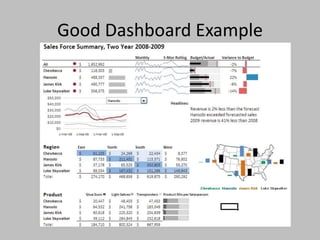
Tip #12: Dashboard Design Tips
• "The most important information needs to be
consumable in 5 seconds" - Paul
• Know your audience - Your users think
differently than you do. Some are visual,
some textual, some more mathematical
• Satisfy everyone in a good report dashboard
Good Dashboard Example
Tip #13: Report Design Tips
• Flat, non-bold colors
• Avoid 3-D effects
• Avoid default, out-of-the box styles
• Match corporate color palates
• Remember…this is what executives care about. This is how we make
money
• You don't need to label days of the week or months
• You don't need the full year
• You don't need a wide variety of colors…just shades of one color
• You don't need borders or anything else that distracts the eye
• Use darker colors when there's a warning
• no fluff
• thin fonts (Arial, segoe ui)
• dim column headers
• dim labels
• one accent color
• visualize rules
• simple icons
• Demo
Tip #14: Choose the Right Chart
• Pie charts don't really give you an action
– They let you understand the contribution to a whole, but afterwards,
there's really nothing left to understand
– START THEM AT THE TOP, NOT THE RIGHT, SO IT LOOKS LIKE A
CLOCK
• time = spark line = shows changes over time without a comparison
to other categories
• categories = bars
• sequence = lines
• Spark lines instead of series
– collapse a bunch of yearly data into a sparkline…and then let them see
it when you expand
• correlation = scatter chart
• Look at bullet graphs
Tip #15: Format in the database
• Store formats in the database and use
common formats
• Or add them as hidden parameters in the
report template
Ike Ellis
• The Monastery
• http://blog.the-monastery.com
• http://www.the-monastery.com
• YouTube
• SQL Pass Book Readers
• San Diego Tech Immersion Group
• @ike_ellis
• 619.922.9801
• Email address is just my first name @the-
monastery.com.

Top 10 sql server reporting services tips

  • 1.
    Top 10 SQLServer Reporting Services Tips By Ike Ellis The Monastery @ike_ellis www.the-monastery.com Blog.the-monastery.com http://www.linkedin.com/in/ikeellis
  • 2.
    Tip #1: StoreColors in the Database • Colors = Business Logic • Put it in the database • Use Expressions to read the colors • Include action colors and levels • Demo
  • 3.
    Tip #2: GetBuy-in to Export to Single Format • Build to export to a single format – Excel – Word – Web – PDF • Then get buy-in and make it a standard in the organization • Demo: Build to export to excel
  • 4.
    Tip #3: Alias,Obscure, and De-couple • Use DNS CName Aliases for ConnectionStrings – If you can’t use that, then use the HOSTS file on the report server and on your dev machine – Or alias the client on the server and your dev machine • Use Views instead of tables and don’t hit the views directly in datasets
  • 6.
    Tip #4: Log,Log, Log (and beware of subscriptions) select c.Name , e.InstanceName , e.UserName , e.Parameters , e.TimeStart , e.TimeEnd , e.TimeDataRetrieval , e.TimeProcessing , e.TimeRendering from executionlog e join catalog c on e.reportid = c.ItemID Send a Link, or a file on a shared folder that you can audit. Find someway to audit who opened the link or the file in the folder. Try to avoid sending the PDF without a way to audit it.
  • 7.
    Tip #5: Createa Template • Create an ssrs template • Add execution date • Add execution parameters on report surface • Add who executed it • Create small fonts • Add business owner to the bottom • Add Default Database Connections/Variables Helps with troubleshooting, logging, report modification, and number matching
  • 8.
    Tip #6: UsedLinked Reports to Manage Security • Allows you to use Role assignments and • Not have duplicate reports in folders • Not have users in folders they shouldn’t be in • Not manage security on individual reports • Demo
  • 9.
    Tip #7: KeepReport Quantity Small • Too many reports means that there are more things to keep consistent • Reports that aren’t used, tend to get forgotten, and then used with bad data
  • 10.
    Tip #8: Spend10 Minutes on Design • Spend 10 minutes on design (as opposed to the zero we typically spend) • Choose colors wisely • 99/100 - developers use the default color palette • HTML color picker websites – http://www.lavishbootstrap.com • MorgueFile – http://www.morguefile.com/
  • 11.
    Tip #9: UseMulti-Value Parameter in T-SQL • Demo
  • 12.
    Tip #10: TheMonastery Report Process • Maintain Balance – Form, Fit & Function • Know Your Audience – Give your user the right pictures, numbers & words for their needs – Use appropriate visual metaphors • Communicate Effectively which means Simplify • Use the Right Report Type – Use standard report styles – Keep them interesting • Make Data Actionable – Enable users to act on the information they receive
  • 13.
    Tip #11: T-SQLTips • Use CONCAT instead of "+" • Use Try_cast instead of cast • Use Try_convert instead of convert • Use CTEs to link non-linkable data (like 10 ten employees with top 10 customers) • Demo
  • 14.
    Tip #12: DashboardDesign Tips • "The most important information needs to be consumable in 5 seconds" - Paul • Know your audience - Your users think differently than you do. Some are visual, some textual, some more mathematical • Satisfy everyone in a good report dashboard
  • 15.
  • 16.
    Tip #13: ReportDesign Tips • Flat, non-bold colors • Avoid 3-D effects • Avoid default, out-of-the box styles • Match corporate color palates • Remember…this is what executives care about. This is how we make money • You don't need to label days of the week or months • You don't need the full year • You don't need a wide variety of colors…just shades of one color • You don't need borders or anything else that distracts the eye • Use darker colors when there's a warning • no fluff • thin fonts (Arial, segoe ui) • dim column headers • dim labels • one accent color • visualize rules • simple icons • Demo
  • 17.
    Tip #14: Choosethe Right Chart • Pie charts don't really give you an action – They let you understand the contribution to a whole, but afterwards, there's really nothing left to understand – START THEM AT THE TOP, NOT THE RIGHT, SO IT LOOKS LIKE A CLOCK • time = spark line = shows changes over time without a comparison to other categories • categories = bars • sequence = lines • Spark lines instead of series – collapse a bunch of yearly data into a sparkline…and then let them see it when you expand • correlation = scatter chart • Look at bullet graphs
  • 18.
    Tip #15: Formatin the database • Store formats in the database and use common formats • Or add them as hidden parameters in the report template
  • 19.
    Ike Ellis • TheMonastery • http://blog.the-monastery.com • http://www.the-monastery.com • YouTube • SQL Pass Book Readers • San Diego Tech Immersion Group • @ike_ellis • 619.922.9801 • Email address is just my first name @the- monastery.com.