






Presenters
Travis Cox
Co-Director of Sales Engineering
Inductive Automation
Don Pearson
Chief Strategy Officer
Inductive Automation
Today’s Agenda
• Introduction
• Why UI/UX & Security are Critical for Control Systems
• Top 10 Design & Security Tips
• Q&A
Ignition: The Industrial
Application Platform
• Unlimited licensing model
• Cross-platform compatibility
• Based on IT-standard technologies
• Scalable server-client architecture
• Web-managed
• Launch on desktop or mobile
• Modular configurability
• Rapid development and deployment
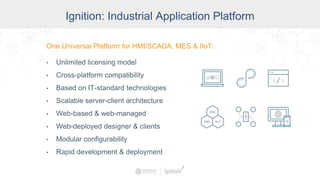
One Universal Platform for HMI, SCADA, MES & IIoT:
One Universal Platform for HMI/SCADA, MES & IIoT:
• Unlimited licensing model
• Cross-platform compatibility
• Based on IT-standard technologies
• Scalable server-client architecture
• Web-based & web-managed
• Web-deployed designer & clients
• Modular configurability
• Rapid development & deployment
Ignition: Industrial Application Platform
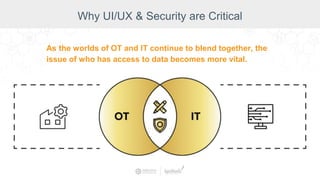
Why UI/UX & Security are Critical
As the worlds of OT and IT continue to blend together, the
issue of who has access to data becomes more vital.
Top 10 SCADA UI/UX & Security Tips
1. Determine Your Navigation Structure
2. Cognitive Load
3. Visual Hierarchy
4. High-Performance HMI Techniques
5. Leverage Mobility
6. Understand and Secure All Connections
7. Employ Two-Factor Authorization (2FA)
and Single Sign-on (SSO)
8. Leverage a DMZ
9. Decouple Devices from Applications
10.Leverage New Smart Sensors
Determine Your Navigation Structure
Tip #1: Determine Your Navigation Structure
• Navigation is vital in any application.
• Organization structure
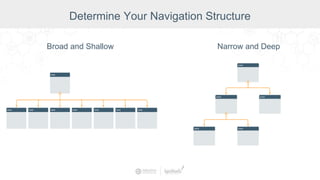
○ Broad and Shallow
○ Narrow and Deep
• Screen layout
Broad and Shallow
Determine Your Navigation Structure
Narrow and Deep
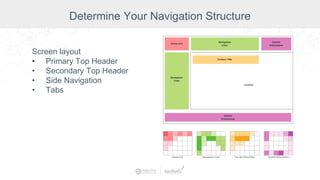
Screen layout
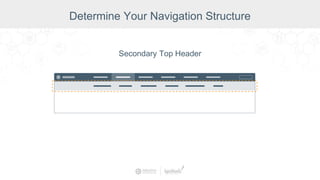
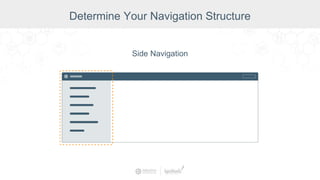
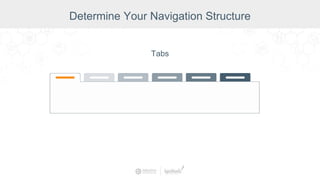
• Primary Top Header
• Secondary Top Header
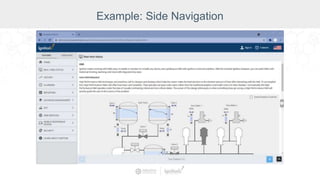
• Side Navigation
• Tabs
Determine Your Navigation Structure
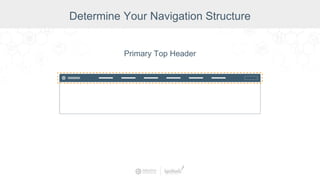
Primary Top Header
Determine Your Navigation Structure
Secondary Top Header
Determine Your Navigation Structure
Side Navigation
Determine Your Navigation Structure
Tabs
Determine Your Navigation Structure
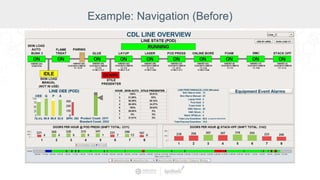
Example: Navigation (Before)
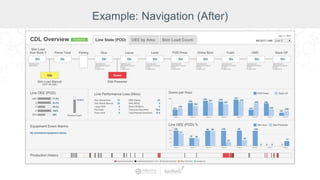
Example: Navigation (After)
Example: Side Navigation
Cognitive Load
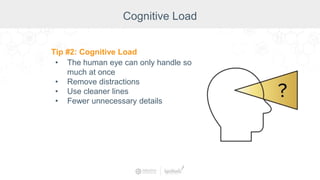
Tip #2: Cognitive Load
• The human eye can only handle so
much at once
• Remove distractions
• Use cleaner lines
• Fewer unnecessary details
Remove visual clutter
Cognitive Load
Alignment & Grids
• Creates a set of visual
rules
• Assists with navigation
Cognitive Load
Using Text
• 2-3 fonts/font variations
• Pair icons with text
• Descriptive errors
where possible
• Left alignment
Cognitive Load
Consistency
• Styling
• Terms
Cognitive Load
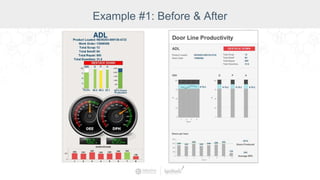
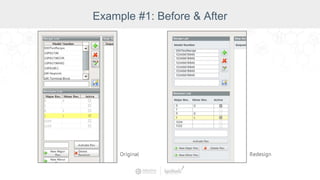
Example #1: Before & After
Visual Hierarchy
Tip #3: Visual Hierarchy
• Create emphasis through:
○ Size
○ Position
○ Color
○ Isolation
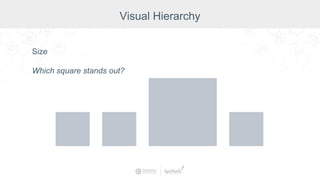
Size
Which square stands out?
Visual Hierarchy
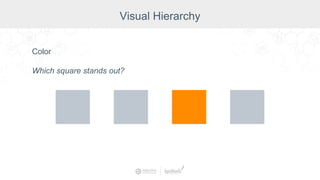
Color
Which square stands out?
Visual Hierarchy
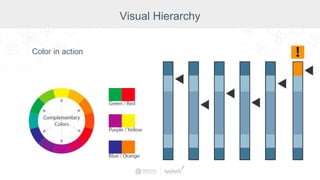
Color in action
Visual Hierarchy
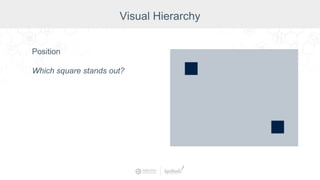
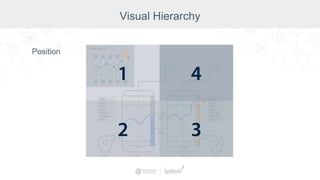
Position
Which square stands out?
Visual Hierarchy
Position
Visual Hierarchy
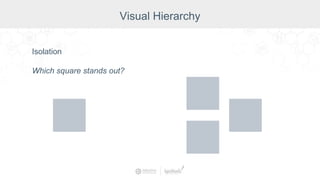
Isolation
Which square stands out?
Visual Hierarchy
By combining emphasis techniques, you
can achieve an even greater effect and
create a hierarchy of importance for each
element on the screen.
Visual Hierarchy
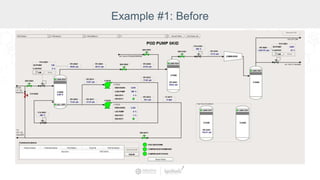
Example #1: Before
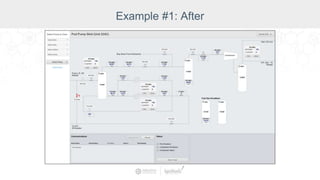
Example #1: After
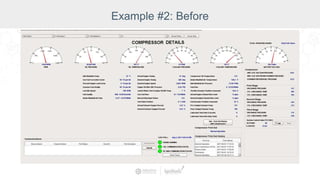
Example #2: Before
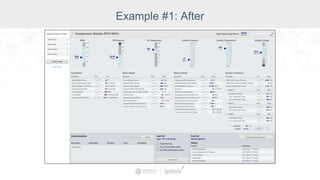
Example #1: After
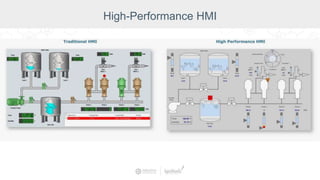
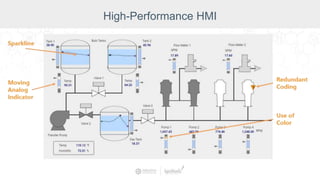
High-Performance HMI
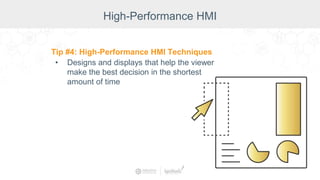
Tip #4: High-Performance HMI Techniques
• Designs and displays that help the viewer
make the best decision in the shortest
amount of time
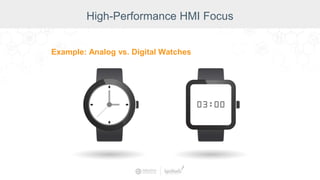
High-Performance HMI Focus
Example: Analog vs. Digital Watches
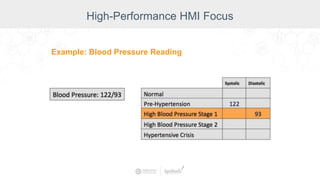
High-Performance HMI Focus
Example: Blood Pressure Reading
High-Performance HMI
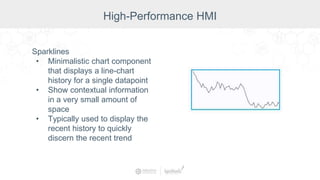
Sparklines
• Minimalistic chart component
that displays a line-chart
history for a single datapoint
• Show contextual information
in a very small amount of
space
• Typically used to display the
recent history to quickly
discern the recent trend
High-Performance HMI
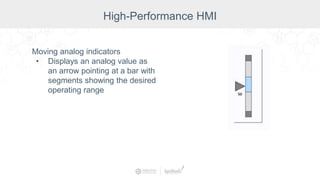
Moving analog indicators
• Displays an analog value as
an arrow pointing at a bar with
segments showing the desired
operating range
High-Performance HMI
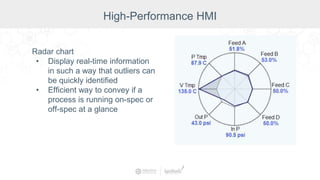
Radar chart
• Display real-time information
in such a way that outliers can
be quickly identified
• Efficient way to convey if a
process is running on-spec or
off-spec at a glance
High-Performance HMI
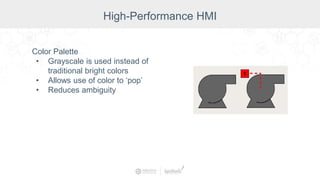
Color Palette
• Grayscale is used instead of
traditional bright colors
• Allows use of color to ‘pop’
• Reduces ambiguity
High-Performance HMI
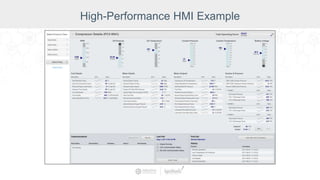
High-Performance HMI Example
Leverage Mobility
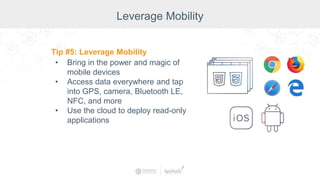
Tip #5: Leverage Mobility
• Bring in the power and magic of
mobile devices
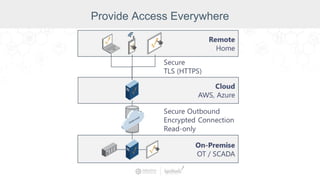
• Access data everywhere and tap
into GPS, camera, Bluetooth LE,
NFC, and more
• Use the cloud to deploy read-only
applications
• Use a camera to take photos of a
faulty machine or oil leak
• Easily scan barcodes including QR
codes that give your SCADA system
instructions
• Take readings or photos in the field
and tag them with GPS and other
sensor data
• Connect to Bluetooth
• And many other practical
applications
The Magic of Mobile
Provide Access Everywhere
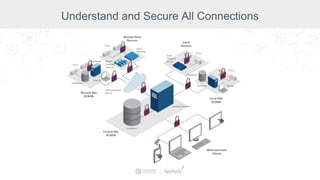
Understand and Secure All Connections
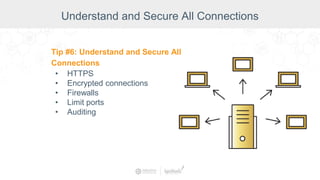
Tip #6: Understand and Secure All
Connections
• HTTPS
• Encrypted connections
• Firewalls
• Limit ports
• Auditing
Understand and Secure All Connections
HTTPS
• ‘S’ means encrypted with
SSL/TLS
• Protects against snooping and
session hijacking
Understand and Secure All Connections
Encrypted connections
• OPC UA and MQTT have
communication encryption
built in
Understand and Secure All Connections
Ways to protect your operating
system
• Enable firewalls for all traffic
• Remove unnecessary
programs
• Keep patches and services up
to date
Understand and Secure All Connections
Limit ports
• Only use needed ports
• Unnecessary ports leave you
open to attack
Understand and Secure All Connections
Auditing
• Keep track of who is doing
what and where
• Gives an overview of system
so that suspicious activity can
be quickly recognized
Understand and Secure All Connections
2FA & SSO
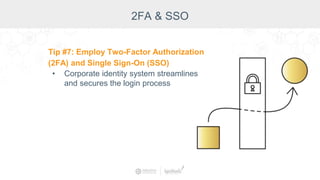
Tip #7: Employ Two-Factor Authorization
(2FA) and Single Sign-On (SSO)
• Corporate identity system streamlines
and secures the login process
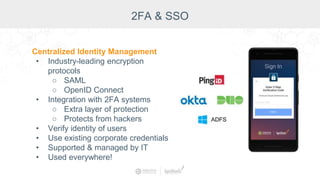
Centralized Identity Management
• Industry-leading encryption
protocols
○ SAML
○ OpenID Connect
• Integration with 2FA systems
○ Extra layer of protection
○ Protects from hackers
• Verify identity of users
• Use existing corporate credentials
• Supported & managed by IT
• Used everywhere!
2FA & SSO
Single sign-on
• One set of credentials allows
access to more than one
application
• Streamlines the login process
and makes it easier to monitor
user activity
2FA & SSO
Leverage a DMZ
Tip #8: Leverage a DMZ
• Protects by adding an extra layer
of security to internal local-area
network from untrusted traffic
• Allows an organization to access
untrusted networks, such as the
internet, while ensuring its private
network or LAN remains secure
Leverage a DMZ
Benefits of a DMZ
• Improved Security - Isolate and/or filter network traffic to limit and/or
prevent access between network segments.
• Better Access Control - Allow users to only access specific network
resources.
• Improved Monitoring - Log events, monitor allowed and denied internal
connections, and detect suspicious behavior.
• Improved Performance - With fewer hosts per subnet, local traffic is
minimized. Broadcast traffic can be isolated to the local subnet.
• Better Containment - When a network issue occurs, its effect is limited
to the local subnet.
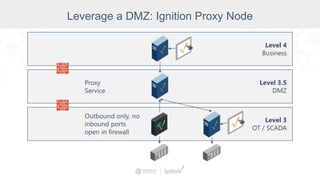
Leverage a DMZ: Ignition Proxy Node
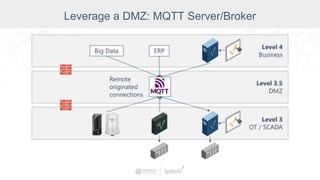
Leverage a DMZ: MQTT Server/Broker
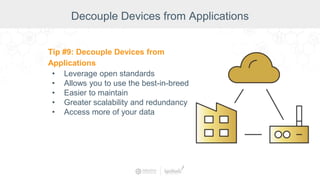
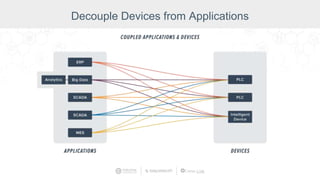
Decouple Devices from Applications
Tip #9: Decouple Devices from
Applications
• Leverage open standards
• Allows you to use the best-in-breed
• Easier to maintain
• Greater scalability and redundancy
• Access more of your data
Decouple Devices from Applications
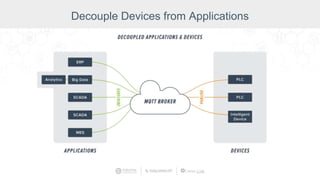
MQTT & Edge
• Leverage the lightweight MQTT protocol
to build a robust architecture for
delivering data to line-of-business
applications
• Take advantage of edge computing to
poll data at the source, poll at faster
rates, get access to more data and
deliver it more efficiently to the business
Decouple Devices from Applications
MQTT Benefits:
● Decouples devices from applications
● Low bandwidth
● Report by exception (RBE)
● TLS
● Outbound connection only (no inbound
firewall rules)
● Stateful awareness
● Quality of service (QOS) data delivery
● Single source of truth
● Plug-and-play functionality
● Eliminates cutovers (parallel applications)
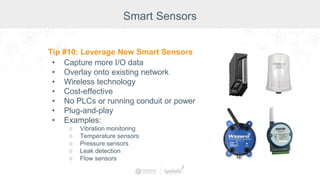
Smart Sensors
Tip #10: Leverage New Smart Sensors
• Capture more I/O data
• Overlay onto existing network
• Wireless technology
• Cost-effective
• No PLCs or running conduit or power
• Plug-and-play
• Examples:
○ Vibration monitoring
○ Temperature sensors
○ Pressure sensors
○ Leak detection
○ Flow sensors
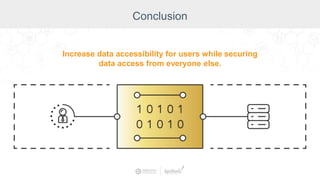
Conclusion
Increase data accessibility for users while securing
data access from everyone else.
International Distributors
Australia iControls Pty Ltd. www.icontrols.com.au
Brazil FG Automação Industrial www.fgltda.com.br
Central America NV Tecnologías S.A. www.nvtecnologias.com
France AXONE-iO www.axone-io.com
Italy EFA Automazione S.p.A www.efa.it
Norway Autic System AS www.autic.no
South Africa Element8 https://element8.co.za/
Switzerland MPI Technologies https://mpi.ch/
Contact International Distribution Manager Annie Wise at: awise@inductiveautomation.com
Top 10 Design & Security Tips to Elevate Your SCADA System

Top 10 Design & Security Tips to Elevate Your SCADA System

  • 2.
    Presenters Travis Cox Co-Director ofSales Engineering Inductive Automation Don Pearson Chief Strategy Officer Inductive Automation
  • 3.
    Today’s Agenda • Introduction •Why UI/UX & Security are Critical for Control Systems • Top 10 Design & Security Tips • Q&A
  • 4.
    Ignition: The Industrial ApplicationPlatform • Unlimited licensing model • Cross-platform compatibility • Based on IT-standard technologies • Scalable server-client architecture • Web-managed • Launch on desktop or mobile • Modular configurability • Rapid development and deployment One Universal Platform for HMI, SCADA, MES & IIoT: One Universal Platform for HMI/SCADA, MES & IIoT: • Unlimited licensing model • Cross-platform compatibility • Based on IT-standard technologies • Scalable server-client architecture • Web-based & web-managed • Web-deployed designer & clients • Modular configurability • Rapid development & deployment Ignition: Industrial Application Platform
  • 5.
    Why UI/UX &Security are Critical As the worlds of OT and IT continue to blend together, the issue of who has access to data becomes more vital.
  • 6.
    Top 10 SCADAUI/UX & Security Tips 1. Determine Your Navigation Structure 2. Cognitive Load 3. Visual Hierarchy 4. High-Performance HMI Techniques 5. Leverage Mobility 6. Understand and Secure All Connections 7. Employ Two-Factor Authorization (2FA) and Single Sign-on (SSO) 8. Leverage a DMZ 9. Decouple Devices from Applications 10.Leverage New Smart Sensors
  • 7.
    Determine Your NavigationStructure Tip #1: Determine Your Navigation Structure • Navigation is vital in any application. • Organization structure ○ Broad and Shallow ○ Narrow and Deep • Screen layout
  • 8.
    Broad and Shallow DetermineYour Navigation Structure Narrow and Deep
  • 9.
    Screen layout • PrimaryTop Header • Secondary Top Header • Side Navigation • Tabs Determine Your Navigation Structure
  • 10.
    Primary Top Header DetermineYour Navigation Structure
  • 11.
    Secondary Top Header DetermineYour Navigation Structure
  • 12.
    Side Navigation Determine YourNavigation Structure
  • 13.
  • 14.
  • 15.
  • 16.
  • 17.
    Cognitive Load Tip #2:Cognitive Load • The human eye can only handle so much at once • Remove distractions • Use cleaner lines • Fewer unnecessary details
  • 18.
  • 19.
    Alignment & Grids •Creates a set of visual rules • Assists with navigation Cognitive Load
  • 20.
    Using Text • 2-3fonts/font variations • Pair icons with text • Descriptive errors where possible • Left alignment Cognitive Load
  • 21.
  • 22.
  • 23.
  • 24.
    Visual Hierarchy Tip #3:Visual Hierarchy • Create emphasis through: ○ Size ○ Position ○ Color ○ Isolation
  • 25.
    Size Which square standsout? Visual Hierarchy
  • 26.
    Color Which square standsout? Visual Hierarchy
  • 27.
  • 28.
    Position Which square standsout? Visual Hierarchy
  • 29.
  • 30.
    Isolation Which square standsout? Visual Hierarchy
  • 31.
    By combining emphasistechniques, you can achieve an even greater effect and create a hierarchy of importance for each element on the screen. Visual Hierarchy
  • 32.
  • 33.
  • 34.
  • 35.
  • 36.
    High-Performance HMI Tip #4:High-Performance HMI Techniques • Designs and displays that help the viewer make the best decision in the shortest amount of time
  • 37.
    High-Performance HMI Focus Example:Analog vs. Digital Watches
  • 38.
  • 39.
  • 40.
    Sparklines • Minimalistic chartcomponent that displays a line-chart history for a single datapoint • Show contextual information in a very small amount of space • Typically used to display the recent history to quickly discern the recent trend High-Performance HMI
  • 41.
    Moving analog indicators •Displays an analog value as an arrow pointing at a bar with segments showing the desired operating range High-Performance HMI
  • 42.
    Radar chart • Displayreal-time information in such a way that outliers can be quickly identified • Efficient way to convey if a process is running on-spec or off-spec at a glance High-Performance HMI
  • 43.
    Color Palette • Grayscaleis used instead of traditional bright colors • Allows use of color to ‘pop’ • Reduces ambiguity High-Performance HMI
  • 44.
  • 45.
  • 46.
    Leverage Mobility Tip #5:Leverage Mobility • Bring in the power and magic of mobile devices • Access data everywhere and tap into GPS, camera, Bluetooth LE, NFC, and more • Use the cloud to deploy read-only applications
  • 47.
    • Use acamera to take photos of a faulty machine or oil leak • Easily scan barcodes including QR codes that give your SCADA system instructions • Take readings or photos in the field and tag them with GPS and other sensor data • Connect to Bluetooth • And many other practical applications The Magic of Mobile
  • 48.
  • 50.
    Understand and SecureAll Connections Tip #6: Understand and Secure All Connections • HTTPS • Encrypted connections • Firewalls • Limit ports • Auditing
  • 51.
    Understand and SecureAll Connections
  • 52.
    HTTPS • ‘S’ meansencrypted with SSL/TLS • Protects against snooping and session hijacking Understand and Secure All Connections
  • 53.
    Encrypted connections • OPCUA and MQTT have communication encryption built in Understand and Secure All Connections
  • 54.
    Ways to protectyour operating system • Enable firewalls for all traffic • Remove unnecessary programs • Keep patches and services up to date Understand and Secure All Connections
  • 55.
    Limit ports • Onlyuse needed ports • Unnecessary ports leave you open to attack Understand and Secure All Connections
  • 56.
    Auditing • Keep trackof who is doing what and where • Gives an overview of system so that suspicious activity can be quickly recognized Understand and Secure All Connections
  • 57.
    2FA & SSO Tip#7: Employ Two-Factor Authorization (2FA) and Single Sign-On (SSO) • Corporate identity system streamlines and secures the login process
  • 58.
    Centralized Identity Management •Industry-leading encryption protocols ○ SAML ○ OpenID Connect • Integration with 2FA systems ○ Extra layer of protection ○ Protects from hackers • Verify identity of users • Use existing corporate credentials • Supported & managed by IT • Used everywhere! 2FA & SSO
  • 59.
    Single sign-on • Oneset of credentials allows access to more than one application • Streamlines the login process and makes it easier to monitor user activity 2FA & SSO
  • 60.
    Leverage a DMZ Tip#8: Leverage a DMZ • Protects by adding an extra layer of security to internal local-area network from untrusted traffic • Allows an organization to access untrusted networks, such as the internet, while ensuring its private network or LAN remains secure
  • 61.
    Leverage a DMZ Benefitsof a DMZ • Improved Security - Isolate and/or filter network traffic to limit and/or prevent access between network segments. • Better Access Control - Allow users to only access specific network resources. • Improved Monitoring - Log events, monitor allowed and denied internal connections, and detect suspicious behavior. • Improved Performance - With fewer hosts per subnet, local traffic is minimized. Broadcast traffic can be isolated to the local subnet. • Better Containment - When a network issue occurs, its effect is limited to the local subnet.
  • 62.
    Leverage a DMZ:Ignition Proxy Node
  • 63.
    Leverage a DMZ:MQTT Server/Broker
  • 64.
    Decouple Devices fromApplications Tip #9: Decouple Devices from Applications • Leverage open standards • Allows you to use the best-in-breed • Easier to maintain • Greater scalability and redundancy • Access more of your data
  • 65.
    Decouple Devices fromApplications MQTT & Edge • Leverage the lightweight MQTT protocol to build a robust architecture for delivering data to line-of-business applications • Take advantage of edge computing to poll data at the source, poll at faster rates, get access to more data and deliver it more efficiently to the business
  • 66.
  • 67.
  • 68.
    Decouple Devices fromApplications MQTT Benefits: ● Decouples devices from applications ● Low bandwidth ● Report by exception (RBE) ● TLS ● Outbound connection only (no inbound firewall rules) ● Stateful awareness ● Quality of service (QOS) data delivery ● Single source of truth ● Plug-and-play functionality ● Eliminates cutovers (parallel applications)
  • 69.
    Smart Sensors Tip #10:Leverage New Smart Sensors • Capture more I/O data • Overlay onto existing network • Wireless technology • Cost-effective • No PLCs or running conduit or power • Plug-and-play • Examples: ○ Vibration monitoring ○ Temperature sensors ○ Pressure sensors ○ Leak detection ○ Flow sensors
  • 70.
    Conclusion Increase data accessibilityfor users while securing data access from everyone else.
  • 73.
    International Distributors Australia iControlsPty Ltd. www.icontrols.com.au Brazil FG Automação Industrial www.fgltda.com.br Central America NV Tecnologías S.A. www.nvtecnologias.com France AXONE-iO www.axone-io.com Italy EFA Automazione S.p.A www.efa.it Norway Autic System AS www.autic.no South Africa Element8 https://element8.co.za/ Switzerland MPI Technologies https://mpi.ch/ Contact International Distribution Manager Annie Wise at: awise@inductiveautomation.com