Unit of Competency: USE BASIC ELECTRONIC HAND TOOLS
Module No. 1 Module Title: USING BASIC ELECTRONIC HAND
TOOLS
Republic of the Philippines
Department of Education
PUBLIC TECHNICAL -VOCATIONAL
HIGH SCHOOLS
i
TABLE OF CONTENTS
How to Use this Module..........................................................................ii
Introduction ..........................................................................................iii
Technical Terms ....................................................................................iv
Learning Outcome 1: Identify Functional Basic Electronic
Hand Tools.............................................................................................1
 Learning Experiences/Activities ....................................................2
 Activity Sheet 1.1........................................................................10
 Activitiy Sheet 1.1 .......................................................................12
 Activity Sheet 1.2........................................................................13
 Activity Sheet 1.3........................................................................15
 Self-Check Sheet 1.3...................................................................15
Learning Outcome 2: Use Appropriate Basic Electronic
Hand Tools Based on the Safety Requirements............................16
 Learning Experiences/Activities ..................................................17
 Activity Sheet 2.1........................................................................18
 Operation Sheet 2.1 ....................................................................19
 Operation Sheet 2.2 ....................................................................20
 Operation Sheet 2.3 ....................................................................21
 Information Sheet 2.1 .................................................................22
 Activity Sheet 2.2........................................................................27
Learning Outcome 3: Maintain Basic Electronic Hand Tools .................28
 Learning Experiences/Activities ..................................................29
 Activity Sheet 3.1........................................................................30
 Operation Sheet 3.1 ....................................................................31
 Teacher Check Sheet 3.1.............................................................31
Assessment Plan ..................................................................................32
 Observation and Questioning Checklist.......................................34
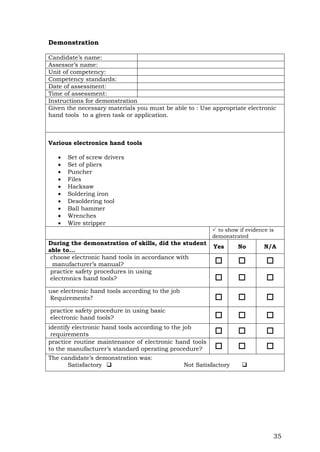
 Demonstration............................................................................35
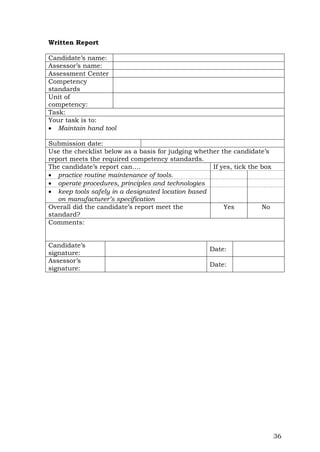
 Written Report ............................................................................36
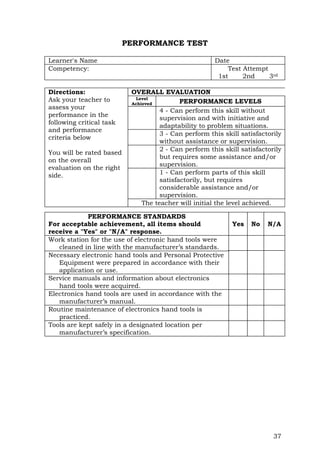
Performance Test..................................................................................37
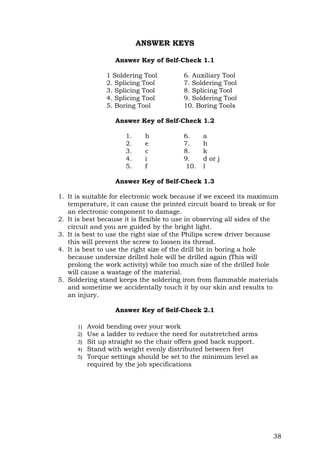
Answer Keys.........................................................................................38
Acknowledgment ..................................................................................39
ii
HOW TO USE THIS MODULE
Welcome to the Module “Using Basic Electronic Hand Tools”.
This module contains training materials and activities for you to
complete.
The unit of competency “Use Basic Electronic Hand Tools”
contains the knowledge, skills and desirable attitudes required for a
Consumer Electronic Servicing required to obtain the National Certificate
(NC) level II.
You are required to go through a series of learning activities in
order to complete each of the learning outcomes of the module. In each
learning outcome there are Information Sheets, Job Sheets,
Assignment Sheets, and Activity Sheets. Follow these activities on
your own and answer the Self-Check at the end of each learning activity.
If you have questions, don’t hesitate to ask your facilitator for
assistance.
Recognition of Prior Learning (RPL)
You may already have some basic knowledge and skills covered in
this module because you have been working for sometime; or already
completed training in this area.
If you can demonstrate to your teacher in a particular skill, talk to
him/her about having them formally recognized so you don’t have to do
the same training again. If you have a qualification or Certificate of
Competency from previous trainings, show it to him/her. If the skills you
acquired are consistent with and relevant to this module, they become
part of the evidence you can present for RPL. If you are not sure about
your competence skills, discuss this with your teacher.
After completing this module ask your teacher to assess your
competence. Result of your assessment will be recorded in your
competency profile. All the learning activities are designed for you to
complete at your own pace.
Inside this module you will find the activities for you to complete
and followed by relevant information sheets for each learning outcome.
Each learning outcome may have more than one learning activity.
This module is prepared to help you achieve the required
competency, in receiving and relaying information. This will be the
source of information that will enable you to acquire the knowledge and
skills in “using basic electronic hand tools” independently at your own
pace or with minimum supervision or help from your teacher.
iii
Program/Course CONSUMER ELECTRONIC
SERVICING NC II
Unit of Competency USE BASIC ELECTRONIC HAND
TOOLS
Module Title Using Basic Electronics Hand Tools
INTRODUCTION
This module contains information and suggested learning activities
on Using Basic Electronic Hand Tools. It includes instructions and
procedure on how to use basic electronic hand tools.
This module consists of three (3) learning outcomes. Each learning
outcome contains learning activities supported by instruction sheets.
Before you perform the instructions, read the information sheets and
answer the self-check and activities provided to ascertain to yourself and
your instructor that you have acquired the knowledge necessary to
perform the skill portion of the particular learning outcome.
Upon completing this module, report to your instructor for
assessment to check your achievement of knowledge and skills
requirements of this module. If you pass the assessment, you will be
given a certificate of completion.
SUMMARY OF LEARNING OUTCOMES
Upon completion of the module, you should be able to:
LO1. identify functional basic electronics hand tools;
LO2. use appropriate basic electronics hand tools based on the safety
requirements; and
LO3. maintain basic electronics hand tools.
PREREQUISITE
None
iv
TECHNICAL TERMS
Active State. It is a condition of a semiconductor device that is
working.
Alternating Current. It is an electric current that is continually
varying in value and reversing its direction of
flow at regular interval.
Anode. It is a positive electrode of semiconductor device.
Biasing Current. It is a current supply needed by the semiconductor
in order to work properly.
Capacitance. It is a property that exits whenever two conductors are
separated by insulating material, permitting the storage
of electricity.
Capacitor. It is a component designed intentionally to have a definite
amount of capacitance.
Cathode. It is a negative electrode of semi-conductor devices.
Circuit. It is an arrangement of one or more complete paths of
electron flow.
Conductor. It is a wire, cable, or other body or medium that is
suitable for carrying electric current.
Couple. This is to connect two circuits so signals are transferred from
one to the other.
Current. It is the rate of transfer of electricity from one point to
another.
Cut-off State. It is a condition of a semiconductor device that is not
working.
DC Milli-Ammeter. It is an instrument that measures the amount of
direct current flow in a component or circuit.
Desoldering. It is a process of unsoldering unwanted parts or
components in the circuit with the support of soldering
tool.
Dielectric Material. It is a material that serves as insulator with poor
electric conductivity.
Direct Current. It is an electric current that flows in one direction.
v
Discrete Components. They are separated components.
Junction. It is a hybrid of an electronic circuit enclosed in a single
package having an output that varies directly proportional
to the input.
Ohmmeter. It is an instrument that measures the amount of
resistance in certain component or circuits.
PCB. It is a Printed Circuit Board or (PCB) which is actually printed
wiring boards that have components inserted into the hole and
soldered to form its circuit connection.
Quiescent Point. It is the least amount of operating current of semi
conductor in order to work properly.
Resistance. It is the opposition that a component or material offers to
the flow current.
Resistor. It is a component designed intentionally to have a definite
amount of resistance.
Soldering. It is a process of joining two metals caused by heat
Soldering Technique. It is a right process in which the solder (lead) is
being applied in a connection or in the printed circuit board.
Splicing. It is defined as a joint that connect two lengths of conductor.
Voltage. It is the electrical pressure that exist between two points and
capable of producing a flow of current when a close circuit is
connected between the points.
Voltmeter. It is an instrument that measures the amount of
electromotive force in a component or circuit.
1
Learning Outcome 1: Identify functional basic electronic hand tools.
ASSESSMENT CRITERIA
1. Basic electronic hand tools are identified according to their
applications.
2. Basic electronic hand tools are specified according to job
requirements.
3. Functions of electronic hand tools are identified and explained.
REFERENCES:
- Buban, Peter andSchmitt, Marshall. Technical Electricity and
Electronics, New York: Mc Graw-Hill: 1972.
- Grob, Bernard. Basic Electronics, 4th Edition; New York: Mc Graw-
Hill Company: 1977
- Grob, Bernard. Electronics Circuits and Application; McGraw-Hill
Company, USA: 1982
- Markus, John. Electronics Dictionary, 4th Edition; New York:
McGraw-Hill Company: 1945
Program/Course CONSUMER ELECTRONIC
SERVICING NC II
Unit of Competency USE HAND TOOLS
Module Title USING HAND TOOLS
2
LEARNING EXPERIENCE/ACTIVITIES
Learning Outcome 1: Choose functional basic electronic hand tools
Learning Activities Special Instruction
1. Read the Information Sheet 1.1
on identifying and classifying
the different hand tools used in
Consumer Electronics
Servicing.
2. Answer the Self-Check to
determine how much you have
learned.
3. Compare your answers with the
answer key on the last page of
this module.
4. If you have missed some of the
questions, go over the
information sheet again.
5. If you have any question or if
you need clarification on the
information, ask the assistance
from your teacher or from your
classmate who has finished
this learning outcome (LO).
6. If you have answered all the
questions, you may proceed to
the next learning outcome (LO).
Try to answer the Self-Check
without looking at the answer
key.
3
INFORMATION SHEET 1.1
Classification of Hand Tools
Basic Electronic Hand Tools
Driving of Tools
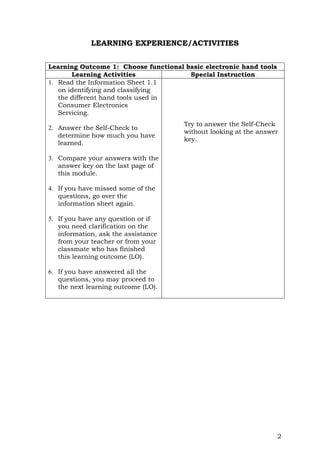
Screwdriver. It is a device specifically designed to insert and
tighten or to loosen and remove screws. A screwdriver comprises
a head or tip which engages with a screw, a mechanism to apply
torque by rotating the tip and some way to position and support
the screwdriver. A typical hand screwdriver comprises an
approximately cylindrical handle of a size and shape to be held
by a human hand and an axial shaft fixed to the handle, the tip
of which is shaped to fit a particular type of screw. The handle
and shaft allow the screwdriver to be positioned and supported
when rotated to apply torque.
Handle
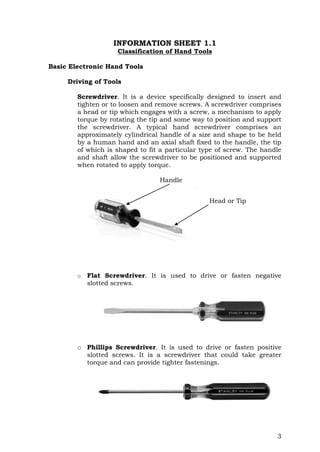
o Flat Screwdriver. It is used to drive or fasten negative
slotted screws.
o Phillips Screwdriver. It is used to drive or fasten positive
slotted screws. It is a screwdriver that could take greater
torque and can provide tighter fastenings.
Head or Tip
4
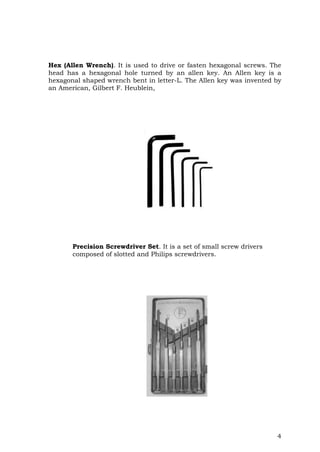
Hex (Allen Wrench). It is used to drive or fasten hexagonal screws. The
head has a hexagonal hole turned by an allen key. An Allen key is a
hexagonal shaped wrench bent in letter-L. The Allen key was invented by
an American, Gilbert F. Heublein,
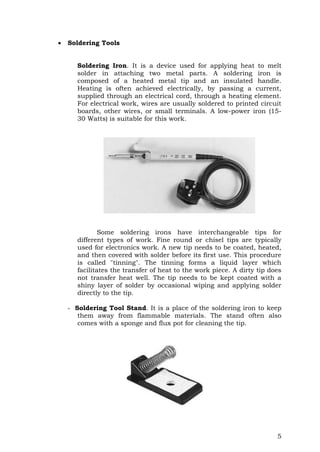
Precision Screwdriver Set. It is a set of small screw drivers
composed of slotted and Philips screwdrivers.
5
 Soldering Tools
Soldering Iron. It is a device used for applying heat to melt
solder in attaching two metal parts. A soldering iron is
composed of a heated metal tip and an insulated handle.
Heating is often achieved electrically, by passing a current,
supplied through an electrical cord, through a heating element.
For electrical work, wires are usually soldered to printed circuit
boards, other wires, or small terminals. A low-power iron (15-
30 Watts) is suitable for this work.
Some soldering irons have interchangeable tips for
different types of work. Fine round or chisel tips are typically
used for electronics work. A new tip needs to be coated, heated,
and then covered with solder before its first use. This procedure
is called "tinning". The tinning forms a liquid layer which
facilitates the transfer of heat to the work piece. A dirty tip does
not transfer heat well. The tip needs to be kept coated with a
shiny layer of solder by occasional wiping and applying solder
directly to the tip.
- Soldering Tool Stand. It is a place of the soldering iron to keep
them away from flammable materials. The stand often also
comes with a sponge and flux pot for cleaning the tip.
6
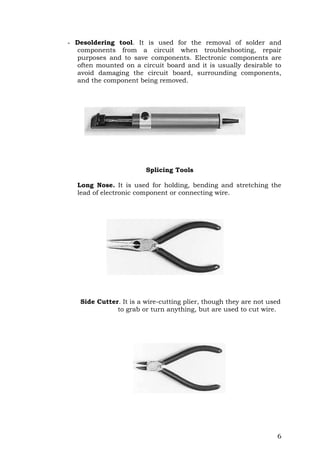
- Desoldering tool. It is used for the removal of solder and
components from a circuit when troubleshooting, repair
purposes and to save components. Electronic components are
often mounted on a circuit board and it is usually desirable to
avoid damaging the circuit board, surrounding components,
and the component being removed.
Splicing Tools
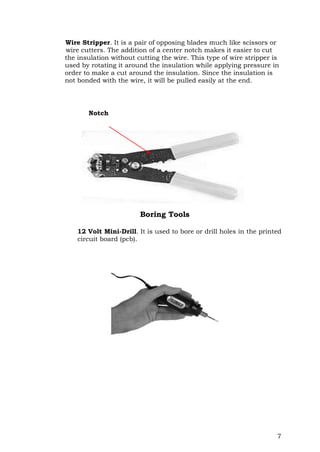
Long Nose. It is used for holding, bending and stretching the
lead of electronic component or connecting wire.
Side Cutter. It is a wire-cutting plier, though they are not used
to grab or turn anything, but are used to cut wire.
7
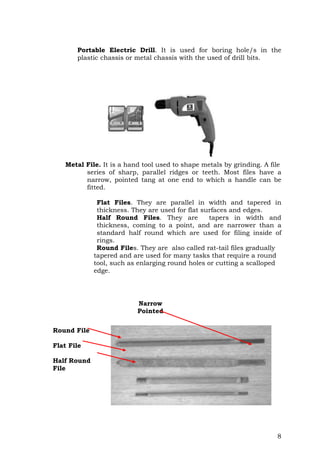
Wire Stripper. It is a pair of opposing blades much like scissors or
wire cutters. The addition of a center notch makes it easier to cut
the insulation without cutting the wire. This type of wire stripper is
used by rotating it around the insulation while applying pressure in
order to make a cut around the insulation. Since the insulation is
not bonded with the wire, it will be pulled easily at the end.
Boring Tools
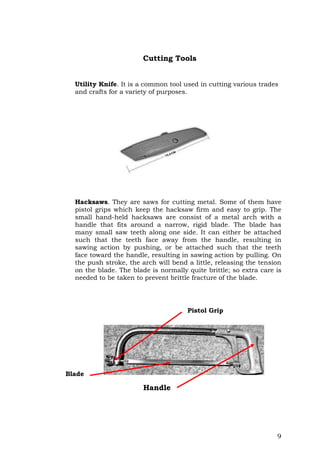
12 Volt Mini-Drill. It is used to bore or drill holes in the printed
circuit board (pcb).
Notch
8
Portable Electric Drill. It is used for boring hole/s in the
plastic chassis or metal chassis with the used of drill bits.
Metal File. It is a hand tool used to shape metals by grinding. A file
series of sharp, parallel ridges or teeth. Most files have a
narrow, pointed tang at one end to which a handle can be
fitted.
Flat Files. They are parallel in width and tapered in
thickness. They are used for flat surfaces and edges.
Half Round Files. They are tapers in width and
thickness, coming to a point, and are narrower than a
standard half round which are used for filing inside of
rings.
Round Files. They are also called rat-tail files gradually
tapered and are used for many tasks that require a round
tool, such as enlarging round holes or cutting a scalloped
edge.
Round File
Flat File
Half Round
File
Narrow
Pointed
Tang
9
Cutting Tools
Utility Knife. It is a common tool used in cutting various trades
and crafts for a variety of purposes.
Hacksaws. They are saws for cutting metal. Some of them have
pistol grips which keep the hacksaw firm and easy to grip. The
small hand-held hacksaws are consist of a metal arch with a
handle that fits around a narrow, rigid blade. The blade has
many small saw teeth along one side. It can either be attached
such that the teeth face away from the handle, resulting in
sawing action by pushing, or be attached such that the teeth
face toward the handle, resulting in sawing action by pulling. On
the push stroke, the arch will bend a little, releasing the tension
on the blade. The blade is normally quite brittle; so extra care is
needed to be taken to prevent brittle fracture of the blade.
Blade
Handle
Pistol Grip
10
Auxiliary Tools
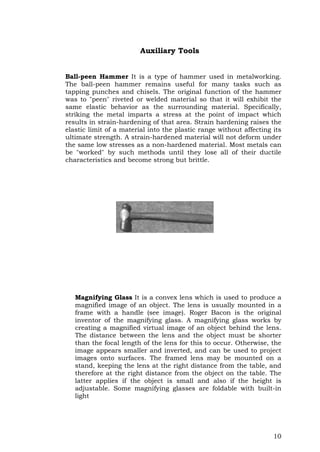
Ball-peen Hammer It is a type of hammer used in metalworking.
The ball-peen hammer remains useful for many tasks such as
tapping punches and chisels. The original function of the hammer
was to "peen" riveted or welded material so that it will exhibit the
same elastic behavior as the surrounding material. Specifically,
striking the metal imparts a stress at the point of impact which
results in strain-hardening of that area. Strain hardening raises the
elastic limit of a material into the plastic range without affecting its
ultimate strength. A strain-hardened material will not deform under
the same low stresses as a non-hardened material. Most metals can
be "worked" by such methods until they lose all of their ductile
characteristics and become strong but brittle.
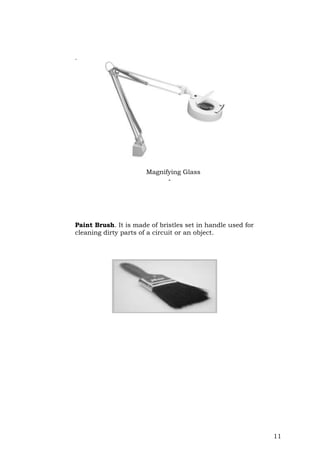
Magnifying Glass It is a convex lens which is used to produce a
magnified image of an object. The lens is usually mounted in a
frame with a handle (see image). Roger Bacon is the original
inventor of the magnifying glass. A magnifying glass works by
creating a magnified virtual image of an object behind the lens.
The distance between the lens and the object must be shorter
than the focal length of the lens for this to occur. Otherwise, the
image appears smaller and inverted, and can be used to project
images onto surfaces. The framed lens may be mounted on a
stand, keeping the lens at the right distance from the table, and
therefore at the right distance from the object on the table. The
latter applies if the object is small and also if the height is
adjustable. Some magnifying glasses are foldable with built-in
light
11
.
Magnifying Glass
-
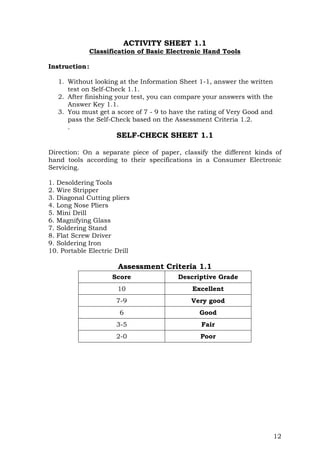
Paint Brush. It is made of bristles set in handle used for
cleaning dirty parts of a circuit or an object.
12
ACTIVITY SHEET 1.1
Classification of Basic Electronic Hand Tools
Instruction:
1. Without looking at the Information Sheet 1-1, answer the written
test on Self-Check 1.1.
2. After finishing your test, you can compare your answers with the
Answer Key 1.1.
3. You must get a score of 7 - 9 to have the rating of Very Good and
pass the Self-Check based on the Assessment Criteria 1.2.
.
SELF-CHECK SHEET 1.1
Direction: On a separate piece of paper, classify the different kinds of
hand tools according to their specifications in a Consumer Electronic
Servicing.
1. Desoldering Tools
2. Wire Stripper
3. Diagonal Cutting pliers
4. Long Nose Pliers
5. Mini Drill
6. Magnifying Glass
7. Soldering Stand
8. Flat Screw Driver
9. Soldering Iron
10. Portable Electric Drill
Assessment Criteria 1.1
Score Descriptive Grade
10 Excellent
7-9 Very good
6 Good
3-5 Fair
2-0 Poor
13
ACTIVITY SHEET 1.2
Identification of Hand Tools and its Function
Instruction:
1. Without looking at the your Information Sheet 1.1, answer the oral
test in the Self-Check 1.2.
2. After finishing your test, you can compare your answers with the
Answer Key 1.2.
3. You must get at least the score of 7 - 9 to have the rating of Very
Good and pass the Self-Check based on the Assessment Criteria
1.2.
SELF-CHECK SHEET 1.2
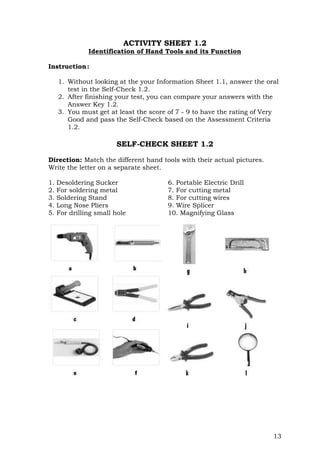
Direction: Match the different hand tools with their actual pictures.
Write the letter on a separate sheet.
1. Desoldering Sucker
2. For soldering metal
3. Soldering Stand
4. Long Nose Pliers
5. For drilling small hole
6. Portable Electric Drill
7. For cutting metal
8. For cutting wires
9. Wire Splicer
10. Magnifying Glass
14
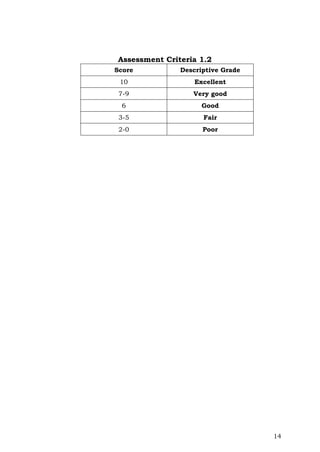
Assessment Criteria 1.2
Score Descriptive Grade
10 Excellent
7-9 Very good
6 Good
3-5 Fair
2-0 Poor
15
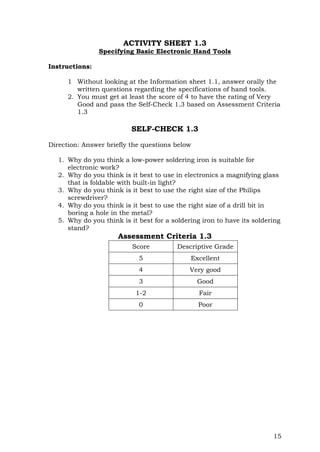
ACTIVITY SHEET 1.3
Specifying Basic Electronic Hand Tools
Instructions:
1 Without looking at the Information sheet 1.1, answer orally the
written questions regarding the specifications of hand tools.
2. You must get at least the score of 4 to have the rating of Very
Good and pass the Self-Check 1.3 based on Assessment Criteria
1.3
SELF-CHECK 1.3
Direction: Answer briefly the questions below
1. Why do you think a low-power soldering iron is suitable for
electronic work?
2. Why do you think is it best to use in electronics a magnifying glass
that is foldable with built-in light?
3. Why do you think is it best to use the right size of the Philips
screwdriver?
4. Why do you think is it best to use the right size of a drill bit in
boring a hole in the metal?
5. Why do you think is it best for a soldering iron to have its soldering
stand?
Assessment Criteria 1.3
Score Descriptive Grade
5 Excellent
4 Very good
3 Good
1-2 Fair
0 Poor
16
Program/Course CONSUMER ELECTRONIC SERVICING
NCII
Unit of Competency USE BASIC ELECTRONIC HAND
TOOLS
Module Title USING BASIC ELECTRONIC HAND
TOOLS
Learning Outcome 2: Use appropriate basic electronics hand tools
based on safety requirements.
ASSESSMENT CRITERIA
1. Electronics tools are chosen in accordance with job requirements.
2. Electronics tools are used in accordance with the manufacturer’s
manual.
3. Safety procedures in using electronic hand tools are practiced.
REFERENCES
- Buban, Peter andSchmitt, Marshall. Technical Electricity And
Electronics, New York: Mc Graw-Hill :1972.
- Grob, Bernard. Basic Electronics, 4th Edition; New York: Mc Graw-
Hill Company: 1977
- Grob, Bernard. Electronics Circuits and Application; McGraw-Hill
Company, USA: 1982
- Markus, John. Electronics Dictionary, 4th Edition; New York:
McGraw-Hill Company: 1945
17
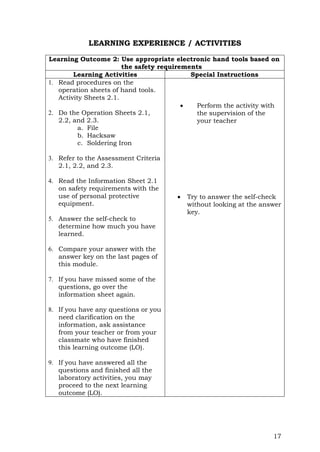
LEARNING EXPERIENCE / ACTIVITIES
Learning Outcome 2: Use appropriate electronic hand tools based on
the safety requirements
Learning Activities Special Instructions
1. Read procedures on the
operation sheets of hand tools.
Activity Sheets 2.1.
2. Do the Operation Sheets 2.1,
2.2, and 2.3.
a. File
b. Hacksaw
c. Soldering Iron
3. Refer to the Assessment Criteria
2.1, 2.2, and 2.3.
4. Read the Information Sheet 2.1
on safety requirements with the
use of personal protective
equipment.
5. Answer the self-check to
determine how much you have
learned.
6. Compare your answer with the
answer key on the last pages of
this module.
7. If you have missed some of the
questions, go over the
information sheet again.
8. If you have any questions or you
need clarification on the
information, ask assistance
from your teacher or from your
classmate who have finished
this learning outcome (LO).
9. If you have answered all the
questions and finished all the
laboratory activities, you may
proceed to the next learning
outcome (LO).
 Perform the activity with
the supervision of the
your teacher
 Try to answer the self-check
without looking at the answer
key.
18
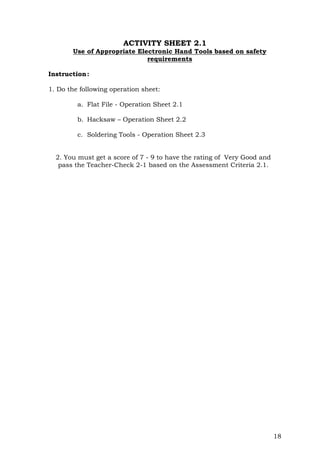
ACTIVITY SHEET 2.1
Use of Appropriate Electronic Hand Tools based on safety
requirements
Instruction:
1. Do the following operation sheet:
a. Flat File - Operation Sheet 2.1
b. Hacksaw – Operation Sheet 2.2
c. Soldering Tools - Operation Sheet 2.3
2. You must get a score of 7 - 9 to have the rating of Very Good and
pass the Teacher-Check 2-1 based on the Assessment Criteria 2.1.
19
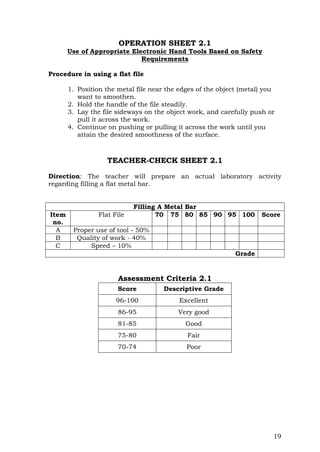
OPERATION SHEET 2.1
Use of Appropriate Electronic Hand Tools Based on Safety
Requirements
Procedure in using a flat file
1. Position the metal file near the edges of the object (metal) you
want to smoothen.
2. Hold the handle of the file steadily.
3. Lay the file sideways on the object work, and carefully push or
pull it across the work.
4. Continue on pushing or pulling it across the work until you
attain the desired smoothness of the surface.
TEACHER-CHECK SHEET 2.1
Direction: The teacher will prepare an actual laboratory activity
regarding filling a flat metal bar.
Filling A Metal Bar
Item
no.
Flat File 70 75 80 85 90 95 100 Score
A Proper use of tool - 50%
B Quality of work - 40%
C Speed – 10%
Grade
Assessment Criteria 2.1
Score Descriptive Grade
96-100 Excellent
86-95 Very good
81-85 Good
75-80 Fair
70-74 Poor
20
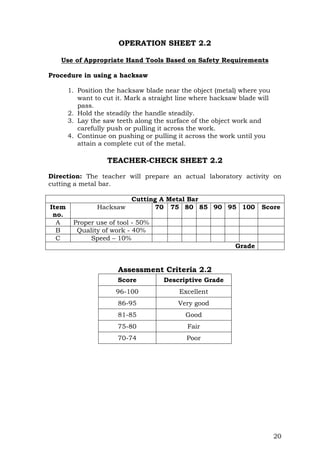
OPERATION SHEET 2.2
Use of Appropriate Hand Tools Based on Safety Requirements
Procedure in using a hacksaw
1. Position the hacksaw blade near the object (metal) where you
want to cut it. Mark a straight line where hacksaw blade will
pass.
2. Hold the steadily the handle steadily.
3. Lay the saw teeth along the surface of the object work and
carefully push or pulling it across the work.
4. Continue on pushing or pulling it across the work until you
attain a complete cut of the metal.
TEACHER-CHECK SHEET 2.2
Direction: The teacher will prepare an actual laboratory activity on
cutting a metal bar.
Cutting A Metal Bar
Item
no.
Hacksaw 70 75 80 85 90 95 100 Score
A Proper use of tool - 50%
B Quality of work - 40%
C Speed – 10%
Grade
Assessment Criteria 2.2
Score Descriptive Grade
96-100 Excellent
86-95 Very good
81-85 Good
75-80 Fair
70-74 Poor
21
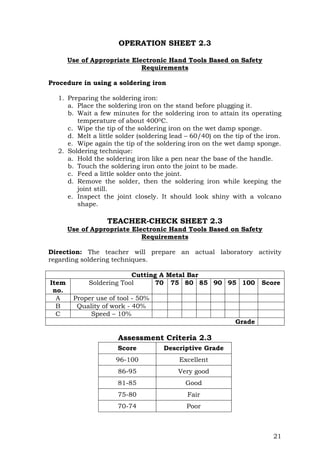
OPERATION SHEET 2.3
Use of Appropriate Electronic Hand Tools Based on Safety
Requirements
Procedure in using a soldering iron
1. Preparing the soldering iron:
a. Place the soldering iron on the stand before plugging it.
b. Wait a few minutes for the soldering iron to attain its operating
temperature of about 4000C.
c. Wipe the tip of the soldering iron on the wet damp sponge.
d. Melt a little solder (soldering lead – 60/40) on the tip of the iron.
e. Wipe again the tip of the soldering iron on the wet damp sponge.
2. Soldering technique:
a. Hold the soldering iron like a pen near the base of the handle.
b. Touch the soldering iron onto the joint to be made.
c. Feed a little solder onto the joint.
d. Remove the solder, then the soldering iron while keeping the
joint still.
e. Inspect the joint closely. It should look shiny with a volcano
shape.
TEACHER-CHECK SHEET 2.3
Use of Appropriate Electronic Hand Tools Based on Safety
Requirements
Direction: The teacher will prepare an actual laboratory activity
regarding soldering techniques.
Cutting A Metal Bar
Item
no.
Soldering Tool 70 75 80 85 90 95 100 Score
A Proper use of tool - 50%
B Quality of work - 40%
C Speed – 10%
Grade
Assessment Criteria 2.3
Score Descriptive Grade
96-100 Excellent
86-95 Very good
81-85 Good
75-80 Fair
70-74 Poor
22
INFORMATION SHEET 2.1
Safety Requirements with the Use of Personal Protective Equipment
Hand Tool Design, Selection, and Setup
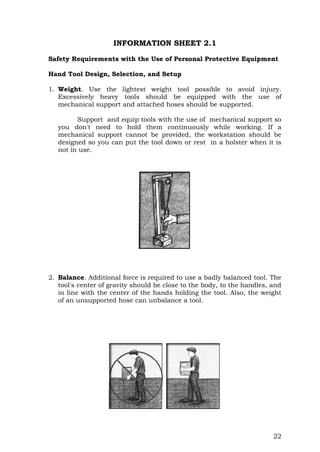
1. Weight. Use the lightest weight tool possible to avoid injury.
Excessively heavy tools should be equipped with the use of
mechanical support and attached hoses should be supported.
Support and equip tools with the use of mechanical support so
you don't need to hold them continuously while working. If a
mechanical support cannot be provided, the workstation should be
designed so you can put the tool down or rest in a holster when it is
not in use.
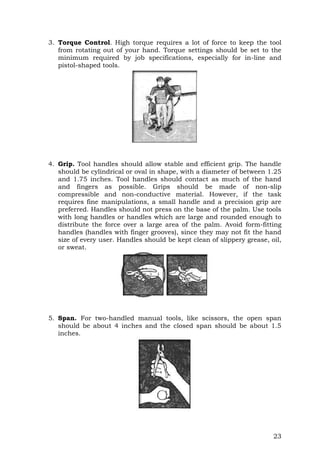
2. Balance. Additional force is required to use a badly balanced tool. The
tool's center of gravity should be close to the body, to the handles, and
in line with the center of the hands holding the tool. Also, the weight
of an unsupported hose can unbalance a tool.
23
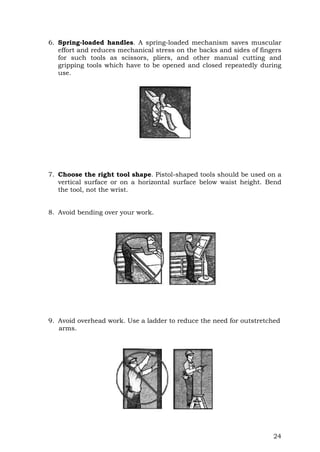
3. Torque Control. High torque requires a lot of force to keep the tool
from rotating out of your hand. Torque settings should be set to the
minimum required by job specifications, especially for in-line and
pistol-shaped tools.
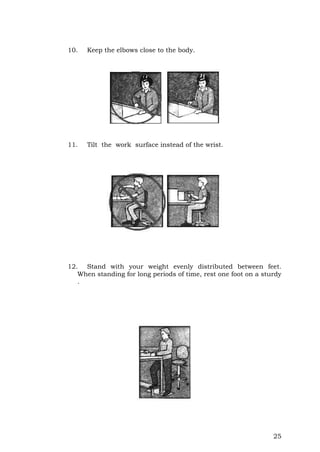
4. Grip. Tool handles should allow stable and efficient grip. The handle
should be cylindrical or oval in shape, with a diameter of between 1.25
and 1.75 inches. Tool handles should contact as much of the hand
and fingers as possible. Grips should be made of non-slip
compressible and non-conductive material. However, if the task
requires fine manipulations, a small handle and a precision grip are
preferred. Handles should not press on the base of the palm. Use tools
with long handles or handles which are large and rounded enough to
distribute the force over a large area of the palm. Avoid form-fitting
handles (handles with finger grooves), since they may not fit the hand
size of every user. Handles should be kept clean of slippery grease, oil,
or sweat.
5. Span. For two-handled manual tools, like scissors, the open span
should be about 4 inches and the closed span should be about 1.5
inches.
24
6. Spring-loaded handles. A spring-loaded mechanism saves muscular
effort and reduces mechanical stress on the backs and sides of fingers
for such tools as scissors, pliers, and other manual cutting and
gripping tools which have to be opened and closed repeatedly during
use.
7. Choose the right tool shape. Pistol-shaped tools should be used on a
vertical surface or on a horizontal surface below waist height. Bend
the tool, not the wrist.
8. Avoid bending over your work.
9. Avoid overhead work. Use a ladder to reduce the need for outstretched
arms.
25
10. Keep the elbows close to the body.
11. Tilt the work surface instead of the wrist.
12. Stand with your weight evenly distributed between feet.
When standing for long periods of time, rest one foot on a sturdy
.
26
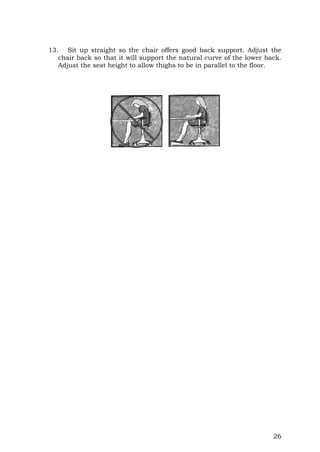
13. Sit up straight so the chair offers good back support. Adjust the
chair back so that it will support the natural curve of the lower back.
Adjust the seat height to allow thighs to be in parallel to the floor.
27
ACTIVITY SHEET 2.2
Safety Requirements with the Use of Personal Protective Equipment
Instruction:
1. Without looking at Information Sheet 2.1, answer the written
test on the safety requirements in using hand tools and test
equipment in theSelf-Check 2.1.
2. After finishing your test, you can compare your answer with the
Answer Key 2.1.
3. You must get at least a score of 7 - 9 to have a rating of Very
Good and pass the Self-check based on Assessment Criteria 2.1.
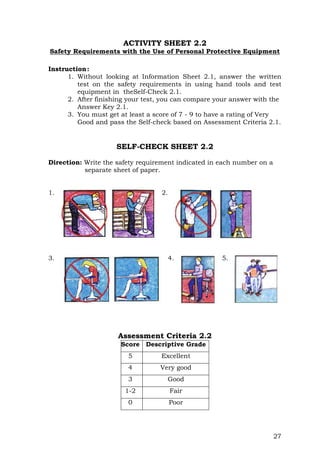
SELF-CHECK SHEET 2.2
Direction: Write the safety requirement indicated in each number on a
separate sheet of paper.
1. 2.
3. 4. 5.
Assessment Criteria 2.2
Score Descriptive Grade
5 Excellent
4 Very good
3 Good
1-2 Fair
0 Poor
28
Program/Course CONSUMER ELECTRONIC
SERVICING NCII
Unit of Competency USE BASIC ELECTRONIC HAND
TOOLS
Module Title USING BASIC ELECTRONIC HAND
TOOLS
Learning Outcome 3: Maintain basic electronic hand tools
ASSESSMENT CRITERIA
1. Routine maintenance of electronic hand tools is practiced.
2. Electronic hand tools are kept safely in a designated location.
REFERENCES
- Buban, Peter andSchmitt, Marshall. Technical Electricity And
Electronics, New York: Mc Graw-Hill 1972.
- Grob, Bernard. Basic Electronics, 4th Edition; New York: Mc Graw-
Hill Company: 1977
- Grob, Bernard. Electronics Circuits and Application; McGraw-Hill
Company, USA: 1982
- Markus, John. Electronics Dictionary, 4th Edition; New York:
McGraw-Hill Company: 1945
29
LEARNING EXPERIENCE / ACTIVITIES
Learning Outcome 3: Maintain basic electronic hand tools
Learning Activities Special Instruction
1. Read the procedure on the
Operational Sheets of hand
tools in Activity Sheets 3.1.
2. Do the Operational Sheet 3.1
on maintaining and storing of
hand tools.
3. Refer to the Assessment criteria
3.1.
4. If you have finished all the
laboratory activities, you may
proceed to the next module.
Perform the activity with the
observation of the teacher.
30
ACTIVITY SHEET 3.1
Maintaining and Storing of Basic Electronic Hand Tools
Instruction:
1. Follow your teacher on how to maintain and store the basic
electronic hand tools properly. The students will be grouped into
five (5) and to be tested in the procedure in maintaining and
storing basic electronic hand tools.
2. After finishing each laboratory activity, your teacher will rate
you.
3. You must at least get a score of 7-9 to have a rating of Very
Good, for this laboratory activity. An assessment criteria will
guide your teacher.
31
OPERATION SHEET 3.1
Maintaining and Storing of Basic Electronic Hand Tools
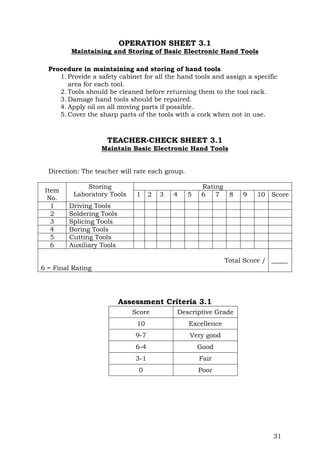
Procedure in maintaining and storing of hand tools
1. Provide a safety cabinet for all the hand tools and assign a specific
area for each tool.
2. Tools should be cleaned before returning them to the tool rack.
3. Damage hand tools should be repaired.
4. Apply oil on all moving parts if possible.
5. Cover the sharp parts of the tools with a cork when not in use.
TEACHER-CHECK SHEET 3.1
Maintain Basic Electronic Hand Tools
Direction: The teacher will rate each group.
Item
No.
Storing
Laboratory Tools
Rating
1 2 3 4 5 6 7 8 9 10 Score
1 Driving Tools
2 Soldering Tools
3 Splicing Tools
4 Boring Tools
5 Cutting Tools
6 Auxiliary Tools
Total Score /
6 = Final Rating
_____
Assessment Criteria 3.1
Score Descriptive Grade
10 Excellence
9-7 Very good
6-4 Good
3-1 Fair
0 Poor
32
ASSESSMENT PLAN
Evidence Checklist
Competency standard: Consumer Electronic Servicing NC II
Unit of competency: Use Basic Electronic Hand Tools
Title of Module Using Basic Electronics Hand Tools
Ways in which evidence will be collected:
[tick the column]
Observation
Questioning
Third
party
Report
Demonstration
Portfolio
Written
The evidence must show that the student can…
 identify the basic electronic hand tools in
accordance with their applications.
 Specify electronic hand tools according
to job requirements.
 Identify functions of electronic hand tools.
 choose electronic hand tools in
accordance with the job requirements.
 use electronic hand tools in accordance
with the manufacturer’s manual.
 practice safety procedures in using
electronic hand tools.
 report defective electronic hand tools to
appropriate personnel.
 practice routine maintenance of electronic
hand tools according to manufacturer’s
standard operating procedures, principles
and techniques.
 keep safely electronic hand tools in a
designated location per manufacturer’s
specifications or standard operating
procedure.
Prepared
by:
Date:
Checked
by:
Date:
33
Observation Checklist
Candidate’s name:
Assessor’s name:
Assessment
Center:
Competency
standards:
Unit of
competency:
Instructions for the assessor:
1. Observe the candidate Using hand tools
2. Describe the assessment activity and the date on which it was undertaken.
3. Place a tick in the box to show that the candidate completed each aspect of
the activity to the standard expected in the enterprise.
4. Complete the feedback sections of the form.
Date of observation
Description of assessment
activity
Location of assessment
activity
The student can… If yes, tick the box
 identify electronic hand tools according to their
applications.
 specify electronic hand tools according to job
requirements.
 use electronic hand tools in accordance with
manufacturer’s manual.
 choose electronics tools in accordance with the job
requirements.
 practice safety procedures in using electronic
hand tools.
 practice routine maintenance of tools according to
manufacturer’s standard operating procedures,
principles and technology.
Did the candidate’s overall performance meet the
standard?
Yes No
Feedback to candidate:
Assessor signature: Date:
34
Observation and Questioning Checklist
Candidate’s name:
Assessor’s name:
Assessment Center
Competency
standards
Unit of
competency:
Instructions for the assessor:
1. Observe the candidate use/identify functional hand tools.
2. Describe the assessment activity and the date on which it was undertaken.
3. Place a tick in the box to show that the candidate completed each aspect of
the activity to the standard expected in the enterprise.
4. Ask the candidate a selection of the questions from the attached list to
confirm his/her underpinning knowledge
5. Place a tick in the box to show that the candidate answered the questions
correctly.
6. Complete the feedback sections of the form.
Date of observation
Description of assessment
activity
Location of assessment
activity
The student can.. If yes, tick the box
 identify electronics hand tools according to their
applications.
 specify electronic hand tools according to the job
requirements.
 identify the functions of basic electronics hand
tools.
 use basic electronic hand tools in accordance with
the manufacturer’s manual.
 choose electronic hand tools in accordance with the
job requirements.
 practice safety procedure in using electronic hand
tools
 practice routine maintenance electronic hand tools
according to the manufacturer’s standard operating
procedure, principles and technology.
Did the candidate’s overall performance meet the
standard?
Yes No
35
Demonstration
Candidate’s name:
Assessor’s name:
Unit of competency:
Competency standards:
Date of assessment:
Time of assessment:
Instructions for demonstration
Given the necessary materials you must be able to : Use appropriate electronic
hand tools to a given task or application.
Various electronics hand tools
 Set of screw drivers
 Set of pliers
 Puncher
 Files
 Hacksaw
 Soldering iron
 Desoldering tool
 Ball hammer
 Wrenches
 Wire stripper
 to show if evidence is
demonstrated
During the demonstration of skills, did the student
able to...
Yes No N/A
choose electronic hand tools in accordance with
manufacturer’s manual?   
practice safety procedures in using
electronics hand tools?   
use electronic hand tools according to the job
Requirements?   
practice safety procedure in using basic
electronic hand tools?   
identify electronic hand tools according to the job
requirements   
practice routine maintenance of electronic hand tools
to the manufacturer’s standard operating procedure?   
The candidate’s demonstration was:
Satisfactory  Not Satisfactory 
36
Written Report
Candidate’s name:
Assessor’s name:
Assessment Center
Competency
standards
Unit of
competency:
Task:
Your task is to:
 Maintain hand tool
Submission date:
Use the checklist below as a basis for judging whether the candidate’s
report meets the required competency standards.
The candidate’s report can…. If yes, tick the box
 practice routine maintenance of tools.
 operate procedures, principles and technologies
 keep tools safely in a designated location based
on manufacturer’s specification
Overall did the candidate’s report meet the
standard?
Yes No
Comments:
Candidate’s
signature:
Date:
Assessor’s
signature:
Date:
37
PERFORMANCE TEST
Learner's Name Date
Competency: Test Attempt
1st 2nd 3rd
Directions:
Ask your teacher to
assess your
performance in the
following critical task
and performance
criteria below
You will be rated based
on the overall
evaluation on the right
side.
OVERALL EVALUATION
Level
Achieved PERFORMANCE LEVELS
4 - Can perform this skill without
supervision and with initiative and
adaptability to problem situations.
3 - Can perform this skill satisfactorily
without assistance or supervision.
2 - Can perform this skill satisfactorily
but requires some assistance and/or
supervision.
1 - Can perform parts of this skill
satisfactorily, but requires
considerable assistance and/or
supervision.
The teacher will initial the level achieved.
PERFORMANCE STANDARDS
For acceptable achievement, all items should
receive a "Yes" or "N/A" response.
Yes No N/A
Work station for the use of electronic hand tools were
cleaned in line with the manufacturer’s standards.
Necessary electronic hand tools and Personal Protective
Equipment were prepared in accordance with their
application or use.
Service manuals and information about electronics
hand tools were acquired.
Electronics hand tools are used in accordance with the
manufacturer’s manual.
Routine maintenance of electronics hand tools is
practiced.
Tools are kept safely in a designated location per
manufacturer’s specification.
38
ANSWER KEYS
Answer Key of Self-Check 1.1
1 Soldering Tool 6. Auxiliary Tool
2. Splicing Tool 7. Soldering Tool
3. Splicing Tool 8. Splicing Tool
4. Splicing Tool 9. Soldering Tool
5. Boring Tool 10. Boring Tools
Answer Key of Self-Check 1.2
1. b 6. a
2. e 7. h
3. c 8. k
4. i 9. d or j
5. f 10. l
Answer Key of Self-Check 1.3
1. It is suitable for electronic work because if we exceed its maximum
temperature, it can cause the printed circuit board to break or for
an electronic component to damage.
2. It is best because it is flexible to use in observing all sides of the
circuit and you are guided by the bright light.
3. It is best to use the right size of the Philips screw driver because
this will prevent the screw to loosen its thread.
4. It is best to use the right size of the drill bit in boring a hole
because undersize drilled hole will be drilled again (This will
prolong the work activity) while too much size of the drilled hole
will cause a wastage of the material.
5. Soldering stand keeps the soldering iron from flammable materials
and sometime we accidentally touch it by our skin and results to
an injury.
Answer Key of Self-Check 2.1
1) Avoid bending over your work
2) Use a ladder to reduce the need for outstretched arms
3) Sit up straight so the chair offers good back support.
4) Stand with weight evenly distributed between feet
5) Torque settings should be set to the minimum level as
required by the job specifications
39
ACKNOWLEDGMENT
Copyright Department of Education 2008
First Published JUNE 2008
This module is based on the Competency-Based Curriculum-
Contextual Learning Matrix (CBC-CLM) and finalized on the Instructional
Modules Finalization Development Workshop conducted at the
Development Academy of the Philippines, Tagaytay City on May 6 -10,
2008
This learning instrument was developed by the following personnel:
Technology Teachers:
 Mr. Vic P. Diola – Group Leader
Bauan Technical High School
 Dr. Gilbert M. Castor
Don Alejandro Roses Sr. Science-Technology High School
 Mr. Eddielou L. Dayao
Sanchez Mira School of Arts and Trade
 Mr. Rufo G. Malla
E. Rodriguez Vocational High School
 Mr. Sherwin P. Medrano
San. Pedro Relocation Center National High School
 Mr. Remar C. Pinsoy
Baguio National School of Arts and Trade
Contextual Teacher:
 Mrs. Daisy Carousel P. Cervantes
Don Alejandro Roses Sr. Science-Technology High School
Facilitators:
 Dr. Edward dela Rosa
TEC-VOC Task Force
 Dr. Corazon L. Echano
TEC-VOC Task Force
Encoders:
 Mrs. Rosario D. Briones
 Mr. Mhariel L. Echano
40
 Mr. Jason O. Villena
Funding: Department of Education
ACKNOWLEDGMENT
Copyright Department of Education 2009
First Published JUNE 2008
This module is based on the Competency-Based Curriculum-
Contextual Learning Matrix (CBC-CLM) refined during the Writeshop on
the Refinement and Enrichment of Competency-Based Curriculum and
Contextual Learning Matrix of ARTS abd TRADES Specializations at
Marikina Hotel, Marikina City on April 20 – 25, 2009.
This learning instrument was refined and enriched by the following
educators:
Technology Teachers:
 Mr. Victorino P. Diola – Group Leader
TVE Coordinator, Bauan Technical High School
Bauan, Batangas
 Mr. Reynaldo C. Cunanan
Head Teacher VI, E. A. Rodriguez Vocational High School
Nagtahan, Sampaloc, Manila
 Mrs. Gigi C. Corpuz
Teacher III, Malvar National High School
Malvar, Batangas
 Mr. Ismael G. Gallardo
Teacher I, Community Vocational High School
Masipit, Calapan City, Oriental Mindoro
 Mr. Rufo G. Malla
Teacher II, E. A. Rodriguez Vocational High School
Nagtahan, Sampaloc, Manila
 Mr. George B. Fuazo
Teacher II, Gen. Mariano Alvarez Technical High School
GMA, Cavite
41
ACKNOWLEDGMENT
Copyright Department of Education 2008
First Published JUNE 2008
This module is based on the Competency-Based Curriculum-
Contextual Learning Matrix (CBC-CLM) and finalized on the Instructional
Modules Finalization Development Workshop conducted at the
Development Academy of the Philippines, Tagaytay City on May 6 -10,
2008
This learning instrument was developed by the following personnel:
Technology Teachers:
 Mr. Vic P. Diola – Group Leader
Bauan Technical High School
 Dr. Gilbert M. Castor
Don Alejandro Roses Sr. Science-Technology High School
 Mr. Eddielou L. Dayao
Sanchez Mira School of Arts and Trade
 Mr. Rufo G. Malla
E. Rodriguez Vocational High School
 Mr. Sherwin P. Medrano
San. Pedro Relocation Center National High School
 Mr. Remar C. Pinsoy
Baguio National School of Arts and Trade
Contextual Teacher:
 Mrs. Daisy Carousel P. Cervantes
Don Alejandro Roses Sr. Science-Technology High School
Facilitators:
 Dr. Edward dela Rosa
TEC-VOC Task Force
 Dr. Corazon L. Echano
TEC-VOC Task Force
Encoders:
 Mrs. Rosario D. Briones
 Mr. Mhariel L. Echano
 Mr. Jason O. Villena
Funding: Department of Education
42
ACKNOWLEDGMENT
Copyright Department of Education 2009
First Published JUNE 2008
This module is based on the Competency-Based Curriculum-
Contextual Learning Matrix (CBC-CLM) refined during the Writeshop on
the Refinement and Enrichment of Competency-Based Curriculum and
Contextual Learning Matrix of ARTS abd TRADES Specializations at
Marikina Hotel, Marikina City on April 20 – 25, 2009.
This learning instrument was refined and enriched by the following
educators:
Technology Teachers:
 Mr. Victorino P. Diola – Group Leader
TVE Coordinator, Bauan Technical High School
Bauan, Batangas
 Mr. Reynaldo C. Cunanan
Head Teacher VI, E. A. Rodriguez Vocational High School
Nagtahan, Sampaloc, Manila
 Mrs. Gigi C. Corpuz
Teacher III, Malvar National High School
Malvar, Batangas
 Mr. Ismael G. Gallardo
Teacher I, Community Vocational High School
Masipit, Calapan City, Oriental Mindoro
 Mr. Rufo G. Malla
Teacher II, E. A. Rodriguez Vocational High School
Nagtahan, Sampaloc, Manila
 Mr. George B. Fuazo
Teacher II, Gen. Mariano Alvarez Technical High School
GMA, Cavite
Contextual Teacher:
English
 Mrs. Teresita P. Tanael
Teacher III, Gen. Mariano Alvarez Technical High School
GMA, Cavite
o Mrs. Charlie I. Soriano
Teacher I, Don Alejandro Roces Sr. Science-Technology HS
Quezon City
43
Mathematics
o Mrs. Analiza Rosa P. Librada
Teacher I,-Mathematics Coordinator, San Pedro Relocation
Center Nat’l. HS
San Pedro, Laguna
Science
o Mrs. Gemma G. Vallarta
Teacher III Science Coordinator, San Pedro Relocation
Center Nat’l. HS
San Pedro, Laguna
o Mrs. Lenalyn Manzano
Teacher I, E A. Rodriguez Vocational High School
Nagtahan, Sampaloc, Manila
Facilitators:
 Dr. Corazon L. Echano
TEC-VOC Task Force
 Dr. Victorio N. Medrano
TEC-VOC Task Force
o Dr. Orlando E. Manuel
TEC-VOC Task Force
Encoders:
o Marisol E. Saldivar
Funding: Department of Education
Contextual Teacher:
English
 Mrs. Teresita P. Tanael
Teacher III, Gen. Mariano Alvarez Technical High School
GMA, Cavite
o Mrs. Charlie I. Soriano
Teacher I, Don Alejandro Roces Sr. Science-Technology HS
Quezon City
Mathematics
o Mrs. Analiza Rosa P. Librada
Teacher I,-Mathematics Coordinator, San Pedro Relocation
Center Nat’l. HS
44
San Pedro, Laguna
Science
o Mrs. Gemma G. Vallarta
Teacher III Science Coordinator, San Pedro Relocation
Center Nat’l. HS
San Pedro, Laguna
o Mrs. Lenalyn Manzano
Teacher I, E A. Rodriguez Vocational High School
Nagtahan, Sampaloc, Manila
Facilitators:
 Dr. Corazon L. Echano
TEC-VOC Task Force
 Dr. Victorio N. Medrano
TEC-VOC Task Force
o Dr. Orlando E. Manuel
TEC-VOC Task Force
Encoders:
o Marisol E. Saldivar
Funding: Department of Education

TLE CES NC II Y2 - Module 1 - Using Basic Electronic Hand Tools.doc

  • 1.
    Unit of Competency:USE BASIC ELECTRONIC HAND TOOLS Module No. 1 Module Title: USING BASIC ELECTRONIC HAND TOOLS Republic of the Philippines Department of Education PUBLIC TECHNICAL -VOCATIONAL HIGH SCHOOLS
  • 3.
    i TABLE OF CONTENTS Howto Use this Module..........................................................................ii Introduction ..........................................................................................iii Technical Terms ....................................................................................iv Learning Outcome 1: Identify Functional Basic Electronic Hand Tools.............................................................................................1  Learning Experiences/Activities ....................................................2  Activity Sheet 1.1........................................................................10  Activitiy Sheet 1.1 .......................................................................12  Activity Sheet 1.2........................................................................13  Activity Sheet 1.3........................................................................15  Self-Check Sheet 1.3...................................................................15 Learning Outcome 2: Use Appropriate Basic Electronic Hand Tools Based on the Safety Requirements............................16  Learning Experiences/Activities ..................................................17  Activity Sheet 2.1........................................................................18  Operation Sheet 2.1 ....................................................................19  Operation Sheet 2.2 ....................................................................20  Operation Sheet 2.3 ....................................................................21  Information Sheet 2.1 .................................................................22  Activity Sheet 2.2........................................................................27 Learning Outcome 3: Maintain Basic Electronic Hand Tools .................28  Learning Experiences/Activities ..................................................29  Activity Sheet 3.1........................................................................30  Operation Sheet 3.1 ....................................................................31  Teacher Check Sheet 3.1.............................................................31 Assessment Plan ..................................................................................32  Observation and Questioning Checklist.......................................34  Demonstration............................................................................35  Written Report ............................................................................36 Performance Test..................................................................................37 Answer Keys.........................................................................................38 Acknowledgment ..................................................................................39
  • 4.
    ii HOW TO USETHIS MODULE Welcome to the Module “Using Basic Electronic Hand Tools”. This module contains training materials and activities for you to complete. The unit of competency “Use Basic Electronic Hand Tools” contains the knowledge, skills and desirable attitudes required for a Consumer Electronic Servicing required to obtain the National Certificate (NC) level II. You are required to go through a series of learning activities in order to complete each of the learning outcomes of the module. In each learning outcome there are Information Sheets, Job Sheets, Assignment Sheets, and Activity Sheets. Follow these activities on your own and answer the Self-Check at the end of each learning activity. If you have questions, don’t hesitate to ask your facilitator for assistance. Recognition of Prior Learning (RPL) You may already have some basic knowledge and skills covered in this module because you have been working for sometime; or already completed training in this area. If you can demonstrate to your teacher in a particular skill, talk to him/her about having them formally recognized so you don’t have to do the same training again. If you have a qualification or Certificate of Competency from previous trainings, show it to him/her. If the skills you acquired are consistent with and relevant to this module, they become part of the evidence you can present for RPL. If you are not sure about your competence skills, discuss this with your teacher. After completing this module ask your teacher to assess your competence. Result of your assessment will be recorded in your competency profile. All the learning activities are designed for you to complete at your own pace. Inside this module you will find the activities for you to complete and followed by relevant information sheets for each learning outcome. Each learning outcome may have more than one learning activity. This module is prepared to help you achieve the required competency, in receiving and relaying information. This will be the source of information that will enable you to acquire the knowledge and skills in “using basic electronic hand tools” independently at your own pace or with minimum supervision or help from your teacher.
  • 5.
    iii Program/Course CONSUMER ELECTRONIC SERVICINGNC II Unit of Competency USE BASIC ELECTRONIC HAND TOOLS Module Title Using Basic Electronics Hand Tools INTRODUCTION This module contains information and suggested learning activities on Using Basic Electronic Hand Tools. It includes instructions and procedure on how to use basic electronic hand tools. This module consists of three (3) learning outcomes. Each learning outcome contains learning activities supported by instruction sheets. Before you perform the instructions, read the information sheets and answer the self-check and activities provided to ascertain to yourself and your instructor that you have acquired the knowledge necessary to perform the skill portion of the particular learning outcome. Upon completing this module, report to your instructor for assessment to check your achievement of knowledge and skills requirements of this module. If you pass the assessment, you will be given a certificate of completion. SUMMARY OF LEARNING OUTCOMES Upon completion of the module, you should be able to: LO1. identify functional basic electronics hand tools; LO2. use appropriate basic electronics hand tools based on the safety requirements; and LO3. maintain basic electronics hand tools. PREREQUISITE None
  • 6.
    iv TECHNICAL TERMS Active State.It is a condition of a semiconductor device that is working. Alternating Current. It is an electric current that is continually varying in value and reversing its direction of flow at regular interval. Anode. It is a positive electrode of semiconductor device. Biasing Current. It is a current supply needed by the semiconductor in order to work properly. Capacitance. It is a property that exits whenever two conductors are separated by insulating material, permitting the storage of electricity. Capacitor. It is a component designed intentionally to have a definite amount of capacitance. Cathode. It is a negative electrode of semi-conductor devices. Circuit. It is an arrangement of one or more complete paths of electron flow. Conductor. It is a wire, cable, or other body or medium that is suitable for carrying electric current. Couple. This is to connect two circuits so signals are transferred from one to the other. Current. It is the rate of transfer of electricity from one point to another. Cut-off State. It is a condition of a semiconductor device that is not working. DC Milli-Ammeter. It is an instrument that measures the amount of direct current flow in a component or circuit. Desoldering. It is a process of unsoldering unwanted parts or components in the circuit with the support of soldering tool. Dielectric Material. It is a material that serves as insulator with poor electric conductivity. Direct Current. It is an electric current that flows in one direction.
  • 7.
    v Discrete Components. Theyare separated components. Junction. It is a hybrid of an electronic circuit enclosed in a single package having an output that varies directly proportional to the input. Ohmmeter. It is an instrument that measures the amount of resistance in certain component or circuits. PCB. It is a Printed Circuit Board or (PCB) which is actually printed wiring boards that have components inserted into the hole and soldered to form its circuit connection. Quiescent Point. It is the least amount of operating current of semi conductor in order to work properly. Resistance. It is the opposition that a component or material offers to the flow current. Resistor. It is a component designed intentionally to have a definite amount of resistance. Soldering. It is a process of joining two metals caused by heat Soldering Technique. It is a right process in which the solder (lead) is being applied in a connection or in the printed circuit board. Splicing. It is defined as a joint that connect two lengths of conductor. Voltage. It is the electrical pressure that exist between two points and capable of producing a flow of current when a close circuit is connected between the points. Voltmeter. It is an instrument that measures the amount of electromotive force in a component or circuit.
  • 8.
    1 Learning Outcome 1:Identify functional basic electronic hand tools. ASSESSMENT CRITERIA 1. Basic electronic hand tools are identified according to their applications. 2. Basic electronic hand tools are specified according to job requirements. 3. Functions of electronic hand tools are identified and explained. REFERENCES: - Buban, Peter andSchmitt, Marshall. Technical Electricity and Electronics, New York: Mc Graw-Hill: 1972. - Grob, Bernard. Basic Electronics, 4th Edition; New York: Mc Graw- Hill Company: 1977 - Grob, Bernard. Electronics Circuits and Application; McGraw-Hill Company, USA: 1982 - Markus, John. Electronics Dictionary, 4th Edition; New York: McGraw-Hill Company: 1945 Program/Course CONSUMER ELECTRONIC SERVICING NC II Unit of Competency USE HAND TOOLS Module Title USING HAND TOOLS
  • 9.
    2 LEARNING EXPERIENCE/ACTIVITIES Learning Outcome1: Choose functional basic electronic hand tools Learning Activities Special Instruction 1. Read the Information Sheet 1.1 on identifying and classifying the different hand tools used in Consumer Electronics Servicing. 2. Answer the Self-Check to determine how much you have learned. 3. Compare your answers with the answer key on the last page of this module. 4. If you have missed some of the questions, go over the information sheet again. 5. If you have any question or if you need clarification on the information, ask the assistance from your teacher or from your classmate who has finished this learning outcome (LO). 6. If you have answered all the questions, you may proceed to the next learning outcome (LO). Try to answer the Self-Check without looking at the answer key.
  • 10.
    3 INFORMATION SHEET 1.1 Classificationof Hand Tools Basic Electronic Hand Tools Driving of Tools Screwdriver. It is a device specifically designed to insert and tighten or to loosen and remove screws. A screwdriver comprises a head or tip which engages with a screw, a mechanism to apply torque by rotating the tip and some way to position and support the screwdriver. A typical hand screwdriver comprises an approximately cylindrical handle of a size and shape to be held by a human hand and an axial shaft fixed to the handle, the tip of which is shaped to fit a particular type of screw. The handle and shaft allow the screwdriver to be positioned and supported when rotated to apply torque. Handle o Flat Screwdriver. It is used to drive or fasten negative slotted screws. o Phillips Screwdriver. It is used to drive or fasten positive slotted screws. It is a screwdriver that could take greater torque and can provide tighter fastenings. Head or Tip
  • 11.
    4 Hex (Allen Wrench).It is used to drive or fasten hexagonal screws. The head has a hexagonal hole turned by an allen key. An Allen key is a hexagonal shaped wrench bent in letter-L. The Allen key was invented by an American, Gilbert F. Heublein, Precision Screwdriver Set. It is a set of small screw drivers composed of slotted and Philips screwdrivers.
  • 12.
    5  Soldering Tools SolderingIron. It is a device used for applying heat to melt solder in attaching two metal parts. A soldering iron is composed of a heated metal tip and an insulated handle. Heating is often achieved electrically, by passing a current, supplied through an electrical cord, through a heating element. For electrical work, wires are usually soldered to printed circuit boards, other wires, or small terminals. A low-power iron (15- 30 Watts) is suitable for this work. Some soldering irons have interchangeable tips for different types of work. Fine round or chisel tips are typically used for electronics work. A new tip needs to be coated, heated, and then covered with solder before its first use. This procedure is called "tinning". The tinning forms a liquid layer which facilitates the transfer of heat to the work piece. A dirty tip does not transfer heat well. The tip needs to be kept coated with a shiny layer of solder by occasional wiping and applying solder directly to the tip. - Soldering Tool Stand. It is a place of the soldering iron to keep them away from flammable materials. The stand often also comes with a sponge and flux pot for cleaning the tip.
  • 13.
    6 - Desoldering tool.It is used for the removal of solder and components from a circuit when troubleshooting, repair purposes and to save components. Electronic components are often mounted on a circuit board and it is usually desirable to avoid damaging the circuit board, surrounding components, and the component being removed. Splicing Tools Long Nose. It is used for holding, bending and stretching the lead of electronic component or connecting wire. Side Cutter. It is a wire-cutting plier, though they are not used to grab or turn anything, but are used to cut wire.
  • 14.
    7 Wire Stripper. Itis a pair of opposing blades much like scissors or wire cutters. The addition of a center notch makes it easier to cut the insulation without cutting the wire. This type of wire stripper is used by rotating it around the insulation while applying pressure in order to make a cut around the insulation. Since the insulation is not bonded with the wire, it will be pulled easily at the end. Boring Tools 12 Volt Mini-Drill. It is used to bore or drill holes in the printed circuit board (pcb). Notch
  • 15.
    8 Portable Electric Drill.It is used for boring hole/s in the plastic chassis or metal chassis with the used of drill bits. Metal File. It is a hand tool used to shape metals by grinding. A file series of sharp, parallel ridges or teeth. Most files have a narrow, pointed tang at one end to which a handle can be fitted. Flat Files. They are parallel in width and tapered in thickness. They are used for flat surfaces and edges. Half Round Files. They are tapers in width and thickness, coming to a point, and are narrower than a standard half round which are used for filing inside of rings. Round Files. They are also called rat-tail files gradually tapered and are used for many tasks that require a round tool, such as enlarging round holes or cutting a scalloped edge. Round File Flat File Half Round File Narrow Pointed Tang
  • 16.
    9 Cutting Tools Utility Knife.It is a common tool used in cutting various trades and crafts for a variety of purposes. Hacksaws. They are saws for cutting metal. Some of them have pistol grips which keep the hacksaw firm and easy to grip. The small hand-held hacksaws are consist of a metal arch with a handle that fits around a narrow, rigid blade. The blade has many small saw teeth along one side. It can either be attached such that the teeth face away from the handle, resulting in sawing action by pushing, or be attached such that the teeth face toward the handle, resulting in sawing action by pulling. On the push stroke, the arch will bend a little, releasing the tension on the blade. The blade is normally quite brittle; so extra care is needed to be taken to prevent brittle fracture of the blade. Blade Handle Pistol Grip
  • 17.
    10 Auxiliary Tools Ball-peen HammerIt is a type of hammer used in metalworking. The ball-peen hammer remains useful for many tasks such as tapping punches and chisels. The original function of the hammer was to "peen" riveted or welded material so that it will exhibit the same elastic behavior as the surrounding material. Specifically, striking the metal imparts a stress at the point of impact which results in strain-hardening of that area. Strain hardening raises the elastic limit of a material into the plastic range without affecting its ultimate strength. A strain-hardened material will not deform under the same low stresses as a non-hardened material. Most metals can be "worked" by such methods until they lose all of their ductile characteristics and become strong but brittle. Magnifying Glass It is a convex lens which is used to produce a magnified image of an object. The lens is usually mounted in a frame with a handle (see image). Roger Bacon is the original inventor of the magnifying glass. A magnifying glass works by creating a magnified virtual image of an object behind the lens. The distance between the lens and the object must be shorter than the focal length of the lens for this to occur. Otherwise, the image appears smaller and inverted, and can be used to project images onto surfaces. The framed lens may be mounted on a stand, keeping the lens at the right distance from the table, and therefore at the right distance from the object on the table. The latter applies if the object is small and also if the height is adjustable. Some magnifying glasses are foldable with built-in light
  • 18.
    11 . Magnifying Glass - Paint Brush.It is made of bristles set in handle used for cleaning dirty parts of a circuit or an object.
  • 19.
    12 ACTIVITY SHEET 1.1 Classificationof Basic Electronic Hand Tools Instruction: 1. Without looking at the Information Sheet 1-1, answer the written test on Self-Check 1.1. 2. After finishing your test, you can compare your answers with the Answer Key 1.1. 3. You must get a score of 7 - 9 to have the rating of Very Good and pass the Self-Check based on the Assessment Criteria 1.2. . SELF-CHECK SHEET 1.1 Direction: On a separate piece of paper, classify the different kinds of hand tools according to their specifications in a Consumer Electronic Servicing. 1. Desoldering Tools 2. Wire Stripper 3. Diagonal Cutting pliers 4. Long Nose Pliers 5. Mini Drill 6. Magnifying Glass 7. Soldering Stand 8. Flat Screw Driver 9. Soldering Iron 10. Portable Electric Drill Assessment Criteria 1.1 Score Descriptive Grade 10 Excellent 7-9 Very good 6 Good 3-5 Fair 2-0 Poor
  • 20.
    13 ACTIVITY SHEET 1.2 Identificationof Hand Tools and its Function Instruction: 1. Without looking at the your Information Sheet 1.1, answer the oral test in the Self-Check 1.2. 2. After finishing your test, you can compare your answers with the Answer Key 1.2. 3. You must get at least the score of 7 - 9 to have the rating of Very Good and pass the Self-Check based on the Assessment Criteria 1.2. SELF-CHECK SHEET 1.2 Direction: Match the different hand tools with their actual pictures. Write the letter on a separate sheet. 1. Desoldering Sucker 2. For soldering metal 3. Soldering Stand 4. Long Nose Pliers 5. For drilling small hole 6. Portable Electric Drill 7. For cutting metal 8. For cutting wires 9. Wire Splicer 10. Magnifying Glass
  • 21.
    14 Assessment Criteria 1.2 ScoreDescriptive Grade 10 Excellent 7-9 Very good 6 Good 3-5 Fair 2-0 Poor
  • 22.
    15 ACTIVITY SHEET 1.3 SpecifyingBasic Electronic Hand Tools Instructions: 1 Without looking at the Information sheet 1.1, answer orally the written questions regarding the specifications of hand tools. 2. You must get at least the score of 4 to have the rating of Very Good and pass the Self-Check 1.3 based on Assessment Criteria 1.3 SELF-CHECK 1.3 Direction: Answer briefly the questions below 1. Why do you think a low-power soldering iron is suitable for electronic work? 2. Why do you think is it best to use in electronics a magnifying glass that is foldable with built-in light? 3. Why do you think is it best to use the right size of the Philips screwdriver? 4. Why do you think is it best to use the right size of a drill bit in boring a hole in the metal? 5. Why do you think is it best for a soldering iron to have its soldering stand? Assessment Criteria 1.3 Score Descriptive Grade 5 Excellent 4 Very good 3 Good 1-2 Fair 0 Poor
  • 23.
    16 Program/Course CONSUMER ELECTRONICSERVICING NCII Unit of Competency USE BASIC ELECTRONIC HAND TOOLS Module Title USING BASIC ELECTRONIC HAND TOOLS Learning Outcome 2: Use appropriate basic electronics hand tools based on safety requirements. ASSESSMENT CRITERIA 1. Electronics tools are chosen in accordance with job requirements. 2. Electronics tools are used in accordance with the manufacturer’s manual. 3. Safety procedures in using electronic hand tools are practiced. REFERENCES - Buban, Peter andSchmitt, Marshall. Technical Electricity And Electronics, New York: Mc Graw-Hill :1972. - Grob, Bernard. Basic Electronics, 4th Edition; New York: Mc Graw- Hill Company: 1977 - Grob, Bernard. Electronics Circuits and Application; McGraw-Hill Company, USA: 1982 - Markus, John. Electronics Dictionary, 4th Edition; New York: McGraw-Hill Company: 1945
  • 24.
    17 LEARNING EXPERIENCE /ACTIVITIES Learning Outcome 2: Use appropriate electronic hand tools based on the safety requirements Learning Activities Special Instructions 1. Read procedures on the operation sheets of hand tools. Activity Sheets 2.1. 2. Do the Operation Sheets 2.1, 2.2, and 2.3. a. File b. Hacksaw c. Soldering Iron 3. Refer to the Assessment Criteria 2.1, 2.2, and 2.3. 4. Read the Information Sheet 2.1 on safety requirements with the use of personal protective equipment. 5. Answer the self-check to determine how much you have learned. 6. Compare your answer with the answer key on the last pages of this module. 7. If you have missed some of the questions, go over the information sheet again. 8. If you have any questions or you need clarification on the information, ask assistance from your teacher or from your classmate who have finished this learning outcome (LO). 9. If you have answered all the questions and finished all the laboratory activities, you may proceed to the next learning outcome (LO).  Perform the activity with the supervision of the your teacher  Try to answer the self-check without looking at the answer key.
  • 25.
    18 ACTIVITY SHEET 2.1 Useof Appropriate Electronic Hand Tools based on safety requirements Instruction: 1. Do the following operation sheet: a. Flat File - Operation Sheet 2.1 b. Hacksaw – Operation Sheet 2.2 c. Soldering Tools - Operation Sheet 2.3 2. You must get a score of 7 - 9 to have the rating of Very Good and pass the Teacher-Check 2-1 based on the Assessment Criteria 2.1.
  • 26.
    19 OPERATION SHEET 2.1 Useof Appropriate Electronic Hand Tools Based on Safety Requirements Procedure in using a flat file 1. Position the metal file near the edges of the object (metal) you want to smoothen. 2. Hold the handle of the file steadily. 3. Lay the file sideways on the object work, and carefully push or pull it across the work. 4. Continue on pushing or pulling it across the work until you attain the desired smoothness of the surface. TEACHER-CHECK SHEET 2.1 Direction: The teacher will prepare an actual laboratory activity regarding filling a flat metal bar. Filling A Metal Bar Item no. Flat File 70 75 80 85 90 95 100 Score A Proper use of tool - 50% B Quality of work - 40% C Speed – 10% Grade Assessment Criteria 2.1 Score Descriptive Grade 96-100 Excellent 86-95 Very good 81-85 Good 75-80 Fair 70-74 Poor
  • 27.
    20 OPERATION SHEET 2.2 Useof Appropriate Hand Tools Based on Safety Requirements Procedure in using a hacksaw 1. Position the hacksaw blade near the object (metal) where you want to cut it. Mark a straight line where hacksaw blade will pass. 2. Hold the steadily the handle steadily. 3. Lay the saw teeth along the surface of the object work and carefully push or pulling it across the work. 4. Continue on pushing or pulling it across the work until you attain a complete cut of the metal. TEACHER-CHECK SHEET 2.2 Direction: The teacher will prepare an actual laboratory activity on cutting a metal bar. Cutting A Metal Bar Item no. Hacksaw 70 75 80 85 90 95 100 Score A Proper use of tool - 50% B Quality of work - 40% C Speed – 10% Grade Assessment Criteria 2.2 Score Descriptive Grade 96-100 Excellent 86-95 Very good 81-85 Good 75-80 Fair 70-74 Poor
  • 28.
    21 OPERATION SHEET 2.3 Useof Appropriate Electronic Hand Tools Based on Safety Requirements Procedure in using a soldering iron 1. Preparing the soldering iron: a. Place the soldering iron on the stand before plugging it. b. Wait a few minutes for the soldering iron to attain its operating temperature of about 4000C. c. Wipe the tip of the soldering iron on the wet damp sponge. d. Melt a little solder (soldering lead – 60/40) on the tip of the iron. e. Wipe again the tip of the soldering iron on the wet damp sponge. 2. Soldering technique: a. Hold the soldering iron like a pen near the base of the handle. b. Touch the soldering iron onto the joint to be made. c. Feed a little solder onto the joint. d. Remove the solder, then the soldering iron while keeping the joint still. e. Inspect the joint closely. It should look shiny with a volcano shape. TEACHER-CHECK SHEET 2.3 Use of Appropriate Electronic Hand Tools Based on Safety Requirements Direction: The teacher will prepare an actual laboratory activity regarding soldering techniques. Cutting A Metal Bar Item no. Soldering Tool 70 75 80 85 90 95 100 Score A Proper use of tool - 50% B Quality of work - 40% C Speed – 10% Grade Assessment Criteria 2.3 Score Descriptive Grade 96-100 Excellent 86-95 Very good 81-85 Good 75-80 Fair 70-74 Poor
  • 29.
    22 INFORMATION SHEET 2.1 SafetyRequirements with the Use of Personal Protective Equipment Hand Tool Design, Selection, and Setup 1. Weight. Use the lightest weight tool possible to avoid injury. Excessively heavy tools should be equipped with the use of mechanical support and attached hoses should be supported. Support and equip tools with the use of mechanical support so you don't need to hold them continuously while working. If a mechanical support cannot be provided, the workstation should be designed so you can put the tool down or rest in a holster when it is not in use. 2. Balance. Additional force is required to use a badly balanced tool. The tool's center of gravity should be close to the body, to the handles, and in line with the center of the hands holding the tool. Also, the weight of an unsupported hose can unbalance a tool.
  • 30.
    23 3. Torque Control.High torque requires a lot of force to keep the tool from rotating out of your hand. Torque settings should be set to the minimum required by job specifications, especially for in-line and pistol-shaped tools. 4. Grip. Tool handles should allow stable and efficient grip. The handle should be cylindrical or oval in shape, with a diameter of between 1.25 and 1.75 inches. Tool handles should contact as much of the hand and fingers as possible. Grips should be made of non-slip compressible and non-conductive material. However, if the task requires fine manipulations, a small handle and a precision grip are preferred. Handles should not press on the base of the palm. Use tools with long handles or handles which are large and rounded enough to distribute the force over a large area of the palm. Avoid form-fitting handles (handles with finger grooves), since they may not fit the hand size of every user. Handles should be kept clean of slippery grease, oil, or sweat. 5. Span. For two-handled manual tools, like scissors, the open span should be about 4 inches and the closed span should be about 1.5 inches.
  • 31.
    24 6. Spring-loaded handles.A spring-loaded mechanism saves muscular effort and reduces mechanical stress on the backs and sides of fingers for such tools as scissors, pliers, and other manual cutting and gripping tools which have to be opened and closed repeatedly during use. 7. Choose the right tool shape. Pistol-shaped tools should be used on a vertical surface or on a horizontal surface below waist height. Bend the tool, not the wrist. 8. Avoid bending over your work. 9. Avoid overhead work. Use a ladder to reduce the need for outstretched arms.
  • 32.
    25 10. Keep theelbows close to the body. 11. Tilt the work surface instead of the wrist. 12. Stand with your weight evenly distributed between feet. When standing for long periods of time, rest one foot on a sturdy .
  • 33.
    26 13. Sit upstraight so the chair offers good back support. Adjust the chair back so that it will support the natural curve of the lower back. Adjust the seat height to allow thighs to be in parallel to the floor.
  • 34.
    27 ACTIVITY SHEET 2.2 SafetyRequirements with the Use of Personal Protective Equipment Instruction: 1. Without looking at Information Sheet 2.1, answer the written test on the safety requirements in using hand tools and test equipment in theSelf-Check 2.1. 2. After finishing your test, you can compare your answer with the Answer Key 2.1. 3. You must get at least a score of 7 - 9 to have a rating of Very Good and pass the Self-check based on Assessment Criteria 2.1. SELF-CHECK SHEET 2.2 Direction: Write the safety requirement indicated in each number on a separate sheet of paper. 1. 2. 3. 4. 5. Assessment Criteria 2.2 Score Descriptive Grade 5 Excellent 4 Very good 3 Good 1-2 Fair 0 Poor
  • 35.
    28 Program/Course CONSUMER ELECTRONIC SERVICINGNCII Unit of Competency USE BASIC ELECTRONIC HAND TOOLS Module Title USING BASIC ELECTRONIC HAND TOOLS Learning Outcome 3: Maintain basic electronic hand tools ASSESSMENT CRITERIA 1. Routine maintenance of electronic hand tools is practiced. 2. Electronic hand tools are kept safely in a designated location. REFERENCES - Buban, Peter andSchmitt, Marshall. Technical Electricity And Electronics, New York: Mc Graw-Hill 1972. - Grob, Bernard. Basic Electronics, 4th Edition; New York: Mc Graw- Hill Company: 1977 - Grob, Bernard. Electronics Circuits and Application; McGraw-Hill Company, USA: 1982 - Markus, John. Electronics Dictionary, 4th Edition; New York: McGraw-Hill Company: 1945
  • 36.
    29 LEARNING EXPERIENCE /ACTIVITIES Learning Outcome 3: Maintain basic electronic hand tools Learning Activities Special Instruction 1. Read the procedure on the Operational Sheets of hand tools in Activity Sheets 3.1. 2. Do the Operational Sheet 3.1 on maintaining and storing of hand tools. 3. Refer to the Assessment criteria 3.1. 4. If you have finished all the laboratory activities, you may proceed to the next module. Perform the activity with the observation of the teacher.
  • 37.
    30 ACTIVITY SHEET 3.1 Maintainingand Storing of Basic Electronic Hand Tools Instruction: 1. Follow your teacher on how to maintain and store the basic electronic hand tools properly. The students will be grouped into five (5) and to be tested in the procedure in maintaining and storing basic electronic hand tools. 2. After finishing each laboratory activity, your teacher will rate you. 3. You must at least get a score of 7-9 to have a rating of Very Good, for this laboratory activity. An assessment criteria will guide your teacher.
  • 38.
    31 OPERATION SHEET 3.1 Maintainingand Storing of Basic Electronic Hand Tools Procedure in maintaining and storing of hand tools 1. Provide a safety cabinet for all the hand tools and assign a specific area for each tool. 2. Tools should be cleaned before returning them to the tool rack. 3. Damage hand tools should be repaired. 4. Apply oil on all moving parts if possible. 5. Cover the sharp parts of the tools with a cork when not in use. TEACHER-CHECK SHEET 3.1 Maintain Basic Electronic Hand Tools Direction: The teacher will rate each group. Item No. Storing Laboratory Tools Rating 1 2 3 4 5 6 7 8 9 10 Score 1 Driving Tools 2 Soldering Tools 3 Splicing Tools 4 Boring Tools 5 Cutting Tools 6 Auxiliary Tools Total Score / 6 = Final Rating _____ Assessment Criteria 3.1 Score Descriptive Grade 10 Excellence 9-7 Very good 6-4 Good 3-1 Fair 0 Poor
  • 39.
    32 ASSESSMENT PLAN Evidence Checklist Competencystandard: Consumer Electronic Servicing NC II Unit of competency: Use Basic Electronic Hand Tools Title of Module Using Basic Electronics Hand Tools Ways in which evidence will be collected: [tick the column] Observation Questioning Third party Report Demonstration Portfolio Written The evidence must show that the student can…  identify the basic electronic hand tools in accordance with their applications.  Specify electronic hand tools according to job requirements.  Identify functions of electronic hand tools.  choose electronic hand tools in accordance with the job requirements.  use electronic hand tools in accordance with the manufacturer’s manual.  practice safety procedures in using electronic hand tools.  report defective electronic hand tools to appropriate personnel.  practice routine maintenance of electronic hand tools according to manufacturer’s standard operating procedures, principles and techniques.  keep safely electronic hand tools in a designated location per manufacturer’s specifications or standard operating procedure. Prepared by: Date: Checked by: Date:
  • 40.
    33 Observation Checklist Candidate’s name: Assessor’sname: Assessment Center: Competency standards: Unit of competency: Instructions for the assessor: 1. Observe the candidate Using hand tools 2. Describe the assessment activity and the date on which it was undertaken. 3. Place a tick in the box to show that the candidate completed each aspect of the activity to the standard expected in the enterprise. 4. Complete the feedback sections of the form. Date of observation Description of assessment activity Location of assessment activity The student can… If yes, tick the box  identify electronic hand tools according to their applications.  specify electronic hand tools according to job requirements.  use electronic hand tools in accordance with manufacturer’s manual.  choose electronics tools in accordance with the job requirements.  practice safety procedures in using electronic hand tools.  practice routine maintenance of tools according to manufacturer’s standard operating procedures, principles and technology. Did the candidate’s overall performance meet the standard? Yes No Feedback to candidate: Assessor signature: Date:
  • 41.
    34 Observation and QuestioningChecklist Candidate’s name: Assessor’s name: Assessment Center Competency standards Unit of competency: Instructions for the assessor: 1. Observe the candidate use/identify functional hand tools. 2. Describe the assessment activity and the date on which it was undertaken. 3. Place a tick in the box to show that the candidate completed each aspect of the activity to the standard expected in the enterprise. 4. Ask the candidate a selection of the questions from the attached list to confirm his/her underpinning knowledge 5. Place a tick in the box to show that the candidate answered the questions correctly. 6. Complete the feedback sections of the form. Date of observation Description of assessment activity Location of assessment activity The student can.. If yes, tick the box  identify electronics hand tools according to their applications.  specify electronic hand tools according to the job requirements.  identify the functions of basic electronics hand tools.  use basic electronic hand tools in accordance with the manufacturer’s manual.  choose electronic hand tools in accordance with the job requirements.  practice safety procedure in using electronic hand tools  practice routine maintenance electronic hand tools according to the manufacturer’s standard operating procedure, principles and technology. Did the candidate’s overall performance meet the standard? Yes No
  • 42.
    35 Demonstration Candidate’s name: Assessor’s name: Unitof competency: Competency standards: Date of assessment: Time of assessment: Instructions for demonstration Given the necessary materials you must be able to : Use appropriate electronic hand tools to a given task or application. Various electronics hand tools  Set of screw drivers  Set of pliers  Puncher  Files  Hacksaw  Soldering iron  Desoldering tool  Ball hammer  Wrenches  Wire stripper  to show if evidence is demonstrated During the demonstration of skills, did the student able to... Yes No N/A choose electronic hand tools in accordance with manufacturer’s manual?    practice safety procedures in using electronics hand tools?    use electronic hand tools according to the job Requirements?    practice safety procedure in using basic electronic hand tools?    identify electronic hand tools according to the job requirements    practice routine maintenance of electronic hand tools to the manufacturer’s standard operating procedure?    The candidate’s demonstration was: Satisfactory  Not Satisfactory 
  • 43.
    36 Written Report Candidate’s name: Assessor’sname: Assessment Center Competency standards Unit of competency: Task: Your task is to:  Maintain hand tool Submission date: Use the checklist below as a basis for judging whether the candidate’s report meets the required competency standards. The candidate’s report can…. If yes, tick the box  practice routine maintenance of tools.  operate procedures, principles and technologies  keep tools safely in a designated location based on manufacturer’s specification Overall did the candidate’s report meet the standard? Yes No Comments: Candidate’s signature: Date: Assessor’s signature: Date:
  • 44.
    37 PERFORMANCE TEST Learner's NameDate Competency: Test Attempt 1st 2nd 3rd Directions: Ask your teacher to assess your performance in the following critical task and performance criteria below You will be rated based on the overall evaluation on the right side. OVERALL EVALUATION Level Achieved PERFORMANCE LEVELS 4 - Can perform this skill without supervision and with initiative and adaptability to problem situations. 3 - Can perform this skill satisfactorily without assistance or supervision. 2 - Can perform this skill satisfactorily but requires some assistance and/or supervision. 1 - Can perform parts of this skill satisfactorily, but requires considerable assistance and/or supervision. The teacher will initial the level achieved. PERFORMANCE STANDARDS For acceptable achievement, all items should receive a "Yes" or "N/A" response. Yes No N/A Work station for the use of electronic hand tools were cleaned in line with the manufacturer’s standards. Necessary electronic hand tools and Personal Protective Equipment were prepared in accordance with their application or use. Service manuals and information about electronics hand tools were acquired. Electronics hand tools are used in accordance with the manufacturer’s manual. Routine maintenance of electronics hand tools is practiced. Tools are kept safely in a designated location per manufacturer’s specification.
  • 45.
    38 ANSWER KEYS Answer Keyof Self-Check 1.1 1 Soldering Tool 6. Auxiliary Tool 2. Splicing Tool 7. Soldering Tool 3. Splicing Tool 8. Splicing Tool 4. Splicing Tool 9. Soldering Tool 5. Boring Tool 10. Boring Tools Answer Key of Self-Check 1.2 1. b 6. a 2. e 7. h 3. c 8. k 4. i 9. d or j 5. f 10. l Answer Key of Self-Check 1.3 1. It is suitable for electronic work because if we exceed its maximum temperature, it can cause the printed circuit board to break or for an electronic component to damage. 2. It is best because it is flexible to use in observing all sides of the circuit and you are guided by the bright light. 3. It is best to use the right size of the Philips screw driver because this will prevent the screw to loosen its thread. 4. It is best to use the right size of the drill bit in boring a hole because undersize drilled hole will be drilled again (This will prolong the work activity) while too much size of the drilled hole will cause a wastage of the material. 5. Soldering stand keeps the soldering iron from flammable materials and sometime we accidentally touch it by our skin and results to an injury. Answer Key of Self-Check 2.1 1) Avoid bending over your work 2) Use a ladder to reduce the need for outstretched arms 3) Sit up straight so the chair offers good back support. 4) Stand with weight evenly distributed between feet 5) Torque settings should be set to the minimum level as required by the job specifications
  • 46.
    39 ACKNOWLEDGMENT Copyright Department ofEducation 2008 First Published JUNE 2008 This module is based on the Competency-Based Curriculum- Contextual Learning Matrix (CBC-CLM) and finalized on the Instructional Modules Finalization Development Workshop conducted at the Development Academy of the Philippines, Tagaytay City on May 6 -10, 2008 This learning instrument was developed by the following personnel: Technology Teachers:  Mr. Vic P. Diola – Group Leader Bauan Technical High School  Dr. Gilbert M. Castor Don Alejandro Roses Sr. Science-Technology High School  Mr. Eddielou L. Dayao Sanchez Mira School of Arts and Trade  Mr. Rufo G. Malla E. Rodriguez Vocational High School  Mr. Sherwin P. Medrano San. Pedro Relocation Center National High School  Mr. Remar C. Pinsoy Baguio National School of Arts and Trade Contextual Teacher:  Mrs. Daisy Carousel P. Cervantes Don Alejandro Roses Sr. Science-Technology High School Facilitators:  Dr. Edward dela Rosa TEC-VOC Task Force  Dr. Corazon L. Echano TEC-VOC Task Force Encoders:  Mrs. Rosario D. Briones  Mr. Mhariel L. Echano
  • 47.
    40  Mr. JasonO. Villena Funding: Department of Education ACKNOWLEDGMENT Copyright Department of Education 2009 First Published JUNE 2008 This module is based on the Competency-Based Curriculum- Contextual Learning Matrix (CBC-CLM) refined during the Writeshop on the Refinement and Enrichment of Competency-Based Curriculum and Contextual Learning Matrix of ARTS abd TRADES Specializations at Marikina Hotel, Marikina City on April 20 – 25, 2009. This learning instrument was refined and enriched by the following educators: Technology Teachers:  Mr. Victorino P. Diola – Group Leader TVE Coordinator, Bauan Technical High School Bauan, Batangas  Mr. Reynaldo C. Cunanan Head Teacher VI, E. A. Rodriguez Vocational High School Nagtahan, Sampaloc, Manila  Mrs. Gigi C. Corpuz Teacher III, Malvar National High School Malvar, Batangas  Mr. Ismael G. Gallardo Teacher I, Community Vocational High School Masipit, Calapan City, Oriental Mindoro  Mr. Rufo G. Malla Teacher II, E. A. Rodriguez Vocational High School Nagtahan, Sampaloc, Manila  Mr. George B. Fuazo Teacher II, Gen. Mariano Alvarez Technical High School GMA, Cavite
  • 48.
    41 ACKNOWLEDGMENT Copyright Department ofEducation 2008 First Published JUNE 2008 This module is based on the Competency-Based Curriculum- Contextual Learning Matrix (CBC-CLM) and finalized on the Instructional Modules Finalization Development Workshop conducted at the Development Academy of the Philippines, Tagaytay City on May 6 -10, 2008 This learning instrument was developed by the following personnel: Technology Teachers:  Mr. Vic P. Diola – Group Leader Bauan Technical High School  Dr. Gilbert M. Castor Don Alejandro Roses Sr. Science-Technology High School  Mr. Eddielou L. Dayao Sanchez Mira School of Arts and Trade  Mr. Rufo G. Malla E. Rodriguez Vocational High School  Mr. Sherwin P. Medrano San. Pedro Relocation Center National High School  Mr. Remar C. Pinsoy Baguio National School of Arts and Trade Contextual Teacher:  Mrs. Daisy Carousel P. Cervantes Don Alejandro Roses Sr. Science-Technology High School Facilitators:  Dr. Edward dela Rosa TEC-VOC Task Force  Dr. Corazon L. Echano TEC-VOC Task Force Encoders:  Mrs. Rosario D. Briones  Mr. Mhariel L. Echano  Mr. Jason O. Villena Funding: Department of Education
  • 49.
    42 ACKNOWLEDGMENT Copyright Department ofEducation 2009 First Published JUNE 2008 This module is based on the Competency-Based Curriculum- Contextual Learning Matrix (CBC-CLM) refined during the Writeshop on the Refinement and Enrichment of Competency-Based Curriculum and Contextual Learning Matrix of ARTS abd TRADES Specializations at Marikina Hotel, Marikina City on April 20 – 25, 2009. This learning instrument was refined and enriched by the following educators: Technology Teachers:  Mr. Victorino P. Diola – Group Leader TVE Coordinator, Bauan Technical High School Bauan, Batangas  Mr. Reynaldo C. Cunanan Head Teacher VI, E. A. Rodriguez Vocational High School Nagtahan, Sampaloc, Manila  Mrs. Gigi C. Corpuz Teacher III, Malvar National High School Malvar, Batangas  Mr. Ismael G. Gallardo Teacher I, Community Vocational High School Masipit, Calapan City, Oriental Mindoro  Mr. Rufo G. Malla Teacher II, E. A. Rodriguez Vocational High School Nagtahan, Sampaloc, Manila  Mr. George B. Fuazo Teacher II, Gen. Mariano Alvarez Technical High School GMA, Cavite Contextual Teacher: English  Mrs. Teresita P. Tanael Teacher III, Gen. Mariano Alvarez Technical High School GMA, Cavite o Mrs. Charlie I. Soriano Teacher I, Don Alejandro Roces Sr. Science-Technology HS Quezon City
  • 50.
    43 Mathematics o Mrs. AnalizaRosa P. Librada Teacher I,-Mathematics Coordinator, San Pedro Relocation Center Nat’l. HS San Pedro, Laguna Science o Mrs. Gemma G. Vallarta Teacher III Science Coordinator, San Pedro Relocation Center Nat’l. HS San Pedro, Laguna o Mrs. Lenalyn Manzano Teacher I, E A. Rodriguez Vocational High School Nagtahan, Sampaloc, Manila Facilitators:  Dr. Corazon L. Echano TEC-VOC Task Force  Dr. Victorio N. Medrano TEC-VOC Task Force o Dr. Orlando E. Manuel TEC-VOC Task Force Encoders: o Marisol E. Saldivar Funding: Department of Education Contextual Teacher: English  Mrs. Teresita P. Tanael Teacher III, Gen. Mariano Alvarez Technical High School GMA, Cavite o Mrs. Charlie I. Soriano Teacher I, Don Alejandro Roces Sr. Science-Technology HS Quezon City Mathematics o Mrs. Analiza Rosa P. Librada Teacher I,-Mathematics Coordinator, San Pedro Relocation Center Nat’l. HS
  • 51.
    44 San Pedro, Laguna Science oMrs. Gemma G. Vallarta Teacher III Science Coordinator, San Pedro Relocation Center Nat’l. HS San Pedro, Laguna o Mrs. Lenalyn Manzano Teacher I, E A. Rodriguez Vocational High School Nagtahan, Sampaloc, Manila Facilitators:  Dr. Corazon L. Echano TEC-VOC Task Force  Dr. Victorio N. Medrano TEC-VOC Task Force o Dr. Orlando E. Manuel TEC-VOC Task Force Encoders: o Marisol E. Saldivar Funding: Department of Education