Republic of the Philippines 
DEPARTMENT OF EDUCATION 
K to 12 Basic Education Curriculum 
Technology and Livelihood Education 
Learning Module 
CONSUMER 
ELECTRONICS SERVICING 
EXPLORATORY COURSE 
Grade 7 and Grade 8
TABLE OF CONTENTS 
What Is This Module About ? ................................................................................... 2 
How Do You Use This Module ………………………………………………3 
LESSON 1 – Use Hand Tools .......................................................................... 4-22 
LESSON 2 – Perform Mensuration and Calculation ............................. 23-53 
LESSON 3 – Prepare and Interpret Technical Drawings .................... 54-100 
LESSON 4 – Practice Occupational Safety and Health ..................... 101-125 
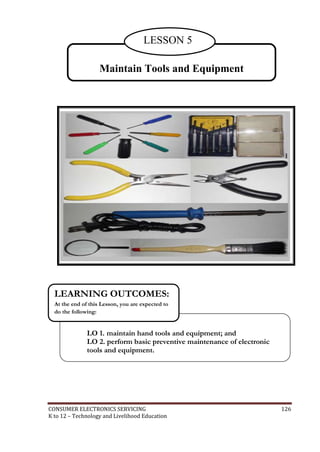
LESSON 5 – Maintain Tools and Equipment ................................... 126-143 
Answer Keys .................................................................................................... 144-151 
Acknowledgment ..................................................................................................... 152 
CONSUMER ELECTRONICS SERVICING 1 
K to 12 – Technology and Livelihood Education
What Is This Module About? 
Welcome to the world of Consumer Electronics Servicing! 
This Module is an exploratory course which leads you to Consumer Electronics 
Servicing National Certificate Level II ( NC II)1. It covers five common competencies that 
a Grade 7 / Grade 8 Technology and Livelihood Education (TLE) student like you ought to 
possess, namely: 
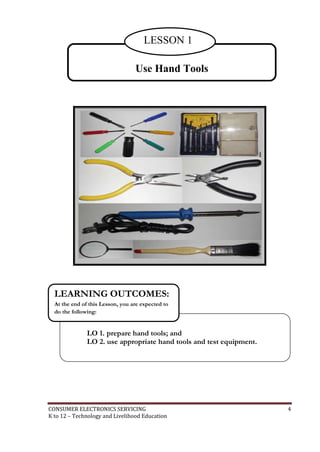
1) Use Hand Tools; 
2) Perform Mensuration and Calculation; 
3) Prepare and Interpret Technical Drawings; 
4) Practice Occupational Safety and Health; and 
5) Maintain Tools and Equipment 
These five common competencies are covered separately in five lessons. As shown 
below, each lesson is directed to the attainment of one or three learning outcomes: 
Lesson 1 – Use Hand Tools 
LO1. Prepare hand tools 
LO 2. Use appropriate hand tools and test equipment 
Lesson 2 – Perform Mensuration and Calculations 
LO 1. Select measuring instruments 
LO 2. Carry out measurements and calculations 
LO 3. Maintain measuring instruments 
Lesson 3 – Prepare and Interpret Technical Drawings 
LO1. Identify different kinds of technical drawings 
LO2. Interpret technical drawing 
LO3. Prepare/Make changes in electrical/electronic schematics and diagrams 
Lesson 4 – Practice Occupational Health and Safety 
LO 1. Identify health hazards and occupational risks 
LO 2.Observe occupational and safety practices 
Lesson 5 – Maintain Tools and Equipment 
LO 1. Maintain hand tools and equipment 
LO 2 Perform basic preventive maintenance of electronic tools and equipment 
Your success in this exploratory course on Consumer Electronics Servicing can be seen 
in your ability to do the performance standards found in each lesson. 
1NATIONAL CERTIFICATE (NC) is a certification issued to individuals who achieved all the required units of competency for a national 
qualification as defined under the Training Regulations. NCs are aligned to specific levels within the PTQF. (TESDA Board Resolution 
No. 2004-13, Training Regulations Framework) 
NATIONAL CERTIFICATE LEVEL refers to the four (4) qualification levels defined in the Philippine TVET Qualifications Framework 
(PTQF) where the worker with: 
a. NC I performs a routine and predictable tasks; has little judgment; and, works under supervision; 
b. NC II performs prescribed range of functions involving known routines and procedures; has limited choice and complexity of 
functions, and has little accountability; 
CONSUMER ELECTRONICS SERVICING 2 
K to 12 – Technology and Livelihood Education
How Do You Use This Module? 
This Module has five Lessons. Each Lesson has the following parts: 
 Learning Outcomes 
 Performance Standards 
 Materials/Resources 
 Definition of Terms 
 What Do You Already Know? 
 What Do You Need to Know? 
 How Much Have You Learned? 
 How Do You Apply What You Have Learned? 
 How Well Did You Perform? 
 References 
To get the most from this Module, you need to do the following: 
1. Begin by reading and understanding the Learning Outcome/s and Performance 
Standards. These will tell you what you should know and be able to do at the end 
of this Module. 
2. Find out what you already know by taking the Pretest then check your answer 
against the Answer Key. If you get 99 to 100% of the items correctly, you may 
proceed to the next Lesson. This means that you need not go through the 
Lesson because you already know what it is about. If you fail to get 99 to 100% 
correctly, go through the Lesson again and review especially those items which 
you failed to get. 
3. Do the required Learning Activities. They begin with one or more Information 
Sheets. An Information Sheet contains important notes or basic information that 
you need to know. 
After reading the Information Sheet, test yourself on how much you have 
learned by means of the Self-check. Refer to the Answer Key for correction. Do 
not hesitate to go back to the Information Sheet when you do not get all test 
items correctly. This will ensure your mastery of basic information. 
4. Demonstrate what you learned by doing what the Activity / Operation /Job Sheet 
directs you to do. 
5. You must be able to apply what you have learned in another activity or in a real 
life situation. 
6. Accomplish the Scoring Rubrics for you to know how well you performed. 
Each Lesson also provides you with references and definition of key terms for your guide. 
They can be of great help. Use them fully. 
If you have questions, ask your teacher for assistance. 
CONSUMER ELECTRONICS SERVICING 3 
K to 12 – Technology and Livelihood Education
LESSON 1 
Use Hand Tools 
LEARNING OUTCOMES: 
At the end of this Lesson, you are expected to 
do the following: 
LO 1. prepare hand tools; and 
LO 2. use appropriate hand tools and test equipment. 
CONSUMER ELECTRONICS SERVICING 4 
K to 12 – Technology and Livelihood Education
Definition of Terms 
Accidental - occurring unexpectedly, unintentionally, or by chance. 
Alternating current - an electric current that is continually varying in value and 
reversing its direction of flow at regular interval 
Anode - a positive electrode of semiconductor device 
Capacitance - a property that exists whenever two conductors are separated by 
insulating material, permitting the storage of electricity 
Capacitor - a component designed intentionally to have a definite amount of 
capacitance 
Circuit - an arrangement of one or more complete paths of electron flow. 
Conductor - a wire, cable, or other body or medium that is suitable for carrying 
electric current 
Current - the rate of transfer of electricity from one point to another 
Desoldering - a process of unsoldering unwanted parts or components in the circuit 
with the support of a soldering tool 
Dielectric material - a material that serves as insulator because it has poor electric 
conductivity 
Direct current - an electric current that flows in one direction 
Discrete components- separated or individual components 
Electronics - a branch of science and technology that deals with the controlled flow 
of electrons 
Flammable - tending to burn quickly 
Hazards - risks; dangers 
Malfunction - not in normal operating condition 
Ohmmeter - an instrument that measures the amount of resistance in certain 
component or circuits 
Resistance - the opposition that a component or material offers to the flow current 
Resistor – a component designed intentionally to have a definite amount of 
resistance 
Soldering - a process of joining two metals caused by heat 
Soldering technique - a strategy in which the solder (lead) is being applied in a 
connection or in the printed circuit board 
Splicing – connecting two lengths of conductor 
Technician - a person skilled in mechanical or industrial techniques or in a particular 
technical field 
Tool kit - a small bag or box equipped with hand tools 
Troubleshooting - identifying and repairing faults in equipment 
Voltage - the electrical pressure that exist between two points and capable of 
producing a flow of current when a close circuit is connected between the 
points. 
Voltmeter - an instrument that measures the amount of electromotive force in a 
component or circuit. 
Acronyms 
PCB – Printed Circuit Board 
PPE – Personal Protective Equipment 
VOM – Volt-Ohm-Milliameter 
CONSUMER ELECTRONICS SERVICING 5 
K to 12 – Technology and Livelihood Education
LEARNING OUTCOME 1 
Prepare Hand Tools 
PERFORMANCE STANDARDS 
 Appropriate hand tools are identified. 
 Appropriate tools are selected according to task requirements. 
What Do You Already Know? 
Let us determine how much you already know about the different hand tools. 
Take this test. 
Pretest LO 1 
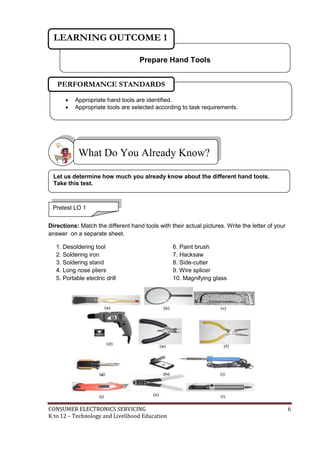
Directions: Match the different hand tools with their actual pictures. Write the letter of your 
answer on a separate sheet. 
1. Desoldering tool 
2. Soldering iron 
3. Soldering stand 
4. Long nose pliers 
5. Portable electric drill 
6. Paint brush 
7. Hacksaw 
8. Side-cutter 
9. Wire splicer 
10. Magnifying glass 
CONSUMER ELECTRONICS SERVICING 6 
K to 12 – Technology and Livelihood Education
What Do You Need To Know? 
Read Information Sheet 1.1 very well; then, find out how much you can 
remember and how much you have learned by answering the Self-check. 
Information Sheet 1.1 
Basic Hand Tools 
Driving of Tools 
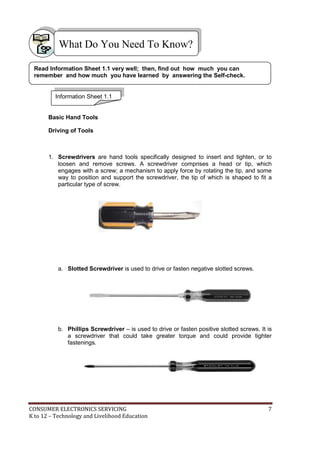
1. Screwdrivers are hand tools specifically designed to insert and tighten, or to 
loosen and remove screws. A screwdriver comprises a head or tip, which 
engages with a screw; a mechanism to apply force by rotating the tip, and some 
way to position and support the screwdriver, the tip of which is shaped to fit a 
particular type of screw. 
a. Slotted Screwdriver is used to drive or fasten negative slotted screws. 
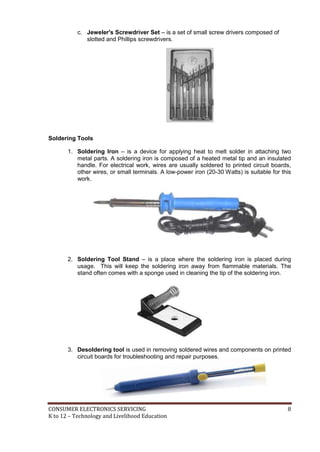
b. Phillips Screwdriver – is used to drive or fasten positive slotted screws. It is 
a screwdriver that could take greater torque and could provide tighter 
fastenings. 
CONSUMER ELECTRONICS SERVICING 7 
K to 12 – Technology and Livelihood Education
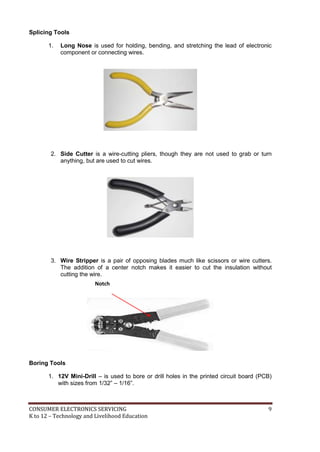
c. Jeweler's Screwdriver Set – is a set of small screw drivers composed of 
slotted and Phillips screwdrivers. 
Soldering Tools 
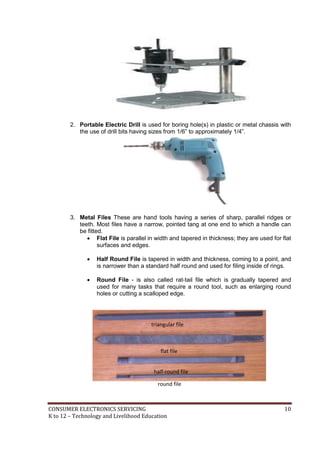
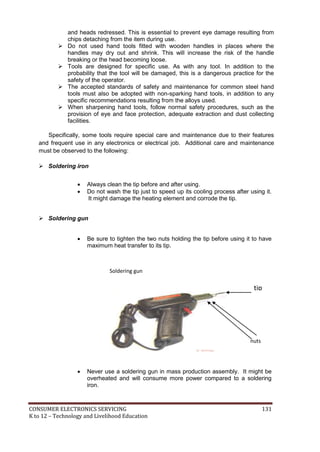
1. Soldering Iron – is a device for applying heat to melt solder in attaching two 
metal parts. A soldering iron is composed of a heated metal tip and an insulated 
handle. For electrical work, wires are usually soldered to printed circuit boards, 
other wires, or small terminals. A low-power iron (20-30 Watts) is suitable for this 
work. 
2. Soldering Tool Stand – is a place where the soldering iron is placed during 
usage. This will keep the soldering iron away from flammable materials. The 
stand often comes with a sponge used in cleaning the tip of the soldering iron. 
3. Desoldering tool is used in removing soldered wires and components on printed 
circuit boards for troubleshooting and repair purposes. 
CONSUMER ELECTRONICS SERVICING 8 
K to 12 – Technology and Livelihood Education
Splicing Tools 
1. Long Nose is used for holding, bending, and stretching the lead of electronic 
component or connecting wires. 
2. Side Cutter is a wire-cutting pliers, though they are not used to grab or turn 
anything, but are used to cut wires. 
3. Wire Stripper is a pair of opposing blades much like scissors or wire cutters. 
The addition of a center notch makes it easier to cut the insulation without 
cutting the wire. 
Boring Tools 
Notch 
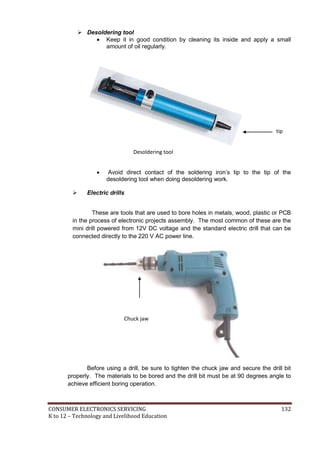
1. 12V Mini-Drill – is used to bore or drill holes in the printed circuit board (PCB) 
with sizes from 1/32” – 1/16”. 
CONSUMER ELECTRONICS SERVICING 9 
K to 12 – Technology and Livelihood Education
2. Portable Electric Drill is used for boring hole(s) in plastic or metal chassis with 
the use of drill bits having sizes from 1/6” to approximately 1/4”. 
3. Metal Files These are hand tools having a series of sharp, parallel ridges or 
teeth. Most files have a narrow, pointed tang at one end to which a handle can 
be fitted. 
 Flat File is parallel in width and tapered in thickness; they are used for flat 
surfaces and edges. 
 Half Round File is tapered in width and thickness, coming to a point, and 
is narrower than a standard half round and used for filing inside of rings. 
 Round File - is also called rat-tail file which is gradually tapered and 
used for many tasks that require a round tool, such as enlarging round 
holes or cutting a scalloped edge. 
triangular file 
flat file 
half-round file 
round file 
CONSUMER ELECTRONICS SERVICING 10 
K to 12 – Technology and Livelihood Education
Cutting Tools 
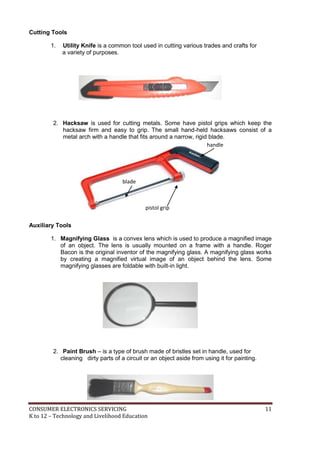
1. Utility Knife is a common tool used in cutting various trades and crafts for 
a variety of purposes. 
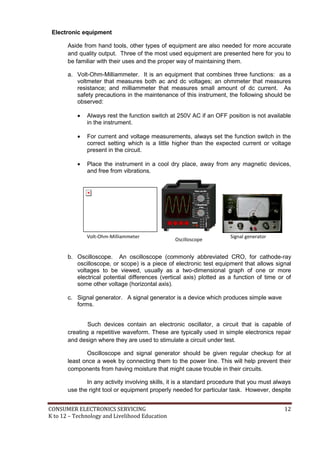
2. Hacksaw is used for cutting metals. Some have pistol grips which keep the 
hacksaw firm and easy to grip. The small hand-held hacksaws consist of a 
metal arch with a handle that fits around a narrow, rigid blade. 
Auxiliary Tools 
handle 
blade 
pistol grip 
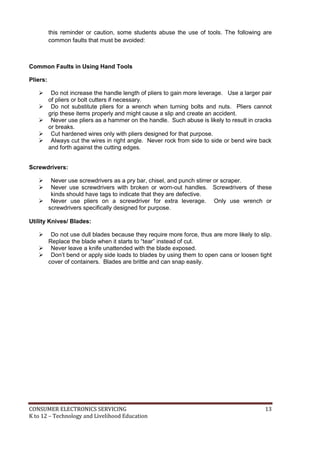
1. Magnifying Glass is a convex lens which is used to produce a magnified image 
of an object. The lens is usually mounted on a frame with a handle. Roger 
Bacon is the original inventor of the magnifying glass. A magnifying glass works 
by creating a magnified virtual image of an object behind the lens. Some 
magnifying glasses are foldable with built-in light. 
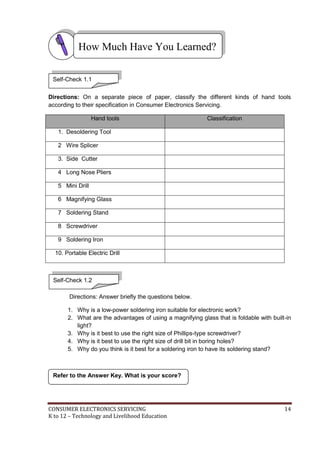
2. Paint Brush – is a type of brush made of bristles set in handle, used for 
cleaning dirty parts of a circuit or an object aside from using it for painting. 
CONSUMER ELECTRONICS SERVICING 11 
K to 12 – Technology and Livelihood Education
Electronic equipment 
Aside from hand tools, other types of equipment are also needed for more accurate 
and quality output. Three of the most used equipment are presented here for you to 
be familiar with their uses and the proper way of maintaining them. 
a. Volt-Ohm-Milliammeter. It is an equipment that combines three functions: as a 
voltmeter that measures both ac and dc voltages; an ohmmeter that measures 
resistance; and milliammeter that measures small amount of dc current. As 
safety precautions in the maintenance of this instrument, the following should be 
observed: 
 Always rest the function switch at 250V AC if an OFF position is not available 
in the instrument. 
 For current and voltage measurements, always set the function switch in the 
correct setting which is a little higher than the expected current or voltage 
present in the circuit. 
 Place the instrument in a cool dry place, away from any magnetic devices, 
and free from vibrations. 
Volt-Ohm-Milliammeter 
Oscilloscope 
Signal generator 
b. Oscilloscope. An oscilloscope (commonly abbreviated CRO, for cathode-ray 
oscilloscope, or scope) is a piece of electronic test equipment that allows signal 
voltages to be viewed, usually as a two-dimensional graph of one or more 
electrical potential differences (vertical axis) plotted as a function of time or of 
some other voltage (horizontal axis). 
c. Signal generator. A signal generator is a device which produces simple wave 
forms. 
Such devices contain an electronic oscillator, a circuit that is capable of 
creating a repetitive waveform. These are typically used in simple electronics repair 
and design where they are used to stimulate a circuit under test. 
Oscilloscope and signal generator should be given regular checkup for at 
least once a week by connecting them to the power line. This will help prevent their 
components from having moisture that might cause trouble in their circuits. 
In any activity involving skills, it is a standard procedure that you must always 
use the right tool or equipment properly needed for particular task. However, despite 
CONSUMER ELECTRONICS SERVICING 12 
K to 12 – Technology and Livelihood Education
this reminder or caution, some students abuse the use of tools. The following are 
common faults that must be avoided: 
Common Faults in Using Hand Tools 
Pliers: 
 Do not increase the handle length of pliers to gain more leverage. Use a larger pair 
of pliers or bolt cutters if necessary. 
 Do not substitute pliers for a wrench when turning bolts and nuts. Pliers cannot 
grip these items properly and might cause a slip and create an accident. 
 Never use pliers as a hammer on the handle. Such abuse is likely to result in cracks 
or breaks. 
 Cut hardened wires only with pliers designed for that purpose. 
 Always cut the wires in right angle. Never rock from side to side or bend wire back 
and forth against the cutting edges. 
Screwdrivers: 
 Never use screwdrivers as a pry bar, chisel, and punch stirrer or scraper. 
 Never use screwdrivers with broken or worn-out handles. Screwdrivers of these 
kinds should have tags to indicate that they are defective. 
 Never use pliers on a screwdriver for extra leverage. Only use wrench or 
screwdrivers specifically designed for purpose. 
Utility Knives/ Blades: 
 Do not use dull blades because they require more force, thus are more likely to slip. 
Replace the blade when it starts to “tear” instead of cut. 
 Never leave a knife unattended with the blade exposed. 
 Don’t bend or apply side loads to blades by using them to open cans or loosen tight 
cover of containers. Blades are brittle and can snap easily. 
CONSUMER ELECTRONICS SERVICING 13 
K to 12 – Technology and Livelihood Education
How Much Have You Learned? 
Self-Check 1.1 
Directions: On a separate piece of paper, classify the different kinds of hand tools 
according to their specification in Consumer Electronics Servicing. 
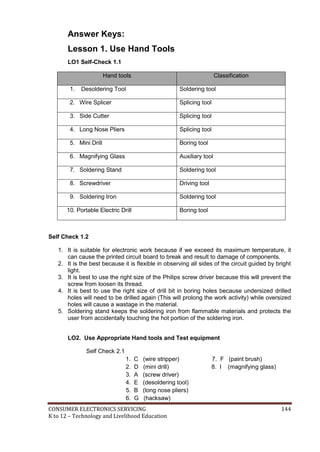
Hand tools Classification 
1. Desoldering Tool 
2 Wire Splicer 
3. Side Cutter 
4 Long Nose Pliers 
5 Mini Drill 
6 Magnifying Glass 
7 Soldering Stand 
8 Screwdriver 
9 Soldering Iron 
10. Portable Electric Drill 
Self-Check 1.2 
Directions: Answer briefly the questions below. 
1. Why is a low-power soldering iron suitable for electronic work? 
2. What are the advantages of using a magnifying glass that is foldable with built-in 
light? 
3. Why is it best to use the right size of Phillips-type screwdriver? 
4. Why is it best to use the right size of drill bit in boring holes? 
5. Why do you think is it best for a soldering iron to have its soldering stand? 
Refer to the Answer Key. What is your score? 
CONSUMER ELECTRONICS SERVICING 14 
K to 12 – Technology and Livelihood Education
LEARNING OUTCOME 2 
Use Appropriate Hand tools and Test Equipment 
PERFORMANCE STANDARDS 
 Tools are used according to task undertaken. 
 All safety procedures in using tools are observed at all times. 
 Malfunctions, unplanned or unusual events are reported to the supervisor. 
What Do You Already Know? 
Determine how much you already know about using appropriate hand tools and 
test equipment. Take this test. 
Pretest LO 2 
Direction: Multiple Choice: Choose the best answer. Write letters only. 
1. Which equipment does NOT belong to the group? 
a. Screw driver c. Diagonal cutter 
b. Long nose pliers d. Side cutting 
2. What is the reason why threads become stripped? 
a. Screws are over tightened c. Screws are molded 
b. Screws are heated d. Screws are painted 
3. What equipment is/are used for safety? 
a. VOM c. OHS 
b. PPE d. All of those mentioned 
4. Which is NOT part of the group? 
a. Soldering iron c. Soldering tool stand 
b. Desoldering tool d. Wire stripper 
5. Which hand tool is used solely for cutting metals? 
a. Utility knife c. Magnifying glass 
b. Saw d. Paint brush 
CONSUMER ELECTRONICS SERVICING 15 
K to 12 – Technology and Livelihood Education
What Do You Need To Know? 
Read Information Sheet 2.1 very well. Then find out how much you can remember 
and how much you learned by answering the Self-check. 
Information Sheet 2.1 
USING TOOLS BASED ON THEIR FUNCTIONS AND OPERATION 
Whenever you perform a task in the workshop you must use personal protective 
clothing and equipment (PPE) that are appropriate for the task and which conforms with your 
local safety regulations and policies. 
Your skill in using tools and equipment will make your work less difficult and ensure 
that tasks are performed properly and safely. 
 Hand Tools 
o screwdrivers, needle-nose pliers 
 Diagnostic Tools 
o Analog or digital Volt-Ohm-Milliammeter, power supply 
Safety check 
 Do not use flammable cleaners or water on electrical equipment. 
 Make sure designated walkways are kept clear of any obstructions. 
 Always wear protective clothing and use the appropriate safety equipment. 
 Make sure that you understand and observe all legislative and personal safety 
procedures when carrying out the following tasks. 
Proper Use of Hand Tools 
 Use the proper type and size of screwdriver by matching it to the screw. 
 Phillips and Flat Head are the most common types. 
 Do not over tighten screws because the threads may become stripped. 
In many types of work, hand tools are used every day. They make work easier and 
allow people to be more efficient. However, majority of students often fail to see the hazards 
these tools can introduce. In this module "Hand Tool Safety" shows workers how accidents 
can be significantly reduced by reviewing the various hazards that are associated with 
specific types of tools. 
CONSUMER ELECTRONICS SERVICING 16 
K to 12 – Technology and Livelihood Education
How Much Have You Learned? 
Self-check 2.1 
Direction: Match Column A with Column B 
A B 
1. Cut the insulation without cutting the wire a. Screwdriver 
2. Drill holes in the printed circuit board b. Long nose 
3. Tighten, loosen or remove screws c. Wire stripper 
4. Remove soldered wires d. 12 V Mini-drill 
5. Hold, bend, stretch the lead of electronic 
component or connecting wires 
6. Cut metals f. Paint brush 
7. Clean dirty parts of an object g. Hacksaw 
8. Produce a magnified image of an object h. Signal generator 
Refer to the Answer Key. What is your score? 
e. Desoldering tool 
i. Magnifying glass 
CONSUMER ELECTRONICS SERVICING 17 
K to 12 – Technology and Livelihood Education
How Do You Apply What You Have Learned? 
Show that you have learned something by doing this activity. 
Operation Sheet 2.1 
Instruction: 
1. Do the following Operation Sheets: 
a. Procedure in using a soldering iron 
b. Mounting and soldering of components on PCB 
c. Disassembly and assembly of the circuit 
Procedure in using a soldering iron 
1. Preparing the soldering iron 
a. Place the soldering iron on the stand before plugging it. 
b. Wait a few minutes for the soldering iron to attain its operating temperature of 
about 4000C. 
c. Wipe the tip of the soldering iron on the wet damp sponge 
d. Melt a little solder (soldering lead – 60/40) on the tip of the iron. 
e. Wipe again the tip of the soldering iron on the wet damp sponge. 
2. Soldering technique 
a. Hold the soldering iron like a pen, near the base of the handle. 
b. Touch the soldering iron onto the joint to be soldered. 
c. Apply a small amount of solder onto the joint. 
d. Remove the solder, then the soldering iron, while keeping the joint in still position. 
e. Inspect the joint closely. It should look shiny and in a volcano shape. 
CONSUMER ELECTRONICS SERVICING 18 
K to 12 – Technology and Livelihood Education
Operation Sheet 2.2 
Mounting and soldering of components on PCB 
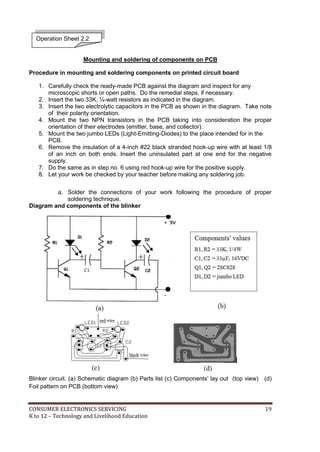
Procedure in mounting and soldering components on printed circuit board 
1. Carefully check the ready-made PCB against the diagram and inspect for any 
microscopic shorts or open paths. Do the remedial steps, if necessary. 
2. Insert the two 33K, ¼-watt resistors as indicated in the diagram. 
3. Insert the two electrolytic capacitors in the PCB as shown in the diagram. Take note 
of their polarity orientation. 
4. Mount the two NPN transistors in the PCB taking into consideration the proper 
orientation of their electrodes (emitter, base, and collector). 
5. Mount the two jumbo LEDs (Light-Emitting-Diodes) to the place intended for in the 
PCB. 
6. Remove the insulation of a 4-inch #22 black stranded hook-up wire with at least 1/8 
of an inch on both ends. Insert the uninsulated part at one end for the negative 
supply. 
7. Do the same as in step no. 6 using red hook-up wire for the positive supply. 
8. Let your work be checked by your teacher before making any soldering job. 
a. Solder the connections of your work following the procedure of proper 
soldering technique. 
Diagram and components of the blinker 
Blinker circuit. (a) Schematic diagram (b) Parts list (c) Components’ lay out (top view) (d) 
Foil pattern on PCB (bottom view) 
CONSUMER ELECTRONICS SERVICING 19 
K to 12 – Technology and Livelihood Education
Disassembly and assembly of the circuit 
Operation Sheet 2.3 
Desoldering 
At some stage, you will probably need to desolder a joint to remove or re-position a 
wire or component. The easiest and most common way is the use of desoldering pump. 
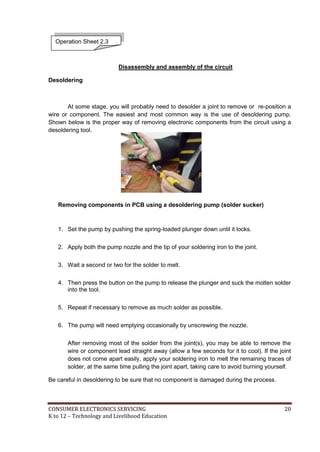
Shown below is the proper way of removing electronic components from the circuit using a 
desoldering tool. 
Removing components in PCB using a desoldering pump (solder sucker) 
1. Set the pump by pushing the spring-loaded plunger down until it locks. 
2. Apply both the pump nozzle and the tip of your soldering iron to the joint. 
3. Wait a second or two for the solder to melt. 
4. Then press the button on the pump to release the plunger and suck the molten solder 
into the tool. 
5. Repeat if necessary to remove as much solder as possible. 
6. The pump will need emptying occasionally by unscrewing the nozzle. 
After removing most of the solder from the joint(s), you may be able to remove the 
wire or component lead straight away (allow a few seconds for it to cool). If the joint 
does not come apart easily, apply your soldering iron to melt the remaining traces of 
solder, at the same time pulling the joint apart, taking care to avoid burning yourself. 
Be careful in desoldering to be sure that no component is damaged during the process. 
CONSUMER ELECTRONICS SERVICING 20 
K to 12 – Technology and Livelihood Education
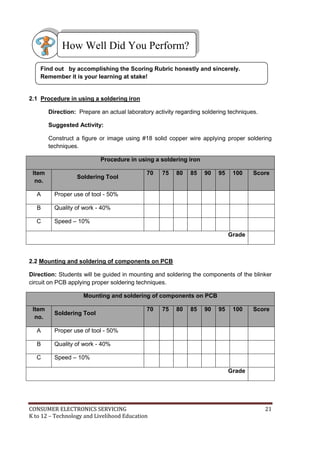
How Well Did You Perform? 
Find out by accomplishing the Scoring Rubric honestly and sincerely. 
Remember it is your learning at stake! 
2.1 Procedure in using a soldering iron 
Direction: Prepare an actual laboratory activity regarding soldering techniques. 
Suggested Activity: 
Construct a figure or image using #18 solid copper wire applying proper soldering 
techniques. 
Procedure in using a soldering iron 
Item 
no. 
Soldering Tool 
70 75 80 85 90 95 100 Score 
A Proper use of tool - 50% 
B Quality of work - 40% 
C Speed – 10% 
Grade 
2.2 Mounting and soldering of components on PCB 
Direction: Students will be guided in mounting and soldering the components of the blinker 
circuit on PCB applying proper soldering techniques. 
Mounting and soldering of components on PCB 
Item 
no. 
Soldering Tool 
70 75 80 85 90 95 100 Score 
A Proper use of tool - 50% 
B Quality of work - 40% 
C Speed – 10% 
Grade 
CONSUMER ELECTRONICS SERVICING 21 
K to 12 – Technology and Livelihood Education
2.3 Disassembly and assembly of the circuit 
Direction: Your teacher will guide you in removing or desoldering the components of the 
blinker circuit on PCB applying proper desoldering procedure. 
Disassembly and assembly of the circuit 
Item 
no. 
Soldering Tool 
70 75 80 85 90 95 100 Score 
A Proper use of tool - 50% 
B Quality of work - 40% 
C Speed – 10% 
Grade 
Congratulations! You did a great job! Rest and 
relax a while then move on to the next lesson. 
Good luck! 
REFERENCES 
 Tan, Michael Q.; Gantalao, Fred T.; Lasala, Rommel M. 
Simple Electronics; Andes Mountain Printers; 2004 
 Enriquez, Marcelo T., Electronics Technology IV; 
Souvenir Publications, Inc. 2003 
 Grob, Bernard, Basic Electronics, 4th Edition; 
New York: McGraw-Hill Company, USA: 1982 
CONSUMER ELECTRONICS SERVICING 22 
K to 12 – Technology and Livelihood Education
LESSON 2 
Perform Mensuration and Calculations 
LEARNING OUTCOMES: 
At the end of this Lesson, you are expected to 
do the following: 
LO 1. select measuring instruments; 
LO 2. carry out measurements and calculations; and 
LO 3. maintain measuring instruments. 
CONSUMER ELECTRONICS SERVICING 23 
K to 12 – Technology and Livelihood Education
Definition of Terms 
Ampere - basic unit of current 
Current - the flow of electrons moving in a given direction 
Electronic measuring instrument – a portable instrument used to measure 
electrical quantities such as current, voltage, and resistance 
Ohmmeter - an electronic instrument used to measure resistance of a component or 
the entire circuit 
Ohmmeter scale - section of the ohmmeter where the value of the resistance is 
being indicated 
Range multiplier - a portion in the ohmmeter where the actual reading is multiplied 
by the range value 
Resistance - the opposition to the flow of electrons 
Resistor - an electronic component that is used to offer opposition to current in an 
electrical circuit 
Resistor color coding - a scheme to determine the value of resistors by color bands 
printed on their bodies as code 
Test Probes - connectors connected to terminals of the VOM and component’s 
terminals or test points in a circuit to be tested. They are oftentimes red and black in 
color 
Tolerance - the fourth color in the 3-band color coding that indicates the percentage 
of deviation from its color coded value 
Volt - basic unit of voltage 
Voltage - an electrical pressure that pushes current to flow within a load through a 
conductor 
Zero-ohm adjuster - part of the ohmmeter that is used in adjusting the pointer of the 
ohmmeter to zero before resistance measurements or continuity tests are made. 
CONSUMER ELECTRONICS SERVICING 24 
K to 12 – Technology and Livelihood Education
LEARNING OUTCOME 1 
Select measuring instrument 
PERFORMANCE STANDARDS 
 Object or component to be measured is identified. 
 Correct specifications are obtained from relevant source. 
 Appropriate measuring instrument is selected in line with job 
requirement. 
What Do You Already Know? 
Let us determine how much you already know about selecting measuring 
instrument. Take this test. 
Pretest LO 1 
Directions: Choose the best answer. Write the letter only. 
1. Which component resists the flow of current in an electrical circuit? 
A) Capacitor B) Inductor C) Resistor D) Transistor 
2. What kind of component is a resistor? 
A) Combined B) Discrete C) Integrated D) Hybrid 
3. What color in the color coding scheme has an equivalent of 5 in the 2nd 
band? 
A) Brown B) Green C) Red D) Yellow 
4. What is the color of the tolerance representing ± 10%? 
A) Gold B) Black C) Orange D) Silver 
5. What is the value of a resistor with the following colors : 
Green - Black- Silver- Gold? 
A) 500 Ohms ±5% C) 5.0 Ohms ± 5% 
B) 50 Ohms ± 5% D) 0.5 Ohm ± 5% 
CONSUMER ELECTRONICS SERVICING 25 
K to 12 – Technology and Livelihood Education
What Do You Need To Know? 
Read Information Sheet 1.1 very well then find out how much you can remember 
and how much you have learned by doing Self-Check. 
Information Sheet 1.1 
Electronics is a branch of technology that deals with many applications. Audio 
electronics, video electronics, digital, medical up to weapons and banking are 
covered by the influence of electronics. There are quite a number of 
components used in the application of electronics. To name a few of these 
electronic components are resistors, capacitors, inductors and semi-conductors. 
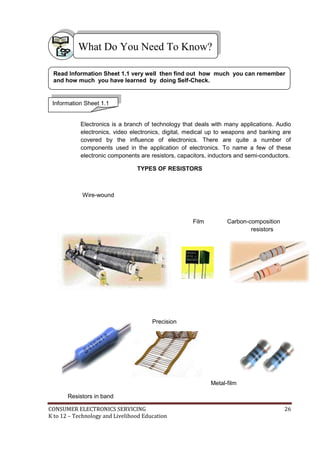
TYPES OF RESISTORS 
Wire-wound 
Film Carbon-composition 
resistors 
Precision 
Metal-film 
Resistors in band 
CONSUMER ELECTRONICS SERVICING 26 
K to 12 – Technology and Livelihood Education
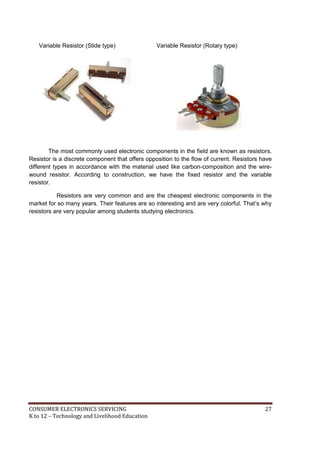
Variable Resistor (Slide type) Variable Resistor (Rotary type) 
The most commonly used electronic components in the field are known as resistors. 
Resistor is a discrete component that offers opposition to the flow of current. Resistors have 
different types in accordance with the material used like carbon-composition and the wire-wound 
resistor. According to construction, we have the fixed resistor and the variable 
resistor. 
Resistors are very common and are the cheapest electronic components in the 
market for so many years. Their features are so interesting and are very colorful. That’s why 
resistors are very popular among students studying electronics. 
CONSUMER ELECTRONICS SERVICING 27 
K to 12 – Technology and Livelihood Education
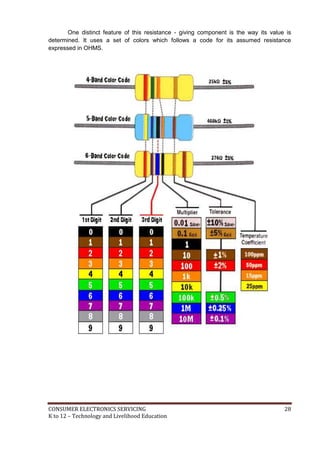
One distinct feature of this resistance - giving component is the way its value is 
determined. It uses a set of colors which follows a code for its assumed resistance 
expressed in OHMS. 
CONSUMER ELECTRONICS SERVICING 28 
K to 12 – Technology and Livelihood Education
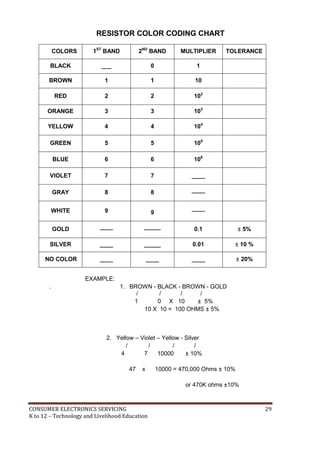
RESISTOR COLOR CODING CHART 
COLORS 1ST BAND 2ND BAND MULTIPLIER TOLERANCE 
BLACK ___ 0 1 
BROWN 1 1 10 
RED 
2 
2 
102 
ORANGE 3 3 103 
YELLOW 
4 
4 
104 
GREEN 
5 
5 
105 
BLUE 6 6 106 
VIOLET 7 7 ____ 
GRAY 
8 
8 
____ 
WHITE 
9 
9 
____ 
GOLD 
____ 
_____ 
0.1 
± 5% 
SILVER ____ _____ 0.01 ± 10 % 
NO COLOR ____ ____ ____ ± 20% 
. 
EXAMPLE: 
1. BROWN - BLACK - BROWN - GOLD 
/ / / / 
1 0 X 10 ± 5% 
10 X 10 = 100 OHMS ± 5% 
2. Yellow – Violet – Yellow - Silver 
/ / / / 
4 7 10000 ± 10% 
47 x 10000 = 470,000 Ohms ± 10% 
or 470K ohms ±10% 
CONSUMER ELECTRONICS SERVICING 29 
K to 12 – Technology and Livelihood Education
How Much Have You Learned? 
Self-Check 1.1 
Directions: Multiple Choice. Choose the best answer. Write the letter only. 
1. What is the value of a resistor with the following colors: 
Green - Black- orange - Gold? 
A) 500 Ohms ± 5% C) 50K ohms ± 5% 
B) 5K Ohms ± 5% D) 500 K Ohms ± 5% 
2. What is the color of the tolerance representing ± 5%? 
A) Gold B) Black C) Orange D) Silver 
3. 5 in the second band of the resistor color coding means 
A) Brown B) Green C) Red D) Yellow 
4. Which component is a discrete type? 
A) Power IC B) Regulator IC C) Resistor D) Digital IC 
5. Resistor is a component that resists the flow of _____________. 
A) Current B) Capacitance C) Power D) Voltage 
Refer to the Answer Key. What is your score? 
CONSUMER ELECTRONICS SERVICING 30 
K to 12 – Technology and Livelihood Education
How Do You Apply What You Have Learned? 
Show that you learned something by doing this activity 
Operation Sheet 1.1 
Materials: 
10 pieces - Carbon resistors, 1 watt, assorted values 
1 pc - Resistor Tabulation form 
Procedure: 
1. Arrange the resistors on a piece of styrofor in random manner. 
2. Identify the colors of the resistors one by one and record them in the resistor 
tabulation form. 
3. Compute for the resistance value of each resistor by following the color 
coding scheme. 
4. Write the value of the resistance in the tabulation form. 
5. Arrange the resistors in such a way that the value is in ascending manner. 
CONSUMER ELECTRONICS SERVICING 31 
K to 12 – Technology and Livelihood Education
Resistor Tabulation Form 
1st band 
Color/value 
2nd band 
Color/value 
3rdband 
multiplier 
Coded 
value 
Tolerance 
Over-all 
Value 
1 
2 
3 
4 
5 
6 
7 
8 
9 
10 
CONSUMER ELECTRONICS SERVICING 32 
K to 12 – Technology and Livelihood Education
How Well Did You Perform? 
Find out by accomplishing the Scoring Rubric honestly and sincerely. 
Remember it is your learning at stake! 
Find out by accomplishing the Scoring Rubrics honestly and 
sincerely. Remember it is your learning at stake 
 With perfect score of 10 ………………………….. 5 
 With 1 mistake …………………………………….. 4 
 With 2 – 3 mistakes…………………………………3 
 With 4 – 5 mistakes ……………………………….. 2 
 With more than 5 mistakes ………………………. 1 
CONSUMER ELECTRONICS SERVICING 33 
K to 12 – Technology and Livelihood Education
Performance Test. 
Learner's Name 
Date 
Competency: 
Test Attempt 
1st 2nd 3rd 
Directions: 
CALL TEACHER and ask him 
/ her to assess your 
performance in the following 
critical task using the 
performance criteria below 
You will be rated based on the 
overall evaluation on the right 
side. 
OVERALL EVALUATION 
Level 
Achieved 
PERFORMANCE LEVELS 
4 - Can perform this skill without supervision and 
with initiative and adaptability to problem 
situations. 
3 - Can perform this skill satisfactorily without 
assistance or supervision. 
2 - Can perform this skill satisfactorily but requires 
some assistance and/or supervision. 
1 - Can perform parts of this skill satisfactorily, but 
requires considerable assistance and/or 
supervision. 
Teacher will initial level achieved. 
PERFORMANCE STANDARDS 
For acceptable achievement, all items should receive a "Yes" or 
"N/A" response. 
Yes 
No 
N/A 
1. Can recite the colors of the color coding chart in order without looking 
at the chart. 
2. Can identify the first color of the carbon resistor. 
3. Can interpret equivalent numerical value of each color in the chart 
4. Can calculate the color coded value of the resistor. 
5. Can give the over-all value of the resistor after calculation. 
CONSUMER ELECTRONICS SERVICING 34 
K to 12 – Technology and Livelihood Education
LEARNING OUTCOME 2 
Carry out measurement and calculation 
PERFORMANCE STANDARDS 
 Appropriate measuring instruments are selected to achieve 
required outcome. 
 Accurate measurements are obtained for job specifications. 
 Calculations needed to complete work task are performed using 
four fundamental operations. 
 Instruments are read to the limit accuracy of the tool. 
What Do You Already Know? 
Let us determine how much you already know about carrying out measurement 
and calculation. Take this test. 
Pretest LO 2 
Directions: Multiple Choice. Choose the best option. Write the letter only. 
1. What is the item in the color coding scheme that allows the color-coded value to 
deviate to a certain extent? 
A) Multiplier C) Limitation 
B) Body color D) Tolerance 
2. What is the decimal equivalent of 10%? 
A) .01 C) 1.0 
B) 0.1 D) 10 
3. What is 10% of 220? 
A) 210 C) 22 
B) 2.2 D) 11 
4. What Is the maximum deviation of a 220ohms + 10% tolerance? 
A) 230ohms C) 224 ohms 
B) 242 ohms D) 236 ohms 
CONSUMER ELECTRONICS SERVICING 35 
K to 12 – Technology and Livelihood Education
5. What is the minimum deviation of – 10% tolerance of the same resistor cited in no. 
4? 
A) 90 ohms C) 190 ohms 
B) 198 ohms D) 210 ohms 
What Do You Need To Know? 
Read Information Sheet 2.1 very well then find out how much you can remember 
and how much you learned by doing Self-Check. 
Information Sheet 2.1 
Resistor color coded value is not absolute. The real resistance of the resistor is 
sometimes lower or higher than its color coded value but not to exceed its tolerance level. 
Tolerance is the limit on how far the real value of the resistor can deviate from its 
color coded value. It can be more or less but subjected to a tolerable limit. 
In the color coding chart there is a column for tolerance. Color gold is + or – 5%, 
silver is + or – 10 %, and the no color means + or – 20%. 
Procedure in interpreting the tolerance of resistor 
1. Identify the tolerance color of the resistor being analyzed. Assuming the color is 
gold which has a value of + or – 5%. 
2. Convert the percentage into its decimal equivalent. 5% is equivalent to .05 
3. Compute for the percentage of the color coded value. Assuming that the color 
coded value is 100 ohms ± 5%. 
So 100 x .05 = 5 
4. For the + side, add 5 to the color coded value of 100. 
100 + 5= 105 ohms 
That is the maximum deviation for that resistor. Beyond that, the resistor will not be 
fitted for the circuit which requires such tolerance. 
5. For the – side, deduct 5 from the color coded value of 100. 
100 – 5 = 95 ohms 
That will be the minimum deviation for that particular resistor. Far beyond that 
the resistor will be considered to be defective. 
6. Finally the value of the resistor with colors brown- black- brown – gold is 100 
ohms with a deviation of +5 or -5. (95 ohms -105 ohms) 
CONSUMER ELECTRONICS SERVICING 36 
K to 12 – Technology and Livelihood Education
How Much Have You Learned? 
Self-Check 2.1 
Directions: Choose the best option. Write the letter only. 
1. What is the minimum resistance of a 100 ohm resistor with 10% tolerance? 
A) 90 ohms C) 190 ohms 
B) 190 ohms D) 210 ohms 
2. What Is the maximum value of a 220 ohm resistor with a + 10% tolerance? 
A) 230ohms C) 224 ohms 
B) 242 ohms D) 236 ohms 
3. What is 10% of 220? 
A) 210 C) 22 
B) 2.2 D) 11 
4. What is the decimal equivalent of 5%? 
A) .01 C) 1.0 
B) .05 D) 10 
5. The band in the color coding scheme that permits the value to deviate to a certain 
extent? 
A) Multiplier C) Limitation 
B) Body color D) Tolerance 
Refer to the Answer Key. What is your score? 
CONSUMER ELECTRONICS SERVICING 37 
K to 12 – Technology and Livelihood Education
How Do You Apply What You Have Learned? 
Show that you learned something by doing this activity 
Operation Sheet 2.1 
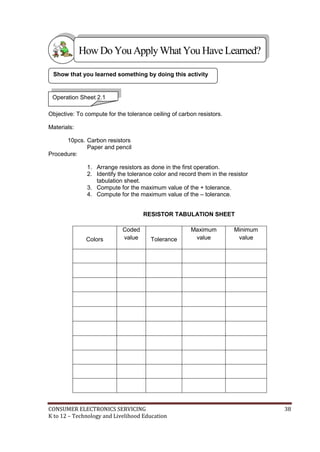
Objective: To compute for the tolerance ceiling of carbon resistors. 
Materials: 
10pcs. Carbon resistors 
Paper and pencil 
Procedure: 
1. Arrange resistors as done in the first operation. 
2. Identify the tolerance color and record them in the resistor 
tabulation sheet. 
3. Compute for the maximum value of the + tolerance. 
4. Compute for the maximum value of the – tolerance. 
RESISTOR TABULATION SHEET 
Colors 
Coded 
value 
Tolerance 
Maximum 
value 
Minimum 
value 
CONSUMER ELECTRONICS SERVICING 38 
K to 12 – Technology and Livelihood Education
How Well Did You Perform? 
Find out by accomplishing the Scoring Rubric honestly and sincerely. 
Remember it is your learning at stake! 
 With perfect score of 10 ………………………….5 
 With 1 mistake …………………………………….4 
 With 2 – 3 mistakes……………………………… 3 
 With 4 – 5 mistakes ………………………………2 
 With more than 5 mistakes ………………………1 
Information Sheet 2.2 
Resistor color coding gives us the color coded value of a given resistor as well as the 
maximum and minimum value as dictated by the tolerance but the actual resistance is still 
unknown to us. The actual value of the resistor and the recorded data will confirm the status 
of the resistor, whether good or defective. 
OHMMETER 
Ohmmeter is a measuring instrument used to determine the resistance of a 
component or equipment. This instrument is a great help in knowing the actual resistance of 
the resistors we use in the two operation sheets. 
The commonly used ohmmeter in electro-electrical laboratories nowadays is 
embedded in a multi-function testing instrument called the (Volt-Ohm-Milliammeter ) VOM. 
For this discussion the VOM will be used but confined only to the ohmmeter section. 
CONSUMER ELECTRONICS SERVICING 39 
K to 12 – Technology and Livelihood Education
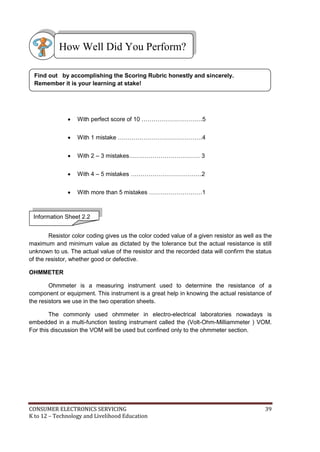
Volt-Ohm-Milliammeter (VOM) 
Parts of an Ohmmeter 
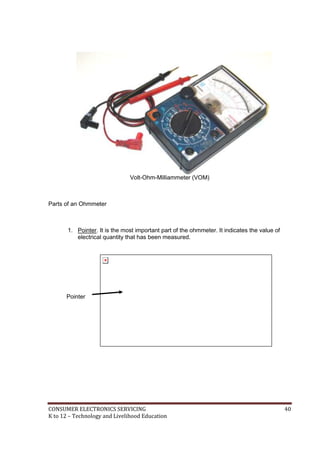
1. Pointer. It is the most important part of the ohmmeter. It indicates the value of 
electrical quantity that has been measured. 
Pointer 
CONSUMER ELECTRONICS SERVICING 40 
K to 12 – Technology and Livelihood Education
2. Ohmmeter Scale- Nonlinear scale where reading of the resistance is based. It is 
usually found in the uppermost part of the VOM. 
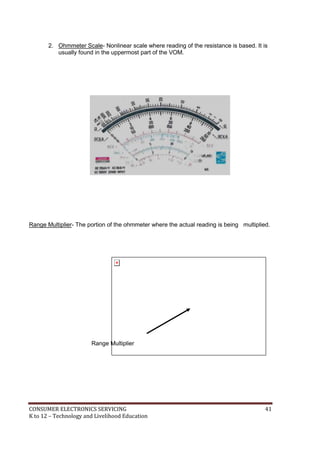
Range Multiplier- The portion of the ohmmeter where the actual reading is being multiplied. 
Range Multiplier 
CONSUMER ELECTRONICS SERVICING 41 
K to 12 – Technology and Livelihood Education
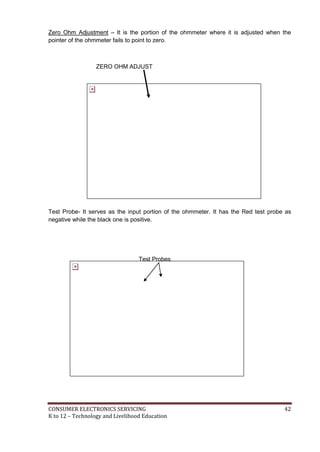
Zero Ohm Adjustment – It is the portion of the ohmmeter where it is adjusted when the 
pointer of the ohmmeter fails to point to zero. 
ZERO OHM ADJUST 
Test Probe- It serves as the input portion of the ohmmeter. It has the Red test probe as 
negative while the black one is positive. 
Test Probes 
CONSUMER ELECTRONICS SERVICING 42 
K to 12 – Technology and Livelihood Education
PROCEDURE ON HOW TO INTERPRET RESISTANCE READING IN AN 
OHMMETER 
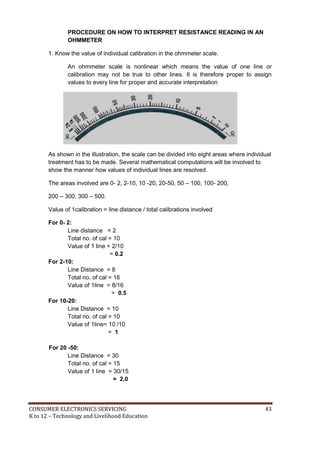
1. Know the value of individual calibration in the ohmmeter scale. 
An ohmmeter scale is nonlinear which means the value of one line or 
calibration may not be true to other lines. It is therefore proper to assign 
values to every line for proper and accurate interpretation 
As shown in the illustration, the scale can be divided into eight areas where individual 
treatment has to be made. Several mathematical computations will be involved to 
show the manner how values of individual lines are resolved. 
The areas involved are 0- 2, 2-10, 10 -20, 20-50, 50 – 100, 100- 200, 
200 – 300, 300 – 500. 
Value of 1calibration = line distance / total calibrations involved 
For 0- 2: 
Line distance = 2 
Total no. of cal = 10 
Value of 1 line = 2/10 
= 0.2 
For 2-10: 
Line Distance = 8 
Total no. of cal = 16 
Value of 1line = 8/16 
= 0.5 
For 10-20: 
Line Distance = 10 
Total no. of cal = 10 
Value of 1line= 10 /10 
= 1 
For 20 -50: 
Line Distance = 30 
Total no. of cal = 15 
Value of 1 line = 30/15 
= 2.0 
CONSUMER ELECTRONICS SERVICING 43 
K to 12 – Technology and Livelihood Education
For 50-100: 
Line Distance = 50 
Total no. of cal = 10 
Value of 1 line = 50/10 
= 5.0 
For 100 – 200: 
Line Distance = 100 
Total no. of cal = 5 
Value of 1 line = 100/5 
= 20 
For 200-300: 
Line Distance= 100 
Total no. of lines = 2 
Value of 1 line = 100/2 
= 50 
For 300–500: 
Line Distance = 200 
Total no. of cal= 2 
Value of 1 line = 200/2 
= 100 
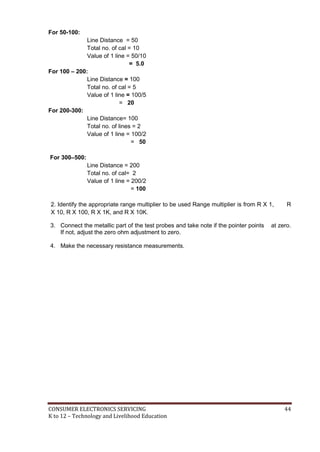
2. Identify the appropriate range multiplier to be used Range multiplier is from R X 1, R 
X 10, R X 100, R X 1K, and R X 10K. 
3. Connect the metallic part of the test probes and take note if the pointer points at zero. 
If not, adjust the zero ohm adjustment to zero. 
4. Make the necessary resistance measurements. 
CONSUMER ELECTRONICS SERVICING 44 
K to 12 – Technology and Livelihood Education
How Much Have You Learned? 
Self-Check 2.2 
Directions: Choose the best answer. Write the letter only. 
1. What is the instrument that is used to measure resistance? 
A) Ammeter C) Voltmeter 
B) Ohmmeter D) Wattmeter 
2. From what part of the ohmmeter do you derive resistance reading? 
A) Range Multiplier C) Test Probes 
B) Reading Scale D) Pointer 
3. What is the lowest range multiplier in an ohmmeter? 
A) RX 1 C) R X 100 
B) R X 10 D) R X 1K 
4. The reading scale of the ohmmeter is of what type? 
A) Horizontal C) Nonlinear 
B) Linear D) Vertical 
5. In what instrument can you find the ohmmeter? 
A) Ammeter C) DMM 
B) Tube tester D) VOM 
Refer to the Answer Key. What is your score? 
CONSUMER ELECTRONICS SERVICING 45 
K to 12 – Technology and Livelihood Education
How Do You Apply What You Have Learned? 
Show that you learned something by doing this activity 
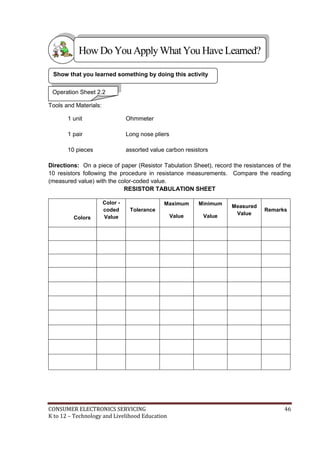
Operation Sheet 2.2 
Tools and Materials: 
1 unit Ohmmeter 
1 pair Long nose pliers 
10 pieces assorted value carbon resistors 
Directions: On a piece of paper (Resistor Tabulation Sheet), record the resistances of the 
10 resistors following the procedure in resistance measurements. Compare the reading 
(measured value) with the color-coded value. 
RESISTOR TABULATION SHEET 
Colors 
Color - 
coded 
Value 
Tolerance 
Maximum 
Value 
Minimum 
Value 
Measured 
Value 
Remarks 
CONSUMER ELECTRONICS SERVICING 46 
K to 12 – Technology and Livelihood Education
How Well Did You Perform? 
Find out by accomplishing the Scoring Rubric honestly and sincerely. 
Remember it is your learning at stake! 
 With perfect score of 10 ………………………….. 5 
 With 1 mistake …………………………………….. 4 
 With 2 – 3 mistakes…………………………………3 
 With 4 – 5 mistakes ………………………………...2 
 With more than 5 mistakes ………………………. 1 
CONSUMER ELECTRONICS SERVICING 47 
K to 12 – Technology and Livelihood Education
LEARNING OUTCOME 3 
Maintain measuring instruments 
PERFORMANCE STANDARDS 
 Measuring instruments are handled properly to avoid damage. 
 Measuring instruments are cleaned before and after using 
 Proper storage of instruments is undertaken according to the 
manufacturer’s specifications and standard operating procedure. 
Materials 
What Do You Already Know? 
Let us determine how much you already know about maintaining measuring 
instrument. Take this test. 
Pretest LO 3 
Directions: Choose the best answer and write the letter only. 
1. Which instrument serves as 3 measuring instruments in one? 
A) Audio Generator C) Signal Generator 
B) Oscilloscope D) VOM 
2. Which device produces simple wave forms? 
A) Audio Amplifier C) Signal tracer 
B) VOM D) Signal Generator 
3. Where is the function switch rested if an off position is not available In the VOM? 
A) 10VDC C) 100 VAC 
B) 50 VAC D) 250 VAC 
CONSUMER ELECTRONICS SERVICING 48 
K to 12 – Technology and Livelihood Education
4. Place instruments in a cool dry place and away from any 
____________devices. 
A) Audio amplifiers C) Magnetic devices 
B) Other instruments D) Digital sources 
5. What measuring instrument should be given regular check up by connecting it 
to power line? 
A) Capacitor Tester C) Oscilloscope 
B) DMM D) VOM 
] 
What Do You Need To Know? 
Read Information Sheet 3.1 very well then find out how much you can remember 
and how much you learned by doing Self-Check. 
Information Sheet 3.1 
Measuring instruments in electronics are confined only to analog testers and 
sometimes digital millimeter. Either way the maintenance of these instruments is a 
priority in all electronics laboratory rooms. 
Electronic Measuring Instruments 
Aside from hand tools, measuring instruments are also needed for more 
accurate and quality output. In this connection, three of the most used instruments 
are presented here for you to be familiar with their uses and the proper way of 
maintaining them. 
CONSUMER ELECTRONICS SERVICING 49 
K to 12 – Technology and Livelihood Education
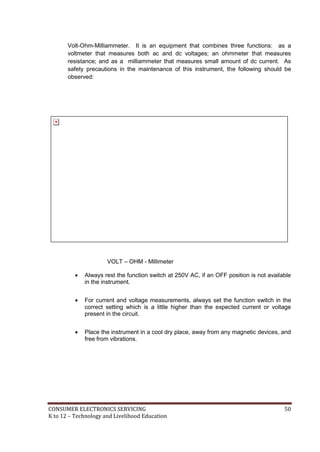
Volt-Ohm-Milliammeter. It is an equipment that combines three functions: as a 
voltmeter that measures both ac and dc voltages; an ohmmeter that measures 
resistance; and as a milliammeter that measures small amount of dc current. As 
safety precautions in the maintenance of this instrument, the following should be 
observed: 
VOLT – OHM - Millimeter 
 Always rest the function switch at 250V AC, if an OFF position is not available 
in the instrument. 
 For current and voltage measurements, always set the function switch in the 
correct setting which is a little higher than the expected current or voltage 
present in the circuit. 
 Place the instrument in a cool dry place, away from any magnetic devices, and 
free from vibrations. 
CONSUMER ELECTRONICS SERVICING 50 
K to 12 – Technology and Livelihood Education
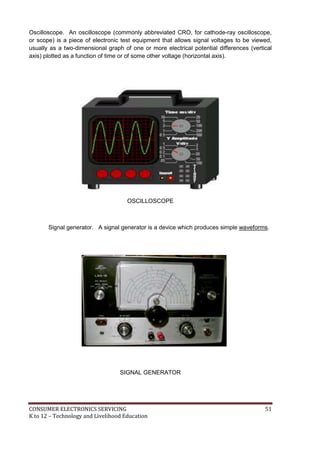
Oscilloscope. An oscilloscope (commonly abbreviated CRO, for cathode-ray oscilloscope, 
oscope 
or scope) is a piece of electronic test equipment that allows signal voltages to be viewed, 
usually as a two-dimensional graph of one or more electrical potential differences (vertical 
axis) plotted as a function of time or of some other voltage (horizontal axis). 
OSCILLOSCOPE 
Signal generator. A signal generator is a device which produces simple waveforms. 
SIGNAL GENERATOR 
CONSUMER ELECTRONICS SERVICING 51 
K to 12 – Technology and Livelihood Education
Such devices contain an electronic oscillator, a circuit that is capable of creating a 
repetitive waveform. These are typically used in simple electronics repair and design where 
they are used to stimulate a circuit under test. 
Oscilloscope and signal generator should be given regular checkup for at least once 
a week by connecting them to the power line. This will help prevent their components from 
having moisture that might cause trouble in their circuits. 
In any activity involving skills, it is a standard procedure that you must always use 
the right tool or equipment properly needed for particular task. However, in spite of this 
reminder or caution, some students abuse the use of tools. 
How Much Have You Learned? 
Self-Check 3.1 
Directions: Choose the best answer and write the letter only. 
1. What is the instrument that serves as 3 measuring instruments in one? 
A) Audio Generator C) Signal Generator 
B) Oscilloscope D) VOM 
2. What is a device which produces simple wave forms? 
A) Audio Amplifier C) Signal tracer 
B) VOM D) Signal Generator 
3. Where is the function switch rested if an off position is not available in the VOM? 
A) 10VDC C) !00 VAC 
B) 50 VAC D) 250 VAC 
4. Place instruments in a cool dry place and away from any ____________ devices. 
A) Other instruments C) Magnetic devices 
B) Audio amplifiers D) Digital sources 
5. What measuring instrument should be given regular checkup by connecting them 
to power line? 
A) Capacitor Tester C) Oscilloscope 
B) DMM D) VOM 
Refer to the Answer Key. What is your score? 
CONSUMER ELECTRONICS SERVICING 52 
K to 12 – Technology and Livelihood Education
Congratulations! You did a great job! Rest and 
relax a while then move on to the next lesson. 
Good luck! 
REFERENCES 
 Enriquez, Marcelo T., Electronics Technology IV; 
Souvenir Publications, Inc. 2003 
 Grob, Bernard, Basic Electronics, 4th Edition; 
New York: McGraw-Hill Company, USA: 1982 
 Tan, Michael Q.; Gantalao, Fred T.; Lasala, Rommel M. 
Simple Electronics; Andes Mountain Printers; 2004 
CONSUMER ELECTRONICS SERVICING 53 
K to 12 – Technology and Livelihood Education
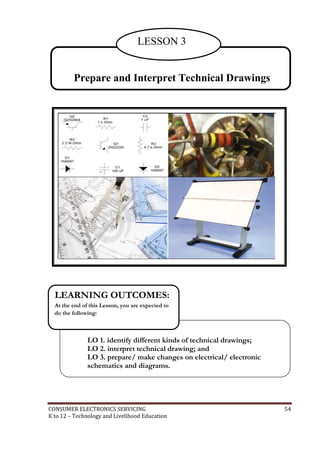
LESSON 3 
Prepare and Interpret Technical Drawings 
LEARNING OUTCOMES: 
At the end of this Lesson, you are expected to 
do the following: 
LO 1. identify different kinds of technical drawings; 
LO 2. interpret technical drawing; and 
LO 3. prepare/ make changes on electrical/ electronic 
schematics and diagrams. 
CONSUMER ELECTRONICS SERVICING 54 
K to 12 – Technology and Livelihood Education
Definition of Terms 
AC voltage - a voltage in which the polarity alternates 
Anode - the positive electrode or terminal of a device. The “P” material of a diode 
Bridge Rectifier - a circuit using four diodes to provide full-wave rectification. It 
converts AC voltage to a pulsating DC voltage 
Calibration – used to adjust the correct value of a reading with comparison to a 
standard value 
Color Code - set of colors used to indicate value of a component 
DC Power Supply – converts alternating current to direct current power source 
Diode - a two terminal device that conducts in only one direction 
Full Wave Rectifier - the rectifier that makes use of the full ac wave in both positive 
and negative half cycles 
Fuse - a device in the current path that melts or breaks when current protective 
exceeds a predetermined maximum value 
Half Wave Rectifier - a diode rectifier that converts AC to pulsating DC by eliminating 
either the negative or positive alternation of each input AC cycle 
Leakage - small undesirable flow of current through an insulator or dielectric 
Light Emitting Diode - a semiconductor diode that converts electric energy into 
electromagnetic radiation at a visible and near infrared 
frequencies when its PN junction is forward bias 
Output - terminal at which a component, circuit or piece of equipment delivers 
current, voltage or power 
Power Supply - electrical equipment used to deliver either AC or DC voltage 
Primary - first winding of a transformer winding that is connected to the source as 
opposed to secondary which is a winding connected to a load 
Printed Circuit Board (PCB) - insulating board containing conductive tracks for 
circuit connections 
Rectification - process that converts alternating current to direct current 
Rectifier - diode circuit that converts AC to pulsating DC 
CONSUMER ELECTRONICS SERVICING 55 
K to 12 – Technology and Livelihood Education
Regulated Power Supply - power supply that maintains a constant output voltage under 
changing load condition 
Rotary Switch - electromechanical device that has a rotating shaft connected to one 
terminal capable of making, breaking a connection to one or more other 
terminals 
Schematic Diagram - illustration of an electrical or electronic circuit with the 
components represented by their symbol 
Secondary - output winding of a transformer winding that is connected to a load 
Short Circuit - Low resistance connection between two points in a circuit typically 
causing excessive current and overheating 
Solder - metallic alloy used to join two metal surfaces 
Soldering Iron - tool with an internal heating element used to heat surfaces being 
soldered where the solder becomes molten 
Substrate - mechanical insulating support upon which a device is fabricated 
Switch - electrical device having two states, ON (closed) or OFF (open) 
Test - sequence of operations intended to verify the correct operation or malfunctioning 
of a piece of equipment or system 
Transformer - inductor with two or more windings 
Troubleshooting - systematic approach to locate the cause of a fault in an electronic 
circuit or system 
Volt-Ohm-Milliammeter - known as a multitester. A test equipment used to check AC, 
DC voltages, current in a circuit and resistance of any components out 
of the circuit 
CONSUMER ELECTRONICS SERVICING 56 
K to 12 – Technology and Livelihood Education
LEARNING OUTCOME 1 
Identifying different kinds of technical drawings 
PERFORMANCE STANDARDS 
 Correct technical drawing is selected according to job 
requirements. 
 Technical drawings are segregated in accordance with the types 
and kinds of drawings. 
What Do You Already Know? 
Let us determine how much you already know about identifying different kinds of 
technical drawings. Take this test. 
Pretest LO 1 
DIRECTIONS: Write the letter of the best answer on the space provided for before each 
number. Use another sheet of paper for your answer. 
______ 1. A drawing instrument consisting of two parts namely the stock and the blade, 
joined together at right angles to each other by means of screws. 
A. L-square C. T-square 
B. Try square D. Protractor 
______ 2. It is a combination of T-squares, scales, set squares, and protractors attached to 
a drawing board. 
A. Drafter C. Drawing set 
B. Electronic template D. French curve 
______ 3. This device includes symbols for electronic and electrical design that can be 
traced using a drawing pencil. 
A. Triangular rule C. French curve 
B. Electronic manual D. Electronic template 
CONSUMER ELECTRONICS SERVICING 57 
K to 12 – Technology and Livelihood Education
______ 4. It is a smooth board usually rectangular in shape provided with perfectly 
straight edge which is used as working edge on which the T-square is 
moved while making drawings. 
A. Drawing board C. T-square 
B. Breadboard D. Set of squares 
_______ 5. A drawing instrument with two legs hinged at one end and is used for 
drawing circles and arcs of circles. 
A. Drafting pen C. Technical pen 
B. Compass D. Protractor 
Criteria for Evaluating Results of Pre-Test 
100%-skip the Learning Outcome and proceed to the next Learning Outcome 
99%-below – Go through the Learning Outcome 
What Do You Need To Know? 
Read Information Sheet 1.1 very well then find out how much you can remember 
and how much you learned by doing Self-check 1.1. 
Information Sheet 1.1 
When you purchase a brand new appliance or equipment, it is very important that a 
diagram is included with the product to insure that there will be a reference material 
in case the appliance or equipment becomes defective. Shown in Fig. 1-1a is the 
schematic diagram of a 1-watt stereo audio amplifier, while Fig. 1-1b is its pictorial 
diagram. 
CONSUMER ELECTRONICS SERVICING 58 
K to 12 – Technology and Livelihood Education
Fig. 1-1a. Schematic diagram of the 1-watt stereo amplifier. 
Fig. 1-1b. Pictorial diagram of the 1-watt stereo amplifier. 
CONSUMER ELECTRONICS SERVICING 59 
K to 12 – Technology and Livelihood Education
To produce a quality and marketable electronic diagram, you have to follow 
the Electronic Drafting Standards which is the process of illustrating various kinds of 
circuits and wiring systems. 
The most common graphical languages used in the illustration of components 
in circuits and wiring systems are block, schematic, wiring, and pictorial 
diagrams. 
Most symbols that you will encounter in laying out electronic diagrams are 
accepted as standard, but in some cases some manufacturers modify symbols and 
practices to suit a particular industrial policy while others use their own symbols to 
represent unique or special component and devices. 
o you know that electronic symbols and their use in conjunction with 
recommended drafting practices have been developed through the 
years, and have been standardized by a number of different 
organizations? Among these are the American National Standards 
D 
Institute (ANSI), the Electronics Industries Association (IEA), the Institute of Electrical 
and Electronics Engineers (IEEE), and the International Electrotechnical Commission 
(IEC). 
CONSUMER ELECTRONICS SERVICING 60 
K to 12 – Technology and Livelihood Education
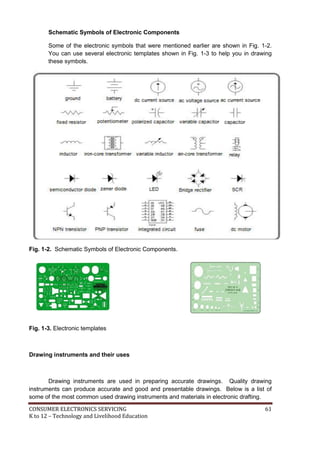
Schematic Symbols of Electronic Components 
Some of the electronic symbols that were mentioned earlier are shown in Fig. 1-2. 
You can use several electronic templates shown in Fig. 1-3 to help you in drawing 
these symbols. 
Fig. 1-2. Schematic Symbols of Electronic Components. 
Fig. 1-3. Electronic templates 
Drawing instruments and their uses 
Drawing instruments are used in preparing accurate drawings. Quality drawing 
instruments can produce accurate and good and presentable drawings. Below is a list of 
some of the most common used drawing instruments and materials in electronic drafting. 
CONSUMER ELECTRONICS SERVICING 61 
K to 12 – Technology and Livelihood Education
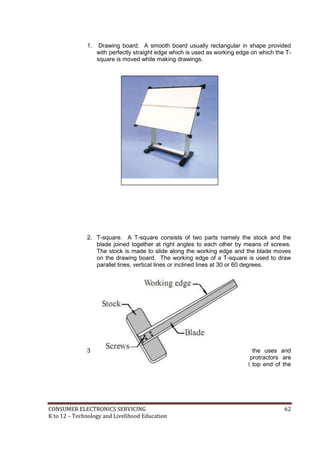
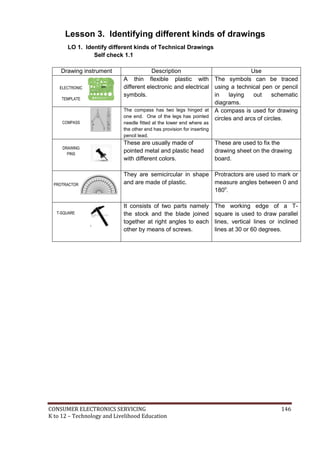
1. Drawing board. A smooth board usually rectangular in shape provided 
with perfectly straight edge which is used as working edge on which the T-square 
is moved while making drawings. 
2. T-square. A T-square consists of two parts namely the stock and the 
blade joined together at right angles to each other by means of screws. 
The stock is made to slide along the working edge and the blade moves 
on the drawing board. The working edge of a T-square is used to draw 
parallel lines, vertical lines or inclined lines at 30 or 60 degrees. 
3. Drafting machine or drafter. In a drafting machine, the uses and 
advantages of T-squares, scales, set squares, and protractors are 
combined. One end of the drafter is clamped at the left top end of the 
drawing board by a screw provided in the drafter. 
CONSUMER ELECTRONICS SERVICING 62 
K to 12 – Technology and Livelihood Education
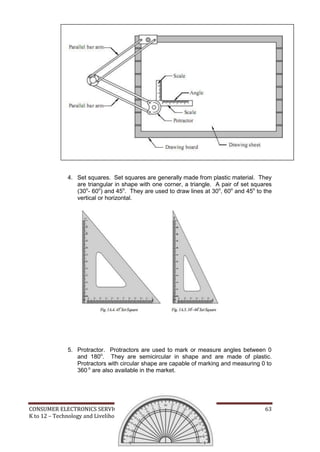
4. Set squares. Set squares are generally made from plastic material. They 
are triangular in shape with one corner, a triangle. A pair of set squares 
(30o- 60o) and 45o. They are used to draw lines at 30o, 60o and 45o to the 
vertical or horizontal. 
5. Protractor. Protractors are used to mark or measure angles between 0 
and 180o. They are semicircular in shape and are made of plastic. 
Protractors with circular shape are capable of marking and measuring 0 to 
360 o are also available in the market. 
CONSUMER ELECTRONICS SERVICING 63 
K to 12 – Technology and Livelihood Education
6. Drawing pencils. The accuracy and appearance of a drawing depends on 
the quality of pencil used to make drawing. The grade of a pencil lead is 
marked on the pencil. HB denotes medium grade. Increase in hardness 
is shown by the value put in front of H such as 2H, 3H, etc. Softer pencils 
are marked as 2B, 3B, and 4B etc. A pencil marked 3B is softer than 2B 
and pencil marked 4B is softer than 3B and so on. Beginning of a drawing 
may be made with H or 2H. For lettering and dimensioning, H or HB 
pencils are used. 
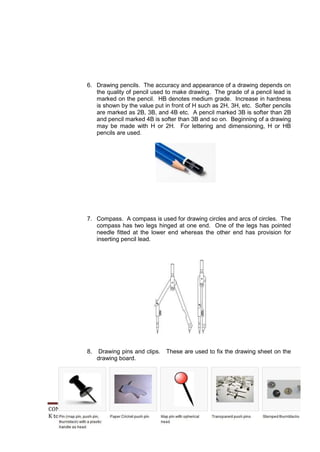
7. Compass. A compass is used for drawing circles and arcs of circles. The 
compass has two legs hinged at one end. One of the legs has pointed 
needle fitted at the lower end whereas the other end has provision for 
inserting pencil lead. 
8. Drawing pins and clips. These are used to fix the drawing sheet on the 
drawing board. 
CONSUMER ELECTRONICS SERVICING 64 
K to 12 – Technology and Livelihood Education
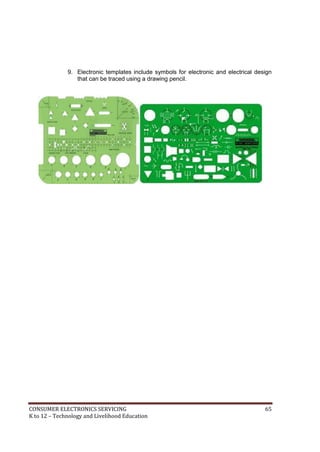
9. Electronic templates include symbols for electronic and electrical design 
that can be traced using a drawing pencil. 
CONSUMER ELECTRONICS SERVICING 65 
K to 12 – Technology and Livelihood Education
How Much Have You Learned? 
Self-Check 1.1 
DIRECTIONS: Draw at least five (5) drawing instruments, describe and give the 
function of each. 
Drawing instrument Description Use 
Refer to the Answer Key. What is your score? 
CONSUMER ELECTRONICS SERVICING 66 
K to 12 – Technology and Livelihood Education
What Do You Already Know? 
Let us determine how much you already know about the use farm tools and 
equipment. Take this test. 
Pretest LO 2.1 
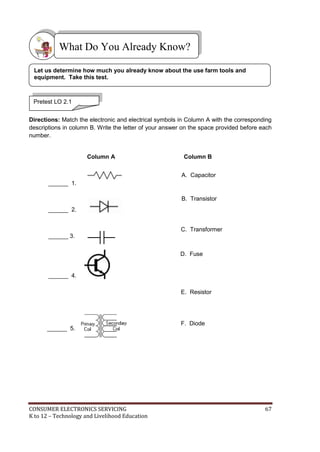
Directions: Match the electronic and electrical symbols in Column A with the corresponding 
descriptions in column B. Write the letter of your answer on the space provided before each 
number. 
Column A Column B 
______ 1. 
______ 2. 
______ 3. 
______ 4. 
______ 5. 
A. Capacitor 
B. Transistor 
C. Transformer 
D. Fuse 
E. Resistor 
F. Diode 
CONSUMER ELECTRONICS SERVICING 67 
K to 12 – Technology and Livelihood Education
Read Information Sheet 1.2 very well then find out how much you can remember 
and how much you learned by doing Self-check 1.2. 
Information Sheet 2.1 
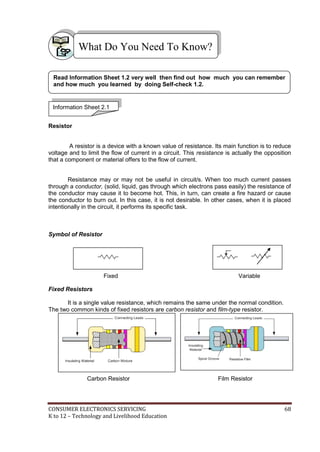
Resistor 
What Do You Need To Know? 
A resistor is a device with a known value of resistance. Its main function is to reduce 
voltage and to limit the flow of current in a circuit. This resistance is actually the opposition 
that a component or material offers to the flow of current. 
Resistance may or may not be useful in circuit/s. When too much current passes 
through a conductor, (solid, liquid, gas through which electrons pass easily) the resistance of 
the conductor may cause it to become hot. This, in turn, can create a fire hazard or cause 
the conductor to burn out. In this case, it is not desirable. In other cases, when it is placed 
intentionally in the circuit, it performs its specific task. 
Symbol of Resistor 
Fixed Variable 
Fixed Resistors 
It is a single value resistance, which remains the same under the normal condition. 
The two common kinds of fixed resistors are carbon resistor and film-type resistor. 
Carbon Resistor Film Resistor 
CONSUMER ELECTRONICS SERVICING 68 
K to 12 – Technology and Livelihood Education
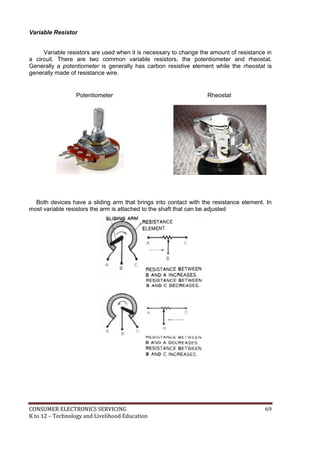
Variable Resistor 
Variable resistors are used when it is necessary to change the amount of resistance in 
a circuit. There are two common variable resistors, the potentiometer and rheostat. 
Generally a potentiometer is generally has carbon resistive element while the rheostat is 
generally made of resistance wire. 
Potentiometer Rheostat 
Both devices have a sliding arm that brings into contact with the resistance element. In 
most variable resistors the arm is attached to the shaft that can be adjusted 
CONSUMER ELECTRONICS SERVICING 69 
K to 12 – Technology and Livelihood Education
A potentiometer is commonly used as control device. It can be used to vary the value of 
voltage applied to a certain circuit such as in the amplifier, television, and different kinds of 
meter circuit. 
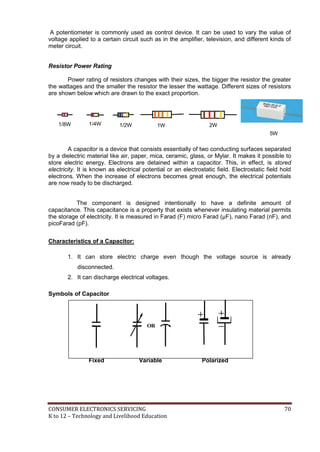
Resistor Power Rating 
Power rating of resistors changes with their sizes, the bigger the resistor the greater 
the wattages and the smaller the resistor the lesser the wattage. Different sizes of resistors 
are shown below which are drawn to the exact proportion. 
1/8W 1/4W 1/2W 1W 2W 
5W 
A capacitor is a device that consists essentially of two conducting surfaces separated 
by a dielectric material like air, paper, mica, ceramic, glass, or Mylar. It makes it possible to 
store electric energy. Electrons are detained within a capacitor. This, in effect, is stored 
electricity. It is known as electrical potential or an electrostatic field. Electrostatic field hold 
electrons. When the increase of electrons becomes great enough, the electrical potentials 
are now ready to be discharged. 
The component is designed intentionally to have a definite amount of 
capacitance. This capacitance is a property that exists whenever insulating material permits 
the storage of electricity. It is measured in Farad (F) micro Farad (μF), nano Farad (nF), and 
picoFarad (pF). 
Characteristics of a Capacitor: 
1. It can store electric charge even though the voltage source is already 
disconnected. 
2. It can discharge electrical voltages. 
Symbols of Capacitor 
OR 
Fixed Variable Polarized 
CONSUMER ELECTRONICS SERVICING 70 
K to 12 – Technology and Livelihood Education
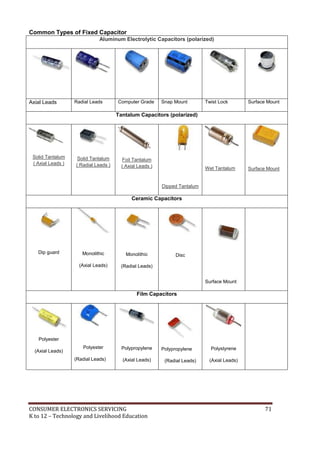
Common Types of Fixed Capacitor 
Aluminum Electrolytic Capacitors (polarized) 
Axial Leads Radial Leads Computer Grade Snap Mount Twist Lock Surface Mount 
Tantalum Capacitors (polarized) 
Solid Tantalum 
( Axial Leads ) 
Solid Tantalum 
( Radial Leads ) 
Foil Tantalum 
( Axial Leads ) 
Dipped Tantalum 
Wet Tantalum 
Surface Mount 
Ceramic Capacitors 
Dip guard 
Monolithic 
(Axial Leads) 
Monolithic 
(Radial Leads) 
Disc 
Surface Mount 
Film Capacitors 
Polyester 
(Axial Leads) 
Polyester 
(Radial Leads) 
Polypropylene 
(Axial Leads) 
Polypropylene 
(Radial Leads) 
Polystyrene 
(Axial Leads) 
CONSUMER ELECTRONICS SERVICING 71 
K to 12 – Technology and Livelihood Education
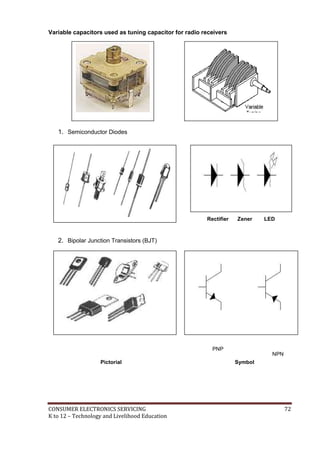
Variable capacitors used as tuning capacitor for radio receivers 
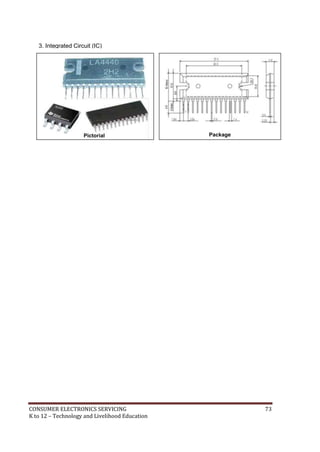
1. Semiconductor Diodes 
2. Bipolar Junction Transistors (BJT) 
Rectifier Zener LED 
PNP 
NPN 
Pictorial Symbol 
CONSUMER ELECTRONICS SERVICING 72 
K to 12 – Technology and Livelihood Education
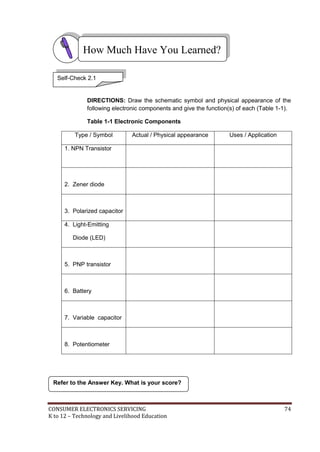
3. Integrated Circuit (IC) 
Pictorial Package 
CONSUMER ELECTRONICS SERVICING 73 
K to 12 – Technology and Livelihood Education
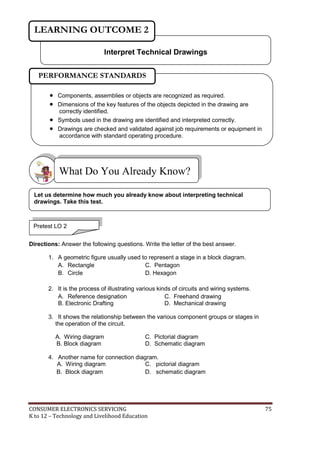
How Much Have You Learned? 
Self-Check 2.1 
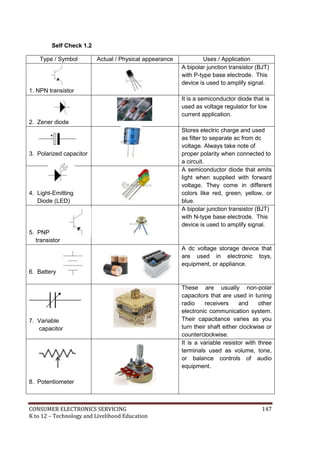
DIRECTIONS: Draw the schematic symbol and physical appearance of the 
following electronic components and give the function(s) of each (Table 1-1). 
Table 1-1 Electronic Components 
Type / Symbol Actual / Physical appearance Uses / Application 
1. NPN Transistor 
2. Zener diode 
3. Polarized capacitor 
4. Light-Emitting 
Diode (LED) 
5. PNP transistor 
6. Battery 
7. Variable capacitor 
8. Potentiometer 
Refer to the Answer Key. What is your score? 
CONSUMER ELECTRONICS SERVICING 74 
K to 12 – Technology and Livelihood Education
LEARNING OUTCOME 2 
Interpret Technical Drawings 
PERFORMANCE STANDARDS 
 Components, assemblies or objects are recognized as required. 
 Dimensions of the key features of the objects depicted in the drawing are 
correctly identified. 
 Symbols used in the drawing are identified and interpreted correctly. 
 Drawings are checked and validated against job requirements or equipment in 
accordance with standard operating procedure. 
What Do You Already Know? 
Let us determine how much you already know about interpreting technical 
drawings. Take this test. 
Pretest LO 2 
Directions: Answer the following questions. Write the letter of the best answer. 
1. A geometric figure usually used to represent a stage in a block diagram. 
A. Rectangle C. Pentagon 
B. Circle D. Hexagon 
2. It is the process of illustrating various kinds of circuits and wiring systems. 
A. Reference designation C. Freehand drawing 
B. Electronic Drafting D. Mechanical drawing 
3. It shows the relationship between the various component groups or stages in 
the operation of the circuit. 
A. Wiring diagram C. Pictorial diagram 
B. Block diagram D. Schematic diagram 
4. Another name for connection diagram. 
A. Wiring diagram C. pictorial diagram 
B. Block diagram D. schematic diagram 
CONSUMER ELECTRONICS SERVICING 75 
K to 12 – Technology and Livelihood Education
5. It is a picture or a sketch drawn to show the component of a circuit and how 
These components are connected together. 
A. Wiring diagram C. Pictorial diagram 
B. Block diagram D. Schematic diagram 
Criteria for Evaluating Results of Pre-Test 
100%-skip the Learning Outcome and proceed to the next Learning Outcome 
99%-below – Go through the Learning Outcome 
What Do You Need To Know? 
Read Information Sheet 2.1 very well then find out how much you can remember 
and how much you learned by doing Self-check 2.1. 
Information Sheet 2.1 
All electronic circuits from the simplest to the most complex design need 
diagrams to be used as reference in designing, modifying, and troubleshooting the 
circuit. The most common used electronic diagrams are schematic, pictorial, wiring, 
and block diagrams. Each one of these diagrams has its own unique characteristics 
in presenting the circuit. The different diagrams that you should be familiar with are 
the following: 
Pictorial diagram - It shows the pictures of the actual components and wiring 
connections although it does not provide the exact size of components. It shows 
exact shape in proportion to the actual component or device. 
CONSUMER ELECTRONICS SERVICING 76 
K to 12 – Technology and Livelihood Education
Pictorial Diagram of a Regulated Power Supply 
Block Diagram – This form usually uses block of squares, rectangles or triangles to 
represent components, group of components or units of equivalent. Block diagrams are 
particularly used to represent internal components of an integrated circuit. 
POWER 
TRANSFORMER 
DIODES OR 
RECTIFIERS 
FILTER CIRCUIT 
Block Diagram of a Regulated Power Supply 
REGULATOR 
CIRCUIT 
Schematic diagram – A diagram that shows the components used in their interconnection. 
Each graphic symbol is also accompanied with a reference designation to distinguish it from 
other similar symbols. It does not illustrate the physical size, shape or chassis location of 
the component parts and devices. 
CONSUMER ELECTRONICS SERVICING 77 
K to 12 – Technology and Livelihood Education
Schematic Diagram of a Regulated Power Supply (power transformer is NOT shown) 
Wiring diagram – A diagram that shows wiring connection in a simplified, easy to follow 
manner. It may show either internal or external connections or both and is usually drawn as 
simple as possible to trace out the connection of a circuit. The components of the circuit are 
identified by name or are represented by means of pictorial illustrations that do not follow 
any well-defined standard form. 
Wiring diagram of a selector switch for different input multi-media equipment 
CONSUMER ELECTRONICS SERVICING 78 
K to 12 – Technology and Livelihood Education
How Much Have You Learned? 
Self-Check 2.1 
DIRECTIONS: Shown below are different electronic diagrams. Write the name of the 
diagram in the space provided for at the bottom of each diagram. 
1.______________________ 2.______________________ 
3.______________________ 
4.______________________ 5.______________________ 
Refer to the Answer Key. What is your score? 
CONSUMER ELECTRONICS SERVICING 79 
K to 12 – Technology and Livelihood Education
LEARNING OUTCOME 3 
Prepare electronic diagrams 
PERFORMANCE STANDARDS 
 Electrical/ electronic schematic diagrams are drawn and correctly identified. 
 Correct drawings are identified, equipment are selected and used in 
accordance with job requirements 
What Do You Already Know? 
Let us determine how much you already know about preparing electronic 
diagrams. Take this test. 
Pretest LO 3 
Directions: Answer the following questions. Encircle the letter of the best 
answer. 
1. If the Greek letter Omega (Ω) appears in a schematic diagram, the 
component 
value being represented is a 
A. Capacitor C. Transformer 
B. Transistor D. Resistor 
2. The labels of a capacitor C1A and C1B in a diagram are examples of _____. 
A. Designated letters C. Subscript letters 
B. Suffix letters D. Coefficient letters 
3. These types of lines are used on schematic diagrams to show a mechanical 
linkage between components. 
A. Dashed lines C. Thick lines 
B. Medium lines D. Thin lines 
CONSUMER ELECTRONICS SERVICING 80 
K to 12 – Technology and Livelihood Education
4. One of these is NOT given in a schematic diagram 
A. Wiring specifications C. Actual appearance of components 
B. Point-to-point resistance values D. Operating instructions 
5. The symbols on a schematic diagram are arranged so that the diagram can be 
“read” in this manner. 
A. Top to bottom C. Right to left 
B. Bottom to top D. Left to right 
Criteria for Evaluating Results 
100%-skip the Learning Outcome and proceed to the next Learning Outcome 
99%-below – Go through the Learning Outcome 
What Do You Need To Know? 
Read Information Sheet 3.1 very well then find out how much you can remember 
and how much you learned by doing Self-check 3.1. 
Information Sheet 3.1 
One of the features of a quality electronic diagram is its appearance with simplicity in 
design and easy-to-understand layout. To achieve this, you have to follow the following 
standards in laying out electronic diagrams. 
Rules for Drawing Symbols 
Recommended practices to be used in the application of symbols to a circuit diagram 
are listed below. 
1. The position of a symbol on a diagram does not affect its meaning. 
2. The weight of a line used in drawing a symbol does not affect its meaning. In some 
cases, a heavier line may be used to emphasize a particular symbol. 
3. A given symbol may be drawn in any size that is suitable for use in any particular 
diagram. However, when a symbol is enlarged or reduced in size, it should be 
drawn in proportion to the rest of the drawing. 
CONSUMER ELECTRONICS SERVICING 81 
K to 12 – Technology and Livelihood Education
4. If necessary for contrast, some symbols may be drawn smaller or larger than 
other symbols on a diagram. However, for simplicity, it is recommended that 
not more than two different sizes of symbols be used on any one diagram. 
5. In general, a connecting line should be brought to a symbol either vertically or 
horizontally, but a connecting line brought to a symbol at an angle has no 
particular significance unless otherwise noted. 
6. The arrowhead of a symbol may be open ( ) or closed ( ) unless 
otherwise noted. 
7. The standard symbol for terminal (o) may be added to any symbol. But when 
this is done, the terminal symbol should not be considered a part of the 
symbol itself. 
Reference Designations 
The symbols used to represent various components on a circuit diagram are most 
often accompanied by a combination of letters that identify the components but 
are not themselves a part of the symbol (Table 3-1). 
Table 3-1. Reference Designations of Electronic Components 
Components Class Designation Letter(s) 
Capacitor C 
Diode D 
Resistor R 
Switch S or SW 
Transformer T 
Transistor Q or TR 
When more than one symbol of a specific type of component appears on a 
diagram, the letter (or letters) is followed by numbers that identify the 
components. These combinations of letters and numbers are referred to as 
reference designations (Fig. 3-1). 
CONSUMER ELECTRONICS SERVICING 82 
K to 12 – Technology and Livelihood Education
Fig. 3-1. Recommended methods of indicating reference designations and component 
values. 
Numerical Values of Components 
When details of the type, rating or value of a particular component are to be given on 
a diagram, this information is placed adjacent to the symbol or is given by means of notes 
accompanying the diagram. For example, resistance and capacitance values are indicated 
as shown in Fig. 3-1. In this scheme, the symbol Ω for ohms and the abbreviations μF and 
pF for capacitance values are usually omitted and are instead replaced by notes such as the 
following: 
1. All resistors expressed in ohms unless otherwise indicated. 
2. All capacitors expressed in microfarads unless otherwise indicated. 
A resistance value of 1,000 ohms or more is most often expressed in terms of Kilohm 
(K) or Meghm (M) units. Thus a resistance of 4,700 ohms is written as 4.7K, while a 
resistance of 270,000 ohms may be written as 270K or as 0.27M. The comma used when 
writing a 4-digit number such as 4,700 is not used when such a number is given on a 
diagram. 
Capacitance values of 1 through 9,999 picofarads are usually expressed in picofarad 
units. Capacitance values greater than 10,000 picofarads should be expressed in 
microfarad units. 
Suffix Letters 
Suffix letters are used to identify separate parts of a unit upon a diagram when such 
components appear as a single, enclosed unit as shown in Fig. 3-2. C1A and C1B are the 
suffix letters used in the diagram. 
CONSUMER ELECTRONICS SERVICING 83 
K to 12 – Technology and Livelihood Education
C1A C1B 
Fig. 3-2. Two capacitors are enclosed in one unit. 
Layout 
The layout or form of a diagram should show the main features prominently. The 
parts of a diagram should be carefully spaced to provide an even balance between 
blank spaces and lines. Enough blank space should be left in the areas near 
symbols to avoid crowding any necessary notes or reference information (Fig. 3-3). 
Fig. 3-3. Schematic diagram of an audio amplifier. 
Line Thickness 
As with other types of diagrams, a schedule of line weights or line 
conventions is used in drawing electrical and electronics diagrams. The standard 
line conventions used in the preparation of these diagrams are shown in Table 3-2. 
CONSUMER ELECTRONICS SERVICING 84 
K to 12 – Technology and Livelihood Education
Table 3-2. Line thickness 
Line application Line thickness 
For general use 
Medium 
Mechanical connection, shielding, and future 
circuits line 
Medium 
Bracket-connecting dash line 
Medium 
Brackets and leader lines 
Thin 
Boundary of mechanical grouping 
Thin 
For emphasis 
Thick 
CONSUMER ELECTRONICS SERVICING 85 
K to 12 – Technology and Livelihood Education
Connecting Lines 
Lines connecting symbols and other parts on a diagram should, whenever 
possible, be drawn either horizontally or vertically. As a general rule, no more than 
three lines should be drawn to any point on a circuit diagram (Fig. 3-4A). This 
procedure reduces the possibility of line crowding that could make the interpretation 
of a diagram more difficult than necessary. 
RECOMMENDED AVOID IF POSSIBLE 
(A) (B) 
Fig. 3-4. Connecting lines. (A) recommended and undesirable methods of 
drawing lines to a point upon a diagram, (B) two “groups” of connecting lines drawn 
parallel to each other. 
When connecting lines are drawn parallel to each other, the space between 
them should be at least 1/16 inch when the diagram is reduced to a final size. 
Interrupted Lines 
Connecting lines whether single or in groups, may be interrupted when a 
diagram does not provide for a continuation of these lines to their final destination. 
When a single line is interrupted, the line identification can also indicate the 
destination (Fig. 3-5A). When groups of lines are interrupted, the destination of the 
lines is usually given in conjunction with brackets (Fig. 3-5B). In all cases, the lines 
should be located as close as possible to the point of interruption. 
output 
Fig. 3-5A. Fig. 3-5B. 
TO LEFT AND RIGHT 
CHANNELS 
Fig. 3-5. Methods of identifying the destination of single and grouped connecting lines. 
CONSUMER ELECTRONICS SERVICING 86 
K to 12 – Technology and Livelihood Education
Dashed Lines 
Dashed lines (------) are used on schematic and other types of diagrams to show a 
mechanical linkage between components or parts of components (Fig. 3-6). 
Fig. 3-6. Dashed lines are used to indicate the mechanical linkage of a 2-pole, 3-position 
selector switch. 
CONSUMER ELECTRONICS SERVICING 87 
K to 12 – Technology and Livelihood Education
How Much Have You Learned? 
Self-Check 3.1 
DIRECTIONS: Write the letter of the best answer on the space provided for 
before each number. 
______ 1. A letter designation is written near or beside a symbol to indicate what 
type of component that symbol is. The letter designation for transistor is _______. 
A. Q C. S 
B. R D. T 
______ 2. These types of lines are used to show mechanical linkages between 
components or parts of components on schematic diagram. 
A. Connecting lines C. Medium lines 
B. Dashed lines D. Thin lines 
______ 3. This punctuation mark is used to show the destination of grouped 
interrupted lines in a diagram. 
A. Bracket C. Open and close quotations 
B. Comma D. Question mark 
______ 4. To avoid crowding of any necessary notes or reference information, 
enough blank space should be left in the areas near, which of the following elements 
on a schematic diagram should be considered? 
A. Component labels C. Dashed lines 
B. Connecting lines D. Symbols 
_______5. In a schematic diagram, values of resistors are usually labeled in this unit 
otherwise noted by the manufacturer. 
A. KΩ C. Ohms 
B. MΩ D. Resistance 
Refer to the Answer Key. What is your score? 
CONSUMER ELECTRONICS SERVICING 88 
K to 12 – Technology and Livelihood Education
How Do You Apply What You Have Learned? 
Show that you learned something by doing this activity. 
Operation Sheet 3.1 
I. Directions: Using your electronic template, redraw the schematic diagram of a six-input 
mixer shown below. Label all components using the values listed as parts list. Be sure 
to follow the rules in drawing symbols. 
Schematic diagram of a six-input audio mixer filter. 
Parts list: 
R1 – R6 = 22KΩ R16 = 68Ω 
R7 – R12 = 39K Ω R17 = 1KΩ 
R13 = 100K Ω C1 – C6 = 10μF/16V 
R14 = 2.2KΩ C7 – C8 = 47μF/16V 
R15 = 6.8KΩ Q1 = 2SC945 
CONSUMER ELECTRONICS SERVICING 89 
K to 12 – Technology and Livelihood Education
II. Redraw the diagram of a 30-watt audio amplifier shown below applying the 
standard drafting practices. Label all components of the 30-watt audio amplifier 
using the values listed in the parts list. 
Schematic diagram of a 30-watt audio amplifier. 
CONSUMER ELECTRONICS SERVICING 90 
K to 12 – Technology and Livelihood Education
III. DIRECTIONS: Shown in Fig. 3-7A is a schematic diagram of a 50-watt booster amplifier 
and in Fig. 3-7B is its pictorial diagram. Redraw the pictorial diagram and write in 
Table 3-3 the name of components/devices indicated by arrows and give their functions. 
Fig. 3-7A. Schematic diagram of a 50-watt booster amplifier. 
Fig. 3-7B. Pictorial diagram of a 50-watt booster amplifier. 
CONSUMER ELECTRONICS SERVICING 91 
K to 12 – Technology and Livelihood Education
Table 3-3. Name of components, devices and their functions. 
Name of component/device Function in the circuit 
1. 
2. 
3. 
4. 
5. 
6. 
7. 
8. 
IV. DIRECTIONS: Redraw the diagram of a discrete audio amplifier of a typical AM 
radio receiver shown below which is NOT properly drawn. Be sure to make your 
diagram more presentable by following the Standard Drafting Practices. 
C18 
CONSUMER ELECTRONICS SERVICING 92 
K to 12 – Technology and Livelihood Education
How Well Did You Perform? 
Find out by accomplishing the Scoring Rubric honestly and sincerely. 
Remember it is your learning at stake! 
ASSESSMENT PLAN 
Directions: Put a check on designated box if you observed the following criteria. 
 Get from assessment criteria of the module (CBC) 
YES NO 
 Electronic components are specified according to their 
jobs. 
 Electronic components are identified based on their 
functions. 
 Electronic components which do not conform to the 
quality standard are identified and marked for disposal. 
 Electronic diagrams are identified according to job 
requirements. 
 The equivalent components of the electronic symbols are 
identified. 
 The connection of the electronic symbols in a circuit is 
identified 
 The symbols used are appropriate to the electronic 
components. 
 Electronic diagrams are drawn based on the 
requirements of the job. 
 The diagrams drawn provide all the specifications 
required by the job identified. 
Prepared by: Date: 
Checked by: Date: 
CONSUMER ELECTRONICS SERVICING 93 
K to 12 – Technology and Livelihood Education
Observation Checklist 
Students name: 
Teachers name: 
Name of School 
Competency 
standards 
Unit of competency: 
Instructions for the teacher: 
1. Observe the student [insert description of activity being observed]. 
2. Describe the assessment activity and the date in which it was undertaken. 
3. Place a tick in the box to show that the student completed each aspect of the activity in 
accordance with the standard expected in the enterprise. 
4. Complete the feedback sections of the form. 
Date of observation 
Description of assessment 
activity 
Location of assessment activity 
The Student…… If yes, tick the box 
 
 
 
 
 
 
 
 
 
 
 
 
 
Did the student overall performance meet the standard? Yes No 
Feedback to student 
Teachers signature: Date: 
CONSUMER ELECTRONICS SERVICING 94 
K to 12 – Technology and Livelihood Education
Observation and Questioning Checklist 
Student’s name: 
Teacher’s name: 
Assessment Center 
Competency 
standards 
Unit of competency: 
Instructions for the teacher: 
1. Observe the student [insert description of activity being observed]. 
2. Describe the assessment activity and the date on which it was undertaken. 
3. Place a tick in the box to show that the student completed each aspect of the activity in 
accordance with the standard expected in the enterprise. 
4. Ask the student a selection of the questions from the attached list to confirm his/her 
underpinning knowledge. 
5. Place a tick in the box to show that the student answered the questions correctly. 
6. Complete the feedback sections of the form. 
Date of observation 
Description of assessment 
activity 
Location of assessment 
activity 
The student…. If yes, tick the box 
 can 
 
 
 
 
 
 
Did the student’s overall performance meet the standard? Yes No 
CONSUMER ELECTRONICS SERVICING 95 
K to 12 – Technology and Livelihood Education
Demonstration 
Students name: 
Teacher’s name: 
Unit of competency: 
Competency standards: 
Date of assessment: 
Time of assessment: 
Instructions for demonstration 
Given the necessary materials the trainee/student must be able to: 
Materials and equipment: 
 to show if evidence is 
demonstrated 
During the demonstration of skills, did the 
student: 
Yes No N/A 
   
   
   
   
The student’s demonstration was: 
Satisfactory  Not Satisfactory  
CONSUMER ELECTRONICS SERVICING 96 
K to 12 – Technology and Livelihood Education
PERFORMANCE TEST 
Student Name 
Date 
Competency: 
Test Attempt 
Directions: 
CALL TEACHER and ask 
him/her to assess your 
performance in the following 
critical task and performance 
criteria below 
You will be rated based on the 
overall evaluation on the right 
side. 
OVERALL EVALUATION 
Level 
Achieved 
1st 2nd 3rd 
PERFORMANCE LEVELS 
4 - Can perform this skill without 
supervision and with initiative and 
adaptability to problem situations. 
3 - Can perform this skill satisfactorily 
without assistance or supervision. 
2 - Can perform this skill satisfactorily but 
requires some assistance and/or 
supervision. 
1 - Can perform parts of this skill 
satisfactorily, but requires considerable 
assistance and/or supervision. 
Teacher will initial level achieved. 
CONSUMER ELECTRONICS SERVICING 97 
K to 12 – Technology and Livelihood Education
PERFORMANCE STANDARDS 
For acceptable achievement, all items should receive a "Yes" or 
"N/A" response. 
Yes 
No 
N/A 
Get from Performance criteria of the module (TR) 
CONSUMER ELECTRONICS SERVICING 98 
K to 12 – Technology and Livelihood Education
Written report 
Student’s name: 
Teacher’s name: 
Assessment Center 
Competency 
standards 
Unit of competency: 
Task: 
Your task is to: 
 [insert description of task] 
Submission date: 
Use the checklist below as a basis for judging whether the student’s report meets the 
required competency standards. 
The student’s report…. If yes, tick the box 
 can solve quantities needed through percentage 
 can tabulate data correctly 
 can convert temperature to the required temperature scale 
 can fill in appropriate form completely and correctly 
 can identify proper method of sealing packed products 
 can label correctly packed products 
Overall did the student’s report meet the standard? Yes No 
Comments: 
Student’s 
signature: 
Date: 
Teacher’s 
signature: 
Date: 
CONSUMER ELECTRONICS SERVICING 99 
K to 12 – Technology and Livelihood Education
Congratulations! You did a great job! Rest and 
relax a while then move on to the next lesson. 
Good luck! 
REFERENCES 
 Enriquez, Marcelo T. Electronics Technology IV; Souvenir Publications, Inc.: 
2003 
 L Tan, Michael Q., Gantalao, Fred T., Lasala, Rommel M. Simple Electronics; 
Andes Mountain Printers: 2004 
CONSUMER ELECTRONICS SERVICING 100 
K to 12 – Technology and Livelihood Education
LESSON 4 
Practice Occupational Health and Safety 
LEARNING OUTCOMES: 
At the end of this Lesson, you are expected to 
do the following: 
LO 1. identify health hazards and occupational risks; and 
LO 2. observe occupational and safety practices. 
CONSUMER ELECTRONICS SERVICING 101 
K to 12 – Technology and Livelihood Education
Definition of Terms 
Electronics Laboratory - a place where activities pertaining to electronics projects 
are done 
Electric shock - a sudden discharge of electricity 
Electrostatic discharge - releasing of the electrical charges produced by the human 
body to ground 
Gloves - covering of leather, cotton, silk, etc for the hand usually with separated 
fingers. 
Goggle - spectacles for protecting eyes from glare, dust, and other pollutants. 
Hazard - something causing danger 
Mask - covering for concealing the face 
Maintenance - keeping up with an A1 operation 
Occupational health - pertaining to wellness of an individual with reference to an 
activity or job in any of the workplace identified 
Personal Protective Equipment - (PPE) equipment used to protect one’s body from 
hazards and danger of the electronics trades 
Risk - exposure to something unpleasant 
Safety practices - set of rules or procedures intended for a safe execution of a 
certain activity or job in a laboratory 
5S - five actions that start with letter S that helps in the arrangement of things in a 
laboratory Systematize. Sort, Sweep, Self discipline, Sanitize 
Systematize – to arrange methodically things in a laboratory 
Standardize - to make things in same features or level in quality or achievement 
Sort - arrange things according to kinds, types, or classification 
Injury - damage or harm to the structure or function of the body caused by an 
outside agent or force, which may be physical or chemical 
Cuts - break in the skin inflicted by sharp objects 
Burns - damage in the skin caused by exposure to fire or excessive heat 
Fire extinguisher - an equipment of chemicals intended to terminate or extinguish 
fire 
First Aid Kit – a kit containing medicine for initial treatment of any wounds inflicted to 
a person 
CONSUMER ELECTRONICS SERVICING 102 
K to 12 – Technology and Livelihood Education
LEARNING OUTCOME 1 
Identify health hazards and occupational risks 
PERFORMANCE STANDARDS 
 Health hazards and occupational risks are identified. 
 Safety nets are formulated and installed. 
 Protective equipment are identified. 
 Occupational health and safety practices are observed 
What Do You Already Know? 
Let us determine how much you already know about identifying health hazards 
and occupational risks. Take this test. 
Pretest LO 1 
Directions: Choose the best answer. Write letters only. 
1. What is the equipment that is used to discharge electrical charges produced by the 
human body? 
A.) Audio Generator C) ESD 
B) Signal Generator D) VOM 
2. What is the term for an exposure to unpleasant situation? 
A) Chance C) Danger 
B) Opportunity D) Risk 
3. What are the set of rules or practices intended for a safe execution of work? 
A) Safety practices C) Policy order 
B) Rules and regulations D) Action plan 
4. What tools are not recommended to be used in electronics work? 
A) Brand new tools C) Damaged tools 
B) Branded tools D) Standard tools 
5. What is the best place for electronic hand tools and equipment? 
A) Tool box C) Tool room 
B) Tool cabinet D) Tool bag 
CONSUMER ELECTRONICS SERVICING 103 
K to 12 – Technology and Livelihood Education
What Do You Need To Know? 
Read Information Sheet 1.1 very well then find out how much you can remember 
and how much you learned by doing Self-check 1.1. 
Information Sheet 1.1 
In every field of work, there are safety precautions and practices to be 
followed to prevent accidents. Sometimes before an accident occurs a warning is 
given, so the individual concerned can prepare for the undesirable eventualities. In 
some situations, no warning at all is served and anyone is caught by surprise. 
In areas where students are acquiring basic technical skills safety begins the 
moment they enter the work area or even before reaching that work area. Identifying 
health hazards and occupational risks is indispensable. In laboratory areas where 
students stay to acquire skills there are certain points to consider. 
1. Electrical hazards. Electrical hazards are the type of risks that are more likely 
fatal than any other hazards that can happen in a laboratory room. Electrical 
hazards such as electrical shocks from open wires, grounded electrical 
appliances can be found anywhere in a disorganized laboratory area. 
CONSUMER ELECTRONICS SERVICING 104 
K to 12 – Technology and Livelihood Education
2. Hazards from improper use of hand tools. Hand tools are classified into cutting 
tools, driving tools, boring tools, joining tools, and measuring tools. 
Cutting tools may inflict injuries when improperly handled due to their sharp edges 
that can cut through the skin of the human body. 
Driving tools 
Cutter knife hacksaw scraper 
Driving tools like screw drivers and hammers, when used improperly can break 
human flesh or fracture bones which are very painful to an individual. 
Claw hammer 
Screwdrivers 
CONSUMER ELECTRONICS SERVICING 105 
K to 12 – Technology and Livelihood Education
Boring tools 
Drill bits, Center punch, and reamer are boring tools. These tools also do 
damage when not properly used. 
Electric drill Drill bits with handle 
Soldering tools 
Soldering tools such as soldering iron, soldering gun, and hot air soldering 
cause extreme heat and can burn the skin when improperly used. 
Soldering iron 
Soldering gun 
Other hazards and risks can be caused by objects not properly placed in laboratory 
area where crumbling or falling is highly possible. 
CONSUMER ELECTRONICS SERVICING 106 
K to 12 – Technology and Livelihood Education
Objects placed on top of a cabinet can be very dangerous to students and teachers as well. 
Other untoward incidents can also happen as a result of haste and sometimes 
neglect of tools, materials, and equipment in the shop. Disorderliness can also make things 
worse, hence presence of mind, particularly while working is important. It is very useful to 
follow guidelines that will serve as a safety net. 
TOOLS MAINTENANCE and SAFETY RULES 
Tools will last longer when properly kept and maintained. A good worker keeps and 
cares for his tools. The following are some pointers to follow in keeping hand tools in good 
condition. 
1. Be sure to inspect tools before using them. This is to check if they are in good 
working condition. The evidence is when you are able to use them smoothly and 
conveniently with ease and comfort. 
2. After using a tool, clean it thoroughly with a damp cloth before keeping it in a tool 
box or cabinet. 
3. Oil the metal parts of a tool to prevent any form of damage caused by air, water, 
or rust. 
CONSUMER ELECTRONICS SERVICING 107 
K to 12 – Technology and Livelihood Education
The following safety rules should be understood and strictly followed to 
avoid accidents while working. 
1. Avoid wearing loose clothing when working. Sleeves should be fit and shirts 
tucked in as much as possible. Remove ties, watches, rings, and other jewelry 
from your body. 
2. Report immediately injuries or accidents of any type to your teacher. 
3. Never put fasteners or any small metal articles in or near your mouth when 
working. 
4. Never throw tools of any type around. Make sure the sharp edge of cutting tools 
are away from the edge of the table or work bench. 
5. Keep working areas clean and free from disposable materials. 
6. Secure the help of your classmates when carrying heavy tools to avoid accidents. 
7. Never use dull or damaged tools. 
8. Do not use tools with loose handles and ragged. Report cases like these to the 
teacher and do the necessary repair and adjustments, if possible. 
9. Know and observe safety measures specific for each tool or operation. 
Safety Requirements 
For your protection, observe the following safety requirements: 
 Follow all cautions, warnings, and instructions marked on the equipment. 
 Ensure that the voltage and frequency rating of the power outlet matches 
the electrical rating labels on the system. 
 Use properly grounded power outlets. 
Safety Requirements with the Use of Personal Protective 
Equipment 
CONSUMER ELECTRONICS SERVICING 108 
K to 12 – Technology and Livelihood Education
Hand Tool Design, Selection, and Setup 
1. Weight - Use the lightest weight tool possible to avoid injury. Excessively heavy tools 
must be equipped with mechanical support and attached hoses should be supported. 
Support - Equip tools with some means of mechanical support so you don't need 
to hold a heavy tool continuously while working. If mechanical support cannot be 
provided, the workstation should be designed so you can put the tool down or rest it in a 
holster when it is not in use. 
2. Balance - Additional force is required to use an unbalanced tool. The tool's center of 
gravity should be close to the body, close to the handles, and in line with the center of 
the hand holding the tool. 
CONSUMER ELECTRONICS SERVICING 109 
K to 12 – Technology and Livelihood Education
3. Torque Control - High torque requires a lot of force to keep the tool from 
rotating out of your hand. Torque settings should be set to the minimum 
required by job specifications, especially for in-line and pistol-shaped tools. 
4. Grip - Tool handles should allow stable and efficient grip. The handle should be 
cylindrical or oval in shape, with a diameter of between 1.25 and 1.75 
inches. Tool handles should contact as much of the hand and fingers as 
possible. Grips should be made of non-slip compressible and non-conductive 
material. Avoid form-fitting handles (handles with finger 
grooves), since they may not fit the hand size of every user. Handles 
should be kept clean and free from slippery grease, oil, or sweat. 
CONSUMER ELECTRONICS SERVICING 110 
K to 12 – Technology and Livelihood Education
5. Span - On two-handled manual tools, like pliers, the open span should be about 
4 inches and the closed span should only be about 1.5 inches. 
6. Spring-loaded handles - A spring-loaded mechanism saves muscular effort and 
reduces mechanical stress on the backs and sides of fingers for such tools as scissors, 
pliers, and other manual cutting and gripping tools which have to be opened and closed 
repeatedly during use. 
7. Choose the right tool shape - Pistol-shaped tools should be used on a vertical surface 
or on a horizontal surface below waist height. Bend the tool, not the wrist. 
8. Avoid bending over your work. 
CONSUMER ELECTRONICS SERVICING 111 
K to 12 – Technology and Livelihood Education
9. Avoid overhead work if possible. Use a ladder to reduce the need for 
outstretched arms. 
10. Keep the elbows close to the body. 
11. Tilt the work surface instead of the wrist. 
CONSUMER ELECTRONICS SERVICING 112 
K to 12 – Technology and Livelihood Education
12. Stand with weight evenly distributed on both feet. When standing for long periods of 
time, rest one foot on a sturdy object above floor height and switch legs periodically. 
13. Sit up straight so the chair offers good back support. Adjust the chair back so it 
comfortably supports the natural curve of the lower back. Adjust the seat height to allow 
thighs to be parallel to the floor. 
CONSUMER ELECTRONICS SERVICING 113 
K to 12 – Technology and Livelihood Education
How Much Have You Learned? 
Self-Check 1.1 
Directions: Write the safety requirement indicated in each number on a separate 
sheet of paper 
1. 
3. 
2. 
4. 5. 
CONSUMER ELECTRONICS SERVICING 114 
K to 12 – Technology and Livelihood Education
How Do You Apply What You Have Learned? 
Show that you learned something by doing this activity 
Operation Sheet 1.1 
Safety Requirements with the Use of Personal Protective Equipment 
Instruction: 
1. Without looking at Information Sheet 1.1, answer the written test on the safety 
requirements in using hand tools and test equipment in Self-Check 1.1. 
2. After finishing your test, you can compare your answer with Answer Key 1.1. 
3. You must get a score of 7 - 9 to get a grade of Very Good and pass the self-check 
based on Assessment Criteria 1.1. 
Operation Sheet 1.2 
Objective: To arrange tools and equipment in a tool cabinet according to the tools’ 
classification. 
Materials, Tools and Equipment: 
 Assorted basic electronic hand tools and equipment 
 Tool cabinet 
 Paper 
 Marking pen 
Procedure: 
1. Make a list of electronic hand tools and equipment. 
2. Sort electronic hand tools according to their function. 
3. Place electronic hand tools in separate areas in the cabinet according to their 
function. 
a. Soldering tools 
b. Cutting tools 
c. Boring tools 
d. Bending tools 
e. Measuring tools 
4. Label the areas according to functions of tools. 
5. Locate tools that are defective. 
6. Make an inventory of the tools and equipment according to function and label 
the status of the tools and equipment. 
CONSUMER ELECTRONICS SERVICING 115 
K to 12 – Technology and Livelihood Education
Operation Sheet 1.3 
Objective: To evaluate an electronics room as to the status of health hazards and 
occupational risks. 
Materials, Tools, and Equipment: 
1. Electronics Room 
2. Laboratory tables with electrical wiring 
3. Tool cabinet/ Tool room 
Instructions: 
1. Evaluate an electronics room as to the following: 
 Health hazards in the laboratory tables 
 Health hazards in the tool room/tool cabinet 
 Occupational risks when using electronics equipment 
How Well Did You Perform? 
Find out by accomplishing the Scoring Rubric honestly and sincerely. 
Remember it is your learning at stake! 
Assessment Criteria 1.1 
Score Descriptive Grade 
5 Excellent 
4 Very good 
3 Good 
1-2 Fair 
0 Poor 
CONSUMER ELECTRONICS SERVICING 116 
K to 12 – Technology and Livelihood Education
PERFORMANCE TEST 
Learner's Name Date 
Competency: 
Test Attempt 
1st 2nd 3rd 
Directions: 
CALL TEACHER and ask 
him/her to assess your 
performance in the following 
critical task and performance 
criteria below 
You will be rated based on the 
overall evaluation on the right 
side. 
OVERALL EVALUATION 
Level 
Achieved 
PERFORMANCE LEVELS 
4 - Perform this skill without supervision and with 
initiative and adaptability to problem situations. 
3 - Perform this skill satisfactorily without 
assistance or supervision. 
2 - Perform this skill satisfactorily but requires 
some assistance and/or supervision. 
1 - Perform parts of this skill satisfactorily, but 
requires considerable assistance and/or 
supervision. 
Teacher will initial the level achieved. 
PERFORMANCE STANDARDS 
For acceptable achievement, all items should receive a "Yes" or 
"N/A" response. 
Yes 
No 
N/A 
1. Identify health hazards and occupational risks in the working 
place. 
2. Identify health hazards and occupational risks in the 
arrangement of tools and equipment. 
3. Identify health hazards and occupational risks in the manner of 
handling tools and equipment. 
4. Identify health hazards and occupational risks in 
laboratory’s electrical wiring system. 
5. Identify health hazards and occupational risks in the 
structure of the laboratory room. 
CONSUMER ELECTRONICS SERVICING 117 
K to 12 – Technology and Livelihood Education
How Do You Extend Your Learning? 
Objective: To reinforce the knowledge and skills acquired in the information sheet, 
job sheet, and operation sheet. 
1. Prepare a tools and equipment maintenance chart. Inspect all tools and 
equipment found in your shop room. 
2. Indicate which ones need cleaning, repairing, rearranging, and labeling. 
3. Determine what safety devices are found in your shop. 
4. Identify health hazards and occupational risks found in your shop room. 
CONSUMER ELECTRONICS SERVICING 118 
K to 12 – Technology and Livelihood Education
LEARNING OUTCOME 2 
Observe occupational health and safety practices 
PERFORMANCE STANDARDS 
 Measure advancing occupational health are observed. 
 Safety Procedures are practiced. 
What Do You Already Know? 
Let us determine how much you already know about observing occupational 
health and safety practices. Take this test. 
Pretest LO 2 
Directions: Modified true or false. Write true if the statement is true. If it is not true, 
write the word or words that make the statement false. 
1. As a general rule, all passages must be free of any obstruction that will hamper 
the movement of persons in the area. 
2. Treat every wire in the electrical system as live wire and act accordingly. Always 
attempt to work in any “live” electronic or electrical circuits. 
3. Never use tools or equipment you are not familiar with or you do not know how to 
operate. Always ask assistance from your teacher to avoid accidents. 
4. The shop is a place of work so one can engage in a play while at work. 
5. Keep the work area always clean and orderly. 
CONSUMER ELECTRONICS SERVICING 119 
K to 12 – Technology and Livelihood Education
What Do You Need To Know? 
Read Information Sheet 2.1 very well then find out how much you can remember 
and how much you have learned by doing Self-check 2.1. 
Information Sheet 2.1 
In the process of observing occupational health and safety practices, measures 
must be set to be followed by the students. Particularly, an electronics lab has these 
measures to highlight the manner of observing safety practices. 
1. As a general rule all passages must be free of any obstruction that will hamper 
the movement of persons in the area. This provision also provides safety during 
emergency situations like fire and earthquake. 
2. Treat every wire in the electrical system as live wire and act accordingly. Never 
attempt to work in any “live” electronic or electrical circuits. 
3. All tools and equipment must be checked to be in A1 condition before they are 
lent to users. 
4. All instructions must be centralized and must emanate from the person-in-charge. 
5. The shop is a place of work, so do not engage in a play while at work. 
6. Never use tools or equipment you are not familiar with or you do not know how 
to operate. Always ask assistance from your teacher to avoid accidents. 
7. Keep hand tools such as screw driver, files, and pliers on the table or tool 
cabinet and not in your pocket as it might hurt you or other people. 
8. Use only tools that are in good condition. 
9. Report accidents and injuries to your teacher no matter how minor. 
10. Keep the work area always clean and orderly. 
CONSUMER ELECTRONICS SERVICING 120 
K to 12 – Technology and Livelihood Education
In every field of life whether in school, industries, and elsewhere, the 
observance of safety is a must. There are basic safety guidelines to prevent minor 
injuries such as cuts, burns, electrical shock and damage to eyesight as well as the loss 
of human lives. As a good practice, make sure that a fire extinguisher and a first aid kit 
are available in case of injury or even fire. 
Personal Safety Guidelines 
These are general guidelines for all types of troubleshooting, installation and 
maintenance tasks. Take them seriously. They may keep you out of a dangerous 
situation. 
1. Never work alone in any electronics project. Always have someone to 
keep an eye out for any potential problem. 
2. Always use protective eyewear or safety goggles when appropriate. 
3. Do not go barefoot when moving tool boxes or laboratory equipment. 
4. Never assume that an electrical device is safe to handle. Perform your 
test with the device disconnected from the power source. 
5. Some tests must be connected with power applied. Be extremely 
cautious when performing these tests. 
6. Do not wear jewelry of any kind while performing works in the laboratory. 
CONSUMER ELECTRONICS SERVICING 121 
K to 12 – Technology and Livelihood Education
How Much Have You Learned? 
Self-Check 2.1 
Directions: Modified TRUE or FALSE. Write true if the statement is true. If it is not 
true, write the word or words that make the statement false. 
1. As a general rule, all passages must be free of any obstruction that will 
hamper the movement of persons in the area. 
2. Treat every wire in the electrical system as live wire and act accordingly. 
Always attempt to work in any “live” electronic or electrical circuits. 
3. Never use tools or equipment you are not familiar with or you do not know 
how to operate. Always ask assistance from your teacher to avoid accidents. 
4. The shop is a place of work so one can engage in a play while at work. 
5. Keep the work area always clean and orderly. 
Refer to the Answer Key. What is your score? 
CONSUMER ELECTRONICS SERVICING 122 
K to 12 – Technology and Livelihood Education
How Do You Apply What You Have Learned? 
Show that you have learned something by doing this activity. 
Operation Sheet 2.1 
Materials, Tools and Equipment: 
Electronic components 
Electric wires 
Basic hand tools 
Measuring equipment 
Working tables 
Chairs and other lab facilities 
Procedure: 
1. Arrange electronic components based on safety considerations. 
2. Arrange the basic hand tools together in a tool cabinet as to facilitate the 
measures regarding tools for occupational health and safety practices. 
3. Arrange electrical wires according to standard safety measures. 
4. Arrange electronic equipment considering occupational health and safety 
standards. 
5. Arrange lab tables, chairs, and other related facilities in line with standard 
occupational health and safety practices. 
6. Prepare an occupational health and safety practices report according to the result 
of the operation made. 
Operation Sheet 2.2 
Materials, Tools, and Equipment: 
Meter for measurement 
Drawing papers 
A laboratory room 
Laboratory tables, chairs 
Tool cabinet 
CONSUMER ELECTRONICS SERVICING 123 
K to 12 – Technology and Livelihood Education
Instructions: 
Using a meter, measure the dimension of the laboratory room and other 
facilities and make a layout of your room. Review the set occupational health 
and safety practices and relate it to the existing shop layout. 
Using your observation and analyses, draw a proposed layout of your shop 
room showing the flow of shop activities focusing on occupational health and 
safety practices. 
How Well Did You Perform? 
Find out by accomplishing the Scoring Rubric honestly and sincerely. 
Remember it is your learning at stake! 
PERFORMANCE TEST 
Learner's Name Date 
Competency: 
Test Attempt 
1st 2nd 3rd 
Directions: 
CALL TEACHER, ask him/her 
to assess your performance in 
the following critical task and 
performance criteria below 
You will be rated based on the 
overall evaluation on the right 
side. 
OVERALL EVALUATION 
Level 
Achieved 
PERFORMANCE LEVELS 
4 - Perform this skill without supervision and with 
initiative and adaptability to problem situations. 
3 - Perform this skill satisfactorily without 
assistance or supervision. 
2 - Perform this skill satisfactorily but requires 
some assistance and/or supervision. 
1 - Perform parts of this skill satisfactorily, but 
requires considerable assistance and/or 
supervision. 
Teacher will initial the level achieved. 
CONSUMER ELECTRONICS SERVICING 124 
K to 12 – Technology and Livelihood Education
PERFORMANCE STANDARDS 
For acceptable achievement, all items should receive a "Yes" or 
"N/A" response. 
Yes 
No 
N/A 
1. Perform occupational health and safety practices with respect to 
the movement in the laboratory. 
2. Perform occupational health and safety practices in the 
arrangement of basic hand tools and equipment. 
3. Perform occupational health and safety practices in the 
arrangement of wires in the laboratory area. 
4. Manifest danger in the arrangement of facilities in the 
laboratory area. 
5. Suggest laboratory set-up based on the standard 
occupational health and safety practices. 
Congratulations! You did a great job! Rest and 
relax a while then move on to the next lesson. 
Good luck! 
REFERENCES 
 Enriquez, Marcelo T., Electronics Technology IV; 
Souvenir Publications, Inc. 2003 
 Grob, Bernard, Basic Electronics, 4th Edition; 
New York: McGraw-Hill Company, USA: 1982 
 Tan, Michael Q.; Gantalao, Fred T.; Lasala, Rommel M. 
Simple Electronics; Andes Mountain Printers; 2004 
CONSUMER ELECTRONICS SERVICING 125 
K to 12 – Technology and Livelihood Education
LESSON 5 
Maintain Tools and Equipment 
LEARNING OUTCOMES: 
At the end of this Lesson, you are expected to 
do the following: 
LO 1. maintain hand tools and equipment; and 
LO 2. perform basic preventive maintenance of electronic 
tools and equipment. 
CONSUMER ELECTRONICS SERVICING 126 
K to 12 – Technology and Livelihood Education
Definition of Terms 
Soldering iron - used in joining two or more electronic components’ terminals and 
connecting wires on printed circuit board (PCB). The ideal power rating used for this 
purpose is 30 watts 
Soldering gun- has a larger power rating, usually 100-140 watts. It is used for 
soldering work requiring higher temperature like direct chassis soldering. This device 
is also convenient for intermittent operation, since it heats almost instantaneously 
when you press the trigger 
Desoldering tool- used to remove soldering lead when a component is to be 
removed from the PCB where it is soldered. The soldered joint is heated by a 
soldering iron or a soldering gun, and then the soldering tool pulls the molten solder 
out of the connection 
Soldering iron stand- used to support a heated soldering iron when not in used 
Paint brush- used in cleaning components mounted on printed circuit boards. It is 
also used in removing dust inside and outside of electronic apparatus 
Mini-drill - a tool used for drilling small holes through printed circuit boards (PCB), 
wood or plastic. It consists of a chuck which is adjustable to handle drill bits from 
1/32” to 1/16” diameter. This device is supplied with 12V dc voltage from a battery or 
from an adapter with 12V dc output 
Screwdriver – an instrument designed to drive in and take out screws. The two most 
common types used in the electronic shop are the standard screwdrivers with a flat 
tip, and the Philip Screwdriver with the crossed tip to fit the recesses of a Philips-head 
screw. Both of these types are manufactured in various sizes and styles such 
as the standard, stubby, and offset. An important rule to remember in the use of 
screwdrivers is to use the right size for the right screw. Too big a size damages the 
slot of the screw and may even cause the screw to break. Too small a size will dent 
the screwdriver and also damage the slot of Philips screws 
Pliers - designed for gripping the holding small parts in electronic servicing, 
assembly and troubleshooting 
Side-cutting pliers - these are used mainly for gripping, bending, cutting small 
electronic components’ terminal or wire. When this pliers is provided with insulated 
handles, it is also called electrician’s pliers 
Long-nosed pliers - these are manufactured either straight or bent. They are used 
for holding very small parts and for positioning in hard-to-get-at place. They are also 
CONSUMER ELECTRONICS SERVICING 127 
K to 12 – Technology and Livelihood Education
very useful in making small loops or rings out of wires. This is sometimes called 
needle-nosed pliers. The bent kind is also known as crooked-nosed pliers 
Diagonal-cutting pliers- or simply diagonals are useful in cutting excess 
terminals of components after soldering them in the printed circuit board 
Nipper-type diagonal cutter- used for precise cutting of components’ terminal. 
This type of pliers is used where accuracy is a factor in cutting the excess leads of 
components soldered in the printed circuit board 
CONSUMER ELECTRONICS SERVICING 128 
K to 12 – Technology and Livelihood Education
LEARNING OUTCOME 1 
Maintain hand tools and equipment 
PERFORMANCE STANDARDS 
 Tools are used according to undertaken task. 
 Routine maintenance of tools undertaken according to standard operational 
procedures, principles and techniques. 
 Tools stored safely in appropriate locations in accordance with manufacturers 
specifications or standard operating procedures. 
What Do You Already Know? 
Let us determine how much you already know about maintaining tools and 
equipment. Take this test. 
Pretest LO 1 
Directions: Choose the correct answer. Write your answer in a separate sheet of paper. 
1. This is safety reminder “prevention is better than ________”. 
A. Accident C. Electric shock 
B. Cure D. Nothing 
2. If it cannot be avoided working with “live” wires, you may do the job provided you 
have to work with: 
A. Both hands C. One hand 
B. Goggles D. Wet hands 
3. If you used a damaged hand tool, what will you do? 
A. Tag a tool C. Put in a trash can 
B. Don’t use it D. None of the above 
CONSUMER ELECTRONICS SERVICING 129 
K to 12 – Technology and Livelihood Education
4. As part of the normal operating and safety procedure, these tools should be 
returned to the __________ after use. 
A. classroom C. store 
B. laboratory D. tool box 
5. When sharpening hand tools, follow normal _____ procedure. 
1. friendly C. safety 
2. common D. sanitary 
What Do You Need To Know? 
Read Information Sheet 1.1 very well then find out how much you can remember 
and how much you learned by doing Self-check 1.1. 
Information Sheet 1.1 
Maintaining Tools 
To avoid accidents in the work place due to incorrect use of hand tools, it is a 
must that you understand the proper use of these tools. Study and practice proper 
use and maintenance of tools to prolong their life span and of course to avoid 
accidents due to improper or misuse of such tools. 
Proper Use, Maintenance, and Storage of Tools 
The use of safety hand tools should be a key component of most school safety 
programs. An understanding of the hand tool’s intended use and environment, 
combined with proper tool selection, maintenance and storage, will greatly reduce the 
risk of harmful accidents. 
The following are guidelines maintaining and storing tools. 
 Keep hand tools clean and free from ferrous or other contaminants. 
 Do not use hand tools in direct contact with acetylene, due to the possible 
formation of explosive acetyl ides, especially in the presence of moisture. 
 During normal use, all pliers and screwdrivers will progressively develop some 
damage to the striking faces of screwdrivers or the cutting edge and striking 
end of pliers. As part of the normal operating and safety procedures, these 
tools should be returned to the workshop, as with steel tools, to have the faces 
CONSUMER ELECTRONICS SERVICING 130 
K to 12 – Technology and Livelihood Education
and heads redressed. This is essential to prevent eye damage resulting from 
chips detaching from the item during use. 
 Do not used hand tools fitted with wooden handles in places where the 
handles may dry out and shrink. This will increase the risk of the handle 
breaking or the head becoming loose. 
 Tools are designed for specific use. As with any tool. In addition to the 
probability that the tool will be damaged, this is a dangerous practice for the 
safety of the operator. 
 The accepted standards of safety and maintenance for common steel hand 
tools must also be adopted with non-sparking hand tools, in addition to any 
specific recommendations resulting from the alloys used. 
 When sharpening hand tools, follow normal safety procedures, such as the 
provision of eye and face protection, adequate extraction and dust collecting 
facilities. 
Specifically, some tools require special care and maintenance due to their features 
and frequent use in any electronics or electrical job. Additional care and maintenance 
must be observed to the following: 
 Soldering iron 
 Always clean the tip before and after using. 
 Do not wash the tip just to speed up its cooling process after using it. 
It might damage the heating element and corrode the tip. 
 Soldering gun 
 Be sure to tighten the two nuts holding the tip before using it to have 
maximum heat transfer to its tip. 
tip 
nuts 
Soldering gun 
 Never use a soldering gun in mass production assembly. It might be 
overheated and will consume more power compared to a soldering 
iron. 
CONSUMER ELECTRONICS SERVICING 131 
K to 12 – Technology and Livelihood Education
 Desoldering tool 
 Keep it in good condition by cleaning its inside and apply a small 
amount of oil regularly. 
tip 
Desoldering tool 
 Avoid direct contact of the soldering iron’s tip to the tip of the 
desoldering tool when doing desoldering work. 
 Electric drills 
These are tools that are used to bore holes in metals, wood, plastic or PCB 
in the process of electronic projects assembly. The most common of these are the 
mini drill powered from 12V DC voltage and the standard electric drill that can be 
connected directly to the 220 V AC power line. 
Chuck jaw 
Before using a drill, be sure to tighten the chuck jaw and secure the drill bit 
properly. The materials to be bored and the drill bit must be at 90 degrees angle to 
achieve efficient boring operation. 
CONSUMER ELECTRONICS SERVICING 132 
K to 12 – Technology and Livelihood Education
For more efficient and quality output with zero accident, the following Safety Pointers 
in Electronics Shop work are additional reminders for you to follow: 
As a reminder, a good technician should always remember that “prevention is better 
than cure” to avoid accidents that might cause damage to tools, instruments, or even inflict 
injuries to himself while performing electronic jobs. 
Accidents can be prevented by following the reminders listed below: 
 Be sure you are physically and mentally fit when working with electrical or electronic 
circuits. 
 Use only standard tools and instruments in performing any electronic job. 
 Always use the right tool for the right job. 
 Do not attempt to use tools or instruments you are not familiar with. Ask the 
assistance of your teacher or a person in authority in operating such unfamiliar 
electronic gadget. 
 Keep all tools and instruments in a safe place like tool box or tool cabinet to avoid 
accident and easy access when these tools are needed for use. 
 If accidents happened, report immediately to your teacher. 
 Keep all tools and instruments in good condition by following the steps of proper care 
and maintenance of electronic tools and instruments. 
 Your working area must be kept clean, in order, and free from any object that might 
hamper your work. 
 Keep flammable substance and materials away from your working area by keeping 
them in a safe place intended for them. 
 If possible, work with only one hand while working in a “live” circuit. 
 Keep yourself insulated from earth ground when working on power line circuit, since 
one side of the line is connected to the earth. 
 When your work is done, clean your working table and return all tools and 
instruments in their proper places. 
 Clean tools and equipment work more efficiently. At the end of each working day clean the 
tools and equipment you used and check them for any damage. If you note damage, tag the 
tool as faulty and organize a repair or replacement. 
 Electrical current can travel over oily or greasy surfaces. Keep electrical power hand 
tools free from dust and dirt and make sure they are free of oil and grease. 
o All workshop hand tools and equipment should have maintenance schedule. 
Always complete the tasks described on the schedule at the required time. 
This will help to keep the hand tools in safe working order. 
CONSUMER ELECTRONICS SERVICING 133 
K to 12 – Technology and Livelihood Education
How Much Have You Learned? 
Self-Check 1.1 
Directions: Choose the correct answer. Write your answer in a separate 
sheet of paper. 
1. When sharpening hand tools, follow normal _____ procedure. 
A. friendly C. safety 
B. common D. sanitary 
2. As part of the normal operating and safety procedure, these tools should be 
returned to the __________ after used. 
A. classroom C. store 
B. laboratory D. tool box 
3. If you used a damaged hand tool, what will you do? 
A. Tag a tool. C. Put in a trash can. 
B. Don’t use it. D. Sell it. 
4. If it cannot be avoided working with “ live wires” you may do the job provided 
you have to work with: 
A. both hands C. one hand 
C. goggles D. wet hands 
5. This is a safety reminder “prevention is better than ________”. 
A. accident C. electric shock 
B. cure D. nothing 
Refer to the Answer Key. What is your score? 
CONSUMER ELECTRONICS SERVICING 134 
K to 12 – Technology and Livelihood Education
How Do You Apply What You Have Learned? 
Show that you learned something by doing this activity 
Operation Sheet 1.1 
I. Directions: Conduct a maintenance activity on the given hand tools with the following 
guide questions: 
1. What will you do if a hand tool is damaged due to misuse? 
2. You are working in an untidy work station, what will you do? 
3. If the hand tools are oily or greasy, what is the proper thing to do? 
Answer the above questions by filling in the matrix below. Do this on a separate answer 
sheet. 
Hand tools Condition of the hand tools 
Action taken to the hand 
tools 
long nose pliers rusty 
flat screw driver rounded tip 
soldering iron distorted tip 
diagonal cutter dull cutting edges 
paint brush oily brush 
II. Instruction: 
1. Observe your teacher as he/she demonstrates on how to maintain and store the 
hand tools properly. You will be grouped into five (5) and to be tested in the 
procedure in maintaining and storing hand tools. 
2. After finishing each laboratory activity, your teacher will grade you. 
3. You must get a score of 7-9 to get a grade (Very Good), for this laboratory 
activity. An assessment criterion will guide your teacher. 
CONSUMER ELECTRONICS SERVICING 135 
K to 12 – Technology and Livelihood Education
Assessment Criteria 
Score Descriptive Grade 
10 Excellent 
7-9 Very good 
6 Good 
3-5 Fair 
2-0 Poor 
III. Directions: Make a matrix indicating the different hand tools grouped according 
to classification and their uses. 
IV. Procedure in maintaining and storing of hand tools 
1. Provide a safety cabinet for all the hand tools and assign a specific 
area for each tool. 
2. It should be cleaned before returning it to the tool rack. 
3. Damage hand tools should be repaired. 
4. Apply oil on all moving parts if possible. 
5. Cover the sharp parts of the tools with a cork when not in use. 
CONSUMER ELECTRONICS SERVICING 136 
K to 12 – Technology and Livelihood Education
How Well Did You Perform? 
Find out by accomplishing the Scoring Rubric honestly and sincerely. 
Remember it is your learning at stake! 
Directions: The teacher will grade each group. 
Item No. 
Storing 
Laboratory Tools 
Rating 
1 2 3 4 5 6 7 8 9 10 Score 
1 Driving Tools 
2 Soldering Tools 
3 Splicing Tools 
4 Boring Tools 
5 Cutting Tools 
6 Auxiliary Tools 
Total Score / 6 = Final Rating 
_____ 
CONSUMER ELECTRONICS SERVICING 137 
K to 12 – Technology and Livelihood Education
PERFORMANCE TEST 
Learner's Name Date 
Competency: Test Attempt 
1st 2nd 3rd 
Directions: 
CALL TEACHER, ask 
instructor to assess your 
performance in the 
following critical task and 
performance criteria below 
You will be rated based on 
the overall evaluation on 
the right side. 
OVERALL EVALUATION 
Level 
Achieved 
PERFORMANCE LEVELS 
4 - Can perform this skill without supervision and 
with initiative and adaptability to problem 
situations. 
3 - Can perform this skill satisfactorily without 
assistance or supervision. 
2 - Can perform this skill satisfactorily but 
requires some assistance and/or supervision. 
1 - Can perform parts of this skill satisfactorily, 
but requires considerable assistance and/or 
supervision. 
The teacher will initial the level achieved. 
PERFORMANCE STANDARDS 
For acceptable achievement, all items should receive a "Yes" or 
"N/A" response. 
Yes No N/A 
Get from Performance criteria of the module (TR) 
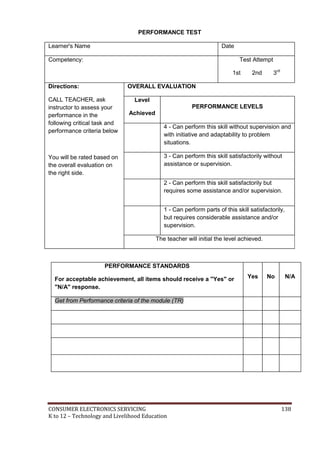
CONSUMER ELECTRONICS SERVICING 138 
K to 12 – Technology and Livelihood Education
LEARNING OUTCOME 2 
Perform basic preventive maintenance of electronic tools 
and equipment 
PERFORMANCE STANDARDS 
 Tools are used according to task undertaken. 
 Routine maintenance of tools undertaken according to standard operational 
procedures, principles and techniques. 
 Tools stored safely in appropriate locations in accordance with manufacturers 
specifications or standard operating procedures. 
What Do You Already Know? 
 
Let us determine how much you already know about performing basic preventive 
maintenance of electronic tools and equipment. Take this test. 
Pretest LO 2 
1. The correct use of hand tools is always the key to ___________________. 
A. project construction C. lab safety program 
B. components soldering D. environmental compliance 
2. Keep hand tools clean and free from________________. 
A. dust C. machine oil 
B. contaminants D. moisture 
3. Which soldering tool is used for high temperature soldering? 
A. Soldering pencil C. Soldering gun 
B. Soldering iron D. Hot air 
4. What equipment need to be tested once a week? 
A. DMM C. Oscilloscope 
B. Frequency meter D. VOM 
5. What tool is used to remove solder from the PCB? 
A. Hot air C. Soldering pencil 
B. Soldering gun D. Desoldering tooi 
CONSUMER ELECTRONICS SERVICING 139 
K to 12 – Technology and Livelihood Education
Read Information Sheet 2.1 very well then find out how much you can remember 
and how much you learned by doing Self-check 2.1. 
Information Sheet 2.1 
M 
What Do You Need To Know? 
Maintaining Hand tools 
1. Screwdrivers 
A. Select a screwdriver that fits the screw head slot perfectly. 
B. Keep the screwdriver’s handle dry, and clean to prevent slippages. 
C. Never use a screwdriver as chisel. 
D. Never hammer a screwdriver’s handle. 
2. Pliers 
A. Always keep pliers in good condition by cleaning and regular application of oil. 
B. Never use pliers as substitute for a wrench or hammer. 
C. Never hammer the pliers when cutting wires. 
3. Files 
A. When using a file, keep a firm grip on its handle at all times. 
B. Do not blow filings as they may get into your eyes . 
C. Always use a file card in cleaning a file. 
4. Mini drill 
A. Hold the mini drill firmly at 90 degrees with the material to be bored and make 
sure to tighten the chuck jaw of the mini drill securely before using it. 
B. Hold the metal, wood, or plastic firmly on the vise when drilling holes. Do not hold 
it with your hands. 
C. Clean chips with a brush, not with your hands. 
D. Keep the work area always clean by using paint brush. 
5. Pencil type soldering Iron. 
A. Clean and maintain the tip of the soldering iron before use. 
B. A 30-watt soldering iron is recommended for soldering electronic components in 
printed circuit board. 
C. Clean the soldering tip with dry cloth, cotton, or tissue paper after using. 
D. Do not wash the tip of the soldering iron with water to speed up its cooling 
process after use It might corrode the soldering tip. 
CONSUMER ELECTRONICS SERVICING 140 
K to 12 – Technology and Livelihood Education
6. Soldering Gun 
A. Do not use this type of the soldering instrument with light soldering work. 
It might damage the Electronic components and PCB because of its very 
high temperature. 
B. If the soldering tip fails to achieve its maximum temperature, tighten the 
two nuts holding the tip of the soldering gun. 
C. Do not use in mass production assembly. It might be overheated. 
D. This type of soldering equipment is more convenient where only few 
connections are to be made requiring much higher temperature like direct 
chassis soldering. 
7. Desoldering tool 
A. Heat the terminals to be resoldered before sucking the melted soldering 
lead with the desoldering tool to avoid direct contact of the desoldering 
tool’s tip with the tip of the soldering iron. 
B. Clean and oil the inside sucking spring and the tip of the desoldering tool 
regularly so that the melted soldering lead will not stick permanently 
inside the desoldering tool. 
8. Volt -Ohm- Milliammeter ( VOM) 
A. Do not play with this instrument by holding both test leads or connecting 
them in any part of your body trying to measure your resistance . 
B. Rest the function switch at 250 VAC when not in use. 
C. Place this instrument in a dry cool place, In free from any vibrations 
D. When making current and voltage measurements, be sure you are in the 
correct settings of function switch .If the current or voltage being 
measured is much greater than the value indicated in the function switch, 
the VOM will be damaged. 
E. Avoid touching any metallic part of the test lead when measuring current 
or voltage 
9. Electronic instruments like oscilloscopes, signal generators, digital 
multimeters and like should be connected to the power line at least once a 
week to warm up the circuit. This will serve as regular check-up and it will 
prevent the electronic components from corrosion due to moist specially 
during rainy season when the air is wet. 
CONSUMER ELECTRONICS SERVICING 141 
K to 12 – Technology and Livelihood Education
How Much Have You Learned? 
Self-Check 2.1 
1. What tool is used to remove solder from the PCB? 
A. Hot air C. Soldering pencil 
B. Soldering gun D. Desoldering tool 
2. Keep hand tools clean and free from________________. 
A. dust C. machine oil 
B. contaminants D. moisture 
3. Which soldering tool is used for high temperature soldering? 
A. Soldering pencil C. Soldering gun 
B. Soldering iron D. Hot air 
4. What equipment needs to be tested once a week? 
A. DMM C. Oscilloscope 
B. Frequency meter D. VOM 
5. The correct use of hand tools is always the key to ___________________. 
A. project construction C. lab safety program 
B. components soldering D. environmental compliance 
Refer to the Answer Key. What is your score? 
CONSUMER ELECTRONICS SERVICING 142 
K to 12 – Technology and Livelihood Education
Congratulations! You did a great job! Rest and 
relax a while then move on to the next lesson. 
Good luck! 
REFERENCES 
 Enriquez, Marcelo T. Electronics Technology IV; Souvenir Publications, Inc.: 
2003 
 L Tan, Michael Q., Gantalao, Fred T., Lasala, Rommel M. Simple Electronics; 
Andes Mountain Printers: 2004 
CONSUMER ELECTRONICS SERVICING 143 
K to 12 – Technology and Livelihood Education
Answer Keys: 
Lesson 1. Use Hand Tools 
LO1 Self-Check 1.1 
Hand tools Classification 
1. Desoldering Tool Soldering tool 
2. Wire Splicer Splicing tool 
3. Side Cutter Splicing tool 
4. Long Nose Pliers Splicing tool 
5. Mini Drill Boring tool 
6. Magnifying Glass Auxiliary tool 
7. Soldering Stand Soldering tool 
8. Screwdriver Driving tool 
9. Soldering Iron Soldering tool 
10. Portable Electric Drill Boring tool 
Self Check 1.2 
1. It is suitable for electronic work because if we exceed its maximum temperature, it 
can cause the printed circuit board to break and result to damage of components. 
2. It is the best because it is flexible in observing all sides of the circuit guided by bright 
light. 
3. It is best to use the right size of the Philips screw driver because this will prevent the 
screw from loosen its thread. 
4. It is best to use the right size of drill bit in boring holes because undersized drilled 
holes will need to be drilled again (This will prolong the work activity) while oversized 
holes will cause a wastage in the material. 
5. Soldering stand keeps the soldering iron from flammable materials and protects the 
user from accidentally touching the hot portion of the soldering iron. 
LO2. Use Appropriate Hand tools and Test equipment 
Self Check 2.1 
1. C (wire stripper) 7. F (paint brush) 
2. D (mini drill) 8. I (magnifying glass) 
3. A (screw driver) 
4. E (desoldering tool) 
5. B (long nose pliers) 
6. G (hacksaw) 
CONSUMER ELECTRONICS SERVICING 144 
K to 12 – Technology and Livelihood Education
Lesson 2 Perform Mensuration and Calculation 
LO 1. Select Measuring Instrument 
Self Check 1.1 
1. C (50K ohms +/- 5%) 
2. A (gold) 
3. B (green) 
4. C (resistor) 
5. A (current) 
LO 2. Carry out measurements and calculation 
Self Check 2.1 
1. A (90 ohms) 
2. B (242 ohms) 
3. C (22) 
4. B (.05) 
5. D (tolerance) 
Self Check 2.2 
1. B (Ohmmeter) 
2. B (Reading Scale) 
3. A (R X 1) 
4. C (Nonlinear) 
5. D (VOM) 
LO 3. Maintaining Measuring Instruments 
Self Check 3.1 
1. D (VOM) 
2. D (Signal Generator) 
3. D (250AC) 
4. C (Magnetic Devices) 
5. C (Oscilloscope) 
CONSUMER ELECTRONICS SERVICING 145 
K to 12 – Technology and Livelihood Education
Lesson 3. Identifying different kinds of drawings 
LO 1. Identify different kinds of Technical Drawings 
Self check 1.1 
Drawing instrument Description Use 
A thin flexible plastic with 
different electronic and electrical 
symbols. 
The symbols can be traced 
using a technical pen or pencil 
in laying out schematic 
diagrams. 
The compass has two legs hinged at 
one end. One of the legs has pointed 
needle fitted at the lower end where as 
the other end has provision for inserting 
pencil lead. 
A compass is used for drawing 
circles and arcs of circles. 
These are usually made of 
pointed metal and plastic head 
with different colors. 
These are used to fix the 
drawing sheet on the drawing 
board. 
They are semicircular in shape 
and are made of plastic. 
Protractors are used to mark or 
measure angles between 0 and 
180o. 
It consists of two parts namely 
the stock and the blade joined 
together at right angles to each 
other by means of screws. 
The working edge of a T-square 
is used to draw parallel 
lines, vertical lines or inclined 
lines at 30 or 60 degrees. 
ELECTRONIC 
TEMPLATE 
COMPASS 
DRAWING 
PINS 
PROTRACTOR 
T-SQUARE 
CONSUMER ELECTRONICS SERVICING 146 
K to 12 – Technology and Livelihood Education
Self Check 1.2 
Type / Symbol Actual / Physical appearance Uses / Application 
1. NPN transistor 
A bipolar junction transistor (BJT) 
with P-type base electrode. This 
device is used to amplify signal. 
2. Zener diode 
It is a semiconductor diode that is 
used as voltage regulator for low 
current application. 
3. Polarized capacitor 
Stores electric charge and used 
as filter to separate ac from dc 
voltage. Always take note of 
proper polarity when connected to 
a circuit. 
4. Light-Emitting 
Diode (LED) 
A semiconductor diode that emits 
light when supplied with forward 
voltage. They come in different 
colors like red, green, yellow, or 
blue. 
5. PNP 
transistor 
A bipolar junction transistor (BJT) 
with N-type base electrode. This 
device is used to amplify signal. 
6. Battery 
A dc voltage storage device that 
are used in electronic toys, 
equipment, or appliance. 
7. Variable 
capacitor 
These are usually non-polar 
capacitors that are used in tuning 
radio receivers and other 
electronic communication system. 
Their capacitance varies as you 
turn their shaft either clockwise or 
counterclockwise. 
8. Potentiometer 
It is a variable resistor with three 
terminals used as volume, tone, 
or balance controls of audio 
equipment. 
CONSUMER ELECTRONICS SERVICING 147 
K to 12 – Technology and Livelihood Education
LO 2. Interpret Technical Drawings 
Self Check 2.1 
1. Schematic diagram 
2. Wiring diagram 
3. Block diagram 
4. Pictorial diagram 
5. Schematic diagram 
LO 3. Prepare electronic diagrams 
Self Check 3.1 
1. A (Q) 
2. B (Dashed lines) 
3. A (Bracket) 
4. D (Symbols) 
5. C (Ohms) 
Lesson 4 Practice Occupational Health and Safety 
LO 1. Identify health hazards and occupational risks 
Self Check 1.1 
1. Avoid bending over your work 
2. Avoid over head work 
3. Sit up straight 
4. Stand with weight evenly distributed on both legs 
5. Torque control 
LO 2. Observe occupational health and safety practices 
Self Check 2.1 
1. True 
2. Always 
3. True 
4. Can engage 
5. True 
Lesson 5 Maintain Tools and Equipment 
LO 1. Maintain tools and equipment 
Self Check 1.1 
1. C (safety) 
2. D (tool box) 
3. A (Tag a tool)) 
4. C (One hand) 
5. B (Cure) 
CONSUMER ELECTRONICS SERVICING 148 
K to 12 – Technology and Livelihood Education
LO 2. Perform basic preventive maintenance of electronic tools and equipment 
Self Check 2.1 
1. D (Desoldering tool)) 
2. B (Contaminants) 
3. C (Soldering gun) 
4. C (Oscilloscope) 
5. C (Lab safety program) 
PRE – TEST 
Answer keys 
LESSON 1. 
LO 1. 
1. L 
2. I 
3. H 
4. F 
5. D 
6. A 
7. C 
8. E 
9. K 
10. B 
LO2. 
1. A 
2. A 
3. B 
4. D 
5. B 
LESSON 2 
LO1. 
1. C 
2. B 
3. B 
4. D 
5. D 
LO2. 
1. D 
2. B 
3. C 
4. B 
5. A 
CONSUMER ELECTRONICS SERVICING 149 
K to 12 – Technology and Livelihood Education
LO3. 
1. D 
2. D 
3. D 
4. C 
5. C 
LESSON 3 
LO1. 
1. C 
2. A 
3. D 
4. A 
5. B 
LO1.2 
1. E 
2. F 
3. A 
4. B 
5. C 
LO2 
1. A 
2. B 
3. B 
4. A 
5. D 
LO3 
1. D 
2. B 
3. A 
4. C 
5. D 
LESSON 4 
LO1 
1. C 
2. D 
3. A 
4. C 
5. C 
LO2 
1. True 
2. Always 
3. True 
4. Can engage 
5. True 
LESSON 5 
LO1. 
1. B 
2. C 
CONSUMER ELECTRONICS SERVICING 150 
K to 12 – Technology and Livelihood Education
3. A 
4. D 
5. C 
LO2 
1. C 
2. B 
3. C 
4. C 
5. D 
CONSUMER ELECTRONICS SERVICING 151 
K to 12 – Technology and Livelihood Education
Acknowledgement 
This Learning Module was developed for the Exploratory Courses in Technology and 
Livelihood Education, Grades 7 and 8 of the K to 12 Curriculum with the assistance of the 
following persons: 
This Learning Module on Consumer Electronics Servicing NC II was developed by 
the following personnel: 
MODULE WRITERS 
MARCELO E. TAN, Ed. D. 
EPS 1, DepED-Manila 
REYNALDO C. CUNANAN 
Head Teacher VI, RVHS 
REVIEWERS 
GIL P. CASUGA 
Chief TESD Specialist 
REYNALDO S. DANTES 
Senior TESD Specialist 
BERNADETTE S. AUDIJE 
Senior TESD Specialist 
MARIA A. ROQUE 
Senior TESD Specialist 
AIDA T. GALURA 
VSA II, ACNTS 
VICTORIO N. MEDRANO 
Principal IV, SPRCNHS 
PARALUMAN R. GIRON, Ed.D. 
Chair, Sub-TWG on K to 10 
BRENDA B. CORPUZ, Ph.D. 
TA for K to 12 Curriculum 
OFELIA O. FLOJO 
Retired Assistant Chief, EED, Region IV-A 
OFELIA O. FLOJO 
Retired Assistant Chief, EED, Region IV-A 
BEATRIZ A. ADRIANO 
Principal IV, ERVHS 
DOMINGA CAROLINA F. CHAVEZ 
Principal II, MBHS 
DOCUMENTORS / SECRETARIAT 
PRISCILLA E. ONG 
K to 12 Secretariat 
FREDERICK G. DEL ROSARIO 
Head Teacher III, BNAHS 
EMMANUEL V. DIONISIO 
Head Teacher III, AFGBMTS 
LYMWEL P. LOPEZ 
Teacher I, AFGBMTS 
DANTE D. VERMON JR. 
Teacher I, AFGBMTS 
ROMANO T. LOPEZ JR. 
Teacher I, AFGBMTS 
JOANNA LISA C. CARPIO 
Teacher I, BNAHS 
LOUIE ANGELES 
Teacher I, BNAHS 
Dir. IMELDA B. TAGANAS 
Executive Director, Qualifications Standards Office 
K to 12 Learning Area Team Convenor, TLE/TVE 
CONSUMER ELECTRONICS SERVICING 152 
K to 12 – Technology and Livelihood Education

Consumer electronics learning module

  • 1.
    Republic of thePhilippines DEPARTMENT OF EDUCATION K to 12 Basic Education Curriculum Technology and Livelihood Education Learning Module CONSUMER ELECTRONICS SERVICING EXPLORATORY COURSE Grade 7 and Grade 8
  • 2.
    TABLE OF CONTENTS What Is This Module About ? ................................................................................... 2 How Do You Use This Module ………………………………………………3 LESSON 1 – Use Hand Tools .......................................................................... 4-22 LESSON 2 – Perform Mensuration and Calculation ............................. 23-53 LESSON 3 – Prepare and Interpret Technical Drawings .................... 54-100 LESSON 4 – Practice Occupational Safety and Health ..................... 101-125 LESSON 5 – Maintain Tools and Equipment ................................... 126-143 Answer Keys .................................................................................................... 144-151 Acknowledgment ..................................................................................................... 152 CONSUMER ELECTRONICS SERVICING 1 K to 12 – Technology and Livelihood Education
  • 3.
    What Is ThisModule About? Welcome to the world of Consumer Electronics Servicing! This Module is an exploratory course which leads you to Consumer Electronics Servicing National Certificate Level II ( NC II)1. It covers five common competencies that a Grade 7 / Grade 8 Technology and Livelihood Education (TLE) student like you ought to possess, namely: 1) Use Hand Tools; 2) Perform Mensuration and Calculation; 3) Prepare and Interpret Technical Drawings; 4) Practice Occupational Safety and Health; and 5) Maintain Tools and Equipment These five common competencies are covered separately in five lessons. As shown below, each lesson is directed to the attainment of one or three learning outcomes: Lesson 1 – Use Hand Tools LO1. Prepare hand tools LO 2. Use appropriate hand tools and test equipment Lesson 2 – Perform Mensuration and Calculations LO 1. Select measuring instruments LO 2. Carry out measurements and calculations LO 3. Maintain measuring instruments Lesson 3 – Prepare and Interpret Technical Drawings LO1. Identify different kinds of technical drawings LO2. Interpret technical drawing LO3. Prepare/Make changes in electrical/electronic schematics and diagrams Lesson 4 – Practice Occupational Health and Safety LO 1. Identify health hazards and occupational risks LO 2.Observe occupational and safety practices Lesson 5 – Maintain Tools and Equipment LO 1. Maintain hand tools and equipment LO 2 Perform basic preventive maintenance of electronic tools and equipment Your success in this exploratory course on Consumer Electronics Servicing can be seen in your ability to do the performance standards found in each lesson. 1NATIONAL CERTIFICATE (NC) is a certification issued to individuals who achieved all the required units of competency for a national qualification as defined under the Training Regulations. NCs are aligned to specific levels within the PTQF. (TESDA Board Resolution No. 2004-13, Training Regulations Framework) NATIONAL CERTIFICATE LEVEL refers to the four (4) qualification levels defined in the Philippine TVET Qualifications Framework (PTQF) where the worker with: a. NC I performs a routine and predictable tasks; has little judgment; and, works under supervision; b. NC II performs prescribed range of functions involving known routines and procedures; has limited choice and complexity of functions, and has little accountability; CONSUMER ELECTRONICS SERVICING 2 K to 12 – Technology and Livelihood Education
  • 4.
    How Do YouUse This Module? This Module has five Lessons. Each Lesson has the following parts:  Learning Outcomes  Performance Standards  Materials/Resources  Definition of Terms  What Do You Already Know?  What Do You Need to Know?  How Much Have You Learned?  How Do You Apply What You Have Learned?  How Well Did You Perform?  References To get the most from this Module, you need to do the following: 1. Begin by reading and understanding the Learning Outcome/s and Performance Standards. These will tell you what you should know and be able to do at the end of this Module. 2. Find out what you already know by taking the Pretest then check your answer against the Answer Key. If you get 99 to 100% of the items correctly, you may proceed to the next Lesson. This means that you need not go through the Lesson because you already know what it is about. If you fail to get 99 to 100% correctly, go through the Lesson again and review especially those items which you failed to get. 3. Do the required Learning Activities. They begin with one or more Information Sheets. An Information Sheet contains important notes or basic information that you need to know. After reading the Information Sheet, test yourself on how much you have learned by means of the Self-check. Refer to the Answer Key for correction. Do not hesitate to go back to the Information Sheet when you do not get all test items correctly. This will ensure your mastery of basic information. 4. Demonstrate what you learned by doing what the Activity / Operation /Job Sheet directs you to do. 5. You must be able to apply what you have learned in another activity or in a real life situation. 6. Accomplish the Scoring Rubrics for you to know how well you performed. Each Lesson also provides you with references and definition of key terms for your guide. They can be of great help. Use them fully. If you have questions, ask your teacher for assistance. CONSUMER ELECTRONICS SERVICING 3 K to 12 – Technology and Livelihood Education
  • 5.
    LESSON 1 UseHand Tools LEARNING OUTCOMES: At the end of this Lesson, you are expected to do the following: LO 1. prepare hand tools; and LO 2. use appropriate hand tools and test equipment. CONSUMER ELECTRONICS SERVICING 4 K to 12 – Technology and Livelihood Education
  • 6.
    Definition of Terms Accidental - occurring unexpectedly, unintentionally, or by chance. Alternating current - an electric current that is continually varying in value and reversing its direction of flow at regular interval Anode - a positive electrode of semiconductor device Capacitance - a property that exists whenever two conductors are separated by insulating material, permitting the storage of electricity Capacitor - a component designed intentionally to have a definite amount of capacitance Circuit - an arrangement of one or more complete paths of electron flow. Conductor - a wire, cable, or other body or medium that is suitable for carrying electric current Current - the rate of transfer of electricity from one point to another Desoldering - a process of unsoldering unwanted parts or components in the circuit with the support of a soldering tool Dielectric material - a material that serves as insulator because it has poor electric conductivity Direct current - an electric current that flows in one direction Discrete components- separated or individual components Electronics - a branch of science and technology that deals with the controlled flow of electrons Flammable - tending to burn quickly Hazards - risks; dangers Malfunction - not in normal operating condition Ohmmeter - an instrument that measures the amount of resistance in certain component or circuits Resistance - the opposition that a component or material offers to the flow current Resistor – a component designed intentionally to have a definite amount of resistance Soldering - a process of joining two metals caused by heat Soldering technique - a strategy in which the solder (lead) is being applied in a connection or in the printed circuit board Splicing – connecting two lengths of conductor Technician - a person skilled in mechanical or industrial techniques or in a particular technical field Tool kit - a small bag or box equipped with hand tools Troubleshooting - identifying and repairing faults in equipment Voltage - the electrical pressure that exist between two points and capable of producing a flow of current when a close circuit is connected between the points. Voltmeter - an instrument that measures the amount of electromotive force in a component or circuit. Acronyms PCB – Printed Circuit Board PPE – Personal Protective Equipment VOM – Volt-Ohm-Milliameter CONSUMER ELECTRONICS SERVICING 5 K to 12 – Technology and Livelihood Education
  • 7.
    LEARNING OUTCOME 1 Prepare Hand Tools PERFORMANCE STANDARDS  Appropriate hand tools are identified.  Appropriate tools are selected according to task requirements. What Do You Already Know? Let us determine how much you already know about the different hand tools. Take this test. Pretest LO 1 Directions: Match the different hand tools with their actual pictures. Write the letter of your answer on a separate sheet. 1. Desoldering tool 2. Soldering iron 3. Soldering stand 4. Long nose pliers 5. Portable electric drill 6. Paint brush 7. Hacksaw 8. Side-cutter 9. Wire splicer 10. Magnifying glass CONSUMER ELECTRONICS SERVICING 6 K to 12 – Technology and Livelihood Education
  • 8.
    What Do YouNeed To Know? Read Information Sheet 1.1 very well; then, find out how much you can remember and how much you have learned by answering the Self-check. Information Sheet 1.1 Basic Hand Tools Driving of Tools 1. Screwdrivers are hand tools specifically designed to insert and tighten, or to loosen and remove screws. A screwdriver comprises a head or tip, which engages with a screw; a mechanism to apply force by rotating the tip, and some way to position and support the screwdriver, the tip of which is shaped to fit a particular type of screw. a. Slotted Screwdriver is used to drive or fasten negative slotted screws. b. Phillips Screwdriver – is used to drive or fasten positive slotted screws. It is a screwdriver that could take greater torque and could provide tighter fastenings. CONSUMER ELECTRONICS SERVICING 7 K to 12 – Technology and Livelihood Education
  • 9.
    c. Jeweler's ScrewdriverSet – is a set of small screw drivers composed of slotted and Phillips screwdrivers. Soldering Tools 1. Soldering Iron – is a device for applying heat to melt solder in attaching two metal parts. A soldering iron is composed of a heated metal tip and an insulated handle. For electrical work, wires are usually soldered to printed circuit boards, other wires, or small terminals. A low-power iron (20-30 Watts) is suitable for this work. 2. Soldering Tool Stand – is a place where the soldering iron is placed during usage. This will keep the soldering iron away from flammable materials. The stand often comes with a sponge used in cleaning the tip of the soldering iron. 3. Desoldering tool is used in removing soldered wires and components on printed circuit boards for troubleshooting and repair purposes. CONSUMER ELECTRONICS SERVICING 8 K to 12 – Technology and Livelihood Education
  • 10.
    Splicing Tools 1.Long Nose is used for holding, bending, and stretching the lead of electronic component or connecting wires. 2. Side Cutter is a wire-cutting pliers, though they are not used to grab or turn anything, but are used to cut wires. 3. Wire Stripper is a pair of opposing blades much like scissors or wire cutters. The addition of a center notch makes it easier to cut the insulation without cutting the wire. Boring Tools Notch 1. 12V Mini-Drill – is used to bore or drill holes in the printed circuit board (PCB) with sizes from 1/32” – 1/16”. CONSUMER ELECTRONICS SERVICING 9 K to 12 – Technology and Livelihood Education
  • 11.
    2. Portable ElectricDrill is used for boring hole(s) in plastic or metal chassis with the use of drill bits having sizes from 1/6” to approximately 1/4”. 3. Metal Files These are hand tools having a series of sharp, parallel ridges or teeth. Most files have a narrow, pointed tang at one end to which a handle can be fitted.  Flat File is parallel in width and tapered in thickness; they are used for flat surfaces and edges.  Half Round File is tapered in width and thickness, coming to a point, and is narrower than a standard half round and used for filing inside of rings.  Round File - is also called rat-tail file which is gradually tapered and used for many tasks that require a round tool, such as enlarging round holes or cutting a scalloped edge. triangular file flat file half-round file round file CONSUMER ELECTRONICS SERVICING 10 K to 12 – Technology and Livelihood Education
  • 12.
    Cutting Tools 1.Utility Knife is a common tool used in cutting various trades and crafts for a variety of purposes. 2. Hacksaw is used for cutting metals. Some have pistol grips which keep the hacksaw firm and easy to grip. The small hand-held hacksaws consist of a metal arch with a handle that fits around a narrow, rigid blade. Auxiliary Tools handle blade pistol grip 1. Magnifying Glass is a convex lens which is used to produce a magnified image of an object. The lens is usually mounted on a frame with a handle. Roger Bacon is the original inventor of the magnifying glass. A magnifying glass works by creating a magnified virtual image of an object behind the lens. Some magnifying glasses are foldable with built-in light. 2. Paint Brush – is a type of brush made of bristles set in handle, used for cleaning dirty parts of a circuit or an object aside from using it for painting. CONSUMER ELECTRONICS SERVICING 11 K to 12 – Technology and Livelihood Education
  • 13.
    Electronic equipment Asidefrom hand tools, other types of equipment are also needed for more accurate and quality output. Three of the most used equipment are presented here for you to be familiar with their uses and the proper way of maintaining them. a. Volt-Ohm-Milliammeter. It is an equipment that combines three functions: as a voltmeter that measures both ac and dc voltages; an ohmmeter that measures resistance; and milliammeter that measures small amount of dc current. As safety precautions in the maintenance of this instrument, the following should be observed:  Always rest the function switch at 250V AC if an OFF position is not available in the instrument.  For current and voltage measurements, always set the function switch in the correct setting which is a little higher than the expected current or voltage present in the circuit.  Place the instrument in a cool dry place, away from any magnetic devices, and free from vibrations. Volt-Ohm-Milliammeter Oscilloscope Signal generator b. Oscilloscope. An oscilloscope (commonly abbreviated CRO, for cathode-ray oscilloscope, or scope) is a piece of electronic test equipment that allows signal voltages to be viewed, usually as a two-dimensional graph of one or more electrical potential differences (vertical axis) plotted as a function of time or of some other voltage (horizontal axis). c. Signal generator. A signal generator is a device which produces simple wave forms. Such devices contain an electronic oscillator, a circuit that is capable of creating a repetitive waveform. These are typically used in simple electronics repair and design where they are used to stimulate a circuit under test. Oscilloscope and signal generator should be given regular checkup for at least once a week by connecting them to the power line. This will help prevent their components from having moisture that might cause trouble in their circuits. In any activity involving skills, it is a standard procedure that you must always use the right tool or equipment properly needed for particular task. However, despite CONSUMER ELECTRONICS SERVICING 12 K to 12 – Technology and Livelihood Education
  • 14.
    this reminder orcaution, some students abuse the use of tools. The following are common faults that must be avoided: Common Faults in Using Hand Tools Pliers:  Do not increase the handle length of pliers to gain more leverage. Use a larger pair of pliers or bolt cutters if necessary.  Do not substitute pliers for a wrench when turning bolts and nuts. Pliers cannot grip these items properly and might cause a slip and create an accident.  Never use pliers as a hammer on the handle. Such abuse is likely to result in cracks or breaks.  Cut hardened wires only with pliers designed for that purpose.  Always cut the wires in right angle. Never rock from side to side or bend wire back and forth against the cutting edges. Screwdrivers:  Never use screwdrivers as a pry bar, chisel, and punch stirrer or scraper.  Never use screwdrivers with broken or worn-out handles. Screwdrivers of these kinds should have tags to indicate that they are defective.  Never use pliers on a screwdriver for extra leverage. Only use wrench or screwdrivers specifically designed for purpose. Utility Knives/ Blades:  Do not use dull blades because they require more force, thus are more likely to slip. Replace the blade when it starts to “tear” instead of cut.  Never leave a knife unattended with the blade exposed.  Don’t bend or apply side loads to blades by using them to open cans or loosen tight cover of containers. Blades are brittle and can snap easily. CONSUMER ELECTRONICS SERVICING 13 K to 12 – Technology and Livelihood Education
  • 15.
    How Much HaveYou Learned? Self-Check 1.1 Directions: On a separate piece of paper, classify the different kinds of hand tools according to their specification in Consumer Electronics Servicing. Hand tools Classification 1. Desoldering Tool 2 Wire Splicer 3. Side Cutter 4 Long Nose Pliers 5 Mini Drill 6 Magnifying Glass 7 Soldering Stand 8 Screwdriver 9 Soldering Iron 10. Portable Electric Drill Self-Check 1.2 Directions: Answer briefly the questions below. 1. Why is a low-power soldering iron suitable for electronic work? 2. What are the advantages of using a magnifying glass that is foldable with built-in light? 3. Why is it best to use the right size of Phillips-type screwdriver? 4. Why is it best to use the right size of drill bit in boring holes? 5. Why do you think is it best for a soldering iron to have its soldering stand? Refer to the Answer Key. What is your score? CONSUMER ELECTRONICS SERVICING 14 K to 12 – Technology and Livelihood Education
  • 16.
    LEARNING OUTCOME 2 Use Appropriate Hand tools and Test Equipment PERFORMANCE STANDARDS  Tools are used according to task undertaken.  All safety procedures in using tools are observed at all times.  Malfunctions, unplanned or unusual events are reported to the supervisor. What Do You Already Know? Determine how much you already know about using appropriate hand tools and test equipment. Take this test. Pretest LO 2 Direction: Multiple Choice: Choose the best answer. Write letters only. 1. Which equipment does NOT belong to the group? a. Screw driver c. Diagonal cutter b. Long nose pliers d. Side cutting 2. What is the reason why threads become stripped? a. Screws are over tightened c. Screws are molded b. Screws are heated d. Screws are painted 3. What equipment is/are used for safety? a. VOM c. OHS b. PPE d. All of those mentioned 4. Which is NOT part of the group? a. Soldering iron c. Soldering tool stand b. Desoldering tool d. Wire stripper 5. Which hand tool is used solely for cutting metals? a. Utility knife c. Magnifying glass b. Saw d. Paint brush CONSUMER ELECTRONICS SERVICING 15 K to 12 – Technology and Livelihood Education
  • 17.
    What Do YouNeed To Know? Read Information Sheet 2.1 very well. Then find out how much you can remember and how much you learned by answering the Self-check. Information Sheet 2.1 USING TOOLS BASED ON THEIR FUNCTIONS AND OPERATION Whenever you perform a task in the workshop you must use personal protective clothing and equipment (PPE) that are appropriate for the task and which conforms with your local safety regulations and policies. Your skill in using tools and equipment will make your work less difficult and ensure that tasks are performed properly and safely.  Hand Tools o screwdrivers, needle-nose pliers  Diagnostic Tools o Analog or digital Volt-Ohm-Milliammeter, power supply Safety check  Do not use flammable cleaners or water on electrical equipment.  Make sure designated walkways are kept clear of any obstructions.  Always wear protective clothing and use the appropriate safety equipment.  Make sure that you understand and observe all legislative and personal safety procedures when carrying out the following tasks. Proper Use of Hand Tools  Use the proper type and size of screwdriver by matching it to the screw.  Phillips and Flat Head are the most common types.  Do not over tighten screws because the threads may become stripped. In many types of work, hand tools are used every day. They make work easier and allow people to be more efficient. However, majority of students often fail to see the hazards these tools can introduce. In this module "Hand Tool Safety" shows workers how accidents can be significantly reduced by reviewing the various hazards that are associated with specific types of tools. CONSUMER ELECTRONICS SERVICING 16 K to 12 – Technology and Livelihood Education
  • 18.
    How Much HaveYou Learned? Self-check 2.1 Direction: Match Column A with Column B A B 1. Cut the insulation without cutting the wire a. Screwdriver 2. Drill holes in the printed circuit board b. Long nose 3. Tighten, loosen or remove screws c. Wire stripper 4. Remove soldered wires d. 12 V Mini-drill 5. Hold, bend, stretch the lead of electronic component or connecting wires 6. Cut metals f. Paint brush 7. Clean dirty parts of an object g. Hacksaw 8. Produce a magnified image of an object h. Signal generator Refer to the Answer Key. What is your score? e. Desoldering tool i. Magnifying glass CONSUMER ELECTRONICS SERVICING 17 K to 12 – Technology and Livelihood Education
  • 19.
    How Do YouApply What You Have Learned? Show that you have learned something by doing this activity. Operation Sheet 2.1 Instruction: 1. Do the following Operation Sheets: a. Procedure in using a soldering iron b. Mounting and soldering of components on PCB c. Disassembly and assembly of the circuit Procedure in using a soldering iron 1. Preparing the soldering iron a. Place the soldering iron on the stand before plugging it. b. Wait a few minutes for the soldering iron to attain its operating temperature of about 4000C. c. Wipe the tip of the soldering iron on the wet damp sponge d. Melt a little solder (soldering lead – 60/40) on the tip of the iron. e. Wipe again the tip of the soldering iron on the wet damp sponge. 2. Soldering technique a. Hold the soldering iron like a pen, near the base of the handle. b. Touch the soldering iron onto the joint to be soldered. c. Apply a small amount of solder onto the joint. d. Remove the solder, then the soldering iron, while keeping the joint in still position. e. Inspect the joint closely. It should look shiny and in a volcano shape. CONSUMER ELECTRONICS SERVICING 18 K to 12 – Technology and Livelihood Education
  • 20.
    Operation Sheet 2.2 Mounting and soldering of components on PCB Procedure in mounting and soldering components on printed circuit board 1. Carefully check the ready-made PCB against the diagram and inspect for any microscopic shorts or open paths. Do the remedial steps, if necessary. 2. Insert the two 33K, ¼-watt resistors as indicated in the diagram. 3. Insert the two electrolytic capacitors in the PCB as shown in the diagram. Take note of their polarity orientation. 4. Mount the two NPN transistors in the PCB taking into consideration the proper orientation of their electrodes (emitter, base, and collector). 5. Mount the two jumbo LEDs (Light-Emitting-Diodes) to the place intended for in the PCB. 6. Remove the insulation of a 4-inch #22 black stranded hook-up wire with at least 1/8 of an inch on both ends. Insert the uninsulated part at one end for the negative supply. 7. Do the same as in step no. 6 using red hook-up wire for the positive supply. 8. Let your work be checked by your teacher before making any soldering job. a. Solder the connections of your work following the procedure of proper soldering technique. Diagram and components of the blinker Blinker circuit. (a) Schematic diagram (b) Parts list (c) Components’ lay out (top view) (d) Foil pattern on PCB (bottom view) CONSUMER ELECTRONICS SERVICING 19 K to 12 – Technology and Livelihood Education
  • 21.
    Disassembly and assemblyof the circuit Operation Sheet 2.3 Desoldering At some stage, you will probably need to desolder a joint to remove or re-position a wire or component. The easiest and most common way is the use of desoldering pump. Shown below is the proper way of removing electronic components from the circuit using a desoldering tool. Removing components in PCB using a desoldering pump (solder sucker) 1. Set the pump by pushing the spring-loaded plunger down until it locks. 2. Apply both the pump nozzle and the tip of your soldering iron to the joint. 3. Wait a second or two for the solder to melt. 4. Then press the button on the pump to release the plunger and suck the molten solder into the tool. 5. Repeat if necessary to remove as much solder as possible. 6. The pump will need emptying occasionally by unscrewing the nozzle. After removing most of the solder from the joint(s), you may be able to remove the wire or component lead straight away (allow a few seconds for it to cool). If the joint does not come apart easily, apply your soldering iron to melt the remaining traces of solder, at the same time pulling the joint apart, taking care to avoid burning yourself. Be careful in desoldering to be sure that no component is damaged during the process. CONSUMER ELECTRONICS SERVICING 20 K to 12 – Technology and Livelihood Education
  • 22.
    How Well DidYou Perform? Find out by accomplishing the Scoring Rubric honestly and sincerely. Remember it is your learning at stake! 2.1 Procedure in using a soldering iron Direction: Prepare an actual laboratory activity regarding soldering techniques. Suggested Activity: Construct a figure or image using #18 solid copper wire applying proper soldering techniques. Procedure in using a soldering iron Item no. Soldering Tool 70 75 80 85 90 95 100 Score A Proper use of tool - 50% B Quality of work - 40% C Speed – 10% Grade 2.2 Mounting and soldering of components on PCB Direction: Students will be guided in mounting and soldering the components of the blinker circuit on PCB applying proper soldering techniques. Mounting and soldering of components on PCB Item no. Soldering Tool 70 75 80 85 90 95 100 Score A Proper use of tool - 50% B Quality of work - 40% C Speed – 10% Grade CONSUMER ELECTRONICS SERVICING 21 K to 12 – Technology and Livelihood Education
  • 23.
    2.3 Disassembly andassembly of the circuit Direction: Your teacher will guide you in removing or desoldering the components of the blinker circuit on PCB applying proper desoldering procedure. Disassembly and assembly of the circuit Item no. Soldering Tool 70 75 80 85 90 95 100 Score A Proper use of tool - 50% B Quality of work - 40% C Speed – 10% Grade Congratulations! You did a great job! Rest and relax a while then move on to the next lesson. Good luck! REFERENCES  Tan, Michael Q.; Gantalao, Fred T.; Lasala, Rommel M. Simple Electronics; Andes Mountain Printers; 2004  Enriquez, Marcelo T., Electronics Technology IV; Souvenir Publications, Inc. 2003  Grob, Bernard, Basic Electronics, 4th Edition; New York: McGraw-Hill Company, USA: 1982 CONSUMER ELECTRONICS SERVICING 22 K to 12 – Technology and Livelihood Education
  • 24.
    LESSON 2 PerformMensuration and Calculations LEARNING OUTCOMES: At the end of this Lesson, you are expected to do the following: LO 1. select measuring instruments; LO 2. carry out measurements and calculations; and LO 3. maintain measuring instruments. CONSUMER ELECTRONICS SERVICING 23 K to 12 – Technology and Livelihood Education
  • 25.
    Definition of Terms Ampere - basic unit of current Current - the flow of electrons moving in a given direction Electronic measuring instrument – a portable instrument used to measure electrical quantities such as current, voltage, and resistance Ohmmeter - an electronic instrument used to measure resistance of a component or the entire circuit Ohmmeter scale - section of the ohmmeter where the value of the resistance is being indicated Range multiplier - a portion in the ohmmeter where the actual reading is multiplied by the range value Resistance - the opposition to the flow of electrons Resistor - an electronic component that is used to offer opposition to current in an electrical circuit Resistor color coding - a scheme to determine the value of resistors by color bands printed on their bodies as code Test Probes - connectors connected to terminals of the VOM and component’s terminals or test points in a circuit to be tested. They are oftentimes red and black in color Tolerance - the fourth color in the 3-band color coding that indicates the percentage of deviation from its color coded value Volt - basic unit of voltage Voltage - an electrical pressure that pushes current to flow within a load through a conductor Zero-ohm adjuster - part of the ohmmeter that is used in adjusting the pointer of the ohmmeter to zero before resistance measurements or continuity tests are made. CONSUMER ELECTRONICS SERVICING 24 K to 12 – Technology and Livelihood Education
  • 26.
    LEARNING OUTCOME 1 Select measuring instrument PERFORMANCE STANDARDS  Object or component to be measured is identified.  Correct specifications are obtained from relevant source.  Appropriate measuring instrument is selected in line with job requirement. What Do You Already Know? Let us determine how much you already know about selecting measuring instrument. Take this test. Pretest LO 1 Directions: Choose the best answer. Write the letter only. 1. Which component resists the flow of current in an electrical circuit? A) Capacitor B) Inductor C) Resistor D) Transistor 2. What kind of component is a resistor? A) Combined B) Discrete C) Integrated D) Hybrid 3. What color in the color coding scheme has an equivalent of 5 in the 2nd band? A) Brown B) Green C) Red D) Yellow 4. What is the color of the tolerance representing ± 10%? A) Gold B) Black C) Orange D) Silver 5. What is the value of a resistor with the following colors : Green - Black- Silver- Gold? A) 500 Ohms ±5% C) 5.0 Ohms ± 5% B) 50 Ohms ± 5% D) 0.5 Ohm ± 5% CONSUMER ELECTRONICS SERVICING 25 K to 12 – Technology and Livelihood Education
  • 27.
    What Do YouNeed To Know? Read Information Sheet 1.1 very well then find out how much you can remember and how much you have learned by doing Self-Check. Information Sheet 1.1 Electronics is a branch of technology that deals with many applications. Audio electronics, video electronics, digital, medical up to weapons and banking are covered by the influence of electronics. There are quite a number of components used in the application of electronics. To name a few of these electronic components are resistors, capacitors, inductors and semi-conductors. TYPES OF RESISTORS Wire-wound Film Carbon-composition resistors Precision Metal-film Resistors in band CONSUMER ELECTRONICS SERVICING 26 K to 12 – Technology and Livelihood Education
  • 28.
    Variable Resistor (Slidetype) Variable Resistor (Rotary type) The most commonly used electronic components in the field are known as resistors. Resistor is a discrete component that offers opposition to the flow of current. Resistors have different types in accordance with the material used like carbon-composition and the wire-wound resistor. According to construction, we have the fixed resistor and the variable resistor. Resistors are very common and are the cheapest electronic components in the market for so many years. Their features are so interesting and are very colorful. That’s why resistors are very popular among students studying electronics. CONSUMER ELECTRONICS SERVICING 27 K to 12 – Technology and Livelihood Education
  • 29.
    One distinct featureof this resistance - giving component is the way its value is determined. It uses a set of colors which follows a code for its assumed resistance expressed in OHMS. CONSUMER ELECTRONICS SERVICING 28 K to 12 – Technology and Livelihood Education
  • 30.
    RESISTOR COLOR CODINGCHART COLORS 1ST BAND 2ND BAND MULTIPLIER TOLERANCE BLACK ___ 0 1 BROWN 1 1 10 RED 2 2 102 ORANGE 3 3 103 YELLOW 4 4 104 GREEN 5 5 105 BLUE 6 6 106 VIOLET 7 7 ____ GRAY 8 8 ____ WHITE 9 9 ____ GOLD ____ _____ 0.1 ± 5% SILVER ____ _____ 0.01 ± 10 % NO COLOR ____ ____ ____ ± 20% . EXAMPLE: 1. BROWN - BLACK - BROWN - GOLD / / / / 1 0 X 10 ± 5% 10 X 10 = 100 OHMS ± 5% 2. Yellow – Violet – Yellow - Silver / / / / 4 7 10000 ± 10% 47 x 10000 = 470,000 Ohms ± 10% or 470K ohms ±10% CONSUMER ELECTRONICS SERVICING 29 K to 12 – Technology and Livelihood Education
  • 31.
    How Much HaveYou Learned? Self-Check 1.1 Directions: Multiple Choice. Choose the best answer. Write the letter only. 1. What is the value of a resistor with the following colors: Green - Black- orange - Gold? A) 500 Ohms ± 5% C) 50K ohms ± 5% B) 5K Ohms ± 5% D) 500 K Ohms ± 5% 2. What is the color of the tolerance representing ± 5%? A) Gold B) Black C) Orange D) Silver 3. 5 in the second band of the resistor color coding means A) Brown B) Green C) Red D) Yellow 4. Which component is a discrete type? A) Power IC B) Regulator IC C) Resistor D) Digital IC 5. Resistor is a component that resists the flow of _____________. A) Current B) Capacitance C) Power D) Voltage Refer to the Answer Key. What is your score? CONSUMER ELECTRONICS SERVICING 30 K to 12 – Technology and Livelihood Education
  • 32.
    How Do YouApply What You Have Learned? Show that you learned something by doing this activity Operation Sheet 1.1 Materials: 10 pieces - Carbon resistors, 1 watt, assorted values 1 pc - Resistor Tabulation form Procedure: 1. Arrange the resistors on a piece of styrofor in random manner. 2. Identify the colors of the resistors one by one and record them in the resistor tabulation form. 3. Compute for the resistance value of each resistor by following the color coding scheme. 4. Write the value of the resistance in the tabulation form. 5. Arrange the resistors in such a way that the value is in ascending manner. CONSUMER ELECTRONICS SERVICING 31 K to 12 – Technology and Livelihood Education
  • 33.
    Resistor Tabulation Form 1st band Color/value 2nd band Color/value 3rdband multiplier Coded value Tolerance Over-all Value 1 2 3 4 5 6 7 8 9 10 CONSUMER ELECTRONICS SERVICING 32 K to 12 – Technology and Livelihood Education
  • 34.
    How Well DidYou Perform? Find out by accomplishing the Scoring Rubric honestly and sincerely. Remember it is your learning at stake! Find out by accomplishing the Scoring Rubrics honestly and sincerely. Remember it is your learning at stake  With perfect score of 10 ………………………….. 5  With 1 mistake …………………………………….. 4  With 2 – 3 mistakes…………………………………3  With 4 – 5 mistakes ……………………………….. 2  With more than 5 mistakes ………………………. 1 CONSUMER ELECTRONICS SERVICING 33 K to 12 – Technology and Livelihood Education
  • 35.
    Performance Test. Learner'sName Date Competency: Test Attempt 1st 2nd 3rd Directions: CALL TEACHER and ask him / her to assess your performance in the following critical task using the performance criteria below You will be rated based on the overall evaluation on the right side. OVERALL EVALUATION Level Achieved PERFORMANCE LEVELS 4 - Can perform this skill without supervision and with initiative and adaptability to problem situations. 3 - Can perform this skill satisfactorily without assistance or supervision. 2 - Can perform this skill satisfactorily but requires some assistance and/or supervision. 1 - Can perform parts of this skill satisfactorily, but requires considerable assistance and/or supervision. Teacher will initial level achieved. PERFORMANCE STANDARDS For acceptable achievement, all items should receive a "Yes" or "N/A" response. Yes No N/A 1. Can recite the colors of the color coding chart in order without looking at the chart. 2. Can identify the first color of the carbon resistor. 3. Can interpret equivalent numerical value of each color in the chart 4. Can calculate the color coded value of the resistor. 5. Can give the over-all value of the resistor after calculation. CONSUMER ELECTRONICS SERVICING 34 K to 12 – Technology and Livelihood Education
  • 36.
    LEARNING OUTCOME 2 Carry out measurement and calculation PERFORMANCE STANDARDS  Appropriate measuring instruments are selected to achieve required outcome.  Accurate measurements are obtained for job specifications.  Calculations needed to complete work task are performed using four fundamental operations.  Instruments are read to the limit accuracy of the tool. What Do You Already Know? Let us determine how much you already know about carrying out measurement and calculation. Take this test. Pretest LO 2 Directions: Multiple Choice. Choose the best option. Write the letter only. 1. What is the item in the color coding scheme that allows the color-coded value to deviate to a certain extent? A) Multiplier C) Limitation B) Body color D) Tolerance 2. What is the decimal equivalent of 10%? A) .01 C) 1.0 B) 0.1 D) 10 3. What is 10% of 220? A) 210 C) 22 B) 2.2 D) 11 4. What Is the maximum deviation of a 220ohms + 10% tolerance? A) 230ohms C) 224 ohms B) 242 ohms D) 236 ohms CONSUMER ELECTRONICS SERVICING 35 K to 12 – Technology and Livelihood Education
  • 37.
    5. What isthe minimum deviation of – 10% tolerance of the same resistor cited in no. 4? A) 90 ohms C) 190 ohms B) 198 ohms D) 210 ohms What Do You Need To Know? Read Information Sheet 2.1 very well then find out how much you can remember and how much you learned by doing Self-Check. Information Sheet 2.1 Resistor color coded value is not absolute. The real resistance of the resistor is sometimes lower or higher than its color coded value but not to exceed its tolerance level. Tolerance is the limit on how far the real value of the resistor can deviate from its color coded value. It can be more or less but subjected to a tolerable limit. In the color coding chart there is a column for tolerance. Color gold is + or – 5%, silver is + or – 10 %, and the no color means + or – 20%. Procedure in interpreting the tolerance of resistor 1. Identify the tolerance color of the resistor being analyzed. Assuming the color is gold which has a value of + or – 5%. 2. Convert the percentage into its decimal equivalent. 5% is equivalent to .05 3. Compute for the percentage of the color coded value. Assuming that the color coded value is 100 ohms ± 5%. So 100 x .05 = 5 4. For the + side, add 5 to the color coded value of 100. 100 + 5= 105 ohms That is the maximum deviation for that resistor. Beyond that, the resistor will not be fitted for the circuit which requires such tolerance. 5. For the – side, deduct 5 from the color coded value of 100. 100 – 5 = 95 ohms That will be the minimum deviation for that particular resistor. Far beyond that the resistor will be considered to be defective. 6. Finally the value of the resistor with colors brown- black- brown – gold is 100 ohms with a deviation of +5 or -5. (95 ohms -105 ohms) CONSUMER ELECTRONICS SERVICING 36 K to 12 – Technology and Livelihood Education
  • 38.
    How Much HaveYou Learned? Self-Check 2.1 Directions: Choose the best option. Write the letter only. 1. What is the minimum resistance of a 100 ohm resistor with 10% tolerance? A) 90 ohms C) 190 ohms B) 190 ohms D) 210 ohms 2. What Is the maximum value of a 220 ohm resistor with a + 10% tolerance? A) 230ohms C) 224 ohms B) 242 ohms D) 236 ohms 3. What is 10% of 220? A) 210 C) 22 B) 2.2 D) 11 4. What is the decimal equivalent of 5%? A) .01 C) 1.0 B) .05 D) 10 5. The band in the color coding scheme that permits the value to deviate to a certain extent? A) Multiplier C) Limitation B) Body color D) Tolerance Refer to the Answer Key. What is your score? CONSUMER ELECTRONICS SERVICING 37 K to 12 – Technology and Livelihood Education
  • 39.
    How Do YouApply What You Have Learned? Show that you learned something by doing this activity Operation Sheet 2.1 Objective: To compute for the tolerance ceiling of carbon resistors. Materials: 10pcs. Carbon resistors Paper and pencil Procedure: 1. Arrange resistors as done in the first operation. 2. Identify the tolerance color and record them in the resistor tabulation sheet. 3. Compute for the maximum value of the + tolerance. 4. Compute for the maximum value of the – tolerance. RESISTOR TABULATION SHEET Colors Coded value Tolerance Maximum value Minimum value CONSUMER ELECTRONICS SERVICING 38 K to 12 – Technology and Livelihood Education
  • 40.
    How Well DidYou Perform? Find out by accomplishing the Scoring Rubric honestly and sincerely. Remember it is your learning at stake!  With perfect score of 10 ………………………….5  With 1 mistake …………………………………….4  With 2 – 3 mistakes……………………………… 3  With 4 – 5 mistakes ………………………………2  With more than 5 mistakes ………………………1 Information Sheet 2.2 Resistor color coding gives us the color coded value of a given resistor as well as the maximum and minimum value as dictated by the tolerance but the actual resistance is still unknown to us. The actual value of the resistor and the recorded data will confirm the status of the resistor, whether good or defective. OHMMETER Ohmmeter is a measuring instrument used to determine the resistance of a component or equipment. This instrument is a great help in knowing the actual resistance of the resistors we use in the two operation sheets. The commonly used ohmmeter in electro-electrical laboratories nowadays is embedded in a multi-function testing instrument called the (Volt-Ohm-Milliammeter ) VOM. For this discussion the VOM will be used but confined only to the ohmmeter section. CONSUMER ELECTRONICS SERVICING 39 K to 12 – Technology and Livelihood Education
  • 41.
    Volt-Ohm-Milliammeter (VOM) Partsof an Ohmmeter 1. Pointer. It is the most important part of the ohmmeter. It indicates the value of electrical quantity that has been measured. Pointer CONSUMER ELECTRONICS SERVICING 40 K to 12 – Technology and Livelihood Education
  • 42.
    2. Ohmmeter Scale-Nonlinear scale where reading of the resistance is based. It is usually found in the uppermost part of the VOM. Range Multiplier- The portion of the ohmmeter where the actual reading is being multiplied. Range Multiplier CONSUMER ELECTRONICS SERVICING 41 K to 12 – Technology and Livelihood Education
  • 43.
    Zero Ohm Adjustment– It is the portion of the ohmmeter where it is adjusted when the pointer of the ohmmeter fails to point to zero. ZERO OHM ADJUST Test Probe- It serves as the input portion of the ohmmeter. It has the Red test probe as negative while the black one is positive. Test Probes CONSUMER ELECTRONICS SERVICING 42 K to 12 – Technology and Livelihood Education
  • 44.
    PROCEDURE ON HOWTO INTERPRET RESISTANCE READING IN AN OHMMETER 1. Know the value of individual calibration in the ohmmeter scale. An ohmmeter scale is nonlinear which means the value of one line or calibration may not be true to other lines. It is therefore proper to assign values to every line for proper and accurate interpretation As shown in the illustration, the scale can be divided into eight areas where individual treatment has to be made. Several mathematical computations will be involved to show the manner how values of individual lines are resolved. The areas involved are 0- 2, 2-10, 10 -20, 20-50, 50 – 100, 100- 200, 200 – 300, 300 – 500. Value of 1calibration = line distance / total calibrations involved For 0- 2: Line distance = 2 Total no. of cal = 10 Value of 1 line = 2/10 = 0.2 For 2-10: Line Distance = 8 Total no. of cal = 16 Value of 1line = 8/16 = 0.5 For 10-20: Line Distance = 10 Total no. of cal = 10 Value of 1line= 10 /10 = 1 For 20 -50: Line Distance = 30 Total no. of cal = 15 Value of 1 line = 30/15 = 2.0 CONSUMER ELECTRONICS SERVICING 43 K to 12 – Technology and Livelihood Education
  • 45.
    For 50-100: LineDistance = 50 Total no. of cal = 10 Value of 1 line = 50/10 = 5.0 For 100 – 200: Line Distance = 100 Total no. of cal = 5 Value of 1 line = 100/5 = 20 For 200-300: Line Distance= 100 Total no. of lines = 2 Value of 1 line = 100/2 = 50 For 300–500: Line Distance = 200 Total no. of cal= 2 Value of 1 line = 200/2 = 100 2. Identify the appropriate range multiplier to be used Range multiplier is from R X 1, R X 10, R X 100, R X 1K, and R X 10K. 3. Connect the metallic part of the test probes and take note if the pointer points at zero. If not, adjust the zero ohm adjustment to zero. 4. Make the necessary resistance measurements. CONSUMER ELECTRONICS SERVICING 44 K to 12 – Technology and Livelihood Education
  • 46.
    How Much HaveYou Learned? Self-Check 2.2 Directions: Choose the best answer. Write the letter only. 1. What is the instrument that is used to measure resistance? A) Ammeter C) Voltmeter B) Ohmmeter D) Wattmeter 2. From what part of the ohmmeter do you derive resistance reading? A) Range Multiplier C) Test Probes B) Reading Scale D) Pointer 3. What is the lowest range multiplier in an ohmmeter? A) RX 1 C) R X 100 B) R X 10 D) R X 1K 4. The reading scale of the ohmmeter is of what type? A) Horizontal C) Nonlinear B) Linear D) Vertical 5. In what instrument can you find the ohmmeter? A) Ammeter C) DMM B) Tube tester D) VOM Refer to the Answer Key. What is your score? CONSUMER ELECTRONICS SERVICING 45 K to 12 – Technology and Livelihood Education
  • 47.
    How Do YouApply What You Have Learned? Show that you learned something by doing this activity Operation Sheet 2.2 Tools and Materials: 1 unit Ohmmeter 1 pair Long nose pliers 10 pieces assorted value carbon resistors Directions: On a piece of paper (Resistor Tabulation Sheet), record the resistances of the 10 resistors following the procedure in resistance measurements. Compare the reading (measured value) with the color-coded value. RESISTOR TABULATION SHEET Colors Color - coded Value Tolerance Maximum Value Minimum Value Measured Value Remarks CONSUMER ELECTRONICS SERVICING 46 K to 12 – Technology and Livelihood Education
  • 48.
    How Well DidYou Perform? Find out by accomplishing the Scoring Rubric honestly and sincerely. Remember it is your learning at stake!  With perfect score of 10 ………………………….. 5  With 1 mistake …………………………………….. 4  With 2 – 3 mistakes…………………………………3  With 4 – 5 mistakes ………………………………...2  With more than 5 mistakes ………………………. 1 CONSUMER ELECTRONICS SERVICING 47 K to 12 – Technology and Livelihood Education
  • 49.
    LEARNING OUTCOME 3 Maintain measuring instruments PERFORMANCE STANDARDS  Measuring instruments are handled properly to avoid damage.  Measuring instruments are cleaned before and after using  Proper storage of instruments is undertaken according to the manufacturer’s specifications and standard operating procedure. Materials What Do You Already Know? Let us determine how much you already know about maintaining measuring instrument. Take this test. Pretest LO 3 Directions: Choose the best answer and write the letter only. 1. Which instrument serves as 3 measuring instruments in one? A) Audio Generator C) Signal Generator B) Oscilloscope D) VOM 2. Which device produces simple wave forms? A) Audio Amplifier C) Signal tracer B) VOM D) Signal Generator 3. Where is the function switch rested if an off position is not available In the VOM? A) 10VDC C) 100 VAC B) 50 VAC D) 250 VAC CONSUMER ELECTRONICS SERVICING 48 K to 12 – Technology and Livelihood Education
  • 50.
    4. Place instrumentsin a cool dry place and away from any ____________devices. A) Audio amplifiers C) Magnetic devices B) Other instruments D) Digital sources 5. What measuring instrument should be given regular check up by connecting it to power line? A) Capacitor Tester C) Oscilloscope B) DMM D) VOM ] What Do You Need To Know? Read Information Sheet 3.1 very well then find out how much you can remember and how much you learned by doing Self-Check. Information Sheet 3.1 Measuring instruments in electronics are confined only to analog testers and sometimes digital millimeter. Either way the maintenance of these instruments is a priority in all electronics laboratory rooms. Electronic Measuring Instruments Aside from hand tools, measuring instruments are also needed for more accurate and quality output. In this connection, three of the most used instruments are presented here for you to be familiar with their uses and the proper way of maintaining them. CONSUMER ELECTRONICS SERVICING 49 K to 12 – Technology and Livelihood Education
  • 51.
    Volt-Ohm-Milliammeter. It isan equipment that combines three functions: as a voltmeter that measures both ac and dc voltages; an ohmmeter that measures resistance; and as a milliammeter that measures small amount of dc current. As safety precautions in the maintenance of this instrument, the following should be observed: VOLT – OHM - Millimeter  Always rest the function switch at 250V AC, if an OFF position is not available in the instrument.  For current and voltage measurements, always set the function switch in the correct setting which is a little higher than the expected current or voltage present in the circuit.  Place the instrument in a cool dry place, away from any magnetic devices, and free from vibrations. CONSUMER ELECTRONICS SERVICING 50 K to 12 – Technology and Livelihood Education
  • 52.
    Oscilloscope. An oscilloscope(commonly abbreviated CRO, for cathode-ray oscilloscope, oscope or scope) is a piece of electronic test equipment that allows signal voltages to be viewed, usually as a two-dimensional graph of one or more electrical potential differences (vertical axis) plotted as a function of time or of some other voltage (horizontal axis). OSCILLOSCOPE Signal generator. A signal generator is a device which produces simple waveforms. SIGNAL GENERATOR CONSUMER ELECTRONICS SERVICING 51 K to 12 – Technology and Livelihood Education
  • 53.
    Such devices containan electronic oscillator, a circuit that is capable of creating a repetitive waveform. These are typically used in simple electronics repair and design where they are used to stimulate a circuit under test. Oscilloscope and signal generator should be given regular checkup for at least once a week by connecting them to the power line. This will help prevent their components from having moisture that might cause trouble in their circuits. In any activity involving skills, it is a standard procedure that you must always use the right tool or equipment properly needed for particular task. However, in spite of this reminder or caution, some students abuse the use of tools. How Much Have You Learned? Self-Check 3.1 Directions: Choose the best answer and write the letter only. 1. What is the instrument that serves as 3 measuring instruments in one? A) Audio Generator C) Signal Generator B) Oscilloscope D) VOM 2. What is a device which produces simple wave forms? A) Audio Amplifier C) Signal tracer B) VOM D) Signal Generator 3. Where is the function switch rested if an off position is not available in the VOM? A) 10VDC C) !00 VAC B) 50 VAC D) 250 VAC 4. Place instruments in a cool dry place and away from any ____________ devices. A) Other instruments C) Magnetic devices B) Audio amplifiers D) Digital sources 5. What measuring instrument should be given regular checkup by connecting them to power line? A) Capacitor Tester C) Oscilloscope B) DMM D) VOM Refer to the Answer Key. What is your score? CONSUMER ELECTRONICS SERVICING 52 K to 12 – Technology and Livelihood Education
  • 54.
    Congratulations! You dida great job! Rest and relax a while then move on to the next lesson. Good luck! REFERENCES  Enriquez, Marcelo T., Electronics Technology IV; Souvenir Publications, Inc. 2003  Grob, Bernard, Basic Electronics, 4th Edition; New York: McGraw-Hill Company, USA: 1982  Tan, Michael Q.; Gantalao, Fred T.; Lasala, Rommel M. Simple Electronics; Andes Mountain Printers; 2004 CONSUMER ELECTRONICS SERVICING 53 K to 12 – Technology and Livelihood Education
  • 55.
    LESSON 3 Prepareand Interpret Technical Drawings LEARNING OUTCOMES: At the end of this Lesson, you are expected to do the following: LO 1. identify different kinds of technical drawings; LO 2. interpret technical drawing; and LO 3. prepare/ make changes on electrical/ electronic schematics and diagrams. CONSUMER ELECTRONICS SERVICING 54 K to 12 – Technology and Livelihood Education
  • 56.
    Definition of Terms AC voltage - a voltage in which the polarity alternates Anode - the positive electrode or terminal of a device. The “P” material of a diode Bridge Rectifier - a circuit using four diodes to provide full-wave rectification. It converts AC voltage to a pulsating DC voltage Calibration – used to adjust the correct value of a reading with comparison to a standard value Color Code - set of colors used to indicate value of a component DC Power Supply – converts alternating current to direct current power source Diode - a two terminal device that conducts in only one direction Full Wave Rectifier - the rectifier that makes use of the full ac wave in both positive and negative half cycles Fuse - a device in the current path that melts or breaks when current protective exceeds a predetermined maximum value Half Wave Rectifier - a diode rectifier that converts AC to pulsating DC by eliminating either the negative or positive alternation of each input AC cycle Leakage - small undesirable flow of current through an insulator or dielectric Light Emitting Diode - a semiconductor diode that converts electric energy into electromagnetic radiation at a visible and near infrared frequencies when its PN junction is forward bias Output - terminal at which a component, circuit or piece of equipment delivers current, voltage or power Power Supply - electrical equipment used to deliver either AC or DC voltage Primary - first winding of a transformer winding that is connected to the source as opposed to secondary which is a winding connected to a load Printed Circuit Board (PCB) - insulating board containing conductive tracks for circuit connections Rectification - process that converts alternating current to direct current Rectifier - diode circuit that converts AC to pulsating DC CONSUMER ELECTRONICS SERVICING 55 K to 12 – Technology and Livelihood Education
  • 57.
    Regulated Power Supply- power supply that maintains a constant output voltage under changing load condition Rotary Switch - electromechanical device that has a rotating shaft connected to one terminal capable of making, breaking a connection to one or more other terminals Schematic Diagram - illustration of an electrical or electronic circuit with the components represented by their symbol Secondary - output winding of a transformer winding that is connected to a load Short Circuit - Low resistance connection between two points in a circuit typically causing excessive current and overheating Solder - metallic alloy used to join two metal surfaces Soldering Iron - tool with an internal heating element used to heat surfaces being soldered where the solder becomes molten Substrate - mechanical insulating support upon which a device is fabricated Switch - electrical device having two states, ON (closed) or OFF (open) Test - sequence of operations intended to verify the correct operation or malfunctioning of a piece of equipment or system Transformer - inductor with two or more windings Troubleshooting - systematic approach to locate the cause of a fault in an electronic circuit or system Volt-Ohm-Milliammeter - known as a multitester. A test equipment used to check AC, DC voltages, current in a circuit and resistance of any components out of the circuit CONSUMER ELECTRONICS SERVICING 56 K to 12 – Technology and Livelihood Education
  • 58.
    LEARNING OUTCOME 1 Identifying different kinds of technical drawings PERFORMANCE STANDARDS  Correct technical drawing is selected according to job requirements.  Technical drawings are segregated in accordance with the types and kinds of drawings. What Do You Already Know? Let us determine how much you already know about identifying different kinds of technical drawings. Take this test. Pretest LO 1 DIRECTIONS: Write the letter of the best answer on the space provided for before each number. Use another sheet of paper for your answer. ______ 1. A drawing instrument consisting of two parts namely the stock and the blade, joined together at right angles to each other by means of screws. A. L-square C. T-square B. Try square D. Protractor ______ 2. It is a combination of T-squares, scales, set squares, and protractors attached to a drawing board. A. Drafter C. Drawing set B. Electronic template D. French curve ______ 3. This device includes symbols for electronic and electrical design that can be traced using a drawing pencil. A. Triangular rule C. French curve B. Electronic manual D. Electronic template CONSUMER ELECTRONICS SERVICING 57 K to 12 – Technology and Livelihood Education
  • 59.
    ______ 4. Itis a smooth board usually rectangular in shape provided with perfectly straight edge which is used as working edge on which the T-square is moved while making drawings. A. Drawing board C. T-square B. Breadboard D. Set of squares _______ 5. A drawing instrument with two legs hinged at one end and is used for drawing circles and arcs of circles. A. Drafting pen C. Technical pen B. Compass D. Protractor Criteria for Evaluating Results of Pre-Test 100%-skip the Learning Outcome and proceed to the next Learning Outcome 99%-below – Go through the Learning Outcome What Do You Need To Know? Read Information Sheet 1.1 very well then find out how much you can remember and how much you learned by doing Self-check 1.1. Information Sheet 1.1 When you purchase a brand new appliance or equipment, it is very important that a diagram is included with the product to insure that there will be a reference material in case the appliance or equipment becomes defective. Shown in Fig. 1-1a is the schematic diagram of a 1-watt stereo audio amplifier, while Fig. 1-1b is its pictorial diagram. CONSUMER ELECTRONICS SERVICING 58 K to 12 – Technology and Livelihood Education
  • 60.
    Fig. 1-1a. Schematicdiagram of the 1-watt stereo amplifier. Fig. 1-1b. Pictorial diagram of the 1-watt stereo amplifier. CONSUMER ELECTRONICS SERVICING 59 K to 12 – Technology and Livelihood Education
  • 61.
    To produce aquality and marketable electronic diagram, you have to follow the Electronic Drafting Standards which is the process of illustrating various kinds of circuits and wiring systems. The most common graphical languages used in the illustration of components in circuits and wiring systems are block, schematic, wiring, and pictorial diagrams. Most symbols that you will encounter in laying out electronic diagrams are accepted as standard, but in some cases some manufacturers modify symbols and practices to suit a particular industrial policy while others use their own symbols to represent unique or special component and devices. o you know that electronic symbols and their use in conjunction with recommended drafting practices have been developed through the years, and have been standardized by a number of different organizations? Among these are the American National Standards D Institute (ANSI), the Electronics Industries Association (IEA), the Institute of Electrical and Electronics Engineers (IEEE), and the International Electrotechnical Commission (IEC). CONSUMER ELECTRONICS SERVICING 60 K to 12 – Technology and Livelihood Education
  • 62.
    Schematic Symbols ofElectronic Components Some of the electronic symbols that were mentioned earlier are shown in Fig. 1-2. You can use several electronic templates shown in Fig. 1-3 to help you in drawing these symbols. Fig. 1-2. Schematic Symbols of Electronic Components. Fig. 1-3. Electronic templates Drawing instruments and their uses Drawing instruments are used in preparing accurate drawings. Quality drawing instruments can produce accurate and good and presentable drawings. Below is a list of some of the most common used drawing instruments and materials in electronic drafting. CONSUMER ELECTRONICS SERVICING 61 K to 12 – Technology and Livelihood Education
  • 63.
    1. Drawing board.A smooth board usually rectangular in shape provided with perfectly straight edge which is used as working edge on which the T-square is moved while making drawings. 2. T-square. A T-square consists of two parts namely the stock and the blade joined together at right angles to each other by means of screws. The stock is made to slide along the working edge and the blade moves on the drawing board. The working edge of a T-square is used to draw parallel lines, vertical lines or inclined lines at 30 or 60 degrees. 3. Drafting machine or drafter. In a drafting machine, the uses and advantages of T-squares, scales, set squares, and protractors are combined. One end of the drafter is clamped at the left top end of the drawing board by a screw provided in the drafter. CONSUMER ELECTRONICS SERVICING 62 K to 12 – Technology and Livelihood Education
  • 64.
    4. Set squares.Set squares are generally made from plastic material. They are triangular in shape with one corner, a triangle. A pair of set squares (30o- 60o) and 45o. They are used to draw lines at 30o, 60o and 45o to the vertical or horizontal. 5. Protractor. Protractors are used to mark or measure angles between 0 and 180o. They are semicircular in shape and are made of plastic. Protractors with circular shape are capable of marking and measuring 0 to 360 o are also available in the market. CONSUMER ELECTRONICS SERVICING 63 K to 12 – Technology and Livelihood Education
  • 65.
    6. Drawing pencils.The accuracy and appearance of a drawing depends on the quality of pencil used to make drawing. The grade of a pencil lead is marked on the pencil. HB denotes medium grade. Increase in hardness is shown by the value put in front of H such as 2H, 3H, etc. Softer pencils are marked as 2B, 3B, and 4B etc. A pencil marked 3B is softer than 2B and pencil marked 4B is softer than 3B and so on. Beginning of a drawing may be made with H or 2H. For lettering and dimensioning, H or HB pencils are used. 7. Compass. A compass is used for drawing circles and arcs of circles. The compass has two legs hinged at one end. One of the legs has pointed needle fitted at the lower end whereas the other end has provision for inserting pencil lead. 8. Drawing pins and clips. These are used to fix the drawing sheet on the drawing board. CONSUMER ELECTRONICS SERVICING 64 K to 12 – Technology and Livelihood Education
  • 66.
    9. Electronic templatesinclude symbols for electronic and electrical design that can be traced using a drawing pencil. CONSUMER ELECTRONICS SERVICING 65 K to 12 – Technology and Livelihood Education
  • 67.
    How Much HaveYou Learned? Self-Check 1.1 DIRECTIONS: Draw at least five (5) drawing instruments, describe and give the function of each. Drawing instrument Description Use Refer to the Answer Key. What is your score? CONSUMER ELECTRONICS SERVICING 66 K to 12 – Technology and Livelihood Education
  • 68.
    What Do YouAlready Know? Let us determine how much you already know about the use farm tools and equipment. Take this test. Pretest LO 2.1 Directions: Match the electronic and electrical symbols in Column A with the corresponding descriptions in column B. Write the letter of your answer on the space provided before each number. Column A Column B ______ 1. ______ 2. ______ 3. ______ 4. ______ 5. A. Capacitor B. Transistor C. Transformer D. Fuse E. Resistor F. Diode CONSUMER ELECTRONICS SERVICING 67 K to 12 – Technology and Livelihood Education
  • 69.
    Read Information Sheet1.2 very well then find out how much you can remember and how much you learned by doing Self-check 1.2. Information Sheet 2.1 Resistor What Do You Need To Know? A resistor is a device with a known value of resistance. Its main function is to reduce voltage and to limit the flow of current in a circuit. This resistance is actually the opposition that a component or material offers to the flow of current. Resistance may or may not be useful in circuit/s. When too much current passes through a conductor, (solid, liquid, gas through which electrons pass easily) the resistance of the conductor may cause it to become hot. This, in turn, can create a fire hazard or cause the conductor to burn out. In this case, it is not desirable. In other cases, when it is placed intentionally in the circuit, it performs its specific task. Symbol of Resistor Fixed Variable Fixed Resistors It is a single value resistance, which remains the same under the normal condition. The two common kinds of fixed resistors are carbon resistor and film-type resistor. Carbon Resistor Film Resistor CONSUMER ELECTRONICS SERVICING 68 K to 12 – Technology and Livelihood Education
  • 70.
    Variable Resistor Variableresistors are used when it is necessary to change the amount of resistance in a circuit. There are two common variable resistors, the potentiometer and rheostat. Generally a potentiometer is generally has carbon resistive element while the rheostat is generally made of resistance wire. Potentiometer Rheostat Both devices have a sliding arm that brings into contact with the resistance element. In most variable resistors the arm is attached to the shaft that can be adjusted CONSUMER ELECTRONICS SERVICING 69 K to 12 – Technology and Livelihood Education
  • 71.
    A potentiometer iscommonly used as control device. It can be used to vary the value of voltage applied to a certain circuit such as in the amplifier, television, and different kinds of meter circuit. Resistor Power Rating Power rating of resistors changes with their sizes, the bigger the resistor the greater the wattages and the smaller the resistor the lesser the wattage. Different sizes of resistors are shown below which are drawn to the exact proportion. 1/8W 1/4W 1/2W 1W 2W 5W A capacitor is a device that consists essentially of two conducting surfaces separated by a dielectric material like air, paper, mica, ceramic, glass, or Mylar. It makes it possible to store electric energy. Electrons are detained within a capacitor. This, in effect, is stored electricity. It is known as electrical potential or an electrostatic field. Electrostatic field hold electrons. When the increase of electrons becomes great enough, the electrical potentials are now ready to be discharged. The component is designed intentionally to have a definite amount of capacitance. This capacitance is a property that exists whenever insulating material permits the storage of electricity. It is measured in Farad (F) micro Farad (μF), nano Farad (nF), and picoFarad (pF). Characteristics of a Capacitor: 1. It can store electric charge even though the voltage source is already disconnected. 2. It can discharge electrical voltages. Symbols of Capacitor OR Fixed Variable Polarized CONSUMER ELECTRONICS SERVICING 70 K to 12 – Technology and Livelihood Education
  • 72.
    Common Types ofFixed Capacitor Aluminum Electrolytic Capacitors (polarized) Axial Leads Radial Leads Computer Grade Snap Mount Twist Lock Surface Mount Tantalum Capacitors (polarized) Solid Tantalum ( Axial Leads ) Solid Tantalum ( Radial Leads ) Foil Tantalum ( Axial Leads ) Dipped Tantalum Wet Tantalum Surface Mount Ceramic Capacitors Dip guard Monolithic (Axial Leads) Monolithic (Radial Leads) Disc Surface Mount Film Capacitors Polyester (Axial Leads) Polyester (Radial Leads) Polypropylene (Axial Leads) Polypropylene (Radial Leads) Polystyrene (Axial Leads) CONSUMER ELECTRONICS SERVICING 71 K to 12 – Technology and Livelihood Education
  • 73.
    Variable capacitors usedas tuning capacitor for radio receivers 1. Semiconductor Diodes 2. Bipolar Junction Transistors (BJT) Rectifier Zener LED PNP NPN Pictorial Symbol CONSUMER ELECTRONICS SERVICING 72 K to 12 – Technology and Livelihood Education
  • 74.
    3. Integrated Circuit(IC) Pictorial Package CONSUMER ELECTRONICS SERVICING 73 K to 12 – Technology and Livelihood Education
  • 75.
    How Much HaveYou Learned? Self-Check 2.1 DIRECTIONS: Draw the schematic symbol and physical appearance of the following electronic components and give the function(s) of each (Table 1-1). Table 1-1 Electronic Components Type / Symbol Actual / Physical appearance Uses / Application 1. NPN Transistor 2. Zener diode 3. Polarized capacitor 4. Light-Emitting Diode (LED) 5. PNP transistor 6. Battery 7. Variable capacitor 8. Potentiometer Refer to the Answer Key. What is your score? CONSUMER ELECTRONICS SERVICING 74 K to 12 – Technology and Livelihood Education
  • 76.
    LEARNING OUTCOME 2 Interpret Technical Drawings PERFORMANCE STANDARDS  Components, assemblies or objects are recognized as required.  Dimensions of the key features of the objects depicted in the drawing are correctly identified.  Symbols used in the drawing are identified and interpreted correctly.  Drawings are checked and validated against job requirements or equipment in accordance with standard operating procedure. What Do You Already Know? Let us determine how much you already know about interpreting technical drawings. Take this test. Pretest LO 2 Directions: Answer the following questions. Write the letter of the best answer. 1. A geometric figure usually used to represent a stage in a block diagram. A. Rectangle C. Pentagon B. Circle D. Hexagon 2. It is the process of illustrating various kinds of circuits and wiring systems. A. Reference designation C. Freehand drawing B. Electronic Drafting D. Mechanical drawing 3. It shows the relationship between the various component groups or stages in the operation of the circuit. A. Wiring diagram C. Pictorial diagram B. Block diagram D. Schematic diagram 4. Another name for connection diagram. A. Wiring diagram C. pictorial diagram B. Block diagram D. schematic diagram CONSUMER ELECTRONICS SERVICING 75 K to 12 – Technology and Livelihood Education
  • 77.
    5. It isa picture or a sketch drawn to show the component of a circuit and how These components are connected together. A. Wiring diagram C. Pictorial diagram B. Block diagram D. Schematic diagram Criteria for Evaluating Results of Pre-Test 100%-skip the Learning Outcome and proceed to the next Learning Outcome 99%-below – Go through the Learning Outcome What Do You Need To Know? Read Information Sheet 2.1 very well then find out how much you can remember and how much you learned by doing Self-check 2.1. Information Sheet 2.1 All electronic circuits from the simplest to the most complex design need diagrams to be used as reference in designing, modifying, and troubleshooting the circuit. The most common used electronic diagrams are schematic, pictorial, wiring, and block diagrams. Each one of these diagrams has its own unique characteristics in presenting the circuit. The different diagrams that you should be familiar with are the following: Pictorial diagram - It shows the pictures of the actual components and wiring connections although it does not provide the exact size of components. It shows exact shape in proportion to the actual component or device. CONSUMER ELECTRONICS SERVICING 76 K to 12 – Technology and Livelihood Education
  • 78.
    Pictorial Diagram ofa Regulated Power Supply Block Diagram – This form usually uses block of squares, rectangles or triangles to represent components, group of components or units of equivalent. Block diagrams are particularly used to represent internal components of an integrated circuit. POWER TRANSFORMER DIODES OR RECTIFIERS FILTER CIRCUIT Block Diagram of a Regulated Power Supply REGULATOR CIRCUIT Schematic diagram – A diagram that shows the components used in their interconnection. Each graphic symbol is also accompanied with a reference designation to distinguish it from other similar symbols. It does not illustrate the physical size, shape or chassis location of the component parts and devices. CONSUMER ELECTRONICS SERVICING 77 K to 12 – Technology and Livelihood Education
  • 79.
    Schematic Diagram ofa Regulated Power Supply (power transformer is NOT shown) Wiring diagram – A diagram that shows wiring connection in a simplified, easy to follow manner. It may show either internal or external connections or both and is usually drawn as simple as possible to trace out the connection of a circuit. The components of the circuit are identified by name or are represented by means of pictorial illustrations that do not follow any well-defined standard form. Wiring diagram of a selector switch for different input multi-media equipment CONSUMER ELECTRONICS SERVICING 78 K to 12 – Technology and Livelihood Education
  • 80.
    How Much HaveYou Learned? Self-Check 2.1 DIRECTIONS: Shown below are different electronic diagrams. Write the name of the diagram in the space provided for at the bottom of each diagram. 1.______________________ 2.______________________ 3.______________________ 4.______________________ 5.______________________ Refer to the Answer Key. What is your score? CONSUMER ELECTRONICS SERVICING 79 K to 12 – Technology and Livelihood Education
  • 81.
    LEARNING OUTCOME 3 Prepare electronic diagrams PERFORMANCE STANDARDS  Electrical/ electronic schematic diagrams are drawn and correctly identified.  Correct drawings are identified, equipment are selected and used in accordance with job requirements What Do You Already Know? Let us determine how much you already know about preparing electronic diagrams. Take this test. Pretest LO 3 Directions: Answer the following questions. Encircle the letter of the best answer. 1. If the Greek letter Omega (Ω) appears in a schematic diagram, the component value being represented is a A. Capacitor C. Transformer B. Transistor D. Resistor 2. The labels of a capacitor C1A and C1B in a diagram are examples of _____. A. Designated letters C. Subscript letters B. Suffix letters D. Coefficient letters 3. These types of lines are used on schematic diagrams to show a mechanical linkage between components. A. Dashed lines C. Thick lines B. Medium lines D. Thin lines CONSUMER ELECTRONICS SERVICING 80 K to 12 – Technology and Livelihood Education
  • 82.
    4. One ofthese is NOT given in a schematic diagram A. Wiring specifications C. Actual appearance of components B. Point-to-point resistance values D. Operating instructions 5. The symbols on a schematic diagram are arranged so that the diagram can be “read” in this manner. A. Top to bottom C. Right to left B. Bottom to top D. Left to right Criteria for Evaluating Results 100%-skip the Learning Outcome and proceed to the next Learning Outcome 99%-below – Go through the Learning Outcome What Do You Need To Know? Read Information Sheet 3.1 very well then find out how much you can remember and how much you learned by doing Self-check 3.1. Information Sheet 3.1 One of the features of a quality electronic diagram is its appearance with simplicity in design and easy-to-understand layout. To achieve this, you have to follow the following standards in laying out electronic diagrams. Rules for Drawing Symbols Recommended practices to be used in the application of symbols to a circuit diagram are listed below. 1. The position of a symbol on a diagram does not affect its meaning. 2. The weight of a line used in drawing a symbol does not affect its meaning. In some cases, a heavier line may be used to emphasize a particular symbol. 3. A given symbol may be drawn in any size that is suitable for use in any particular diagram. However, when a symbol is enlarged or reduced in size, it should be drawn in proportion to the rest of the drawing. CONSUMER ELECTRONICS SERVICING 81 K to 12 – Technology and Livelihood Education
  • 83.
    4. If necessaryfor contrast, some symbols may be drawn smaller or larger than other symbols on a diagram. However, for simplicity, it is recommended that not more than two different sizes of symbols be used on any one diagram. 5. In general, a connecting line should be brought to a symbol either vertically or horizontally, but a connecting line brought to a symbol at an angle has no particular significance unless otherwise noted. 6. The arrowhead of a symbol may be open ( ) or closed ( ) unless otherwise noted. 7. The standard symbol for terminal (o) may be added to any symbol. But when this is done, the terminal symbol should not be considered a part of the symbol itself. Reference Designations The symbols used to represent various components on a circuit diagram are most often accompanied by a combination of letters that identify the components but are not themselves a part of the symbol (Table 3-1). Table 3-1. Reference Designations of Electronic Components Components Class Designation Letter(s) Capacitor C Diode D Resistor R Switch S or SW Transformer T Transistor Q or TR When more than one symbol of a specific type of component appears on a diagram, the letter (or letters) is followed by numbers that identify the components. These combinations of letters and numbers are referred to as reference designations (Fig. 3-1). CONSUMER ELECTRONICS SERVICING 82 K to 12 – Technology and Livelihood Education
  • 84.
    Fig. 3-1. Recommendedmethods of indicating reference designations and component values. Numerical Values of Components When details of the type, rating or value of a particular component are to be given on a diagram, this information is placed adjacent to the symbol or is given by means of notes accompanying the diagram. For example, resistance and capacitance values are indicated as shown in Fig. 3-1. In this scheme, the symbol Ω for ohms and the abbreviations μF and pF for capacitance values are usually omitted and are instead replaced by notes such as the following: 1. All resistors expressed in ohms unless otherwise indicated. 2. All capacitors expressed in microfarads unless otherwise indicated. A resistance value of 1,000 ohms or more is most often expressed in terms of Kilohm (K) or Meghm (M) units. Thus a resistance of 4,700 ohms is written as 4.7K, while a resistance of 270,000 ohms may be written as 270K or as 0.27M. The comma used when writing a 4-digit number such as 4,700 is not used when such a number is given on a diagram. Capacitance values of 1 through 9,999 picofarads are usually expressed in picofarad units. Capacitance values greater than 10,000 picofarads should be expressed in microfarad units. Suffix Letters Suffix letters are used to identify separate parts of a unit upon a diagram when such components appear as a single, enclosed unit as shown in Fig. 3-2. C1A and C1B are the suffix letters used in the diagram. CONSUMER ELECTRONICS SERVICING 83 K to 12 – Technology and Livelihood Education
  • 85.
    C1A C1B Fig.3-2. Two capacitors are enclosed in one unit. Layout The layout or form of a diagram should show the main features prominently. The parts of a diagram should be carefully spaced to provide an even balance between blank spaces and lines. Enough blank space should be left in the areas near symbols to avoid crowding any necessary notes or reference information (Fig. 3-3). Fig. 3-3. Schematic diagram of an audio amplifier. Line Thickness As with other types of diagrams, a schedule of line weights or line conventions is used in drawing electrical and electronics diagrams. The standard line conventions used in the preparation of these diagrams are shown in Table 3-2. CONSUMER ELECTRONICS SERVICING 84 K to 12 – Technology and Livelihood Education
  • 86.
    Table 3-2. Linethickness Line application Line thickness For general use Medium Mechanical connection, shielding, and future circuits line Medium Bracket-connecting dash line Medium Brackets and leader lines Thin Boundary of mechanical grouping Thin For emphasis Thick CONSUMER ELECTRONICS SERVICING 85 K to 12 – Technology and Livelihood Education
  • 87.
    Connecting Lines Linesconnecting symbols and other parts on a diagram should, whenever possible, be drawn either horizontally or vertically. As a general rule, no more than three lines should be drawn to any point on a circuit diagram (Fig. 3-4A). This procedure reduces the possibility of line crowding that could make the interpretation of a diagram more difficult than necessary. RECOMMENDED AVOID IF POSSIBLE (A) (B) Fig. 3-4. Connecting lines. (A) recommended and undesirable methods of drawing lines to a point upon a diagram, (B) two “groups” of connecting lines drawn parallel to each other. When connecting lines are drawn parallel to each other, the space between them should be at least 1/16 inch when the diagram is reduced to a final size. Interrupted Lines Connecting lines whether single or in groups, may be interrupted when a diagram does not provide for a continuation of these lines to their final destination. When a single line is interrupted, the line identification can also indicate the destination (Fig. 3-5A). When groups of lines are interrupted, the destination of the lines is usually given in conjunction with brackets (Fig. 3-5B). In all cases, the lines should be located as close as possible to the point of interruption. output Fig. 3-5A. Fig. 3-5B. TO LEFT AND RIGHT CHANNELS Fig. 3-5. Methods of identifying the destination of single and grouped connecting lines. CONSUMER ELECTRONICS SERVICING 86 K to 12 – Technology and Livelihood Education
  • 88.
    Dashed Lines Dashedlines (------) are used on schematic and other types of diagrams to show a mechanical linkage between components or parts of components (Fig. 3-6). Fig. 3-6. Dashed lines are used to indicate the mechanical linkage of a 2-pole, 3-position selector switch. CONSUMER ELECTRONICS SERVICING 87 K to 12 – Technology and Livelihood Education
  • 89.
    How Much HaveYou Learned? Self-Check 3.1 DIRECTIONS: Write the letter of the best answer on the space provided for before each number. ______ 1. A letter designation is written near or beside a symbol to indicate what type of component that symbol is. The letter designation for transistor is _______. A. Q C. S B. R D. T ______ 2. These types of lines are used to show mechanical linkages between components or parts of components on schematic diagram. A. Connecting lines C. Medium lines B. Dashed lines D. Thin lines ______ 3. This punctuation mark is used to show the destination of grouped interrupted lines in a diagram. A. Bracket C. Open and close quotations B. Comma D. Question mark ______ 4. To avoid crowding of any necessary notes or reference information, enough blank space should be left in the areas near, which of the following elements on a schematic diagram should be considered? A. Component labels C. Dashed lines B. Connecting lines D. Symbols _______5. In a schematic diagram, values of resistors are usually labeled in this unit otherwise noted by the manufacturer. A. KΩ C. Ohms B. MΩ D. Resistance Refer to the Answer Key. What is your score? CONSUMER ELECTRONICS SERVICING 88 K to 12 – Technology and Livelihood Education
  • 90.
    How Do YouApply What You Have Learned? Show that you learned something by doing this activity. Operation Sheet 3.1 I. Directions: Using your electronic template, redraw the schematic diagram of a six-input mixer shown below. Label all components using the values listed as parts list. Be sure to follow the rules in drawing symbols. Schematic diagram of a six-input audio mixer filter. Parts list: R1 – R6 = 22KΩ R16 = 68Ω R7 – R12 = 39K Ω R17 = 1KΩ R13 = 100K Ω C1 – C6 = 10μF/16V R14 = 2.2KΩ C7 – C8 = 47μF/16V R15 = 6.8KΩ Q1 = 2SC945 CONSUMER ELECTRONICS SERVICING 89 K to 12 – Technology and Livelihood Education
  • 91.
    II. Redraw thediagram of a 30-watt audio amplifier shown below applying the standard drafting practices. Label all components of the 30-watt audio amplifier using the values listed in the parts list. Schematic diagram of a 30-watt audio amplifier. CONSUMER ELECTRONICS SERVICING 90 K to 12 – Technology and Livelihood Education
  • 92.
    III. DIRECTIONS: Shownin Fig. 3-7A is a schematic diagram of a 50-watt booster amplifier and in Fig. 3-7B is its pictorial diagram. Redraw the pictorial diagram and write in Table 3-3 the name of components/devices indicated by arrows and give their functions. Fig. 3-7A. Schematic diagram of a 50-watt booster amplifier. Fig. 3-7B. Pictorial diagram of a 50-watt booster amplifier. CONSUMER ELECTRONICS SERVICING 91 K to 12 – Technology and Livelihood Education
  • 93.
    Table 3-3. Nameof components, devices and their functions. Name of component/device Function in the circuit 1. 2. 3. 4. 5. 6. 7. 8. IV. DIRECTIONS: Redraw the diagram of a discrete audio amplifier of a typical AM radio receiver shown below which is NOT properly drawn. Be sure to make your diagram more presentable by following the Standard Drafting Practices. C18 CONSUMER ELECTRONICS SERVICING 92 K to 12 – Technology and Livelihood Education
  • 94.
    How Well DidYou Perform? Find out by accomplishing the Scoring Rubric honestly and sincerely. Remember it is your learning at stake! ASSESSMENT PLAN Directions: Put a check on designated box if you observed the following criteria.  Get from assessment criteria of the module (CBC) YES NO  Electronic components are specified according to their jobs.  Electronic components are identified based on their functions.  Electronic components which do not conform to the quality standard are identified and marked for disposal.  Electronic diagrams are identified according to job requirements.  The equivalent components of the electronic symbols are identified.  The connection of the electronic symbols in a circuit is identified  The symbols used are appropriate to the electronic components.  Electronic diagrams are drawn based on the requirements of the job.  The diagrams drawn provide all the specifications required by the job identified. Prepared by: Date: Checked by: Date: CONSUMER ELECTRONICS SERVICING 93 K to 12 – Technology and Livelihood Education
  • 95.
    Observation Checklist Studentsname: Teachers name: Name of School Competency standards Unit of competency: Instructions for the teacher: 1. Observe the student [insert description of activity being observed]. 2. Describe the assessment activity and the date in which it was undertaken. 3. Place a tick in the box to show that the student completed each aspect of the activity in accordance with the standard expected in the enterprise. 4. Complete the feedback sections of the form. Date of observation Description of assessment activity Location of assessment activity The Student…… If yes, tick the box              Did the student overall performance meet the standard? Yes No Feedback to student Teachers signature: Date: CONSUMER ELECTRONICS SERVICING 94 K to 12 – Technology and Livelihood Education
  • 96.
    Observation and QuestioningChecklist Student’s name: Teacher’s name: Assessment Center Competency standards Unit of competency: Instructions for the teacher: 1. Observe the student [insert description of activity being observed]. 2. Describe the assessment activity and the date on which it was undertaken. 3. Place a tick in the box to show that the student completed each aspect of the activity in accordance with the standard expected in the enterprise. 4. Ask the student a selection of the questions from the attached list to confirm his/her underpinning knowledge. 5. Place a tick in the box to show that the student answered the questions correctly. 6. Complete the feedback sections of the form. Date of observation Description of assessment activity Location of assessment activity The student…. If yes, tick the box  can       Did the student’s overall performance meet the standard? Yes No CONSUMER ELECTRONICS SERVICING 95 K to 12 – Technology and Livelihood Education
  • 97.
    Demonstration Students name: Teacher’s name: Unit of competency: Competency standards: Date of assessment: Time of assessment: Instructions for demonstration Given the necessary materials the trainee/student must be able to: Materials and equipment:  to show if evidence is demonstrated During the demonstration of skills, did the student: Yes No N/A             The student’s demonstration was: Satisfactory  Not Satisfactory  CONSUMER ELECTRONICS SERVICING 96 K to 12 – Technology and Livelihood Education
  • 98.
    PERFORMANCE TEST StudentName Date Competency: Test Attempt Directions: CALL TEACHER and ask him/her to assess your performance in the following critical task and performance criteria below You will be rated based on the overall evaluation on the right side. OVERALL EVALUATION Level Achieved 1st 2nd 3rd PERFORMANCE LEVELS 4 - Can perform this skill without supervision and with initiative and adaptability to problem situations. 3 - Can perform this skill satisfactorily without assistance or supervision. 2 - Can perform this skill satisfactorily but requires some assistance and/or supervision. 1 - Can perform parts of this skill satisfactorily, but requires considerable assistance and/or supervision. Teacher will initial level achieved. CONSUMER ELECTRONICS SERVICING 97 K to 12 – Technology and Livelihood Education
  • 99.
    PERFORMANCE STANDARDS Foracceptable achievement, all items should receive a "Yes" or "N/A" response. Yes No N/A Get from Performance criteria of the module (TR) CONSUMER ELECTRONICS SERVICING 98 K to 12 – Technology and Livelihood Education
  • 100.
    Written report Student’sname: Teacher’s name: Assessment Center Competency standards Unit of competency: Task: Your task is to:  [insert description of task] Submission date: Use the checklist below as a basis for judging whether the student’s report meets the required competency standards. The student’s report…. If yes, tick the box  can solve quantities needed through percentage  can tabulate data correctly  can convert temperature to the required temperature scale  can fill in appropriate form completely and correctly  can identify proper method of sealing packed products  can label correctly packed products Overall did the student’s report meet the standard? Yes No Comments: Student’s signature: Date: Teacher’s signature: Date: CONSUMER ELECTRONICS SERVICING 99 K to 12 – Technology and Livelihood Education
  • 101.
    Congratulations! You dida great job! Rest and relax a while then move on to the next lesson. Good luck! REFERENCES  Enriquez, Marcelo T. Electronics Technology IV; Souvenir Publications, Inc.: 2003  L Tan, Michael Q., Gantalao, Fred T., Lasala, Rommel M. Simple Electronics; Andes Mountain Printers: 2004 CONSUMER ELECTRONICS SERVICING 100 K to 12 – Technology and Livelihood Education
  • 102.
    LESSON 4 PracticeOccupational Health and Safety LEARNING OUTCOMES: At the end of this Lesson, you are expected to do the following: LO 1. identify health hazards and occupational risks; and LO 2. observe occupational and safety practices. CONSUMER ELECTRONICS SERVICING 101 K to 12 – Technology and Livelihood Education
  • 103.
    Definition of Terms Electronics Laboratory - a place where activities pertaining to electronics projects are done Electric shock - a sudden discharge of electricity Electrostatic discharge - releasing of the electrical charges produced by the human body to ground Gloves - covering of leather, cotton, silk, etc for the hand usually with separated fingers. Goggle - spectacles for protecting eyes from glare, dust, and other pollutants. Hazard - something causing danger Mask - covering for concealing the face Maintenance - keeping up with an A1 operation Occupational health - pertaining to wellness of an individual with reference to an activity or job in any of the workplace identified Personal Protective Equipment - (PPE) equipment used to protect one’s body from hazards and danger of the electronics trades Risk - exposure to something unpleasant Safety practices - set of rules or procedures intended for a safe execution of a certain activity or job in a laboratory 5S - five actions that start with letter S that helps in the arrangement of things in a laboratory Systematize. Sort, Sweep, Self discipline, Sanitize Systematize – to arrange methodically things in a laboratory Standardize - to make things in same features or level in quality or achievement Sort - arrange things according to kinds, types, or classification Injury - damage or harm to the structure or function of the body caused by an outside agent or force, which may be physical or chemical Cuts - break in the skin inflicted by sharp objects Burns - damage in the skin caused by exposure to fire or excessive heat Fire extinguisher - an equipment of chemicals intended to terminate or extinguish fire First Aid Kit – a kit containing medicine for initial treatment of any wounds inflicted to a person CONSUMER ELECTRONICS SERVICING 102 K to 12 – Technology and Livelihood Education
  • 104.
    LEARNING OUTCOME 1 Identify health hazards and occupational risks PERFORMANCE STANDARDS  Health hazards and occupational risks are identified.  Safety nets are formulated and installed.  Protective equipment are identified.  Occupational health and safety practices are observed What Do You Already Know? Let us determine how much you already know about identifying health hazards and occupational risks. Take this test. Pretest LO 1 Directions: Choose the best answer. Write letters only. 1. What is the equipment that is used to discharge electrical charges produced by the human body? A.) Audio Generator C) ESD B) Signal Generator D) VOM 2. What is the term for an exposure to unpleasant situation? A) Chance C) Danger B) Opportunity D) Risk 3. What are the set of rules or practices intended for a safe execution of work? A) Safety practices C) Policy order B) Rules and regulations D) Action plan 4. What tools are not recommended to be used in electronics work? A) Brand new tools C) Damaged tools B) Branded tools D) Standard tools 5. What is the best place for electronic hand tools and equipment? A) Tool box C) Tool room B) Tool cabinet D) Tool bag CONSUMER ELECTRONICS SERVICING 103 K to 12 – Technology and Livelihood Education
  • 105.
    What Do YouNeed To Know? Read Information Sheet 1.1 very well then find out how much you can remember and how much you learned by doing Self-check 1.1. Information Sheet 1.1 In every field of work, there are safety precautions and practices to be followed to prevent accidents. Sometimes before an accident occurs a warning is given, so the individual concerned can prepare for the undesirable eventualities. In some situations, no warning at all is served and anyone is caught by surprise. In areas where students are acquiring basic technical skills safety begins the moment they enter the work area or even before reaching that work area. Identifying health hazards and occupational risks is indispensable. In laboratory areas where students stay to acquire skills there are certain points to consider. 1. Electrical hazards. Electrical hazards are the type of risks that are more likely fatal than any other hazards that can happen in a laboratory room. Electrical hazards such as electrical shocks from open wires, grounded electrical appliances can be found anywhere in a disorganized laboratory area. CONSUMER ELECTRONICS SERVICING 104 K to 12 – Technology and Livelihood Education
  • 106.
    2. Hazards fromimproper use of hand tools. Hand tools are classified into cutting tools, driving tools, boring tools, joining tools, and measuring tools. Cutting tools may inflict injuries when improperly handled due to their sharp edges that can cut through the skin of the human body. Driving tools Cutter knife hacksaw scraper Driving tools like screw drivers and hammers, when used improperly can break human flesh or fracture bones which are very painful to an individual. Claw hammer Screwdrivers CONSUMER ELECTRONICS SERVICING 105 K to 12 – Technology and Livelihood Education
  • 107.
    Boring tools Drillbits, Center punch, and reamer are boring tools. These tools also do damage when not properly used. Electric drill Drill bits with handle Soldering tools Soldering tools such as soldering iron, soldering gun, and hot air soldering cause extreme heat and can burn the skin when improperly used. Soldering iron Soldering gun Other hazards and risks can be caused by objects not properly placed in laboratory area where crumbling or falling is highly possible. CONSUMER ELECTRONICS SERVICING 106 K to 12 – Technology and Livelihood Education
  • 108.
    Objects placed ontop of a cabinet can be very dangerous to students and teachers as well. Other untoward incidents can also happen as a result of haste and sometimes neglect of tools, materials, and equipment in the shop. Disorderliness can also make things worse, hence presence of mind, particularly while working is important. It is very useful to follow guidelines that will serve as a safety net. TOOLS MAINTENANCE and SAFETY RULES Tools will last longer when properly kept and maintained. A good worker keeps and cares for his tools. The following are some pointers to follow in keeping hand tools in good condition. 1. Be sure to inspect tools before using them. This is to check if they are in good working condition. The evidence is when you are able to use them smoothly and conveniently with ease and comfort. 2. After using a tool, clean it thoroughly with a damp cloth before keeping it in a tool box or cabinet. 3. Oil the metal parts of a tool to prevent any form of damage caused by air, water, or rust. CONSUMER ELECTRONICS SERVICING 107 K to 12 – Technology and Livelihood Education
  • 109.
    The following safetyrules should be understood and strictly followed to avoid accidents while working. 1. Avoid wearing loose clothing when working. Sleeves should be fit and shirts tucked in as much as possible. Remove ties, watches, rings, and other jewelry from your body. 2. Report immediately injuries or accidents of any type to your teacher. 3. Never put fasteners or any small metal articles in or near your mouth when working. 4. Never throw tools of any type around. Make sure the sharp edge of cutting tools are away from the edge of the table or work bench. 5. Keep working areas clean and free from disposable materials. 6. Secure the help of your classmates when carrying heavy tools to avoid accidents. 7. Never use dull or damaged tools. 8. Do not use tools with loose handles and ragged. Report cases like these to the teacher and do the necessary repair and adjustments, if possible. 9. Know and observe safety measures specific for each tool or operation. Safety Requirements For your protection, observe the following safety requirements:  Follow all cautions, warnings, and instructions marked on the equipment.  Ensure that the voltage and frequency rating of the power outlet matches the electrical rating labels on the system.  Use properly grounded power outlets. Safety Requirements with the Use of Personal Protective Equipment CONSUMER ELECTRONICS SERVICING 108 K to 12 – Technology and Livelihood Education
  • 110.
    Hand Tool Design,Selection, and Setup 1. Weight - Use the lightest weight tool possible to avoid injury. Excessively heavy tools must be equipped with mechanical support and attached hoses should be supported. Support - Equip tools with some means of mechanical support so you don't need to hold a heavy tool continuously while working. If mechanical support cannot be provided, the workstation should be designed so you can put the tool down or rest it in a holster when it is not in use. 2. Balance - Additional force is required to use an unbalanced tool. The tool's center of gravity should be close to the body, close to the handles, and in line with the center of the hand holding the tool. CONSUMER ELECTRONICS SERVICING 109 K to 12 – Technology and Livelihood Education
  • 111.
    3. Torque Control- High torque requires a lot of force to keep the tool from rotating out of your hand. Torque settings should be set to the minimum required by job specifications, especially for in-line and pistol-shaped tools. 4. Grip - Tool handles should allow stable and efficient grip. The handle should be cylindrical or oval in shape, with a diameter of between 1.25 and 1.75 inches. Tool handles should contact as much of the hand and fingers as possible. Grips should be made of non-slip compressible and non-conductive material. Avoid form-fitting handles (handles with finger grooves), since they may not fit the hand size of every user. Handles should be kept clean and free from slippery grease, oil, or sweat. CONSUMER ELECTRONICS SERVICING 110 K to 12 – Technology and Livelihood Education
  • 112.
    5. Span -On two-handled manual tools, like pliers, the open span should be about 4 inches and the closed span should only be about 1.5 inches. 6. Spring-loaded handles - A spring-loaded mechanism saves muscular effort and reduces mechanical stress on the backs and sides of fingers for such tools as scissors, pliers, and other manual cutting and gripping tools which have to be opened and closed repeatedly during use. 7. Choose the right tool shape - Pistol-shaped tools should be used on a vertical surface or on a horizontal surface below waist height. Bend the tool, not the wrist. 8. Avoid bending over your work. CONSUMER ELECTRONICS SERVICING 111 K to 12 – Technology and Livelihood Education
  • 113.
    9. Avoid overheadwork if possible. Use a ladder to reduce the need for outstretched arms. 10. Keep the elbows close to the body. 11. Tilt the work surface instead of the wrist. CONSUMER ELECTRONICS SERVICING 112 K to 12 – Technology and Livelihood Education
  • 114.
    12. Stand withweight evenly distributed on both feet. When standing for long periods of time, rest one foot on a sturdy object above floor height and switch legs periodically. 13. Sit up straight so the chair offers good back support. Adjust the chair back so it comfortably supports the natural curve of the lower back. Adjust the seat height to allow thighs to be parallel to the floor. CONSUMER ELECTRONICS SERVICING 113 K to 12 – Technology and Livelihood Education
  • 115.
    How Much HaveYou Learned? Self-Check 1.1 Directions: Write the safety requirement indicated in each number on a separate sheet of paper 1. 3. 2. 4. 5. CONSUMER ELECTRONICS SERVICING 114 K to 12 – Technology and Livelihood Education
  • 116.
    How Do YouApply What You Have Learned? Show that you learned something by doing this activity Operation Sheet 1.1 Safety Requirements with the Use of Personal Protective Equipment Instruction: 1. Without looking at Information Sheet 1.1, answer the written test on the safety requirements in using hand tools and test equipment in Self-Check 1.1. 2. After finishing your test, you can compare your answer with Answer Key 1.1. 3. You must get a score of 7 - 9 to get a grade of Very Good and pass the self-check based on Assessment Criteria 1.1. Operation Sheet 1.2 Objective: To arrange tools and equipment in a tool cabinet according to the tools’ classification. Materials, Tools and Equipment:  Assorted basic electronic hand tools and equipment  Tool cabinet  Paper  Marking pen Procedure: 1. Make a list of electronic hand tools and equipment. 2. Sort electronic hand tools according to their function. 3. Place electronic hand tools in separate areas in the cabinet according to their function. a. Soldering tools b. Cutting tools c. Boring tools d. Bending tools e. Measuring tools 4. Label the areas according to functions of tools. 5. Locate tools that are defective. 6. Make an inventory of the tools and equipment according to function and label the status of the tools and equipment. CONSUMER ELECTRONICS SERVICING 115 K to 12 – Technology and Livelihood Education
  • 117.
    Operation Sheet 1.3 Objective: To evaluate an electronics room as to the status of health hazards and occupational risks. Materials, Tools, and Equipment: 1. Electronics Room 2. Laboratory tables with electrical wiring 3. Tool cabinet/ Tool room Instructions: 1. Evaluate an electronics room as to the following:  Health hazards in the laboratory tables  Health hazards in the tool room/tool cabinet  Occupational risks when using electronics equipment How Well Did You Perform? Find out by accomplishing the Scoring Rubric honestly and sincerely. Remember it is your learning at stake! Assessment Criteria 1.1 Score Descriptive Grade 5 Excellent 4 Very good 3 Good 1-2 Fair 0 Poor CONSUMER ELECTRONICS SERVICING 116 K to 12 – Technology and Livelihood Education
  • 118.
    PERFORMANCE TEST Learner'sName Date Competency: Test Attempt 1st 2nd 3rd Directions: CALL TEACHER and ask him/her to assess your performance in the following critical task and performance criteria below You will be rated based on the overall evaluation on the right side. OVERALL EVALUATION Level Achieved PERFORMANCE LEVELS 4 - Perform this skill without supervision and with initiative and adaptability to problem situations. 3 - Perform this skill satisfactorily without assistance or supervision. 2 - Perform this skill satisfactorily but requires some assistance and/or supervision. 1 - Perform parts of this skill satisfactorily, but requires considerable assistance and/or supervision. Teacher will initial the level achieved. PERFORMANCE STANDARDS For acceptable achievement, all items should receive a "Yes" or "N/A" response. Yes No N/A 1. Identify health hazards and occupational risks in the working place. 2. Identify health hazards and occupational risks in the arrangement of tools and equipment. 3. Identify health hazards and occupational risks in the manner of handling tools and equipment. 4. Identify health hazards and occupational risks in laboratory’s electrical wiring system. 5. Identify health hazards and occupational risks in the structure of the laboratory room. CONSUMER ELECTRONICS SERVICING 117 K to 12 – Technology and Livelihood Education
  • 119.
    How Do YouExtend Your Learning? Objective: To reinforce the knowledge and skills acquired in the information sheet, job sheet, and operation sheet. 1. Prepare a tools and equipment maintenance chart. Inspect all tools and equipment found in your shop room. 2. Indicate which ones need cleaning, repairing, rearranging, and labeling. 3. Determine what safety devices are found in your shop. 4. Identify health hazards and occupational risks found in your shop room. CONSUMER ELECTRONICS SERVICING 118 K to 12 – Technology and Livelihood Education
  • 120.
    LEARNING OUTCOME 2 Observe occupational health and safety practices PERFORMANCE STANDARDS  Measure advancing occupational health are observed.  Safety Procedures are practiced. What Do You Already Know? Let us determine how much you already know about observing occupational health and safety practices. Take this test. Pretest LO 2 Directions: Modified true or false. Write true if the statement is true. If it is not true, write the word or words that make the statement false. 1. As a general rule, all passages must be free of any obstruction that will hamper the movement of persons in the area. 2. Treat every wire in the electrical system as live wire and act accordingly. Always attempt to work in any “live” electronic or electrical circuits. 3. Never use tools or equipment you are not familiar with or you do not know how to operate. Always ask assistance from your teacher to avoid accidents. 4. The shop is a place of work so one can engage in a play while at work. 5. Keep the work area always clean and orderly. CONSUMER ELECTRONICS SERVICING 119 K to 12 – Technology and Livelihood Education
  • 121.
    What Do YouNeed To Know? Read Information Sheet 2.1 very well then find out how much you can remember and how much you have learned by doing Self-check 2.1. Information Sheet 2.1 In the process of observing occupational health and safety practices, measures must be set to be followed by the students. Particularly, an electronics lab has these measures to highlight the manner of observing safety practices. 1. As a general rule all passages must be free of any obstruction that will hamper the movement of persons in the area. This provision also provides safety during emergency situations like fire and earthquake. 2. Treat every wire in the electrical system as live wire and act accordingly. Never attempt to work in any “live” electronic or electrical circuits. 3. All tools and equipment must be checked to be in A1 condition before they are lent to users. 4. All instructions must be centralized and must emanate from the person-in-charge. 5. The shop is a place of work, so do not engage in a play while at work. 6. Never use tools or equipment you are not familiar with or you do not know how to operate. Always ask assistance from your teacher to avoid accidents. 7. Keep hand tools such as screw driver, files, and pliers on the table or tool cabinet and not in your pocket as it might hurt you or other people. 8. Use only tools that are in good condition. 9. Report accidents and injuries to your teacher no matter how minor. 10. Keep the work area always clean and orderly. CONSUMER ELECTRONICS SERVICING 120 K to 12 – Technology and Livelihood Education
  • 122.
    In every fieldof life whether in school, industries, and elsewhere, the observance of safety is a must. There are basic safety guidelines to prevent minor injuries such as cuts, burns, electrical shock and damage to eyesight as well as the loss of human lives. As a good practice, make sure that a fire extinguisher and a first aid kit are available in case of injury or even fire. Personal Safety Guidelines These are general guidelines for all types of troubleshooting, installation and maintenance tasks. Take them seriously. They may keep you out of a dangerous situation. 1. Never work alone in any electronics project. Always have someone to keep an eye out for any potential problem. 2. Always use protective eyewear or safety goggles when appropriate. 3. Do not go barefoot when moving tool boxes or laboratory equipment. 4. Never assume that an electrical device is safe to handle. Perform your test with the device disconnected from the power source. 5. Some tests must be connected with power applied. Be extremely cautious when performing these tests. 6. Do not wear jewelry of any kind while performing works in the laboratory. CONSUMER ELECTRONICS SERVICING 121 K to 12 – Technology and Livelihood Education
  • 123.
    How Much HaveYou Learned? Self-Check 2.1 Directions: Modified TRUE or FALSE. Write true if the statement is true. If it is not true, write the word or words that make the statement false. 1. As a general rule, all passages must be free of any obstruction that will hamper the movement of persons in the area. 2. Treat every wire in the electrical system as live wire and act accordingly. Always attempt to work in any “live” electronic or electrical circuits. 3. Never use tools or equipment you are not familiar with or you do not know how to operate. Always ask assistance from your teacher to avoid accidents. 4. The shop is a place of work so one can engage in a play while at work. 5. Keep the work area always clean and orderly. Refer to the Answer Key. What is your score? CONSUMER ELECTRONICS SERVICING 122 K to 12 – Technology and Livelihood Education
  • 124.
    How Do YouApply What You Have Learned? Show that you have learned something by doing this activity. Operation Sheet 2.1 Materials, Tools and Equipment: Electronic components Electric wires Basic hand tools Measuring equipment Working tables Chairs and other lab facilities Procedure: 1. Arrange electronic components based on safety considerations. 2. Arrange the basic hand tools together in a tool cabinet as to facilitate the measures regarding tools for occupational health and safety practices. 3. Arrange electrical wires according to standard safety measures. 4. Arrange electronic equipment considering occupational health and safety standards. 5. Arrange lab tables, chairs, and other related facilities in line with standard occupational health and safety practices. 6. Prepare an occupational health and safety practices report according to the result of the operation made. Operation Sheet 2.2 Materials, Tools, and Equipment: Meter for measurement Drawing papers A laboratory room Laboratory tables, chairs Tool cabinet CONSUMER ELECTRONICS SERVICING 123 K to 12 – Technology and Livelihood Education
  • 125.
    Instructions: Using ameter, measure the dimension of the laboratory room and other facilities and make a layout of your room. Review the set occupational health and safety practices and relate it to the existing shop layout. Using your observation and analyses, draw a proposed layout of your shop room showing the flow of shop activities focusing on occupational health and safety practices. How Well Did You Perform? Find out by accomplishing the Scoring Rubric honestly and sincerely. Remember it is your learning at stake! PERFORMANCE TEST Learner's Name Date Competency: Test Attempt 1st 2nd 3rd Directions: CALL TEACHER, ask him/her to assess your performance in the following critical task and performance criteria below You will be rated based on the overall evaluation on the right side. OVERALL EVALUATION Level Achieved PERFORMANCE LEVELS 4 - Perform this skill without supervision and with initiative and adaptability to problem situations. 3 - Perform this skill satisfactorily without assistance or supervision. 2 - Perform this skill satisfactorily but requires some assistance and/or supervision. 1 - Perform parts of this skill satisfactorily, but requires considerable assistance and/or supervision. Teacher will initial the level achieved. CONSUMER ELECTRONICS SERVICING 124 K to 12 – Technology and Livelihood Education
  • 126.
    PERFORMANCE STANDARDS Foracceptable achievement, all items should receive a "Yes" or "N/A" response. Yes No N/A 1. Perform occupational health and safety practices with respect to the movement in the laboratory. 2. Perform occupational health and safety practices in the arrangement of basic hand tools and equipment. 3. Perform occupational health and safety practices in the arrangement of wires in the laboratory area. 4. Manifest danger in the arrangement of facilities in the laboratory area. 5. Suggest laboratory set-up based on the standard occupational health and safety practices. Congratulations! You did a great job! Rest and relax a while then move on to the next lesson. Good luck! REFERENCES  Enriquez, Marcelo T., Electronics Technology IV; Souvenir Publications, Inc. 2003  Grob, Bernard, Basic Electronics, 4th Edition; New York: McGraw-Hill Company, USA: 1982  Tan, Michael Q.; Gantalao, Fred T.; Lasala, Rommel M. Simple Electronics; Andes Mountain Printers; 2004 CONSUMER ELECTRONICS SERVICING 125 K to 12 – Technology and Livelihood Education
  • 127.
    LESSON 5 MaintainTools and Equipment LEARNING OUTCOMES: At the end of this Lesson, you are expected to do the following: LO 1. maintain hand tools and equipment; and LO 2. perform basic preventive maintenance of electronic tools and equipment. CONSUMER ELECTRONICS SERVICING 126 K to 12 – Technology and Livelihood Education
  • 128.
    Definition of Terms Soldering iron - used in joining two or more electronic components’ terminals and connecting wires on printed circuit board (PCB). The ideal power rating used for this purpose is 30 watts Soldering gun- has a larger power rating, usually 100-140 watts. It is used for soldering work requiring higher temperature like direct chassis soldering. This device is also convenient for intermittent operation, since it heats almost instantaneously when you press the trigger Desoldering tool- used to remove soldering lead when a component is to be removed from the PCB where it is soldered. The soldered joint is heated by a soldering iron or a soldering gun, and then the soldering tool pulls the molten solder out of the connection Soldering iron stand- used to support a heated soldering iron when not in used Paint brush- used in cleaning components mounted on printed circuit boards. It is also used in removing dust inside and outside of electronic apparatus Mini-drill - a tool used for drilling small holes through printed circuit boards (PCB), wood or plastic. It consists of a chuck which is adjustable to handle drill bits from 1/32” to 1/16” diameter. This device is supplied with 12V dc voltage from a battery or from an adapter with 12V dc output Screwdriver – an instrument designed to drive in and take out screws. The two most common types used in the electronic shop are the standard screwdrivers with a flat tip, and the Philip Screwdriver with the crossed tip to fit the recesses of a Philips-head screw. Both of these types are manufactured in various sizes and styles such as the standard, stubby, and offset. An important rule to remember in the use of screwdrivers is to use the right size for the right screw. Too big a size damages the slot of the screw and may even cause the screw to break. Too small a size will dent the screwdriver and also damage the slot of Philips screws Pliers - designed for gripping the holding small parts in electronic servicing, assembly and troubleshooting Side-cutting pliers - these are used mainly for gripping, bending, cutting small electronic components’ terminal or wire. When this pliers is provided with insulated handles, it is also called electrician’s pliers Long-nosed pliers - these are manufactured either straight or bent. They are used for holding very small parts and for positioning in hard-to-get-at place. They are also CONSUMER ELECTRONICS SERVICING 127 K to 12 – Technology and Livelihood Education
  • 129.
    very useful inmaking small loops or rings out of wires. This is sometimes called needle-nosed pliers. The bent kind is also known as crooked-nosed pliers Diagonal-cutting pliers- or simply diagonals are useful in cutting excess terminals of components after soldering them in the printed circuit board Nipper-type diagonal cutter- used for precise cutting of components’ terminal. This type of pliers is used where accuracy is a factor in cutting the excess leads of components soldered in the printed circuit board CONSUMER ELECTRONICS SERVICING 128 K to 12 – Technology and Livelihood Education
  • 130.
    LEARNING OUTCOME 1 Maintain hand tools and equipment PERFORMANCE STANDARDS  Tools are used according to undertaken task.  Routine maintenance of tools undertaken according to standard operational procedures, principles and techniques.  Tools stored safely in appropriate locations in accordance with manufacturers specifications or standard operating procedures. What Do You Already Know? Let us determine how much you already know about maintaining tools and equipment. Take this test. Pretest LO 1 Directions: Choose the correct answer. Write your answer in a separate sheet of paper. 1. This is safety reminder “prevention is better than ________”. A. Accident C. Electric shock B. Cure D. Nothing 2. If it cannot be avoided working with “live” wires, you may do the job provided you have to work with: A. Both hands C. One hand B. Goggles D. Wet hands 3. If you used a damaged hand tool, what will you do? A. Tag a tool C. Put in a trash can B. Don’t use it D. None of the above CONSUMER ELECTRONICS SERVICING 129 K to 12 – Technology and Livelihood Education
  • 131.
    4. As partof the normal operating and safety procedure, these tools should be returned to the __________ after use. A. classroom C. store B. laboratory D. tool box 5. When sharpening hand tools, follow normal _____ procedure. 1. friendly C. safety 2. common D. sanitary What Do You Need To Know? Read Information Sheet 1.1 very well then find out how much you can remember and how much you learned by doing Self-check 1.1. Information Sheet 1.1 Maintaining Tools To avoid accidents in the work place due to incorrect use of hand tools, it is a must that you understand the proper use of these tools. Study and practice proper use and maintenance of tools to prolong their life span and of course to avoid accidents due to improper or misuse of such tools. Proper Use, Maintenance, and Storage of Tools The use of safety hand tools should be a key component of most school safety programs. An understanding of the hand tool’s intended use and environment, combined with proper tool selection, maintenance and storage, will greatly reduce the risk of harmful accidents. The following are guidelines maintaining and storing tools.  Keep hand tools clean and free from ferrous or other contaminants.  Do not use hand tools in direct contact with acetylene, due to the possible formation of explosive acetyl ides, especially in the presence of moisture.  During normal use, all pliers and screwdrivers will progressively develop some damage to the striking faces of screwdrivers or the cutting edge and striking end of pliers. As part of the normal operating and safety procedures, these tools should be returned to the workshop, as with steel tools, to have the faces CONSUMER ELECTRONICS SERVICING 130 K to 12 – Technology and Livelihood Education
  • 132.
    and heads redressed.This is essential to prevent eye damage resulting from chips detaching from the item during use.  Do not used hand tools fitted with wooden handles in places where the handles may dry out and shrink. This will increase the risk of the handle breaking or the head becoming loose.  Tools are designed for specific use. As with any tool. In addition to the probability that the tool will be damaged, this is a dangerous practice for the safety of the operator.  The accepted standards of safety and maintenance for common steel hand tools must also be adopted with non-sparking hand tools, in addition to any specific recommendations resulting from the alloys used.  When sharpening hand tools, follow normal safety procedures, such as the provision of eye and face protection, adequate extraction and dust collecting facilities. Specifically, some tools require special care and maintenance due to their features and frequent use in any electronics or electrical job. Additional care and maintenance must be observed to the following:  Soldering iron  Always clean the tip before and after using.  Do not wash the tip just to speed up its cooling process after using it. It might damage the heating element and corrode the tip.  Soldering gun  Be sure to tighten the two nuts holding the tip before using it to have maximum heat transfer to its tip. tip nuts Soldering gun  Never use a soldering gun in mass production assembly. It might be overheated and will consume more power compared to a soldering iron. CONSUMER ELECTRONICS SERVICING 131 K to 12 – Technology and Livelihood Education
  • 133.
     Desoldering tool  Keep it in good condition by cleaning its inside and apply a small amount of oil regularly. tip Desoldering tool  Avoid direct contact of the soldering iron’s tip to the tip of the desoldering tool when doing desoldering work.  Electric drills These are tools that are used to bore holes in metals, wood, plastic or PCB in the process of electronic projects assembly. The most common of these are the mini drill powered from 12V DC voltage and the standard electric drill that can be connected directly to the 220 V AC power line. Chuck jaw Before using a drill, be sure to tighten the chuck jaw and secure the drill bit properly. The materials to be bored and the drill bit must be at 90 degrees angle to achieve efficient boring operation. CONSUMER ELECTRONICS SERVICING 132 K to 12 – Technology and Livelihood Education
  • 134.
    For more efficientand quality output with zero accident, the following Safety Pointers in Electronics Shop work are additional reminders for you to follow: As a reminder, a good technician should always remember that “prevention is better than cure” to avoid accidents that might cause damage to tools, instruments, or even inflict injuries to himself while performing electronic jobs. Accidents can be prevented by following the reminders listed below:  Be sure you are physically and mentally fit when working with electrical or electronic circuits.  Use only standard tools and instruments in performing any electronic job.  Always use the right tool for the right job.  Do not attempt to use tools or instruments you are not familiar with. Ask the assistance of your teacher or a person in authority in operating such unfamiliar electronic gadget.  Keep all tools and instruments in a safe place like tool box or tool cabinet to avoid accident and easy access when these tools are needed for use.  If accidents happened, report immediately to your teacher.  Keep all tools and instruments in good condition by following the steps of proper care and maintenance of electronic tools and instruments.  Your working area must be kept clean, in order, and free from any object that might hamper your work.  Keep flammable substance and materials away from your working area by keeping them in a safe place intended for them.  If possible, work with only one hand while working in a “live” circuit.  Keep yourself insulated from earth ground when working on power line circuit, since one side of the line is connected to the earth.  When your work is done, clean your working table and return all tools and instruments in their proper places.  Clean tools and equipment work more efficiently. At the end of each working day clean the tools and equipment you used and check them for any damage. If you note damage, tag the tool as faulty and organize a repair or replacement.  Electrical current can travel over oily or greasy surfaces. Keep electrical power hand tools free from dust and dirt and make sure they are free of oil and grease. o All workshop hand tools and equipment should have maintenance schedule. Always complete the tasks described on the schedule at the required time. This will help to keep the hand tools in safe working order. CONSUMER ELECTRONICS SERVICING 133 K to 12 – Technology and Livelihood Education
  • 135.
    How Much HaveYou Learned? Self-Check 1.1 Directions: Choose the correct answer. Write your answer in a separate sheet of paper. 1. When sharpening hand tools, follow normal _____ procedure. A. friendly C. safety B. common D. sanitary 2. As part of the normal operating and safety procedure, these tools should be returned to the __________ after used. A. classroom C. store B. laboratory D. tool box 3. If you used a damaged hand tool, what will you do? A. Tag a tool. C. Put in a trash can. B. Don’t use it. D. Sell it. 4. If it cannot be avoided working with “ live wires” you may do the job provided you have to work with: A. both hands C. one hand C. goggles D. wet hands 5. This is a safety reminder “prevention is better than ________”. A. accident C. electric shock B. cure D. nothing Refer to the Answer Key. What is your score? CONSUMER ELECTRONICS SERVICING 134 K to 12 – Technology and Livelihood Education
  • 136.
    How Do YouApply What You Have Learned? Show that you learned something by doing this activity Operation Sheet 1.1 I. Directions: Conduct a maintenance activity on the given hand tools with the following guide questions: 1. What will you do if a hand tool is damaged due to misuse? 2. You are working in an untidy work station, what will you do? 3. If the hand tools are oily or greasy, what is the proper thing to do? Answer the above questions by filling in the matrix below. Do this on a separate answer sheet. Hand tools Condition of the hand tools Action taken to the hand tools long nose pliers rusty flat screw driver rounded tip soldering iron distorted tip diagonal cutter dull cutting edges paint brush oily brush II. Instruction: 1. Observe your teacher as he/she demonstrates on how to maintain and store the hand tools properly. You will be grouped into five (5) and to be tested in the procedure in maintaining and storing hand tools. 2. After finishing each laboratory activity, your teacher will grade you. 3. You must get a score of 7-9 to get a grade (Very Good), for this laboratory activity. An assessment criterion will guide your teacher. CONSUMER ELECTRONICS SERVICING 135 K to 12 – Technology and Livelihood Education
  • 137.
    Assessment Criteria ScoreDescriptive Grade 10 Excellent 7-9 Very good 6 Good 3-5 Fair 2-0 Poor III. Directions: Make a matrix indicating the different hand tools grouped according to classification and their uses. IV. Procedure in maintaining and storing of hand tools 1. Provide a safety cabinet for all the hand tools and assign a specific area for each tool. 2. It should be cleaned before returning it to the tool rack. 3. Damage hand tools should be repaired. 4. Apply oil on all moving parts if possible. 5. Cover the sharp parts of the tools with a cork when not in use. CONSUMER ELECTRONICS SERVICING 136 K to 12 – Technology and Livelihood Education
  • 138.
    How Well DidYou Perform? Find out by accomplishing the Scoring Rubric honestly and sincerely. Remember it is your learning at stake! Directions: The teacher will grade each group. Item No. Storing Laboratory Tools Rating 1 2 3 4 5 6 7 8 9 10 Score 1 Driving Tools 2 Soldering Tools 3 Splicing Tools 4 Boring Tools 5 Cutting Tools 6 Auxiliary Tools Total Score / 6 = Final Rating _____ CONSUMER ELECTRONICS SERVICING 137 K to 12 – Technology and Livelihood Education
  • 139.
    PERFORMANCE TEST Learner'sName Date Competency: Test Attempt 1st 2nd 3rd Directions: CALL TEACHER, ask instructor to assess your performance in the following critical task and performance criteria below You will be rated based on the overall evaluation on the right side. OVERALL EVALUATION Level Achieved PERFORMANCE LEVELS 4 - Can perform this skill without supervision and with initiative and adaptability to problem situations. 3 - Can perform this skill satisfactorily without assistance or supervision. 2 - Can perform this skill satisfactorily but requires some assistance and/or supervision. 1 - Can perform parts of this skill satisfactorily, but requires considerable assistance and/or supervision. The teacher will initial the level achieved. PERFORMANCE STANDARDS For acceptable achievement, all items should receive a "Yes" or "N/A" response. Yes No N/A Get from Performance criteria of the module (TR) CONSUMER ELECTRONICS SERVICING 138 K to 12 – Technology and Livelihood Education
  • 140.
    LEARNING OUTCOME 2 Perform basic preventive maintenance of electronic tools and equipment PERFORMANCE STANDARDS  Tools are used according to task undertaken.  Routine maintenance of tools undertaken according to standard operational procedures, principles and techniques.  Tools stored safely in appropriate locations in accordance with manufacturers specifications or standard operating procedures. What Do You Already Know?  Let us determine how much you already know about performing basic preventive maintenance of electronic tools and equipment. Take this test. Pretest LO 2 1. The correct use of hand tools is always the key to ___________________. A. project construction C. lab safety program B. components soldering D. environmental compliance 2. Keep hand tools clean and free from________________. A. dust C. machine oil B. contaminants D. moisture 3. Which soldering tool is used for high temperature soldering? A. Soldering pencil C. Soldering gun B. Soldering iron D. Hot air 4. What equipment need to be tested once a week? A. DMM C. Oscilloscope B. Frequency meter D. VOM 5. What tool is used to remove solder from the PCB? A. Hot air C. Soldering pencil B. Soldering gun D. Desoldering tooi CONSUMER ELECTRONICS SERVICING 139 K to 12 – Technology and Livelihood Education
  • 141.
    Read Information Sheet2.1 very well then find out how much you can remember and how much you learned by doing Self-check 2.1. Information Sheet 2.1 M What Do You Need To Know? Maintaining Hand tools 1. Screwdrivers A. Select a screwdriver that fits the screw head slot perfectly. B. Keep the screwdriver’s handle dry, and clean to prevent slippages. C. Never use a screwdriver as chisel. D. Never hammer a screwdriver’s handle. 2. Pliers A. Always keep pliers in good condition by cleaning and regular application of oil. B. Never use pliers as substitute for a wrench or hammer. C. Never hammer the pliers when cutting wires. 3. Files A. When using a file, keep a firm grip on its handle at all times. B. Do not blow filings as they may get into your eyes . C. Always use a file card in cleaning a file. 4. Mini drill A. Hold the mini drill firmly at 90 degrees with the material to be bored and make sure to tighten the chuck jaw of the mini drill securely before using it. B. Hold the metal, wood, or plastic firmly on the vise when drilling holes. Do not hold it with your hands. C. Clean chips with a brush, not with your hands. D. Keep the work area always clean by using paint brush. 5. Pencil type soldering Iron. A. Clean and maintain the tip of the soldering iron before use. B. A 30-watt soldering iron is recommended for soldering electronic components in printed circuit board. C. Clean the soldering tip with dry cloth, cotton, or tissue paper after using. D. Do not wash the tip of the soldering iron with water to speed up its cooling process after use It might corrode the soldering tip. CONSUMER ELECTRONICS SERVICING 140 K to 12 – Technology and Livelihood Education
  • 142.
    6. Soldering Gun A. Do not use this type of the soldering instrument with light soldering work. It might damage the Electronic components and PCB because of its very high temperature. B. If the soldering tip fails to achieve its maximum temperature, tighten the two nuts holding the tip of the soldering gun. C. Do not use in mass production assembly. It might be overheated. D. This type of soldering equipment is more convenient where only few connections are to be made requiring much higher temperature like direct chassis soldering. 7. Desoldering tool A. Heat the terminals to be resoldered before sucking the melted soldering lead with the desoldering tool to avoid direct contact of the desoldering tool’s tip with the tip of the soldering iron. B. Clean and oil the inside sucking spring and the tip of the desoldering tool regularly so that the melted soldering lead will not stick permanently inside the desoldering tool. 8. Volt -Ohm- Milliammeter ( VOM) A. Do not play with this instrument by holding both test leads or connecting them in any part of your body trying to measure your resistance . B. Rest the function switch at 250 VAC when not in use. C. Place this instrument in a dry cool place, In free from any vibrations D. When making current and voltage measurements, be sure you are in the correct settings of function switch .If the current or voltage being measured is much greater than the value indicated in the function switch, the VOM will be damaged. E. Avoid touching any metallic part of the test lead when measuring current or voltage 9. Electronic instruments like oscilloscopes, signal generators, digital multimeters and like should be connected to the power line at least once a week to warm up the circuit. This will serve as regular check-up and it will prevent the electronic components from corrosion due to moist specially during rainy season when the air is wet. CONSUMER ELECTRONICS SERVICING 141 K to 12 – Technology and Livelihood Education
  • 143.
    How Much HaveYou Learned? Self-Check 2.1 1. What tool is used to remove solder from the PCB? A. Hot air C. Soldering pencil B. Soldering gun D. Desoldering tool 2. Keep hand tools clean and free from________________. A. dust C. machine oil B. contaminants D. moisture 3. Which soldering tool is used for high temperature soldering? A. Soldering pencil C. Soldering gun B. Soldering iron D. Hot air 4. What equipment needs to be tested once a week? A. DMM C. Oscilloscope B. Frequency meter D. VOM 5. The correct use of hand tools is always the key to ___________________. A. project construction C. lab safety program B. components soldering D. environmental compliance Refer to the Answer Key. What is your score? CONSUMER ELECTRONICS SERVICING 142 K to 12 – Technology and Livelihood Education
  • 144.
    Congratulations! You dida great job! Rest and relax a while then move on to the next lesson. Good luck! REFERENCES  Enriquez, Marcelo T. Electronics Technology IV; Souvenir Publications, Inc.: 2003  L Tan, Michael Q., Gantalao, Fred T., Lasala, Rommel M. Simple Electronics; Andes Mountain Printers: 2004 CONSUMER ELECTRONICS SERVICING 143 K to 12 – Technology and Livelihood Education
  • 145.
    Answer Keys: Lesson1. Use Hand Tools LO1 Self-Check 1.1 Hand tools Classification 1. Desoldering Tool Soldering tool 2. Wire Splicer Splicing tool 3. Side Cutter Splicing tool 4. Long Nose Pliers Splicing tool 5. Mini Drill Boring tool 6. Magnifying Glass Auxiliary tool 7. Soldering Stand Soldering tool 8. Screwdriver Driving tool 9. Soldering Iron Soldering tool 10. Portable Electric Drill Boring tool Self Check 1.2 1. It is suitable for electronic work because if we exceed its maximum temperature, it can cause the printed circuit board to break and result to damage of components. 2. It is the best because it is flexible in observing all sides of the circuit guided by bright light. 3. It is best to use the right size of the Philips screw driver because this will prevent the screw from loosen its thread. 4. It is best to use the right size of drill bit in boring holes because undersized drilled holes will need to be drilled again (This will prolong the work activity) while oversized holes will cause a wastage in the material. 5. Soldering stand keeps the soldering iron from flammable materials and protects the user from accidentally touching the hot portion of the soldering iron. LO2. Use Appropriate Hand tools and Test equipment Self Check 2.1 1. C (wire stripper) 7. F (paint brush) 2. D (mini drill) 8. I (magnifying glass) 3. A (screw driver) 4. E (desoldering tool) 5. B (long nose pliers) 6. G (hacksaw) CONSUMER ELECTRONICS SERVICING 144 K to 12 – Technology and Livelihood Education
  • 146.
    Lesson 2 PerformMensuration and Calculation LO 1. Select Measuring Instrument Self Check 1.1 1. C (50K ohms +/- 5%) 2. A (gold) 3. B (green) 4. C (resistor) 5. A (current) LO 2. Carry out measurements and calculation Self Check 2.1 1. A (90 ohms) 2. B (242 ohms) 3. C (22) 4. B (.05) 5. D (tolerance) Self Check 2.2 1. B (Ohmmeter) 2. B (Reading Scale) 3. A (R X 1) 4. C (Nonlinear) 5. D (VOM) LO 3. Maintaining Measuring Instruments Self Check 3.1 1. D (VOM) 2. D (Signal Generator) 3. D (250AC) 4. C (Magnetic Devices) 5. C (Oscilloscope) CONSUMER ELECTRONICS SERVICING 145 K to 12 – Technology and Livelihood Education
  • 147.
    Lesson 3. Identifyingdifferent kinds of drawings LO 1. Identify different kinds of Technical Drawings Self check 1.1 Drawing instrument Description Use A thin flexible plastic with different electronic and electrical symbols. The symbols can be traced using a technical pen or pencil in laying out schematic diagrams. The compass has two legs hinged at one end. One of the legs has pointed needle fitted at the lower end where as the other end has provision for inserting pencil lead. A compass is used for drawing circles and arcs of circles. These are usually made of pointed metal and plastic head with different colors. These are used to fix the drawing sheet on the drawing board. They are semicircular in shape and are made of plastic. Protractors are used to mark or measure angles between 0 and 180o. It consists of two parts namely the stock and the blade joined together at right angles to each other by means of screws. The working edge of a T-square is used to draw parallel lines, vertical lines or inclined lines at 30 or 60 degrees. ELECTRONIC TEMPLATE COMPASS DRAWING PINS PROTRACTOR T-SQUARE CONSUMER ELECTRONICS SERVICING 146 K to 12 – Technology and Livelihood Education
  • 148.
    Self Check 1.2 Type / Symbol Actual / Physical appearance Uses / Application 1. NPN transistor A bipolar junction transistor (BJT) with P-type base electrode. This device is used to amplify signal. 2. Zener diode It is a semiconductor diode that is used as voltage regulator for low current application. 3. Polarized capacitor Stores electric charge and used as filter to separate ac from dc voltage. Always take note of proper polarity when connected to a circuit. 4. Light-Emitting Diode (LED) A semiconductor diode that emits light when supplied with forward voltage. They come in different colors like red, green, yellow, or blue. 5. PNP transistor A bipolar junction transistor (BJT) with N-type base electrode. This device is used to amplify signal. 6. Battery A dc voltage storage device that are used in electronic toys, equipment, or appliance. 7. Variable capacitor These are usually non-polar capacitors that are used in tuning radio receivers and other electronic communication system. Their capacitance varies as you turn their shaft either clockwise or counterclockwise. 8. Potentiometer It is a variable resistor with three terminals used as volume, tone, or balance controls of audio equipment. CONSUMER ELECTRONICS SERVICING 147 K to 12 – Technology and Livelihood Education
  • 149.
    LO 2. InterpretTechnical Drawings Self Check 2.1 1. Schematic diagram 2. Wiring diagram 3. Block diagram 4. Pictorial diagram 5. Schematic diagram LO 3. Prepare electronic diagrams Self Check 3.1 1. A (Q) 2. B (Dashed lines) 3. A (Bracket) 4. D (Symbols) 5. C (Ohms) Lesson 4 Practice Occupational Health and Safety LO 1. Identify health hazards and occupational risks Self Check 1.1 1. Avoid bending over your work 2. Avoid over head work 3. Sit up straight 4. Stand with weight evenly distributed on both legs 5. Torque control LO 2. Observe occupational health and safety practices Self Check 2.1 1. True 2. Always 3. True 4. Can engage 5. True Lesson 5 Maintain Tools and Equipment LO 1. Maintain tools and equipment Self Check 1.1 1. C (safety) 2. D (tool box) 3. A (Tag a tool)) 4. C (One hand) 5. B (Cure) CONSUMER ELECTRONICS SERVICING 148 K to 12 – Technology and Livelihood Education
  • 150.
    LO 2. Performbasic preventive maintenance of electronic tools and equipment Self Check 2.1 1. D (Desoldering tool)) 2. B (Contaminants) 3. C (Soldering gun) 4. C (Oscilloscope) 5. C (Lab safety program) PRE – TEST Answer keys LESSON 1. LO 1. 1. L 2. I 3. H 4. F 5. D 6. A 7. C 8. E 9. K 10. B LO2. 1. A 2. A 3. B 4. D 5. B LESSON 2 LO1. 1. C 2. B 3. B 4. D 5. D LO2. 1. D 2. B 3. C 4. B 5. A CONSUMER ELECTRONICS SERVICING 149 K to 12 – Technology and Livelihood Education
  • 151.
    LO3. 1. D 2. D 3. D 4. C 5. C LESSON 3 LO1. 1. C 2. A 3. D 4. A 5. B LO1.2 1. E 2. F 3. A 4. B 5. C LO2 1. A 2. B 3. B 4. A 5. D LO3 1. D 2. B 3. A 4. C 5. D LESSON 4 LO1 1. C 2. D 3. A 4. C 5. C LO2 1. True 2. Always 3. True 4. Can engage 5. True LESSON 5 LO1. 1. B 2. C CONSUMER ELECTRONICS SERVICING 150 K to 12 – Technology and Livelihood Education
  • 152.
    3. A 4.D 5. C LO2 1. C 2. B 3. C 4. C 5. D CONSUMER ELECTRONICS SERVICING 151 K to 12 – Technology and Livelihood Education
  • 153.
    Acknowledgement This LearningModule was developed for the Exploratory Courses in Technology and Livelihood Education, Grades 7 and 8 of the K to 12 Curriculum with the assistance of the following persons: This Learning Module on Consumer Electronics Servicing NC II was developed by the following personnel: MODULE WRITERS MARCELO E. TAN, Ed. D. EPS 1, DepED-Manila REYNALDO C. CUNANAN Head Teacher VI, RVHS REVIEWERS GIL P. CASUGA Chief TESD Specialist REYNALDO S. DANTES Senior TESD Specialist BERNADETTE S. AUDIJE Senior TESD Specialist MARIA A. ROQUE Senior TESD Specialist AIDA T. GALURA VSA II, ACNTS VICTORIO N. MEDRANO Principal IV, SPRCNHS PARALUMAN R. GIRON, Ed.D. Chair, Sub-TWG on K to 10 BRENDA B. CORPUZ, Ph.D. TA for K to 12 Curriculum OFELIA O. FLOJO Retired Assistant Chief, EED, Region IV-A OFELIA O. FLOJO Retired Assistant Chief, EED, Region IV-A BEATRIZ A. ADRIANO Principal IV, ERVHS DOMINGA CAROLINA F. CHAVEZ Principal II, MBHS DOCUMENTORS / SECRETARIAT PRISCILLA E. ONG K to 12 Secretariat FREDERICK G. DEL ROSARIO Head Teacher III, BNAHS EMMANUEL V. DIONISIO Head Teacher III, AFGBMTS LYMWEL P. LOPEZ Teacher I, AFGBMTS DANTE D. VERMON JR. Teacher I, AFGBMTS ROMANO T. LOPEZ JR. Teacher I, AFGBMTS JOANNA LISA C. CARPIO Teacher I, BNAHS LOUIE ANGELES Teacher I, BNAHS Dir. IMELDA B. TAGANAS Executive Director, Qualifications Standards Office K to 12 Learning Area Team Convenor, TLE/TVE CONSUMER ELECTRONICS SERVICING 152 K to 12 – Technology and Livelihood Education