Dynamic content generation
Eleonora Ciceri
ciceri@elet.polimi.it
Dynamic content generation
¤  Motivations
¤  User needs cannot be satisfied by using just static content.
The following is needed too:
¤  Data coming from databases
¤  Response to specific requests (e.g., queries)
¤  Client-side scripting does not achieve the required results in
dynamic data gathering
¤  Solution
¤  Server-side architectures that generate content dynamically
HTTP basics
HTTP basics
¤  HTTP is a stateless protocol:
¤  The client performs the request
¤  The web server responds and the transaction is done
¤  Each request is associated with a method, that specifies
the type of action the client wants performed
¤  Available methods:
¤  GET
¤  POST
¤  Others: HEAD, PUT, DELETE, TRACE, OPTIONS
GET method
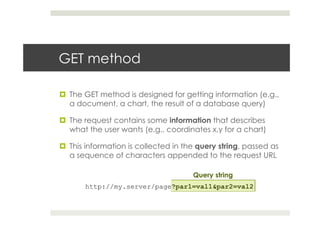
¤  The GET method is designed for getting information (e.g.,
a document, a chart, the result of a database query)
¤  The request contains some information that describes
what the user wants (e.g., coordinates x,y for a chart)
¤  This information is collected in the query string, passed as
a sequence of characters appended to the request URL
http://my.server/page?par1=val1&par2=val2
Query string
POST method
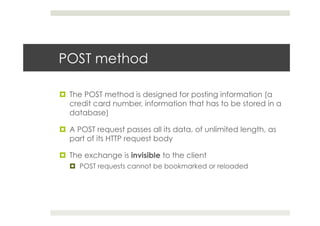
¤  The POST method is designed for posting information (a
credit card number, information that has to be stored in a
database)
¤  A POST request passes all its data, of unlimited length, as
part of its HTTP request body
¤  The exchange is invisible to the client
¤  POST requests cannot be bookmarked or reloaded
POST method: form
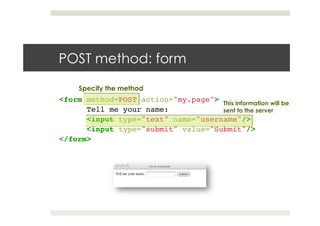
<form method=POST action="my.page">!
!Tell me your name:!
!<input type="text" name="username"/>!
!<input type="submit" value="Submit"/>!
</form>!
This information will be
sent to the server
Specify the method
Other request methods
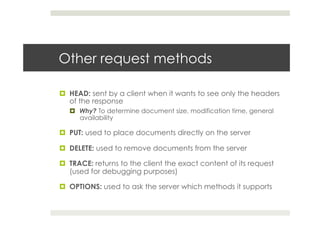
¤  HEAD: sent by a client when it wants to see only the headers
of the response
¤  Why? To determine document size, modification time, general
availability
¤  PUT: used to place documents directly on the server
¤  DELETE: used to remove documents from the server
¤  TRACE: returns to the client the exact content of its request
(used for debugging purposes)
¤  OPTIONS: used to ask the server which methods it supports
Java Servlets
Basic concepts
Why do we use Java?
¤  Cross-platform: useful in case of a heterogeneous
collection of servers (Unix/Windows operating systems)
¤  Object-oriented
¤  Support for networking and enterprise APIs
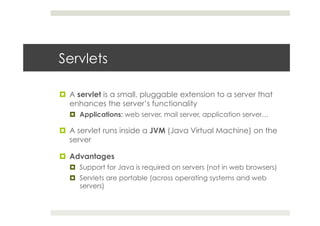
Servlets
¤  A servlet is a small, pluggable extension to a server that
enhances the server’s functionality
¤  Applications: web server, mail server, application server…
¤  A servlet runs inside a JVM (Java Virtual Machine) on the
server
¤  Advantages
¤  Support for Java is required on servers (not in web browsers)
¤  Servlets are portable (across operating systems and web
servers)
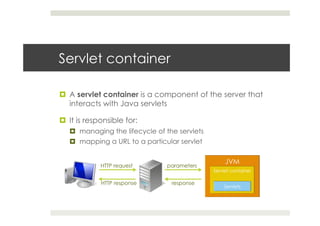
Servlet container
¤  A servlet container is a component of the server that
interacts with Java servlets
¤  It is responsible for:
¤  managing the lifecycle of the servlets
¤  mapping a URL to a particular servlet
HTTP request parameters
responseHTTP response
Persistence
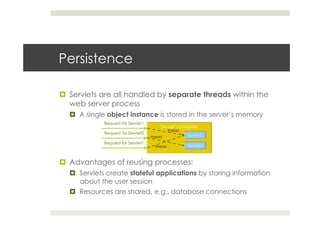
¤  Servlets are all handled by separate threads within the
web server process
¤  A single object instance is stored in the server’s memory
¤  Advantages of reusing processes:
¤  Servlets create stateful applications by storing information
about the user session
¤  Resources are shared, e.g., database connections
Request for Servlet1
Request for Servlet2
Request for Servlet1
thread
thread
thread
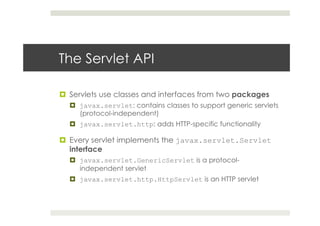
The Servlet API
¤  Servlets use classes and interfaces from two packages
¤  javax.servlet: contains classes to support generic servlets
(protocol-independent)
¤  javax.servlet.http: adds HTTP-specific functionality
¤  Every servlet implements the javax.servlet.Servlet
interface
¤  javax.servlet.GenericServlet is a protocol-
independent servlet
¤  javax.servlet.http.HttpServlet is an HTTP servlet
GenericServlet
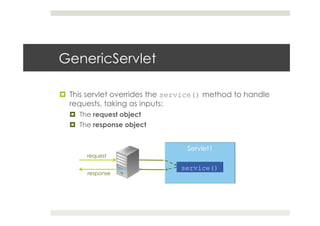
¤  This servlet overrides the service() method to handle
requests, taking as inputs:
¤  The request object
¤  The response object
request
response
HttpServlet
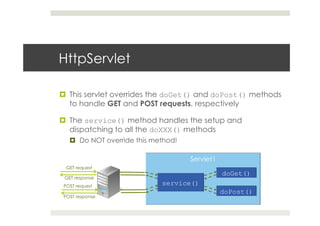
¤  This servlet overrides the doGet() and doPost() methods
to handle GET and POST requests, respectively
¤  The service() method handles the setup and
dispatching to all the doXXX() methods
¤  Do NOT override this method!
GET request
GET response
POST request
POST response
Servlet life cycle
¤  Servlet’s initialization: when the server starts, the servlet’s
init() method is called
¤  Handle requests: when a request is captured by the
server, the servlet’s service(), doGet() and doPost()
methods are called according to the request type
¤  Servlet’s destruction: when the server process is stopped,
the servlet’s destroy() method is called and the
garbage collection is performed
Java Servlets
Basic coding using Java Servlet API
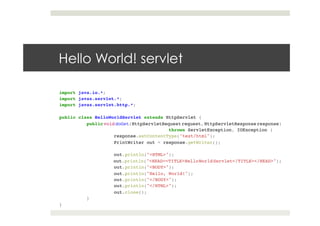
Hello World! servlet
import java.io.*;!
import javax.servlet.*;!
import javax.servlet.http.*;!
!
public class HelloWorldServlet extends HttpServlet {!
!public void doGet(HttpServletRequest request, HttpServletResponse response)!
! ! ! !throws ServletException, IOException {!
! !response.setContentType("text/html");!
! !PrintWriter out = response.getWriter();!
! !!
! !out.println("<HTML>");!
! !out.println("<HEAD><TITLE>HelloWorldServlet</TITLE></HEAD>");!
! !out.println("<BODY>");!
! !out.println("Hello, World!");!
! !out.println("</BODY>");!
! !out.println("</HTML>");!
! !out.close();!
!}!
}
import java.io.*;!
import javax.servlet.*;!
import javax.servlet.http.*;!
!
public class HelloWorldServlet extends HttpServlet {!
!public void doGet(HttpServletRequest request, HttpServletResponse response)!
! ! ! !throws ServletException, IOException {!
! !response.setContentType("text/html");!
! !PrintWriter out = response.getWriter();!
! !!
! !out.println("<HTML>");!
! !out.println("<HEAD><TITLE>HelloWorldServlet</TITLE></HEAD>");!
! !out.println("<BODY>");!
! !out.println("Hello, World!");!
! !out.println("</BODY>");!
! !out.println("</HTML>");!
! !out.close();!
!}!
}
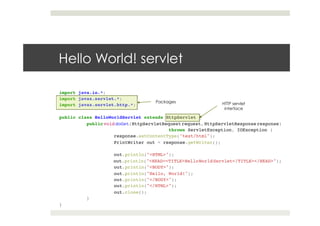
Hello World! servlet
HTTP servlet
interface
Packages
import java.io.*;!
import javax.servlet.*;!
import javax.servlet.http.*;!
!
public class HelloWorldServlet extends HttpServlet {!
!public void doGet(HttpServletRequest request, HttpServletResponse response)!
! ! ! !throws ServletException, IOException {!
! !response.setContentType("text/html");!
! !PrintWriter out = response.getWriter();!
! !!
! !out.println("<HTML>");!
! !out.println("<HEAD><TITLE>HelloWorldServlet</TITLE></HEAD>");!
! !out.println("<BODY>");!
! !out.println("Hello, World!");!
! !out.println("</BODY>");!
! !out.println("</HTML>");!
! !out.close();!
!}!
}
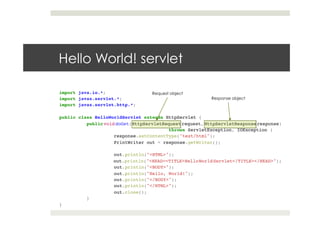
Hello World! servlet
Request object
Response object
import java.io.*;!
import javax.servlet.*;!
import javax.servlet.http.*;!
!
public class HelloWorldServlet extends HttpServlet {!
!public void doGet(HttpServletRequest request, HttpServletResponse response)!
! ! ! !throws ServletException, IOException {!
! !response.setContentType("text/html");!
! !PrintWriter out = response.getWriter();!
! !!
! !out.println("<HTML>");!
! !out.println("<HEAD><TITLE>HelloWorldServlet</TITLE></HEAD>");!
! !out.println("<BODY>");!
! !out.println("Hello, World!");!
! !out.println("</BODY>");!
! !out.println("</HTML>");!
! !out.close();!
!}!
}
Hello World! servlet
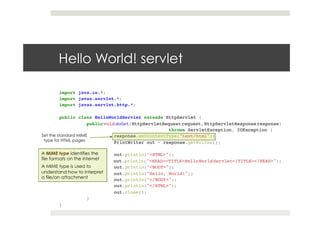
Set the standard MIME
type for HTML pages
A MIME type identifies the
file formats on the internet
A MIME type is used to
understand how to interpret
a file/an attachment
import java.io.*;!
import javax.servlet.*;!
import javax.servlet.http.*;!
!
public class HelloWorldServlet extends HttpServlet {!
!public void doGet(HttpServletRequest request, HttpServletResponse response)!
! ! ! !throws ServletException, IOException {!
! !response.setContentType("text/html");!
! !PrintWriter out = response.getWriter();!
! !!
! !out.println("<HTML>");!
! !out.println("<HEAD><TITLE>HelloWorldServlet</TITLE></HEAD>");!
! !out.println("<BODY>");!
! !out.println("Hello, World!");!
! !out.println("</BODY>");!
! !out.println("</HTML>");!
! !out.close();!
!}!
}
Hello World! servlet
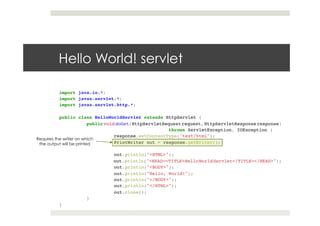
Requires the writer on which
the output will be printed
import java.io.*;!
import javax.servlet.*;!
import javax.servlet.http.*;!
!
public class HelloWorldServlet extends HttpServlet {!
!public void doGet(HttpServletRequest request, HttpServletResponse response)!
! ! ! !throws ServletException, IOException {!
! !response.setContentType("text/html");!
! !PrintWriter out = response.getWriter();!
! !!
! !out.println("<HTML>");!
! !out.println("<HEAD><TITLE>HelloWorldServlet</TITLE></HEAD>");!
! !out.println("<BODY>");!
! !out.println("Hello, World!");!
! !out.println("</BODY>");!
! !out.println("</HTML>");!
! !out.close();!
!}!
}
Hello World! servlet
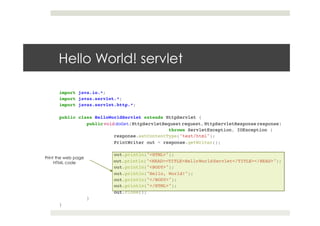
Print the web page
HTML code
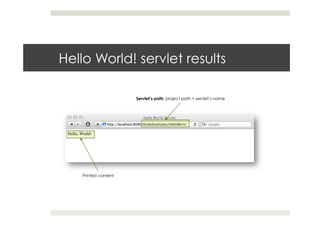
Hello World! servlet results
Servlet’s path: project path + servlet’s name
Printed content
Configure a web application
¤  A web application is made of a set of servlets that are
stored in a project
¤  The description of the web application content is
contained in the web.xml file
¤  This file contains:
¤  The description of each servlet (name, class)
¤  The mapping of the servlet (used to reference the servlet
when accessing to the server)
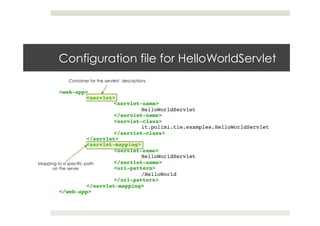
Configuration file for HelloWorldServlet
<web-app> !
!<servlet>!
! !<servlet-name>!
! ! !HelloWorldServlet!
! !</servlet-name>!
! !<servlet-class>!
! ! !it.polimi.tiw.examples.HelloWorldServlet!
! !</servlet-class>!
!</servlet>!
!<servlet-mapping>!
! !<servlet-name>!
! ! !HelloWorldServlet!
! !</servlet-name>!
! !<url-pattern>!
! ! !/HelloWorld!
! !</url-pattern>!
!</servlet-mapping>!
</web-app>
Container for the servlets’ descriptions
Mapping to a specific path
on the server
Java Servlets
Input and output
Read information from the client
¤  Information is received from the client by reading the
data included in HttpServletRequest
¤  Input stream methods
¤  getReader(): retrieves the body of the request
¤  getContentType(): retrieves the request content type
¤  getContentLength(): retrieves the request content length
¤  Header reading methods
¤  getHeader(name): retrieves the name HTTP header
¤  getHeaders(name): retrieves the name HTTP header as a
collection of String objects
Read information from the client
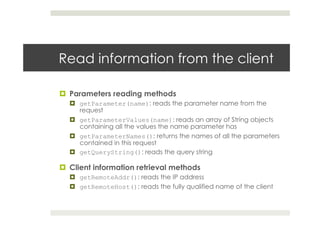
¤  Parameters reading methods
¤  getParameter(name): reads the parameter name from the
request
¤  getParameterValues(name): reads an array of String objects
containing all the values the name parameter has
¤  getParameterNames(): returns the names of all the parameters
contained in this request
¤  getQueryString(): reads the query string
¤  Client information retrieval methods
¤  getRemoteAddr(): reads the IP address
¤  getRemoteHost(): reads the fully qualified name of the client
Send information to the client
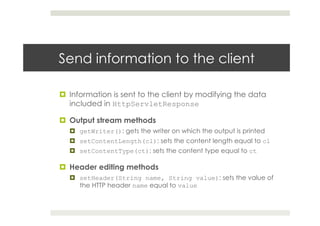
¤  Information is sent to the client by modifying the data
included in HttpServletResponse
¤  Output stream methods
¤  getWriter(): gets the writer on which the output is printed
¤  setContentLength(cl): sets the content length equal to cl
¤  setContentType(ct): sets the content type equal to ct
¤  Header editing methods
¤  setHeader(String name, String value): sets the value of
the HTTP header name equal to value
Send information to the client
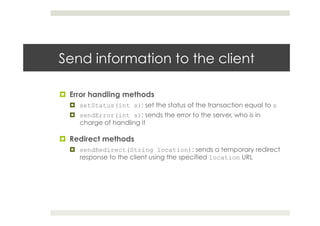
¤  Error handling methods
¤  setStatus(int s): set the status of the transaction equal to s
¤  sendError(int s): sends the error to the server, who is in
charge of handling it
¤  Redirect methods
¤  sendRedirect(String location): sends a temporary redirect
response to the client using the specified location URL
Handling forms data
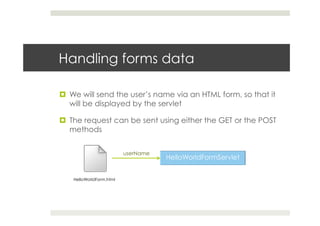
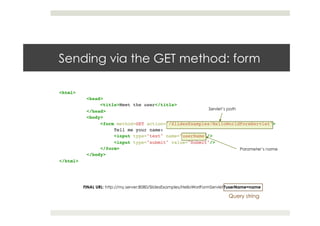
¤  We will send the user’s name via an HTML form, so that it
will be displayed by the servlet
¤  The request can be sent using either the GET or the POST
methods
HelloWorldForm.html
userName
Sending via the GET method: form
<html>!
!<head>!
! <title>Meet the user</title>!
!</head>!
!<body>!
! <form method=GET action="/SlidesExamples/HelloWorldFormServlet">!
! !Tell me your name:!
! !<input type="text" name="userName"/>!
! !<input type="submit" value="Submit"/>!
! </form>!
!</body>!
</html>
Servlet’s path
Parameter’s name
FINAL URL: http://my.server:8080/SlidesExamples/HelloWorlFormServlet?userName=name
Query string
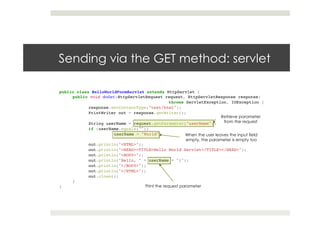
Sending via the GET method: servlet
public class HelloWorldFormServlet extends HttpServlet {!
public void doGet(HttpServletRequest request, HttpServletResponse response)!
! ! ! !throws ServletException, IOException {!
response.setContentType("text/html");!
PrintWriter out = response.getWriter();!
! !!
String userName = request.getParameter("userName");!
if (userName.equals(""))!
!userName = "World";!
! !!
out.println("<HTML>");!
out.println("<HEAD><TITLE>Hello World Servlet</TITLE></HEAD>");!
out.println("<BODY>");!
out.println("Hello, " + userName + "!");!
out.println("</BODY>");!
out.println("</HTML>");!
out.close();!
}!
}
Retrieve parameter
from the request
When the user leaves the input field
empty, the parameter is empty too
Print the request parameter
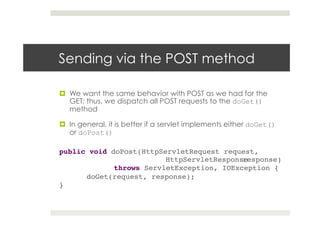
Sending via the POST method
¤  We want the same behavior with POST as we had for the
GET; thus, we dispatch all POST requests to the doGet()
method
¤  In general, it is better if a servlet implements either doGet()
or doPost()
public void doPost(HttpServletRequest request,
! ! ! !HttpServletResponseresponse)!
! !throws ServletException, IOException {!
!doGet(request, response);!
}!
Java Servlets
Instance persistence
¤  Servlets persist between requests as object instances
¤  Advantage: a servlet has already loaded anything it’s
likely to need during the handling of a request
¤  Database connections
¤  Shopping cart
¤  Cached pages
¤  …
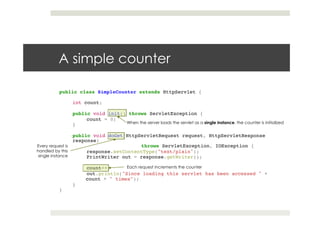
A simple counter
public class SimpleCounter extends HttpServlet {!
!!
int count;!
!!
public void init() throws ServletException {!
!count = 0;!
}!
!!
public void doGet(HttpServletRequest request, HttpServletResponse
response)!
! ! !throws ServletException, IOException {!
!response.setContentType("text/plain");!
!PrintWriter out = response.getWriter();!
! !!
!count++;!
!out.println("Since loading this servlet has been accessed " + !
count + " times");!
}!
}
When the server loads the servlet as a single instance, the counter is initialized
Every request is
handled by this
single instance
Each request increments the counter
A simple counter: results
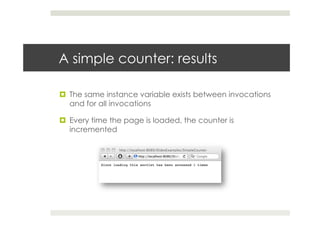
¤  The same instance variable exists between invocations
and for all invocations
¤  Every time the page is loaded, the counter is
incremented
Synchronization
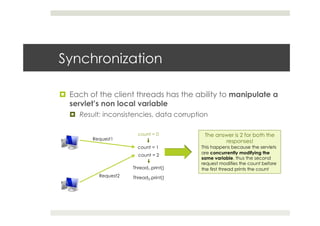
¤  Each of the client threads has the ability to manipulate a
servlet’s non local variable
¤  Result: inconsistencies, data corruption
Request1
Request2
count = 0
count = 1
count = 2
The answer is 2 for both the
responses!
This happens because the servlets
are concurrently modifying the
same variable, thus the second
request modifies the count before
the first thread prints the countThread1.print()
Thread2.print()
Synchronization
¤  To prevent this problem one can add one or more
synchronized blocks to the code
¤  Anything inside a synchronized block is guaranteed not to
be executed concurrently by another thread
¤  When a thread wants to modify what is inside a
synchronized block, it has to obtain a monitor
¤  If another thread has the monitor, the first thread must
wait
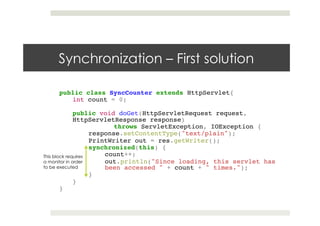
Synchronization – First solution
public class SyncCounter extends HttpServlet{ !
int count = 0;!
!
public void doGet(HttpServletRequest request,
HttpServletResponse response) !
! !throws ServletException, IOException {!
response.setContentType("text/plain"); !
PrintWriter out = res.getWriter(); !
synchronized(this) {!
count++; !
out.println("Since loading, this servlet has
been accessed " + count + " times.");!
}!
}!
}
This block requires
a monitor in order
to be executed
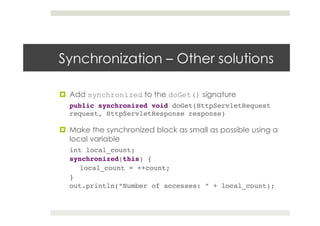
Synchronization – Other solutions
¤  Add synchronized to the doGet() signature
public synchronized void doGet(HttpServletRequest
request, HttpServletResponse response)!
¤  Make the synchronized block as small as possible using a
local variable
int local_count;!
synchronized(this) {!
local_count = ++count;!
}!
out.println(“Number of accesses: ” + local_count);!
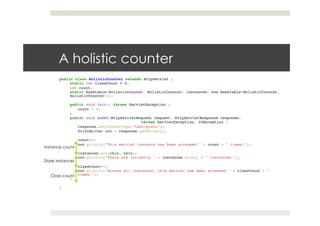
Class count
A holistic counter
public class HolisticCounter extends HttpServlet {!
static int classCount = 0;!
int count;!
static Hashtable<HolisticCounter, HolisticCounter> instances= new Hashtable<HolisticCounter,
HolisticCounter>();!
!!
public void init() throws ServletException {!
count = 0;!
} !!
public void doGet(HttpServletRequest request, HttpServletResponse response)!
! ! !throws ServletException, IOException {!
response.setContentType("text/plain");!
PrintWriter out = response.getWriter();!
! !!
count++;!
out.println("This servlet instance has been accessed " + count + " times.");!
! !!
instances.put(this, this);!
out.println("There are currently " + instances.size() + " instances.");!
! !!
classCount++;!
out.println("Across all instances, this servlet has been accessed " + classCount + "
times.");!
}!
!
}
Instance count
Store instances
Java servlets
Init and context parameters
Init parameters
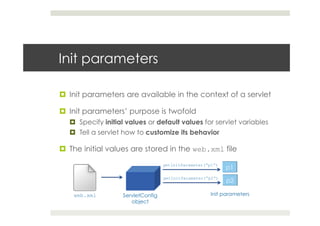
¤  Init parameters are available in the context of a servlet
¤  Init parameters’ purpose is twofold
¤  Specify initial values or default values for servlet variables
¤  Tell a servlet how to customize its behavior
¤  The initial values are stored in the web.xml file
ServletConfig
object
web.xml
getInitParameter(“p1”)
getInitParameter(“p2”)
Init parameters
Init parameters
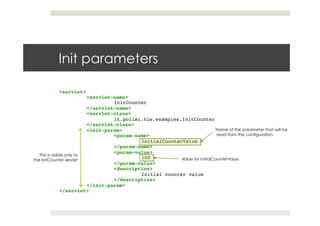
<servlet>!
!<servlet-name>!
! !InitCounter!
!</servlet-name>!
!<servlet-class>!
! !it.polimi.tiw.examples.InitCounter!
!</servlet-class>!
!<init-param>!
! !<param-name>!
! ! !InitialCounterValue!
! !</param-name>!
! !<param-value>!
! ! !100!
! !</param-value>!
! !<description>!
! ! !Initial counter value!
! !</description>!
!</init-param>!
</servlet>
This is visible only to
the InitCounter servlet
Name of the parameter that will be
read from the configuration
Value for InitialCounterValue
Init parameters
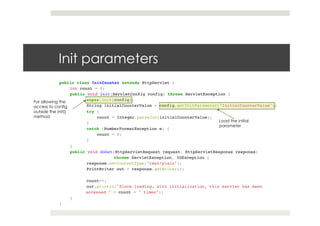
public class InitCounter extends HttpServlet { !!
int count = 0; !!
public void init(ServletConfig config) throws ServletException {!
!super.init(config);!
!String initialCounterValue = config.getInitParameter("InitialCounterValue");!
!try {!
count = Integer.parseInt(initialCounterValue);!
!}!
!catch (NumberFormatException e) {!
count = 0;!
!}!
} !!
public void doGet(HttpServletRequest request, HttpServletResponse response)!
! !throws ServletException, IOException {!
!response.setContentType("text/plain");!
!PrintWriter out = response.getWriter();!
! !!
!count++;!
!out.println("Since loading, with initialization, this servlet has been !
accessed " + count + " times");!
}!
}
Load the initial
parameter
For allowing the
access to config
outside the init()
method
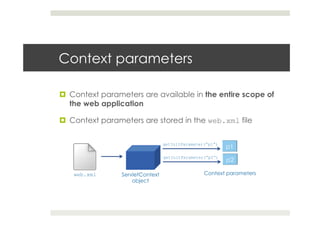
Context parameters
¤  Context parameters are available in the entire scope of
the web application
¤  Context parameters are stored in the web.xml file
ServletContext
object
web.xml
getInitParameter(“p1”)
getInitParameter(“p2”)
Context parameters
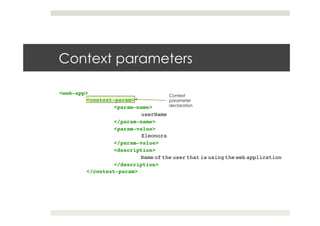
Context parameters
<web-app> !
!<context-param>!
! !<param-name>!
! ! !userName!
! !</param-name>!
! !<param-value>!
! ! !Eleonora!
! !</param-value>!
! !<description>!
! ! !Name of the user that is using the web application!
! !</description>!
!</context-param>
Context
parameter
declaration
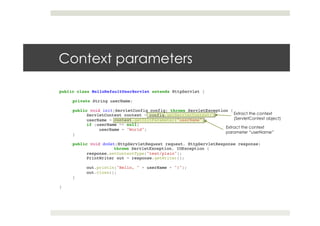
Context parameters
public class HelloDefaultUserServlet extends HttpServlet {!
!
private String userName;!
!!
public void init(ServletConfig config) throws ServletException {!
!ServletContext context = config.getServletContext();!
!userName = context.getInitParameter("userName");!
!if (userName == null)!
userName = "World";!
}!
!!
public void doGet(HttpServletRequest request, HttpServletResponse response)!
! !throws ServletException, IOException {!
!response.setContentType("text/plain");!
!PrintWriter out = response.getWriter();!
!
!out.println("Hello, " + userName + "!");!
!out.close();!
}!
!
}
Extract the context
(ServletContext object)
Extract the context
parameter “userName”
Java Servlets
Session tracking
Motivations
¤  HTTP is a stateless protocol
¤  No way for a server to recognize that a sequence of
requests are from the same client
¤  Problem: shopping cart? Several interactions!
¤  Solution: the client introduces himself as it makes each
request
¤  Unique identifier
¤  Additional information about its identity
User authorization
¤  One way to perform session tracking is to leverage the
information that comes with user authorization
¤  When the client logs in, the username is available to a servlet
through getRemoteUser()
¤  The user is identified through her username and thereby
track her session
¤  Advantage: easy to implement, works also if the user uses
different machines to log in
¤  Disadvantage: it requires each user to register for an
account and then log in each time she visits the site
Hidden form fields
¤  Another way to perform session tracking is to add
information to the form by inserting hidden fields, i.e.,
fields that contain information but that are not visible
¤  <INPUT TYPE=hidden NAME=“zip” VALUE=“834629”/>
¤  Advantage: ubiquity, support for anonymity, no special
server requirements
¤  Disadvantage: it works only for a sequence of
dynamically generated forms, it breaks down with static/
emailed/bookmarked documents or browser shutdowns
Persistent cookies
¤  A cookie is a bit of information sent by a web server to a
browser that can later be read back from that browser
¤  When the browser receives the cookie
¤  It saves the cookie
¤  It sends the cookie back to the server each time it accesses
a page on that server
¤  A cookie’s value can be set so as to uniquely identify the
user
¤  Thus: cookies are used in order to track the session
Working with cookies
¤  A cookie is creating by specifying:
¤  The name of the cookie
¤  The value of the cookie
¤  Cookie(name, value)
¤  The cookie is attached to the response by using the
method addCookie(cookie)
¤  Cookies are read from the request by using the method
getCookies()
Saving the sessionId in a cookie
public class SessionIdCookie extends HttpServlet {!
!
public void doGet(HttpServletRequest request, HttpServletResponse response) !
throws ServletException, IOException {!
!response.setContentType("text/plain");!
!PrintWriter out = response.getWriter();!
! !!
!String sessionId = null;!
!Cookie[] cookies = request.getCookies();!
!if (cookies != null)!
for (int i = 0; i < cookies.length; i++)!
if (cookies[i].getName().equals("sessionId"))!
! !sessionId = cookies[i].getValue();!
! !!
!if (sessionId == null) {!
sessionId = new java.rmi.server.UID().toString();!
Cookie cookie = new Cookie("sessionId", sessionId);!
response.addCookie(cookie);!
!}!
! !!
!out.println("SessionId: " + sessionId);!
!out.close();!
}!
}
Retrieve
cookies from
the request
Look for the cookie
containing the sessionId
If the needed cookie does not
exist, we create the sessionId
with a standard method and
then store it in a new cookie
Other functions for handling cookies
¤  setMaxAge(int expiry) specifies the maximum age of
the cookie (in seconds) before it expires
¤  setSecure(boolean flag) indicates whether the
cookie should be sent only over a secure channel, such
as SSL
¤  setComment(String comment) sets the comment field
of the cookie, describing the intended purpose of it
URL rewriting (1)
¤  Every local URL the user might click is dynamically
modified to include extra information
¤  You have to ask your servlet container to enable it
¤  Several ways of doing it
¤  Extra path information
¤  http://my.server:port/servlet/Rewritten/extraPath
¤  extraPath contains extra information
¤  Works fine for all the servers, but some servlet might use it as
a true path
URL rewriting (2)
¤  Added parameter
¤  http://my.server:port/servlet/Rewritten?sessionid=123
¤  Works on all servers
¤  It fails as a target for forms that use the POST method
¤  Custom change
¤  http://my.server:port/servlet/Rewritten;sessionid=123
¤  It does not work for those servers that don’t support the change
¤  The session ID is uniquely created for the user, and
passed to it by attaching it to the response
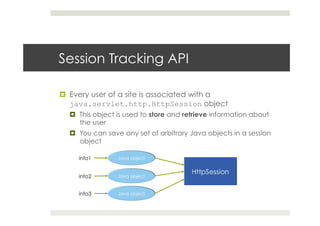
Session Tracking API
¤  Every user of a site is associated with a
java.servlet.http.HttpSession object
¤  This object is used to store and retrieve information about
the user
¤  You can save any set of arbitrary Java objects in a session
object
info1
info2
info3
Cookies vs. URL rewriting
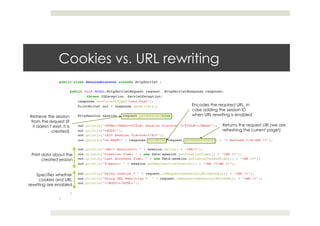
public class SessionDiscover extends HttpServlet {!
!!
public void doGet(HttpServletRequest request, HttpServletResponse response)!
!throws IOException, ServletException{ ! !!
response.setContentType("text/html");!
PrintWriter out = response.getWriter();!
! !!
HttpSession session = request.getSession(true);!
! !!
out.println("<HTML><HEAD><TITLE> Session Discover </TITLE></HEAD>");!
out.println("<BODY>");!
out.println("<H2> Session Discover</H2>");!
out.println(“<A HREF=" + response.encodeURL(request.getRequestURI()) + "> Refresh </A><BR />"); !
!!
out.println("<BR/> SessionID: " + session.getId() + "<BR/>");!
out.println("Creation Time: " + new Date(session.getCreationTime()) + "<BR />");!
out.println("Last Accessed Time: " + new Date(session.getLastAccessedTime()) + "<BR />");!
out.println("Timeout: " + session.getMaxInactiveInterval() + "<BR /><BR />");!
! !!
out.println("Using cookies ? " + request.isRequestedSessionIdFromCookie() + "<BR />");!
out.println("Using URL Rewriting ? " + request.isRequestedSessionIdFromURL() + "<BR />");!
out.println("</BODY></HTML>");!!
! !!
}!
}
Encodes the required URL, in
case adding the session ID
when URL rewriting is enabled
Returns the request URI (we are
refreshing the current page!)
Retrieve the session
from the request (if
it doesn’t exist, it is
created)
Print data about the
created session
Specifies whether
cookies and URL
rewriting are enabled
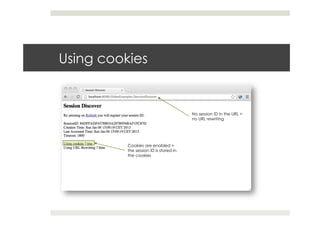
Using cookies
No session ID in the URL =
no URL rewriting
Cookies are enabled =
the session ID is stored in
the cookies
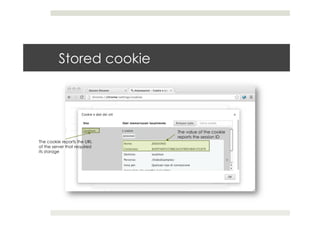
Stored cookie
The cookie reports the URL
of the server that required
its storage
The value of the cookie
reports the session ID
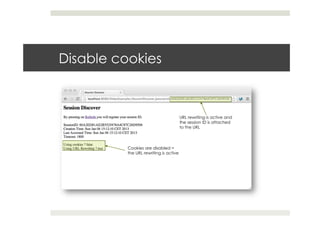
Disable cookies
Cookies are disabled =
the URL rewriting is active
URL rewriting is active and
the session ID is attached
to the URL
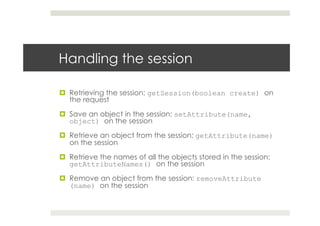
Handling the session
¤  Retrieving the session: getSession(boolean create) on
the request
¤  Save an object in the session: setAttribute(name,
object) on the session
¤  Retrieve an object from the session: getAttribute(name)
on the session
¤  Retrieve the names of all the objects stored in the session:
getAttributeNames() on the session
¤  Remove an object from the session: removeAttribute
(name) on the session
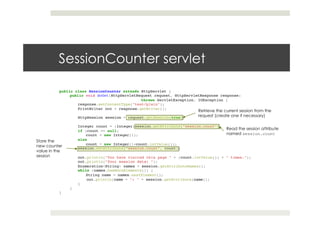
SessionCounter servlet
public class SessionCounter extends HttpServlet {!
public void doGet(HttpServletRequest request, HttpServletResponse response) !
! ! !throws ServletException, IOException {!
response.setContentType("text/plain");!
PrintWriter out = response.getWriter();!
! !!
HttpSession session = request.getSession(true);!
! !!
Integer count = (Integer)session.getAttribute("session.count");!
if (count == null) !
count = new Integer(1);!
else!
count = new Integer(1+count.intValue());!
session.setAttribute("session.count", count);!
! !!
out.println("You have visited this page " + (count.intValue()) + " times.");!
out.println("Your session data: ");!
Enumeration<String> names = session.getAttributeNames();!
while (names.hasMoreElements()) {!
String name = names.nextElement();!
!out.println(name + ": " + session.getAttribute(name));!
}!
}!
}
Retrieve the current session from the
request (create one if necessary)
Read the session attribute
named session.count
Store the
new counter
value in the
session
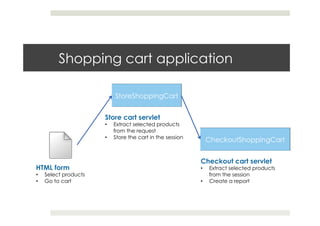
Shopping cart application
HTML form
•  Select products
•  Go to cart
Store cart servlet
•  Extract selected products
from the request
•  Store the cart in the session
Checkout cart servlet
•  Extract selected products
from the session
•  Create a report
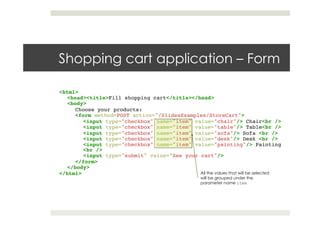
Shopping cart application – Form
<html>!
<head><title>Fill shopping cart</title></head>!
<body>!
Choose your products:!
<form method=POST action="/SlidesExamples/StoreCart">!
<input type="checkbox" name="item" value="chair"/> Chair<br />!
<input type="checkbox" name="item" value="table"/> Table<br />!
<input type="checkbox" name="item" value="sofa"/> Sofa <br />!
<input type="checkbox" name="item" value="desk"/> Desk <br />!
<input type="checkbox" name="item" value="painting"/> Painting
<br />!
<input type="submit" value="See your cart"/>!
</form>!
</body>!
</html> All the values that will be selected
will be grouped under the
parameter name item
Shopping cart application – Store cart (1)
public class StoreShoppingCart extends HttpServlet {!
!
public void doGet(HttpServletRequest request, HttpServletResponse response)!
! !throws ServletException, IOException {!
response.setContentType("text/html");!
PrintWriter out = response.getWriter();!
! !!
out.println("<html>");!
out.println("<head><title>Your shopping cart</title></head>");!
out.println("<body>Your items:");!
! !!
String[] cartItems = request.getParameterValues("item");!
if (cartItems == null)!
out.println("No items were selected.");!
else {!
out.println("<ul>");!
for (int i = 0; i < cartItems.length; i++)!
out.println("<li>" + cartItems[i]);!
out.println("</ul>");!
}!
! !!
! !
Retrieve the selected
products from the request
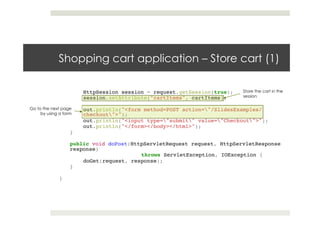
Shopping cart application – Store cart (1)
HttpSession session = request.getSession(true);!
session.setAttribute("cartItems", cartItems);!
! !!
out.println("<form method=POST action="/SlidesExamples/
checkout">");!
out.println("<input type="submit" value="Checkout">");!
out.println("</form></body></html>");!
}!
!!
public void doPost(HttpServletRequest request, HttpServletResponse
response)!
! ! !throws ServletException, IOException {!
doGet(request, response);!
}!
!!
}
Store the cart in the
session
Go to the next page
by using a form
Shopping cart application - Checkout
public void doGet(HttpServletRequest request, HttpServletResponse response)!
!throws ServletException, IOException {!
response.setContentType("text/html");!
PrintWriter out = response.getWriter();!
! !!
out.println("<html>");!
out.println("<head><title>Checkout</title></head>");!
out.println("<body>Your items:");!
! !!
HttpSession session = request.getSession();!
String[] cartItems = (String[])session.getAttribute("cartItems");!
if (cartItems == null)!
!out.println("No items were selected.");!
else {!
!out.println("<ul>");!
!for (int i = 0; i < cartItems.length; i++)!
out.println("<li>" + cartItems[i]);!
!out.println("</ul>");!
}!
out.println("</body></html>");!
}!
Retrieve the
selected products
from the session
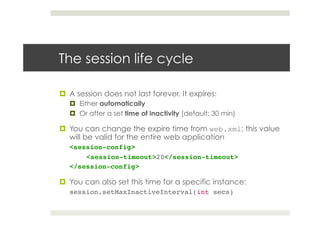
The session life cycle
¤  A session does not last forever. It expires:
¤  Either automatically
¤  Or after a set time of inactivity (default: 30 min)
¤  You can change the expire time from web.xml; this value
will be valid for the entire web application
<session-config>!
!<session-timeout>20</session-timeout>!
</session-config>!
¤  You can also set this time for a specific instance:
session.setMaxInactiveInterval(int secs)!
Java Servlets
Redirect and Forward
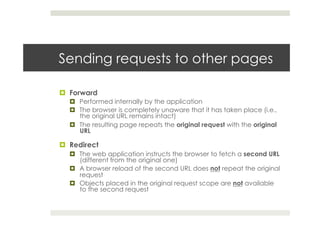
Sending requests to other pages
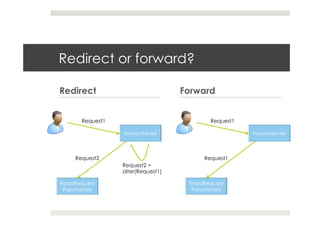
¤  Forward
¤  Performed internally by the application
¤  The browser is completely unaware that it has taken place (i.e.,
the original URL remains intact)
¤  The resulting page repeats the original request with the original
URL
¤  Redirect
¤  The web application instructs the browser to fetch a second URL
(different from the original one)
¤  A browser reload of the second URL does not repeat the original
request
¤  Objects placed in the original request scope are not available
to the second request
Redirect or forward?
Redirect Forward
Request1
Request2 =
alter(Request1)
Request2
Request1
Request1
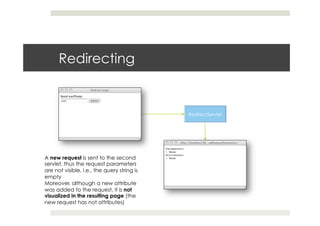
Redirecting
A new request is sent to the second
servlet, thus the request parameters
are not visible, i.e., the query string is
empty
Moreover, although a new attribute
was added to the request, it is not
visualized in the resulting page (the
new request has not attributes)
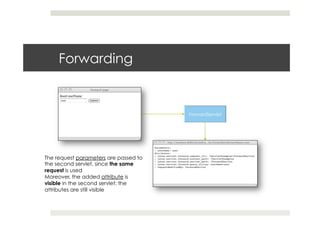
Forwarding
The request parameters are passed to
the second servlet, since the same
request is used
Moreover, the added attribute is
visible in the second servlet: the
attributes are still visible
References
References
¤  Java Servlet Programming, Jason Hunter and William
Crawford, O’Reilly

Dynamic content generation

  • 1.
    Dynamic content generation EleonoraCiceri ciceri@elet.polimi.it
  • 2.
    Dynamic content generation ¤ Motivations ¤  User needs cannot be satisfied by using just static content. The following is needed too: ¤  Data coming from databases ¤  Response to specific requests (e.g., queries) ¤  Client-side scripting does not achieve the required results in dynamic data gathering ¤  Solution ¤  Server-side architectures that generate content dynamically
  • 3.
  • 4.
    HTTP basics ¤  HTTPis a stateless protocol: ¤  The client performs the request ¤  The web server responds and the transaction is done ¤  Each request is associated with a method, that specifies the type of action the client wants performed ¤  Available methods: ¤  GET ¤  POST ¤  Others: HEAD, PUT, DELETE, TRACE, OPTIONS
  • 5.
    GET method ¤  TheGET method is designed for getting information (e.g., a document, a chart, the result of a database query) ¤  The request contains some information that describes what the user wants (e.g., coordinates x,y for a chart) ¤  This information is collected in the query string, passed as a sequence of characters appended to the request URL http://my.server/page?par1=val1&par2=val2 Query string
  • 6.
    POST method ¤  ThePOST method is designed for posting information (a credit card number, information that has to be stored in a database) ¤  A POST request passes all its data, of unlimited length, as part of its HTTP request body ¤  The exchange is invisible to the client ¤  POST requests cannot be bookmarked or reloaded
  • 7.
    POST method: form <formmethod=POST action="my.page">! !Tell me your name:! !<input type="text" name="username"/>! !<input type="submit" value="Submit"/>! </form>! This information will be sent to the server Specify the method
  • 8.
    Other request methods ¤ HEAD: sent by a client when it wants to see only the headers of the response ¤  Why? To determine document size, modification time, general availability ¤  PUT: used to place documents directly on the server ¤  DELETE: used to remove documents from the server ¤  TRACE: returns to the client the exact content of its request (used for debugging purposes) ¤  OPTIONS: used to ask the server which methods it supports
  • 9.
  • 10.
    Why do weuse Java? ¤  Cross-platform: useful in case of a heterogeneous collection of servers (Unix/Windows operating systems) ¤  Object-oriented ¤  Support for networking and enterprise APIs
  • 11.
    Servlets ¤  A servletis a small, pluggable extension to a server that enhances the server’s functionality ¤  Applications: web server, mail server, application server… ¤  A servlet runs inside a JVM (Java Virtual Machine) on the server ¤  Advantages ¤  Support for Java is required on servers (not in web browsers) ¤  Servlets are portable (across operating systems and web servers)
  • 12.
    Servlet container ¤  Aservlet container is a component of the server that interacts with Java servlets ¤  It is responsible for: ¤  managing the lifecycle of the servlets ¤  mapping a URL to a particular servlet HTTP request parameters responseHTTP response
  • 13.
    Persistence ¤  Servlets areall handled by separate threads within the web server process ¤  A single object instance is stored in the server’s memory ¤  Advantages of reusing processes: ¤  Servlets create stateful applications by storing information about the user session ¤  Resources are shared, e.g., database connections Request for Servlet1 Request for Servlet2 Request for Servlet1 thread thread thread
  • 14.
    The Servlet API ¤ Servlets use classes and interfaces from two packages ¤  javax.servlet: contains classes to support generic servlets (protocol-independent) ¤  javax.servlet.http: adds HTTP-specific functionality ¤  Every servlet implements the javax.servlet.Servlet interface ¤  javax.servlet.GenericServlet is a protocol- independent servlet ¤  javax.servlet.http.HttpServlet is an HTTP servlet
  • 15.
    GenericServlet ¤  This servletoverrides the service() method to handle requests, taking as inputs: ¤  The request object ¤  The response object request response
  • 16.
    HttpServlet ¤  This servletoverrides the doGet() and doPost() methods to handle GET and POST requests, respectively ¤  The service() method handles the setup and dispatching to all the doXXX() methods ¤  Do NOT override this method! GET request GET response POST request POST response
  • 17.
    Servlet life cycle ¤ Servlet’s initialization: when the server starts, the servlet’s init() method is called ¤  Handle requests: when a request is captured by the server, the servlet’s service(), doGet() and doPost() methods are called according to the request type ¤  Servlet’s destruction: when the server process is stopped, the servlet’s destroy() method is called and the garbage collection is performed
  • 18.
    Java Servlets Basic codingusing Java Servlet API
  • 19.
    Hello World! servlet importjava.io.*;! import javax.servlet.*;! import javax.servlet.http.*;! ! public class HelloWorldServlet extends HttpServlet {! !public void doGet(HttpServletRequest request, HttpServletResponse response)! ! ! ! !throws ServletException, IOException {! ! !response.setContentType("text/html");! ! !PrintWriter out = response.getWriter();! ! !! ! !out.println("<HTML>");! ! !out.println("<HEAD><TITLE>HelloWorldServlet</TITLE></HEAD>");! ! !out.println("<BODY>");! ! !out.println("Hello, World!");! ! !out.println("</BODY>");! ! !out.println("</HTML>");! ! !out.close();! !}! }
  • 20.
    import java.io.*;! import javax.servlet.*;! importjavax.servlet.http.*;! ! public class HelloWorldServlet extends HttpServlet {! !public void doGet(HttpServletRequest request, HttpServletResponse response)! ! ! ! !throws ServletException, IOException {! ! !response.setContentType("text/html");! ! !PrintWriter out = response.getWriter();! ! !! ! !out.println("<HTML>");! ! !out.println("<HEAD><TITLE>HelloWorldServlet</TITLE></HEAD>");! ! !out.println("<BODY>");! ! !out.println("Hello, World!");! ! !out.println("</BODY>");! ! !out.println("</HTML>");! ! !out.close();! !}! } Hello World! servlet HTTP servlet interface Packages
  • 21.
    import java.io.*;! import javax.servlet.*;! importjavax.servlet.http.*;! ! public class HelloWorldServlet extends HttpServlet {! !public void doGet(HttpServletRequest request, HttpServletResponse response)! ! ! ! !throws ServletException, IOException {! ! !response.setContentType("text/html");! ! !PrintWriter out = response.getWriter();! ! !! ! !out.println("<HTML>");! ! !out.println("<HEAD><TITLE>HelloWorldServlet</TITLE></HEAD>");! ! !out.println("<BODY>");! ! !out.println("Hello, World!");! ! !out.println("</BODY>");! ! !out.println("</HTML>");! ! !out.close();! !}! } Hello World! servlet Request object Response object
  • 22.
    import java.io.*;! import javax.servlet.*;! importjavax.servlet.http.*;! ! public class HelloWorldServlet extends HttpServlet {! !public void doGet(HttpServletRequest request, HttpServletResponse response)! ! ! ! !throws ServletException, IOException {! ! !response.setContentType("text/html");! ! !PrintWriter out = response.getWriter();! ! !! ! !out.println("<HTML>");! ! !out.println("<HEAD><TITLE>HelloWorldServlet</TITLE></HEAD>");! ! !out.println("<BODY>");! ! !out.println("Hello, World!");! ! !out.println("</BODY>");! ! !out.println("</HTML>");! ! !out.close();! !}! } Hello World! servlet Set the standard MIME type for HTML pages A MIME type identifies the file formats on the internet A MIME type is used to understand how to interpret a file/an attachment
  • 23.
    import java.io.*;! import javax.servlet.*;! importjavax.servlet.http.*;! ! public class HelloWorldServlet extends HttpServlet {! !public void doGet(HttpServletRequest request, HttpServletResponse response)! ! ! ! !throws ServletException, IOException {! ! !response.setContentType("text/html");! ! !PrintWriter out = response.getWriter();! ! !! ! !out.println("<HTML>");! ! !out.println("<HEAD><TITLE>HelloWorldServlet</TITLE></HEAD>");! ! !out.println("<BODY>");! ! !out.println("Hello, World!");! ! !out.println("</BODY>");! ! !out.println("</HTML>");! ! !out.close();! !}! } Hello World! servlet Requires the writer on which the output will be printed
  • 24.
    import java.io.*;! import javax.servlet.*;! importjavax.servlet.http.*;! ! public class HelloWorldServlet extends HttpServlet {! !public void doGet(HttpServletRequest request, HttpServletResponse response)! ! ! ! !throws ServletException, IOException {! ! !response.setContentType("text/html");! ! !PrintWriter out = response.getWriter();! ! !! ! !out.println("<HTML>");! ! !out.println("<HEAD><TITLE>HelloWorldServlet</TITLE></HEAD>");! ! !out.println("<BODY>");! ! !out.println("Hello, World!");! ! !out.println("</BODY>");! ! !out.println("</HTML>");! ! !out.close();! !}! } Hello World! servlet Print the web page HTML code
  • 25.
    Hello World! servletresults Servlet’s path: project path + servlet’s name Printed content
  • 26.
    Configure a webapplication ¤  A web application is made of a set of servlets that are stored in a project ¤  The description of the web application content is contained in the web.xml file ¤  This file contains: ¤  The description of each servlet (name, class) ¤  The mapping of the servlet (used to reference the servlet when accessing to the server)
  • 27.
    Configuration file forHelloWorldServlet <web-app> ! !<servlet>! ! !<servlet-name>! ! ! !HelloWorldServlet! ! !</servlet-name>! ! !<servlet-class>! ! ! !it.polimi.tiw.examples.HelloWorldServlet! ! !</servlet-class>! !</servlet>! !<servlet-mapping>! ! !<servlet-name>! ! ! !HelloWorldServlet! ! !</servlet-name>! ! !<url-pattern>! ! ! !/HelloWorld! ! !</url-pattern>! !</servlet-mapping>! </web-app> Container for the servlets’ descriptions Mapping to a specific path on the server
  • 28.
  • 29.
    Read information fromthe client ¤  Information is received from the client by reading the data included in HttpServletRequest ¤  Input stream methods ¤  getReader(): retrieves the body of the request ¤  getContentType(): retrieves the request content type ¤  getContentLength(): retrieves the request content length ¤  Header reading methods ¤  getHeader(name): retrieves the name HTTP header ¤  getHeaders(name): retrieves the name HTTP header as a collection of String objects
  • 30.
    Read information fromthe client ¤  Parameters reading methods ¤  getParameter(name): reads the parameter name from the request ¤  getParameterValues(name): reads an array of String objects containing all the values the name parameter has ¤  getParameterNames(): returns the names of all the parameters contained in this request ¤  getQueryString(): reads the query string ¤  Client information retrieval methods ¤  getRemoteAddr(): reads the IP address ¤  getRemoteHost(): reads the fully qualified name of the client
  • 31.
    Send information tothe client ¤  Information is sent to the client by modifying the data included in HttpServletResponse ¤  Output stream methods ¤  getWriter(): gets the writer on which the output is printed ¤  setContentLength(cl): sets the content length equal to cl ¤  setContentType(ct): sets the content type equal to ct ¤  Header editing methods ¤  setHeader(String name, String value): sets the value of the HTTP header name equal to value
  • 32.
    Send information tothe client ¤  Error handling methods ¤  setStatus(int s): set the status of the transaction equal to s ¤  sendError(int s): sends the error to the server, who is in charge of handling it ¤  Redirect methods ¤  sendRedirect(String location): sends a temporary redirect response to the client using the specified location URL
  • 33.
    Handling forms data ¤ We will send the user’s name via an HTML form, so that it will be displayed by the servlet ¤  The request can be sent using either the GET or the POST methods HelloWorldForm.html userName
  • 34.
    Sending via theGET method: form <html>! !<head>! ! <title>Meet the user</title>! !</head>! !<body>! ! <form method=GET action="/SlidesExamples/HelloWorldFormServlet">! ! !Tell me your name:! ! !<input type="text" name="userName"/>! ! !<input type="submit" value="Submit"/>! ! </form>! !</body>! </html> Servlet’s path Parameter’s name FINAL URL: http://my.server:8080/SlidesExamples/HelloWorlFormServlet?userName=name Query string
  • 35.
    Sending via theGET method: servlet public class HelloWorldFormServlet extends HttpServlet {! public void doGet(HttpServletRequest request, HttpServletResponse response)! ! ! ! !throws ServletException, IOException {! response.setContentType("text/html");! PrintWriter out = response.getWriter();! ! !! String userName = request.getParameter("userName");! if (userName.equals(""))! !userName = "World";! ! !! out.println("<HTML>");! out.println("<HEAD><TITLE>Hello World Servlet</TITLE></HEAD>");! out.println("<BODY>");! out.println("Hello, " + userName + "!");! out.println("</BODY>");! out.println("</HTML>");! out.close();! }! } Retrieve parameter from the request When the user leaves the input field empty, the parameter is empty too Print the request parameter
  • 36.
    Sending via thePOST method ¤  We want the same behavior with POST as we had for the GET; thus, we dispatch all POST requests to the doGet() method ¤  In general, it is better if a servlet implements either doGet() or doPost() public void doPost(HttpServletRequest request, ! ! ! !HttpServletResponseresponse)! ! !throws ServletException, IOException {! !doGet(request, response);! }!
  • 37.
  • 38.
    Instance persistence ¤  Servletspersist between requests as object instances ¤  Advantage: a servlet has already loaded anything it’s likely to need during the handling of a request ¤  Database connections ¤  Shopping cart ¤  Cached pages ¤  …
  • 39.
    A simple counter publicclass SimpleCounter extends HttpServlet {! !! int count;! !! public void init() throws ServletException {! !count = 0;! }! !! public void doGet(HttpServletRequest request, HttpServletResponse response)! ! ! !throws ServletException, IOException {! !response.setContentType("text/plain");! !PrintWriter out = response.getWriter();! ! !! !count++;! !out.println("Since loading this servlet has been accessed " + ! count + " times");! }! } When the server loads the servlet as a single instance, the counter is initialized Every request is handled by this single instance Each request increments the counter
  • 40.
    A simple counter:results ¤  The same instance variable exists between invocations and for all invocations ¤  Every time the page is loaded, the counter is incremented
  • 41.
    Synchronization ¤  Each ofthe client threads has the ability to manipulate a servlet’s non local variable ¤  Result: inconsistencies, data corruption Request1 Request2 count = 0 count = 1 count = 2 The answer is 2 for both the responses! This happens because the servlets are concurrently modifying the same variable, thus the second request modifies the count before the first thread prints the countThread1.print() Thread2.print()
  • 42.
    Synchronization ¤  To preventthis problem one can add one or more synchronized blocks to the code ¤  Anything inside a synchronized block is guaranteed not to be executed concurrently by another thread ¤  When a thread wants to modify what is inside a synchronized block, it has to obtain a monitor ¤  If another thread has the monitor, the first thread must wait
  • 43.
    Synchronization – Firstsolution public class SyncCounter extends HttpServlet{ ! int count = 0;! ! public void doGet(HttpServletRequest request, HttpServletResponse response) ! ! !throws ServletException, IOException {! response.setContentType("text/plain"); ! PrintWriter out = res.getWriter(); ! synchronized(this) {! count++; ! out.println("Since loading, this servlet has been accessed " + count + " times.");! }! }! } This block requires a monitor in order to be executed
  • 44.
    Synchronization – Othersolutions ¤  Add synchronized to the doGet() signature public synchronized void doGet(HttpServletRequest request, HttpServletResponse response)! ¤  Make the synchronized block as small as possible using a local variable int local_count;! synchronized(this) {! local_count = ++count;! }! out.println(“Number of accesses: ” + local_count);!
  • 45.
    Class count A holisticcounter public class HolisticCounter extends HttpServlet {! static int classCount = 0;! int count;! static Hashtable<HolisticCounter, HolisticCounter> instances= new Hashtable<HolisticCounter, HolisticCounter>();! !! public void init() throws ServletException {! count = 0;! } !! public void doGet(HttpServletRequest request, HttpServletResponse response)! ! ! !throws ServletException, IOException {! response.setContentType("text/plain");! PrintWriter out = response.getWriter();! ! !! count++;! out.println("This servlet instance has been accessed " + count + " times.");! ! !! instances.put(this, this);! out.println("There are currently " + instances.size() + " instances.");! ! !! classCount++;! out.println("Across all instances, this servlet has been accessed " + classCount + " times.");! }! ! } Instance count Store instances
  • 46.
    Java servlets Init andcontext parameters
  • 47.
    Init parameters ¤  Initparameters are available in the context of a servlet ¤  Init parameters’ purpose is twofold ¤  Specify initial values or default values for servlet variables ¤  Tell a servlet how to customize its behavior ¤  The initial values are stored in the web.xml file ServletConfig object web.xml getInitParameter(“p1”) getInitParameter(“p2”) Init parameters
  • 48.
    Init parameters <servlet>! !<servlet-name>! ! !InitCounter! !</servlet-name>! !<servlet-class>! !!it.polimi.tiw.examples.InitCounter! !</servlet-class>! !<init-param>! ! !<param-name>! ! ! !InitialCounterValue! ! !</param-name>! ! !<param-value>! ! ! !100! ! !</param-value>! ! !<description>! ! ! !Initial counter value! ! !</description>! !</init-param>! </servlet> This is visible only to the InitCounter servlet Name of the parameter that will be read from the configuration Value for InitialCounterValue
  • 49.
    Init parameters public classInitCounter extends HttpServlet { !! int count = 0; !! public void init(ServletConfig config) throws ServletException {! !super.init(config);! !String initialCounterValue = config.getInitParameter("InitialCounterValue");! !try {! count = Integer.parseInt(initialCounterValue);! !}! !catch (NumberFormatException e) {! count = 0;! !}! } !! public void doGet(HttpServletRequest request, HttpServletResponse response)! ! !throws ServletException, IOException {! !response.setContentType("text/plain");! !PrintWriter out = response.getWriter();! ! !! !count++;! !out.println("Since loading, with initialization, this servlet has been ! accessed " + count + " times");! }! } Load the initial parameter For allowing the access to config outside the init() method
  • 50.
    Context parameters ¤  Contextparameters are available in the entire scope of the web application ¤  Context parameters are stored in the web.xml file ServletContext object web.xml getInitParameter(“p1”) getInitParameter(“p2”) Context parameters
  • 51.
    Context parameters <web-app> ! !<context-param>! !!<param-name>! ! ! !userName! ! !</param-name>! ! !<param-value>! ! ! !Eleonora! ! !</param-value>! ! !<description>! ! ! !Name of the user that is using the web application! ! !</description>! !</context-param> Context parameter declaration
  • 52.
    Context parameters public classHelloDefaultUserServlet extends HttpServlet {! ! private String userName;! !! public void init(ServletConfig config) throws ServletException {! !ServletContext context = config.getServletContext();! !userName = context.getInitParameter("userName");! !if (userName == null)! userName = "World";! }! !! public void doGet(HttpServletRequest request, HttpServletResponse response)! ! !throws ServletException, IOException {! !response.setContentType("text/plain");! !PrintWriter out = response.getWriter();! ! !out.println("Hello, " + userName + "!");! !out.close();! }! ! } Extract the context (ServletContext object) Extract the context parameter “userName”
  • 53.
  • 54.
    Motivations ¤  HTTP isa stateless protocol ¤  No way for a server to recognize that a sequence of requests are from the same client ¤  Problem: shopping cart? Several interactions! ¤  Solution: the client introduces himself as it makes each request ¤  Unique identifier ¤  Additional information about its identity
  • 55.
    User authorization ¤  Oneway to perform session tracking is to leverage the information that comes with user authorization ¤  When the client logs in, the username is available to a servlet through getRemoteUser() ¤  The user is identified through her username and thereby track her session ¤  Advantage: easy to implement, works also if the user uses different machines to log in ¤  Disadvantage: it requires each user to register for an account and then log in each time she visits the site
  • 56.
    Hidden form fields ¤ Another way to perform session tracking is to add information to the form by inserting hidden fields, i.e., fields that contain information but that are not visible ¤  <INPUT TYPE=hidden NAME=“zip” VALUE=“834629”/> ¤  Advantage: ubiquity, support for anonymity, no special server requirements ¤  Disadvantage: it works only for a sequence of dynamically generated forms, it breaks down with static/ emailed/bookmarked documents or browser shutdowns
  • 57.
    Persistent cookies ¤  Acookie is a bit of information sent by a web server to a browser that can later be read back from that browser ¤  When the browser receives the cookie ¤  It saves the cookie ¤  It sends the cookie back to the server each time it accesses a page on that server ¤  A cookie’s value can be set so as to uniquely identify the user ¤  Thus: cookies are used in order to track the session
  • 58.
    Working with cookies ¤ A cookie is creating by specifying: ¤  The name of the cookie ¤  The value of the cookie ¤  Cookie(name, value) ¤  The cookie is attached to the response by using the method addCookie(cookie) ¤  Cookies are read from the request by using the method getCookies()
  • 59.
    Saving the sessionIdin a cookie public class SessionIdCookie extends HttpServlet {! ! public void doGet(HttpServletRequest request, HttpServletResponse response) ! throws ServletException, IOException {! !response.setContentType("text/plain");! !PrintWriter out = response.getWriter();! ! !! !String sessionId = null;! !Cookie[] cookies = request.getCookies();! !if (cookies != null)! for (int i = 0; i < cookies.length; i++)! if (cookies[i].getName().equals("sessionId"))! ! !sessionId = cookies[i].getValue();! ! !! !if (sessionId == null) {! sessionId = new java.rmi.server.UID().toString();! Cookie cookie = new Cookie("sessionId", sessionId);! response.addCookie(cookie);! !}! ! !! !out.println("SessionId: " + sessionId);! !out.close();! }! } Retrieve cookies from the request Look for the cookie containing the sessionId If the needed cookie does not exist, we create the sessionId with a standard method and then store it in a new cookie
  • 60.
    Other functions forhandling cookies ¤  setMaxAge(int expiry) specifies the maximum age of the cookie (in seconds) before it expires ¤  setSecure(boolean flag) indicates whether the cookie should be sent only over a secure channel, such as SSL ¤  setComment(String comment) sets the comment field of the cookie, describing the intended purpose of it
  • 61.
    URL rewriting (1) ¤ Every local URL the user might click is dynamically modified to include extra information ¤  You have to ask your servlet container to enable it ¤  Several ways of doing it ¤  Extra path information ¤  http://my.server:port/servlet/Rewritten/extraPath ¤  extraPath contains extra information ¤  Works fine for all the servers, but some servlet might use it as a true path
  • 62.
    URL rewriting (2) ¤ Added parameter ¤  http://my.server:port/servlet/Rewritten?sessionid=123 ¤  Works on all servers ¤  It fails as a target for forms that use the POST method ¤  Custom change ¤  http://my.server:port/servlet/Rewritten;sessionid=123 ¤  It does not work for those servers that don’t support the change ¤  The session ID is uniquely created for the user, and passed to it by attaching it to the response
  • 63.
    Session Tracking API ¤ Every user of a site is associated with a java.servlet.http.HttpSession object ¤  This object is used to store and retrieve information about the user ¤  You can save any set of arbitrary Java objects in a session object info1 info2 info3
  • 64.
    Cookies vs. URLrewriting public class SessionDiscover extends HttpServlet {! !! public void doGet(HttpServletRequest request, HttpServletResponse response)! !throws IOException, ServletException{ ! !! response.setContentType("text/html");! PrintWriter out = response.getWriter();! ! !! HttpSession session = request.getSession(true);! ! !! out.println("<HTML><HEAD><TITLE> Session Discover </TITLE></HEAD>");! out.println("<BODY>");! out.println("<H2> Session Discover</H2>");! out.println(“<A HREF=" + response.encodeURL(request.getRequestURI()) + "> Refresh </A><BR />"); ! !! out.println("<BR/> SessionID: " + session.getId() + "<BR/>");! out.println("Creation Time: " + new Date(session.getCreationTime()) + "<BR />");! out.println("Last Accessed Time: " + new Date(session.getLastAccessedTime()) + "<BR />");! out.println("Timeout: " + session.getMaxInactiveInterval() + "<BR /><BR />");! ! !! out.println("Using cookies ? " + request.isRequestedSessionIdFromCookie() + "<BR />");! out.println("Using URL Rewriting ? " + request.isRequestedSessionIdFromURL() + "<BR />");! out.println("</BODY></HTML>");!! ! !! }! } Encodes the required URL, in case adding the session ID when URL rewriting is enabled Returns the request URI (we are refreshing the current page!) Retrieve the session from the request (if it doesn’t exist, it is created) Print data about the created session Specifies whether cookies and URL rewriting are enabled
  • 65.
    Using cookies No sessionID in the URL = no URL rewriting Cookies are enabled = the session ID is stored in the cookies
  • 66.
    Stored cookie The cookiereports the URL of the server that required its storage The value of the cookie reports the session ID
  • 67.
    Disable cookies Cookies aredisabled = the URL rewriting is active URL rewriting is active and the session ID is attached to the URL
  • 68.
    Handling the session ¤ Retrieving the session: getSession(boolean create) on the request ¤  Save an object in the session: setAttribute(name, object) on the session ¤  Retrieve an object from the session: getAttribute(name) on the session ¤  Retrieve the names of all the objects stored in the session: getAttributeNames() on the session ¤  Remove an object from the session: removeAttribute (name) on the session
  • 69.
    SessionCounter servlet public classSessionCounter extends HttpServlet {! public void doGet(HttpServletRequest request, HttpServletResponse response) ! ! ! !throws ServletException, IOException {! response.setContentType("text/plain");! PrintWriter out = response.getWriter();! ! !! HttpSession session = request.getSession(true);! ! !! Integer count = (Integer)session.getAttribute("session.count");! if (count == null) ! count = new Integer(1);! else! count = new Integer(1+count.intValue());! session.setAttribute("session.count", count);! ! !! out.println("You have visited this page " + (count.intValue()) + " times.");! out.println("Your session data: ");! Enumeration<String> names = session.getAttributeNames();! while (names.hasMoreElements()) {! String name = names.nextElement();! !out.println(name + ": " + session.getAttribute(name));! }! }! } Retrieve the current session from the request (create one if necessary) Read the session attribute named session.count Store the new counter value in the session
  • 70.
    Shopping cart application HTMLform •  Select products •  Go to cart Store cart servlet •  Extract selected products from the request •  Store the cart in the session Checkout cart servlet •  Extract selected products from the session •  Create a report
  • 71.
    Shopping cart application– Form <html>! <head><title>Fill shopping cart</title></head>! <body>! Choose your products:! <form method=POST action="/SlidesExamples/StoreCart">! <input type="checkbox" name="item" value="chair"/> Chair<br />! <input type="checkbox" name="item" value="table"/> Table<br />! <input type="checkbox" name="item" value="sofa"/> Sofa <br />! <input type="checkbox" name="item" value="desk"/> Desk <br />! <input type="checkbox" name="item" value="painting"/> Painting <br />! <input type="submit" value="See your cart"/>! </form>! </body>! </html> All the values that will be selected will be grouped under the parameter name item
  • 72.
    Shopping cart application– Store cart (1) public class StoreShoppingCart extends HttpServlet {! ! public void doGet(HttpServletRequest request, HttpServletResponse response)! ! !throws ServletException, IOException {! response.setContentType("text/html");! PrintWriter out = response.getWriter();! ! !! out.println("<html>");! out.println("<head><title>Your shopping cart</title></head>");! out.println("<body>Your items:");! ! !! String[] cartItems = request.getParameterValues("item");! if (cartItems == null)! out.println("No items were selected.");! else {! out.println("<ul>");! for (int i = 0; i < cartItems.length; i++)! out.println("<li>" + cartItems[i]);! out.println("</ul>");! }! ! !! ! ! Retrieve the selected products from the request
  • 73.
    Shopping cart application– Store cart (1) HttpSession session = request.getSession(true);! session.setAttribute("cartItems", cartItems);! ! !! out.println("<form method=POST action="/SlidesExamples/ checkout">");! out.println("<input type="submit" value="Checkout">");! out.println("</form></body></html>");! }! !! public void doPost(HttpServletRequest request, HttpServletResponse response)! ! ! !throws ServletException, IOException {! doGet(request, response);! }! !! } Store the cart in the session Go to the next page by using a form
  • 74.
    Shopping cart application- Checkout public void doGet(HttpServletRequest request, HttpServletResponse response)! !throws ServletException, IOException {! response.setContentType("text/html");! PrintWriter out = response.getWriter();! ! !! out.println("<html>");! out.println("<head><title>Checkout</title></head>");! out.println("<body>Your items:");! ! !! HttpSession session = request.getSession();! String[] cartItems = (String[])session.getAttribute("cartItems");! if (cartItems == null)! !out.println("No items were selected.");! else {! !out.println("<ul>");! !for (int i = 0; i < cartItems.length; i++)! out.println("<li>" + cartItems[i]);! !out.println("</ul>");! }! out.println("</body></html>");! }! Retrieve the selected products from the session
  • 75.
    The session lifecycle ¤  A session does not last forever. It expires: ¤  Either automatically ¤  Or after a set time of inactivity (default: 30 min) ¤  You can change the expire time from web.xml; this value will be valid for the entire web application <session-config>! !<session-timeout>20</session-timeout>! </session-config>! ¤  You can also set this time for a specific instance: session.setMaxInactiveInterval(int secs)!
  • 76.
  • 77.
    Sending requests toother pages ¤  Forward ¤  Performed internally by the application ¤  The browser is completely unaware that it has taken place (i.e., the original URL remains intact) ¤  The resulting page repeats the original request with the original URL ¤  Redirect ¤  The web application instructs the browser to fetch a second URL (different from the original one) ¤  A browser reload of the second URL does not repeat the original request ¤  Objects placed in the original request scope are not available to the second request
  • 78.
    Redirect or forward? RedirectForward Request1 Request2 = alter(Request1) Request2 Request1 Request1
  • 79.
    Redirecting A new requestis sent to the second servlet, thus the request parameters are not visible, i.e., the query string is empty Moreover, although a new attribute was added to the request, it is not visualized in the resulting page (the new request has not attributes)
  • 80.
    Forwarding The request parametersare passed to the second servlet, since the same request is used Moreover, the added attribute is visible in the second servlet: the attributes are still visible
  • 81.
  • 82.
    References ¤  Java ServletProgramming, Jason Hunter and William Crawford, O’Reilly