Introduction
• Networking
– Massive,complex topic
– Java networking in several packages
• java.net
– Socket based communications
• View networking as streams of data
– Reading/writing to socket like reading/writing to file
– Packet based communications
• Transmit packets of information.
• Remote Method Invocation (RMI)
– Objects in different Java Virtual Machines can communicate
3.
Introduction
• Client-server relationship
–Client request action
– Server performs action, responds to client
– This view foundation of servlets
• Highest-level view of networking
• Servlet extends functionality of server
– Useful for database-intensive applications
• Thin clients - little client-side support needed
• Server controls database access
– Logic code written once, on server
4.
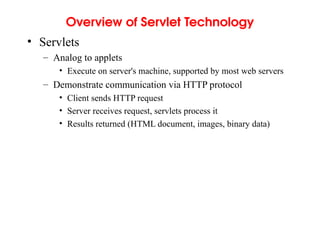
Overview of ServletTechnology
• Servlets
– Analog to applets
• Execute on server's machine, supported by most web servers
– Demonstrate communication via HTTP protocol
• Client sends HTTP request
• Server receives request, servlets process it
• Results returned (HTML document, images, binary data)
5.
The Servlet API
•Servlet interface
– Implemented by all servlets
– Many methods invoked automatically by server
• Similar to applets (paint, init, start, etc.)
– abstract classes that implement Servlet
• GenericServlet (javax.servlet)
• HTTPServlet (javax.servlet.http)
– Examples in chapter extend HTTPServlet
• Methods
– void init( ServletConfig config )
• Automatically called, argument provided
6.
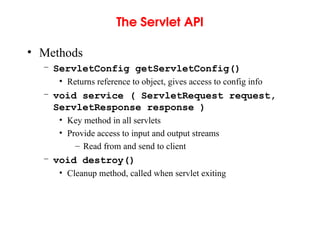
The Servlet API
•Methods
– ServletConfig getServletConfig()
• Returns reference to object, gives access to config info
– void service ( ServletRequest request,
ServletResponse response )
• Key method in all servlets
• Provide access to input and output streams
– Read from and send to client
– void destroy()
• Cleanup method, called when servlet exiting
HttpServlet Class
• HttpServlet
–Base class for web-based servlets
– Overrides method service
• Request methods:
– GET - retrieve HTML documents or image
– POST - send server data from HTML form
– Methods doGet and doPost respond to GET and POST
• Called by service
• Receive HttpServletRequest and
HttpServletResponse (return void) objects
9.
HttpServletRequest Interface
• HttpServletRequestinterface
– Object passed to doGet and doPost
– Extends ServletRequest
• Methods
– String getParameter( String name )
• Returns value of parameter name (part of GET or POST)
– Enumeration getParameterNames()
• Returns names of parameters (POST)
– String[] getParameterValues( String name )
• Returns array of strings containing values of a parameter
– Cookie[] getCookies()
• Returns array of Cookie objects, can be used to identify client
10.
HttpServletResponse Interface
• HttpServletResponse
–Object passed to doGet and doPost
– Extends ServletResponse
• Methods
– void addCookie( Cookie cookie )
• Add Cookie to header of response to client
– ServletOutputStream getOutputStream()
• Gets byte-based output stream, send binary data to client
– PrintWriter getWriter()
• Gets character-based output stream, send text to client
– void setContentType( String type )
• Specify MIME type of the response (Multipurpose Internet Mail
Extensions)
• MIME type “text/html” indicates that response is HTML document.
• Helps display data
11.
Handling HTTP GETRequests
• HTTP GET requests
– Usually gets content of specified URL
• Usually HTML document (web page)
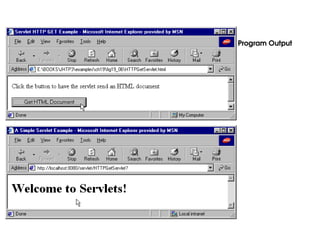
• Example servlet
– Handles HTTP GET requests
– User clicks Get Page button in HTML document
• GET request sent to servlet HTTPGetServlet
– Servlet dynamically creates HTML document displaying
"Welcome to Servlets!"
12.
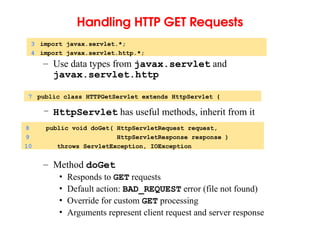
Handling HTTP GETRequests
– Use data types from javax.servlet and
javax.servlet.http
– HttpServlet has useful methods, inherit from it
– Method doGet
• Responds to GET requests
• Default action: BAD_REQUEST error (file not found)
• Override for custom GET processing
• Arguments represent client request and server response
3 import javax.servlet.*;
4 import javax.servlet.http.*;
7 public class HTTPGetServlet extends HttpServlet {
8 public void doGet( HttpServletRequest request,
9 HttpServletResponse response )
10 throws ServletException, IOException
13.
Handling HTTP GETRequests
– setContentType
• Specify content
• text/html for HTML documents
– getWriter
• Returns PrintWriter object, can send text to client
• getOutputStream to send binary data (returns
ServletOutputStream object)
14 response.setContentType( "text/html" ); // content type
12 PrintWriter output;
15 output = response.getWriter(); // get writer
14.
Handling HTTP GETRequests
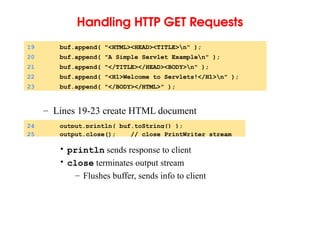
– Lines 19-23 create HTML document
• println sends response to client
• close terminates output stream
– Flushes buffer, sends info to client
19 buf.append( "<HTML><HEAD><TITLE>n" );
20 buf.append( "A Simple Servlet Examplen" );
21 buf.append( "</TITLE></HEAD><BODY>n" );
22 buf.append( "<H1>Welcome to Servlets!</H1>n" );
23 buf.append( "</BODY></HTML>" );
24 output.println( buf.toString() );
25 output.close(); // close PrintWriter stream
15.
Handling HTTP GETRequests
• Running servlets
– Must be running on a server
• Check documentation for how to install servlets
• Tomcat web server
• Apache Tomcat
16.
Handling HTTP GETRequests
• Port number
– Where server waits for client (handshake point)
– Client must specify proper port number
• Integers 1 - 65535, 1024 and below usually reserved
– Well-known port numbers
• Web servers - port 80 default
• JSDK/Apache Tomcat 4.0 Webserver- port 8080
– Change in default.cfg (server.port=8080)
17.
Handling HTTP GETRequests
• HTML documents
– Comments: <!-- text -->
– Tags: <TAG> ... </TAG>
• <HTML> ... <HTML> tags enclose document
• <HEAD> ... </HEAD> - enclose header
– Includes <TITLE> Title </TITLE> tags
– Sets title of document
1 <!-- Fig. 19.6: HTTPGetServlet.html -->
2 <HTML>
3 <HEAD>
4 <TITLE>
5 Servlet HTTP GET Example
6 </TITLE>
7 </HEAD>
18.
Handling HTTP GETRequests
– Document body (<BODY> tags)
• Has literal text and tags for formatting
– Form (<FORM> tags )
• ACTION - server-side form handler
• METHOD - request type
9 <FORM
10 ACTION="http://lab.cs.siu.edu:8080/rahimi/HTTPGetServlet"
11 METHOD="GET">
12 <P>Click the button to have the servlet send
13 an HTML document</P>
14 <INPUT TYPE="submit" VALUE="Get HTML Document">
15 </FORM>
16 </BODY>
19.
Handling HTTP GETRequests
– ACTION
• localhost - your computer
• :8080 - port
• /servlet - directory
– GUI component
• INPUT element
• TYPE - "submit" (button)
• VALUE - label
• When pressed, performs ACTION
• If parameters passed, separated by ? in URL
10 ACTION="http://localhost:8080/servlet/HTTPGetServlet"
14 <INPUT TYPE="submit" VALUE="Get HTML Document">
20.
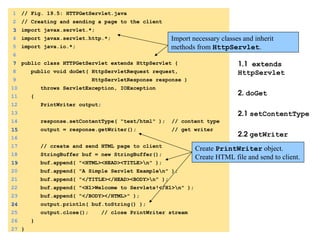
1. import
1.1 extends
HttpServlet
2.doGet
2.1 setContentType
2.2 getWriter
2.3 println
1 // Fig. 19.5: HTTPGetServlet.java
2 // Creating and sending a page to the client
3
3 import javax.servlet.*;
4 import javax.servlet.http.*;
5 import java.io.*;
6
7
7 public class HTTPGetServlet extends HttpServlet {
8 public void doGet( HttpServletRequest request,
9 HttpServletResponse response )
10 throws ServletException, IOException
11 {
12 PrintWriter output;
13
14 response.setContentType( "text/html" ); // content type
15
15 output = response.getWriter(); // get writer
16
17 // create and send HTML page to client
18 StringBuffer buf = new StringBuffer();
19
19 buf.append( "<HTML><HEAD><TITLE>n" );
20 buf.append( "A Simple Servlet Examplen" );
21 buf.append( "</TITLE></HEAD><BODY>n" );
22 buf.append( "<H1>Welcome to Servlets!</H1>n" );
23 buf.append( "</BODY></HTML>" );
24
24 output.println( buf.toString() );
25 output.close(); // close PrintWriter stream
26 }
27 }
Import necessary classes and inherit
methods from HttpServlet.
Create PrintWriter object.
Create HTML file and send to client.
21.
HTML document
1. <TITLE>
2.<FORM>
2.1 ACTION
2.2 METHOD
3. INPUT TYPE
1 <!-- Fig. 19.6: HTTPGetServlet.html -->
2 <HTML>
3 <HEAD>
4 <TITLE>
5 Servlet HTTP GET Example
6 </TITLE>
7 </HEAD>
8 <BODY>
9 <FORM
10
10 ACTION="http://lab.cs.siu.edu:8080/rahimi/HTTPGetServlet"
11
11 METHOD="GET">
12 <P>Click the button to have the servlet send
13 an HTML document</P>
14
14 <INPUT TYPE="submit" VALUE="Get HTML Document">
15 </FORM>
16 </BODY>
17 </HTML>
ACTION specifies form handler,
METHOD specifies request type.
Creates submit button,
performs ACTION when
clicked.
Handling HTTP POSTRequests
• HTTP POST
– Used to post data to server-side form handler (i.e. surveys)
– Both GET and POST can supply parameters
• Example servlet
– Survey
• Store results in file on server
– User selects radio button, presses Submit
• Browser sends POST request to servlet
– Servlet updates responses
• Displays cumulative results
24.
Handling HTTP POSTRequests
– Extend HttpServlet
• Handle GET and POST
– Array for animal names
– doPost
• Responds to POST requests (default BAD_REQUEST)
• Same arguments as doGet (client request, server response)
9 public class HTTPPostServlet extends HttpServlet {
10 private String animalNames[] =
11 { "dog", "cat", "bird", "snake", "none" };
13 public void doPost( HttpServletRequest request,
14 HttpServletResponse response )
15 throws ServletException, IOException
25.
Handling HTTP POSTRequests
– Open survey.txt, load animals array
– Method getParameter( name )
• Returns value of parameter as a string
– Content type
18 File f = new File( "survey.txt" );
23 ObjectInputStream input = new ObjectInputStream(
24 new FileInputStream( f ) );
26 animals = (int []) input.readObject();
40 String value =
41 request.getParameter( "animal" );
64 response.setContentType( "text/html" ); // content type
26.
Handling HTTP POSTRequests
– Return HTML document as before
– <PRE> tag
• Preformatted text, fixed-width
– <BR> tag - line break
67 StringBuffer buf = new StringBuffer();
68 buf.append( "<html>n" );
69 buf.append( "<title>Thank you!</title>n" );
70 buf.append( "Thank you for participating.n" );
71 buf.append( "<BR>Results:n<PRE>" );
73 DecimalFormat twoDigits = new DecimalFormat( "#0.00" );
74 for ( int i = 0; i < percentages.length; ++i ) {
75 buf.append( "<BR>" );
76 buf.append( animalNames[ i ] );
88 responseOutput.println( buf.toString() );
27.
Handling HTTP POSTRequests
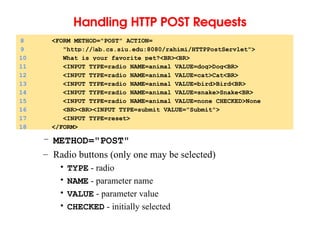
– METHOD="POST"
– Radio buttons (only one may be selected)
• TYPE - radio
• NAME - parameter name
• VALUE - parameter value
• CHECKED - initially selected
8 <FORM METHOD="POST" ACTION=
9 "http://lab.cs.siu.edu:8080/rahimi/HTTPPostServlet">
10 What is your favorite pet?<BR><BR>
11 <INPUT TYPE=radio NAME=animal VALUE=dog>Dog<BR>
12 <INPUT TYPE=radio NAME=animal VALUE=cat>Cat<BR>
13 <INPUT TYPE=radio NAME=animal VALUE=bird>Bird<BR>
14 <INPUT TYPE=radio NAME=animal VALUE=snake>Snake<BR>
15 <INPUT TYPE=radio NAME=animal VALUE=none CHECKED>None
16 <BR><BR><INPUT TYPE=submit VALUE="Submit">
17 <INPUT TYPE=reset>
18 </FORM>
1. import
1.1 extends
HttpServlet
1.2animalNames
2. doPost
2.1 Open file
1 // Fig. 19.7: HTTPPostServlet.java
2 // A simple survey servlet
3 import javax.servlet.*;
4 import javax.servlet.http.*;
5 import java.text.*;
6 import java.io.*;
7 import java.util.*;
8
9
9 public class HTTPPostServlet extends HttpServlet {
10 private String animalNames[] =
11 { "dog", "cat", "bird", "snake", "none" };
12
13 public void doPost( HttpServletRequest request,
14 HttpServletResponse response )
15 throws ServletException, IOException
16 {
17 int animals[] = null, total = 0;
18 File f = new File( "survey.txt" );
19
20 if ( f.exists() ) {
21 // Determine # of survey responses so far
22 try {
23 ObjectInputStream input = new ObjectInputStream(
24 new FileInputStream( f ) );
25
26 animals = (int []) input.readObject();
27 input.close(); // close stream
28
29 for ( int i = 0; i < animals.length; ++i )
30 total += animals[ i ];
31 }
Extending HttpServlet allows
processing of GET and POST
requests.
30.
2.2 getParameter
2.3 Writeto file
32 catch( ClassNotFoundException cnfe ) {
33 cnfe.printStackTrace();
34 }
35 }
36 else
37 animals = new int[ 5 ];
38
39 // read current survey response
40 String value =
41
41 request.getParameter( "animal" );
42 ++total; // update total of all responses
43
44 // determine which was selected and update its total
45 for ( int i = 0; i < animalNames.length; ++i )
46 if ( value.equals( animalNames[ i ] ) )
47 ++animals[ i ];
48
49 // write updated totals out to disk
50 ObjectOutputStream output = new ObjectOutputStream(
51 new FileOutputStream( f ) );
52
53 output.writeObject( animals );
54 output.flush();
55 output.close();
56
57 // Calculate percentages
58 double percentages[] = new double[ animals.length ];
59
60 for ( int i = 0; i < percentages.length; ++i )
61 percentages[ i ] = 100.0 * animals[ i ] / total;
62
Use request (HttpServletRequest) method
getParameter to get value of animal.
31.
2.4 getWriter
2.5 CreateHTML code
2.6 println
63 // send a thank you message to client
64 response.setContentType( "text/html" ); // content type
65
66 PrintWriter responseOutput = response.getWriter();
67 StringBuffer buf = new StringBuffer();
68 buf.append( "<html>n" );
69 buf.append( "<title>Thank you!</title>n" );
70 buf.append( "Thank you for participating.n" );
71 buf.append( "<BR>Results:n<PRE>" );
72
73 DecimalFormat twoDigits = new DecimalFormat( "#0.00" );
74 for ( int i = 0; i < percentages.length; ++i ) {
75 buf.append( "<BR>" );
76 buf.append( animalNames[ i ] );
77 buf.append( ": " );
78 buf.append( twoDigits.format( percentages[ i ] ) );
79 buf.append( "% responses: " );
80 buf.append( animals[ i ] );
81 buf.append( "n" );
82 }
83
84 buf.append( "n<BR><BR>Total responses: " );
85 buf.append( total );
86 buf.append( "</PRE>n</html>" );
87
88 responseOutput.println( buf.toString() );
89 responseOutput.close();
90 }
91 }
32.
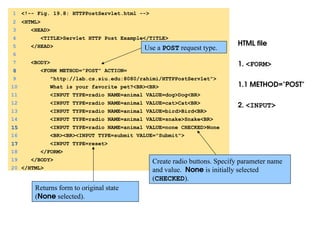
HTML file
1. <FORM>
1.1METHOD="POST"
2. <INPUT>
1 <!-- Fig. 19.8: HTTPPostServlet.html -->
2 <HTML>
3 <HEAD>
4 <TITLE>Servlet HTTP Post Example</TITLE>
5 </HEAD>
6
7 <BODY>
8
8 <FORM METHOD="POST" ACTION=
9 "http://lab.cs.siu.edu:8080/rahimi/HTTPPostServlet">
10 What is your favorite pet?<BR><BR>
11 <INPUT TYPE=radio NAME=animal VALUE=dog>Dog<BR>
12 <INPUT TYPE=radio NAME=animal VALUE=cat>Cat<BR>
13 <INPUT TYPE=radio NAME=animal VALUE=bird>Bird<BR>
14 <INPUT TYPE=radio NAME=animal VALUE=snake>Snake<BR>
15
15 <INPUT TYPE=radio NAME=animal VALUE=none CHECKED>None
16 <BR><BR><INPUT TYPE=submit VALUE="Submit">
17
17 <INPUT TYPE=reset>
18 </FORM>
19 </BODY>
20 </HTML>
Create radio buttons. Specify parameter name
and value. None is initially selected
(CHECKED).
Use a POST request type.
Returns form to original state
(None selected).
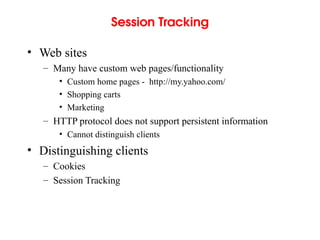
Session Tracking
• Websites
– Many have custom web pages/functionality
• Custom home pages - http://my.yahoo.com/
• Shopping carts
• Marketing
– HTTP protocol does not support persistent information
• Cannot distinguish clients
• Distinguishing clients
– Cookies
– Session Tracking
36.
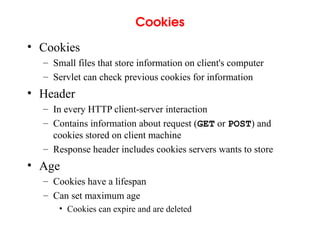
Cookies
• Cookies
– Smallfiles that store information on client's computer
– Servlet can check previous cookies for information
• Header
– In every HTTP client-server interaction
– Contains information about request (GET or POST) and
cookies stored on client machine
– Response header includes cookies servers wants to store
• Age
– Cookies have a lifespan
– Can set maximum age
• Cookies can expire and are deleted
37.
Cookies
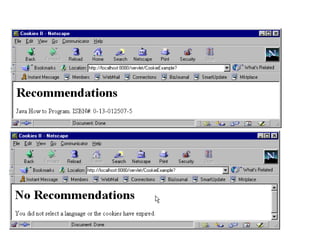
• Example
– Demonstratecookies
– Servlet handles both POST and GET requests
– User selects programming language (radio buttons)
• POST - Add cookie containing language, return HTML page
• GET - Browser sends cookies to servlet
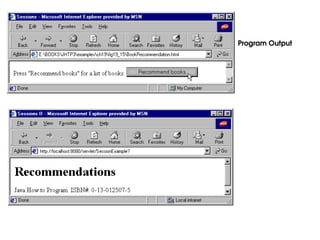
– Servlet returns HTML document with recommended
books
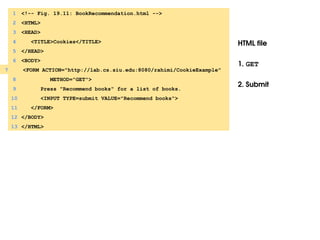
– Two separate HTML files
• One invokes POST, the other GET
• Same ACTION - invoke same servlet
38.
Cookies
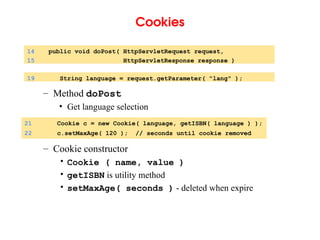
– Method doPost
•Get language selection
– Cookie constructor
• Cookie ( name, value )
• getISBN is utility method
• setMaxAge( seconds ) - deleted when expire
14 public void doPost( HttpServletRequest request,
15 HttpServletResponse response )
19 String language = request.getParameter( "lang" );
21 Cookie c = new Cookie( language, getISBN( language ) );
22 c.setMaxAge( 120 ); // seconds until cookie removed
39.
Cookies
– Add cookieto client response
• Part of HTTP header, must come first
• Then HTML document sent to client
– Method doGet
– getCookies
• Returns array of Cookies
23 response.addCookie( c ); // must precede getWriter
41 public void doGet( HttpServletRequest request,
42 HttpServletResponse response )
46 Cookie cookies[];
48 cookies = request.getCookies(); // get client's cookies
40.
Cookies
– Cookie methods
•getName, getValue
• Used to determine recommended book
• If cookie has expired, does not execute
57 if ( cookies != null ) {
62 output.println(
63 cookies[ i ].getName() + " How to Program. " +
64 "ISBN#: " + cookies[ i ].getValue() + "<BR>" );
41.
1. import
1.1 extends
HttpServlet
2.doPost
2.1 getParameter
2.2 Cookie
2.3 setMaxAge
2.4 addCookie
1 // Fig. 19.9: CookieExample.java
2 // Using cookies.
3 import javax.servlet.*;
4 import javax.servlet.http.*;
5 import java.io.*;
6
7
7 public class CookieExample extends HttpServlet {
8 private String names[] = { "C", "C++", "Java",
9 "Visual Basic 6" };
10 private String isbn[] = {
11 "0-13-226119-7", "0-13-528910-6",
12 "0-13-012507-5", "0-13-528910-6" };
13
14 public void doPost( HttpServletRequest request,
15 HttpServletResponse response )
16 throws ServletException, IOException
17 {
18 PrintWriter output;
19 String language = request.getParameter( "lang" );
20
21
21 Cookie c = new Cookie( language, getISBN( language ) );
22
22 c.setMaxAge( 120 ); // seconds until cookie removed
23 response.addCookie( c ); // must precede getWriter
24
25 response.setContentType( "text/html" );
26 output = response.getWriter();
27
Create a new Cookie, initialized
with language parameter.
Set maximum age of
cookie, add to header.
Allows class to handle GET
and POST.
42.
3. doGet
3.1 getCookies
28// send HTML page to client
29 output.println( "<HTML><HEAD><TITLE>" );
30 output.println( "Cookies" );
31 output.println( "</TITLE></HEAD><BODY>" );
32 output.println( "<P>Welcome to Cookies!<BR>" );
33 output.println( "<P>" );
34 output.println( language );
35 output.println( " is a great language." );
36 output.println( "</BODY></HTML>" );
37
38 output.close(); // close stream
39 }
40
41 public void doGet( HttpServletRequest request,
42 HttpServletResponse response )
43 throws ServletException, IOException
44 {
45 PrintWriter output;
46 Cookie cookies[];
47
48
48 cookies = request.getCookies(); // get client's cookies
49
50 response.setContentType( "text/html" );
51 output = response.getWriter();
52
53 output.println( "<HTML><HEAD><TITLE>" );
54 output.println( "Cookies II" );
55 output.println( "</TITLE></HEAD><BODY>" );
56
Returns array of Cookies.
43.
3.2 getName,
getValue
4. MethodgetISBN
57 if ( cookies != null ) {
58 output.println( "<H1>Recommendations</H1>" );
59
60 // get the name of each cookie
61 for ( int i = 0; i < cookies.length; i++ )
62 output.println(
63
63 cookies[ i ].getName() + " How to Program. " +
64 "ISBN#: " + cookies[ i ].getValue() + "<BR>" );
65 }
66
66 else {
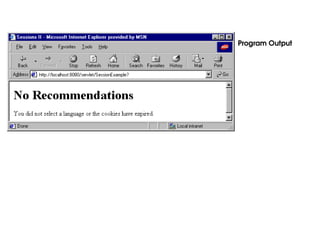
67 output.println( "<H1>No Recommendations</H1>" );
68 output.println( "You did not select a language or" );
69 output.println( "the cookies have expired." );
70 }
71
72 output.println( "</BODY></HTML>" );
73 output.close(); // close stream
74 }
75
76 private String getISBN( String lang )
77 {
78 for ( int i = 0; i < names.length; ++i )
79 if ( lang.equals( names[ i ] ) )
80 return isbn[ i ];
81
82 return ""; // no matching string found
83 }
84 }
Use cookies to determine
recommended book and ISBN.
If cookies have expired, no
recommendations.
Session Tracking withHttpSession
• HttpSession (javax.servlet.http)
– Alternative to cookies
– Data available until browsing ends
• Methods
– Creation
– getSession( createNew )
• Class HttpServletRequest
• Returns client's previous HttpSession object
• createNew - if true, creates new HttpSession object if
does not exist
23 HttpSession session = request.getSession( true );
50.
Session Tracking withHttpSession
– putvalue( name, value )
• Adds a name/value pair to object
– getValueNames()
• Returns array of Strings with names
– getValue( name )
• Returns value of name as an Object
• Cast to proper type
26 session.putValue( language, getISBN( language ) );
58 valueNames = session.getValueNames();
73 for ( int i = 0; i < valueNames.length; i++ ) {
74 String value =
75 (String) session.getValue( valueNames[ i ] );
51.
Session Tracking withHttpSession
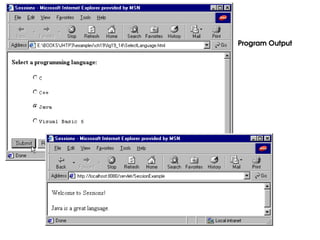
• Redo previous example
– Use HttpSession instead of cookies
– Use same HTML files as before
• Change ACTION URL to new servlet
52.
1. import
2. doPost
2.1getSession
2.2 putValue
1 // Fig. 19.13: SessionExample.java
2 // Using sessions.
3 import javax.servlet.*;
4 import javax.servlet.http.*;
5 import java.io.*;
6
7 public class SessionExample extends HttpServlet {
8 private final static String names[] =
9 { "C", "C++", "Java", "Visual Basic 6" };
10 private final static String isbn[] = {
11 "0-13-226119-7", "0-13-528910-6",
12 "0-13-012507-5", "0-13-528910-6" };
13
14 public void doPost( HttpServletRequest request,
15 HttpServletResponse response )
16 throws ServletException, IOException
17 {
18 PrintWriter output;
19 String language = request.getParameter( "lang" );
20
21 // Get the user's session object.
22 // Create a session (true) if one does not exist.
23
23 HttpSession session = request.getSession( true );
24
25 // add a value for user's choice to session
26
26 session.putValue( language, getISBN( language ) );
27
Load HttpSession if
exists, create if does not.
Set name/value pair.
53.
3. doGet
3.1 getSession
28response.setContentType( "text/html" );
29 output = response.getWriter();
30
31 // send HTML page to client
32 output.println( "<HTML><HEAD><TITLE>" );
33 output.println( "Sessions" );
34 output.println( "</TITLE></HEAD><BODY>" );
35 output.println( "<P>Welcome to Sessions!<BR>" );
36 output.println( "<P>" );
37 output.println( language );
38 output.println( " is a great language." );
39 output.println( "</BODY></HTML>" );
40
41 output.close(); // close stream
42 }
43
44 public void doGet( HttpServletRequest request,
45 HttpServletResponse response )
46 throws ServletException, IOException
47 {
48 PrintWriter output;
49
50 // Get the user's session object.
51 // Don't create a session (false) if one does not exist.
52
52 HttpSession session = request.getSession( false );
53
54 // get names of session object's values
55 String valueNames[];
56
Do not create object if does not
exist. session set to null.
54.
3.2 getValueNames
3.3 getValue
57if ( session != null )
58
58 valueNames = session.getValueNames();
59 else
60 valueNames = null;
61
62 response.setContentType( "text/html" );
63 output = response.getWriter();
64
65 output.println( "<HTML><HEAD><TITLE>" );
66 output.println( "Sessions II" );
67 output.println( "</TITLE></HEAD><BODY>" );
68
69 if ( valueNames != null && valueNames.length != 0 ) {
70 output.println( "<H1>Recommendations</H1>" );
71
72 // get value for each name in valueNames
73 for ( int i = 0; i < valueNames.length; i++ ) {
74 String value =
75
75 (String) session.getValue( valueNames[ i ] );
76
77 output.println(
78 valueNames[ i ] + " How to Program. " +
79 "ISBN#: " + value + "<BR>" );
80 }
81 }
82 else {
83 output.println( "<H1>No Recommendations</H1>" );
84 output.println( "You did not select a language or" );
85 output.println( "the session has expired." );
86 }
Put names into array.
Get value associated with name.
55.
87
88 output.println( "</BODY></HTML>");
89 output.close(); // close stream
90 }
91
92 private String getISBN( String lang )
93 {
94 for ( int i = 0; i < names.length; ++i )
95 if ( lang.equals( names[ i ] ) )
96 return isbn[ i ];
97
98 return ""; // no matching string found
99 }
100}
Multitier Applications: UsingJDBC from a
Servlet
• Servlets and databases
– Communicate via JDBC
• Connect to databases in general manner
• Use SQL-based queries
• Three tier distributed applications
– User interface
• Often in HTML, sometimes applets
• HTML preferred, more portable
– Business logic (middle tier)
• Accesses database
– Database access
– Three tiers may be on separate computers
• Web servers for middle tier
60.
Multitier Applications: UsingJDBC from a
Servlet
• Servlets
– Method init
• Called exactly once, before client requests
• Initialization parameters
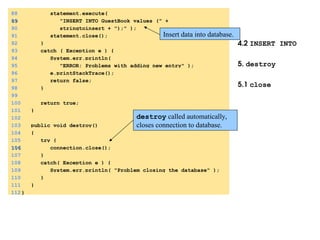
– Method destroy
• Called automatically, cleanup method
• Close files, connections to databases, etc.
61.
Multitier Applications: UsingJDBC from a
Servlet
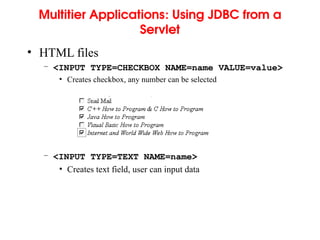
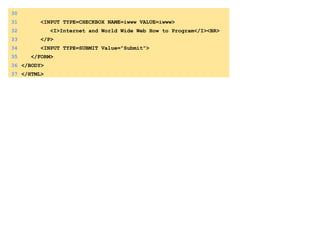
• HTML files
– <INPUT TYPE=CHECKBOX NAME=name VALUE=value>
• Creates checkbox, any number can be selected
– <INPUT TYPE=TEXT NAME=name>
• Creates text field, user can input data
62.
Multitier Applications: UsingJDBC from a
Servlet
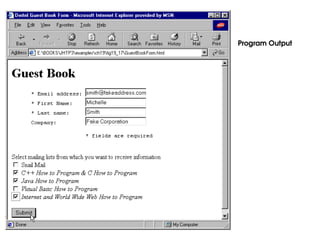
• Example servlet
– Guest book to register for mailing lists
– HTML document first tier
• Get data from user
– Use servlet as middle tier
• Provides access to database
• Set up connection in init
– Microsoft Access database (third tier)
63.
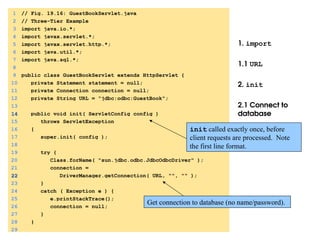
1. import
1.1 URL
2.init
2.1 Connect to
database
1 // Fig. 19.16: GuestBookServlet.java
2 // Three-Tier Example
3 import java.io.*;
4 import javax.servlet.*;
5 import javax.servlet.http.*;
6 import java.util.*;
7 import java.sql.*;
8
9 public class GuestBookServlet extends HttpServlet {
10 private Statement statement = null;
11 private Connection connection = null;
12 private String URL = "jdbc:odbc:GuestBook";
13
14
14 public void init( ServletConfig config )
15 throws ServletException
16 {
17 super.init( config );
18
19 try {
20 Class.forName( "sun.jdbc.odbc.JdbcOdbcDriver" );
21 connection =
22
22 DriverManager.getConnection( URL, "", "" );
23 }
24 catch ( Exception e ) {
25 e.printStackTrace();
26 connection = null;
27 }
28 }
29
Get connection to database (no name/password).
init called exactly once, before
client requests are processed. Note
the first line format.
Electronic Commerce
• Revolutionin electronic commerce
– 2/3 of stock transactions by 2007
– amazon.com, ebay.com, huge volumes of sales
– Business to business transactions
– Servlet technology
• Help companies get into e-commerce
– Client-server systems
• Many developers use all Java
• Applets for client, servlets for server





![HttpServletRequest Interface
• HttpServletRequest interface
– Object passed to doGet and doPost
– Extends ServletRequest
• Methods
– String getParameter( String name )
• Returns value of parameter name (part of GET or POST)
– Enumeration getParameterNames()
• Returns names of parameters (POST)
– String[] getParameterValues( String name )
• Returns array of strings containing values of a parameter
– Cookie[] getCookies()
• Returns array of Cookie objects, can be used to identify client](https://image.slidesharecdn.com/35p17csc1032020121208141238-250806114438-66ab410c/85/35_P17CSC103_2020121208141238-java-introduction-ppt-9-320.jpg)






![Handling HTTP POST Requests
– Extend HttpServlet
• Handle GET and POST
– Array for animal names
– doPost
• Responds to POST requests (default BAD_REQUEST)
• Same arguments as doGet (client request, server response)
9 public class HTTPPostServlet extends HttpServlet {
10 private String animalNames[] =
11 { "dog", "cat", "bird", "snake", "none" };
13 public void doPost( HttpServletRequest request,
14 HttpServletResponse response )
15 throws ServletException, IOException](https://image.slidesharecdn.com/35p17csc1032020121208141238-250806114438-66ab410c/85/35_P17CSC103_2020121208141238-java-introduction-ppt-24-320.jpg)
![Handling HTTP POST Requests
– Open survey.txt, load animals array
– Method getParameter( name )
• Returns value of parameter as a string
– Content type
18 File f = new File( "survey.txt" );
23 ObjectInputStream input = new ObjectInputStream(
24 new FileInputStream( f ) );
26 animals = (int []) input.readObject();
40 String value =
41 request.getParameter( "animal" );
64 response.setContentType( "text/html" ); // content type](https://image.slidesharecdn.com/35p17csc1032020121208141238-250806114438-66ab410c/85/35_P17CSC103_2020121208141238-java-introduction-ppt-25-320.jpg)
![Handling HTTP POST Requests
– Return HTML document as before
– <PRE> tag
• Preformatted text, fixed-width
– <BR> tag - line break
67 StringBuffer buf = new StringBuffer();
68 buf.append( "<html>n" );
69 buf.append( "<title>Thank you!</title>n" );
70 buf.append( "Thank you for participating.n" );
71 buf.append( "<BR>Results:n<PRE>" );
73 DecimalFormat twoDigits = new DecimalFormat( "#0.00" );
74 for ( int i = 0; i < percentages.length; ++i ) {
75 buf.append( "<BR>" );
76 buf.append( animalNames[ i ] );
88 responseOutput.println( buf.toString() );](https://image.slidesharecdn.com/35p17csc1032020121208141238-250806114438-66ab410c/85/35_P17CSC103_2020121208141238-java-introduction-ppt-26-320.jpg)

![1. import
1.1 extends
HttpServlet
1.2 animalNames
2. doPost
2.1 Open file
1 // Fig. 19.7: HTTPPostServlet.java
2 // A simple survey servlet
3 import javax.servlet.*;
4 import javax.servlet.http.*;
5 import java.text.*;
6 import java.io.*;
7 import java.util.*;
8
9
9 public class HTTPPostServlet extends HttpServlet {
10 private String animalNames[] =
11 { "dog", "cat", "bird", "snake", "none" };
12
13 public void doPost( HttpServletRequest request,
14 HttpServletResponse response )
15 throws ServletException, IOException
16 {
17 int animals[] = null, total = 0;
18 File f = new File( "survey.txt" );
19
20 if ( f.exists() ) {
21 // Determine # of survey responses so far
22 try {
23 ObjectInputStream input = new ObjectInputStream(
24 new FileInputStream( f ) );
25
26 animals = (int []) input.readObject();
27 input.close(); // close stream
28
29 for ( int i = 0; i < animals.length; ++i )
30 total += animals[ i ];
31 }
Extending HttpServlet allows
processing of GET and POST
requests.](https://image.slidesharecdn.com/35p17csc1032020121208141238-250806114438-66ab410c/85/35_P17CSC103_2020121208141238-java-introduction-ppt-29-320.jpg)
![2.2 getParameter
2.3 Write to file
32 catch( ClassNotFoundException cnfe ) {
33 cnfe.printStackTrace();
34 }
35 }
36 else
37 animals = new int[ 5 ];
38
39 // read current survey response
40 String value =
41
41 request.getParameter( "animal" );
42 ++total; // update total of all responses
43
44 // determine which was selected and update its total
45 for ( int i = 0; i < animalNames.length; ++i )
46 if ( value.equals( animalNames[ i ] ) )
47 ++animals[ i ];
48
49 // write updated totals out to disk
50 ObjectOutputStream output = new ObjectOutputStream(
51 new FileOutputStream( f ) );
52
53 output.writeObject( animals );
54 output.flush();
55 output.close();
56
57 // Calculate percentages
58 double percentages[] = new double[ animals.length ];
59
60 for ( int i = 0; i < percentages.length; ++i )
61 percentages[ i ] = 100.0 * animals[ i ] / total;
62
Use request (HttpServletRequest) method
getParameter to get value of animal.](https://image.slidesharecdn.com/35p17csc1032020121208141238-250806114438-66ab410c/85/35_P17CSC103_2020121208141238-java-introduction-ppt-30-320.jpg)
![2.4 getWriter
2.5 Create HTML code
2.6 println
63 // send a thank you message to client
64 response.setContentType( "text/html" ); // content type
65
66 PrintWriter responseOutput = response.getWriter();
67 StringBuffer buf = new StringBuffer();
68 buf.append( "<html>n" );
69 buf.append( "<title>Thank you!</title>n" );
70 buf.append( "Thank you for participating.n" );
71 buf.append( "<BR>Results:n<PRE>" );
72
73 DecimalFormat twoDigits = new DecimalFormat( "#0.00" );
74 for ( int i = 0; i < percentages.length; ++i ) {
75 buf.append( "<BR>" );
76 buf.append( animalNames[ i ] );
77 buf.append( ": " );
78 buf.append( twoDigits.format( percentages[ i ] ) );
79 buf.append( "% responses: " );
80 buf.append( animals[ i ] );
81 buf.append( "n" );
82 }
83
84 buf.append( "n<BR><BR>Total responses: " );
85 buf.append( total );
86 buf.append( "</PRE>n</html>" );
87
88 responseOutput.println( buf.toString() );
89 responseOutput.close();
90 }
91 }](https://image.slidesharecdn.com/35p17csc1032020121208141238-250806114438-66ab410c/85/35_P17CSC103_2020121208141238-java-introduction-ppt-31-320.jpg)



![Cookies
– Add cookie to client response
• Part of HTTP header, must come first
• Then HTML document sent to client
– Method doGet
– getCookies
• Returns array of Cookies
23 response.addCookie( c ); // must precede getWriter
41 public void doGet( HttpServletRequest request,
42 HttpServletResponse response )
46 Cookie cookies[];
48 cookies = request.getCookies(); // get client's cookies](https://image.slidesharecdn.com/35p17csc1032020121208141238-250806114438-66ab410c/85/35_P17CSC103_2020121208141238-java-introduction-ppt-39-320.jpg)
![Cookies
– Cookie methods
• getName, getValue
• Used to determine recommended book
• If cookie has expired, does not execute
57 if ( cookies != null ) {
62 output.println(
63 cookies[ i ].getName() + " How to Program. " +
64 "ISBN#: " + cookies[ i ].getValue() + "<BR>" );](https://image.slidesharecdn.com/35p17csc1032020121208141238-250806114438-66ab410c/85/35_P17CSC103_2020121208141238-java-introduction-ppt-40-320.jpg)
![1. import
1.1 extends
HttpServlet
2. doPost
2.1 getParameter
2.2 Cookie
2.3 setMaxAge
2.4 addCookie
1 // Fig. 19.9: CookieExample.java
2 // Using cookies.
3 import javax.servlet.*;
4 import javax.servlet.http.*;
5 import java.io.*;
6
7
7 public class CookieExample extends HttpServlet {
8 private String names[] = { "C", "C++", "Java",
9 "Visual Basic 6" };
10 private String isbn[] = {
11 "0-13-226119-7", "0-13-528910-6",
12 "0-13-012507-5", "0-13-528910-6" };
13
14 public void doPost( HttpServletRequest request,
15 HttpServletResponse response )
16 throws ServletException, IOException
17 {
18 PrintWriter output;
19 String language = request.getParameter( "lang" );
20
21
21 Cookie c = new Cookie( language, getISBN( language ) );
22
22 c.setMaxAge( 120 ); // seconds until cookie removed
23 response.addCookie( c ); // must precede getWriter
24
25 response.setContentType( "text/html" );
26 output = response.getWriter();
27
Create a new Cookie, initialized
with language parameter.
Set maximum age of
cookie, add to header.
Allows class to handle GET
and POST.](https://image.slidesharecdn.com/35p17csc1032020121208141238-250806114438-66ab410c/85/35_P17CSC103_2020121208141238-java-introduction-ppt-41-320.jpg)
![3. doGet
3.1 getCookies
28 // send HTML page to client
29 output.println( "<HTML><HEAD><TITLE>" );
30 output.println( "Cookies" );
31 output.println( "</TITLE></HEAD><BODY>" );
32 output.println( "<P>Welcome to Cookies!<BR>" );
33 output.println( "<P>" );
34 output.println( language );
35 output.println( " is a great language." );
36 output.println( "</BODY></HTML>" );
37
38 output.close(); // close stream
39 }
40
41 public void doGet( HttpServletRequest request,
42 HttpServletResponse response )
43 throws ServletException, IOException
44 {
45 PrintWriter output;
46 Cookie cookies[];
47
48
48 cookies = request.getCookies(); // get client's cookies
49
50 response.setContentType( "text/html" );
51 output = response.getWriter();
52
53 output.println( "<HTML><HEAD><TITLE>" );
54 output.println( "Cookies II" );
55 output.println( "</TITLE></HEAD><BODY>" );
56
Returns array of Cookies.](https://image.slidesharecdn.com/35p17csc1032020121208141238-250806114438-66ab410c/85/35_P17CSC103_2020121208141238-java-introduction-ppt-42-320.jpg)
![3.2 getName,
getValue
4. Method getISBN
57 if ( cookies != null ) {
58 output.println( "<H1>Recommendations</H1>" );
59
60 // get the name of each cookie
61 for ( int i = 0; i < cookies.length; i++ )
62 output.println(
63
63 cookies[ i ].getName() + " How to Program. " +
64 "ISBN#: " + cookies[ i ].getValue() + "<BR>" );
65 }
66
66 else {
67 output.println( "<H1>No Recommendations</H1>" );
68 output.println( "You did not select a language or" );
69 output.println( "the cookies have expired." );
70 }
71
72 output.println( "</BODY></HTML>" );
73 output.close(); // close stream
74 }
75
76 private String getISBN( String lang )
77 {
78 for ( int i = 0; i < names.length; ++i )
79 if ( lang.equals( names[ i ] ) )
80 return isbn[ i ];
81
82 return ""; // no matching string found
83 }
84 }
Use cookies to determine
recommended book and ISBN.
If cookies have expired, no
recommendations.](https://image.slidesharecdn.com/35p17csc1032020121208141238-250806114438-66ab410c/85/35_P17CSC103_2020121208141238-java-introduction-ppt-43-320.jpg)




![Session Tracking with HttpSession
– putvalue( name, value )
• Adds a name/value pair to object
– getValueNames()
• Returns array of Strings with names
– getValue( name )
• Returns value of name as an Object
• Cast to proper type
26 session.putValue( language, getISBN( language ) );
58 valueNames = session.getValueNames();
73 for ( int i = 0; i < valueNames.length; i++ ) {
74 String value =
75 (String) session.getValue( valueNames[ i ] );](https://image.slidesharecdn.com/35p17csc1032020121208141238-250806114438-66ab410c/85/35_P17CSC103_2020121208141238-java-introduction-ppt-50-320.jpg)

![1. import
2. doPost
2.1 getSession
2.2 putValue
1 // Fig. 19.13: SessionExample.java
2 // Using sessions.
3 import javax.servlet.*;
4 import javax.servlet.http.*;
5 import java.io.*;
6
7 public class SessionExample extends HttpServlet {
8 private final static String names[] =
9 { "C", "C++", "Java", "Visual Basic 6" };
10 private final static String isbn[] = {
11 "0-13-226119-7", "0-13-528910-6",
12 "0-13-012507-5", "0-13-528910-6" };
13
14 public void doPost( HttpServletRequest request,
15 HttpServletResponse response )
16 throws ServletException, IOException
17 {
18 PrintWriter output;
19 String language = request.getParameter( "lang" );
20
21 // Get the user's session object.
22 // Create a session (true) if one does not exist.
23
23 HttpSession session = request.getSession( true );
24
25 // add a value for user's choice to session
26
26 session.putValue( language, getISBN( language ) );
27
Load HttpSession if
exists, create if does not.
Set name/value pair.](https://image.slidesharecdn.com/35p17csc1032020121208141238-250806114438-66ab410c/85/35_P17CSC103_2020121208141238-java-introduction-ppt-52-320.jpg)
![3. doGet
3.1 getSession
28 response.setContentType( "text/html" );
29 output = response.getWriter();
30
31 // send HTML page to client
32 output.println( "<HTML><HEAD><TITLE>" );
33 output.println( "Sessions" );
34 output.println( "</TITLE></HEAD><BODY>" );
35 output.println( "<P>Welcome to Sessions!<BR>" );
36 output.println( "<P>" );
37 output.println( language );
38 output.println( " is a great language." );
39 output.println( "</BODY></HTML>" );
40
41 output.close(); // close stream
42 }
43
44 public void doGet( HttpServletRequest request,
45 HttpServletResponse response )
46 throws ServletException, IOException
47 {
48 PrintWriter output;
49
50 // Get the user's session object.
51 // Don't create a session (false) if one does not exist.
52
52 HttpSession session = request.getSession( false );
53
54 // get names of session object's values
55 String valueNames[];
56
Do not create object if does not
exist. session set to null.](https://image.slidesharecdn.com/35p17csc1032020121208141238-250806114438-66ab410c/85/35_P17CSC103_2020121208141238-java-introduction-ppt-53-320.jpg)
![3.2 getValueNames
3.3 getValue
57 if ( session != null )
58
58 valueNames = session.getValueNames();
59 else
60 valueNames = null;
61
62 response.setContentType( "text/html" );
63 output = response.getWriter();
64
65 output.println( "<HTML><HEAD><TITLE>" );
66 output.println( "Sessions II" );
67 output.println( "</TITLE></HEAD><BODY>" );
68
69 if ( valueNames != null && valueNames.length != 0 ) {
70 output.println( "<H1>Recommendations</H1>" );
71
72 // get value for each name in valueNames
73 for ( int i = 0; i < valueNames.length; i++ ) {
74 String value =
75
75 (String) session.getValue( valueNames[ i ] );
76
77 output.println(
78 valueNames[ i ] + " How to Program. " +
79 "ISBN#: " + value + "<BR>" );
80 }
81 }
82 else {
83 output.println( "<H1>No Recommendations</H1>" );
84 output.println( "You did not select a language or" );
85 output.println( "the session has expired." );
86 }
Put names into array.
Get value associated with name.](https://image.slidesharecdn.com/35p17csc1032020121208141238-250806114438-66ab410c/85/35_P17CSC103_2020121208141238-java-introduction-ppt-54-320.jpg)
![87
88 output.println( "</BODY></HTML>" );
89 output.close(); // close stream
90 }
91
92 private String getISBN( String lang )
93 {
94 for ( int i = 0; i < names.length; ++i )
95 if ( lang.equals( names[ i ] ) )
96 return isbn[ i ];
97
98 return ""; // no matching string found
99 }
100}](https://image.slidesharecdn.com/35p17csc1032020121208141238-250806114438-66ab410c/85/35_P17CSC103_2020121208141238-java-introduction-ppt-55-320.jpg)







![Java Web Programming [2/9] : Servlet Basic](https://cdn.slidesharecdn.com/ss_thumbnails/javaweb-module2-130106070240-phpapp02-thumbnail.jpg?width=640&height=640&fit=bounds)


