Java Servlets
JDBC and database connectivity
Eleonora Ciceri
ciceri@elet.polimi.it
Persistent data
¤  When data have to be stored persistently, i.e., so as to
restore them when needed, a database can be used
¤  A database is a structured collection of data, that are
typically organized to model relevant aspects of reality,
e.g., availability of rooms in a hotel
¤  A database management system (DBMS) is a set of
programs that enables you to store, modify and extract
information from a database
Relational databases
¤  A Relational Database Management System (RDMBS)
organizes data into tables
¤  Each table is organized into rows and columns
¤  Particular rows and columns in a table can be related to
one or more rows and columns in another table
¤  Data can be read, updated, appended and deleted
using the SQL language
¤  SQL: Structured Query Language, application-specific
declarative language used for handling a relational
database
Database connection flow
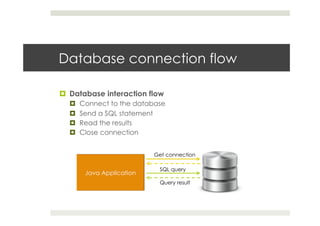
¤  Database interaction flow
¤  Connect to the database
¤  Send a SQL statement
¤  Read the results
¤  Close connection
Get connection
SQL query
Query result
Interfaces
¤  Web applications can connect to databases, but each
of them has its own interface that can be used in order to
manipulate data
¤  ODBC
¤  Open Database Connectivity. Interface written in C
¤  Problem: programs written in C are not as portable as the
ones written in Java
¤  JDBC:
¤  Java Database Connectivity. Interface written in Java
¤  It can be seen as a porting of ODBC in Java
JDBC
¤  JDBC is a SQL-level API that allows to execute SQL
statements and retrieve the results
Application
The driver
converts JDBC
method calls into
ODBC function
calls.
Package java.sql (1)
¤  java.sql.Connection
¤  Connection (session) with a specific database
¤  SQL statements are executed and results are returned within the
context of a connection
¤  java.sql.Statement
¤  Used for executing a static SQL statement and returning the
results it produces
¤  Only one ResultSet object per statement can be opened at
the same time. If two ResultSet are read at the same time,
they have been generated by different Statement objects
¤  All execution methods in the Statement interface implicitly close
a statement's current ResultSet object if an opened one exists
Package java.sql (2)
¤  java.sql.ResultSet
¤  A table of data representing a database result set, which
is usually generated by executing a statement that
queries the database
¤  java.sql.DriverManager
¤  The basic service for managing a set of JDBC drivers
¤  When initialized, it will attempt to load the driver classes
referenced in the "jdbc.drivers" system property
¤  When the method getConnection is called, it will attempt to
locate a suitable driver from amongst those loaded at
initialization and those loaded explicitly
Example: DBPhoneLookup (1)
import java.io.*;!
import java.sql.*;!
!
import javax.servlet.*;!
import javax.servlet.http.*;!
!
public class DBPhoneLookup extends HttpServlet {!
!
public void doGet(HttpServletRequest request,
HttpServletResponse response)!
! !throws ServletException, IOException {!
Connection connection = null;!
! !!
response.setContentType("text/plain");!
PrintWriter out = response.getWriter();!
! !!
Package for JDBC + SQL
Example: DBPhoneLookup (2)
try {!
Class.forName("com.mysql.jdbc.Driver");!
!
connection = DriverManager.getConnection!
("jdbc:mysql://localhost:3306/test", "root", "");!
!
Statement statement = connection.createStatement();!
ResultSet resultSet = statement.executeQuery("SELECT * !
FROM employees");!
! ! !!
out.println("Phone numbers:");!
while (resultSet.next())!
out.println("- " + resultSet.getString("name") + ":
" + resultSet.getString("phone"));!
}!
Driver used for connecting to a MySQL database
Retrieve a
connection
Database address
Username Password
SQL query
Navigate result set
Retrieve an attribute from
the current tuple
Example: DBPhoneLookup (3)
catch (ClassNotFoundException e) {!
out.println("Couldn't load database driver: " + e.getMessage());!
}!
!
catch (SQLException e) {!
out.println("SQLexception caught: " + e.getMessage());!
}!
! !!
finally {!
if (connection != null) {!
try {!
connection.close();!
}!
catch (SQLException ignored) {!
}!
}!
}!
}!
}
Always close the
connection!!
More syntax
¤  When the attributes names and types are unknown,
ResultSetMetadata gives us a way of reading them
¤  resultSet.getMetadata(): reads the result set metadata
¤  metadata.getColumnCount(): returns the number of columns
in the result set
¤  metadata.getColumnLabel(i): returns the name of the i-th
column in the result set
¤  Result set data retrieval
¤  resultSet.getObject(): extract a non-String value from the
result set
¤  resultSet.getString(): extract a String value from the result
set
Modify data
¤  Execute a generic query:
¤  boolean state = statement.execute(query);
¤  When used for updating: the state is false since a result set is not
retrieved (the updated tuples count is retrieved)
¤  Execute an update:
¤  int count = statement.executeUpdate(updateQuery);
¤  Example: “DELETE FROM products WHERE id = 7”
¤  Retrieve results:
¤  resultSet = statement.getResultSet();
¤  count = statement.getUpdateCount();
Prepared statements
¤  A PreparedStatement is a Statement objects that is
precompiled by the database for faster execution
¤  Example: PreparedStatement statement =
connection.prepareStatement(“INSERT INTO ORDERS(ID,
CLIENTID, TOTAL) VALUES (?,?,?)”);
¤  The placeholders are substituted later:
statement.clearParameters();
statement.setInt(1,2);
statement.setInt(2,4);
statement.setDouble(3, 53.43);
statement.executeUpdate();
Reuse database connections
¤  Since creating and deleting database connections is
very expensive, a good idea is to reuse them
¤  How?
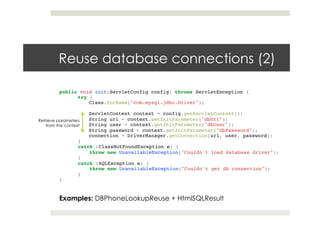
¤  Create them in the init() method
¤  Another “good practice”?
¤  Store the database connection parameter in the context.
Pro: sharing across all servlets, not written in the code
Reuse database connections (2)
public void init(ServletConfig config) throws ServletException {!
try {!
Class.forName("com.mysql.jdbc.Driver");!
!
ServletContext context = config.getServletContext();!
String url = context.getInitParameter("dbUrl");!
String user = context.getInitParameter("dbUser");!
String password = context.getInitParameter("dbPassword");!
connection = DriverManager.getConnection(url, user, password); ! !!
}!
catch (ClassNotFoundException e) {!
! throw new UnavailableException("Couldn't load database driver");!
}!
catch (SQLException e) {!
! throw new UnavailableException("Couldn't get db connection");!
} ! !
}
Retrieve parameters
from the context
Examples: DBPhoneLookupReuse + HtmlSQLResult
Transactions
¤  A transaction comprises a unit of work performed within a
DBMS against a database
¤  Example: a series of SQL queries for updating data in a
database when a user performs an order
¤  A database transaction must be:
¤  Atomic: all occur, or nothing occurs
¤  Consistent: it does not violate any integrity constraint during the
execution
¤  Isolated: defines how and when the changes made by the
transaction become visible to other operations
¤  Durable: transactions that have committed will survive
permanently
Transactions vs. JDBC
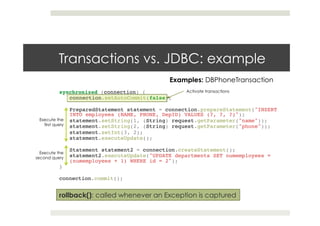
¤  Transactions are managed by using the Connection
object
¤  Use the transactions:
¤  connection.setAutoCommit(false);
¤  Commit the result:
¤  connection.commit();
¤  Rollback when an error occurs:
¤  connection.rollback();
Transactions vs. JDBC: example
synchronized (connection) {!
connection.setAutoCommit(false);!
!
PreparedStatement statement = connection.prepareStatement("INSERT
INTO employees (NAME, PHONE, DepID) VALUES (?, ?, ?)");!
statement.setString(1, (String) request.getParameter("name"));!
statement.setString(2, (String) request.getParameter("phone"));!
statement.setInt(3, 2);!
statement.executeUpdate();!
!
Statement statement2 = connection.createStatement();!
statement2.executeUpdate("UPDATE departments SET numemployees =
(numemployees + 1) WHERE id = 2"); ! ! !
} ! ! ! ! !
!
connection.commit(); !
Activate transactions
Execute the
first query
Execute the
second query
rollback(): called whenever an Exception is captured
Examples: DBPhoneTransaction
CallableStatement (1)
¤  The interface used to execute SQL stored procedures
¤  The provided syntax allows stored procedures to be called in
a standard way for all RDBMSs.
¤  Call: connection.prepareCall(java.lang.String)
¤  The syntax requires one result parameter (optional,
indicated as OUT) and several IN/OUT parameters.
Parameters are referred using numbers, starting from 1
¤  {?= call <procedure-name>[<arg1>,<arg2>, ...]}
¤  {call <procedure-name>[<arg1>,<arg2>, ...]}
CallableStatement (2)
¤  Handling parameters:
¤  IN: set using the set methods of PreparedStatement
¤  OUT: set the type before the call, retrieve the values
after the execution using the get methods
¤  Result: multiple ResultSet objects are handled using
operations inherited from Statement
javax.sql.*
¤  The package provides the API for server side data source
access and processing
¤  It integrates java.sql.*
¤  The package provides for the following:
¤  The DataSource interface as an alternative to the
DriverManager for establishing a connection with a data
source
¤  Connection pooling
¤  Distributed transaction
Connection pooling
¤  This procedure improves performance, avoiding to
create new connections
¤  A connection is used and reused
¤  The number of new connections that need to be created is
cut down
¤  Connection pooling is transparent and done
automatically in the middle tier of a J2EE configuration
Connection pooling: example
¤  init()
ServletContext context = config.getServletContext(); 	
String loginUser = context.getInitParameter("dbUser");	
String loginPasswd = context.getInitParameter
("dbPassword");	
String driver = context.getInitParameter("dbDriver");	
String loginUrl = context.getInitParameter("dbUrl"); 	
	 	 	 		
dataSource = setupDataSource(driver, loginUrl, loginUser,
loginPasswd);
¤  doGet()
connection = dataSource.getConnection();
Examples: DBPhonePool+ DBPhoneSingle
References
References
¤  Java Servlet Programming, Jason Hunter and William
Crawford, O’Reilly

JDBC in Servlets

  • 1.
    Java Servlets JDBC anddatabase connectivity Eleonora Ciceri ciceri@elet.polimi.it
  • 2.
    Persistent data ¤  Whendata have to be stored persistently, i.e., so as to restore them when needed, a database can be used ¤  A database is a structured collection of data, that are typically organized to model relevant aspects of reality, e.g., availability of rooms in a hotel ¤  A database management system (DBMS) is a set of programs that enables you to store, modify and extract information from a database
  • 3.
    Relational databases ¤  ARelational Database Management System (RDMBS) organizes data into tables ¤  Each table is organized into rows and columns ¤  Particular rows and columns in a table can be related to one or more rows and columns in another table ¤  Data can be read, updated, appended and deleted using the SQL language ¤  SQL: Structured Query Language, application-specific declarative language used for handling a relational database
  • 4.
    Database connection flow ¤ Database interaction flow ¤  Connect to the database ¤  Send a SQL statement ¤  Read the results ¤  Close connection Get connection SQL query Query result
  • 5.
    Interfaces ¤  Web applicationscan connect to databases, but each of them has its own interface that can be used in order to manipulate data ¤  ODBC ¤  Open Database Connectivity. Interface written in C ¤  Problem: programs written in C are not as portable as the ones written in Java ¤  JDBC: ¤  Java Database Connectivity. Interface written in Java ¤  It can be seen as a porting of ODBC in Java
  • 6.
    JDBC ¤  JDBC isa SQL-level API that allows to execute SQL statements and retrieve the results Application The driver converts JDBC method calls into ODBC function calls.
  • 7.
    Package java.sql (1) ¤ java.sql.Connection ¤  Connection (session) with a specific database ¤  SQL statements are executed and results are returned within the context of a connection ¤  java.sql.Statement ¤  Used for executing a static SQL statement and returning the results it produces ¤  Only one ResultSet object per statement can be opened at the same time. If two ResultSet are read at the same time, they have been generated by different Statement objects ¤  All execution methods in the Statement interface implicitly close a statement's current ResultSet object if an opened one exists
  • 8.
    Package java.sql (2) ¤ java.sql.ResultSet ¤  A table of data representing a database result set, which is usually generated by executing a statement that queries the database ¤  java.sql.DriverManager ¤  The basic service for managing a set of JDBC drivers ¤  When initialized, it will attempt to load the driver classes referenced in the "jdbc.drivers" system property ¤  When the method getConnection is called, it will attempt to locate a suitable driver from amongst those loaded at initialization and those loaded explicitly
  • 9.
    Example: DBPhoneLookup (1) importjava.io.*;! import java.sql.*;! ! import javax.servlet.*;! import javax.servlet.http.*;! ! public class DBPhoneLookup extends HttpServlet {! ! public void doGet(HttpServletRequest request, HttpServletResponse response)! ! !throws ServletException, IOException {! Connection connection = null;! ! !! response.setContentType("text/plain");! PrintWriter out = response.getWriter();! ! !! Package for JDBC + SQL
  • 10.
    Example: DBPhoneLookup (2) try{! Class.forName("com.mysql.jdbc.Driver");! ! connection = DriverManager.getConnection! ("jdbc:mysql://localhost:3306/test", "root", "");! ! Statement statement = connection.createStatement();! ResultSet resultSet = statement.executeQuery("SELECT * ! FROM employees");! ! ! !! out.println("Phone numbers:");! while (resultSet.next())! out.println("- " + resultSet.getString("name") + ": " + resultSet.getString("phone"));! }! Driver used for connecting to a MySQL database Retrieve a connection Database address Username Password SQL query Navigate result set Retrieve an attribute from the current tuple
  • 11.
    Example: DBPhoneLookup (3) catch(ClassNotFoundException e) {! out.println("Couldn't load database driver: " + e.getMessage());! }! ! catch (SQLException e) {! out.println("SQLexception caught: " + e.getMessage());! }! ! !! finally {! if (connection != null) {! try {! connection.close();! }! catch (SQLException ignored) {! }! }! }! }! } Always close the connection!!
  • 12.
    More syntax ¤  Whenthe attributes names and types are unknown, ResultSetMetadata gives us a way of reading them ¤  resultSet.getMetadata(): reads the result set metadata ¤  metadata.getColumnCount(): returns the number of columns in the result set ¤  metadata.getColumnLabel(i): returns the name of the i-th column in the result set ¤  Result set data retrieval ¤  resultSet.getObject(): extract a non-String value from the result set ¤  resultSet.getString(): extract a String value from the result set
  • 13.
    Modify data ¤  Executea generic query: ¤  boolean state = statement.execute(query); ¤  When used for updating: the state is false since a result set is not retrieved (the updated tuples count is retrieved) ¤  Execute an update: ¤  int count = statement.executeUpdate(updateQuery); ¤  Example: “DELETE FROM products WHERE id = 7” ¤  Retrieve results: ¤  resultSet = statement.getResultSet(); ¤  count = statement.getUpdateCount();
  • 14.
    Prepared statements ¤  APreparedStatement is a Statement objects that is precompiled by the database for faster execution ¤  Example: PreparedStatement statement = connection.prepareStatement(“INSERT INTO ORDERS(ID, CLIENTID, TOTAL) VALUES (?,?,?)”); ¤  The placeholders are substituted later: statement.clearParameters(); statement.setInt(1,2); statement.setInt(2,4); statement.setDouble(3, 53.43); statement.executeUpdate();
  • 15.
    Reuse database connections ¤ Since creating and deleting database connections is very expensive, a good idea is to reuse them ¤  How? ¤  Create them in the init() method ¤  Another “good practice”? ¤  Store the database connection parameter in the context. Pro: sharing across all servlets, not written in the code
  • 16.
    Reuse database connections(2) public void init(ServletConfig config) throws ServletException {! try {! Class.forName("com.mysql.jdbc.Driver");! ! ServletContext context = config.getServletContext();! String url = context.getInitParameter("dbUrl");! String user = context.getInitParameter("dbUser");! String password = context.getInitParameter("dbPassword");! connection = DriverManager.getConnection(url, user, password); ! !! }! catch (ClassNotFoundException e) {! ! throw new UnavailableException("Couldn't load database driver");! }! catch (SQLException e) {! ! throw new UnavailableException("Couldn't get db connection");! } ! ! } Retrieve parameters from the context Examples: DBPhoneLookupReuse + HtmlSQLResult
  • 17.
    Transactions ¤  A transactioncomprises a unit of work performed within a DBMS against a database ¤  Example: a series of SQL queries for updating data in a database when a user performs an order ¤  A database transaction must be: ¤  Atomic: all occur, or nothing occurs ¤  Consistent: it does not violate any integrity constraint during the execution ¤  Isolated: defines how and when the changes made by the transaction become visible to other operations ¤  Durable: transactions that have committed will survive permanently
  • 18.
    Transactions vs. JDBC ¤ Transactions are managed by using the Connection object ¤  Use the transactions: ¤  connection.setAutoCommit(false); ¤  Commit the result: ¤  connection.commit(); ¤  Rollback when an error occurs: ¤  connection.rollback();
  • 19.
    Transactions vs. JDBC:example synchronized (connection) {! connection.setAutoCommit(false);! ! PreparedStatement statement = connection.prepareStatement("INSERT INTO employees (NAME, PHONE, DepID) VALUES (?, ?, ?)");! statement.setString(1, (String) request.getParameter("name"));! statement.setString(2, (String) request.getParameter("phone"));! statement.setInt(3, 2);! statement.executeUpdate();! ! Statement statement2 = connection.createStatement();! statement2.executeUpdate("UPDATE departments SET numemployees = (numemployees + 1) WHERE id = 2"); ! ! ! } ! ! ! ! ! ! connection.commit(); ! Activate transactions Execute the first query Execute the second query rollback(): called whenever an Exception is captured Examples: DBPhoneTransaction
  • 20.
    CallableStatement (1) ¤  Theinterface used to execute SQL stored procedures ¤  The provided syntax allows stored procedures to be called in a standard way for all RDBMSs. ¤  Call: connection.prepareCall(java.lang.String) ¤  The syntax requires one result parameter (optional, indicated as OUT) and several IN/OUT parameters. Parameters are referred using numbers, starting from 1 ¤  {?= call <procedure-name>[<arg1>,<arg2>, ...]} ¤  {call <procedure-name>[<arg1>,<arg2>, ...]}
  • 21.
    CallableStatement (2) ¤  Handlingparameters: ¤  IN: set using the set methods of PreparedStatement ¤  OUT: set the type before the call, retrieve the values after the execution using the get methods ¤  Result: multiple ResultSet objects are handled using operations inherited from Statement
  • 22.
    javax.sql.* ¤  The packageprovides the API for server side data source access and processing ¤  It integrates java.sql.* ¤  The package provides for the following: ¤  The DataSource interface as an alternative to the DriverManager for establishing a connection with a data source ¤  Connection pooling ¤  Distributed transaction
  • 23.
    Connection pooling ¤  Thisprocedure improves performance, avoiding to create new connections ¤  A connection is used and reused ¤  The number of new connections that need to be created is cut down ¤  Connection pooling is transparent and done automatically in the middle tier of a J2EE configuration
  • 24.
    Connection pooling: example ¤ init() ServletContext context = config.getServletContext(); String loginUser = context.getInitParameter("dbUser"); String loginPasswd = context.getInitParameter ("dbPassword"); String driver = context.getInitParameter("dbDriver"); String loginUrl = context.getInitParameter("dbUrl"); dataSource = setupDataSource(driver, loginUrl, loginUser, loginPasswd); ¤  doGet() connection = dataSource.getConnection(); Examples: DBPhonePool+ DBPhoneSingle
  • 25.
  • 26.
    References ¤  Java ServletProgramming, Jason Hunter and William Crawford, O’Reilly