




SEARCH MARKETING 101
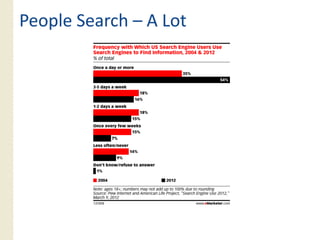
People Search – A Lot
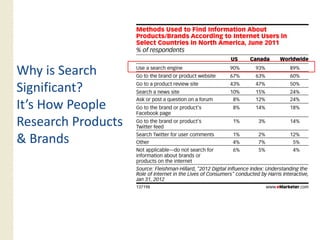
Why is Search
Significant?
It s
It’s How People
Research Products
& Brands
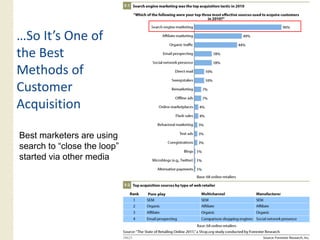
…So It’s One of
  So It s
the Best
Methods of
Customer
Acquisition

Best marketers are using
search to “close the loop”
started via other media
How Search Engines Work
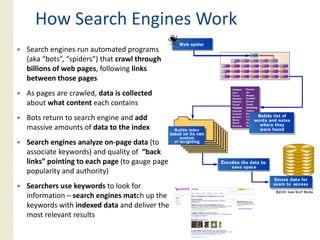
Search engines run automated programs
(aka “bots”, “spiders”) that crawl through
billions of web pages, following links
                pages
between those pages
As pages are crawled, data is collected
about what content each contains
Bots return to search engine and add
massive amounts of data to the index
Search engines analyze on‐page data (to
associate keywords) and quality of “back
links” pointing to each page (to gauge page
popularity and authority)
Searchers use keywords to look for
information – search engines match up the
keywords with indexed data and deliver the
most relevant results
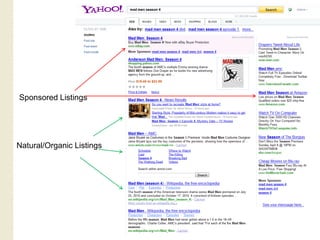
Sponsored Listings


Natural/Organic Listings
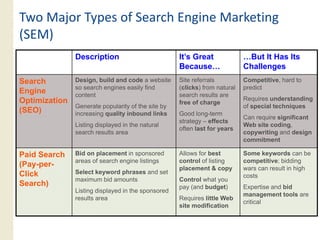
Two Major Types of Search Engine Marketing
(SEM)
               Description                          It’s Great              …But It Has Its
                                                    Because…                Challenges
Search         Design, build and code a website     Site referrals          Competitive, hard to
               so search engines easily find        (clicks) from natural   predict
Engine         content                              search results are
Optimization                                                                Requires understanding
                                                    free of charge
               Generate popularity of the site by                           of special techniques
(SEO)          increasing quality inbound links     Good long-term
                                                                            Can require significant
                                                    strategy – effects
               Listing displayed in the natural                             Web site coding,
                                                    often last for years
               search results area                                          copywriting and design
                                                                            commitment

Paid Search    Bid on placement in sponsored        Allows for best         Some keywords can be
               areas of search engine listings      control of listing      competitive; bidding
(Pay-per-                                           p
                                                    placement & copy   py   wars can result in high
                                                                                                 g
Click
Cli k          Select keyword phrases and set
                                                                            costs
               maximum bid amounts                  Control what you
Search)                                             pay (and budget)        Expertise and bid
               Listing displayed in the sponsored
                                                                            management tools are
               results area                         Requires little Web
                                                                            critical
                                                    site modification
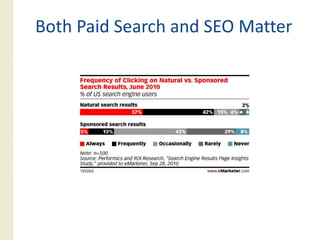
Both Paid Search and SEO Matter
KEY SEARCH TRENDS
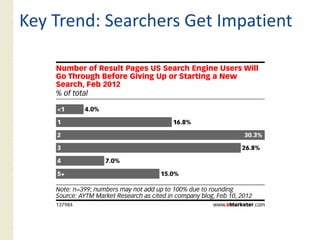
Key Trend: Searchers Get Impatient
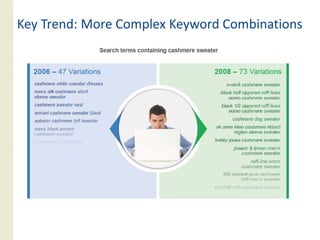
Key Trend: More Complex Keyword Combinations
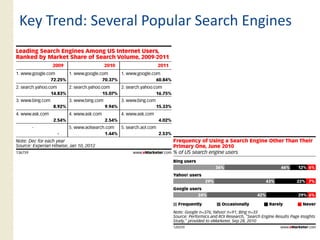
Key Trend: Several Popular Search Engines
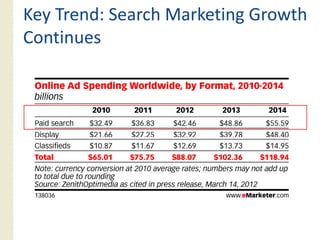
Key Trend: Search Marketing Growth
Contin es
Continues
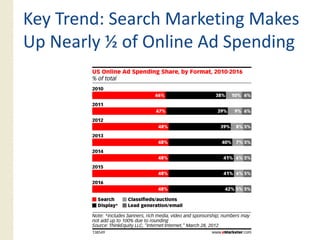
Key Trend: Search Marketing Makes
Up Nearly ½ of Online Ad Spending
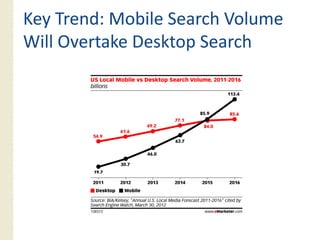
Key Trend: Mobile Search Volume
Will Overtake Desktop Search
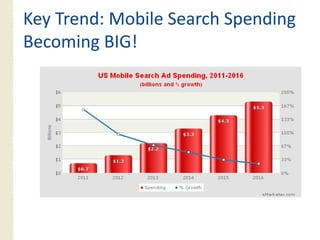
Key Trend: Mobile Search Spending
Becoming BIG!
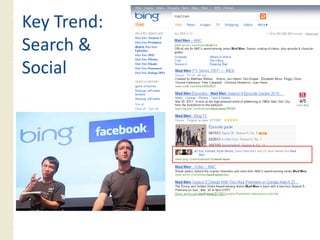
Key Trend:
Search &
Social
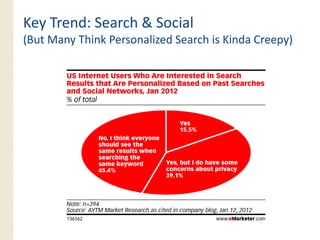
Key Trend: Search & Social
(But Many Think Personalized Search is Kinda Creepy)
PAID SEARCH/PPC
           /
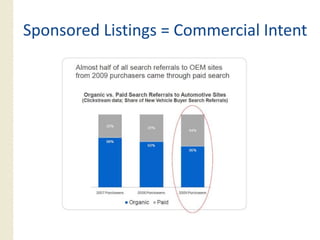
Sponsored Listings = Commercial Intent
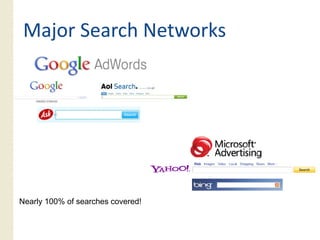
Major Search Networks


Nearly 100% of searches covered!
     y
Paid Search Marketplaces are Similar
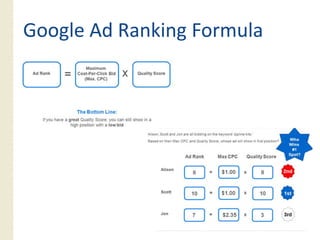
 Advertisers “bid” a maximum cost‐per‐click for each
 keyword to show up in sponsored search results
 Search engines consider each advertiser’s bid for each
 keyword plus the likelihood of searchers to click each ad to
 determine where to rank them
 ◦ Other factors considered incl ding landing page “q alit ”
                 considered, including             “quality”
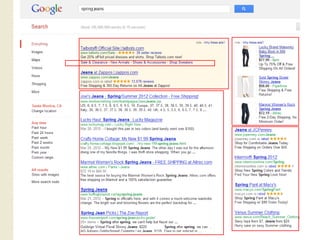
 Ads are mostly text characters and are displayed above and
 alongside natural results
 Additional links available for most popular ads
 Advertisers can d id which geographic locations th i ads
 Ad ti           decide hi h       hi l ti       their d
 are served
Google Ad Ranking Formula
SEARCH MARKETING
OPPORTUNITIES
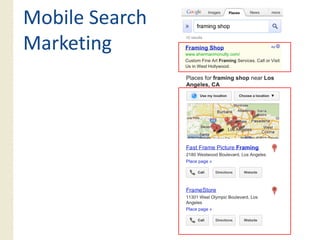
Mobile Search
Marketing
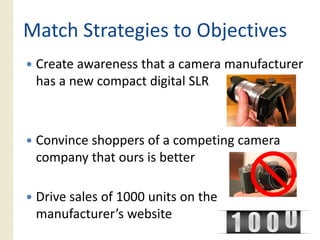
Match Strategies to Objectives
 Create awareness that a camera manufacturer
 has a new compact digital SLR


 Convince shoppers of a competing camera
 C i       h         f       ti
 company that ours is better

 Drive sales of 1000 units on the
 manufacturer’s website
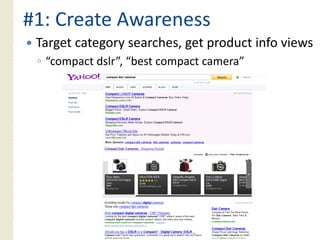
#1: Create Awareness
 Target category searches, get product info views
 ◦ “compact dslr”, “best compact camera”
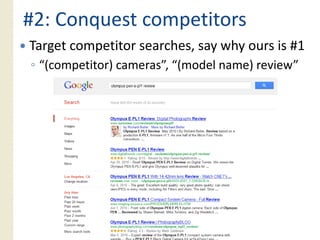
#2: Conquest competitors
Target competitor searches, say why ours is #1
◦ “(competitor) cameras”, “(model name) review”
   (competitor) cameras , (model        review
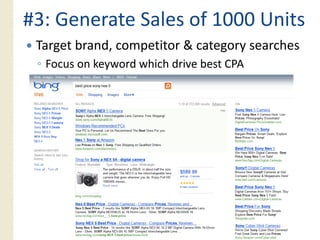
#3: Generate Sales of 1000 Units
 Target brand, competitor & category searches
 ◦ Focus on keyword which drive best CPA
              y
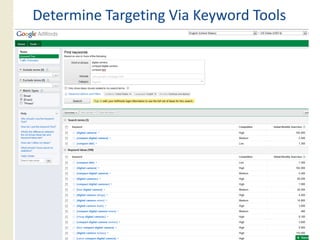
Determine Targeting Via Keyword Tools
Develop Search Listing Creative
Write page titles & descriptions to search engine specs
◦ Focus on selling the unique benefits of your brand/site; not
  just the product/service that people are searching for
   Leverage your site’s unique value proposition; “Official Site”,
   “$10 off this weekend”, etc. http://www.clickz.com/3632847/
   Consider your competition and what their listings communicate:
   why should people choose your listing over the other options?
◦ Tailor creative by keyword or keyword group
   Include keyword in title and description when possible
◦ Use Google, Yahoo & Bing’s unique ad extensions
   Geo‐location, site links, click to call, product images, etc.
Optimize Bids, Keywords, Ad Copy
 p               y            py
Evaluate effectiveness by KPI (key performance
indicator) – P d
i di     ) Product video views? S l ?
                     id    i     ? Sales?
Keywords with good $/KPI are most important
◦ Bid for high ad position
◦ Discover similar keywords
Test multiple ad variations for each group of
  y
keywords
◦ Different product benefits or offers
◦ Ad extensions
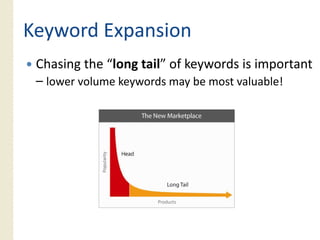
Keyword Expansion
 Chasing the “long tail” of keywords is important
        g         g           y            p
 – lower volume keywords may be most valuable!
QUESTIONS?
APPENDIX: SEO
(SEARCH ENGINE OPTIMIZATION)
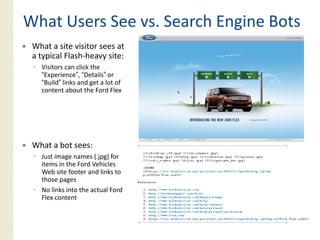
What Users See vs. Search Engine Bots
 What a site visitor sees at
 a typical Flash‐heavy site:
 ◦ Visitors can click the
   “Experience”, “Details” or
   “Build” links and get a lot of
   content about the Ford Flex


 What a bot sees:
 ◦ Just image names (.jpg) for
   items in the Ford Vehicles
   Web site footer and links to
   those pages
 ◦ No links into the actual Ford
   Flex content
On‐
On‐Page SEO: Keywords in Content
 Understand which keyword searches are most
 important t your b i
 i    t t to      business
  Leverage Web tracking/analytics software, learnings
  from paid search campaigns, competitor
  information
 Use various tools to learn which keywords are
 closely related to your top keywords
  Google or Yahoo Keyword Tool, Keyword Discovery
  Build a target keyword list and segment into
      g
  categories
 Determine which pages apply to each group of
 keywords
  Each page should be optimized to no more than 3‐4
                                                34
  related keyword phrases
On‐
On‐Page SEO: Code Optimization
Eliminate Flash Web site intros that redirect into site
◦ Or only serve these to visitors identified as having Flash capabilities
Flash Web content should sit on distinct HTML pages
◦ Make your Flash content visible to search engines as HTML
Restrict the use of frames
◦ Should only be used for content that doesn’t need to be seen by search engines
                                       doesn t
Limit heavy reliance on Javascript for key site content
(especially links)
◦ And have your coder move heavy Javascript code to bottom of each page, if
  possible
Avoid pages with duplicate content; search engines often use
the wrong signals to determine which is the best page
◦ Can result in significant dilution of inbound link value
◦ Use permanent redirects to point content across multiple domains to a single
  location (e.g. www.Website.com and Website.com)
Off‐
Off‐Page SEO: Link‐Building
              Link‐
  Popularity and trustworthiness of Web pages that link to
  your Web site has a major impact on your Web pages’
  ability to rank for related searches
  ◦ PageRank is Google’s scoring of your site’s general value/popularity
  ◦ TrustRank is Google’s secret rating of a site’s trustworthiness in linking
  Submit site to the major directories: Yahoo, Best of the
  Web, Business.com & DMOZ
  ◦ Aside from these, avoid paying for links; may get your site
                these
    penalized by Google
  Request links from sites within your industry
  ◦ Business partners and sister companies
  ◦ Association and industry Web sites
  ◦ Research who links to your competitor sites and request the same (Yahoo
    Site Explorer ‐ siteexplorer.search.yahoo.com)
  Social media optimization (e g links from blogs Twitter)
                            (e.g.,           blogs,
  Publish keyword‐rich press releases linking to your site
  ◦ Submit your press releases to services such as PR Leap
  Links within your own site are critical (e.g. cross‐linking)
                                                cross linking)
  ◦ Leverage keyword‐focused linking text where possible
Off‐
Off‐Page SEO: Folders and Links
 A straightforward URL structure helps searchers know
 your content is relevant to their search
 ◦ Good URL: www.WebSite.com/Product/
 ◦ Bad URL:
   www.WebSite.com/Folder1/Folder2/Content=Product
   Code&Color=1&Size=A
 ◦ Leverage keywords in URLs where
   possible/appropriate
 Consistent user‐focused site structure and navigation i
 C i              f     d i               d    i i is
 also valued by search engines
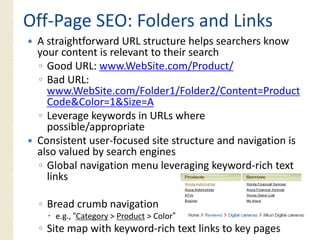
 ◦ Global navigation menu leveraging keyword‐rich text
   links

 ◦ Bread crumb navigation
    e.g., “Category > Product > Color”
 ◦ Site map with keyword‐rich text links to key pages
Off‐
Off‐Page SEO: S.E.R.P. Creative
 Create unique page titles and meta descriptions for each page
 on your W b sites
         Web i
 ◦ For less‐important pages, use page copy to automate process
 Recognize character limits
 ◦ Titles: 65 character max
 ◦ Descriptions: ~150 characters will be displayed (200‐250 indexed)
 Leverage keywords relevant to each Web page
 ◦ But don’t stuff them into titles and descriptions unnaturally
 Write titles and descriptions to convince users to choose your
 listings
 ◦ Leverage your site’s key benefits; “Official Site”, “outstanding selection”, etc.
 ◦ Consider your competition and what their listings communicate
 ◦ Why should people choose your listing over the other options?

thinkLA Search 101: RPA

  • 1.
  • 2.
  • 3.
    Why is Search Significant? Its It’s How People Research Products & Brands
  • 4.
    …So It’s Oneof So It s the Best Methods of Customer Acquisition Best marketers are using search to “close the loop” started via other media
  • 5.
    How Search EnginesWork Search engines run automated programs (aka “bots”, “spiders”) that crawl through billions of web pages, following links pages between those pages As pages are crawled, data is collected about what content each contains Bots return to search engine and add massive amounts of data to the index Search engines analyze on‐page data (to associate keywords) and quality of “back links” pointing to each page (to gauge page popularity and authority) Searchers use keywords to look for information – search engines match up the keywords with indexed data and deliver the most relevant results
  • 6.
  • 7.
    Two Major Typesof Search Engine Marketing (SEM) Description It’s Great …But It Has Its Because… Challenges Search Design, build and code a website Site referrals Competitive, hard to so search engines easily find (clicks) from natural predict Engine content search results are Optimization Requires understanding free of charge Generate popularity of the site by of special techniques (SEO) increasing quality inbound links Good long-term Can require significant strategy – effects Listing displayed in the natural Web site coding, often last for years search results area copywriting and design commitment Paid Search Bid on placement in sponsored Allows for best Some keywords can be areas of search engine listings control of listing competitive; bidding (Pay-per- p placement & copy py wars can result in high g Click Cli k Select keyword phrases and set costs maximum bid amounts Control what you Search) pay (and budget) Expertise and bid Listing displayed in the sponsored management tools are results area Requires little Web critical site modification
  • 8.
    Both Paid Searchand SEO Matter
  • 9.
  • 10.
    Key Trend: SearchersGet Impatient
  • 11.
    Key Trend: MoreComplex Keyword Combinations
  • 12.
    Key Trend: SeveralPopular Search Engines
  • 13.
    Key Trend: SearchMarketing Growth Contin es Continues
  • 14.
    Key Trend: SearchMarketing Makes Up Nearly ½ of Online Ad Spending
  • 15.
    Key Trend: MobileSearch Volume Will Overtake Desktop Search
  • 16.
    Key Trend: MobileSearch Spending Becoming BIG!
  • 17.
  • 18.
    Key Trend: Search& Social (But Many Think Personalized Search is Kinda Creepy)
  • 19.
  • 20.
    Sponsored Listings =Commercial Intent
  • 21.
    Major Search Networks Nearly100% of searches covered! y
  • 22.
    Paid Search Marketplacesare Similar Advertisers “bid” a maximum cost‐per‐click for each keyword to show up in sponsored search results Search engines consider each advertiser’s bid for each keyword plus the likelihood of searchers to click each ad to determine where to rank them ◦ Other factors considered incl ding landing page “q alit ” considered, including “quality” Ads are mostly text characters and are displayed above and alongside natural results Additional links available for most popular ads Advertisers can d id which geographic locations th i ads Ad ti decide hi h hi l ti their d are served
  • 23.
  • 24.
  • 26.
  • 27.
    Match Strategies toObjectives Create awareness that a camera manufacturer has a new compact digital SLR Convince shoppers of a competing camera C i h f ti company that ours is better Drive sales of 1000 units on the manufacturer’s website
  • 28.
    #1: Create Awareness Target category searches, get product info views ◦ “compact dslr”, “best compact camera”
  • 29.
    #2: Conquest competitors Targetcompetitor searches, say why ours is #1 ◦ “(competitor) cameras”, “(model name) review” (competitor) cameras , (model review
  • 30.
    #3: Generate Salesof 1000 Units Target brand, competitor & category searches ◦ Focus on keyword which drive best CPA y
  • 31.
  • 32.
    Develop Search ListingCreative Write page titles & descriptions to search engine specs ◦ Focus on selling the unique benefits of your brand/site; not just the product/service that people are searching for Leverage your site’s unique value proposition; “Official Site”, “$10 off this weekend”, etc. http://www.clickz.com/3632847/ Consider your competition and what their listings communicate: why should people choose your listing over the other options? ◦ Tailor creative by keyword or keyword group Include keyword in title and description when possible ◦ Use Google, Yahoo & Bing’s unique ad extensions Geo‐location, site links, click to call, product images, etc.
  • 33.
    Optimize Bids, Keywords,Ad Copy p y py Evaluate effectiveness by KPI (key performance indicator) – P d i di ) Product video views? S l ? id i ? Sales? Keywords with good $/KPI are most important ◦ Bid for high ad position ◦ Discover similar keywords Test multiple ad variations for each group of y keywords ◦ Different product benefits or offers ◦ Ad extensions
  • 34.
    Keyword Expansion Chasingthe “long tail” of keywords is important g g y p – lower volume keywords may be most valuable!
  • 35.
  • 36.
  • 37.
    What Users Seevs. Search Engine Bots What a site visitor sees at a typical Flash‐heavy site: ◦ Visitors can click the “Experience”, “Details” or “Build” links and get a lot of content about the Ford Flex What a bot sees: ◦ Just image names (.jpg) for items in the Ford Vehicles Web site footer and links to those pages ◦ No links into the actual Ford Flex content
  • 38.
    On‐ On‐Page SEO: Keywordsin Content Understand which keyword searches are most important t your b i i t t to business Leverage Web tracking/analytics software, learnings from paid search campaigns, competitor information Use various tools to learn which keywords are closely related to your top keywords Google or Yahoo Keyword Tool, Keyword Discovery Build a target keyword list and segment into g categories Determine which pages apply to each group of keywords Each page should be optimized to no more than 3‐4 34 related keyword phrases
  • 39.
    On‐ On‐Page SEO: CodeOptimization Eliminate Flash Web site intros that redirect into site ◦ Or only serve these to visitors identified as having Flash capabilities Flash Web content should sit on distinct HTML pages ◦ Make your Flash content visible to search engines as HTML Restrict the use of frames ◦ Should only be used for content that doesn’t need to be seen by search engines doesn t Limit heavy reliance on Javascript for key site content (especially links) ◦ And have your coder move heavy Javascript code to bottom of each page, if possible Avoid pages with duplicate content; search engines often use the wrong signals to determine which is the best page ◦ Can result in significant dilution of inbound link value ◦ Use permanent redirects to point content across multiple domains to a single location (e.g. www.Website.com and Website.com)
  • 40.
    Off‐ Off‐Page SEO: Link‐Building Link‐ Popularity and trustworthiness of Web pages that link to your Web site has a major impact on your Web pages’ ability to rank for related searches ◦ PageRank is Google’s scoring of your site’s general value/popularity ◦ TrustRank is Google’s secret rating of a site’s trustworthiness in linking Submit site to the major directories: Yahoo, Best of the Web, Business.com & DMOZ ◦ Aside from these, avoid paying for links; may get your site these penalized by Google Request links from sites within your industry ◦ Business partners and sister companies ◦ Association and industry Web sites ◦ Research who links to your competitor sites and request the same (Yahoo Site Explorer ‐ siteexplorer.search.yahoo.com) Social media optimization (e g links from blogs Twitter) (e.g., blogs, Publish keyword‐rich press releases linking to your site ◦ Submit your press releases to services such as PR Leap Links within your own site are critical (e.g. cross‐linking) cross linking) ◦ Leverage keyword‐focused linking text where possible
  • 41.
    Off‐ Off‐Page SEO: Foldersand Links A straightforward URL structure helps searchers know your content is relevant to their search ◦ Good URL: www.WebSite.com/Product/ ◦ Bad URL: www.WebSite.com/Folder1/Folder2/Content=Product Code&Color=1&Size=A ◦ Leverage keywords in URLs where possible/appropriate Consistent user‐focused site structure and navigation i C i f d i d i i is also valued by search engines ◦ Global navigation menu leveraging keyword‐rich text links ◦ Bread crumb navigation e.g., “Category > Product > Color” ◦ Site map with keyword‐rich text links to key pages
  • 42.
    Off‐ Off‐Page SEO: S.E.R.P.Creative Create unique page titles and meta descriptions for each page on your W b sites Web i ◦ For less‐important pages, use page copy to automate process Recognize character limits ◦ Titles: 65 character max ◦ Descriptions: ~150 characters will be displayed (200‐250 indexed) Leverage keywords relevant to each Web page ◦ But don’t stuff them into titles and descriptions unnaturally Write titles and descriptions to convince users to choose your listings ◦ Leverage your site’s key benefits; “Official Site”, “outstanding selection”, etc. ◦ Consider your competition and what their listings communicate ◦ Why should people choose your listing over the other options?