PROJECT OVERVIEW WWW.FOODSAFETYMARKET.EU 1
TheFSM
The Food Safety Market: an SME-powered industrial data platform to boost the
competitiveness of European food certification
Co-funded by the Horizon 2020
Framework Programme of the European Union
Grant Agreement Number 871703
THEFSM PROJECT – CERTIFICATION DECISION
www. foodsafetymarket.eu
DECEMBER, 2022
Sousanna Charalambidou
Head of TUV AUSTRIA Cyprus
PROJECT OVERVIEW WWW.FOODSAFETYMARKET.EU 2
OUTLINE
• TheFSM project
• Intro of the business scenario
• Discussion
PROJECT OVERVIEW WWW.FOODSAFETYMARKET.EU 3
PROJECT PROFILE
Project Acronym: TheFSM
Project title: The Food Safety Market: an SME-
powered industrial data platform to boost the
competitiveness of European food certification
Starting date: 01/02/2020
Duration: 36 months
PROJECT OVERVIEW WWW.FOODSAFETYMARKET.EU 4
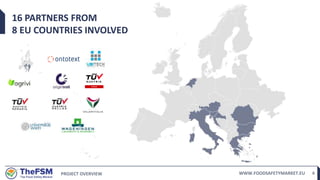
16 PARTNERS FROM
8 EU COUNTRIES INVOLVED
PROJECT OVERVIEW WWW.FOODSAFETYMARKET.EU 5
OUR MISSION
To create a transparent data-powered
certification ecosystem for a safe food
supply chain
PROJECT OVERVIEW WWW.FOODSAFETYMARKET.EU 6
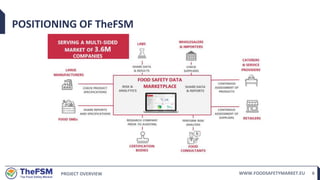
POSITIONING OF TheFSM
PROJECT OVERVIEW WWW.FOODSAFETYMARKET.EU 7
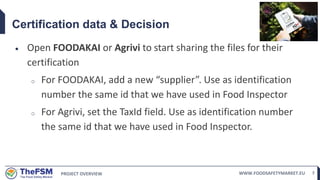
Certification data & Decision
 Open FOODAKAI or Agrivi to start sharing the files for their
certification
o For FOODAKAI, add a new “supplier”. Use as identification
number the same id that we have used in Food Inspector
o For Agrivi, set the TaxId field. Use as identification number
the same id that we have used in Food Inspector.
PROJECT OVERVIEW WWW.FOODSAFETYMARKET.EU 8
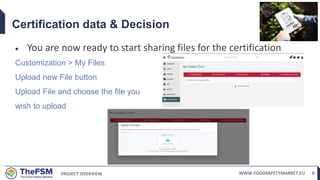
Certification data & Decision
 You are now ready to start sharing files for the certification
Customization > My Files
Upload new File button
Upload File and choose the file you
wish to upload
PROJECT OVERVIEW WWW.FOODSAFETYMARKET.EU 9
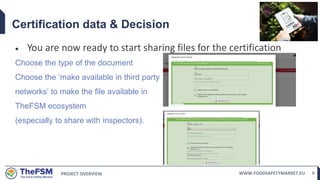
Certification data & Decision
 You are now ready to start sharing files for the certification
Choose the type of the document
Choose the ‘make available in third party
networks’ to make the file available in
TheFSM ecosystem
(especially to share with inspectors).
PROJECT OVERVIEW WWW.FOODSAFETYMARKET.EU 10
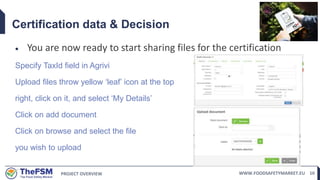
Certification data & Decision
 You are now ready to start sharing files for the certification
Specify TaxId field in Agrivi
Upload files throw yellow ‘leaf’ icon at the top
right, click on it, and select ‘My Details’
Click on add document
Click on browse and select the file
you wish to upload
PROJECT OVERVIEW WWW.FOODSAFETYMARKET.EU 11
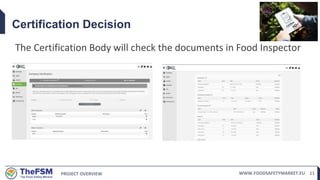
Certification Decision
The Certification Body will check the documents in Food Inspector
PROJECT OVERVIEW WWW.FOODSAFETYMARKET.EU 12
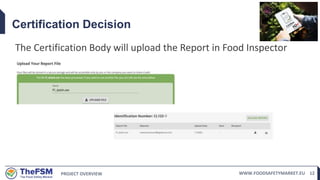
Certification Decision
The Certification Body will upload the Report in Food Inspector

TheFSM_TAC_3_Certification.pptx

  • 1.
    PROJECT OVERVIEW WWW.FOODSAFETYMARKET.EU1 TheFSM The Food Safety Market: an SME-powered industrial data platform to boost the competitiveness of European food certification Co-funded by the Horizon 2020 Framework Programme of the European Union Grant Agreement Number 871703 THEFSM PROJECT – CERTIFICATION DECISION www. foodsafetymarket.eu DECEMBER, 2022 Sousanna Charalambidou Head of TUV AUSTRIA Cyprus
  • 2.
    PROJECT OVERVIEW WWW.FOODSAFETYMARKET.EU2 OUTLINE • TheFSM project • Intro of the business scenario • Discussion
  • 3.
    PROJECT OVERVIEW WWW.FOODSAFETYMARKET.EU3 PROJECT PROFILE Project Acronym: TheFSM Project title: The Food Safety Market: an SME- powered industrial data platform to boost the competitiveness of European food certification Starting date: 01/02/2020 Duration: 36 months
  • 4.
    PROJECT OVERVIEW WWW.FOODSAFETYMARKET.EU4 16 PARTNERS FROM 8 EU COUNTRIES INVOLVED
  • 5.
    PROJECT OVERVIEW WWW.FOODSAFETYMARKET.EU5 OUR MISSION To create a transparent data-powered certification ecosystem for a safe food supply chain
  • 6.
  • 7.
    PROJECT OVERVIEW WWW.FOODSAFETYMARKET.EU7 Certification data & Decision  Open FOODAKAI or Agrivi to start sharing the files for their certification o For FOODAKAI, add a new “supplier”. Use as identification number the same id that we have used in Food Inspector o For Agrivi, set the TaxId field. Use as identification number the same id that we have used in Food Inspector.
  • 8.
    PROJECT OVERVIEW WWW.FOODSAFETYMARKET.EU8 Certification data & Decision  You are now ready to start sharing files for the certification Customization > My Files Upload new File button Upload File and choose the file you wish to upload
  • 9.
    PROJECT OVERVIEW WWW.FOODSAFETYMARKET.EU9 Certification data & Decision  You are now ready to start sharing files for the certification Choose the type of the document Choose the ‘make available in third party networks’ to make the file available in TheFSM ecosystem (especially to share with inspectors).
  • 10.
    PROJECT OVERVIEW WWW.FOODSAFETYMARKET.EU10 Certification data & Decision  You are now ready to start sharing files for the certification Specify TaxId field in Agrivi Upload files throw yellow ‘leaf’ icon at the top right, click on it, and select ‘My Details’ Click on add document Click on browse and select the file you wish to upload
  • 11.
    PROJECT OVERVIEW WWW.FOODSAFETYMARKET.EU11 Certification Decision The Certification Body will check the documents in Food Inspector
  • 12.
    PROJECT OVERVIEW WWW.FOODSAFETYMARKET.EU12 Certification Decision The Certification Body will upload the Report in Food Inspector