2
Process Management
I - Processes
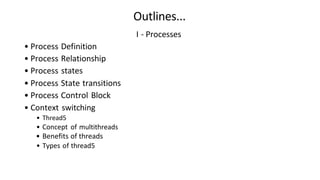
• Process Definition
• Process Relationship
• Process states
• Process State transitions
• Process Control Block
• Context switching
• Thread5
• Concept of multithreads
• Benefits of threads
• Types of thread5
Outlines...
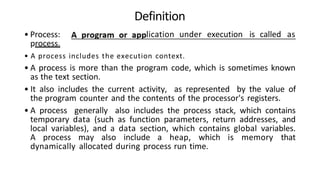
• Process:
process.
Definition
lication under execution is called as
• A process includes the execution context.
• A process is more than the program code, which is sometimes known
as the text section.
• It also includes the current activity, as represented by the value of
the program counter and the contents of the processor's registers.
• A process generally also includes the process stack, which contains
temporary data (such as function parameters, return addresses, and
local variables), and a data section, which contains global variables.
A process may also include a heap, which is memory that
dynamically allocated during process run time.
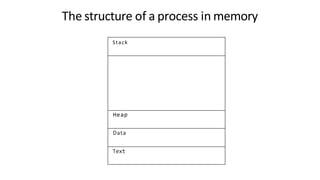
Stack
Heap
Data
Text
The structure of a process in memory
Process Relationship
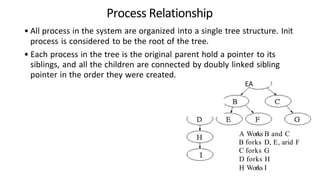
• All process in the system are organized into a single tree structure. Init
process is considered to be the root of the tree.
• Each process in the tree is the original parent hold a pointer to its
siblings, and all the children are connected by doubly linked sibling
pointer in the order they were created.
EA
A Works B and C
B forks D, E, arid F
C forks G
D forks H
H Works I
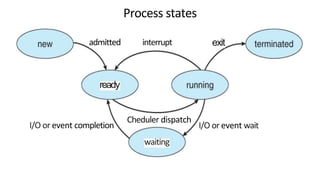
Process states
admitted interrupt
ready
exit
I/O or event completion
Cheduler dispatch
I/O or event wait
waiting
Process states
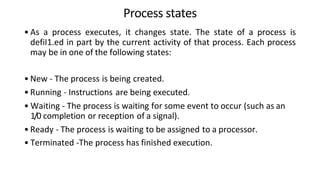
• As a process executes, it changes state. The state of a process is
defiI1.ed in part by the current activity of that process. Each process
may be in one of the following states:
• New - The process is being created.
• Running - Instructions are being executed.
• Waiting - The process is waiting for some event to occur (such as an
1/0 completion or reception of a signal).
• Ready - The process is waiting to be assigned to a processor.
• Terminated -The process has finished execution.
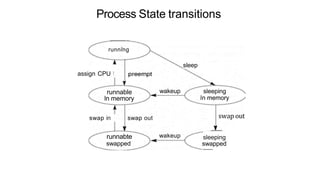
Process State transitions
running
assign CPU !
runnable
in memory
swap in swap out
runnabte
swapped
sleep
wakeup sleeping
in memory
wakeup
swap out
sleeping
swapped
process state
process number
program counter
registers
memory limits
list of o p e n files
Process Control Block
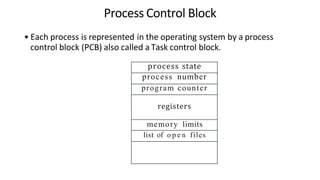
• Each process is represented in the operating system by a process
control block (PCB) also called a Task control block.
Process Control Block
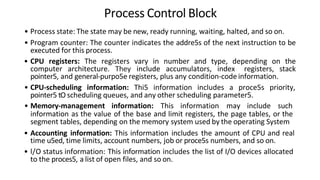
• Process state: The state may be new, ready running, waiting, halted, and so on.
• Program counter: The counter indicates the addre5s of the next instruction to be
executed for this process.
• CPU registers: The registers vary in number and type, depending on the
computer architecture. They include accumulators, index registers, stack
pointer5, and general-purpo5e registers, plus any condition-code information.
• CPU-scheduling information: Thi5 information includes a proce5s priority,
pointer5 tO scheduling queues, and any other scheduling parameter5.
• Memory-management information: This information may include such
information as the value of the base and limit registers, the page tables, or the
segment tables, depending on the memory system used by the operating System
• Accounting information: This information includes the amount of CPU and real
time u5ed, time limits, account numbers, job or proce5s numbers, and so on.
• l/O status information: This information includes the list of I/O devices allocated
to the proces5, a list of open files, and so on.
Context switching
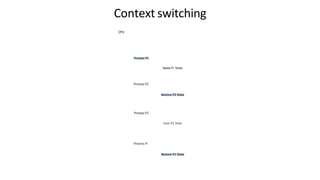
• In computing, a context switch is the process of storing and restoring
the state (more specifically, the execution context) of a process or
thread so that execution can be resumed from the same point at a
later time.
• When an interrupt arrives, the cpu must perform a state-save of the
currently running process, and then switch into kernel mode to
handle the interrupt, and finally perform a state-restored of the
interrupted process.
• A context switch occurs when the time slice for one process has
expired and a new process is to be laded from the ready queue.
Context switching
CPU
Process P2
Process P2
Save P2 State
Process PI
Saves PI State
Threads
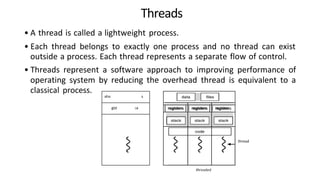
• A thread is called a lightweight process.
• Each thread belongs to exactly one process and no thread can exist
outside a process. Each thread represents a separate flow of control.
• Threads represent a software approach to improving performance of
operating system by reducing the overhead thread is equivalent to a
classical process.
aha s
gist sa registers registers t registers
threaded
thread
DiRerence between Process and Thread
Process is heavy weight or resource intensive.
Process switching needs interaction with
operating system.
In multiple processing environments, each
process executes the same code but has its own
memory and file resources.
If one process is blocked, then no other process
can execute until the first process is unblocked.
Multiple processes without using threads use
more resources.
In multiple processes each process operates
independently of the others.
Thread is light weight, taking lesser resources
than a process.
Thread switching does not need to interact with
operating system.
All threads can share same set of open files,
child processes.
While one thread is blocked and waiting, a
second thread in the same task can run.
Multiple threaded processes use fewer
resources.
One thread can read, write or change another
thread's data.
Types of Thread
• User Level Threads —User managed threads.
• Kernel Level Threads —Operating System managed threads acting on
kernel, an operating system core.
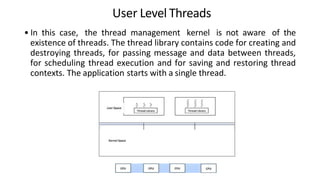
User Level Threads
• In this case, the thread management kernel is not aware of the
existence of threads. The thread library contains code for creating and
destroying threads, for passing message and data between threads,
for scheduling thread execution and for saving and restoring thread
contexts. The application starts with a single thread.
Kernel Level Threads
• In this case, thread management is done by the Kernel. There is no
thread management code in the application area. Kernel threads are
supported directly by the operating system. Any application can be
programmed to be multithreaded. All of the threads within an
application are supported within a single process.
• Kernel can simultaneously schedule multiple threads from the same
process on multiple processes.
• Kernel threads are generally slower to create and manage than the
user threads.
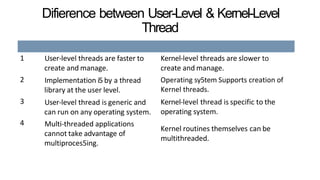
Difierence between User-Level & Kernel-Level
Thread
1 User-level threads are faster to
create and manage.
Implementation i5 by a thread
library at the user level.
User-level thread is generic and
can run on any operating system.
Multi-threaded applications
cannot take advantage of
multiproces5ing.
2
3
4
Kernel-level threads are slower to
create and manage.
Operating sy5tem Supports creation of
Kernel threads.
Kernel-level thread is specific to the
operating system.
Kernel routines themselves can be
multithreaded.
Concept of Multithreading
• Some operating system provide a combined user level thread and
Kernel level thread facility.
• Multithreading models are three types
1. Many to many relationship.
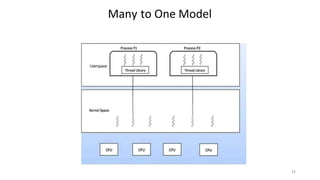
2. Many to one relationship.
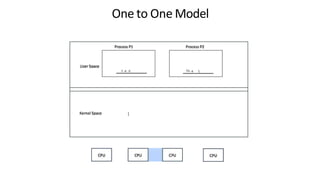
3. One to one relationship.
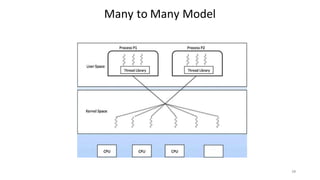
Many to Many Model
20
Uærspaœ
Many to One Model
21
h e d Th e L
One to One Model
Benefits of threads
• Threads minimize the context switching time.
• Use of threads provides concurrency within a process.
• Efficient communication.
• It is more economical to create and context switch threads.
• Threads allow utilization of multiprocessor architectures to a greater
scale and efficiency.
Outlines...
II —Processes Scheduling
• Process Scheduling Definition
• Scheduling objective5
• Types of Schedulers
• Scheduling criteria
• CPU utilization
• Throughput
• Turnaround Time
• Waiting Time
• Response Time
• Scheduling algorithms
• Pre-emptive and Non-preemptive
• FCFS
• SJF
• RR
• Multiproce5sor Scheduling
• Types
Process Scheduling
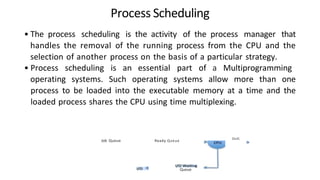
• The process scheduling is the activity of the process manager that
handles the removal of the running process from the CPU and the
selection of another process on the basis of a particular strategy.
• Process scheduling is an essential part of a Multiprogramming
operating systems. Such operating systems allow more than one
process to be loaded into the executable memory at a time and the
loaded process shares the CPU using time multiplexing.
Job Queue Ready Queue
Queue
Esdt
Scheduling objectives
• THROUGHPUT: Minimize total work done in a given (long) period of
time
• TURNAROUND: Minimize total time required for a single (typically
long) task, such as a batch job.
• RESPONSE TIME: Minimize total time required for a single (typically
short) task, such as a command.
• OTHER RESOURCE USE: Minimize use of other resources besides
processor time, especially storage.
• FAIRNESS: Provide service appropriate related to the priority of each
task, which may be established by external policies.
• CONSISTENCY: Besides minimizing resource use, it may be important
to ensure consistent service over a set of tasks.
Types of Schedulers
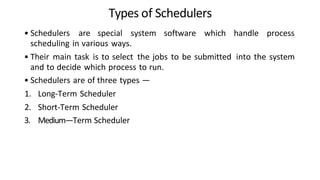
• Schedulers are special system software which handle process
scheduling in various ways.
• Their main task is to select the jobs to be submitted into the system
and to decide which process to run.
• Schedulers are of three types —
1. Long-Term Scheduler
2. Short-Term Scheduler
3. Medium—Term Scheduler
1
3
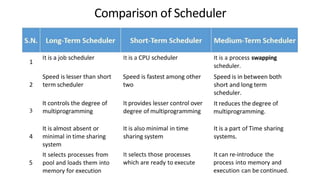
It is a job scheduler
Comparison of Scheduler
It is a CPU scheduler
Speed is lesser than short
2 term scheduler
Speed is fastest among other
two
It controls the degree of
multiprogramming
It provides lesser control over
degree of multiprogramming
It is almost absent or
4 minimal in time sharing
system
It selects processes from
5 pool and loads them into
memory for execution
It is also minimal in time
sharing system
It selects those processes
which are ready to execute
It is a process swapping
scheduler.
Speed is in between both
short and long term
scheduler.
It reduces the degree of
multiprogramming.
It is a part of Time sharing
systems.
It can re-introduce the
process into memory and
execution can be continued.
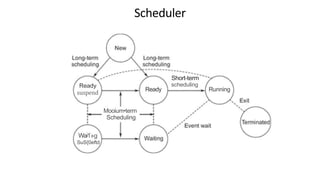
Ready
suspend
Mooium•term
Scheduling
Wa1»g
SuS{0eftd
Scheduler
Short-term
scheduling
Ready Running
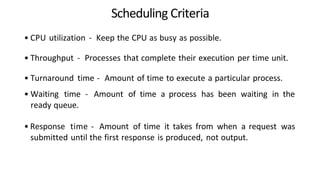
Scheduling Criteria
• CPU utilization - Keep the CPU as busy as possible.
• Throughput - Processes that complete their execution per time unit.
• Turnaround time - Amount of time to execute a particular process.
• Waiting time - Amount of time a process has been waiting in the
ready queue.
• Response time - Amount of time it takes from when a request was
submitted until the first response is produced, not output.
Scheduling algorithms
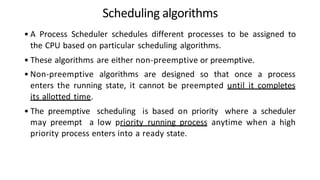
• A Process Scheduler schedules different processes to be assigned to
the CPU based on particular scheduling algorithms.
• These algorithms are either non-preemptive or preemptive.
• Non-preemptive algorithms are designed so that once a process
enters the running state, it cannot be preempted until it completes
its allotted time.
• The preemptive scheduling is based on priority where a scheduler
may preempt a low priority running process anytime when a high
priority process enters into a ready state.
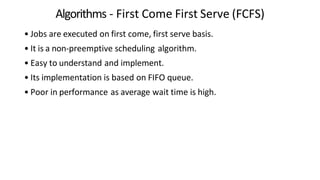
Algorithms - First Come First Serve (FCFS)
• Jobs are executed on first come, first serve basis.
• It is a non-preemptive scheduling algorithm.
• Easy to understand and implement.
• Its implementation is based on FIFO queue.
• Poor in performance as average wait time is high.
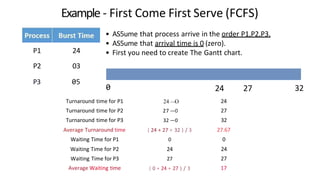
Example - First Come First Serve (FCFS)
• AS5ume that process arrive in the order P1,P2,P3.
• AS5ume that arrival time is 0 (zero).
• First you need to create The Gantt chart.
P1 24
P2 03
P3 05
0
Turnaround time for P1 24 —
O 24
Turnaround time for P2 27 —0 27
Turnaround time for P3 32 —0 32
Average Turnaround time ( 24 + 27 + 32 ) / 3 27.67
Waiting Time for P1 0 0
Waiting Time for P2 24 24
Waiting Time for P3 27 27
Average Waiting time ( 0 + 24 + 27 ) / 3 17
24 27 32
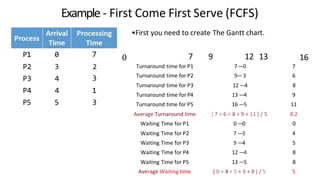
P1 0
P2 3 2
P3 4 3
P4 4 1
P5 5 3
Example - First Come First Serve (FCFS)
7 0
•First you need to create The Gantt chart.
7 9 12 13
Turnaround time for P1 7—0 7
Turnaround time for P2 9—3 6
Turnaround time for P3 12 —4 8
Turnaround time for P4 13 —4 9
Turnaround time for PS 16 —5 11
Average Turnaround time ( 7 + 6 + 8 + 9 + 11 ) / 5 8.2
Waiting Time for P1 0 —0 0
Waiting Time for P2 7 —3 4
Waiting Time for P3 9 —4 5
Waiting Time for P4 12 —4 8
Waiting Time for PS 13 —5 8
Average Waiting time ( 0 + 4 + 5 + 8 + 8 ) / 5 5
16
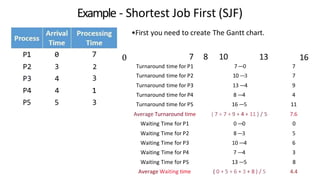
Algorithms —Shortest Job First (SJF)
• This is a non-preemptive, pre-emptive scheduling algorithm.
• Best approach to minimize waiting time.
• Easy to implement in Batch systems where required CPU time is
known in advance.
• Impossible to implement in interactive systems where required CPU
time is not known.
• The processer should know in advance how much time process will
take
P1 0
P2 3 2
P3 4 3
P4 4 1
P5 5 3
Example - Shortest Job First (SJF)
7 0
•First you need to create The Gantt chart.
7 8 10 13
Turnaround time for P1 7—0 7
Turnaround time for P2 10 —3 7
Turnaround time for P3 13 —4 9
Turnaround time for P4 8 —4 4
Turnaround time for PS 16 —5 11
Average Turnaround time ( 7 + 7 + 9 + 4 + 11 ) / 5 7.6
Waiting Time for P1 0 —0 0
Waiting Time for P2 8—3 5
Waiting Time for P3 10 —4 6
Waiting Time for P4 7 —4 3
Waiting Time for PS 13 —5 8
Average Waiting time ( 0 + 5 + 6 + 3 + 8 ) / 5 4.4
16
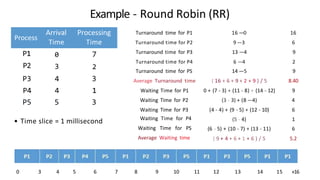
Algorithms —Round Robin (RR)
• Round Robin is the preemptive process scheduling algorithm.
• Each process is provided a fix time to execute, it is called a quantum.
• Once a process is executed for a given time period, it is preempted
and other process executes for a given time period.
• Context switching is used to save states of preempted processes.
Process
Arrival
Time
Processing
Time
P1
P2
0
3
P3 4 3 Average Turnaround time ( 16 + 6 + 9 + 2 + 9 ) / 5 8.40
P4 4 1 Waiting Time for P1 0 + (7 - 3) + (11 - 8) + (14 - 12) 9
P5 5 3 Waiting Time for P2
Waiting Time for P3
(3 - 3) + (8 —4)
(4 - 4) + (9 - 5) + (12 - 10)
4
6
Example - Round Robin (RR)
7
2
• Time slice = 1 millisecond
0 3 4 5
Turnaround time for P1
Turnaround time for P2
16 —0
9 —3
16
6
Turnaround time for P3 13 —4 9
Turnaround time for P4 6 —4 2
Turnaround time for PS 14 —5 9
Waiting Time for P4
Waiting Time for PS
Average Waiting time
(5 - 4)
(6 - 5) + (10 - 7) + (13 - 11)
( 9 + 4 + 6 + 1 + 6 ) / 5
1
6
5.2
6 7 8 9 10 11 12 13 14 15 »16
Multiprocessor scheduling
• Now a day's we can see systems packaged with multiple CPU for
better processing performance. An efficient multiprocessor system
must be capable of evenly balancing work between all available CPUs
in the system.
• In a multiprocessor system, each processor will have its own
scheduler. It is a duty of each of these scheduler to plan optimum
utilization of CPU for maximum efficiency.
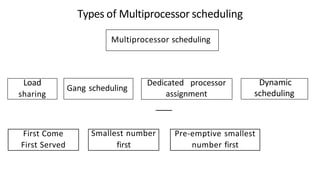
First Come Smallest number Pre-emptive smallest
First Served first number first
Load
sharing
Types of Multiprocessor scheduling
Multiprocessor scheduling
Gang scheduling
Dedicated processor
assignment
Dynamic
scheduling
Load sharing
• In this case, a pool of thread is maintained when processor become
idle scheduler selects a thread from ready queue for execution.
1. First Come First Served (FCFS)
• As job arrive each thread pertaining to that job is added to the end of shared queue.
2. Smallest number first
• Here shared ready queue is used as priority queue.
• Jobs with minimum number of unscheduled threads are chosen first for execution.
3. Pre-emptive smallest number first
• This works in the same way as smallest number of thread first method with a small
execution.
• In this case, if job with higher priority arrives than currently execution job It will be
forcefully suspended from execution making a way for priority job.
Multiprocessor scheduling
Gang scheduling
• Related threads are chosen and scheduled for execution with same
processor.
• This possible due to fact that thread that belong to same process
share same logical address space.
Dedicated processor assignment
• Here each program is allotted to number of CPU's by distributing
equal to number of threads till completion of program execution.
Multiprocessor scheduling
Dynamic scheduling
• By the time execution continues total number of threads in use will
vary since some thread may exit the memory after completion.
Than
You!!

UNIT-2-PROCESS MANAGEMENT in opeartive system.pptx

  • 1.
  • 2.
    I - Processes •Process Definition • Process Relationship • Process states • Process State transitions • Process Control Block • Context switching • Thread5 • Concept of multithreads • Benefits of threads • Types of thread5 Outlines...
  • 3.
    • Process: process. Definition lication underexecution is called as • A process includes the execution context. • A process is more than the program code, which is sometimes known as the text section. • It also includes the current activity, as represented by the value of the program counter and the contents of the processor's registers. • A process generally also includes the process stack, which contains temporary data (such as function parameters, return addresses, and local variables), and a data section, which contains global variables. A process may also include a heap, which is memory that dynamically allocated during process run time.
  • 4.
  • 5.
    Process Relationship • Allprocess in the system are organized into a single tree structure. Init process is considered to be the root of the tree. • Each process in the tree is the original parent hold a pointer to its siblings, and all the children are connected by doubly linked sibling pointer in the order they were created. EA A Works B and C B forks D, E, arid F C forks G D forks H H Works I
  • 6.
    Process states admitted interrupt ready exit I/Oor event completion Cheduler dispatch I/O or event wait waiting
  • 7.
    Process states • Asa process executes, it changes state. The state of a process is defiI1.ed in part by the current activity of that process. Each process may be in one of the following states: • New - The process is being created. • Running - Instructions are being executed. • Waiting - The process is waiting for some event to occur (such as an 1/0 completion or reception of a signal). • Ready - The process is waiting to be assigned to a processor. • Terminated -The process has finished execution.
  • 8.
    Process State transitions running assignCPU ! runnable in memory swap in swap out runnabte swapped sleep wakeup sleeping in memory wakeup swap out sleeping swapped
  • 9.
    process state process number programcounter registers memory limits list of o p e n files Process Control Block • Each process is represented in the operating system by a process control block (PCB) also called a Task control block.
  • 10.
    Process Control Block •Process state: The state may be new, ready running, waiting, halted, and so on. • Program counter: The counter indicates the addre5s of the next instruction to be executed for this process. • CPU registers: The registers vary in number and type, depending on the computer architecture. They include accumulators, index registers, stack pointer5, and general-purpo5e registers, plus any condition-code information. • CPU-scheduling information: Thi5 information includes a proce5s priority, pointer5 tO scheduling queues, and any other scheduling parameter5. • Memory-management information: This information may include such information as the value of the base and limit registers, the page tables, or the segment tables, depending on the memory system used by the operating System • Accounting information: This information includes the amount of CPU and real time u5ed, time limits, account numbers, job or proce5s numbers, and so on. • l/O status information: This information includes the list of I/O devices allocated to the proces5, a list of open files, and so on.
  • 11.
    Context switching • Incomputing, a context switch is the process of storing and restoring the state (more specifically, the execution context) of a process or thread so that execution can be resumed from the same point at a later time. • When an interrupt arrives, the cpu must perform a state-save of the currently running process, and then switch into kernel mode to handle the interrupt, and finally perform a state-restored of the interrupted process. • A context switch occurs when the time slice for one process has expired and a new process is to be laded from the ready queue.
  • 12.
    Context switching CPU Process P2 ProcessP2 Save P2 State Process PI Saves PI State
  • 13.
    Threads • A threadis called a lightweight process. • Each thread belongs to exactly one process and no thread can exist outside a process. Each thread represents a separate flow of control. • Threads represent a software approach to improving performance of operating system by reducing the overhead thread is equivalent to a classical process. aha s gist sa registers registers t registers threaded thread
  • 14.
    DiRerence between Processand Thread Process is heavy weight or resource intensive. Process switching needs interaction with operating system. In multiple processing environments, each process executes the same code but has its own memory and file resources. If one process is blocked, then no other process can execute until the first process is unblocked. Multiple processes without using threads use more resources. In multiple processes each process operates independently of the others. Thread is light weight, taking lesser resources than a process. Thread switching does not need to interact with operating system. All threads can share same set of open files, child processes. While one thread is blocked and waiting, a second thread in the same task can run. Multiple threaded processes use fewer resources. One thread can read, write or change another thread's data.
  • 15.
    Types of Thread •User Level Threads —User managed threads. • Kernel Level Threads —Operating System managed threads acting on kernel, an operating system core.
  • 16.
    User Level Threads •In this case, the thread management kernel is not aware of the existence of threads. The thread library contains code for creating and destroying threads, for passing message and data between threads, for scheduling thread execution and for saving and restoring thread contexts. The application starts with a single thread.
  • 17.
    Kernel Level Threads •In this case, thread management is done by the Kernel. There is no thread management code in the application area. Kernel threads are supported directly by the operating system. Any application can be programmed to be multithreaded. All of the threads within an application are supported within a single process. • Kernel can simultaneously schedule multiple threads from the same process on multiple processes. • Kernel threads are generally slower to create and manage than the user threads.
  • 18.
    Difierence between User-Level& Kernel-Level Thread 1 User-level threads are faster to create and manage. Implementation i5 by a thread library at the user level. User-level thread is generic and can run on any operating system. Multi-threaded applications cannot take advantage of multiproces5ing. 2 3 4 Kernel-level threads are slower to create and manage. Operating sy5tem Supports creation of Kernel threads. Kernel-level thread is specific to the operating system. Kernel routines themselves can be multithreaded.
  • 19.
    Concept of Multithreading •Some operating system provide a combined user level thread and Kernel level thread facility. • Multithreading models are three types 1. Many to many relationship. 2. Many to one relationship. 3. One to one relationship.
  • 20.
    Many to ManyModel 20
  • 21.
  • 22.
    h e dTh e L One to One Model
  • 23.
    Benefits of threads •Threads minimize the context switching time. • Use of threads provides concurrency within a process. • Efficient communication. • It is more economical to create and context switch threads. • Threads allow utilization of multiprocessor architectures to a greater scale and efficiency.
  • 24.
    Outlines... II —Processes Scheduling •Process Scheduling Definition • Scheduling objective5 • Types of Schedulers • Scheduling criteria • CPU utilization • Throughput • Turnaround Time • Waiting Time • Response Time • Scheduling algorithms • Pre-emptive and Non-preemptive • FCFS • SJF • RR • Multiproce5sor Scheduling • Types
  • 25.
    Process Scheduling • Theprocess scheduling is the activity of the process manager that handles the removal of the running process from the CPU and the selection of another process on the basis of a particular strategy. • Process scheduling is an essential part of a Multiprogramming operating systems. Such operating systems allow more than one process to be loaded into the executable memory at a time and the loaded process shares the CPU using time multiplexing. Job Queue Ready Queue Queue Esdt
  • 26.
    Scheduling objectives • THROUGHPUT:Minimize total work done in a given (long) period of time • TURNAROUND: Minimize total time required for a single (typically long) task, such as a batch job. • RESPONSE TIME: Minimize total time required for a single (typically short) task, such as a command. • OTHER RESOURCE USE: Minimize use of other resources besides processor time, especially storage. • FAIRNESS: Provide service appropriate related to the priority of each task, which may be established by external policies. • CONSISTENCY: Besides minimizing resource use, it may be important to ensure consistent service over a set of tasks.
  • 27.
    Types of Schedulers •Schedulers are special system software which handle process scheduling in various ways. • Their main task is to select the jobs to be submitted into the system and to decide which process to run. • Schedulers are of three types — 1. Long-Term Scheduler 2. Short-Term Scheduler 3. Medium—Term Scheduler
  • 28.
    1 3 It is ajob scheduler Comparison of Scheduler It is a CPU scheduler Speed is lesser than short 2 term scheduler Speed is fastest among other two It controls the degree of multiprogramming It provides lesser control over degree of multiprogramming It is almost absent or 4 minimal in time sharing system It selects processes from 5 pool and loads them into memory for execution It is also minimal in time sharing system It selects those processes which are ready to execute It is a process swapping scheduler. Speed is in between both short and long term scheduler. It reduces the degree of multiprogramming. It is a part of Time sharing systems. It can re-introduce the process into memory and execution can be continued.
  • 29.
  • 30.
    Scheduling Criteria • CPUutilization - Keep the CPU as busy as possible. • Throughput - Processes that complete their execution per time unit. • Turnaround time - Amount of time to execute a particular process. • Waiting time - Amount of time a process has been waiting in the ready queue. • Response time - Amount of time it takes from when a request was submitted until the first response is produced, not output.
  • 31.
    Scheduling algorithms • AProcess Scheduler schedules different processes to be assigned to the CPU based on particular scheduling algorithms. • These algorithms are either non-preemptive or preemptive. • Non-preemptive algorithms are designed so that once a process enters the running state, it cannot be preempted until it completes its allotted time. • The preemptive scheduling is based on priority where a scheduler may preempt a low priority running process anytime when a high priority process enters into a ready state.
  • 32.
    Algorithms - FirstCome First Serve (FCFS) • Jobs are executed on first come, first serve basis. • It is a non-preemptive scheduling algorithm. • Easy to understand and implement. • Its implementation is based on FIFO queue. • Poor in performance as average wait time is high.
  • 33.
    Example - FirstCome First Serve (FCFS) • AS5ume that process arrive in the order P1,P2,P3. • AS5ume that arrival time is 0 (zero). • First you need to create The Gantt chart. P1 24 P2 03 P3 05 0 Turnaround time for P1 24 — O 24 Turnaround time for P2 27 —0 27 Turnaround time for P3 32 —0 32 Average Turnaround time ( 24 + 27 + 32 ) / 3 27.67 Waiting Time for P1 0 0 Waiting Time for P2 24 24 Waiting Time for P3 27 27 Average Waiting time ( 0 + 24 + 27 ) / 3 17 24 27 32
  • 34.
    P1 0 P2 32 P3 4 3 P4 4 1 P5 5 3 Example - First Come First Serve (FCFS) 7 0 •First you need to create The Gantt chart. 7 9 12 13 Turnaround time for P1 7—0 7 Turnaround time for P2 9—3 6 Turnaround time for P3 12 —4 8 Turnaround time for P4 13 —4 9 Turnaround time for PS 16 —5 11 Average Turnaround time ( 7 + 6 + 8 + 9 + 11 ) / 5 8.2 Waiting Time for P1 0 —0 0 Waiting Time for P2 7 —3 4 Waiting Time for P3 9 —4 5 Waiting Time for P4 12 —4 8 Waiting Time for PS 13 —5 8 Average Waiting time ( 0 + 4 + 5 + 8 + 8 ) / 5 5 16
  • 35.
    Algorithms —Shortest JobFirst (SJF) • This is a non-preemptive, pre-emptive scheduling algorithm. • Best approach to minimize waiting time. • Easy to implement in Batch systems where required CPU time is known in advance. • Impossible to implement in interactive systems where required CPU time is not known. • The processer should know in advance how much time process will take
  • 36.
    P1 0 P2 32 P3 4 3 P4 4 1 P5 5 3 Example - Shortest Job First (SJF) 7 0 •First you need to create The Gantt chart. 7 8 10 13 Turnaround time for P1 7—0 7 Turnaround time for P2 10 —3 7 Turnaround time for P3 13 —4 9 Turnaround time for P4 8 —4 4 Turnaround time for PS 16 —5 11 Average Turnaround time ( 7 + 7 + 9 + 4 + 11 ) / 5 7.6 Waiting Time for P1 0 —0 0 Waiting Time for P2 8—3 5 Waiting Time for P3 10 —4 6 Waiting Time for P4 7 —4 3 Waiting Time for PS 13 —5 8 Average Waiting time ( 0 + 5 + 6 + 3 + 8 ) / 5 4.4 16
  • 37.
    Algorithms —Round Robin(RR) • Round Robin is the preemptive process scheduling algorithm. • Each process is provided a fix time to execute, it is called a quantum. • Once a process is executed for a given time period, it is preempted and other process executes for a given time period. • Context switching is used to save states of preempted processes.
  • 38.
    Process Arrival Time Processing Time P1 P2 0 3 P3 4 3Average Turnaround time ( 16 + 6 + 9 + 2 + 9 ) / 5 8.40 P4 4 1 Waiting Time for P1 0 + (7 - 3) + (11 - 8) + (14 - 12) 9 P5 5 3 Waiting Time for P2 Waiting Time for P3 (3 - 3) + (8 —4) (4 - 4) + (9 - 5) + (12 - 10) 4 6 Example - Round Robin (RR) 7 2 • Time slice = 1 millisecond 0 3 4 5 Turnaround time for P1 Turnaround time for P2 16 —0 9 —3 16 6 Turnaround time for P3 13 —4 9 Turnaround time for P4 6 —4 2 Turnaround time for PS 14 —5 9 Waiting Time for P4 Waiting Time for PS Average Waiting time (5 - 4) (6 - 5) + (10 - 7) + (13 - 11) ( 9 + 4 + 6 + 1 + 6 ) / 5 1 6 5.2 6 7 8 9 10 11 12 13 14 15 »16
  • 39.
    Multiprocessor scheduling • Nowa day's we can see systems packaged with multiple CPU for better processing performance. An efficient multiprocessor system must be capable of evenly balancing work between all available CPUs in the system. • In a multiprocessor system, each processor will have its own scheduler. It is a duty of each of these scheduler to plan optimum utilization of CPU for maximum efficiency.
  • 40.
    First Come Smallestnumber Pre-emptive smallest First Served first number first Load sharing Types of Multiprocessor scheduling Multiprocessor scheduling Gang scheduling Dedicated processor assignment Dynamic scheduling
  • 41.
    Load sharing • Inthis case, a pool of thread is maintained when processor become idle scheduler selects a thread from ready queue for execution. 1. First Come First Served (FCFS) • As job arrive each thread pertaining to that job is added to the end of shared queue. 2. Smallest number first • Here shared ready queue is used as priority queue. • Jobs with minimum number of unscheduled threads are chosen first for execution. 3. Pre-emptive smallest number first • This works in the same way as smallest number of thread first method with a small execution. • In this case, if job with higher priority arrives than currently execution job It will be forcefully suspended from execution making a way for priority job.
  • 42.
    Multiprocessor scheduling Gang scheduling •Related threads are chosen and scheduled for execution with same processor. • This possible due to fact that thread that belong to same process share same logical address space. Dedicated processor assignment • Here each program is allotted to number of CPU's by distributing equal to number of threads till completion of program execution.
  • 43.
    Multiprocessor scheduling Dynamic scheduling •By the time execution continues total number of threads in use will vary since some thread may exit the memory after completion.
  • 44.