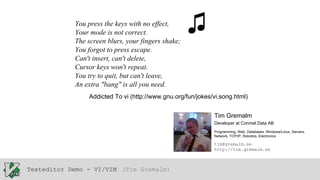
You press the keys with no effect,
Your mode is not correct.
The screen blurs, your fingers shake;
You forgot to press escape.
Can't insert, can't delete,
Cursor keys won't repeat.
You try to quit, but can't leave,
An extra "bang" is all you need.

♫

Addicted To vi (http://www.gnu.org/fun/jokes/vi.song.html)
Tim Gremalm
Developer at Conmel Data AB
Programming, Web, Databases, Windows/Linux, Servers,
Network, TCP/IP, Robotics, Electronics

tim@gremalm.se
http://tim.gremalm.se

Texteditor Demo - VI/VIM (Tim Gremalm)
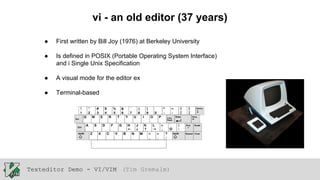
vi - an old editor (37 years)
●

First written by Bill Joy (1976) at Berkeley University

●

Is defined in POSIX (Portable Operating System Interface)
and i Single Unix Specification

●

A visual mode for the editor ex

●

Terminal-based

Texteditor Demo - VI/VIM (Tim Gremalm)
vim - Vi IMproved
●

Written by Bram Moolenaar (1991) at Atari - Amiga

●

A extended version of vi, with more features

●

Still terminal-based

●

gVim (GUI)

Texteditor Demo - VI/VIM (Tim Gremalm)
Why you should know Vim
●

A whole world of UNIX-culture

●

more/less

●

Regular expressions

●

Cross platform - it even exists in Computercraft (Minecraft)

●

Quick and Responsive - To start, and to work with

●

Efficient

Texteditor Demo - VI/VIM (Tim Gremalm)
How to work with Vim
●

You start out in normal mode, all keys is mapped to different commands

●

Navigation h/j/k/l or ←/↓/↑/→

●

Jump between Characters, Words, Sentence, Paragraphs and Lines

●

Go to line X

●

To start edit, you will have to switch mode

Texteditor Demo - VI/VIM (Tim Gremalm)
How to work with Vim
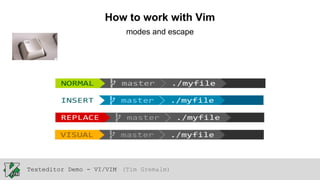
modes and escape

Texteditor Demo - VI/VIM (Tim Gremalm)
How to work with Vim
●

You build sentences of how you want to edit
<number><command><text object or motion>

●
●
●

y - “yank” copy
d - delete
p - “put” paste

●
●
●
●
●

y3j - yank 3 down
d3w - delete 3 words
yap - yank a paragraph
cw - change word, followed by insert
cia - change inner argument

●

. - Repat last change

●

Edit beyond individual characters. Instead, edit by word, sentence, line,
and paragraph

Texteditor Demo - VI/VIM (Tim Gremalm)
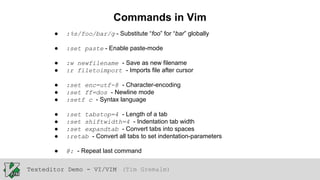
Commands in Vim
●

:%s/foo/bar/g - Substitute “foo” for “bar” globally

●

:set paste - Enable paste-mode

●
●

:w newfilename - Save as new filename
:r filetoimport - Imports file after cursor

●
●
●

:set enc=utf-8 - Character-encoding
:set ff=dos - Newline mode
:setf c - Syntax language

●
●
●
●

:set tabstop=4 - Length of a tab
:set shiftwidth=4 - Indentation tab width
:set expandtab - Convert tabs into spaces
:retab - Convert all tabs to set indentation-parameters

●

@: - Repeat last command

Texteditor Demo - VI/VIM (Tim Gremalm)
Vim features
●

Tabs

●

Split pane

●

Python-support

●

Plugins (.vim)

Texteditor Demo - VI/VIM (Tim Gremalm)
Plugins for Vim
●

Vundle

●

Powerline

●

Autocomplete

●

Ctrl+P

●

NERDTree

Texteditor Demo - VI/VIM (Tim Gremalm)
Links
●

http://vim-adventures.com/ - A small Vim-game (get started)

●

http://www.vim.org/ - Vim’s mainsite

●

http://blog.carbonfive.com/2011/10/17/vim-text-objects-the-definitive-guide/ - Edit efficently

●

http://vimbits.com/ - Vim tips

●

https://news.ycombinator.com/ - News about programming, alot of vim-stuff appears here

Texteditor Demo - VI/VIM (Tim Gremalm)

Kodar-lan - Text and editors Vi/Vim (2013-06-15)

  • 1.
    You press thekeys with no effect, Your mode is not correct. The screen blurs, your fingers shake; You forgot to press escape. Can't insert, can't delete, Cursor keys won't repeat. You try to quit, but can't leave, An extra "bang" is all you need. ♫ Addicted To vi (http://www.gnu.org/fun/jokes/vi.song.html) Tim Gremalm Developer at Conmel Data AB Programming, Web, Databases, Windows/Linux, Servers, Network, TCP/IP, Robotics, Electronics tim@gremalm.se http://tim.gremalm.se Texteditor Demo - VI/VIM (Tim Gremalm)
  • 2.
    vi - anold editor (37 years) ● First written by Bill Joy (1976) at Berkeley University ● Is defined in POSIX (Portable Operating System Interface) and i Single Unix Specification ● A visual mode for the editor ex ● Terminal-based Texteditor Demo - VI/VIM (Tim Gremalm)
  • 3.
    vim - ViIMproved ● Written by Bram Moolenaar (1991) at Atari - Amiga ● A extended version of vi, with more features ● Still terminal-based ● gVim (GUI) Texteditor Demo - VI/VIM (Tim Gremalm)
  • 4.
    Texteditor Demo -VI/VIM (Tim Gremalm)
  • 5.
    Why you shouldknow Vim ● A whole world of UNIX-culture ● more/less ● Regular expressions ● Cross platform - it even exists in Computercraft (Minecraft) ● Quick and Responsive - To start, and to work with ● Efficient Texteditor Demo - VI/VIM (Tim Gremalm)
  • 6.
    How to workwith Vim ● You start out in normal mode, all keys is mapped to different commands ● Navigation h/j/k/l or ←/↓/↑/→ ● Jump between Characters, Words, Sentence, Paragraphs and Lines ● Go to line X ● To start edit, you will have to switch mode Texteditor Demo - VI/VIM (Tim Gremalm)
  • 7.
    How to workwith Vim modes and escape Texteditor Demo - VI/VIM (Tim Gremalm)
  • 8.
    How to workwith Vim ● You build sentences of how you want to edit <number><command><text object or motion> ● ● ● y - “yank” copy d - delete p - “put” paste ● ● ● ● ● y3j - yank 3 down d3w - delete 3 words yap - yank a paragraph cw - change word, followed by insert cia - change inner argument ● . - Repat last change ● Edit beyond individual characters. Instead, edit by word, sentence, line, and paragraph Texteditor Demo - VI/VIM (Tim Gremalm)
  • 9.
    Commands in Vim ● :%s/foo/bar/g- Substitute “foo” for “bar” globally ● :set paste - Enable paste-mode ● ● :w newfilename - Save as new filename :r filetoimport - Imports file after cursor ● ● ● :set enc=utf-8 - Character-encoding :set ff=dos - Newline mode :setf c - Syntax language ● ● ● ● :set tabstop=4 - Length of a tab :set shiftwidth=4 - Indentation tab width :set expandtab - Convert tabs into spaces :retab - Convert all tabs to set indentation-parameters ● @: - Repeat last command Texteditor Demo - VI/VIM (Tim Gremalm)
  • 10.
    Vim features ● Tabs ● Split pane ● Python-support ● Plugins(.vim) Texteditor Demo - VI/VIM (Tim Gremalm)
  • 11.
  • 12.
    Links ● http://vim-adventures.com/ - Asmall Vim-game (get started) ● http://www.vim.org/ - Vim’s mainsite ● http://blog.carbonfive.com/2011/10/17/vim-text-objects-the-definitive-guide/ - Edit efficently ● http://vimbits.com/ - Vim tips ● https://news.ycombinator.com/ - News about programming, alot of vim-stuff appears here Texteditor Demo - VI/VIM (Tim Gremalm)