New Product Development
The Mouse !
    In computing, a mouse is a pointing
     device that functions by detecting two-
     dimensional motion relative its
     supporting surface (a mouse pad)


    The name mouse, originated at the
     Stanford Research Institute, it use to
     have a cord at the back of the device
     which resembled a mouse tail.
The invention of mouse

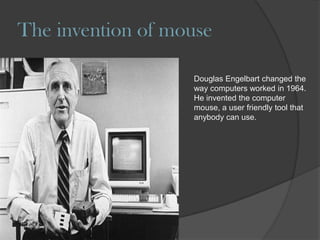
                   Douglas Engelbart changed the
                   way computers worked in 1964.
                   He invented the computer
                   mouse, a user friendly tool that
                   anybody can use.
HOW IT CAME TO BE!

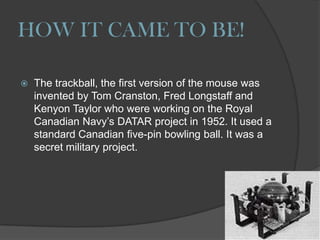
   The trackball, the first version of the mouse was
    invented by Tom Cranston, Fred Longstaff and
    Kenyon Taylor who were working on the Royal
    Canadian Navy‟s DATAR project in 1952. It used a
    standard Canadian five-pin bowling ball. It was a
    secret military project.
WHY DO WE NEED IT?

   The mouse allows the user to operate on a GUI
    (graphics user interface) which is usually
    displayed via a monitor.

   It is possible to use a computer without a mouse
    or a touchpad (“laptops mouse”) as you can
    navigate with just the keys but that may be a little
    tricky for the average person.
The First Mouse


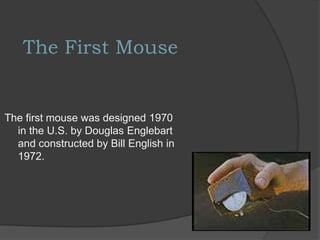
The first mouse was designed 1970
  in the U.S. by Douglas Englebart
  and constructed by Bill English in
  1972.
Mechanical Mouse:
This type of mouse was the first one around which uses a
moving ball inside to work. As you move the mouse
across a surface, the ball moves too. Two rollers are also
inside the mouse which track the horizontal and vertical
movement of the ball.
Optical Mouse:

The most common type of mouse in use today. This
mouse uses optical technology, so it doesn‟t require
moving parts. The LED light inside the mouse, reads the
pattern or grid on the surface.
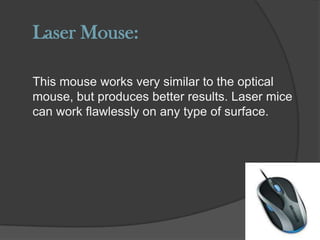
Laser Mouse:

This mouse works very similar to the optical
mouse, but produces better results. Laser mice
can work flawlessly on any type of surface.
How has the design changed
•The computer mouse has definitely changed size, getting smaller and smaller.
•The design has also become more comfortable to hold, as the first computer
mouse was quite square.
•Motion detectors have changed from a tracking ball, to an LED light, and now a
laser. This improves the quality of motion you see on the screen, and also
eliminated the use of mouse pads.
•A „scroll wheel‟ is also available on most mouses, making it easier to view web
pages and folders.
The mouse!

The mouse!

  • 1.
  • 2.
    The Mouse !  In computing, a mouse is a pointing device that functions by detecting two- dimensional motion relative its supporting surface (a mouse pad)  The name mouse, originated at the Stanford Research Institute, it use to have a cord at the back of the device which resembled a mouse tail.
  • 3.
    The invention ofmouse Douglas Engelbart changed the way computers worked in 1964. He invented the computer mouse, a user friendly tool that anybody can use.
  • 4.
    HOW IT CAMETO BE!  The trackball, the first version of the mouse was invented by Tom Cranston, Fred Longstaff and Kenyon Taylor who were working on the Royal Canadian Navy‟s DATAR project in 1952. It used a standard Canadian five-pin bowling ball. It was a secret military project.
  • 5.
    WHY DO WENEED IT?  The mouse allows the user to operate on a GUI (graphics user interface) which is usually displayed via a monitor.  It is possible to use a computer without a mouse or a touchpad (“laptops mouse”) as you can navigate with just the keys but that may be a little tricky for the average person.
  • 6.
    The First Mouse Thefirst mouse was designed 1970 in the U.S. by Douglas Englebart and constructed by Bill English in 1972.
  • 7.
    Mechanical Mouse: This typeof mouse was the first one around which uses a moving ball inside to work. As you move the mouse across a surface, the ball moves too. Two rollers are also inside the mouse which track the horizontal and vertical movement of the ball.
  • 8.
    Optical Mouse: The mostcommon type of mouse in use today. This mouse uses optical technology, so it doesn‟t require moving parts. The LED light inside the mouse, reads the pattern or grid on the surface.
  • 9.
    Laser Mouse: This mouseworks very similar to the optical mouse, but produces better results. Laser mice can work flawlessly on any type of surface.
  • 10.
    How has thedesign changed •The computer mouse has definitely changed size, getting smaller and smaller. •The design has also become more comfortable to hold, as the first computer mouse was quite square. •Motion detectors have changed from a tracking ball, to an LED light, and now a laser. This improves the quality of motion you see on the screen, and also eliminated the use of mouse pads. •A „scroll wheel‟ is also available on most mouses, making it easier to view web pages and folders.