LMS Choices: To Self-Host or Vendor-Host? Kurt Beer Sales Director – Northeast Moodlerooms, Inc. Keith Landa Director of Instructional Technology Purchase College SUNY
Agenda The changing Learning Management System landscape Motivators to Change LMSs Why open source? Variables when Deciding Self-Host vs. Vendor-Host Decision to Self-Host (Purchase College example) Decision to Vendor-Host Questions and Answers
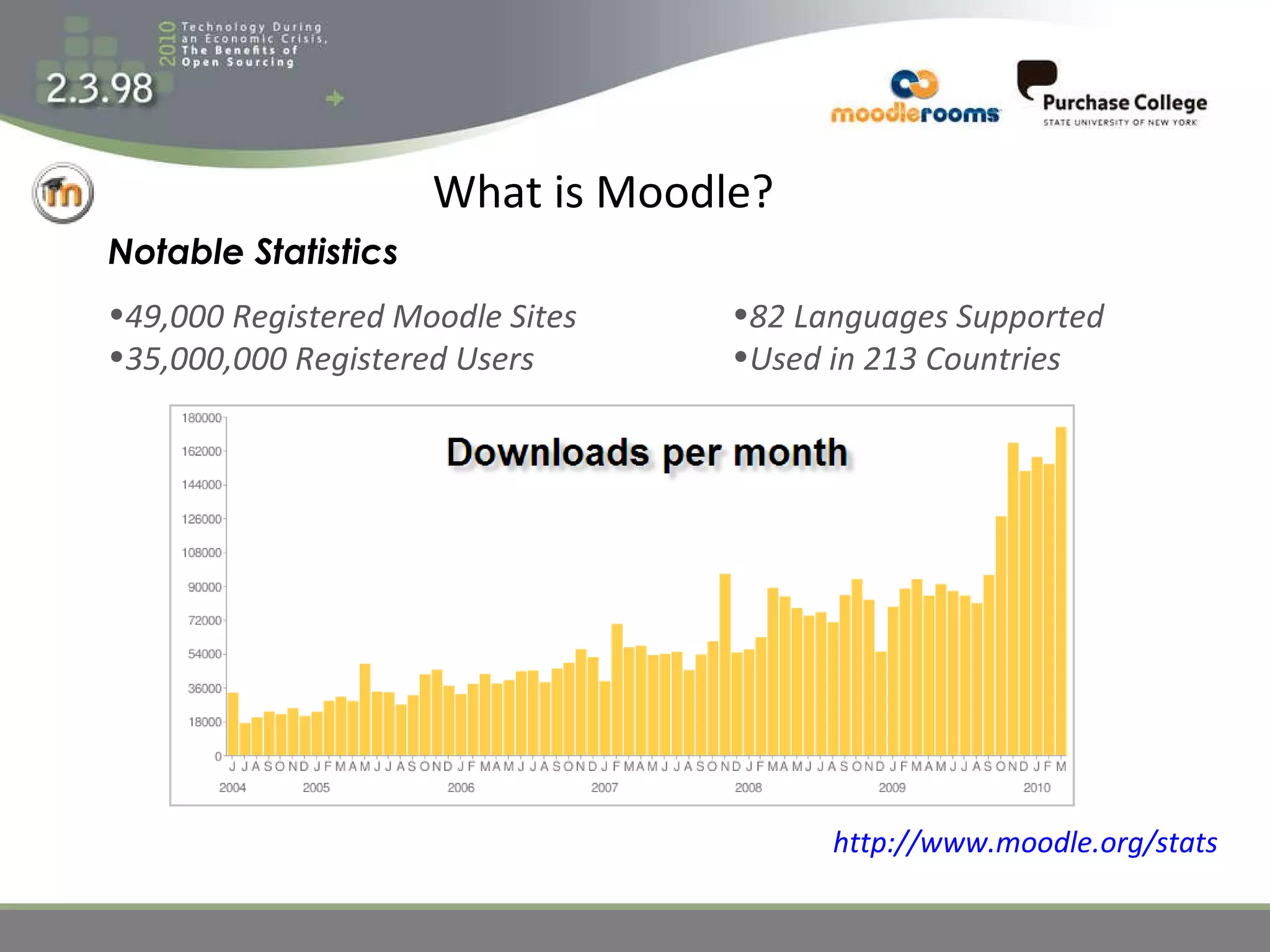
What is Moodle? The world’s most widely used open source LMS 49,000 Registered Moodle Sites 35,000,000 Registered Users http://www.moodle.org/stats
Motivators to Change LMSs What  pain  causes schools to consider LMS alternatives? Innovation Lacking Difficult / Expensive to Customize Vendor Support Declining Increasing License Fees  Inflexible Vendors, Ts & Cs Resource Limitations  (budget & personnel)
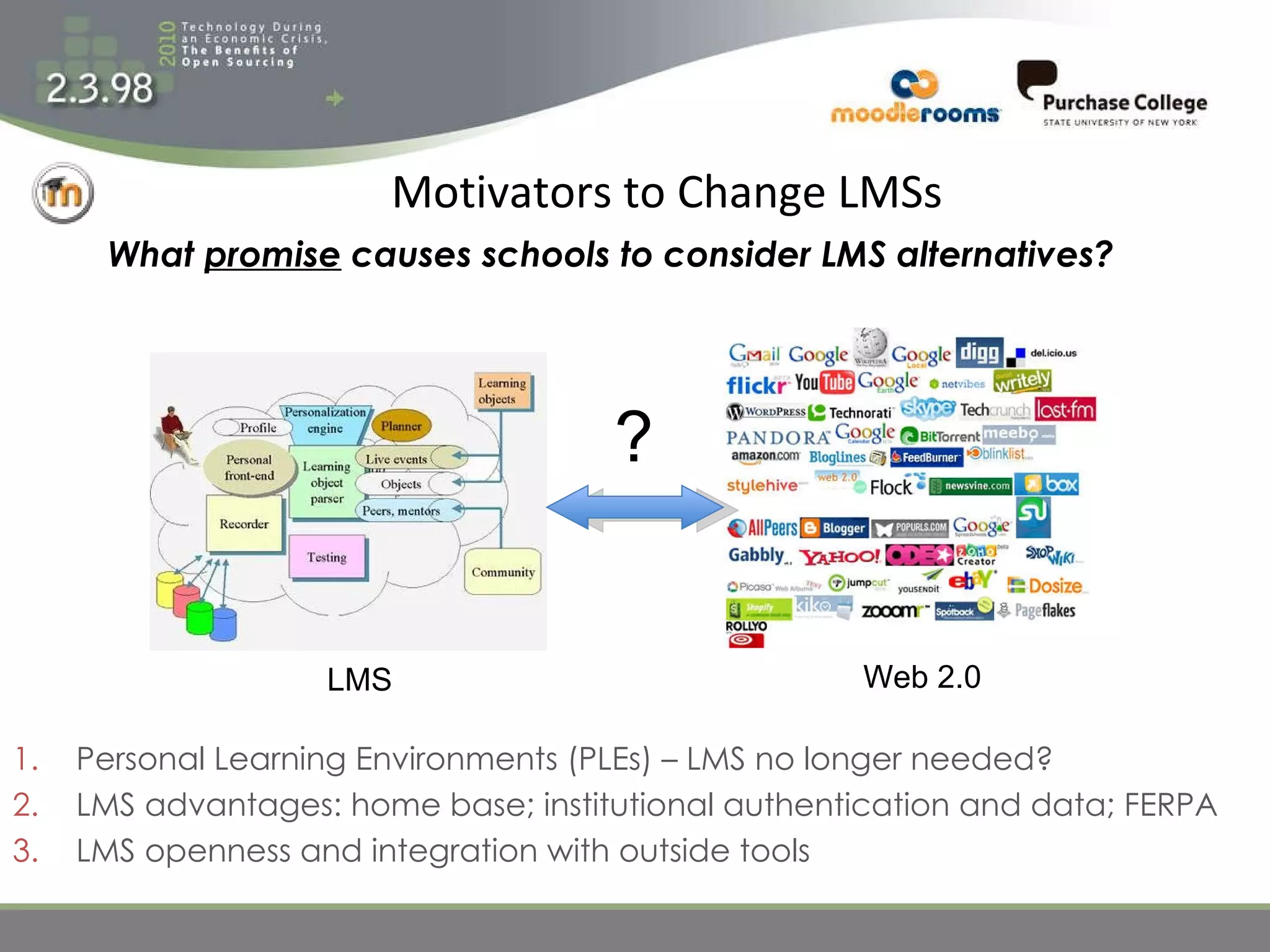
Motivators to Change LMSs What  promise  causes schools to consider LMS alternatives? Personal Learning Environments (PLEs) – LMS no longer needed? LMS advantages: home base; institutional authentication and data; FERPA LMS openness and integration with outside tools LMS Web 2.0 ?
Motivators to Change LMSs What are the options? Software type Hosting option Proprietary software, Self-hosted Open source software, Self-hosted Home-built Proprietary software, Vendor-hosted (SaaS models) Open source software, Vendor-hosted (“Managed open source”)
Why open source? Focus on teaching & learning - Robust set of activities & resources - Clear development pathway - Expansion/customization, community Costs - No licensing costs Support costs Total cost of ownership Risk management - Risks of open source - Commercial products have different risks Integration - Other systems - Web 2.0 world Flexible open architecture
Decision Variables: Self-Host vs. Vendor-Host
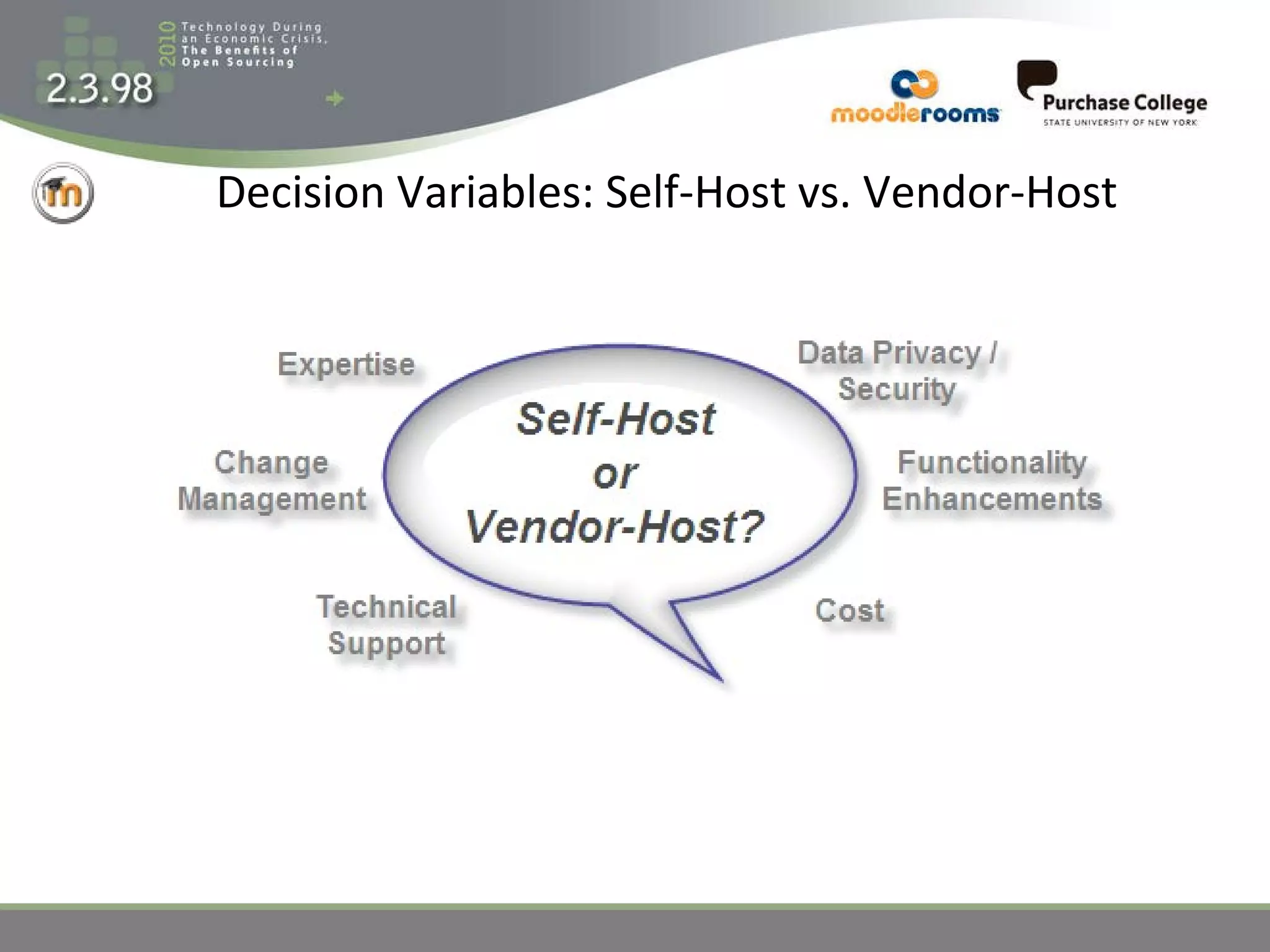
Decision Variables: Self-Host vs. Vendor-Host Currently  have an LMS ? If  yes , then do you  host yourself ? If  yes , then do you  host Moodle … If  yes , then  A) you’re well informed to decide . If  no , then  B) evaluate differences between Moodle, et al. If  no , then  C) much work must be done to evaluate alternatives. I f  no , then  D)  ??? Expertise.
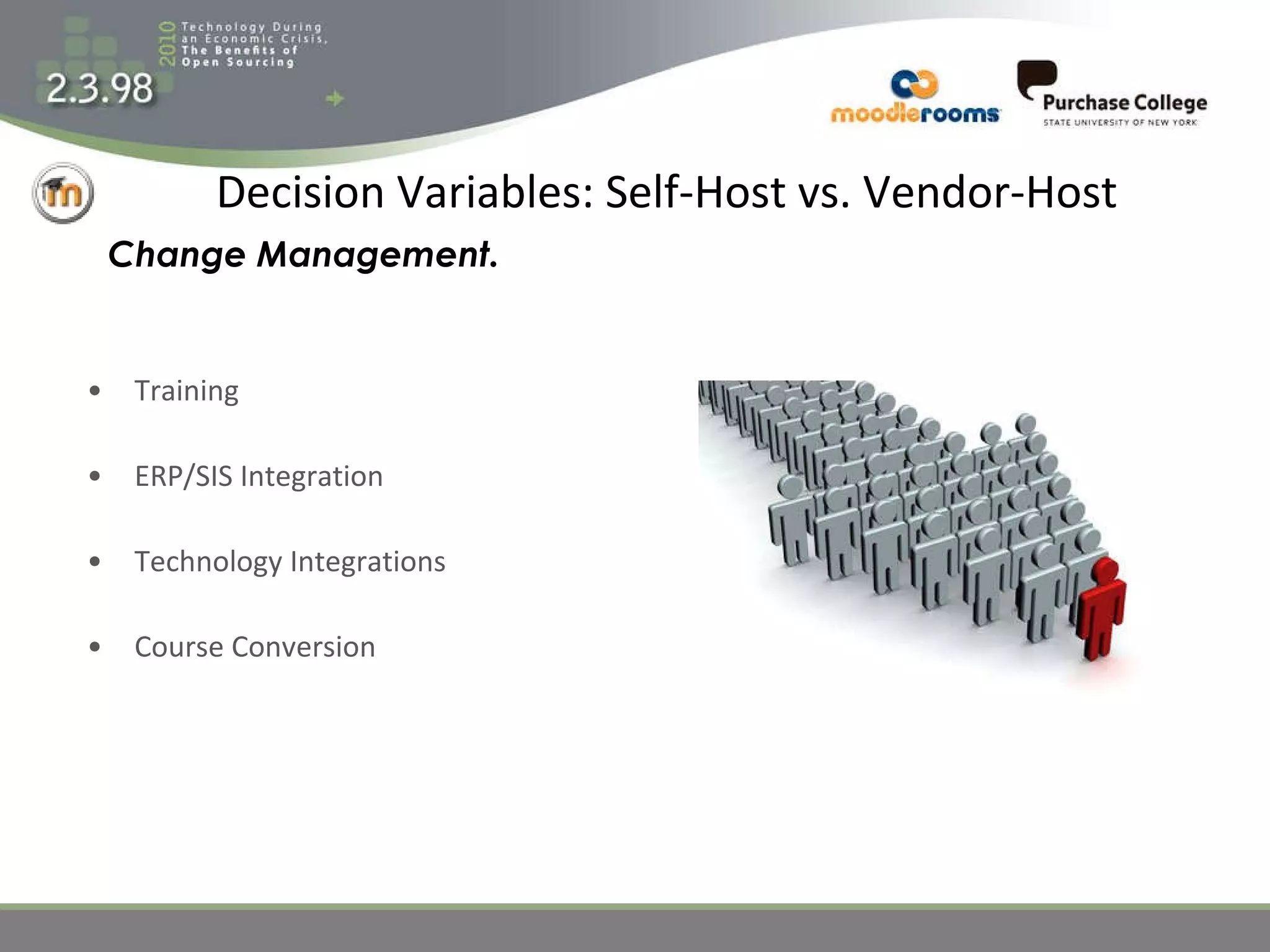
Decision Variables: Self-Host vs. Vendor-Host Training ERP/SIS Integration Technology Integrations Course Conversion Change Management.
Decision Variables: Self-Host vs. Vendor-Host Logistically Types of questions Quantity of questions Timeliness of responses Quality of responses Strategically Tech Support as core competency Need a throat to choke Technical Support.
Decision Variables: Self-Host vs. Vendor-Host Core Moodle Moodle.org Plug-ins Technology Partner Integrations Synchronous tools, Anti-plagiarism, ePortfolios, Respondus, Google Apps, Live@EDU, publisher content… Customizations Themes, reports, mobile, etc. Impact to support and upgrades Functionality Enhancements.
Decision Variables: Self-Host vs. Vendor-Host FERPA & Institutional Data Compliance Who, What, How Technology Investment Backup / DR Management Proactive Antivirus Management Data Network Design / Isolation Reporting / Auditing / Monitoring Process for Responding to Breeches Security / Data Privacy.
Decision Variables: Self-Host vs. Vendor-Host Hardware / Infrastructure Servers  (Web, Storage, Database) Network  (Switches, Routers, Load Balancers) Supporting Software OS  (Windows, Linux, Solaris or Virtual) Database  (MySQL, SQL Server, Oracle) Backup / DR  (Veritas, DoubleTake) Antivirus / Security Performance Monitoring Personnel Cost.
Background – Purchase – 2008 Liberal Arts and Sciences plus Arts Conservatories ~4200 FTE Web enhancement of F2F courses ERes electronic reserves
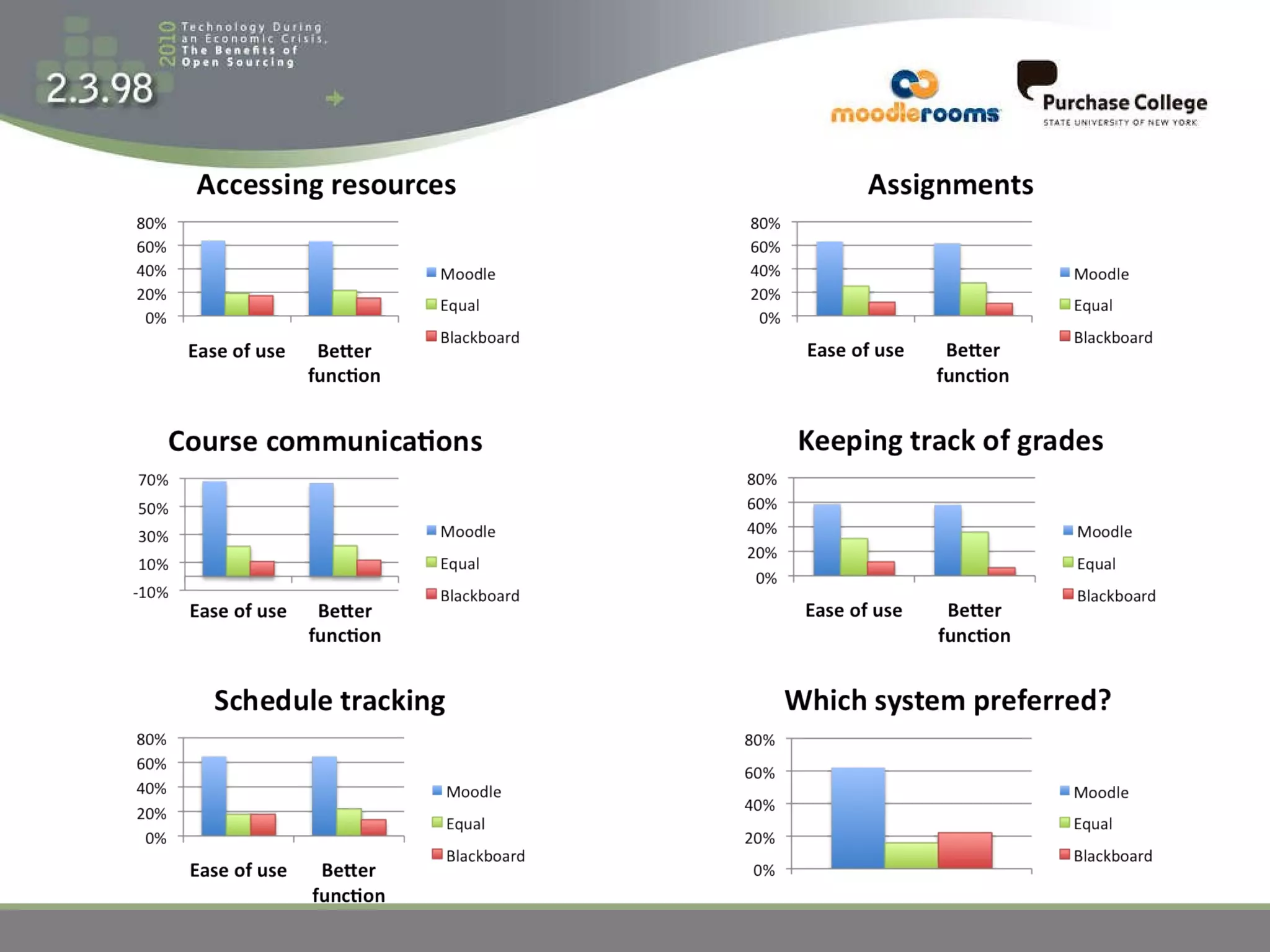
Change management Building a case, implementing a new LMS Fall 2008 : faculty task force established; faculty survey; discussion of selection criteria (functionality, technical requirements, costs) Spring 2009 : Moodle production system established; pilot Moodle courses (~20); student survey (key driver); ongoing communication; development of general sense among faculty that ‘we’re going with Moodle’…. Context : faculty dissatisfaction with Blackboard; superficial use of LMS; escalating costs Summer 2009 : summer faculty workshop series (new); course conversion and course prep; consolidation of electronic reserves into Moodle courses Fall 2009/Spring 2010 : transition year; immediate termination of ERes; one more year of Blackboard; faculty assisted to move courses to Moodle; ongoing Moodle workshops; termination of Blackboard at end of year
 
Implementation – course migration Blackboard - ~1000 courses; ERes – substantially more ERes – document download, upload to Moodle Blackboard – Moodle can import Blackboard course archives (zip files), but…. (problems with the Bb archives) Temp services staff - ~300 hours from May to Aug 2009, primarily ERes migration Bb course migration on request during 2009/2010 year
Implementation – faculty development Spring 2009 workshops: hour long sessions, various topics; early adopters; 28 faculty 2009 Summer Faculty Workshop Series: new programming, not just Moodle; half- and full-day workshops; stipends; 36 faculty at Moodle sessions Fall 2009: Moodle Kickoff workshops; Getting Started, Gradebook, Learning Activity; 98 faculty
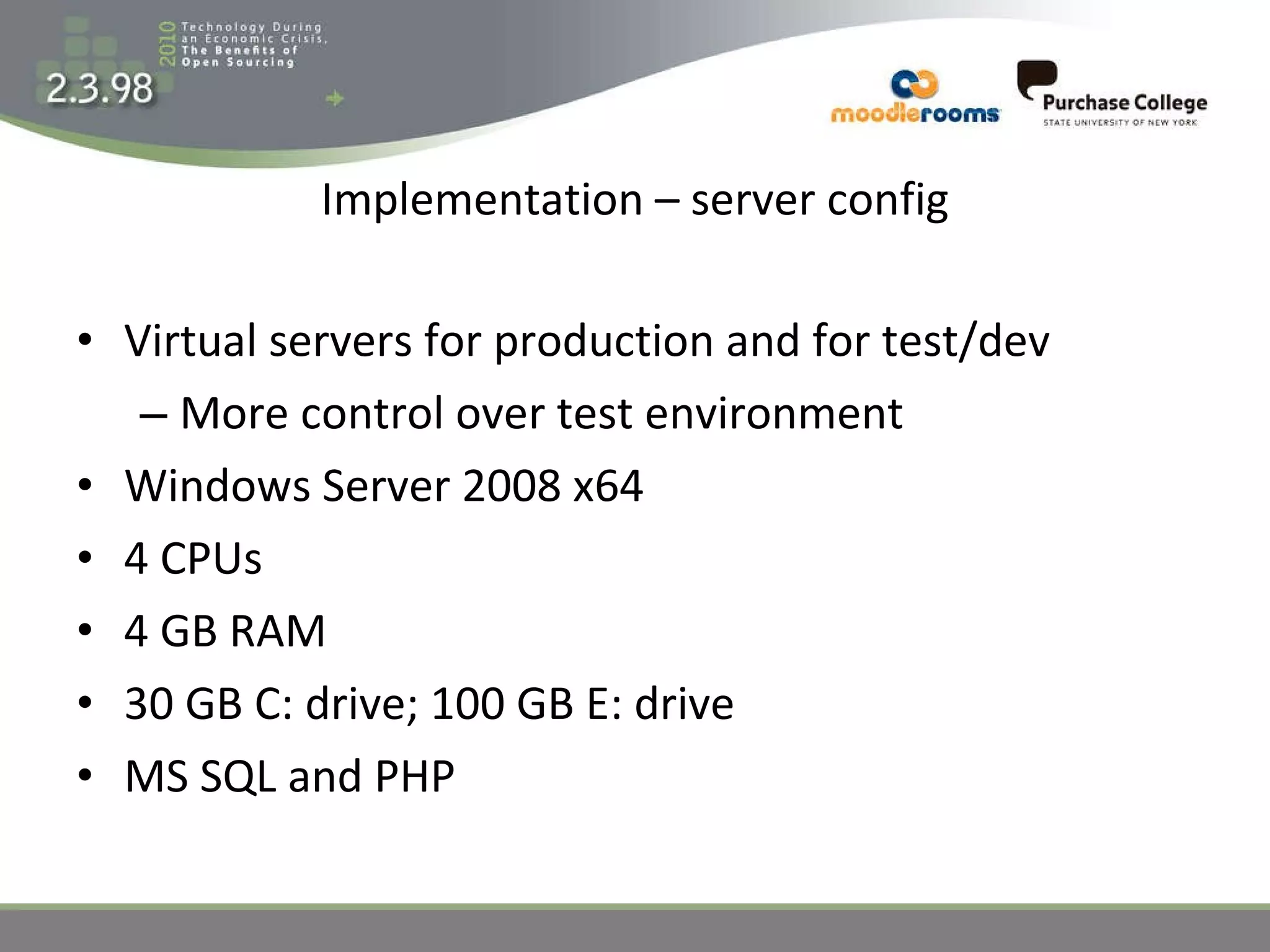
Implementation – server config Virtual servers for production and for test/dev More control over test environment Windows Server 2008 x64 4 CPUs 4 GB RAM 30 GB C: drive; 100 GB E: drive MS SQL and PHP
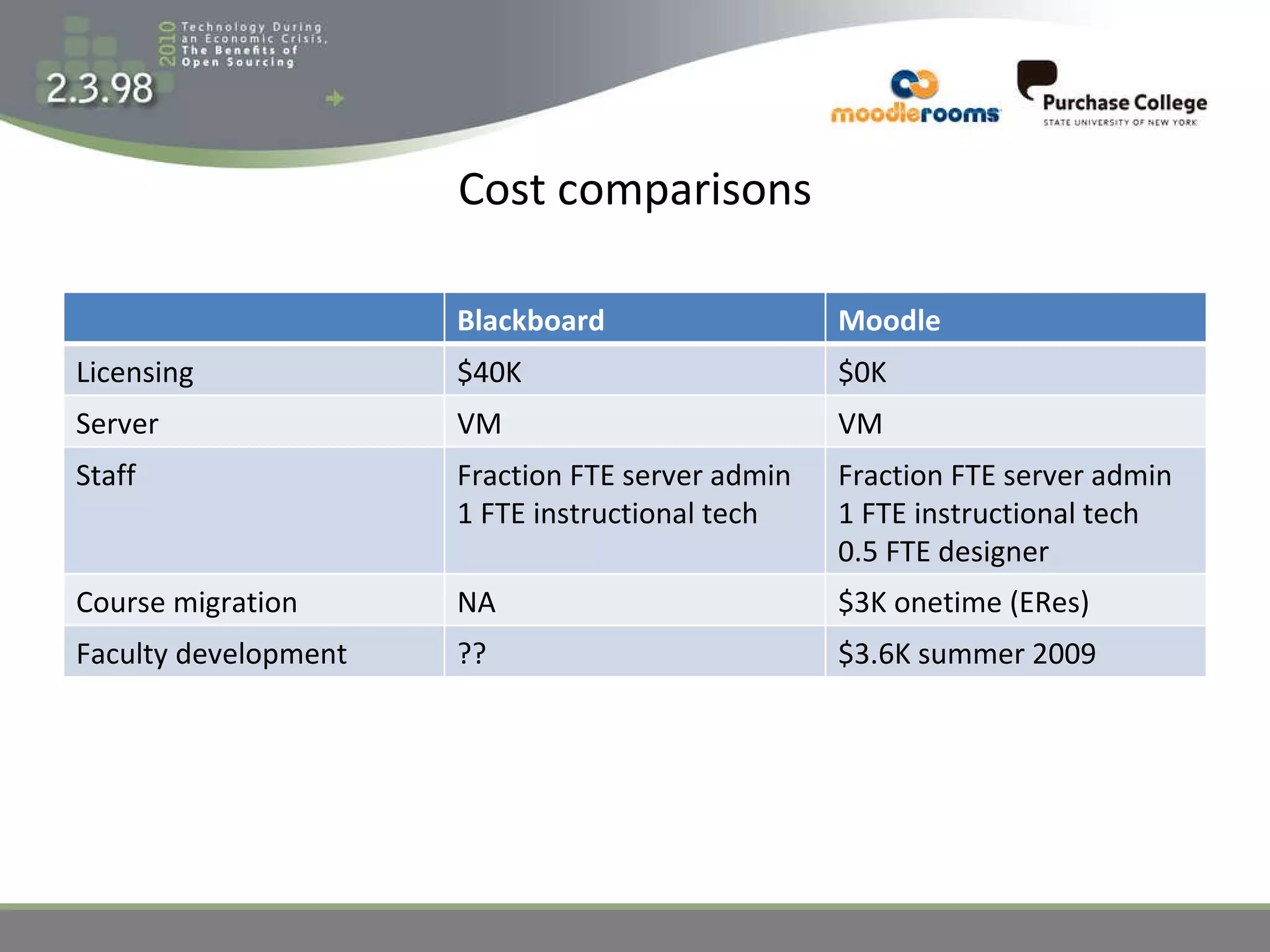
Cost comparisons Blackboard Moodle Licensing $40K $0K Server VM VM Staff Fraction FTE server admin 1 FTE instructional tech Fraction FTE server admin 1 FTE instructional tech 0.5 FTE designer Course migration NA $3K onetime (ERes) Faculty development ?? $3.6K summer 2009
Moodle development @ Purchase Community add-ons Feedback, Questionnaire, Attendance, Book, Moodle-Google, Map, etc MLE – support for mobile  Moodle Lightbox Gallery SLOODLE
Moodle development @ Purchase Integrations Mahara e-portfolio Google Analytics Classroom response system Home-grown SIS VoiceThread
Moodle development @ Purchase Purchase projects Flash video Library integrations Reserves requests, database searches, image archives, librarian roles Integrated Moodle help Moodle as hub for a suite of integrated teaching/learning applications
Purchase College’s Decision to Self-Host Moodle
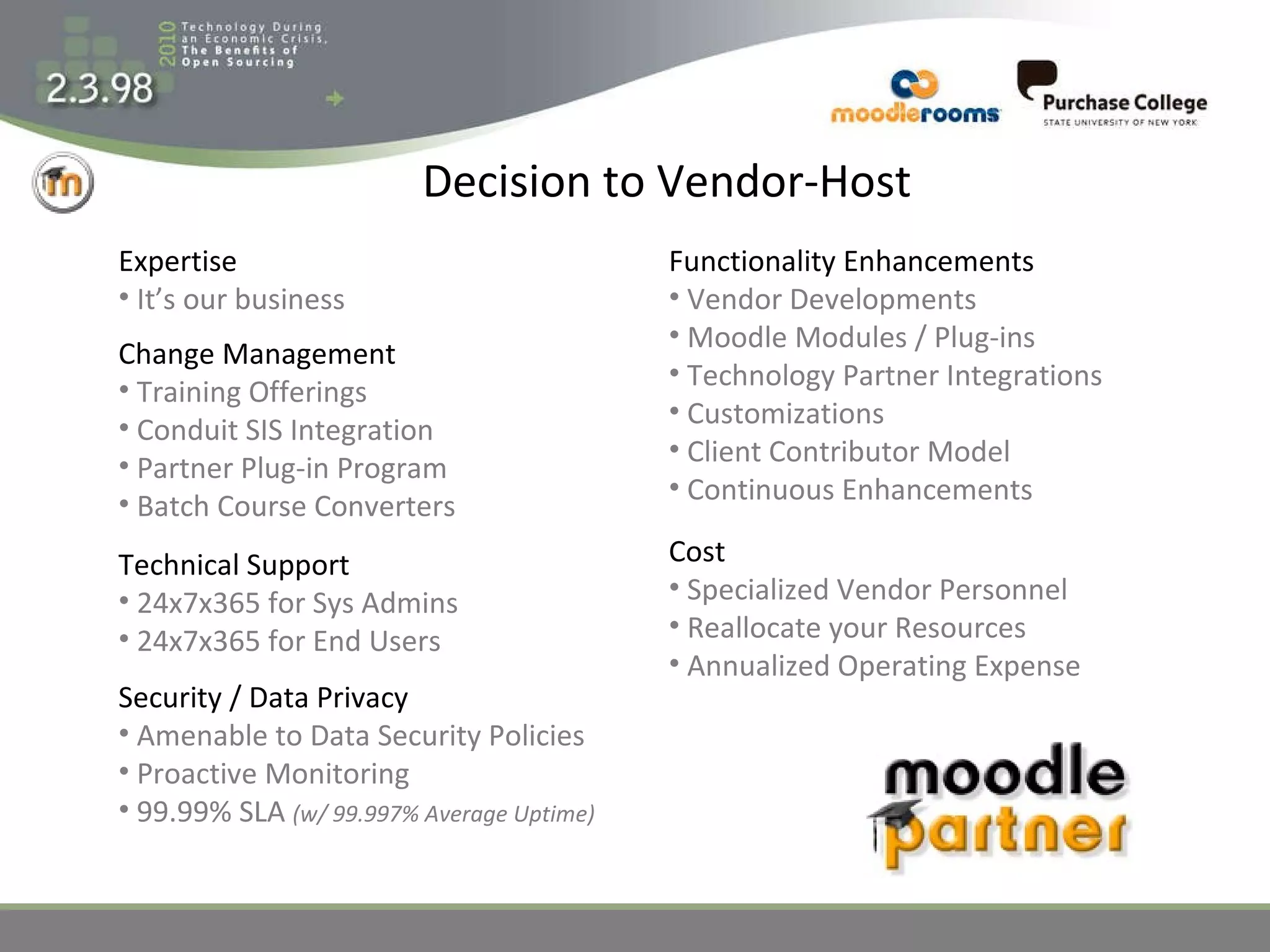
Decision to Vendor-Host Expertise It’s our business Change Management Training Offerings Conduit SIS Integration Partner Plug-in Program Batch Course Converters Technical Support 24x7x365 for Sys Admins 24x7x365 for End Users Security / Data Privacy Amenable to Data Security Policies Proactive Monitoring 99.99% SLA  (w/ 99.997% Average Uptime) Functionality Enhancements Vendor Developments Moodle Modules / Plug-ins Technology Partner Integrations Customizations Client Contributor Model Continuous Enhancements Cost Specialized Vendor Personnel Reallocate your Resources Annualized Operating Expense
Decision to Vendor-Host Go to  http://sakaiproject.org/commercial-support   to see the list of Selecting a Sakai Vendor.
Decision to Vendor-Host Go to  http://Moodle.com   to see the full list of 54 global partners Selecting a Moodle Vendor.
Questions? Keith Landa Purchase College SUNY 914-251-6440 keith.landa@ purchase.edu www.slideshare.net/keith.landa Kurt Beer Moodlerooms, Inc. 317-679-8386 [email_address]
Thank you!
What is Moodle? Created by Martin Dougiamis v1.0 Released in 2002 via GPL Open Source Accessible  (508 compliant) Scalable Standards Based Feature Rich Flexible The world’s most widely used open source LMS Standard Moodle Features
What is Moodle? Notable Statistics 49,000 Registered Moodle Sites 35,000,000 Registered Users http://www.moodle.org/stats   82 Languages Supported Used in 213 Countries
Conclusion Moodle is… Feature Rich Easy to Use Scalable Standards Based Accessible   Sustainable
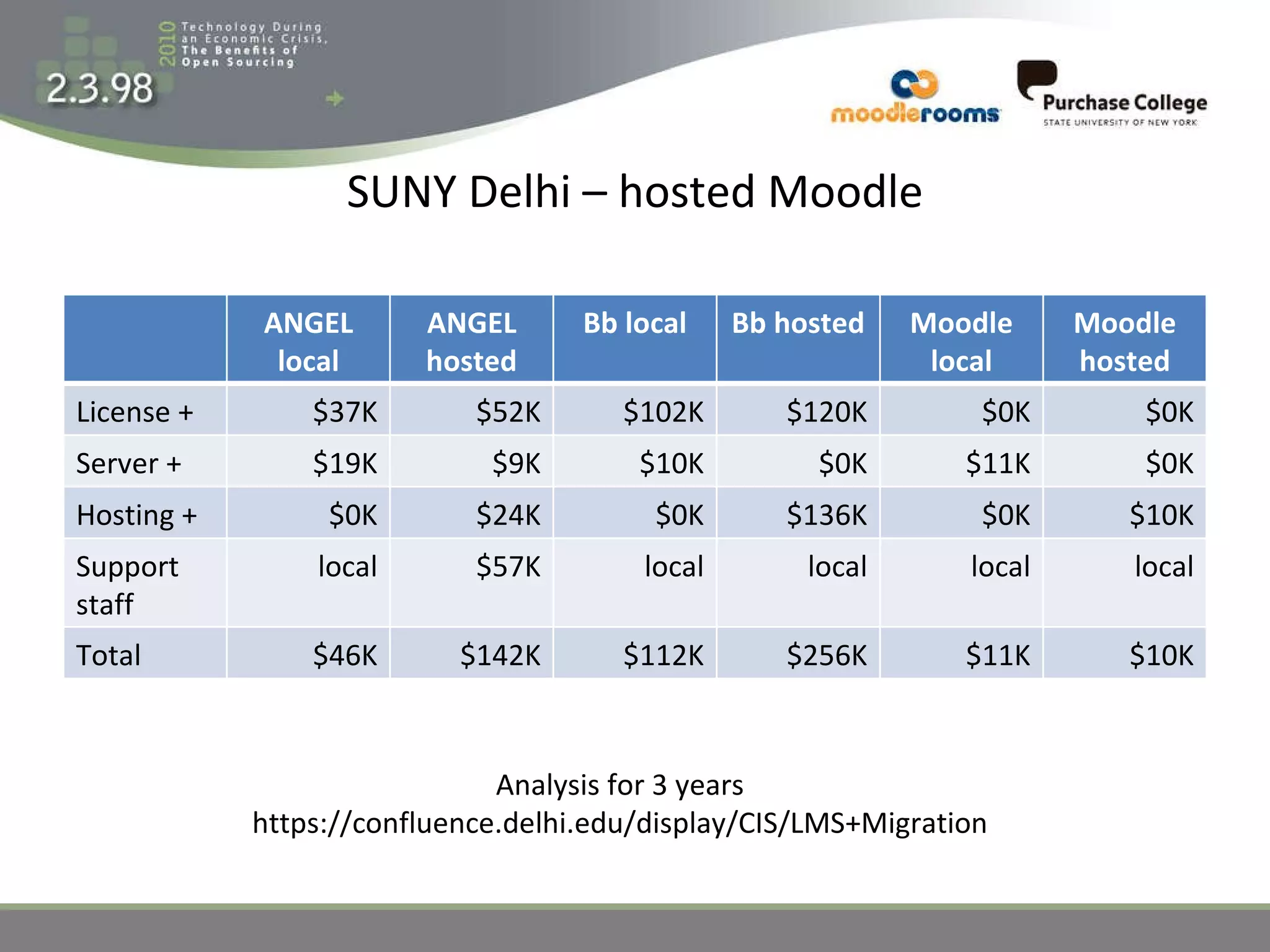
SUNY Delhi – hosted Moodle Analysis for 3 years https://confluence.delhi.edu/display/CIS/LMS+Migration ANGEL local ANGEL hosted Bb local Bb hosted Moodle local Moodle hosted License + $37K $52K $102K $120K $0K $0K Server + $19K $9K $10K $0K $11K $0K Hosting + $0K $24K $0K $136K $0K $10K Support staff local $57K local local local local Total $46K $142K $112K $256K $11K $10K

The LMS Delimma: Self Host or Vendor Host - Kurt Beer

  • 1.
    LMS Choices: ToSelf-Host or Vendor-Host? Kurt Beer Sales Director – Northeast Moodlerooms, Inc. Keith Landa Director of Instructional Technology Purchase College SUNY
  • 2.
    Agenda The changingLearning Management System landscape Motivators to Change LMSs Why open source? Variables when Deciding Self-Host vs. Vendor-Host Decision to Self-Host (Purchase College example) Decision to Vendor-Host Questions and Answers
  • 3.
    What is Moodle?The world’s most widely used open source LMS 49,000 Registered Moodle Sites 35,000,000 Registered Users http://www.moodle.org/stats
  • 4.
    Motivators to ChangeLMSs What pain causes schools to consider LMS alternatives? Innovation Lacking Difficult / Expensive to Customize Vendor Support Declining Increasing License Fees Inflexible Vendors, Ts & Cs Resource Limitations (budget & personnel)
  • 5.
    Motivators to ChangeLMSs What promise causes schools to consider LMS alternatives? Personal Learning Environments (PLEs) – LMS no longer needed? LMS advantages: home base; institutional authentication and data; FERPA LMS openness and integration with outside tools LMS Web 2.0 ?
  • 6.
    Motivators to ChangeLMSs What are the options? Software type Hosting option Proprietary software, Self-hosted Open source software, Self-hosted Home-built Proprietary software, Vendor-hosted (SaaS models) Open source software, Vendor-hosted (“Managed open source”)
  • 7.
    Why open source?Focus on teaching & learning - Robust set of activities & resources - Clear development pathway - Expansion/customization, community Costs - No licensing costs Support costs Total cost of ownership Risk management - Risks of open source - Commercial products have different risks Integration - Other systems - Web 2.0 world Flexible open architecture
  • 8.
  • 9.
    Decision Variables: Self-Hostvs. Vendor-Host Currently have an LMS ? If yes , then do you host yourself ? If yes , then do you host Moodle … If yes , then A) you’re well informed to decide . If no , then B) evaluate differences between Moodle, et al. If no , then C) much work must be done to evaluate alternatives. I f no , then D) ??? Expertise.
  • 10.
    Decision Variables: Self-Hostvs. Vendor-Host Training ERP/SIS Integration Technology Integrations Course Conversion Change Management.
  • 11.
    Decision Variables: Self-Hostvs. Vendor-Host Logistically Types of questions Quantity of questions Timeliness of responses Quality of responses Strategically Tech Support as core competency Need a throat to choke Technical Support.
  • 12.
    Decision Variables: Self-Hostvs. Vendor-Host Core Moodle Moodle.org Plug-ins Technology Partner Integrations Synchronous tools, Anti-plagiarism, ePortfolios, Respondus, Google Apps, Live@EDU, publisher content… Customizations Themes, reports, mobile, etc. Impact to support and upgrades Functionality Enhancements.
  • 13.
    Decision Variables: Self-Hostvs. Vendor-Host FERPA & Institutional Data Compliance Who, What, How Technology Investment Backup / DR Management Proactive Antivirus Management Data Network Design / Isolation Reporting / Auditing / Monitoring Process for Responding to Breeches Security / Data Privacy.
  • 14.
    Decision Variables: Self-Hostvs. Vendor-Host Hardware / Infrastructure Servers (Web, Storage, Database) Network (Switches, Routers, Load Balancers) Supporting Software OS (Windows, Linux, Solaris or Virtual) Database (MySQL, SQL Server, Oracle) Backup / DR (Veritas, DoubleTake) Antivirus / Security Performance Monitoring Personnel Cost.
  • 15.
    Background – Purchase– 2008 Liberal Arts and Sciences plus Arts Conservatories ~4200 FTE Web enhancement of F2F courses ERes electronic reserves
  • 16.
    Change management Buildinga case, implementing a new LMS Fall 2008 : faculty task force established; faculty survey; discussion of selection criteria (functionality, technical requirements, costs) Spring 2009 : Moodle production system established; pilot Moodle courses (~20); student survey (key driver); ongoing communication; development of general sense among faculty that ‘we’re going with Moodle’…. Context : faculty dissatisfaction with Blackboard; superficial use of LMS; escalating costs Summer 2009 : summer faculty workshop series (new); course conversion and course prep; consolidation of electronic reserves into Moodle courses Fall 2009/Spring 2010 : transition year; immediate termination of ERes; one more year of Blackboard; faculty assisted to move courses to Moodle; ongoing Moodle workshops; termination of Blackboard at end of year
  • 17.
  • 18.
    Implementation – coursemigration Blackboard - ~1000 courses; ERes – substantially more ERes – document download, upload to Moodle Blackboard – Moodle can import Blackboard course archives (zip files), but…. (problems with the Bb archives) Temp services staff - ~300 hours from May to Aug 2009, primarily ERes migration Bb course migration on request during 2009/2010 year
  • 19.
    Implementation – facultydevelopment Spring 2009 workshops: hour long sessions, various topics; early adopters; 28 faculty 2009 Summer Faculty Workshop Series: new programming, not just Moodle; half- and full-day workshops; stipends; 36 faculty at Moodle sessions Fall 2009: Moodle Kickoff workshops; Getting Started, Gradebook, Learning Activity; 98 faculty
  • 20.
    Implementation – serverconfig Virtual servers for production and for test/dev More control over test environment Windows Server 2008 x64 4 CPUs 4 GB RAM 30 GB C: drive; 100 GB E: drive MS SQL and PHP
  • 21.
    Cost comparisons BlackboardMoodle Licensing $40K $0K Server VM VM Staff Fraction FTE server admin 1 FTE instructional tech Fraction FTE server admin 1 FTE instructional tech 0.5 FTE designer Course migration NA $3K onetime (ERes) Faculty development ?? $3.6K summer 2009
  • 22.
    Moodle development @Purchase Community add-ons Feedback, Questionnaire, Attendance, Book, Moodle-Google, Map, etc MLE – support for mobile Moodle Lightbox Gallery SLOODLE
  • 23.
    Moodle development @Purchase Integrations Mahara e-portfolio Google Analytics Classroom response system Home-grown SIS VoiceThread
  • 24.
    Moodle development @Purchase Purchase projects Flash video Library integrations Reserves requests, database searches, image archives, librarian roles Integrated Moodle help Moodle as hub for a suite of integrated teaching/learning applications
  • 25.
    Purchase College’s Decisionto Self-Host Moodle
  • 26.
    Decision to Vendor-HostExpertise It’s our business Change Management Training Offerings Conduit SIS Integration Partner Plug-in Program Batch Course Converters Technical Support 24x7x365 for Sys Admins 24x7x365 for End Users Security / Data Privacy Amenable to Data Security Policies Proactive Monitoring 99.99% SLA (w/ 99.997% Average Uptime) Functionality Enhancements Vendor Developments Moodle Modules / Plug-ins Technology Partner Integrations Customizations Client Contributor Model Continuous Enhancements Cost Specialized Vendor Personnel Reallocate your Resources Annualized Operating Expense
  • 27.
    Decision to Vendor-HostGo to http://sakaiproject.org/commercial-support to see the list of Selecting a Sakai Vendor.
  • 28.
    Decision to Vendor-HostGo to http://Moodle.com to see the full list of 54 global partners Selecting a Moodle Vendor.
  • 29.
    Questions? Keith LandaPurchase College SUNY 914-251-6440 keith.landa@ purchase.edu www.slideshare.net/keith.landa Kurt Beer Moodlerooms, Inc. 317-679-8386 [email_address]
  • 30.
  • 31.
    What is Moodle?Created by Martin Dougiamis v1.0 Released in 2002 via GPL Open Source Accessible (508 compliant) Scalable Standards Based Feature Rich Flexible The world’s most widely used open source LMS Standard Moodle Features
  • 32.
    What is Moodle?Notable Statistics 49,000 Registered Moodle Sites 35,000,000 Registered Users http://www.moodle.org/stats 82 Languages Supported Used in 213 Countries
  • 33.
    Conclusion Moodle is…Feature Rich Easy to Use Scalable Standards Based Accessible Sustainable
  • 34.
    SUNY Delhi –hosted Moodle Analysis for 3 years https://confluence.delhi.edu/display/CIS/LMS+Migration ANGEL local ANGEL hosted Bb local Bb hosted Moodle local Moodle hosted License + $37K $52K $102K $120K $0K $0K Server + $19K $9K $10K $0K $11K $0K Hosting + $0K $24K $0K $136K $0K $10K Support staff local $57K local local local local Total $46K $142K $112K $256K $11K $10K

Editor's Notes

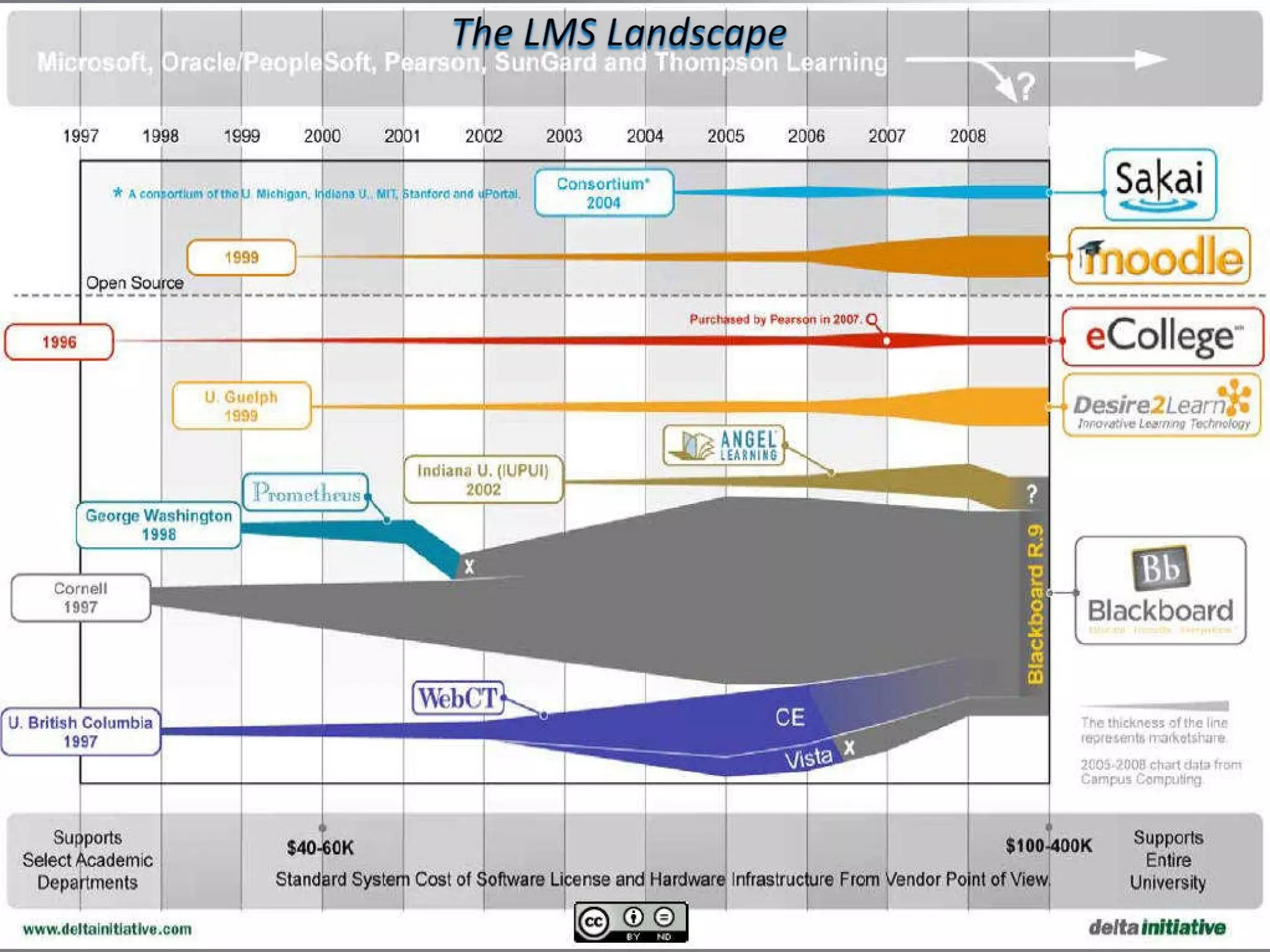
  • #4 This illustration was developed by the independent management consulting company, Delta Initiative, less than a year ago (late 2009) to summarize (quite well) how the landscape of the LMS has changed in roughly the last decade. This is a busy screen so let me attempt to describe what you are seeing: For each year displayed along the x-axis (or the columns at the top) you can see the amount of usage for each of the various LMS technologies used for that year. The thickness associated with each individual LMS demonstrates the number of users using that particular system. This illustration also identifies the mergers or acquisitions that have taken place over the years. For example we see when eCollege was acquired by Pearson in 2007 and when several systems including WebCT and ANGEL were acquired by Blackboard. A couple things stand out to me with this illustration: 1) Below the dotted line you can see that in the proprietary space there has been quite a bit of volatility primarily due to acquisitions. In fact, there is only proprietary system displayed that appears to have not YET been acquired by either Pearson or Blackboard. 2) Above the dotted line you can see the most notable open source systems. The story here is quite different. Here it is clear that the open source systems are experiencing slow, consistent yet substantial adoption by institutions. In a recent survey by the Campus Computing Project, Moodle is the second most used Learning Management System in the US behind Blackboard (or Blackboard’s suite of acquired systems). Not only does this illustration do a fantastic job of demonstrating where we have come from, but also signals the direction in which LMS technology adoption is headed.
  • #5 Attempt to show the variables that many schools must consider when deciding
  • #6 Attempt to show the variables that many schools must consider when deciding
  • #7 Attempt to show the variables that many schools must consider when deciding
  • #9 Attempt to show the variables that many schools must consider when deciding
  • #10 Experience -> Knowledge -> Experience. Let’s look at what your current situation is. Based on your experience we can make broad assumptions of your expertise.
  • #26 Attempt to show the variables that many schools must consider when deciding
  • #27 Attempt to show the variables that many schools must consider when deciding
  • #28 Attempt to show the variables that many schools must consider when deciding
  • #29 Attempt to show the variables that many schools must consider when deciding
  • #32 Moodle is globally the most widely used open source Learning Management System (also referred to as a VLE, Virtual Learning Environment, or CMS, Course Management System). Most of the features that you would expect in an LMS are build natively into Moodle such as Collaboration and Communication tools as well as tools for Instruction and Assessment. The development of Moodle began in the 1990’s when a WebCT Administrator from Curtin University of Technology in Australia when he realized people were struggling with using technology to enrich their classroom experiences. In 2002, version 1.0 of Moodle was released and was made publicly available under GPL (or “General Public License”). GPL is licence applied to a program to specify it can be distributed and modified by anyone, but if a modified version is distributed, the source must also be distributed. There are several aspects of Moodle that make it a great fit for facilitating online programs. 1) Moodle is Open Source. This means it is freely available for anyone to download making access to the system easy for all. 2) Moodle is built to meet the specifications for Section 508 of the 1998 ammendment of the Rehabilitation Act paving the way for users with disabilities to best interact with the system. 3) Moodle is highly scalable whether you wish to install Moodle on your local computer or it is the Open University in the UK which uses one instance of Moodle to serve more than 600,000 individuals. 4) Moodle is built on all of the leading industry standards that ensure portability of content between Learning Mangement Systems and also from publishers. 5) Moodle is a feature rich system that over the last decade has developed hundreds of helpful tools used by educators globally. 6) Moodle is a highly flexible system that allows it to be integrated with other campus systems and technologies.