Topics

•   How we planned for the move
•   Upgrade or fresh install?
•   Issues that needed an early decision
•   What technical problems we faced
    • How we handled them
• Organisational planning
    • Involved curriculum teams
• Reflection
How we planned for the move

• Key things to consider:
  • Installed modules and services
    • Are they still needed?
    • Are these available for Moodle 2?
  • Type of usage and level of usage
    • Age/type of courses
    • Quality of courses
  • Staff skills with Moodle
  • What are your objectives?
B&SD College
• Before the project:
  • Well established but unmanaged
  • Few plugins or modules being used
  • Mostly old courses
     • Some not used at all
     • Others needed a restart
  • Good usage in few areas
  • Confusion around student enrolment
• Windows Server
• http://moodle2.bsdc.ac.uk/vle/
Sandwell College
• Before the project:
  • Well managed Moodle 1.9
  • Courses maintained on an annual basis
  • Fractured/Stagnated
     • Mostly file storage
     • Considered difficult to use by some
  • Good selection of plugins & modules installed
• SLES 10 Server
• http://svc.sandwell.ac.uk/student/
Possible Objectives

•   Simplified usage for all users
•   Improved integration w/ infrastructure
•   Relaunch, rejuvenation, reinvention
•   Preparation for future development
•   Encourage resource sharing
•   Make use of improved theming

• Ensure support from moodle.org
Upgrade or Fresh Install?
• Depends greatly on objectives
• What content you have to bring across
• A fresh start will be a more stable base
  • But after 18 months this isn't such a problem
  • Moodle 2.1 and onwards can import individual
    backups
• Also consider the spin for users
  • Do you want this to be a fresh start?
Issues needing an early decision

• How to host
  •   Internal / External
  •   Operating System
  •   Hosting Software
  •   Database Options
• Whether to link to infrastructure
  • Information Systems
  • Domains
• Staff engagement required
Hosting: Internal or External?

• Probably know this already if running
  Moodle 1.9
• Internal requires certain skills and will
  probably cost more
• But it also makes it easier to:
  • Integrate Moodle with other services
  • Customise Moodle to meet specific needs
  • Test and debug problems
Hosting: Operating System

• Windows Server
  •   Skills are more widely available
  •   Easier support for other MS systems
  •   Can't handle large amounts of processes
  •   Prefers threading work within one process
• Linux Server
  • Apache/PHP on Linux is native software
  • Support dependant on "flavour" of Linux
Hosting: Hosting Software

• HTTP Hosting:
  • Apache
    • Best established, plenty of guides
  • IIS (Windows Only)
    • Microsoft support, about 10 to 20% slower
  • Lighttp
    • Designed to handle modern web usage
    • Really quick if well configured
    • Little support online
Hosting: Hosting Software - PHP
• PHP 5.2 for Moodle 2.0, PHP 5.3 for 2.1
• For Windows Server download from here
  • What is VC6 and VC9?
     • Compiler used, should match http host
  • What about TS or NTS?
     • Use a NTS install with a FCGI connector
• For Linux depends on type used
  • Pre-compiled or Compile from source
• PHP Extensions
  • Moodle requirements are all common and easily
    obtainable
Hosting: Database

• A few choices:
  • MySQL (5.0.25 or later)
     • Standard, & best supported by Moodle
  • MS-SQL (2005 or later)
     • Microsoft's, good software
     • Should be fine but has had unique bugs in the past
  • Oracle (10.2 or later)
  • PostgreSQL (8.3)
Technical Problems we Faced

•   Updating Moodle 1.9 to 2.X
•   Database differences
•   Developing plug-ins
•   Creating a new theme
    •   IE Compatibility
• Stress testing
• Streamlining configurations
Updating from 1.9 to 2.X
• File storage completely changed
  • No folders on server per course id!
• Update essentially the same as usual
  •   Backup everything! Moodle, Files & Database
  •   Replace / Moodle contents
  •   Log in as Admin to start process
• Lots of processing required
  •   Modifying Databases
  •   Restructure File Storage
  •   Rebuild Questions/Quizzes
Database Differences
• For MySQL, Moodle uses InnoDB storage
  engine.
   • Should be more reliable
     • Transaction safe, capable of row locking
  • A little bit slower & uses more resources
  • Different operations available
     • no repair, just check
• Issue w/ mdl_backup_controllers (MDL-29262)
  • Gets massive when backing up and restoring.
  • Not important, so no need to backup
     • Use --ignore-table option with mysqldump
Developing Plugins
• Many new types of plug-ins possible
   •   Enrolment Methods, Repositories, Plagiarism
       Detectors, Sub-Activities, Question-types
• Get around poor documentation
   •   Dissected other plugins to understand them
   •   Found Moodle XREF sites very useful
   •   Comments found in lib & locallib files
    • Such as lib/enrollib.php and enrol/locallib.php
• Familiarise yourself with Moodle
  coding guidelines if intend to publish
Creating a new theme
• Lots of guides and docs for this
• Inherit as few themes as possible
  •   Fastest themes inherit from Base
• config.php holds a lot of functionality
  • Javascripts for header or footer
  • Exclude inherited styles
  • Apply custom renderer
• Check through other themes,
  • particularly "Afterburner" from 2.1 onwards
• Be aware of standard folders
  • Such as "pix_core" and "pix_plugins"
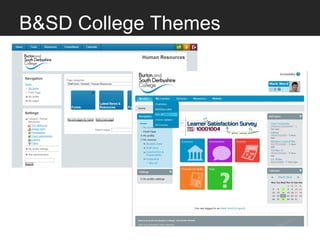
B&SD College Themes
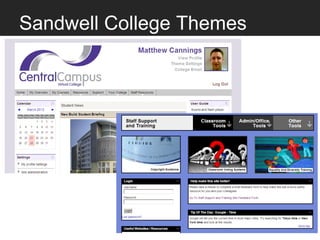
Sandwell College Themes
IE Compatibility
• Targeting specific browsers with
    • Body classes (.ie .ie7)
• Check out CSS3PIE
• IE6 woes? Two main choices:
    •   Eliminate IE6 and update to IE8
    •   Try and make Moodle 2 support IE6
•   Support will always be clonky for IE6
•   Can improve support with a few tweaks
    to CSS.
Stress Testing
• Useful free tools like Apache JMeter
  •   Allows you to "record" a test session
  •   Includes logging in and out
  •   Test can then be scaled up to include:
       •   Variable amount of test users
       •   Variable time between user page loads.
• Also check intensive activities
  •   Like language check-in/out for customisation
  •   Course backups and importing
  •   Bulk user avatar importing
Streamlining Configurations

• Be aware Apache/PHP has different
  settings/recommendations for
  Linux/Windows

• Caching
  • PHP - eAccelerator, APC
  • Database
    • Bigger caches can reduce execution times
    • Giant caches misbehave, issues with recovery
Organisational Planning
• How will usage differ across the
 organisation?
  • Will you be able to meet these needs?
• Is there an opportunity for
 improvement?
  • New ways of working maybe?
• Are people aware of what will change?
• Offer to attend meetings to discuss
 these things
On Reflection - What we learnt

• Migration is an opportunity for change
  • Not just changes in Moodle itself
  • But also for organisations using it
• Some big changes have been made
  • But each of them for a good reason
  • Repositories sound scary but are important
     • They're really just a source for getting files
• Keep an eye on what's ahead
  • A new version every 6 months

Movingto moodle2 v1 1

  • 2.
    Topics • How we planned for the move • Upgrade or fresh install? • Issues that needed an early decision • What technical problems we faced • How we handled them • Organisational planning • Involved curriculum teams • Reflection
  • 3.
    How we plannedfor the move • Key things to consider: • Installed modules and services • Are they still needed? • Are these available for Moodle 2? • Type of usage and level of usage • Age/type of courses • Quality of courses • Staff skills with Moodle • What are your objectives?
  • 4.
    B&SD College • Beforethe project: • Well established but unmanaged • Few plugins or modules being used • Mostly old courses • Some not used at all • Others needed a restart • Good usage in few areas • Confusion around student enrolment • Windows Server • http://moodle2.bsdc.ac.uk/vle/
  • 5.
    Sandwell College • Beforethe project: • Well managed Moodle 1.9 • Courses maintained on an annual basis • Fractured/Stagnated • Mostly file storage • Considered difficult to use by some • Good selection of plugins & modules installed • SLES 10 Server • http://svc.sandwell.ac.uk/student/
  • 6.
    Possible Objectives • Simplified usage for all users • Improved integration w/ infrastructure • Relaunch, rejuvenation, reinvention • Preparation for future development • Encourage resource sharing • Make use of improved theming • Ensure support from moodle.org
  • 7.
    Upgrade or FreshInstall? • Depends greatly on objectives • What content you have to bring across • A fresh start will be a more stable base • But after 18 months this isn't such a problem • Moodle 2.1 and onwards can import individual backups • Also consider the spin for users • Do you want this to be a fresh start?
  • 8.
    Issues needing anearly decision • How to host • Internal / External • Operating System • Hosting Software • Database Options • Whether to link to infrastructure • Information Systems • Domains • Staff engagement required
  • 9.
    Hosting: Internal orExternal? • Probably know this already if running Moodle 1.9 • Internal requires certain skills and will probably cost more • But it also makes it easier to: • Integrate Moodle with other services • Customise Moodle to meet specific needs • Test and debug problems
  • 10.
    Hosting: Operating System •Windows Server • Skills are more widely available • Easier support for other MS systems • Can't handle large amounts of processes • Prefers threading work within one process • Linux Server • Apache/PHP on Linux is native software • Support dependant on "flavour" of Linux
  • 11.
    Hosting: Hosting Software •HTTP Hosting: • Apache • Best established, plenty of guides • IIS (Windows Only) • Microsoft support, about 10 to 20% slower • Lighttp • Designed to handle modern web usage • Really quick if well configured • Little support online
  • 12.
    Hosting: Hosting Software- PHP • PHP 5.2 for Moodle 2.0, PHP 5.3 for 2.1 • For Windows Server download from here • What is VC6 and VC9? • Compiler used, should match http host • What about TS or NTS? • Use a NTS install with a FCGI connector • For Linux depends on type used • Pre-compiled or Compile from source • PHP Extensions • Moodle requirements are all common and easily obtainable
  • 13.
    Hosting: Database • Afew choices: • MySQL (5.0.25 or later) • Standard, & best supported by Moodle • MS-SQL (2005 or later) • Microsoft's, good software • Should be fine but has had unique bugs in the past • Oracle (10.2 or later) • PostgreSQL (8.3)
  • 14.
    Technical Problems weFaced • Updating Moodle 1.9 to 2.X • Database differences • Developing plug-ins • Creating a new theme • IE Compatibility • Stress testing • Streamlining configurations
  • 15.
    Updating from 1.9to 2.X • File storage completely changed • No folders on server per course id! • Update essentially the same as usual • Backup everything! Moodle, Files & Database • Replace / Moodle contents • Log in as Admin to start process • Lots of processing required • Modifying Databases • Restructure File Storage • Rebuild Questions/Quizzes
  • 16.
    Database Differences • ForMySQL, Moodle uses InnoDB storage engine. • Should be more reliable • Transaction safe, capable of row locking • A little bit slower & uses more resources • Different operations available • no repair, just check • Issue w/ mdl_backup_controllers (MDL-29262) • Gets massive when backing up and restoring. • Not important, so no need to backup • Use --ignore-table option with mysqldump
  • 17.
    Developing Plugins • Manynew types of plug-ins possible • Enrolment Methods, Repositories, Plagiarism Detectors, Sub-Activities, Question-types • Get around poor documentation • Dissected other plugins to understand them • Found Moodle XREF sites very useful • Comments found in lib & locallib files • Such as lib/enrollib.php and enrol/locallib.php • Familiarise yourself with Moodle coding guidelines if intend to publish
  • 18.
    Creating a newtheme • Lots of guides and docs for this • Inherit as few themes as possible • Fastest themes inherit from Base • config.php holds a lot of functionality • Javascripts for header or footer • Exclude inherited styles • Apply custom renderer • Check through other themes, • particularly "Afterburner" from 2.1 onwards • Be aware of standard folders • Such as "pix_core" and "pix_plugins"
  • 19.
  • 20.
  • 21.
    IE Compatibility • Targetingspecific browsers with • Body classes (.ie .ie7) • Check out CSS3PIE • IE6 woes? Two main choices: • Eliminate IE6 and update to IE8 • Try and make Moodle 2 support IE6 • Support will always be clonky for IE6 • Can improve support with a few tweaks to CSS.
  • 22.
    Stress Testing • Usefulfree tools like Apache JMeter • Allows you to "record" a test session • Includes logging in and out • Test can then be scaled up to include: • Variable amount of test users • Variable time between user page loads. • Also check intensive activities • Like language check-in/out for customisation • Course backups and importing • Bulk user avatar importing
  • 23.
    Streamlining Configurations • Beaware Apache/PHP has different settings/recommendations for Linux/Windows • Caching • PHP - eAccelerator, APC • Database • Bigger caches can reduce execution times • Giant caches misbehave, issues with recovery
  • 24.
    Organisational Planning • Howwill usage differ across the organisation? • Will you be able to meet these needs? • Is there an opportunity for improvement? • New ways of working maybe? • Are people aware of what will change? • Offer to attend meetings to discuss these things
  • 25.
    On Reflection -What we learnt • Migration is an opportunity for change • Not just changes in Moodle itself • But also for organisations using it • Some big changes have been made • But each of them for a good reason • Repositories sound scary but are important • They're really just a source for getting files • Keep an eye on what's ahead • A new version every 6 months