The last picks
Md. Nafiur Rahman TuhinMd. Abdullah Al Abid Md. Mazharul Islam Shubho
Md. Sunny Ul Islam
Secure Socket Layer (SSL)
Secure Sockets Layer Protocol is the standard security
technology for establishing an encrypted link between a web
server and a browser. This link ensures that all data passed
between the web server and browsers remain private and
integral.
Netscape developed The Secure Sockets Layer Protocol
(SSL) in 1994, as a response to the growing concern over
security on the Internet.
Version Of Secure Socket Layer(SSL)
♦SSL Version 1.0
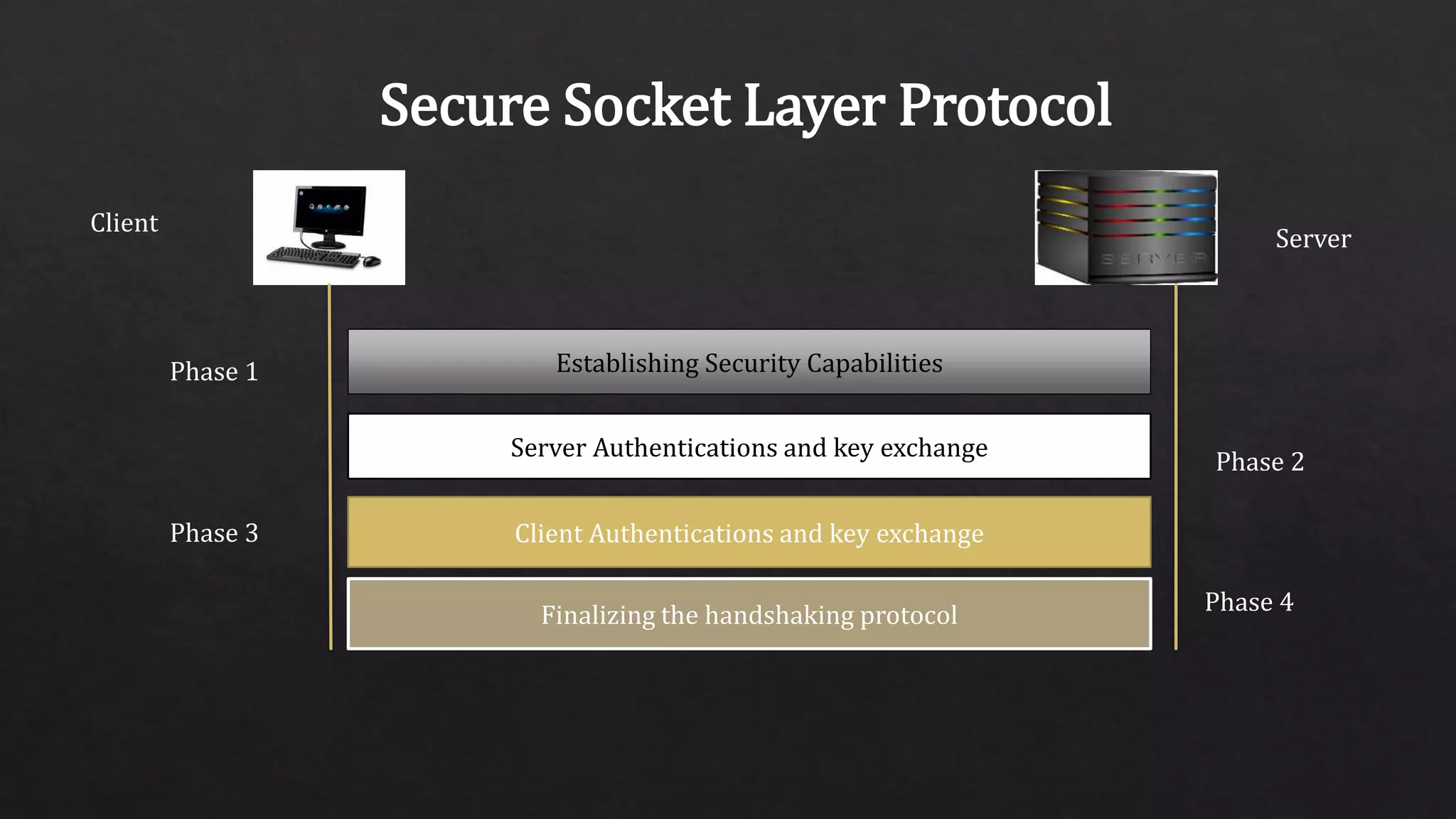
♦SSL Version 2.0
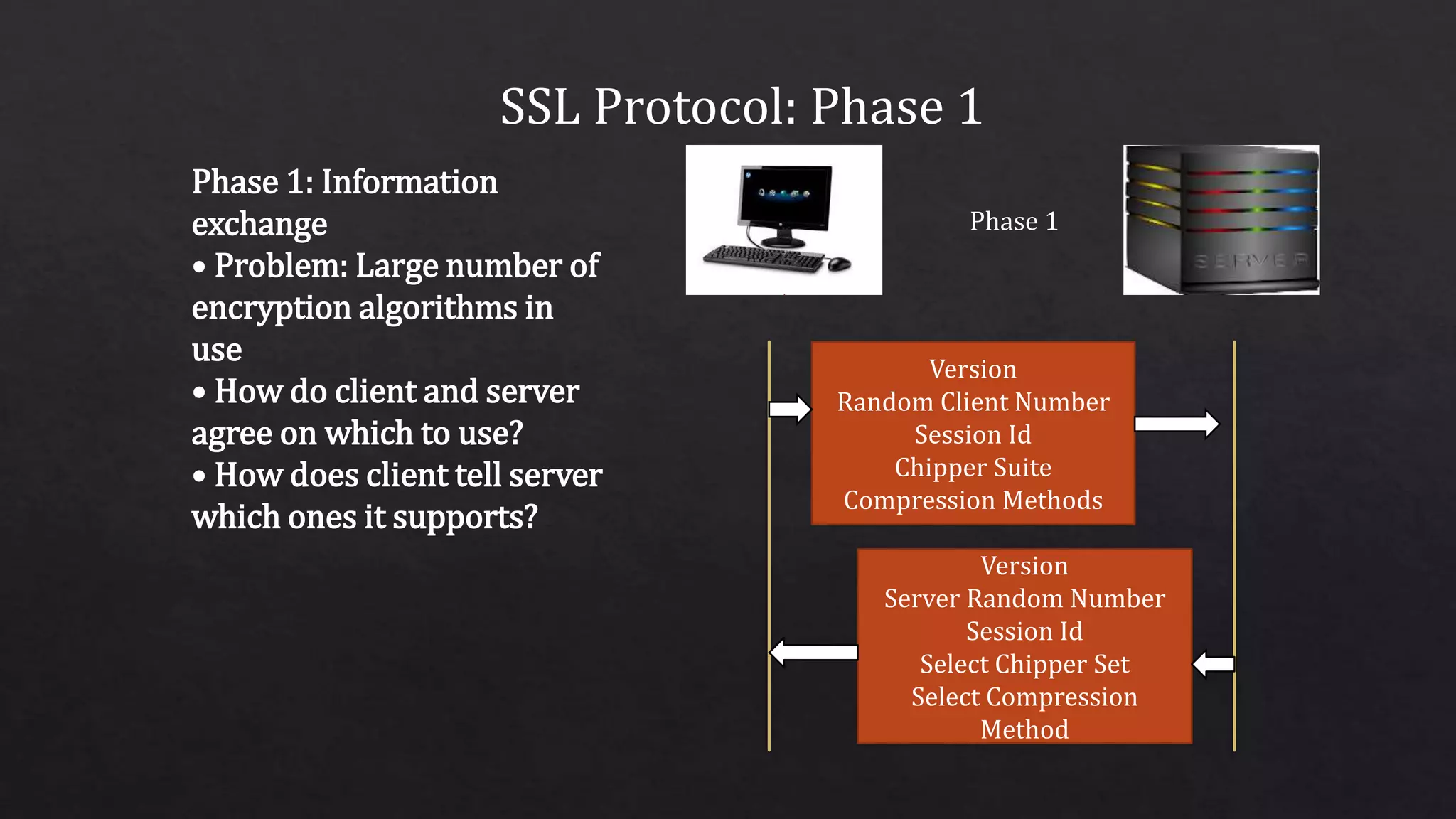
♦SSL Version 3.0
♦TLS Version 1.0
♦TLS Version 1.1
♦TLS Version 1.2
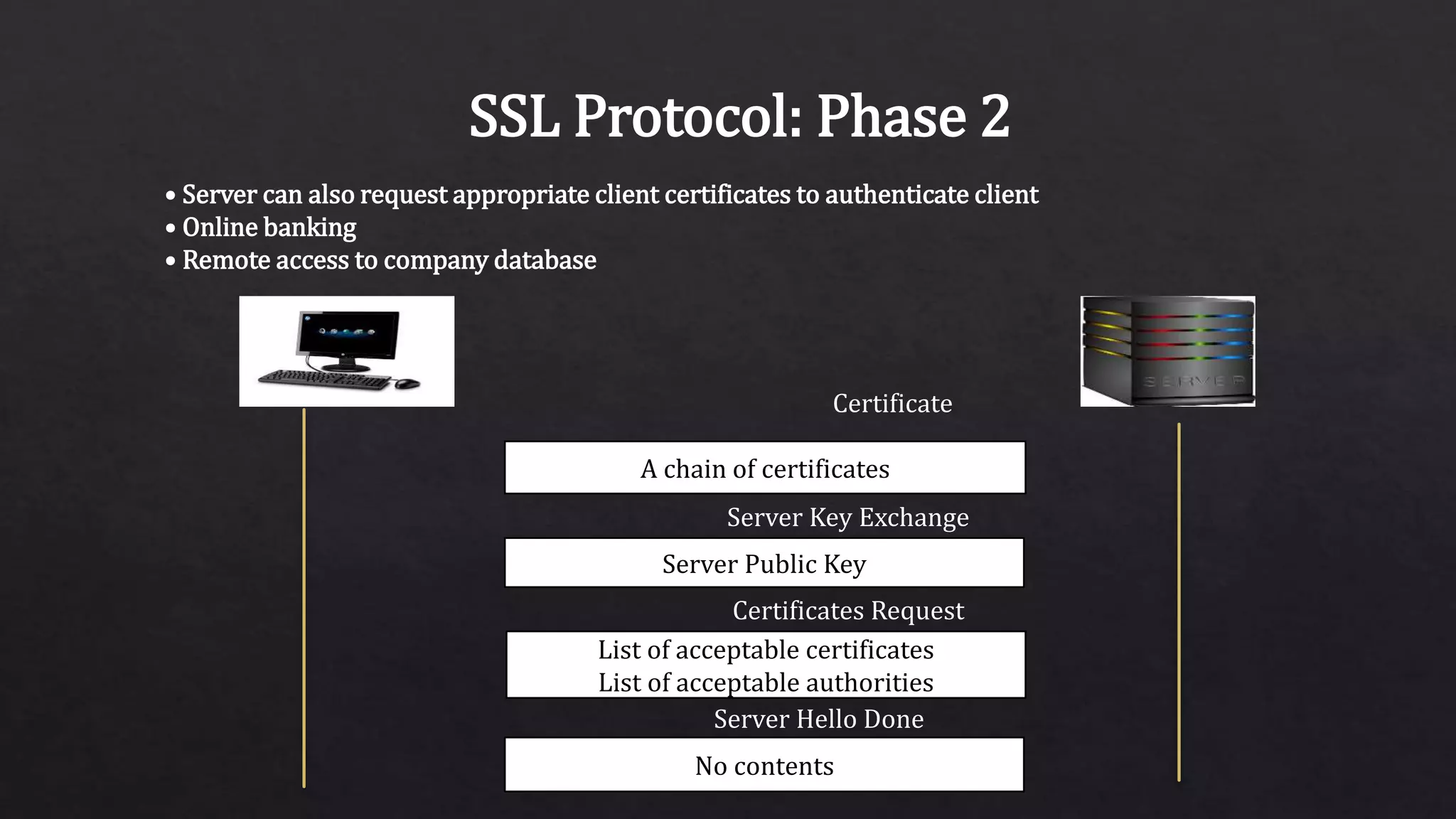
♦TLS Version 1.3 ( August 2018)
SSL Architecture
SSL Handshakes
Protocol
SSLChange
Cipher Space
Protocol
SSL Alert
Protocol
Applications
SSL Record Protocol
TCP
IP
How It Works
The SSL protocol uses RSA public key cryptography for Internet
Security
Public key encryption uses a pair of asymmetric keys for
encryption and decryption.
Each pair of keys consists of a public key and a private key. The
public key is made public by distributing it widely; the private key
is always kept secret
Data encrypted with the public key can be decrypted only with
the private key, and vice versa.
Example of SSL with amazon
If you’ve ever bought something from Amazon, you’ve used SSL.
During checkout you may have noticed the little padlock icon
(amazon.com) in the status bar of your web browser, or that the
URL field of your browser begins with “https.” This is indicating
that you’re
communicating with the website’s server via SSL to secure your
personal information, your credit card number, etc.
This type of SSL between a web browser and a website server
includes what is commonly referred to as Server Authentication
Server Authentication
Server Authentication is a
means of authenticating and
identifying the sever to the
client using a Server Certificate.
A Server Certificate is a required
part of any SSL communication.
The server
certificate contains basic
information and a digital
signature that properly
identifies the server it is
associated with.
Steps for SSL Communication
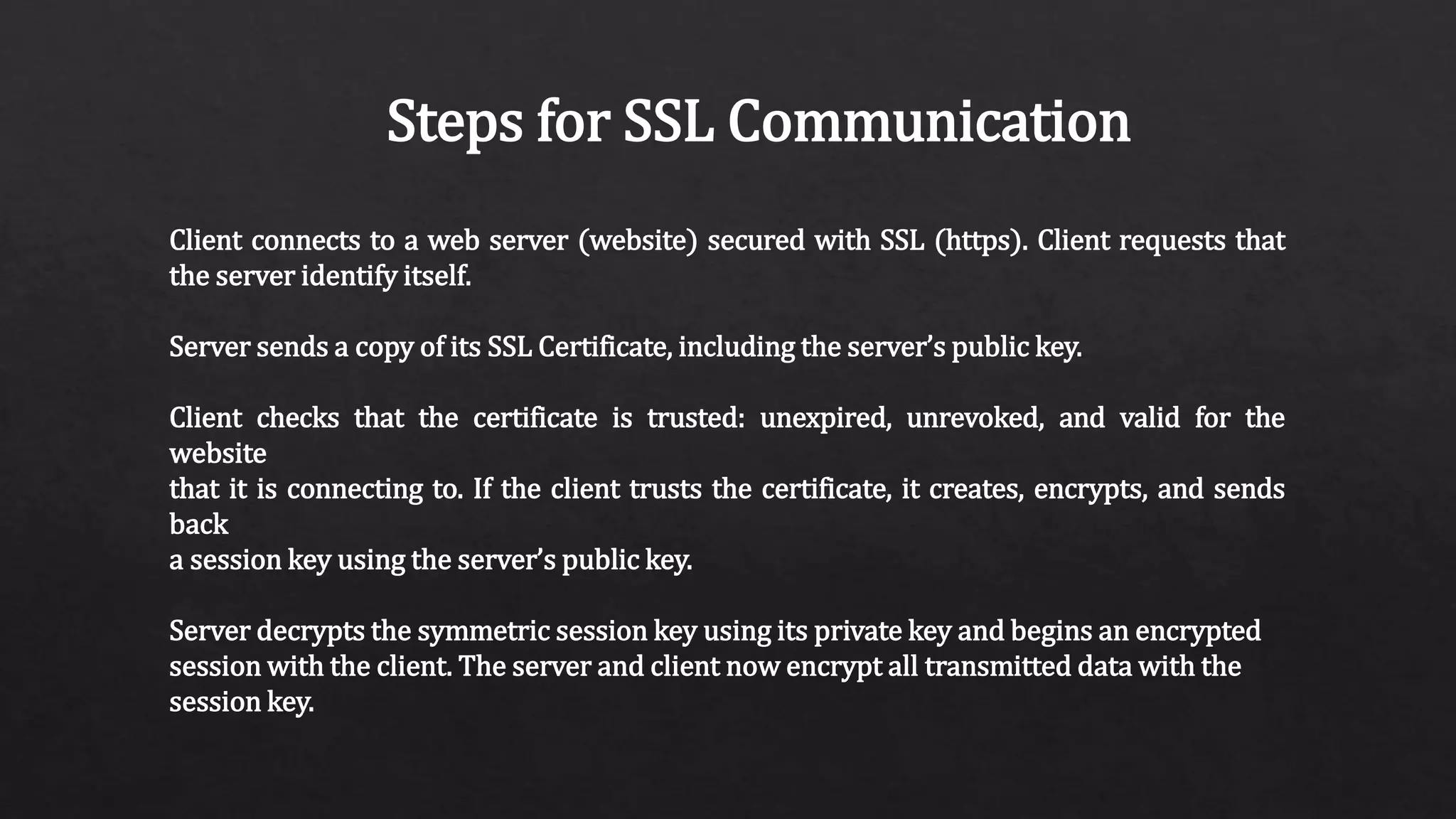
Client connects to a web server (website) secured with SSL (https). Client requests that
the server identify itself.
Server sends a copy of its SSL Certificate, including the server’s public key.
Client checks that the certificate is trusted: unexpired, unrevoked, and valid for the
website
that it is connecting to. If the client trusts the certificate, it creates, encrypts, and sends
back
a session key using the server’s public key.
Server decrypts the symmetric session key using its private key and begins an encrypted
session with the client. The server and client now encrypt all transmitted data with the
session key.
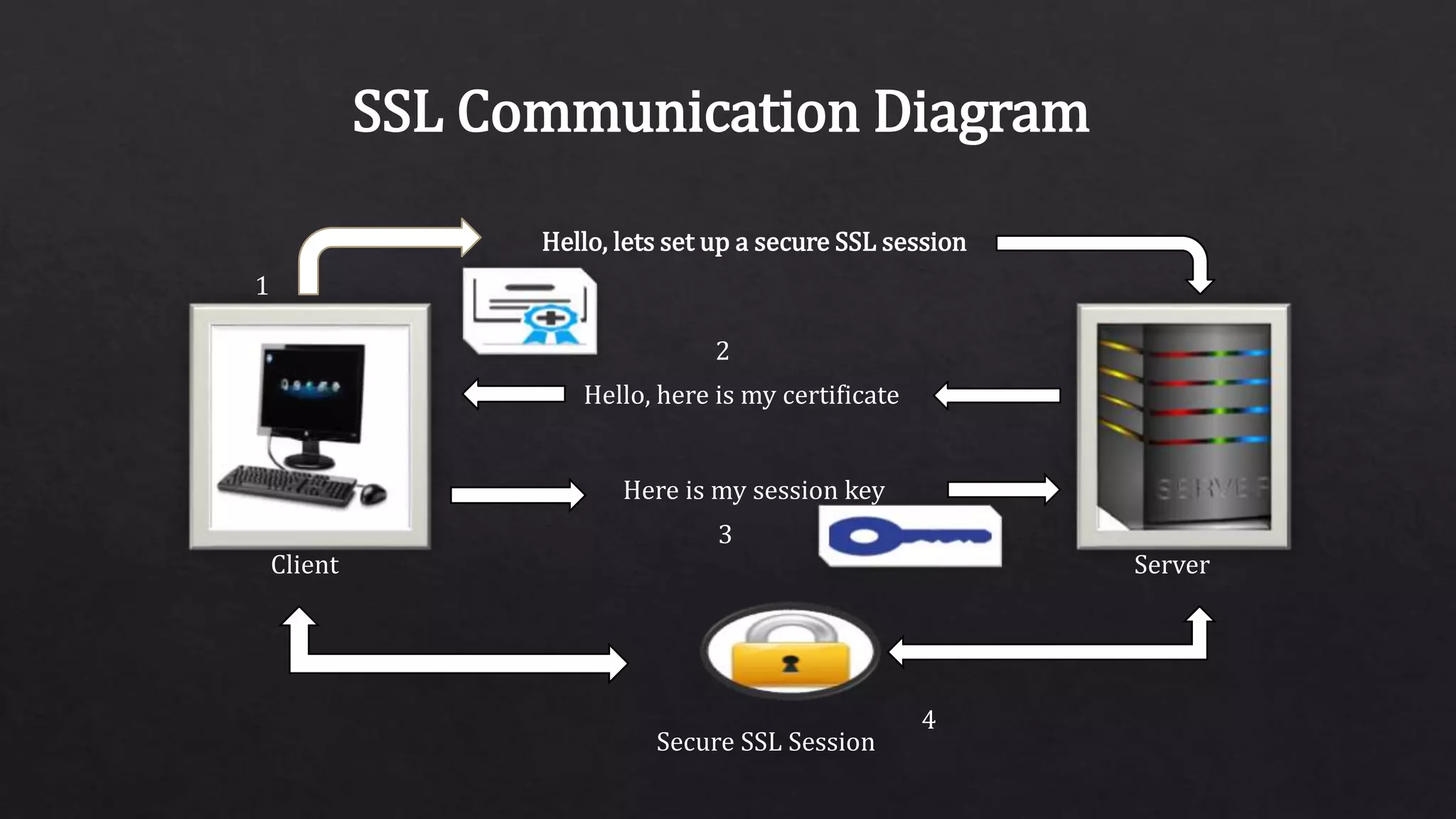
SSL Communication Diagram
Client Server
Hello, lets set up a secure SSL session
Hello, here is my certificate
Here is my session key
Secure SSL Session
1
2
3
4
Mutual or “Two-Way” Authentication
Mutual Authentication, also commonly referred to as Two-Way
Authentication, refers to the combination of both Server and
Client Authentication.
The authentication is mutual, or two-way, because the server is
authenticating itself to the client, and the client is
authenticating itself to the server.
Client Authentication
Client Authentication, similar to server authentication, is a
means of authenticating and identifying the client to the server
using a Client Certificate.
A Client Certificate contains basic information about the client’s
identity, and the digital signature on this certificate verifies that
this information is authentic.
Mutual Authentication Diagram
Hello, lets set up a secure SSL session
Hello, where is your certificate
Here is my certificate
Here is my session key
Secure SSL Session
1
2
3
4
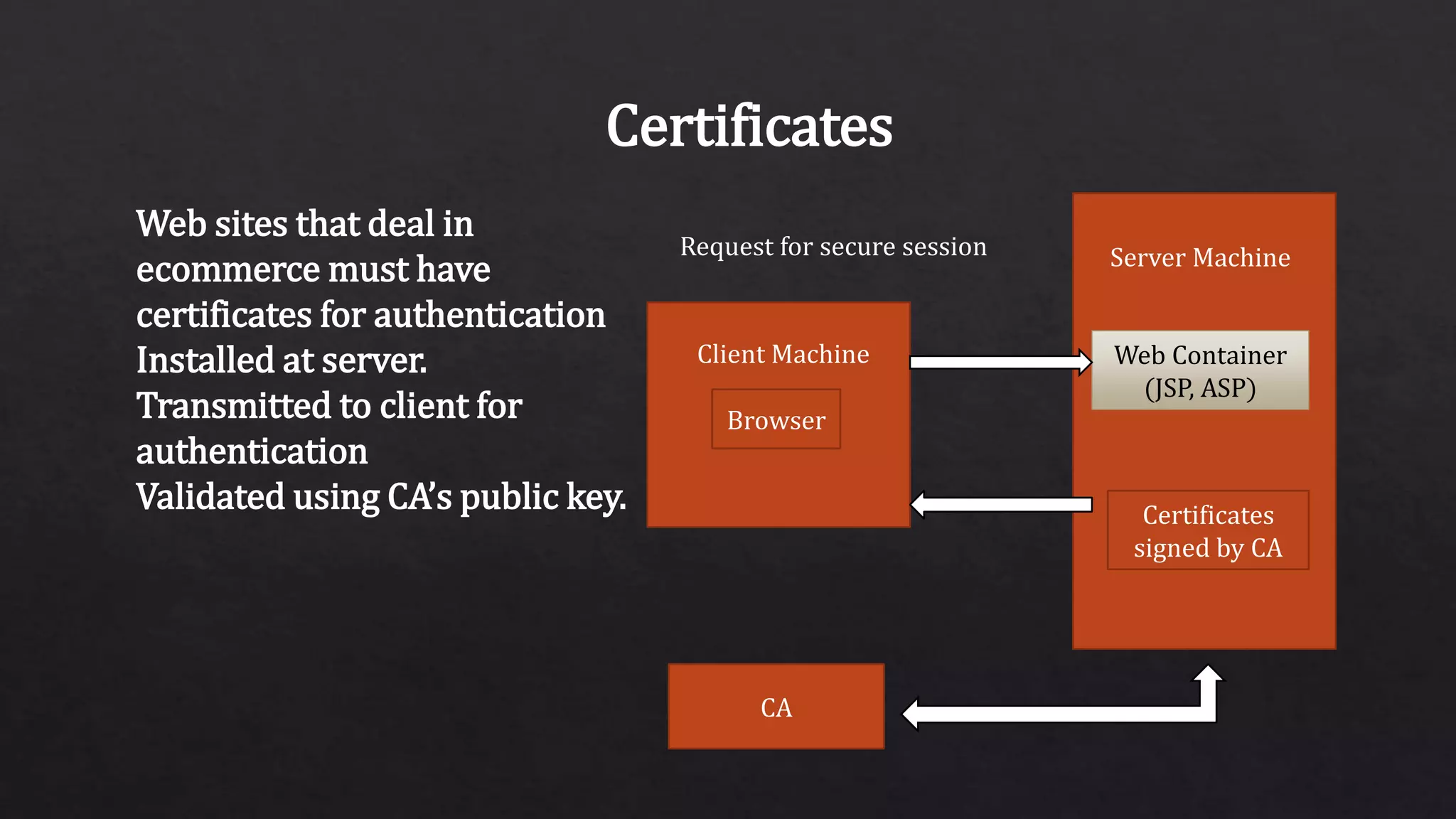
Certificates
Web sites that deal in
ecommerce must have
certificates for authentication
Installed at server.
Transmitted to client for
authentication
Validated using CA’s public key.
Browser
Client Machine
Server Machine
Web Container
(JSP, ASP)
Certificates
signed by CA
CA
Request for secure session
Secure Socket Layer Protocol
Server
Client
Establishing Security Capabilities
Server Authentications and key exchange
Client Authentications and key exchange
Finalizing the handshaking protocol
Phase 1
Phase 2
Phase 3
Phase 4
SSL Protocol: Phase 1
Phase 1: Information
exchange
• Problem: Large number of
encryption algorithms in
use
• How do client and server
agree on which to use?
• How does client tell server
which ones it supports?
Phase 1
Version
Random Client Number
Session Id
Chipper Suite
Compression Methods
Version
Server Random Number
Session Id
Select Chipper Set
Select Compression
Method
SSL Protocol: Phase 1
• Client passes preferred algorithms to server via https request
• Public key encryption algorithms
• Private key encryption algorithms
• Hash algorithms
• Compression algorithms
• Also random number for key generation
• Server replies with algorithms that will be used
• Also passes own random number
SSL Protocol: Phase 2
Phase 2: Server Identification and
Key Exchange
• Server passes their certificates to
client
• Client uses issuer public key to
verify identity
• Client retrieves server public key
from certificate
• Server may pass many
certificates for authentication
Client Server
A chain of certificate
Server Public Key
Certificate
Server Key Exchange
SSL Protocol: Phase 2
If no certificate containing a public key, separate public key must be passed
Certificate No Certificate
RSA Exchange
g, p, gs
No Server Key Exchange
Server Key Exchange
Certificate contains RSA public key,
so no separate key passed
No certificate, so Diffie-Hellman key
exchange parameters passed
SSL Protocol: Phase 2
• Server can also request appropriate client certificates to authenticate client
• Online banking
• Remote access to company database
A chain of certificates
Server Public Key
List of acceptable certificates
List of acceptable authorities
No contents
Certificate
Server Key Exchange
Certificates Request
Server Hello Done
SSL Protocol: Phase 3
Phase 3: Client Identification and Key Exchange
• Client sends certificate or public key if requested by server
Chain Of Certifications
Client Public key
Phase 3
Certificate
Client Key Exchange
Client Server
SSL Data Transmission
• Message broken into blocks
• Block compressed
• Compressed block hashed
with
authentication key to get MAC
(message integrity)
• Compressed block + MAC
encrypted
with cipher key
• Encrypted block + record
protocol
header with version/length
information sent
Payload from upper layer Protocol
Fragment
Sompression
Compressed
Compressed MAC
Encryption
Encrypted Fragment
Hash
SSL Payload

The last picks

  • 1.
    The last picks Md.Nafiur Rahman TuhinMd. Abdullah Al Abid Md. Mazharul Islam Shubho Md. Sunny Ul Islam
  • 2.
    Secure Socket Layer(SSL) Secure Sockets Layer Protocol is the standard security technology for establishing an encrypted link between a web server and a browser. This link ensures that all data passed between the web server and browsers remain private and integral. Netscape developed The Secure Sockets Layer Protocol (SSL) in 1994, as a response to the growing concern over security on the Internet.
  • 3.
    Version Of SecureSocket Layer(SSL) ♦SSL Version 1.0 ♦SSL Version 2.0 ♦SSL Version 3.0 ♦TLS Version 1.0 ♦TLS Version 1.1 ♦TLS Version 1.2 ♦TLS Version 1.3 ( August 2018)
  • 4.
    SSL Architecture SSL Handshakes Protocol SSLChange CipherSpace Protocol SSL Alert Protocol Applications SSL Record Protocol TCP IP
  • 5.
    How It Works TheSSL protocol uses RSA public key cryptography for Internet Security Public key encryption uses a pair of asymmetric keys for encryption and decryption. Each pair of keys consists of a public key and a private key. The public key is made public by distributing it widely; the private key is always kept secret Data encrypted with the public key can be decrypted only with the private key, and vice versa.
  • 6.
    Example of SSLwith amazon If you’ve ever bought something from Amazon, you’ve used SSL. During checkout you may have noticed the little padlock icon (amazon.com) in the status bar of your web browser, or that the URL field of your browser begins with “https.” This is indicating that you’re communicating with the website’s server via SSL to secure your personal information, your credit card number, etc. This type of SSL between a web browser and a website server includes what is commonly referred to as Server Authentication
  • 7.
    Server Authentication Server Authenticationis a means of authenticating and identifying the sever to the client using a Server Certificate. A Server Certificate is a required part of any SSL communication. The server certificate contains basic information and a digital signature that properly identifies the server it is associated with.
  • 8.
    Steps for SSLCommunication Client connects to a web server (website) secured with SSL (https). Client requests that the server identify itself. Server sends a copy of its SSL Certificate, including the server’s public key. Client checks that the certificate is trusted: unexpired, unrevoked, and valid for the website that it is connecting to. If the client trusts the certificate, it creates, encrypts, and sends back a session key using the server’s public key. Server decrypts the symmetric session key using its private key and begins an encrypted session with the client. The server and client now encrypt all transmitted data with the session key.
  • 9.
    SSL Communication Diagram ClientServer Hello, lets set up a secure SSL session Hello, here is my certificate Here is my session key Secure SSL Session 1 2 3 4
  • 10.
    Mutual or “Two-Way”Authentication Mutual Authentication, also commonly referred to as Two-Way Authentication, refers to the combination of both Server and Client Authentication. The authentication is mutual, or two-way, because the server is authenticating itself to the client, and the client is authenticating itself to the server.
  • 11.
    Client Authentication Client Authentication,similar to server authentication, is a means of authenticating and identifying the client to the server using a Client Certificate. A Client Certificate contains basic information about the client’s identity, and the digital signature on this certificate verifies that this information is authentic.
  • 12.
    Mutual Authentication Diagram Hello,lets set up a secure SSL session Hello, where is your certificate Here is my certificate Here is my session key Secure SSL Session 1 2 3 4
  • 13.
    Certificates Web sites thatdeal in ecommerce must have certificates for authentication Installed at server. Transmitted to client for authentication Validated using CA’s public key. Browser Client Machine Server Machine Web Container (JSP, ASP) Certificates signed by CA CA Request for secure session
  • 14.
    Secure Socket LayerProtocol Server Client Establishing Security Capabilities Server Authentications and key exchange Client Authentications and key exchange Finalizing the handshaking protocol Phase 1 Phase 2 Phase 3 Phase 4
  • 15.
    SSL Protocol: Phase1 Phase 1: Information exchange • Problem: Large number of encryption algorithms in use • How do client and server agree on which to use? • How does client tell server which ones it supports? Phase 1 Version Random Client Number Session Id Chipper Suite Compression Methods Version Server Random Number Session Id Select Chipper Set Select Compression Method
  • 16.
    SSL Protocol: Phase1 • Client passes preferred algorithms to server via https request • Public key encryption algorithms • Private key encryption algorithms • Hash algorithms • Compression algorithms • Also random number for key generation • Server replies with algorithms that will be used • Also passes own random number
  • 17.
    SSL Protocol: Phase2 Phase 2: Server Identification and Key Exchange • Server passes their certificates to client • Client uses issuer public key to verify identity • Client retrieves server public key from certificate • Server may pass many certificates for authentication Client Server A chain of certificate Server Public Key Certificate Server Key Exchange
  • 18.
    SSL Protocol: Phase2 If no certificate containing a public key, separate public key must be passed Certificate No Certificate RSA Exchange g, p, gs No Server Key Exchange Server Key Exchange Certificate contains RSA public key, so no separate key passed No certificate, so Diffie-Hellman key exchange parameters passed
  • 19.
    SSL Protocol: Phase2 • Server can also request appropriate client certificates to authenticate client • Online banking • Remote access to company database A chain of certificates Server Public Key List of acceptable certificates List of acceptable authorities No contents Certificate Server Key Exchange Certificates Request Server Hello Done
  • 20.
    SSL Protocol: Phase3 Phase 3: Client Identification and Key Exchange • Client sends certificate or public key if requested by server Chain Of Certifications Client Public key Phase 3 Certificate Client Key Exchange Client Server
  • 21.
    SSL Data Transmission •Message broken into blocks • Block compressed • Compressed block hashed with authentication key to get MAC (message integrity) • Compressed block + MAC encrypted with cipher key • Encrypted block + record protocol header with version/length information sent Payload from upper layer Protocol Fragment Sompression Compressed Compressed MAC Encryption Encrypted Fragment Hash SSL Payload