

SharePoint Workflow:

Taking the Manual Out of Your
           Process

          Donald Donais
Donald Donais

Avtex IT Pro Consultant
  ddonais@avtex.com
Blog – Tales from IT Side
  http://talesfromitside.wordpress.com
Twitter
  @dondonais
Overview

• Business Process Management
• Crawl, Walk, Run Approach
• Crawl
   OOB SharePoint Workflows
• Walk
   SharePoint Designer 2010
   3rd Party Vendor Workflow Products
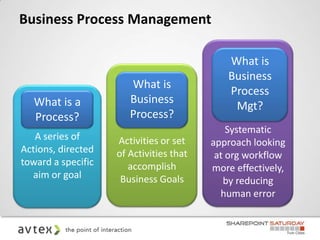
Business Process Management

                                             What is
                                             Business
                       What is
                                             Process
   What is a           Business
                                              Mgt?
   Process?            Process?
                                             Systematic
   A series of      Activities or set    approach looking
Actions, directed   of Activities that    at org workflow
toward a specific      accomplish        more effectively,
  aim or goal        Business Goals         by reducing
                                           human error
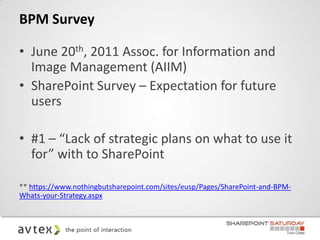
BPM Survey

• June 20th, 2011 Assoc. for Information and
  Image Management (AIIM)
• SharePoint Survey – Expectation for future
  users

• #1 – “Lack of strategic plans on what to use it
  for” with to SharePoint

** https://www.nothingbutsharepoint.com/sites/eusp/Pages/SharePoint-and-BPM-
Whats-your-Strategy.aspx
Survey Continued
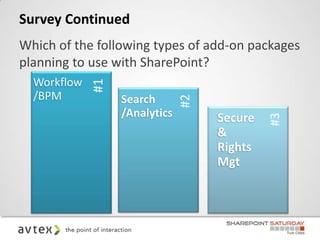
Which of the following types of add-on packages
planning to use with SharePoint?
  Workflow
  /BPM       #1   Search


                               #2
                  /Analytics        Secure


                                             #3
                                    &
                                    Rights
                                    Mgt
Survey Continued
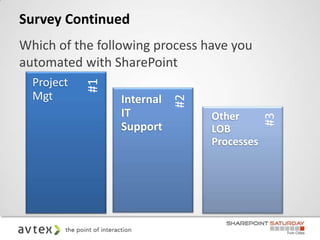
Which of the following process have you
automated with SharePoint
  Project
  Mgt       #1   Internal


                            #2
                 IT              Other


                                             #3
                 Support         LOB
                                 Processes
Tips when Automating Business
Process
• Make sure to define the process
• Define reasons for automation
• Necessary to define initial investment and maintenance costs
• Do not automate every step in the process
• Take the time to analyze potential ROI from process
  automation
• Make sure to consider the human element within process
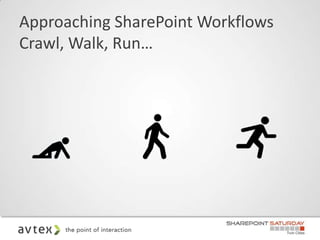
Approaching SharePoint Workflows
Crawl, Walk, Run…
Crawl

• Out of the Box Workflows
Walk

• Introduce SharePoint Designer 2007/2010
   Workflows
   CodePlex Actions

• Introduce 3rd Party Workflow Tools
  2007/2010
• Use Visio Services to Visualize Business
  Processes 2010
Run

• Develop more robust workflows
• .NET workflows
• Integrated systems
• Custom .NET Actions and Conditions for
  SharePoint Designer
• Advanced 3rd Party Workflow Tools
Why Workflow?

• One version of the truth
• Flexibility
• Auditability
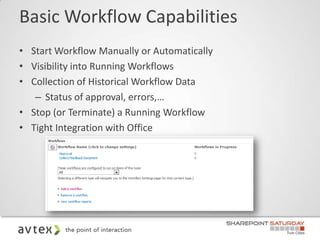
Basic Workflow Capabilities
• Start Workflow Manually or Automatically
• Visibility into Running Workflows
• Collection of Historical Workflow Data
   – Status of approval, errors,…
• Stop (or Terminate) a Running Workflow
• Tight Integration with Office
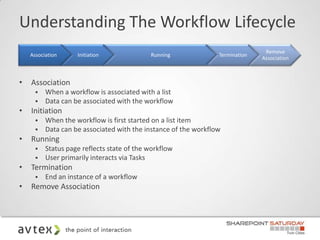
Understanding The Workflow Lifecycle
                                                                                Remove
    Association     Initiation              Running              Termination
                                                                               Association


•   Association
         When a workflow is associated with a list
         Data can be associated with the workflow
•   Initiation
         When the workflow is first started on a list item
         Data can be associated with the instance of the workflow
•   Running
         Status page reflects state of the workflow
         User primarily interacts via Tasks
•   Termination
         End an instance of a workflow
•   Remove Association
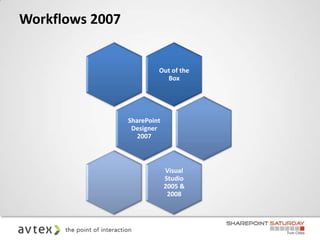
Workflows 2007


                          Out of the
                            Box


                 SharePoint
                  Designer
                    2007


                              Visual
                              Studio
                              2005 &
                               2008
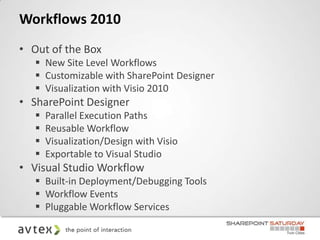
Workflows 2010
• Out of the Box
    New Site Level Workflows
    Customizable with SharePoint Designer
    Visualization with Visio 2010
• SharePoint Designer
      Parallel Execution Paths
      Reusable Workflow
      Visualization/Design with Visio
      Exportable to Visual Studio
• Visual Studio Workflow
    Built-in Deployment/Debugging Tools
    Workflow Events
    Pluggable Workflow Services
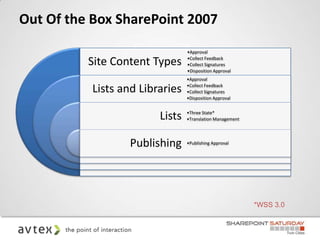
Out Of the Box SharePoint 2007
                                 •Approval

          Site Content Types     •Collect Feedback
                                 •Collect Signatures
                                 •Disposition Approval
                                 •Approval

           Lists and Libraries   •Collect Feedback
                                 •Collect Signatures
                                 •Disposition Approval


                         Lists   •Three State*
                                 •Translation Management


                   Publishing    •Publishing Approval


                                                           *WSS 3.0
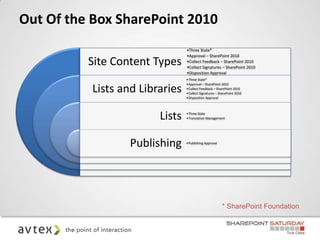
Out Of the Box SharePoint 2010
                                 •Three State*
                                 •Approval – SharePoint 2010
          Site Content Types     •Collect Feedback – SharePoint 2010
                                 •Collect Signatures – SharePoint 2010
                                 •Disposition Approval
                                 •Three State*
                                 •Approval – SharePoint 2010
           Lists and Libraries   •Collect Feedback – SharePoint 2010
                                 •Collect Signatures – SharePoint 2010
                                 •Disposition Approval


                         Lists   •Three State
                                 •Translation Management


                   Publishing    •Publishing Approval


                                                        * SharePoint Foundation
Out of the Box Workflows
SharePoint Designer 2007

•   Next version of FrontPage!
•   UI comprised of multiple panels
•   Only Compatible with SharePoint 2007 (all versions)
•   Allow Users to Create Workflows
•   Associate Workflow to List or Library
•   Workflow Designer
•   Conditions & Actions – Augmented by
    CodePlex
SharePoint Designer 2010

• Redesigned for SharePoint 2010
• New UI
• Only Compatible with SharePoint 2010
• Allow Users to Create New Workflows
• Associate Workflow to List, Library or
  Reusable (Content Types)
• Import/Export to Visio
• New Workflow Designer Wizard
SharePoint Designer and Visio Workflows
Let’s set it up!

•   Sales Documents Process
•   If Estimate is >$100000 then . . .
•   Automatically approved if less
•   Manager Approved and email Sales and VP of
    Sales
Custom .NET Workflow

• Bring in the Reinforcements!
• You are here because:
     Missing Specific Feature
     SharePoint Designer Missing Action
     Custom Data or Actions Needed
     Existing Windows Workflow Investment
     State Machine Workflow Requirement
     Expose the Full Power of .NET
• Word of Warning – There is a steep learning
  curve
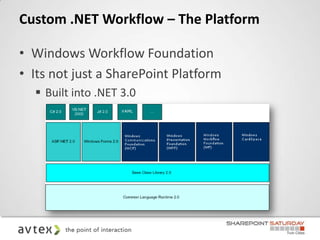
Custom .NET Workflow – The Platform

• Windows Workflow Foundation
• Its not just a SharePoint Platform
   Built into .NET 3.0
Workflow – Platform Implications

• Workflow a Core .NET Feature
     Workflow can be ‘hosted’ anywhere
     SharePoint was Microsoft’s first host (CRM 4 uses
      it now too)
• Custom applications can host it as well
• Standardized Format
     XML based file format (XOML)

• Widespread Availability
3rd Party SharePoint Workflows

• Nintex
   Workflow 2007 & 2010
   Forms 2007 & 2010
• K2
   Blackpearl
   Blackpoint
   K2 Forms
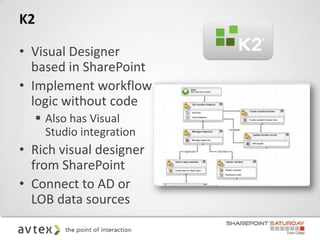
K2

• Visual Designer
  based in SharePoint
• Implement workflow
  logic without code
      Also has Visual
       Studio integration
• Rich visual designer
  from SharePoint
• Connect to AD or
  LOB data sources
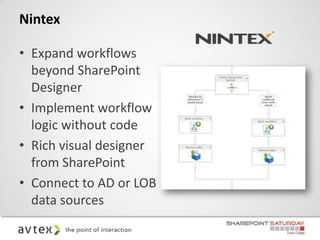
Nintex

• Expand workflows
  beyond SharePoint
  Designer
• Implement workflow
  logic without code
• Rich visual designer
  from SharePoint
• Connect to AD or LOB
  data sources
Nintex

•   Small Installation Footprint
•   Start in SharePoint, stay in SharePoint
•   Document Assembly and Conversion
•   User Defined Actions (UDA)
•   Lazy Approval
•   Workflow Change Approval
Nintex Workflow 2010
Resources

SharePoint Workflow:
• Workflow Resource Center | SharePoint 2010 (Dev):
  http://msdn.microsoft.com/en-us/sharepoint/hh295805
• Workflows in SharePoint Server 2010: http://technet.microsoft.com/en-
  us/sharepoint/ff819861

SharePoint 2010:
• SharePoint 2010: http://sharepoint2010.microsoft.com
• SharePoint MSDN: http://msdn.microsoft.com/en-
  us/sharepoint/default.aspx
Questions?
Donald Donais
      ddonais@avtex.com
 Blog – Tales from IT Side
      http://talesfromitside.wordpress.com
 Twitter
      @dondonais

SharePoint Workflows - SharePoint Saturday Twin Cities April 2012

  • 1.
    SharePoint Workflow: Taking theManual Out of Your Process Donald Donais
  • 2.
    Donald Donais Avtex ITPro Consultant ddonais@avtex.com Blog – Tales from IT Side http://talesfromitside.wordpress.com Twitter @dondonais
  • 3.
    Overview • Business ProcessManagement • Crawl, Walk, Run Approach • Crawl  OOB SharePoint Workflows • Walk  SharePoint Designer 2010  3rd Party Vendor Workflow Products
  • 4.
    Business Process Management What is Business What is Process What is a Business Mgt? Process? Process? Systematic A series of Activities or set approach looking Actions, directed of Activities that at org workflow toward a specific accomplish more effectively, aim or goal Business Goals by reducing human error
  • 5.
    BPM Survey • June20th, 2011 Assoc. for Information and Image Management (AIIM) • SharePoint Survey – Expectation for future users • #1 – “Lack of strategic plans on what to use it for” with to SharePoint ** https://www.nothingbutsharepoint.com/sites/eusp/Pages/SharePoint-and-BPM- Whats-your-Strategy.aspx
  • 6.
    Survey Continued Which ofthe following types of add-on packages planning to use with SharePoint? Workflow /BPM #1 Search #2 /Analytics Secure #3 & Rights Mgt
  • 7.
    Survey Continued Which ofthe following process have you automated with SharePoint Project Mgt #1 Internal #2 IT Other #3 Support LOB Processes
  • 8.
    Tips when AutomatingBusiness Process • Make sure to define the process • Define reasons for automation • Necessary to define initial investment and maintenance costs • Do not automate every step in the process • Take the time to analyze potential ROI from process automation • Make sure to consider the human element within process
  • 9.
  • 10.
    Crawl • Out ofthe Box Workflows
  • 11.
    Walk • Introduce SharePointDesigner 2007/2010  Workflows  CodePlex Actions • Introduce 3rd Party Workflow Tools 2007/2010 • Use Visio Services to Visualize Business Processes 2010
  • 12.
    Run • Develop morerobust workflows • .NET workflows • Integrated systems • Custom .NET Actions and Conditions for SharePoint Designer • Advanced 3rd Party Workflow Tools
  • 13.
    Why Workflow? • Oneversion of the truth • Flexibility • Auditability
  • 14.
    Basic Workflow Capabilities •Start Workflow Manually or Automatically • Visibility into Running Workflows • Collection of Historical Workflow Data – Status of approval, errors,… • Stop (or Terminate) a Running Workflow • Tight Integration with Office
  • 15.
    Understanding The WorkflowLifecycle Remove Association Initiation Running Termination Association • Association  When a workflow is associated with a list  Data can be associated with the workflow • Initiation  When the workflow is first started on a list item  Data can be associated with the instance of the workflow • Running  Status page reflects state of the workflow  User primarily interacts via Tasks • Termination  End an instance of a workflow • Remove Association
  • 16.
    Workflows 2007 Out of the Box SharePoint Designer 2007 Visual Studio 2005 & 2008
  • 17.
    Workflows 2010 • Outof the Box  New Site Level Workflows  Customizable with SharePoint Designer  Visualization with Visio 2010 • SharePoint Designer  Parallel Execution Paths  Reusable Workflow  Visualization/Design with Visio  Exportable to Visual Studio • Visual Studio Workflow  Built-in Deployment/Debugging Tools  Workflow Events  Pluggable Workflow Services
  • 18.
    Out Of theBox SharePoint 2007 •Approval Site Content Types •Collect Feedback •Collect Signatures •Disposition Approval •Approval Lists and Libraries •Collect Feedback •Collect Signatures •Disposition Approval Lists •Three State* •Translation Management Publishing •Publishing Approval *WSS 3.0
  • 19.
    Out Of theBox SharePoint 2010 •Three State* •Approval – SharePoint 2010 Site Content Types •Collect Feedback – SharePoint 2010 •Collect Signatures – SharePoint 2010 •Disposition Approval •Three State* •Approval – SharePoint 2010 Lists and Libraries •Collect Feedback – SharePoint 2010 •Collect Signatures – SharePoint 2010 •Disposition Approval Lists •Three State •Translation Management Publishing •Publishing Approval * SharePoint Foundation
  • 20.
    Out of theBox Workflows
  • 21.
    SharePoint Designer 2007 • Next version of FrontPage! • UI comprised of multiple panels • Only Compatible with SharePoint 2007 (all versions) • Allow Users to Create Workflows • Associate Workflow to List or Library • Workflow Designer • Conditions & Actions – Augmented by CodePlex
  • 22.
    SharePoint Designer 2010 •Redesigned for SharePoint 2010 • New UI • Only Compatible with SharePoint 2010 • Allow Users to Create New Workflows • Associate Workflow to List, Library or Reusable (Content Types) • Import/Export to Visio • New Workflow Designer Wizard
  • 23.
    SharePoint Designer andVisio Workflows
  • 24.
    Let’s set itup! • Sales Documents Process • If Estimate is >$100000 then . . . • Automatically approved if less • Manager Approved and email Sales and VP of Sales
  • 25.
    Custom .NET Workflow •Bring in the Reinforcements! • You are here because:  Missing Specific Feature  SharePoint Designer Missing Action  Custom Data or Actions Needed  Existing Windows Workflow Investment  State Machine Workflow Requirement  Expose the Full Power of .NET • Word of Warning – There is a steep learning curve
  • 26.
    Custom .NET Workflow– The Platform • Windows Workflow Foundation • Its not just a SharePoint Platform  Built into .NET 3.0
  • 27.
    Workflow – PlatformImplications • Workflow a Core .NET Feature  Workflow can be ‘hosted’ anywhere  SharePoint was Microsoft’s first host (CRM 4 uses it now too) • Custom applications can host it as well • Standardized Format  XML based file format (XOML) • Widespread Availability
  • 28.
    3rd Party SharePointWorkflows • Nintex  Workflow 2007 & 2010  Forms 2007 & 2010 • K2  Blackpearl  Blackpoint  K2 Forms
  • 29.
    K2 • Visual Designer based in SharePoint • Implement workflow logic without code  Also has Visual Studio integration • Rich visual designer from SharePoint • Connect to AD or LOB data sources
  • 30.
    Nintex • Expand workflows beyond SharePoint Designer • Implement workflow logic without code • Rich visual designer from SharePoint • Connect to AD or LOB data sources
  • 31.
    Nintex • Small Installation Footprint • Start in SharePoint, stay in SharePoint • Document Assembly and Conversion • User Defined Actions (UDA) • Lazy Approval • Workflow Change Approval
  • 32.
  • 33.
    Resources SharePoint Workflow: • WorkflowResource Center | SharePoint 2010 (Dev): http://msdn.microsoft.com/en-us/sharepoint/hh295805 • Workflows in SharePoint Server 2010: http://technet.microsoft.com/en- us/sharepoint/ff819861 SharePoint 2010: • SharePoint 2010: http://sharepoint2010.microsoft.com • SharePoint MSDN: http://msdn.microsoft.com/en- us/sharepoint/default.aspx
  • 34.
  • 35.
    Donald Donais ddonais@avtex.com Blog – Tales from IT Side http://talesfromitside.wordpress.com Twitter @dondonais

Editor's Notes