The Complete
GUIDE TOU S I N G C A N V A
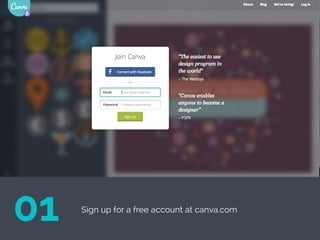
Sign up for a free account at canva.com
01
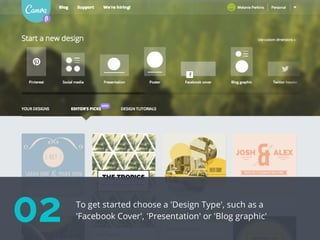
02 To get started choose a 'Design Type', such as a
'Facebook Cover', 'Presentation' or 'Blog graphic'
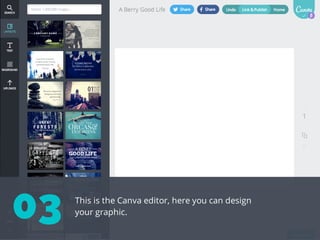
This is the Canva editor, here you can design
your graphic.03
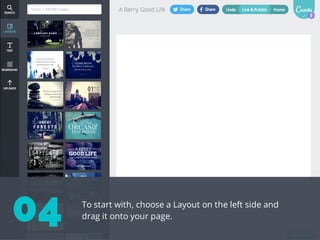
To start with, choose a Layout on the left side and
drag it onto your page.04
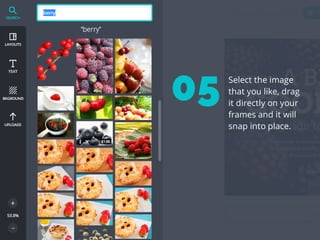
Select the image
that you like, drag
it directly on your
frames and it will
snap into place.
05
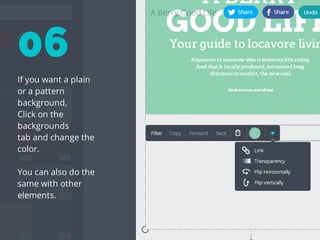
If you want a plain
or a pattern
background,
Click on the
backgrounds
tab and change the
color.
You can also do the
same with other
elements.
06
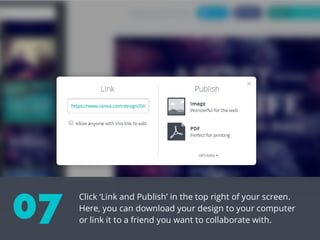
Click ‘Link and Publish’ in the top right of your screen.
Here, you can download your design to your computer
or link it to a friend you want to collaborate with.
07
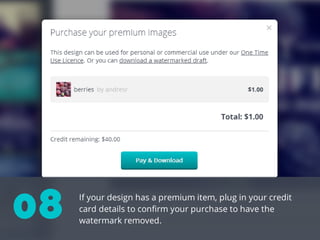
If your design has a premium item, plug in your credit
card details to confirm your purchase to have the
watermark removed.
08
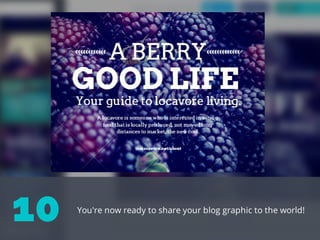
You're now ready to share your blog graphic to the world!
10
Start your own designs!
canva.com

The Complete Beginners Guide to Using Canva

  • 1.
    The Complete GUIDE TOUS I N G C A N V A
  • 2.
    Sign up fora free account at canva.com 01
  • 3.
    02 To getstarted choose a 'Design Type', such as a 'Facebook Cover', 'Presentation' or 'Blog graphic'
  • 4.
    This is theCanva editor, here you can design your graphic.03
  • 5.
    To start with,choose a Layout on the left side and drag it onto your page.04
  • 6.
    Select the image thatyou like, drag it directly on your frames and it will snap into place. 05
  • 7.
    If you wanta plain or a pattern background, Click on the backgrounds tab and change the color. You can also do the same with other elements. 06
  • 8.
    Click ‘Link andPublish’ in the top right of your screen. Here, you can download your design to your computer or link it to a friend you want to collaborate with. 07
  • 9.
    If your designhas a premium item, plug in your credit card details to confirm your purchase to have the watermark removed. 08
  • 10.
    You're now readyto share your blog graphic to the world! 10
  • 11.
    Start your owndesigns! canva.com