1. Who owns a business here?
2. Did you encounter any difficulty in
balancing your assets and liabilities? In
your inventory?
Did you know that ICT has something to offer to
make your computation life easy?
READ OUR
OBJECTIVES
The learner uses common productivity tools effectively
by maximizing advanced application techniques.
(CS_ICT11/12-ICTPT-Ic-d-4-5)
Identify the different excel formula and functions used
in Advanced and complex formulas and computations
that is useful in your chosen career.
Perform different formula and function.
Learning Competencies / Objectives
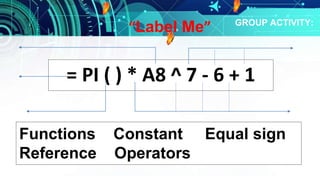
Functions Constant Equal sign
Reference Operators
= PI ( ) * A8 ^ 7 - 6 + 1
GROUP ACTIVITY:
“Label Me”
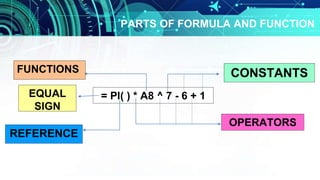
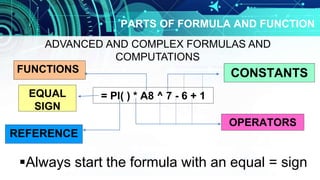
PARTS OF FORMULA AND FUNCTION
= PI( ) * A8 ^ 7 - 6 + 1
CONSTANTS
OPERATORS
FUNCTIONS
EQUAL
SIGN
REFERENCE
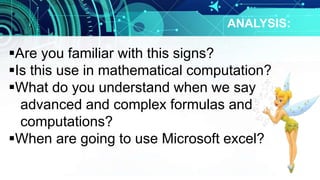
ANALYSIS:
Are you familiar with this signs?
Is this use in mathematical computation?
What do you understand when we say
advanced and complex formulas and
computations?
When are going to use Microsoft excel?
PARTS OF FORMULA AND FUNCTION
= PI( ) * A8 ^ 7 - 6 + 1
CONSTANTS
OPERATORS
FUNCTIONS
EQUAL
SIGN
REFERENCE
Always start the formula with an equal = sign
ADVANCED AND COMPLEX FORMULAS AND
COMPUTATIONS
ADVANCED AND COMPLEX FORMULAS
AND COMPUTATIONS
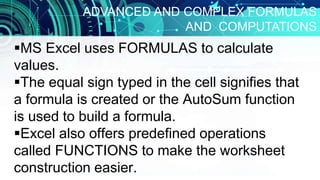
MS Excel uses FORMULAS to calculate
values.
The equal sign typed in the cell signifies that
a formula is created or the AutoSum function
is used to build a formula.
Excel also offers predefined operations
called FUNCTIONS to make the worksheet
construction easier.
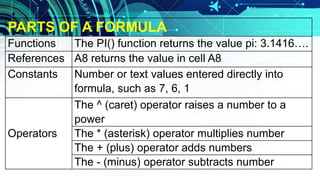
PARTS OF A FORMULA
Functions The PI() function returns the value pi: 3.1416….
References A8 returns the value in cell A8
Constants Number or text values entered directly into
formula, such as 7, 6, 1
Operators
The ^ (caret) operator raises a number to a
power
The * (asterisk) operator multiplies number
The + (plus) operator adds numbers
The - (minus) operator subtracts number
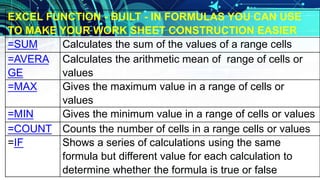
EXCEL FUNCTION - BUILT - IN FORMULAS YOU CAN USE
TO MAKE YOUR WORK SHEET CONSTRUCTION EASIER
=SUM Calculates the sum of the values of a range cells
=AVERA
GE
Calculates the arithmetic mean of range of cells or
values
=MAX Gives the maximum value in a range of cells or
values
=MIN Gives the minimum value in a range of cells or values
=COUNT Counts the number of cells in a range cells or values
=IF Shows a series of calculations using the same
formula but different value for each calculation to
determine whether the formula is true or false
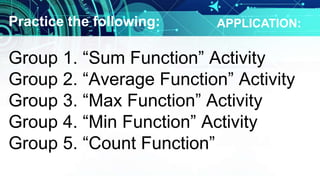
Practice the following:
Group 1. “Sum Function” Activity
Group 2. “Average Function” Activity
Group 3. “Max Function” Activity
Group 4. “Min Function” Activity
Group 5. “Count Function”
APPLICATION:
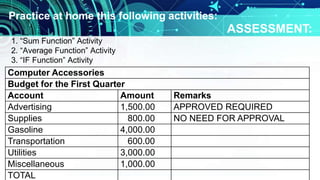
Computer Accessories
Budget for the First Quarter
Account Amount Remarks
Advertising 1,500.00 APPROVED REQUIRED
Supplies 800.00 NO NEED FOR APPROVAL
Gasoline 4,000.00
Transportation 600.00
Utilities 3,000.00
Miscellaneous 1,000.00
TOTAL
1. “Sum Function” Activity
2. “Average Function” Activity
3. “IF Function” Activity
Practice at home this following activities:
ASSESSMENT:
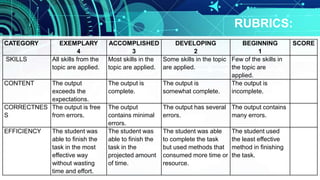
CATEGORY EXEMPLARY
4
ACCOMPLISHED
3
DEVELOPING
2
BEGINNING
1
SCORE
SKILLS All skills from the
topic are applied.
Most skills in the
topic are applied.
Some skills in the topic
are applied.
Few of the skills in
the topic are
applied.
CONTENT The output
exceeds the
expectations.
The output is
complete.
The output is
somewhat complete.
The output is
incomplete.
CORRECTNES
S
The output is free
from errors.
The output
contains minimal
errors.
The output has several
errors.
The output contains
many errors.
EFFICIENCY The student was
able to finish the
task in the most
effective way
without wasting
time and effort.
The student was
able to finish the
task in the
projected amount
of time.
The student was able
to complete the task
but used methods that
consumed more time or
resource.
The student used
the least effective
method in finishing
the task.
RUBRICS:
Excel

Excel

  • 1.
    1. Who ownsa business here? 2. Did you encounter any difficulty in balancing your assets and liabilities? In your inventory? Did you know that ICT has something to offer to make your computation life easy?
  • 2.
    READ OUR OBJECTIVES The learneruses common productivity tools effectively by maximizing advanced application techniques. (CS_ICT11/12-ICTPT-Ic-d-4-5) Identify the different excel formula and functions used in Advanced and complex formulas and computations that is useful in your chosen career. Perform different formula and function. Learning Competencies / Objectives
  • 3.
    Functions Constant Equalsign Reference Operators = PI ( ) * A8 ^ 7 - 6 + 1 GROUP ACTIVITY: “Label Me”
  • 4.
    PARTS OF FORMULAAND FUNCTION = PI( ) * A8 ^ 7 - 6 + 1 CONSTANTS OPERATORS FUNCTIONS EQUAL SIGN REFERENCE
  • 5.
    ANALYSIS: Are you familiarwith this signs? Is this use in mathematical computation? What do you understand when we say advanced and complex formulas and computations? When are going to use Microsoft excel?
  • 6.
    PARTS OF FORMULAAND FUNCTION = PI( ) * A8 ^ 7 - 6 + 1 CONSTANTS OPERATORS FUNCTIONS EQUAL SIGN REFERENCE Always start the formula with an equal = sign ADVANCED AND COMPLEX FORMULAS AND COMPUTATIONS
  • 7.
    ADVANCED AND COMPLEXFORMULAS AND COMPUTATIONS MS Excel uses FORMULAS to calculate values. The equal sign typed in the cell signifies that a formula is created or the AutoSum function is used to build a formula. Excel also offers predefined operations called FUNCTIONS to make the worksheet construction easier.
  • 8.
    PARTS OF AFORMULA Functions The PI() function returns the value pi: 3.1416…. References A8 returns the value in cell A8 Constants Number or text values entered directly into formula, such as 7, 6, 1 Operators The ^ (caret) operator raises a number to a power The * (asterisk) operator multiplies number The + (plus) operator adds numbers The - (minus) operator subtracts number
  • 9.
    EXCEL FUNCTION -BUILT - IN FORMULAS YOU CAN USE TO MAKE YOUR WORK SHEET CONSTRUCTION EASIER =SUM Calculates the sum of the values of a range cells =AVERA GE Calculates the arithmetic mean of range of cells or values =MAX Gives the maximum value in a range of cells or values =MIN Gives the minimum value in a range of cells or values =COUNT Counts the number of cells in a range cells or values =IF Shows a series of calculations using the same formula but different value for each calculation to determine whether the formula is true or false
  • 10.
    Practice the following: Group1. “Sum Function” Activity Group 2. “Average Function” Activity Group 3. “Max Function” Activity Group 4. “Min Function” Activity Group 5. “Count Function” APPLICATION:
  • 11.
    Computer Accessories Budget forthe First Quarter Account Amount Remarks Advertising 1,500.00 APPROVED REQUIRED Supplies 800.00 NO NEED FOR APPROVAL Gasoline 4,000.00 Transportation 600.00 Utilities 3,000.00 Miscellaneous 1,000.00 TOTAL 1. “Sum Function” Activity 2. “Average Function” Activity 3. “IF Function” Activity Practice at home this following activities: ASSESSMENT:
  • 12.
    CATEGORY EXEMPLARY 4 ACCOMPLISHED 3 DEVELOPING 2 BEGINNING 1 SCORE SKILLS Allskills from the topic are applied. Most skills in the topic are applied. Some skills in the topic are applied. Few of the skills in the topic are applied. CONTENT The output exceeds the expectations. The output is complete. The output is somewhat complete. The output is incomplete. CORRECTNES S The output is free from errors. The output contains minimal errors. The output has several errors. The output contains many errors. EFFICIENCY The student was able to finish the task in the most effective way without wasting time and effort. The student was able to finish the task in the projected amount of time. The student was able to complete the task but used methods that consumed more time or resource. The student used the least effective method in finishing the task. RUBRICS: