The Basics of (X)HTML Tags Background photo by  Will Pate LearningNerd.com LearningNerd.com
This is part of a series of (X)HTML and CSS tutorials, which can all be found at  LearningNerd.com/xhtml-css
Anatomy of an (X)HTML Tag
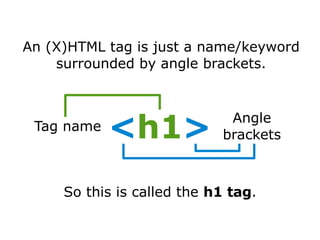
An (X)HTML tag is just a name/keyword surrounded by angle brackets. So this is called the  h1 tag . Tag name Angle brackets < h1 >
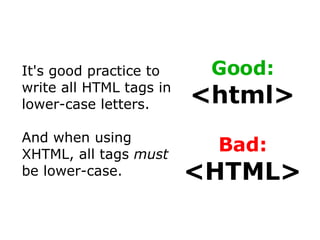
It's good practice to write all HTML tags in lower-case letters. And when using XHTML, all tags  must  be lower-case. Good:  <html> Bad:  <HTML>
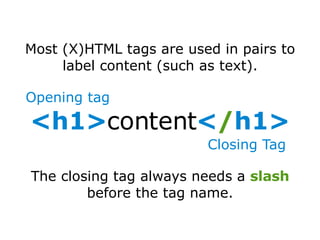
Most (X)HTML tags are used in pairs to label content (such as text). The closing tag always needs a  slash  before the tag name. Opening tag Closing Tag <h1> content < / h1>
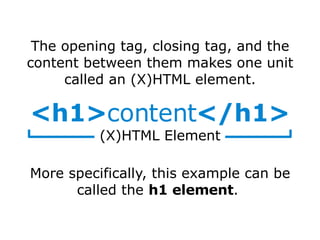
The opening tag, closing tag, and the content between them makes one unit called an (X)HTML element. More specifically, this example can be called the  h1 element .  <h1> content </h1> (X)HTML Element
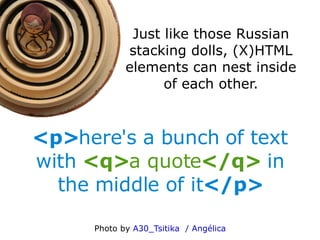
Just like those Russian stacking dolls, (X)HTML elements can nest inside of each other. <p> here's a bunch of  text with   <q> a  quote </q>   in the middle of it </p> Photo by  A30_Tsitika  / Angélica
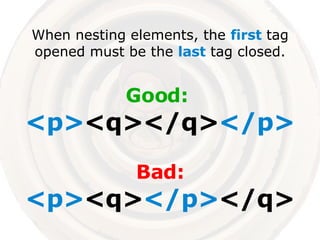
When nesting elements, the  first  tag opened must be the  last  tag closed. Good:  <p> <q></q> </p> Bad: <p> <q> </p> </q>
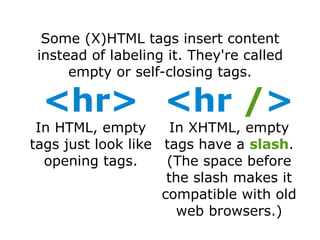
Some (X)HTML tags insert content instead of labeling it. They're called empty or self-closing tags. <hr> In HTML, empty tags just look like opening tags. <hr   / > In XHTML, empty tags have a  slash . (The space before the  slash  makes it compatible with old web browsers.)
Attributes
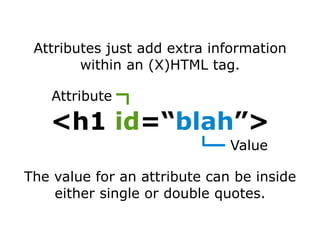
Attributes just add extra information within an (X)HTML tag. The value for an attribute can be inside either single or double quotes. <h1  id =“ blah ”> Attribute Value
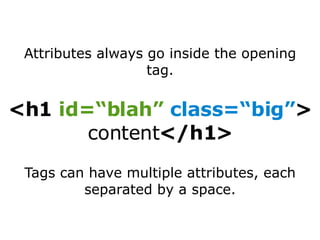
Tags can have multiple attributes, each separated by a  space . <h1  id=“blah”   class=“big” > content </h1> Attributes always go inside the opening tag.
You'll learn how to use every specific attribute and tag later in this series. Now that you know the basic rules for writing (X)HTML, the rest will be easy!
The next part of this series will cover the elements of an (X)HTML document. If you have any questions, feel free to contact me through  LearningNerd.com .

The Basics of (X)HTML Tags

  • 1.
    The Basics of(X)HTML Tags Background photo by Will Pate LearningNerd.com LearningNerd.com
  • 2.
    This is partof a series of (X)HTML and CSS tutorials, which can all be found at LearningNerd.com/xhtml-css
  • 3.
    Anatomy of an(X)HTML Tag
  • 4.
    An (X)HTML tagis just a name/keyword surrounded by angle brackets. So this is called the h1 tag . Tag name Angle brackets < h1 >
  • 5.
    It's good practiceto write all HTML tags in lower-case letters. And when using XHTML, all tags must be lower-case. Good: <html> Bad: <HTML>
  • 6.
    Most (X)HTML tagsare used in pairs to label content (such as text). The closing tag always needs a slash before the tag name. Opening tag Closing Tag <h1> content < / h1>
  • 7.
    The opening tag,closing tag, and the content between them makes one unit called an (X)HTML element. More specifically, this example can be called the h1 element . <h1> content </h1> (X)HTML Element
  • 8.
    Just like thoseRussian stacking dolls, (X)HTML elements can nest inside of each other. <p> here's a bunch of text with <q> a quote </q> in the middle of it </p> Photo by A30_Tsitika / Angélica
  • 9.
    When nesting elements,the first tag opened must be the last tag closed. Good: <p> <q></q> </p> Bad: <p> <q> </p> </q>
  • 10.
    Some (X)HTML tagsinsert content instead of labeling it. They're called empty or self-closing tags. <hr> In HTML, empty tags just look like opening tags. <hr / > In XHTML, empty tags have a slash . (The space before the slash makes it compatible with old web browsers.)
  • 11.
  • 12.
    Attributes just addextra information within an (X)HTML tag. The value for an attribute can be inside either single or double quotes. <h1 id =“ blah ”> Attribute Value
  • 13.
    Tags can havemultiple attributes, each separated by a space . <h1 id=“blah” class=“big” > content </h1> Attributes always go inside the opening tag.
  • 14.
    You'll learn howto use every specific attribute and tag later in this series. Now that you know the basic rules for writing (X)HTML, the rest will be easy!
  • 15.
    The next partof this series will cover the elements of an (X)HTML document. If you have any questions, feel free to contact me through LearningNerd.com .