HTML Basic Tags
HTML Tags
HTML markup tags are usually called HTML
tags
● HTML tags are keywords surrounded by angle
brackets like <html>
● HTML tags normally come in pairs like <b>
and </b>
● The first tag in a pair is the start tag, the
second tag is the end tag
● Start and end tags are also called opening
tags and closing tags
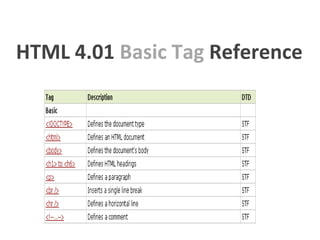
HTML 4.01 Basic Tag
Reference
HTML 4.01 Basic Tag Reference
HTML <!DOCTYPE> Declaration
● The doctype declaration should be the very
first thing in an HTML document, before the
<html> tag.
● The doctype declaration is not an HTML tag; it
is an instruction to the web browser about
what version of the markup language the page
is written in.
● The doctype declaration refers to a Document
Type Definition (DTD). The DTD specifies the
rules for the markup language, so that the
browsers render the content correctly.
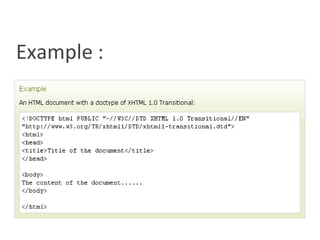
Example :
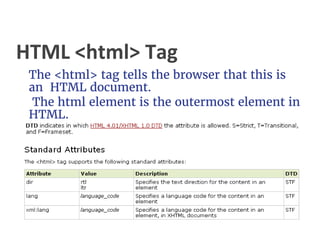
HTML <html> Tag
The <html> tag tells the browser that this is
an HTML document.
The html element is the outermost element in
HTML.
HTML <body> Tag
● The body element defines the document's
body.
● The body element contains all the contents of
an HTML document, such as text, hyperlinks,
images, tables, lists, etc.
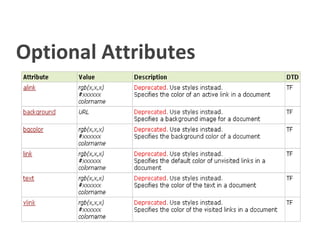
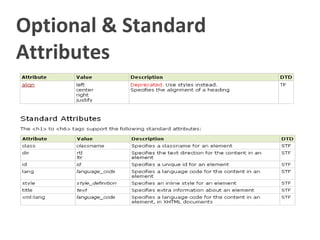
Optional Attributes
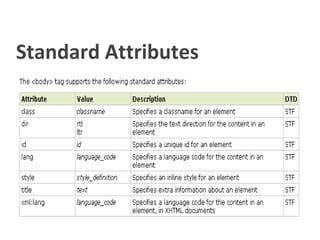
Standard Attributes
HTML <h1> to <h6> Tags
● The <h1> to <h6> tags are used to define
HTML headings.
● <h1> defines the most important heading.
<h6> defines the least important heading.
Optional & Standard
Attributes
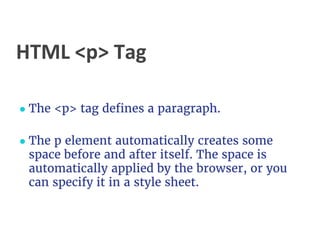
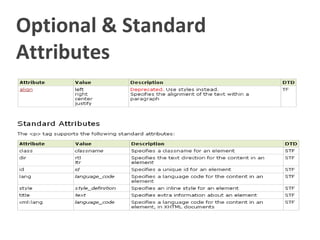
HTML <p> Tag
● The <p> tag defines a paragraph.
● The p element automatically creates some
space before and after itself. The space is
automatically applied by the browser, or you
can specify it in a style sheet.
Optional & Standard
Attributes
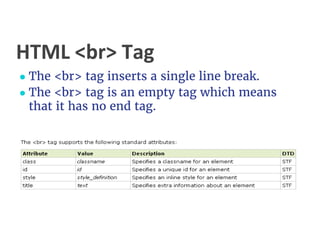
HTML <br> Tag
● The <br> tag inserts a single line break.
● The <br> tag is an empty tag which means
that it has no end tag.
HTML <hr> Tag
● The <hr> tag creates a horizontal line in an
HTML page.
● The hr element can be used to separate
content in an HTML page.
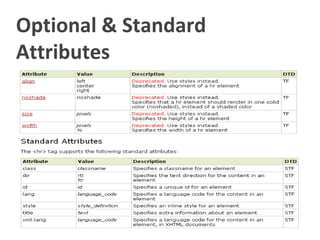
Optional & Standard
Attributes
HTML <!--...--> Tag
The comment tag is used to insert a comment in
the source code. A comment will be ignored by the
browser. You can use comments to explain your
code, which can help you when you edit the source
code at a later date.
You can also store program-specific information
inside comments. In this case they will not be
visible for the user, but they are still available to
the program. A good practice is to comment the
text inside scripts and style elements to prevent
older browsers, that do not support scripting or
styles, from showing it as plain text.
The comment tag does not support any standard
End Of HTML Tour

Html basic tags

  • 1.
  • 2.
    HTML Tags HTML markuptags are usually called HTML tags ● HTML tags are keywords surrounded by angle brackets like <html> ● HTML tags normally come in pairs like <b> and </b> ● The first tag in a pair is the start tag, the second tag is the end tag ● Start and end tags are also called opening tags and closing tags
  • 3.
    HTML 4.01 BasicTag Reference
  • 4.
    HTML 4.01 BasicTag Reference
  • 5.
    HTML <!DOCTYPE> Declaration ●The doctype declaration should be the very first thing in an HTML document, before the <html> tag. ● The doctype declaration is not an HTML tag; it is an instruction to the web browser about what version of the markup language the page is written in. ● The doctype declaration refers to a Document Type Definition (DTD). The DTD specifies the rules for the markup language, so that the browsers render the content correctly.
  • 6.
  • 7.
    HTML <html> Tag The<html> tag tells the browser that this is an HTML document. The html element is the outermost element in HTML.
  • 8.
    HTML <body> Tag ●The body element defines the document's body. ● The body element contains all the contents of an HTML document, such as text, hyperlinks, images, tables, lists, etc.
  • 9.
  • 10.
  • 11.
    HTML <h1> to<h6> Tags ● The <h1> to <h6> tags are used to define HTML headings. ● <h1> defines the most important heading. <h6> defines the least important heading.
  • 12.
  • 13.
    HTML <p> Tag ●The <p> tag defines a paragraph. ● The p element automatically creates some space before and after itself. The space is automatically applied by the browser, or you can specify it in a style sheet.
  • 14.
  • 15.
    HTML <br> Tag ●The <br> tag inserts a single line break. ● The <br> tag is an empty tag which means that it has no end tag.
  • 16.
    HTML <hr> Tag ●The <hr> tag creates a horizontal line in an HTML page. ● The hr element can be used to separate content in an HTML page.
  • 17.
  • 18.
    HTML <!--...--> Tag Thecomment tag is used to insert a comment in the source code. A comment will be ignored by the browser. You can use comments to explain your code, which can help you when you edit the source code at a later date. You can also store program-specific information inside comments. In this case they will not be visible for the user, but they are still available to the program. A good practice is to comment the text inside scripts and style elements to prevent older browsers, that do not support scripting or styles, from showing it as plain text. The comment tag does not support any standard
  • 19.