

Test automatisering in de praktijk
Structuur
• Test automatisering
• Tools
• Doen!

Als iets niet duidelijk is: schrijf het NIET op maar
vraag het direct!!

2
Imagination > Knowledge
Hoe ziet geautomatiseerd testen eruit?
• AutoIt
• Sikuli

4
• Wat is Test automatisering?

5
Wat is Test automatisering
• Test automatisering is het door speciale software laten
uitvoeren van tests (checks) waarvan 100% zeker
automatisch kan worden vastgesteld of er een “pass”
of een “fail” is.
• Test automation is the use of special software
(separate from the software being tested) to control
the execution of tests and the comparison of actual
outcomes to predicted outcomes.
• This is the process of using a computer program to
execute system or user transactions against an IT
system.
6
Wat is Test automatisering?

Programmeren

package org.openqa.selenium.example;
import
import
import
import

org.openqa.selenium.By;
org.openqa.selenium.WebDriver;
org.openqa.selenium.WebElement;
org.openqa.selenium.htmlunit.HtmlUnitDriver;

public class Example {
public static void main(String[] args) {
// Create a new instance of the html unit driver
// Notice that the remainder of the code relies on the interface,
// not the implementation.
WebDriver driver = new HtmlUnitDriver();
// And now use this to visit Google
driver.get("http://www.google.com");
// Find the text input element by its name
WebElement element = driver.findElement(By.name("q"));
// Enter something to search for
element.sendKeys("Cheese!");
// Now submit the form. WebDriver will find the form for us from the element
element.submit();

// Check the title of the page
System.out.println("Page title is: " + driver.getTitle());
}
}
7
8
Test automatisering tooling
Graphical User Interface
Abstractie laag

Test automation driver laag
Mobile
automation

•
•
•
•
•
•
•
•
•

9

Web
automation

Open Source
WebDriver
White
Jersey
Twin
SelenDroid
IOsDriver
UISpec
ODBC
JDBC

API
automation

SAP
automation

•
•
•
•
•
•
•
•
•

Database
automation

Desktop
automation

Commercieel
HP Functional Tester
IBM Rational Functional Tester
Borland Silktest
Telerik TestStudio
SmartBear TestComplete
Tricentis Tosca
Microsoft Visual Studio Test
Professional
Original Software TestDrive
Froglogic Squish
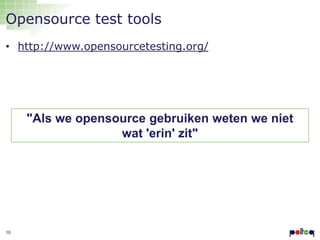
Opensource test tools
• http://www.opensourcetesting.org/

"Als we opensource gebruiken weten we niet
wat 'erin' zit"

10
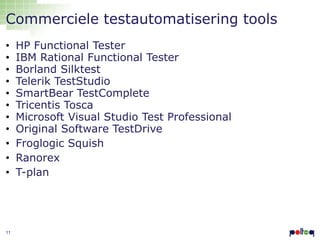
Commerciele testautomatisering tools
•
•
•
•
•
•
•
•
•
•
•

11

HP Functional Tester
IBM Rational Functional Tester
Borland Silktest
Telerik TestStudio
SmartBear TestComplete
Tricentis Tosca
Microsoft Visual Studio Test Professional
Original Software TestDrive
Froglogic Squish
Ranorex
T-plan
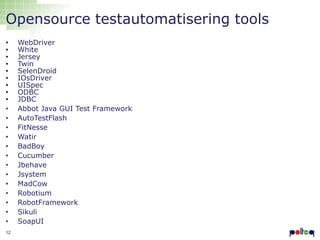
Opensource testautomatisering tools
•
•
•
•
•
•
•
•
•
•
•
•
•
•
•
•
•
•
•
•
•
•
12

WebDriver
White
Jersey
Twin
SelenDroid
IOsDriver
UISpec
ODBC
JDBC
Abbot Java GUI Test Framework
AutoTestFlash
FitNesse
Watir
BadBoy
Cucumber
Jbehave
Jsystem
MadCow
Robotium
RobotFramework
Sikuli
SoapUI
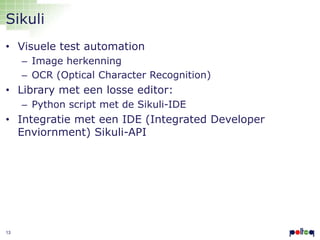
Sikuli
• Visuele test automation
– Image herkenning
– OCR (Optical Character Recognition)

• Library met een losse editor:
– Python script met de Sikuli-IDE

• Integratie met een IDE (Integrated Developer
Enviornment) Sikuli-API

13
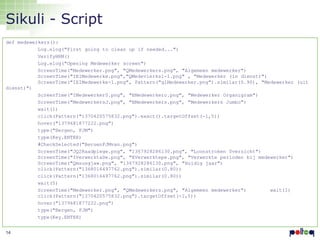
Sikuli - Script
def medewerkers():
Log.elog("First going to clean up if needed...")
VerifyHRM()
Log.elog("Opening Medewerker screen")
ScreenTime("Medewerker.png", "QMedewerkers.png", "Algemeen medewerker")
ScreenTime("IEIMedewerke.png","QMedevierks1-1.png" , "Medewerker (in dienst)")
ScreenTime("IEIMedewerke-1.png", Pattern("glMedewerker.png").similar(0.90), "Medewerker (uit
dienst)")
ScreenTime("IMedewerker0.png", "EMedewerkero.png", "Medewerker Organigram")
ScreenTime("MedewerkersJ.png", "EMedewerkers.png", "Medewerkers Jumbo")
wait(1)
click(Pattern("1370420575832.png").exact().targetOffset(-1,5))
hover("1379681877222.png")
type("Bergen, FJM")
type(Key.ENTER)
#CheckSelected("BeruenFJMvan.png")
ScreenTime("JQ2Raadplege.png", "1367928286130.png", "Loonstroken 0verzicht")
ScreenTime("IVerwerktaDe.png", "EVerwerktepe.png", "Verwerkte perioden bij medewerker")
ScreenTime("Qmsusgjaw.png", "1367928286130.png", "Huidig jaar")
click(Pattern("1368016497762.png").similar(0.80))
wait(5)
ScreenTime("Medewerker.png", "QMedewerkers.png", "Algemeen medewerker")
wait(1)
click(Pattern("1370420575832.png").targetOffset(-1,5))
hover("1379681877222.png")
type("Bergen, FJM")
type(Key.ENTER)
14
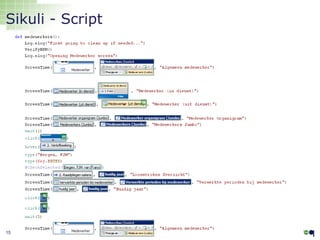
Sikuli - Script

15
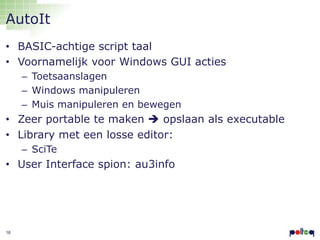
AutoIt
• BASIC-achtige script taal
• Voornamelijk voor Windows GUI acties
– Toetsaanslagen
– Windows manipuleren
– Muis manipuleren en bewegen

• Zeer portable te maken  opslaan als executable
• Library met een losse editor:
– SciTe

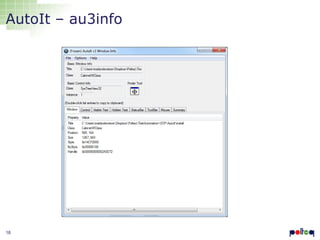
• User Interface spion: au3info

16
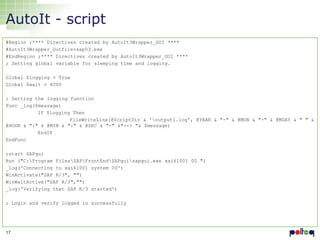
AutoIt - script
#Region ;**** Directives created by AutoIt3Wrapper_GUI ****
#AutoIt3Wrapper_Outfile=sap03.exe
#EndRegion ;**** Directives created by AutoIt3Wrapper_GUI ****
; Setting global variable for sleeping time and logging.
Global $logging = True
Global $wait = 4000
; Setting the logging function
Func _log($message)
If $logging Then
FileWriteLine(@ScriptDir & 'output1.log', @YEAR & "-" & @MON & "-" & @MDAY & " " &
@HOUR & ":" & @MIN & ":" & @SEC & "-" &"--> "& $message)
EndIf
EndFunc

;start SAPgui
Run ("C:Program FilesSAPFrontEndSAPguisapgui.exe xai61001 00 ")
_log('Connecting to xai61001 system 00')
WinActivate("SAP R/3", "")
WinWaitActive("SAP R/3","")
_log('Verifying that SAP R/3 started')
; Login and verify logged in successfully

17
AutoIt – au3info

18
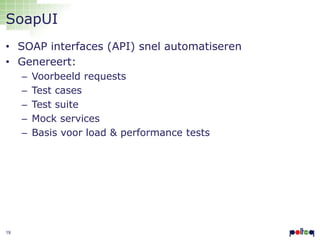
SoapUI
• SOAP interfaces (API) snel automatiseren
• Genereert:
–
–
–
–
–

19

Voorbeeld requests
Test cases
Test suite
Mock services
Basis voor load & performance tests
SOAP v.s. REST v.s. CRUD
• SOAP: Simple Object Access Protocol
– product.Service.GetProduct(“121”)

• REST: Representational State Transfer
– http://someurl.com/products/product/121

• CRUD: Create Read Update Delete
– select name, price, desc from Products where
ProductID=121

20
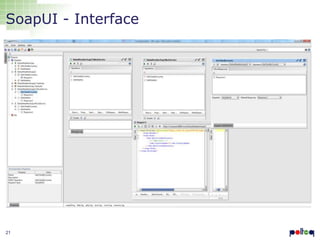
SoapUI - Interface

21
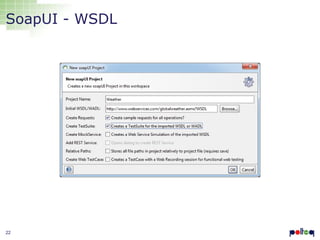
SoapUI - WSDL

22
SoapUI - Request
<soap:Envelope xmlns:soap="http://www.w3.org/2003/05/soapenvelope" xmlns:web="http://www.webserviceX.NET">
<soap:Header/>
<soap:Body>
<web:GetWeather>
<!--Optional:-->
<web:CityName>Amsterdam Airport Schiphol</web:CityName>
<!--Optional:-->
<web:CountryName>Netherlands</web:CountryName>
</web:GetWeather>
</soap:Body>
</soap:Envelope>

23
SoapUI - Response
<soap:Envelope xmlns:soap="http://www.w3.org/2003/05/soap-envelope"
xmlns:xsi="http://www.w3.org/2001/XMLSchema-instance"
xmlns:xsd="http://www.w3.org/2001/XMLSchema">
<soap:Body>
<GetWeatherResponse xmlns="http://www.webserviceX.NET">
<GetWeatherResult><![CDATA[<?xml version="1.0" encoding="utf-16"?>
<CurrentWeather>
<Location>Amsterdam Airport Schiphol, Netherlands (EHAM) 52-18N 004-46E -2M</Location>
<Time>Nov 14, 2013 - 07:55 AM EST / 2013.11.14 1255 UTC</Time>
<Wind> from the W (260 degrees) at 3 MPH (3 KT) (direction variable):0</Wind>
<Visibility> greater than 7 mile(s):0</Visibility>
<SkyConditions> mostly cloudy</SkyConditions>
<Temperature> 48 F (9 C)</Temperature>
<DewPoint> 46 F (8 C)</DewPoint>
<RelativeHumidity> 93%</RelativeHumidity>
<Pressure> 30.00 in. Hg (1016 hPa)</Pressure>
<Status>Success</Status>
</CurrentWeather>]]></GetWeatherResult>
</GetWeatherResponse>
</soap:Body>
</soap:Envelope>

24
Notepad++
• Text editor
• Syntax highlighting
• Automatische formatting van heel veel ontwikkel en
script talen
• Validatie van de diverse talen
• Krachtige find/replace
• Krachtige Regular Expression functionaliteit

25
26
Show me the money!
• Voer met één van de tools op de USB stick de
volgende opdrachten uit:
– Met de rekenmachine (calculator) bereken de wortel van
12033961  AutoIt of Sikuli
– Met excel bereken de wortel van 12033961  AutoIt of
Sikuli
– Creëer een account op
http://selenium.polteq.com/testshop en gooi iets in je
shopping basket ==> Sikuli of Firefox + Selenium IDE
– Haal het weer op van alle steden in Uzbekistan in 1
script  SoapUI
– In de WindowsUpdate.log vind hoe vaak de PC een
herstart heeft gekregen vanwege een update zonder de
file te openen Notepad++
27

Test automation introduction training at Polteq

  • 1.
  • 2.
    Structuur • Test automatisering •Tools • Doen! Als iets niet duidelijk is: schrijf het NIET op maar vraag het direct!! 2
  • 3.
  • 4.
    Hoe ziet geautomatiseerdtesten eruit? • AutoIt • Sikuli 4
  • 5.
    • Wat isTest automatisering? 5
  • 6.
    Wat is Testautomatisering • Test automatisering is het door speciale software laten uitvoeren van tests (checks) waarvan 100% zeker automatisch kan worden vastgesteld of er een “pass” of een “fail” is. • Test automation is the use of special software (separate from the software being tested) to control the execution of tests and the comparison of actual outcomes to predicted outcomes. • This is the process of using a computer program to execute system or user transactions against an IT system. 6
  • 7.
    Wat is Testautomatisering? Programmeren package org.openqa.selenium.example; import import import import org.openqa.selenium.By; org.openqa.selenium.WebDriver; org.openqa.selenium.WebElement; org.openqa.selenium.htmlunit.HtmlUnitDriver; public class Example { public static void main(String[] args) { // Create a new instance of the html unit driver // Notice that the remainder of the code relies on the interface, // not the implementation. WebDriver driver = new HtmlUnitDriver(); // And now use this to visit Google driver.get("http://www.google.com"); // Find the text input element by its name WebElement element = driver.findElement(By.name("q")); // Enter something to search for element.sendKeys("Cheese!"); // Now submit the form. WebDriver will find the form for us from the element element.submit(); // Check the title of the page System.out.println("Page title is: " + driver.getTitle()); } } 7
  • 8.
  • 9.
    Test automatisering tooling GraphicalUser Interface Abstractie laag Test automation driver laag Mobile automation • • • • • • • • • 9 Web automation Open Source WebDriver White Jersey Twin SelenDroid IOsDriver UISpec ODBC JDBC API automation SAP automation • • • • • • • • • Database automation Desktop automation Commercieel HP Functional Tester IBM Rational Functional Tester Borland Silktest Telerik TestStudio SmartBear TestComplete Tricentis Tosca Microsoft Visual Studio Test Professional Original Software TestDrive Froglogic Squish
  • 10.
    Opensource test tools •http://www.opensourcetesting.org/ "Als we opensource gebruiken weten we niet wat 'erin' zit" 10
  • 11.
    Commerciele testautomatisering tools • • • • • • • • • • • 11 HPFunctional Tester IBM Rational Functional Tester Borland Silktest Telerik TestStudio SmartBear TestComplete Tricentis Tosca Microsoft Visual Studio Test Professional Original Software TestDrive Froglogic Squish Ranorex T-plan
  • 12.
  • 13.
    Sikuli • Visuele testautomation – Image herkenning – OCR (Optical Character Recognition) • Library met een losse editor: – Python script met de Sikuli-IDE • Integratie met een IDE (Integrated Developer Enviornment) Sikuli-API 13
  • 14.
    Sikuli - Script defmedewerkers(): Log.elog("First going to clean up if needed...") VerifyHRM() Log.elog("Opening Medewerker screen") ScreenTime("Medewerker.png", "QMedewerkers.png", "Algemeen medewerker") ScreenTime("IEIMedewerke.png","QMedevierks1-1.png" , "Medewerker (in dienst)") ScreenTime("IEIMedewerke-1.png", Pattern("glMedewerker.png").similar(0.90), "Medewerker (uit dienst)") ScreenTime("IMedewerker0.png", "EMedewerkero.png", "Medewerker Organigram") ScreenTime("MedewerkersJ.png", "EMedewerkers.png", "Medewerkers Jumbo") wait(1) click(Pattern("1370420575832.png").exact().targetOffset(-1,5)) hover("1379681877222.png") type("Bergen, FJM") type(Key.ENTER) #CheckSelected("BeruenFJMvan.png") ScreenTime("JQ2Raadplege.png", "1367928286130.png", "Loonstroken 0verzicht") ScreenTime("IVerwerktaDe.png", "EVerwerktepe.png", "Verwerkte perioden bij medewerker") ScreenTime("Qmsusgjaw.png", "1367928286130.png", "Huidig jaar") click(Pattern("1368016497762.png").similar(0.80)) click(Pattern("1368016497762.png").similar(0.80)) wait(5) ScreenTime("Medewerker.png", "QMedewerkers.png", "Algemeen medewerker") wait(1) click(Pattern("1370420575832.png").targetOffset(-1,5)) hover("1379681877222.png") type("Bergen, FJM") type(Key.ENTER) 14
  • 15.
  • 16.
    AutoIt • BASIC-achtige scripttaal • Voornamelijk voor Windows GUI acties – Toetsaanslagen – Windows manipuleren – Muis manipuleren en bewegen • Zeer portable te maken  opslaan als executable • Library met een losse editor: – SciTe • User Interface spion: au3info 16
  • 17.
    AutoIt - script #Region;**** Directives created by AutoIt3Wrapper_GUI **** #AutoIt3Wrapper_Outfile=sap03.exe #EndRegion ;**** Directives created by AutoIt3Wrapper_GUI **** ; Setting global variable for sleeping time and logging. Global $logging = True Global $wait = 4000 ; Setting the logging function Func _log($message) If $logging Then FileWriteLine(@ScriptDir & 'output1.log', @YEAR & "-" & @MON & "-" & @MDAY & " " & @HOUR & ":" & @MIN & ":" & @SEC & "-" &"--> "& $message) EndIf EndFunc ;start SAPgui Run ("C:Program FilesSAPFrontEndSAPguisapgui.exe xai61001 00 ") _log('Connecting to xai61001 system 00') WinActivate("SAP R/3", "") WinWaitActive("SAP R/3","") _log('Verifying that SAP R/3 started') ; Login and verify logged in successfully 17
  • 18.
  • 19.
    SoapUI • SOAP interfaces(API) snel automatiseren • Genereert: – – – – – 19 Voorbeeld requests Test cases Test suite Mock services Basis voor load & performance tests
  • 20.
    SOAP v.s. RESTv.s. CRUD • SOAP: Simple Object Access Protocol – product.Service.GetProduct(“121”) • REST: Representational State Transfer – http://someurl.com/products/product/121 • CRUD: Create Read Update Delete – select name, price, desc from Products where ProductID=121 20
  • 21.
  • 22.
  • 23.
    SoapUI - Request <soap:Envelopexmlns:soap="http://www.w3.org/2003/05/soapenvelope" xmlns:web="http://www.webserviceX.NET"> <soap:Header/> <soap:Body> <web:GetWeather> <!--Optional:--> <web:CityName>Amsterdam Airport Schiphol</web:CityName> <!--Optional:--> <web:CountryName>Netherlands</web:CountryName> </web:GetWeather> </soap:Body> </soap:Envelope> 23
  • 24.
    SoapUI - Response <soap:Envelopexmlns:soap="http://www.w3.org/2003/05/soap-envelope" xmlns:xsi="http://www.w3.org/2001/XMLSchema-instance" xmlns:xsd="http://www.w3.org/2001/XMLSchema"> <soap:Body> <GetWeatherResponse xmlns="http://www.webserviceX.NET"> <GetWeatherResult><![CDATA[<?xml version="1.0" encoding="utf-16"?> <CurrentWeather> <Location>Amsterdam Airport Schiphol, Netherlands (EHAM) 52-18N 004-46E -2M</Location> <Time>Nov 14, 2013 - 07:55 AM EST / 2013.11.14 1255 UTC</Time> <Wind> from the W (260 degrees) at 3 MPH (3 KT) (direction variable):0</Wind> <Visibility> greater than 7 mile(s):0</Visibility> <SkyConditions> mostly cloudy</SkyConditions> <Temperature> 48 F (9 C)</Temperature> <DewPoint> 46 F (8 C)</DewPoint> <RelativeHumidity> 93%</RelativeHumidity> <Pressure> 30.00 in. Hg (1016 hPa)</Pressure> <Status>Success</Status> </CurrentWeather>]]></GetWeatherResult> </GetWeatherResponse> </soap:Body> </soap:Envelope> 24
  • 25.
    Notepad++ • Text editor •Syntax highlighting • Automatische formatting van heel veel ontwikkel en script talen • Validatie van de diverse talen • Krachtige find/replace • Krachtige Regular Expression functionaliteit 25
  • 26.
  • 27.
    Show me themoney! • Voer met één van de tools op de USB stick de volgende opdrachten uit: – Met de rekenmachine (calculator) bereken de wortel van 12033961  AutoIt of Sikuli – Met excel bereken de wortel van 12033961  AutoIt of Sikuli – Creëer een account op http://selenium.polteq.com/testshop en gooi iets in je shopping basket ==> Sikuli of Firefox + Selenium IDE – Haal het weer op van alle steden in Uzbekistan in 1 script  SoapUI – In de WindowsUpdate.log vind hoe vaak de PC een herstart heeft gekregen vanwege een update zonder de file te openen Notepad++ 27

Editor's Notes

  • #10 #tooling#opensource#commercieel#driver#engine#GUI#abstractie