



DANIEL JIMENEZ GARCIA
UNIT
TESTING
TYPESCRIPT
Daniel Jimenez | 2015-11-01 | Page 2
uSING…
› Qunit (Test Framework)
– Alternatives: Jasmine (BDD) Mocha (Node.js)
› Sinon (Mocking Framework)
– Alternative: Jasmine spies
› Grunt (JS Task Runner)
– Alternative: Gulp
Daniel Jimenez | 2015-11-01 | Page 3
1. Introduction
2. Writing Typescript tests using QUnit
and Sinon.js
› Writing Qunit tests
› Basic mocking
› Mocking with Sinon.js
› Advanced tips
3. Unit testing workflows
› Manual workflow
› Automated workflow using grunt
› Scaffold html runner files using grunt
› External modules
Agenda
1. INTRODUCTION
Daniel Jimenez | 2015-11-01 | Page 5
Qunit basics (1)
Visit: http://qunitjs.com/
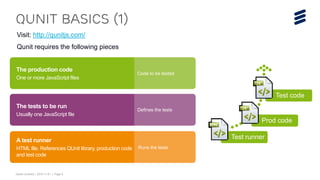
Qunit requires the following pieces
Transform
The production code
One or more JavaScript files
Code to be tested
Defines the tests
The tests to be run
Usually one JavaScript file
Runs the tests
A test runner
HTML file. References QUnit library, production code
and test code
Test runner
Prod code
Test code
Daniel Jimenez | 2015-11-01 | Page 6
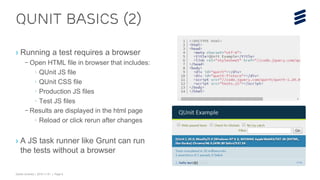
› Running a test requires a browser
– Open HTML file in browser that includes:
› QUnit JS file
› QUnit CSS file
› Production JS files
› Test JS files
– Results are displayed in the html page
› Reload or click rerun after changes
› A JS task runner like Grunt can run
the tests without a browser
Qunit basics (2)
Daniel Jimenez | 2015-11-01 | Page 7
› When testing TypeScript
– Compile TypeScript code into JavaScript
– Reference compiled JavaScript in the
HTML runner file
– Use a declaration file to reference libraries
like QUnit in your test TypeScript code
› Download .d.ts files from:
http://definitelytyped.org/
› A JS task runner like Grunt can be
used to compile TS code.
› Some editors and IDE (like VS) can
also compile the TS code.
Qunit basics (3)
Daniel Jimenez | 2015-11-01 | Page 8
DEMO: QUNIT BASICS
2. WRITING Typescript
tests using QUnit and
Sinon.js
Daniel Jimenez | 2015-11-01 | Page 10
Writing qunit tests (1)
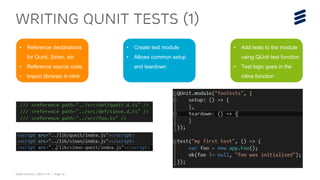
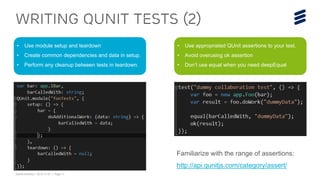
• Reference declarations
for Qunit, Sinon, etc
• Reference source code
• Import libraries in html
• Create test module
• Allows common setup
and teardown
• Add tests to the module
using QUnit test function
• Test logic goes in the
inline function
Daniel Jimenez | 2015-11-01 | Page 11
Writing qunit tests (2)
• Use module setup and teardown
• Create common dependencies and data in setup.
• Perform any cleanup between tests in teardown.
• Use appropriated QUnit assertions to your test.
• Avoid overusing ok assertion
• Don’t use equal when you need deepEqual
Familiarize with the range of assertions:
http://api.qunitjs.com/category/assert/
Daniel Jimenez | 2015-11-01 | Page 12
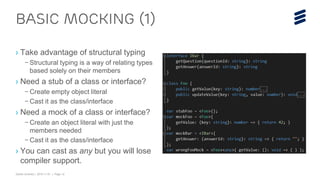
› Take advantage of structural typing
– Structural typing is a way of relating types
based solely on their members
› Need a stub of a class or interface?
– Create empty object literal
– Cast it as the class/interface
› Need a mock of a class or interface?
– Create an object literal with just the
members needed
– Cast it as the class/interface
› You can cast as any but you will lose
compiler support.
BASIC MOCKING (1)
Daniel Jimenez | 2015-11-01 | Page 13
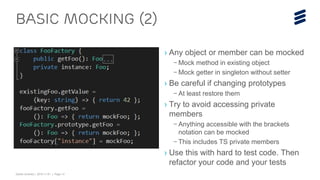
› Any object or member can be mocked
– Mock method in existing object
– Mock getter in singleton without setter
› Be careful if changing prototypes
– At least restore them
› Try to avoid accessing private
members
– Anything accessible with the brackets
notation can be mocked
– This includes TS private members
› Use this with hard to test code. Then
refactor your code and your tests
BASIC MOCKING (2)
Daniel Jimenez | 2015-11-01 | Page 14
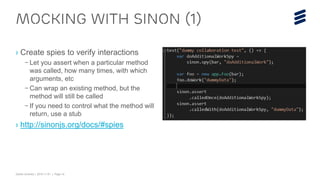
› Create spies to verify interactions
– Let you assert when a particular method
was called, how many times, with which
arguments, etc
– Can wrap an existing method, but the
method will still be called
– If you need to control what the method will
return, use a stub
› http://sinonjs.org/docs/#spies
MOCKING WITH SINON (1)
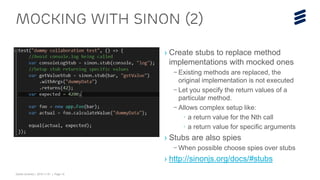
Daniel Jimenez | 2015-11-01 | Page 15
› Create stubs to replace method
implementations with mocked ones
– Existing methods are replaced, the
original implementation is not executed
– Let you specify the return values of a
particular method.
– Allows complex setup like:
› a return value for the Nth call
› a return value for specific arguments
› Stubs are also spies
– When possible choose spies over stubs
› http://sinonjs.org/docs/#stubs
MOCKING WITH SINON (2)
Daniel Jimenez | 2015-11-01 | Page 16
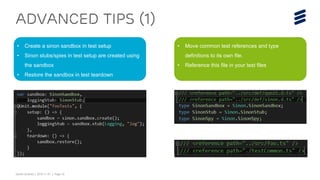
Advanced tips (1)
• Create a sinon sandbox in test setup
• Sinon stubs/spies in test setup are created using
the sandbox
• Restore the sandbox in test teardown
• Move common test references and type
definitions to its own file.
• Reference this file in your test files
Daniel Jimenez | 2015-11-01 | Page 17
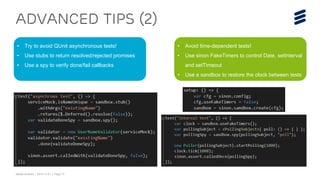
Advanced tips (2)
• Try to avoid QUnit asynchronous tests!
• Use stubs to return resolved/rejected promises
• Use a spy to verify done/fail callbacks
• Avoid time-dependent tests!
• Use sinon FakeTimers to control Date, setInterval
and setTimeout
• Use a sandbox to restore the clock between tests
Daniel Jimenez | 2015-11-01 | Page 18
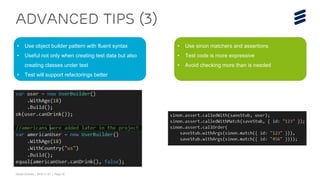
Advanced tips (3)
• Use object builder pattern with fluent syntax
• Useful not only when creating test data but also
creating classes under test
• Test will support refactorings better
• Use sinon matchers and assertions
• Test code is more expressive
• Avoid checking more than is needed
Daniel Jimenez | 2015-11-01 | Page 19
DEMO: writing tests using
QUNIT and sinon
3. Unit testing
workflows
Daniel Jimenez | 2015-11-01 | Page 21
MANUAL WORKFLOW
You can run unit tests just by compiling typescript and using a browser
Might be enough for small projects
Create tests
Write TypeScript tests
Create QUnit html test
runners
Manually manage
dependencies by adding
scripts in the test runner
html file
Manually manage paths to
the compiled files
Compile TS
Compile TypeScript code
and tests into JavaScript.
Some IDE and editors can
compile TypeScript
automatically
You can also
manually compile using
tsc.exe or Node.js
Run in browser
Manually open QUnit test
runner html files in the browser
Every html file has to be
opened independently
Requires someone
to run the tests and
interpret the results
Daniel Jimenez | 2015-11-01 | Page 22
AUTOMATing the WORKFLOW USING
Grunt is a JS Task Runner that can automate tasks like bundling or minification
There are hundreds of plugins, including TS compilation and running QUnit tests
STEP 4
Text
Create tests
Write TypeScript tests
Create QUnit html test
runners
Manually manage
dependencies by adding
scripts in the test runner
html file
Manually manage paths to
the compiled files in the
folder
Configure Grunt
Install grunt-ts for compiling
TypeScript
Install grunt-contrib-qunit
for running QUnit tests
Add tasks in your
gruntfile for:
1. Clean a temp folder
2. Compile into temp
folder
3. Copy html files into
temp folder
4. Run QUnit tests
Run Grunt
Add a “test” task in the
gruntfile . It will run the
tasks in the full process
Run grunt either from the
command line (installing
grunt-cli) or from an
IDE like Visual Studio
The full process can be run
with a single command, will
report test results and the
exit code will be non zero if
failed
http://gruntjs.com/
https://github.com/grunt
js/grunt-contrib-qunit
https://github.com/Type
Strong/grunt-ts
Daniel Jimenez | 2015-11-01 | Page 23
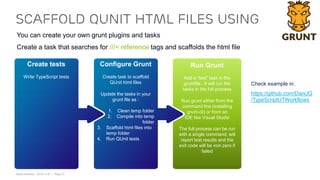
SCAFFOLD QUNIT HTML FILES USING
You can create your own grunt plugins and tasks
Create a task that searches for ///< reference tags and scaffolds the html file
STEP 4
Text
Create tests
Write TypeScript tests
Configure Grunt
Create task to scaffold
QUnit html files
Update the tasks in your
grunt file as :
1. Clean temp folder
2. Compile into temp
folder
3. Scaffold html files into
temp folder
4. Run QUnit tests
Run Grunt
Add a “test” task in the
gruntfile . It will run the
tasks in the full process
Run grunt either from the
command line (installing
grunt-cli) or from an
IDE like Visual Studio
The full process can be run
with a single command, will
report test results and the
exit code will be non zero if
failed
Check example in:
https://github.com/DaniJG
/TypeScriptUTWorkflows
Daniel Jimenez | 2015-11-01 | Page 24
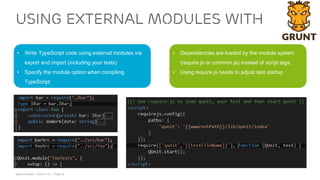
USING EXTERNAL MODULES WITH
• Write TypeScript code using external modules via
export and import (including your tests)
• Specify the module option when compiling
TypeScript
• Dependencies are loaded by the module system
(require.js or common.js) instead of script tags.
• Using require.js needs to adjust test startup
Daniel Jimenez | 2015-11-01 | Page 25
DEMO: unit testing workflows
Unit Testing TypeScript

Unit Testing TypeScript

  • 1.
  • 2.
    Daniel Jimenez |2015-11-01 | Page 2 uSING… › Qunit (Test Framework) – Alternatives: Jasmine (BDD) Mocha (Node.js) › Sinon (Mocking Framework) – Alternative: Jasmine spies › Grunt (JS Task Runner) – Alternative: Gulp
  • 3.
    Daniel Jimenez |2015-11-01 | Page 3 1. Introduction 2. Writing Typescript tests using QUnit and Sinon.js › Writing Qunit tests › Basic mocking › Mocking with Sinon.js › Advanced tips 3. Unit testing workflows › Manual workflow › Automated workflow using grunt › Scaffold html runner files using grunt › External modules Agenda
  • 4.
  • 5.
    Daniel Jimenez |2015-11-01 | Page 5 Qunit basics (1) Visit: http://qunitjs.com/ Qunit requires the following pieces Transform The production code One or more JavaScript files Code to be tested Defines the tests The tests to be run Usually one JavaScript file Runs the tests A test runner HTML file. References QUnit library, production code and test code Test runner Prod code Test code
  • 6.
    Daniel Jimenez |2015-11-01 | Page 6 › Running a test requires a browser – Open HTML file in browser that includes: › QUnit JS file › QUnit CSS file › Production JS files › Test JS files – Results are displayed in the html page › Reload or click rerun after changes › A JS task runner like Grunt can run the tests without a browser Qunit basics (2)
  • 7.
    Daniel Jimenez |2015-11-01 | Page 7 › When testing TypeScript – Compile TypeScript code into JavaScript – Reference compiled JavaScript in the HTML runner file – Use a declaration file to reference libraries like QUnit in your test TypeScript code › Download .d.ts files from: http://definitelytyped.org/ › A JS task runner like Grunt can be used to compile TS code. › Some editors and IDE (like VS) can also compile the TS code. Qunit basics (3)
  • 8.
    Daniel Jimenez |2015-11-01 | Page 8 DEMO: QUNIT BASICS
  • 9.
    2. WRITING Typescript testsusing QUnit and Sinon.js
  • 10.
    Daniel Jimenez |2015-11-01 | Page 10 Writing qunit tests (1) • Reference declarations for Qunit, Sinon, etc • Reference source code • Import libraries in html • Create test module • Allows common setup and teardown • Add tests to the module using QUnit test function • Test logic goes in the inline function
  • 11.
    Daniel Jimenez |2015-11-01 | Page 11 Writing qunit tests (2) • Use module setup and teardown • Create common dependencies and data in setup. • Perform any cleanup between tests in teardown. • Use appropriated QUnit assertions to your test. • Avoid overusing ok assertion • Don’t use equal when you need deepEqual Familiarize with the range of assertions: http://api.qunitjs.com/category/assert/
  • 12.
    Daniel Jimenez |2015-11-01 | Page 12 › Take advantage of structural typing – Structural typing is a way of relating types based solely on their members › Need a stub of a class or interface? – Create empty object literal – Cast it as the class/interface › Need a mock of a class or interface? – Create an object literal with just the members needed – Cast it as the class/interface › You can cast as any but you will lose compiler support. BASIC MOCKING (1)
  • 13.
    Daniel Jimenez |2015-11-01 | Page 13 › Any object or member can be mocked – Mock method in existing object – Mock getter in singleton without setter › Be careful if changing prototypes – At least restore them › Try to avoid accessing private members – Anything accessible with the brackets notation can be mocked – This includes TS private members › Use this with hard to test code. Then refactor your code and your tests BASIC MOCKING (2)
  • 14.
    Daniel Jimenez |2015-11-01 | Page 14 › Create spies to verify interactions – Let you assert when a particular method was called, how many times, with which arguments, etc – Can wrap an existing method, but the method will still be called – If you need to control what the method will return, use a stub › http://sinonjs.org/docs/#spies MOCKING WITH SINON (1)
  • 15.
    Daniel Jimenez |2015-11-01 | Page 15 › Create stubs to replace method implementations with mocked ones – Existing methods are replaced, the original implementation is not executed – Let you specify the return values of a particular method. – Allows complex setup like: › a return value for the Nth call › a return value for specific arguments › Stubs are also spies – When possible choose spies over stubs › http://sinonjs.org/docs/#stubs MOCKING WITH SINON (2)
  • 16.
    Daniel Jimenez |2015-11-01 | Page 16 Advanced tips (1) • Create a sinon sandbox in test setup • Sinon stubs/spies in test setup are created using the sandbox • Restore the sandbox in test teardown • Move common test references and type definitions to its own file. • Reference this file in your test files
  • 17.
    Daniel Jimenez |2015-11-01 | Page 17 Advanced tips (2) • Try to avoid QUnit asynchronous tests! • Use stubs to return resolved/rejected promises • Use a spy to verify done/fail callbacks • Avoid time-dependent tests! • Use sinon FakeTimers to control Date, setInterval and setTimeout • Use a sandbox to restore the clock between tests
  • 18.
    Daniel Jimenez |2015-11-01 | Page 18 Advanced tips (3) • Use object builder pattern with fluent syntax • Useful not only when creating test data but also creating classes under test • Test will support refactorings better • Use sinon matchers and assertions • Test code is more expressive • Avoid checking more than is needed
  • 19.
    Daniel Jimenez |2015-11-01 | Page 19 DEMO: writing tests using QUNIT and sinon
  • 20.
  • 21.
    Daniel Jimenez |2015-11-01 | Page 21 MANUAL WORKFLOW You can run unit tests just by compiling typescript and using a browser Might be enough for small projects Create tests Write TypeScript tests Create QUnit html test runners Manually manage dependencies by adding scripts in the test runner html file Manually manage paths to the compiled files Compile TS Compile TypeScript code and tests into JavaScript. Some IDE and editors can compile TypeScript automatically You can also manually compile using tsc.exe or Node.js Run in browser Manually open QUnit test runner html files in the browser Every html file has to be opened independently Requires someone to run the tests and interpret the results
  • 22.
    Daniel Jimenez |2015-11-01 | Page 22 AUTOMATing the WORKFLOW USING Grunt is a JS Task Runner that can automate tasks like bundling or minification There are hundreds of plugins, including TS compilation and running QUnit tests STEP 4 Text Create tests Write TypeScript tests Create QUnit html test runners Manually manage dependencies by adding scripts in the test runner html file Manually manage paths to the compiled files in the folder Configure Grunt Install grunt-ts for compiling TypeScript Install grunt-contrib-qunit for running QUnit tests Add tasks in your gruntfile for: 1. Clean a temp folder 2. Compile into temp folder 3. Copy html files into temp folder 4. Run QUnit tests Run Grunt Add a “test” task in the gruntfile . It will run the tasks in the full process Run grunt either from the command line (installing grunt-cli) or from an IDE like Visual Studio The full process can be run with a single command, will report test results and the exit code will be non zero if failed http://gruntjs.com/ https://github.com/grunt js/grunt-contrib-qunit https://github.com/Type Strong/grunt-ts
  • 23.
    Daniel Jimenez |2015-11-01 | Page 23 SCAFFOLD QUNIT HTML FILES USING You can create your own grunt plugins and tasks Create a task that searches for ///< reference tags and scaffolds the html file STEP 4 Text Create tests Write TypeScript tests Configure Grunt Create task to scaffold QUnit html files Update the tasks in your grunt file as : 1. Clean temp folder 2. Compile into temp folder 3. Scaffold html files into temp folder 4. Run QUnit tests Run Grunt Add a “test” task in the gruntfile . It will run the tasks in the full process Run grunt either from the command line (installing grunt-cli) or from an IDE like Visual Studio The full process can be run with a single command, will report test results and the exit code will be non zero if failed Check example in: https://github.com/DaniJG /TypeScriptUTWorkflows
  • 24.
    Daniel Jimenez |2015-11-01 | Page 24 USING EXTERNAL MODULES WITH • Write TypeScript code using external modules via export and import (including your tests) • Specify the module option when compiling TypeScript • Dependencies are loaded by the module system (require.js or common.js) instead of script tags. • Using require.js needs to adjust test startup
  • 25.
    Daniel Jimenez |2015-11-01 | Page 25 DEMO: unit testing workflows

Editor's Notes

  • #9 Demo TypeScriptUTIntro: Show stack source, test code and html test runner Open test in chrome. Add new test for push method and refresh test in chrome (The test will push an item, then calling pop should return the same item)
  • #20 Demo TypeScriptUT: Add second test in userFormProcessingTest to validate the user will be posted when the validation succeeds. Shared instances for stubs/mocks are created in the startup method. A sandbox is created. Stub for user name validation is configured using withArgs so the stub is only applied when that particular name is validated The validation stub returns a resolved promise, telling the user is valid. User is created with an object builder. (Adding a property or refactor into a class would be easier later) UserFormProcessor (class under test) is also created with an object builder. (Adding/modifying a dependency would be easier) There is a spy to verify the postUser method was called There is another spy to verify the done callback of the asynchronous method we were testing was called The code we are testing and its dependencies are asynchronous, but the whole test can be synchronously run.
  • #22 11/17/2015
  • #23 11/17/2015
  • #24 11/17/2015
  • #26 Demo TypeScriptUTWorkflows: The Manual one was already modified AutomatedWorkflow You can just run “grunt test” from the command line or tools like VS Add an option to run particular tests like the “-p” argument we have used in Ericsson The code is compiled into a temp folder, you can still open html files from there in chrome and debug Show gruntfile ScaffoldingWorkflow Similar to previous one but there is a new custom task in the gruntfile to generate the html files This task searches for reference tags in the ts code and genereates the html file using a handlebars template Show how we don’t need to worry about writing html files anymore ExternalModulesWorkflow This idea can work with external modules too Code has to be written and compiled using external modules (Using a module loader like require.js) Show compiled JS code The html template has to be modified so we load and start Qunit using require.js