11th Meetup
18 July 2019
DBS, Singapore
Good practices for
debugging Selenium
and Appium tests
Abhijeet Vaikar
Senior Software Engineer Test @ Carousell
Co-organizer @ taqelah!
Testing web and mobile apps since 7 years
LinkedIn: https://www.linkedin.com/in/abhijeetvaikar/
Twitter: https://twitter.com/AbhijeetVaikar
Poll Time
Testing is a process of
Learning, Discovering, Exploring, Analysing a
system.
Automated testing, thus is
also a process of
Learning, Discovering, Exploring, Analysing a
system
where the system is:
● the AUT
● and your test code too!
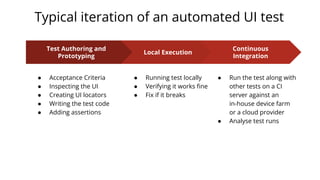
Typical iteration of an automated UI test
Local Execution
● Running test locally
● Verifying it works fine
● Fix if it breaks
Continuous
Integration
● Run the test along with
other tests on a CI
server against an
in-house device farm
or a cloud provider
● Analyse test runs
Test Authoring and
Prototyping
● Acceptance Criteria
● Inspecting the UI
● Creating UI locators
● Writing the test code
● Adding assertions
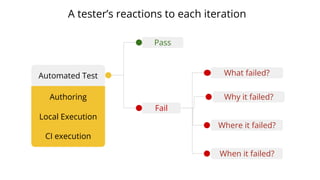
Pass
Automated Test
Fail
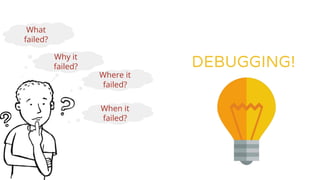
What failed?
Why it failed?
Where it failed?
When it failed?
A tester’s reactions to each iteration
Authoring
Local Execution
CI execution
What
failed?
Where it
failed?
When it
failed?
Why it
failed? DEBUGGING!
Sources of debugging your Selenium/Appium code
● UI Inspectors and browser dev tools for debugging locators
● REPL tools for trying out Selenium/Appium client commands
● Debuggers in your IDE
● Test execution logs
● Selenium/Appium server logs
● Javascript console logs in browser
● Logs produced by native mobile apps
● Network logs
UI Inspectors and browser dev tools for
debugging locators
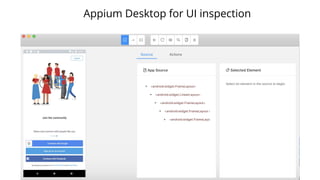
Appium Desktop for UI inspection
What can you do with Appium desktop?
● Inspect the UI hierarchy interactively
● Design and try out locators with different strategies
● Swipe by coordinates
● Tap by coordinates
● Record actions and convert them to script in the language of your choice
(Javascript, Java-JUnit, Ruby, Python, Robot framework) along with boiler
plate code
● Copy the XML UI hierarchy source which you can then inspect
● (New) Actions tab to execute device and session based actions
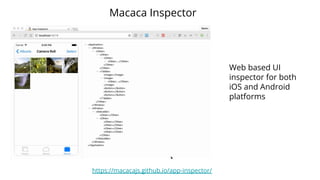
Macaca Inspector
https://macacajs.github.io/app-inspector/
Web based UI
inspector for both
iOS and Android
platforms
Android specific: UiAutomator Viewer
iOS specific: XCode’s Accessibility inspector
Want more?
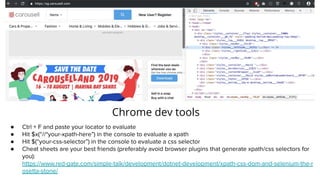
Chrome dev tools
● Ctrl + F and paste your locator to evaluate
● Hit $x(“//*your-xpath-here”) in the console to evaluate a xpath
● Hit $(“your-css-selector”) in the console to evaluate a css selector
● Cheat sheets are your best friends (preferably avoid browser plugins that generate xpath/css selectors for
you):
https://www.red-gate.com/simple-talk/development/dotnet-development/xpath-css-dom-and-selenium-the-r
osetta-stone/
REPL tools for debugging
Selenium/Appium client commands
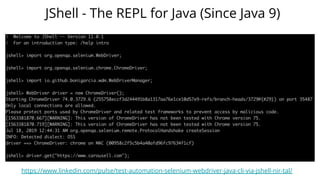
JShell - The REPL for Java (Since Java 9)
https://www.linkedin.com/pulse/test-automation-selenium-webdriver-java-cli-via-jshell-nir-tal/
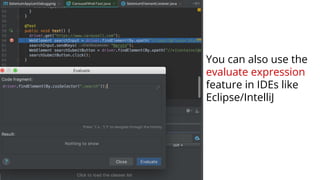
You can also use the
evaluate expression
feature in IDEs like
Eclipse/IntelliJ
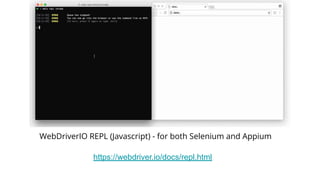
WebDriverIO REPL (Javascript) - for both Selenium and Appium
https://webdriver.io/docs/repl.html
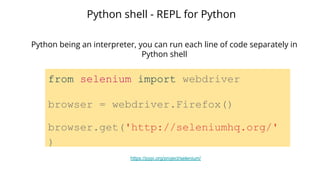
from selenium import webdriver
browser = webdriver.Firefox()
browser.get('http://seleniumhq.org/'
)
Python shell - REPL for Python
Python being an interpreter, you can run each line of code separately in
Python shell
https://pypi.org/project/selenium/
Ruby
Build your own REPL for Selenium/Appium:
http://elementalselenium.com/tips/11-build-an-interactive-prompt
ARC (Appium Ruby Console):
https://github.com/appium/ruby_console
NodeJS
Appium REPL:
https://www.npmjs.com/package/appium-repl
Debuggers in your IDE
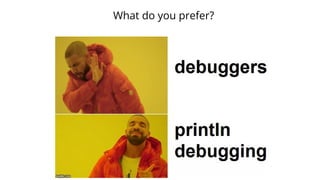
What do you prefer?
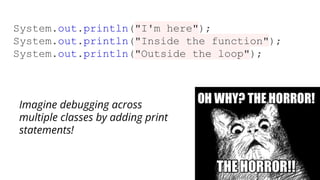
System.out.println("I'm here");
System.out.println("Inside the function");
System.out.println("Outside the loop");
Imagine debugging across
multiple classes by adding print
statements!
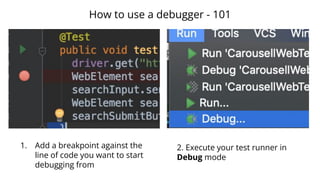
How to use a debugger - 101
1. Add a breakpoint against the
line of code you want to start
debugging from
2. Execute your test runner in
Debug mode
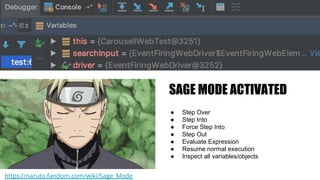
SAGE MODE ACTIVATED
● Step Over
● Step Into
● Force Step Into
● Step Out
● Evaluate Expression
● Resume normal execution
● Inspect all variables/objects
https://naruto.fandom.com/wiki/Sage_Mode
Test execution logs
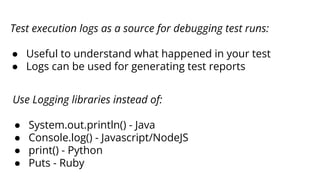
Use Logging libraries instead of:
● System.out.println() - Java
● Console.log() - Javascript/NodeJS
● print() - Python
● Puts - Ruby
Test execution logs as a source for debugging test runs:
● Useful to understand what happened in your test
● Logs can be used for generating test reports
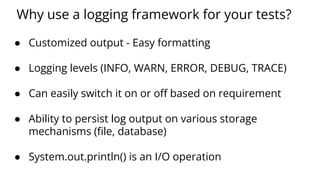
Why use a logging framework for your tests?
● Customized output - Easy formatting
● Logging levels (INFO, WARN, ERROR, DEBUG, TRACE)
● Can easily switch it on or off based on requirement
● Ability to persist log output on various storage
mechanisms (file, database)
● System.out.println() is an I/O operation
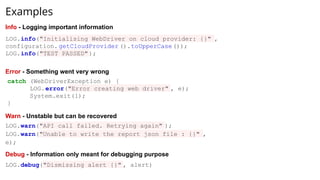
Examples
LOG.info("Initialising WebDriver on cloud provider: {}" ,
configuration. getCloudProvider ().toUpperCase());
LOG.info("TEST PASSED");
catch (WebDriverException e) {
LOG.error("Error creating web driver" , e);
System.exit(1);
}
LOG.warn("API call failed. Retrying again" );
LOG.warn("Unable to write the report json file : {}" ,
e);
Info - Logging important information
Error - Something went very wrong
Warn - Unstable but can be recovered
LOG.debug("Dismissing alert {}" , alert)
Debug - Information only meant for debugging purpose
Selenium/Appium server logs
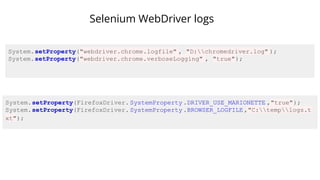
Selenium WebDriver logs
System.setProperty("webdriver.chrome.logfile" , "D:chromedriver.log" );
System.setProperty("webdriver.chrome.verboseLogging" , "true");
System.setProperty(FirefoxDriver. SystemProperty .DRIVER_USE_MARIONETTE ,"true");
System.setProperty(FirefoxDriver. SystemProperty .BROWSER_LOGFILE ,"C:templogs.t
xt");
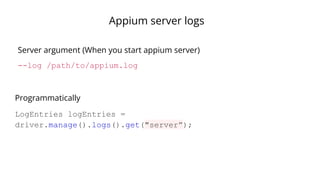
Appium server logs
--log /path/to/appium.log
Server argument (When you start appium server)
LogEntries logEntries =
driver.manage().logs().get("server”);
Programmatically
Javascript console logs in browser
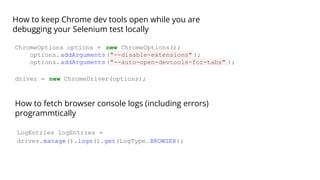
How to keep Chrome dev tools open while you are
debugging your Selenium test locally
ChromeOptions options = new ChromeOptions();
options.addArguments("--disable-extensions" );
options.addArguments("--auto-open-devtools-for-tabs" );
driver = new ChromeDriver(options);
How to fetch browser console logs (including errors)
programmtically
LogEntries logEntries =
driver.manage().logs().get(LogType.BROWSER);
Logs produced by native mobile apps
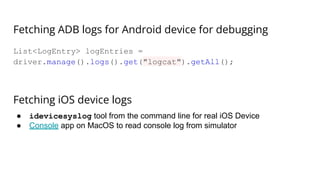
Fetching ADB logs for Android device for debugging
List<LogEntry> logEntries =
driver.manage().logs().get("logcat").getAll();
Fetching iOS device logs
● idevicesyslog tool from the command line for real iOS Device
● Console app on MacOS to read console log from simulator
Network Logs
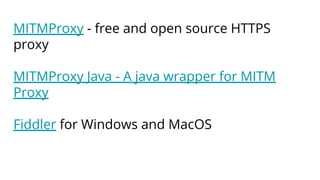
MITMProxy - free and open source HTTPS
proxy
MITMProxy Java - A java wrapper for MITM
Proxy
Fiddler for Windows and MacOS
What techniques or practices do
you follow to debug your
automation scripts?
Please share!
Thank you!

Good practices for debugging Selenium and Appium tests

  • 1.
    11th Meetup 18 July2019 DBS, Singapore Good practices for debugging Selenium and Appium tests
  • 2.
    Abhijeet Vaikar Senior SoftwareEngineer Test @ Carousell Co-organizer @ taqelah! Testing web and mobile apps since 7 years LinkedIn: https://www.linkedin.com/in/abhijeetvaikar/ Twitter: https://twitter.com/AbhijeetVaikar
  • 3.
  • 4.
    Testing is aprocess of Learning, Discovering, Exploring, Analysing a system.
  • 5.
    Automated testing, thusis also a process of Learning, Discovering, Exploring, Analysing a system where the system is: ● the AUT ● and your test code too!
  • 6.
    Typical iteration ofan automated UI test Local Execution ● Running test locally ● Verifying it works fine ● Fix if it breaks Continuous Integration ● Run the test along with other tests on a CI server against an in-house device farm or a cloud provider ● Analyse test runs Test Authoring and Prototyping ● Acceptance Criteria ● Inspecting the UI ● Creating UI locators ● Writing the test code ● Adding assertions
  • 7.
    Pass Automated Test Fail What failed? Whyit failed? Where it failed? When it failed? A tester’s reactions to each iteration Authoring Local Execution CI execution
  • 8.
  • 10.
    Sources of debuggingyour Selenium/Appium code ● UI Inspectors and browser dev tools for debugging locators ● REPL tools for trying out Selenium/Appium client commands ● Debuggers in your IDE ● Test execution logs ● Selenium/Appium server logs ● Javascript console logs in browser ● Logs produced by native mobile apps ● Network logs
  • 11.
    UI Inspectors andbrowser dev tools for debugging locators
  • 12.
    Appium Desktop forUI inspection
  • 13.
    What can youdo with Appium desktop? ● Inspect the UI hierarchy interactively ● Design and try out locators with different strategies ● Swipe by coordinates ● Tap by coordinates ● Record actions and convert them to script in the language of your choice (Javascript, Java-JUnit, Ruby, Python, Robot framework) along with boiler plate code ● Copy the XML UI hierarchy source which you can then inspect ● (New) Actions tab to execute device and session based actions
  • 14.
    Macaca Inspector https://macacajs.github.io/app-inspector/ Web basedUI inspector for both iOS and Android platforms
  • 15.
    Android specific: UiAutomatorViewer iOS specific: XCode’s Accessibility inspector Want more?
  • 16.
    Chrome dev tools ●Ctrl + F and paste your locator to evaluate ● Hit $x(“//*your-xpath-here”) in the console to evaluate a xpath ● Hit $(“your-css-selector”) in the console to evaluate a css selector ● Cheat sheets are your best friends (preferably avoid browser plugins that generate xpath/css selectors for you): https://www.red-gate.com/simple-talk/development/dotnet-development/xpath-css-dom-and-selenium-the-r osetta-stone/
  • 17.
    REPL tools fordebugging Selenium/Appium client commands
  • 18.
    JShell - TheREPL for Java (Since Java 9) https://www.linkedin.com/pulse/test-automation-selenium-webdriver-java-cli-via-jshell-nir-tal/
  • 19.
    You can alsouse the evaluate expression feature in IDEs like Eclipse/IntelliJ
  • 20.
    WebDriverIO REPL (Javascript)- for both Selenium and Appium https://webdriver.io/docs/repl.html
  • 21.
    from selenium importwebdriver browser = webdriver.Firefox() browser.get('http://seleniumhq.org/' ) Python shell - REPL for Python Python being an interpreter, you can run each line of code separately in Python shell https://pypi.org/project/selenium/
  • 22.
    Ruby Build your ownREPL for Selenium/Appium: http://elementalselenium.com/tips/11-build-an-interactive-prompt ARC (Appium Ruby Console): https://github.com/appium/ruby_console NodeJS Appium REPL: https://www.npmjs.com/package/appium-repl
  • 23.
  • 24.
    What do youprefer?
  • 25.
    System.out.println("I'm here"); System.out.println("Inside thefunction"); System.out.println("Outside the loop"); Imagine debugging across multiple classes by adding print statements!
  • 26.
    How to usea debugger - 101 1. Add a breakpoint against the line of code you want to start debugging from 2. Execute your test runner in Debug mode
  • 27.
    SAGE MODE ACTIVATED ●Step Over ● Step Into ● Force Step Into ● Step Out ● Evaluate Expression ● Resume normal execution ● Inspect all variables/objects https://naruto.fandom.com/wiki/Sage_Mode
  • 28.
  • 29.
    Use Logging librariesinstead of: ● System.out.println() - Java ● Console.log() - Javascript/NodeJS ● print() - Python ● Puts - Ruby Test execution logs as a source for debugging test runs: ● Useful to understand what happened in your test ● Logs can be used for generating test reports
  • 30.
    Why use alogging framework for your tests? ● Customized output - Easy formatting ● Logging levels (INFO, WARN, ERROR, DEBUG, TRACE) ● Can easily switch it on or off based on requirement ● Ability to persist log output on various storage mechanisms (file, database) ● System.out.println() is an I/O operation
  • 31.
    Examples LOG.info("Initialising WebDriver oncloud provider: {}" , configuration. getCloudProvider ().toUpperCase()); LOG.info("TEST PASSED"); catch (WebDriverException e) { LOG.error("Error creating web driver" , e); System.exit(1); } LOG.warn("API call failed. Retrying again" ); LOG.warn("Unable to write the report json file : {}" , e); Info - Logging important information Error - Something went very wrong Warn - Unstable but can be recovered LOG.debug("Dismissing alert {}" , alert) Debug - Information only meant for debugging purpose
  • 32.
  • 33.
    Selenium WebDriver logs System.setProperty("webdriver.chrome.logfile", "D:chromedriver.log" ); System.setProperty("webdriver.chrome.verboseLogging" , "true"); System.setProperty(FirefoxDriver. SystemProperty .DRIVER_USE_MARIONETTE ,"true"); System.setProperty(FirefoxDriver. SystemProperty .BROWSER_LOGFILE ,"C:templogs.t xt");
  • 34.
    Appium server logs --log/path/to/appium.log Server argument (When you start appium server) LogEntries logEntries = driver.manage().logs().get("server”); Programmatically
  • 35.
  • 36.
    How to keepChrome dev tools open while you are debugging your Selenium test locally ChromeOptions options = new ChromeOptions(); options.addArguments("--disable-extensions" ); options.addArguments("--auto-open-devtools-for-tabs" ); driver = new ChromeDriver(options); How to fetch browser console logs (including errors) programmtically LogEntries logEntries = driver.manage().logs().get(LogType.BROWSER);
  • 37.
    Logs produced bynative mobile apps
  • 38.
    Fetching ADB logsfor Android device for debugging List<LogEntry> logEntries = driver.manage().logs().get("logcat").getAll(); Fetching iOS device logs ● idevicesyslog tool from the command line for real iOS Device ● Console app on MacOS to read console log from simulator
  • 39.
  • 40.
    MITMProxy - freeand open source HTTPS proxy MITMProxy Java - A java wrapper for MITM Proxy Fiddler for Windows and MacOS
  • 41.
    What techniques orpractices do you follow to debug your automation scripts? Please share!
  • 42.